圣诞将至,翻遍全网想找个免费又好看的圣诞特效代码,却发现要么收费要么功能残缺。作为一名热爱开源的开发者,我决定把自己写的 3D 圣诞树立体动画代码完全开源分享出来,既希望能给大家的圣诞增添一份浪漫,也想借此聊聊开源精神 ------ 技术的美好,本就该因分享而闪光。
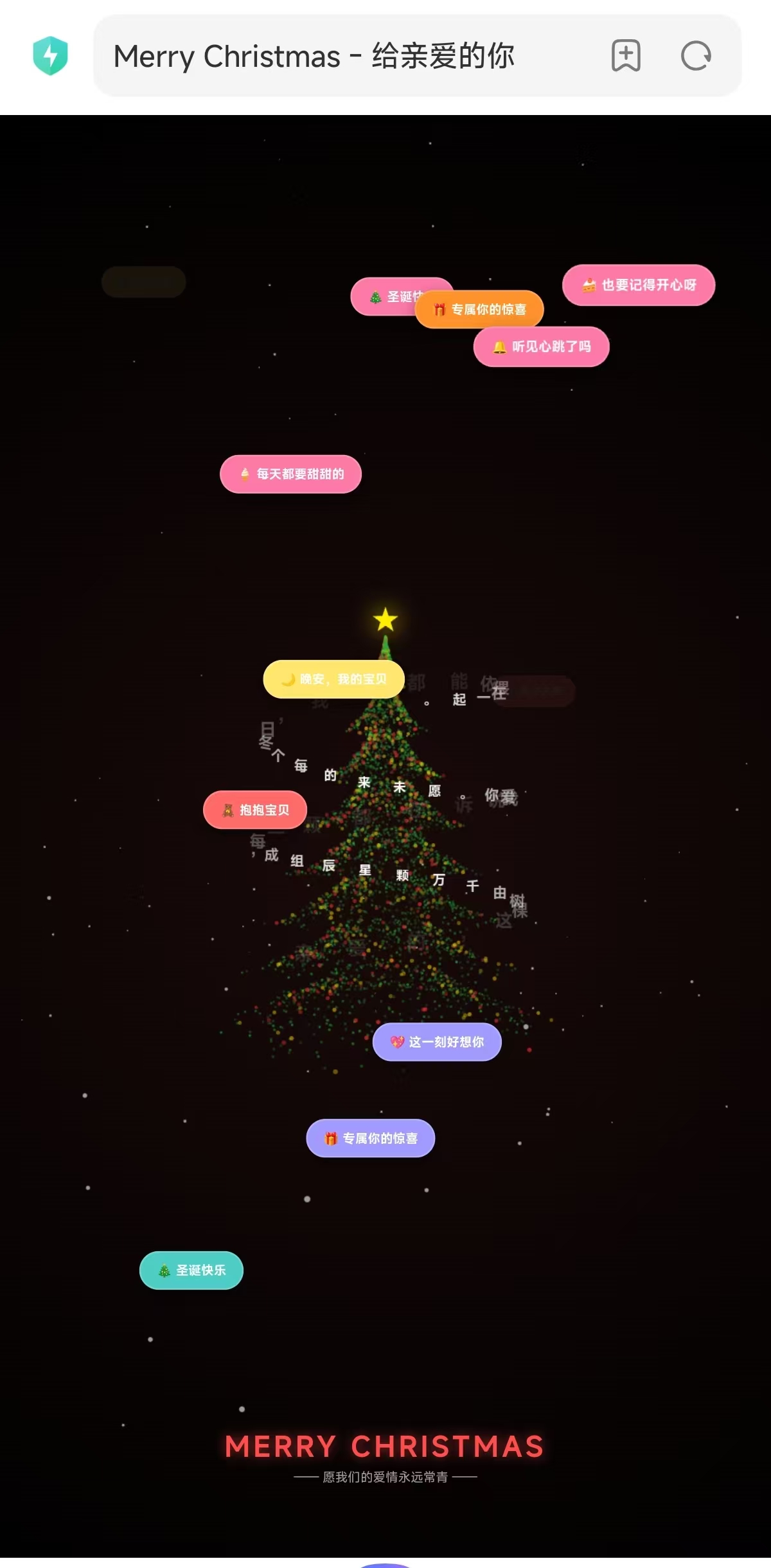
先看效果!这个圣诞树有多酷?
🌟 3D 分层立体结构:4000 + 粒子组成的巨型圣诞树,经典森林绿搭配红金装饰,旋转时层次感拉满
❄️ 动态雪花飘落:沉浸式圣诞氛围,雪花会跟随视角自然飘动
💬 浪漫弹窗祝福:随机弹出圣诞情话,色彩缤纷的气泡式提示
✨ 环绕文字特效:自定义告白文字环绕圣诞树旋转,藏满心意
🎯 自适应布局:适配各种屏幕尺寸,PC / 手机都能完美展示

完整开源代码
直接复制下方代码,保存为christmas.html文件即可使用:
html
预览
<!DOCTYPE html>
<html lang="zh-CN">
<head>
    <meta charset="UTF-8">
    <title>Merry Christmas - 给亲爱的你</title>
    <style>
        body {
            margin: 0;
            overflow: hidden;
            background: radial-gradient(circle at center, #1a0a0a 0%, #000000 100%);
            display: flex;
            justify-content: center;
            align-items: center;
            height: 100vh;
            font-family: 'Microsoft YaHei', sans-serif;
        }
        #canvas { display: block; z-index: 1; }

        /* 弹窗样式 */
        .popup {
            position: absolute;
            padding: 12px 20px;
            border-radius: 50px; /* 圆角气泡感 */
            font-weight: bold;
            font-size: 16px;
            color: white;
            box-shadow: 0 8px 20px rgba(0,0,0,0.4);
            z-index: 100;
            pointer-events: none;
            white-space: nowrap;
            animation: popIn 0.5s cubic-bezier(0.175, 0.885, 0.32, 1.275);
            display: flex;
            align-items: center;
            border: 2px solid rgba(255,255,255,0.2);
        }

        @keyframes popIn {
            0% { transform: scale(0) translate(0, 20px); opacity: 0; }
            100% { transform: scale(1) translate(0, 0); opacity: 1; }
        }

        @keyframes fadeOut {
            to { opacity: 0; transform: scale(0.8) translateY(-30px); }
        }

        /* 底部文字容器 */
        .ui-container {
            position: absolute;
            bottom: 5%;
            left: 0;
            width: 100%;
            text-align: center;
            pointer-events: none;
            z-index: 10;
        }
        .main-title {
            color: #ff4d4d;
            font-size: 2.2rem;
            font-weight: bold;
            letter-spacing: 4px;
            text-shadow: 0 0 15px rgba(255, 77, 77, 0.6);
            margin-bottom: 5px;
        }
        .sub-text {
            color: rgba(255, 255, 255, 0.6);
            font-size: 1rem;
        }
    </style>
</head>
<body>

<canvas id="canvas"></canvas>

<div class="ui-container">
    <div class="main-title">MERRY CHRISTMAS</div>
    <div class="sub-text">------ 愿我们的爱情永远常青 ------</div>
</div>

<script>
    const canvas = document.getElementById('canvas');
    const ctx = canvas.getContext('2d');

    let width, height;
    let particles = [];
    let snowflakes = [];
    let textParticles = [];

    // --- 【弹窗祝福语配置】 ---
    const popupMessages = [
        "❤️ 永远爱你", "🎄 圣诞快乐", "🎁 专属你的惊喜", "🌟 你是我的唯一",
        "🧸 抱抱宝贝", "🍦 每天都要甜甜的", "🔥 爱你如初", "🌈 遇见你最幸运",
        "💖 这一刻好想你", "✨ 闪闪发光的女孩", "❄️ 纯洁的爱", "🔔 听见心跳了吗",
        "🍰 也要记得开心呀", "👗 你是这世间最美", "👫 执子之手", "🌙 晚安,我的宝贝"
    ];

    // --- 【圣诞树配置:巨大版】 ---
    const secretMessage = "亲爱的,这棵树由千万颗星辰组成,每一颗都在诉说我爱你。愿未来的每个冬日,我们都能依偎在一起。";
    const treeHeight = 850;
    const treeBaseY = -350;
    // ----------------------------

    function init() {
        resize();
        createLayeredTree(); // 恢复分层结构算法
        createSnow();
        createText();
        animate();
        setInterval(spawnPopup, 500); // 弹窗生成频率
    }

    function resize() {
        width = canvas.width = window.innerWidth;
        height = canvas.height = window.innerHeight;
    }

    function spawnPopup() {
        const popup = document.createElement('div');
        popup.className = 'popup';
        const colors = ['#FF6B6B', '#4ECDC4', '#FFE66D', '#FF922B', '#A29BFE', '#55E6C1', '#FD79A8'];
        popup.style.backgroundColor = colors[Math.floor(Math.random() * colors.length)];
        popup.innerText = popupMessages[Math.floor(Math.random() * popupMessages.length)];

        const x = Math.random() * (window.innerWidth - 250) + 50;
        const y = Math.random() * (window.innerHeight - 300) + 100;
        popup.style.left = x + 'px';
        popup.style.top = y + 'px';

        document.body.appendChild(popup);
        setTimeout(() => {
            popup.style.animation = 'fadeOut 0.6s forwards';
            setTimeout(() => popup.remove(), 600);
        }, 2000);
    }

    function project(x, y, z) {
        const perspective = 800;
        const scale = perspective / (perspective + z + 600);
        return {
            x: width / 2 + x * scale,
            y: height / 2 - y * scale,
            scale: scale
        };
    }

    // 核心:分层经典绿圣诞树生成算法
    function createLayeredTree() {
        particles = [];
        const totalParticles = 4000;
        const tiers = 8;

        for (let i = 0; i < totalParticles; i++) {
            let hRel = Math.random();
            let hActual = hRel * treeHeight;

            const tierHeight = treeHeight / tiers;
            let tierPosition = (hActual % tierHeight) / tierHeight;
            tierPosition = Math.pow(tierPosition, 0.6);

            const baseRadius = (1 - hRel) * 350;
            const r = baseRadius * (1.1 - tierPosition * 0.7) * (0.8 + Math.random() * 0.2);
            const angle = Math.random() * Math.PI * 2;

            let color;
            const rand = Math.random();
            if (rand < 0.85) {
                // 经典森林绿
                color = [20 + Math.random()*30, 120 + Math.random()*100, 40 + Math.random()*40];
            } else if (rand < 0.93) {
                // 红色点缀
                color = [255, 50, 50];
            } else {
                // 金色点缀
                color = [255, 215, 0];
            }

            particles.push({
                x: Math.cos(angle) * r,
                y: hActual + treeBaseY,
                z: Math.sin(angle) * r,
                colorBase: color,
                alpha: 0.5 + Math.random() * 0.5,
                blinkOffset: Math.random() * Math.PI * 2,
                isDeco: rand >= 0.85
            });
        }
    }

    function createSnow() {
        snowflakes = [];
        for (let i = 0; i < 150; i++) {
            snowflakes.push({
                x: (Math.random() - 0.5) * 2000,
                y: Math.random() * 1000,
                z: (Math.random() - 0.5) * 2000,
                speed: 1 + Math.random() * 2,
                radius: 1 + Math.random() * 2
            });
        }
    }

    function createText() {
        textParticles = [];
        const chars = secretMessage.split('');
        const totalChars = chars.length;
        chars.forEach((char, i) => {
            const h = treeBaseY + treeHeight * 0.2 + (i / totalChars) * treeHeight * 0.7;
            const r = (1 - (i / totalChars)) * 50 + 250;
            textParticles.push({
                char: char, y: h, r: r, angleBase: i * 0.35
            });
        });
    }

    function drawStar(cx, cy, spikes, outerRadius, innerRadius, color) {
        let rot = Math.PI / 2 * 3;
        let step = Math.PI / spikes;
        ctx.beginPath();
        ctx.moveTo(cx, cy - outerRadius);
        for (let i = 0; i < spikes; i++) {
            ctx.lineTo(cx + Math.cos(rot) * outerRadius, cy + Math.sin(rot) * outerRadius);
            rot += step;
            ctx.lineTo(cx + Math.cos(rot) * innerRadius, cy + Math.sin(rot) * innerRadius);
            rot += step;
        }
        ctx.lineTo(cx, cy - outerRadius);
        ctx.closePath();
        ctx.fillStyle = color;
        ctx.shadowBlur = 30;
        ctx.shadowColor = color;
        ctx.fill();
        ctx.shadowBlur = 0;
    }

    let time = 0;
    function animate() {
        ctx.clearRect(0, 0, width, height);
        time += 0.007;
        const rotationAngle = time * 0.5;

        // 1. 雪花
        ctx.fillStyle = "rgba(255, 255, 255, 0.6)";
        snowflakes.forEach(s => {
            s.y -= s.speed;
            if (s.y < treeBaseY - 200) s.y = height;
            const p = project(s.x, s.y, s.z);
            if(p.scale > 0) {
                ctx.beginPath();
                ctx.arc(p.x, p.y, s.radius * p.scale, 0, Math.PI * 2);
                ctx.fill();
            }
        });

        // 2. 排序粒子 (深度感)
        particles.sort((a, b) => {
             const za = a.x * Math.sin(rotationAngle) + a.z * Math.cos(rotationAngle);
             const zb = b.x * Math.sin(rotationAngle) + b.z * Math.cos(rotationAngle);
             return zb - za;
        });

        // 3. 画树
        particles.forEach(pt => {
            const rx = pt.x * Math.cos(rotationAngle) - pt.z * Math.sin(rotationAngle);
            const rz = pt.x * Math.sin(rotationAngle) + pt.z * Math.cos(rotationAngle);
            const p = project(rx, pt.y, rz);
            if(p.scale > 0) {
                const blink = Math.sin(time * 3 + pt.blinkOffset) * 0.2 + 0.8;
                let size = pt.isDeco ? 4 * p.scale : 2.5 * p.scale;
                ctx.fillStyle = `rgba(${pt.colorBase[0]}, ${pt.colorBase[1]}, ${pt.colorBase[2]}, ${pt.alpha * p.scale * (pt.isDeco ? 1 : blink)})`;
                ctx.beginPath();
                ctx.arc(p.x, p.y, size, 0, Math.PI * 2);
                ctx.fill();
            }
        });

        // 4. 加大号文字环绕
        textParticles.forEach(tp => {
            const angle = tp.angleBase - time * 0.7;
            const p = project(Math.cos(angle) * tp.r, tp.y, Math.sin(angle) * tp.r);
            if (p.scale > 0.3) {
                const zDepth = Math.sin(angle);
                const alpha = Math.min(Math.max((zDepth + 1) / 2, 0.1), 1);
                ctx.font = `bold ${35 * p.scale}px 'Microsoft YaHei'`;
                ctx.fillStyle = `rgba(255, 255, 255, ${alpha})`;
                ctx.textAlign = "center";
                ctx.fillText(tp.char, p.x, p.y);
            }
        });

        // 5. 顶端大星星
        const starP = project(0, treeBaseY + treeHeight + 35, 0);
        drawStar(starP.x, starP.y, 5, 30 * starP.scale, 12 * starP.scale, '#fff000');

        requestAnimationFrame(animate);
    }

    window.addEventListener('resize', () => { resize(); init(); });
    init();
</script>
</body>
</html>
零基础教程:VSCode 中运行这个圣诞树
第一步:安装 VSCode(如果还没装)
- 打开浏览器,访问 VSCode 官网:https://code.visualstudio.com/
- 点击下载按钮(根据你的系统选择 Windows/Mac/Linux)
- 安装过程一路点击「下一步」即可,无需修改任何默认设置
第二步:创建并保存文件
- 打开 VSCode,点击左侧「资源管理器」(文件夹图标)
- 点击「打开文件夹」,选择一个你容易找到的文件夹(比如桌面新建一个「圣诞特效」文件夹)
- 在 VSCode 中,右键点击文件夹空白处 → 「新建文件」
- 文件名输入:
christmas.html(注意后缀必须是.html,不能错) - 把上面的完整代码复制进去,按
Ctrl+S(Mac 是Command+S)保存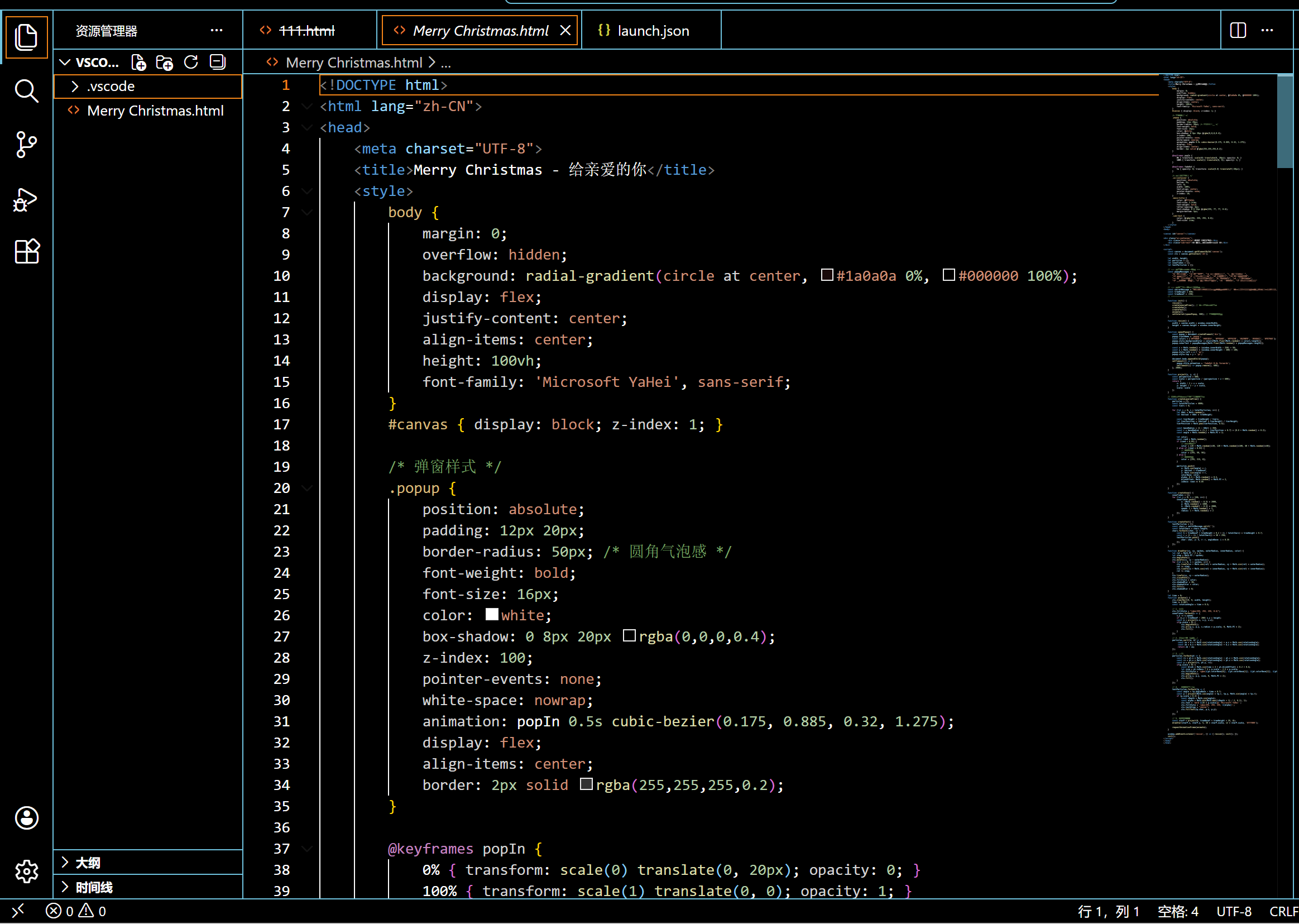
第三步:运行预览(两种方法,任选其一)
方法 1:直接用浏览器打开(最简单)
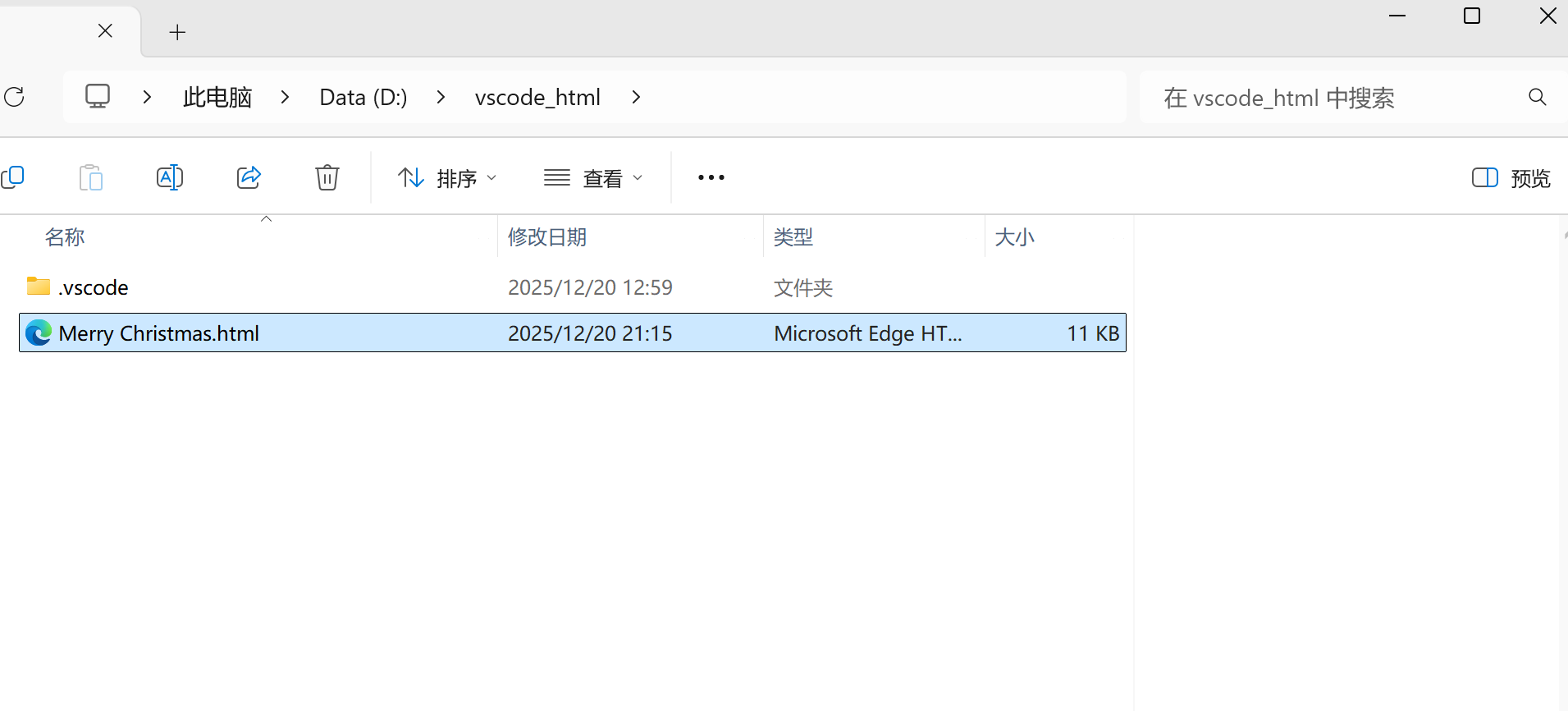
- 在 VSCode 左侧找到你创建的
christmas.html文件 - 右键点击该文件 → 「在资源管理器中显示」(Windows)/「在访达中显示」(Mac)
- 双击这个文件,会自动用你的默认浏览器打开,就能看到圣诞树效果了!
方法 2:用 VSCode 插件(更方便调试)
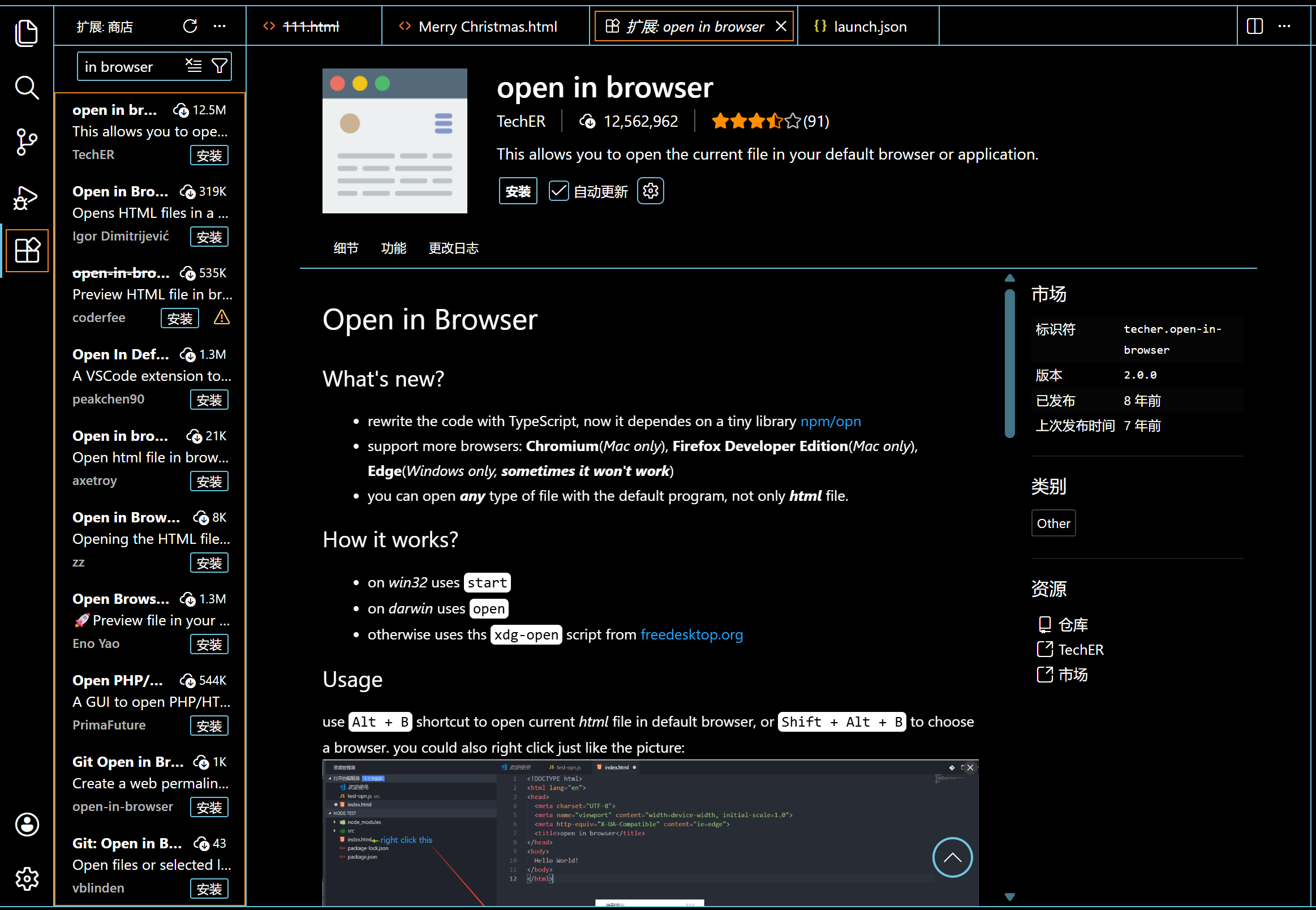
- 在 VSCode 顶部点击「扩展」(方块图标,或按
Ctrl+Shift+X) - 搜索框输入「Open in Browser」,安装第一个插件(作者是 TechER)
- 回到
christmas.html文件编辑页面 - 右键点击代码区域 → 「Open in Default Browser」
- 浏览器会自动打开并显示圣诞树
自定义修改教程(零基础也能改)
不想用默认的文字和祝福?这些地方可以轻松改:
- 修改底部标语 :找到代码中
<div class="main-title">MERRY CHRISTMAS</div>和<div class="sub-text">------ 愿我们的爱情永远常青 ------</div>,替换成你想写的话 - 修改弹窗祝福语 :找到
popupMessages数组,里面的每一行都是弹窗文字,可增删改 - 修改环绕告白文字 :找到
secretMessage变量,替换成你想对 TA 说的话 - 调整圣诞树大小 :修改
treeHeight数值(越大树越高),treeBaseY调整垂直位置 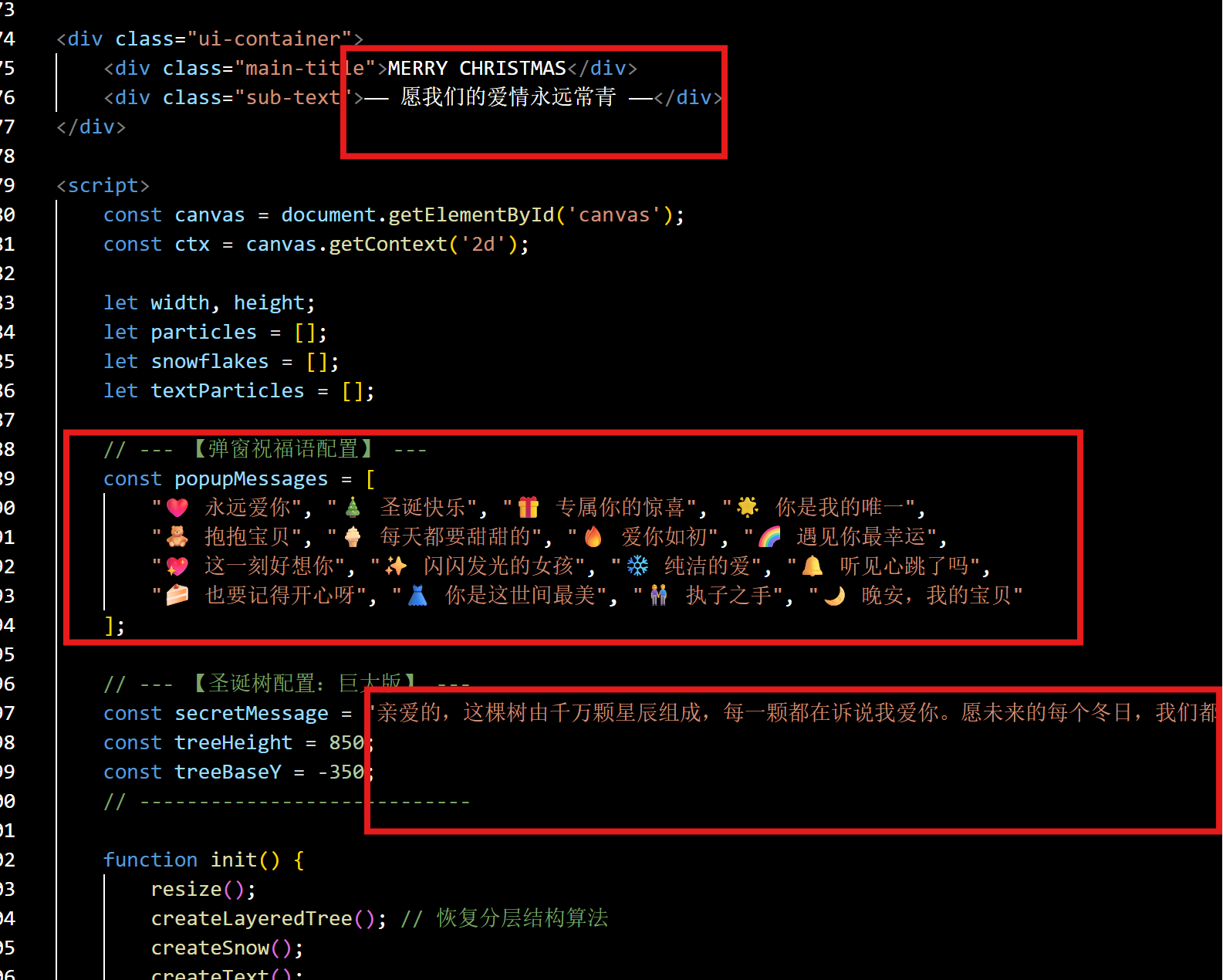
聊聊开源精神
分享这个代码,不只是希望大家能有一个好看的圣诞特效,更想传递一个理念:开源不是单向的给予,而是双向的成长。
我自己在学习前端的过程中,无数次受益于开源社区 ------ 免费的教程、开源的组件、热心的解答。现在我也希望能成为这个生态的一份子,哪怕只是一个小小的圣诞特效,也能给需要的人带来一点帮助。
技术本就不该有壁垒,尤其是前端这样的入门友好型领域。一个简单的 HTML 文件,就能让零基础的朋友感受到编程的乐趣,这本身就是一件很美好的事。
最后
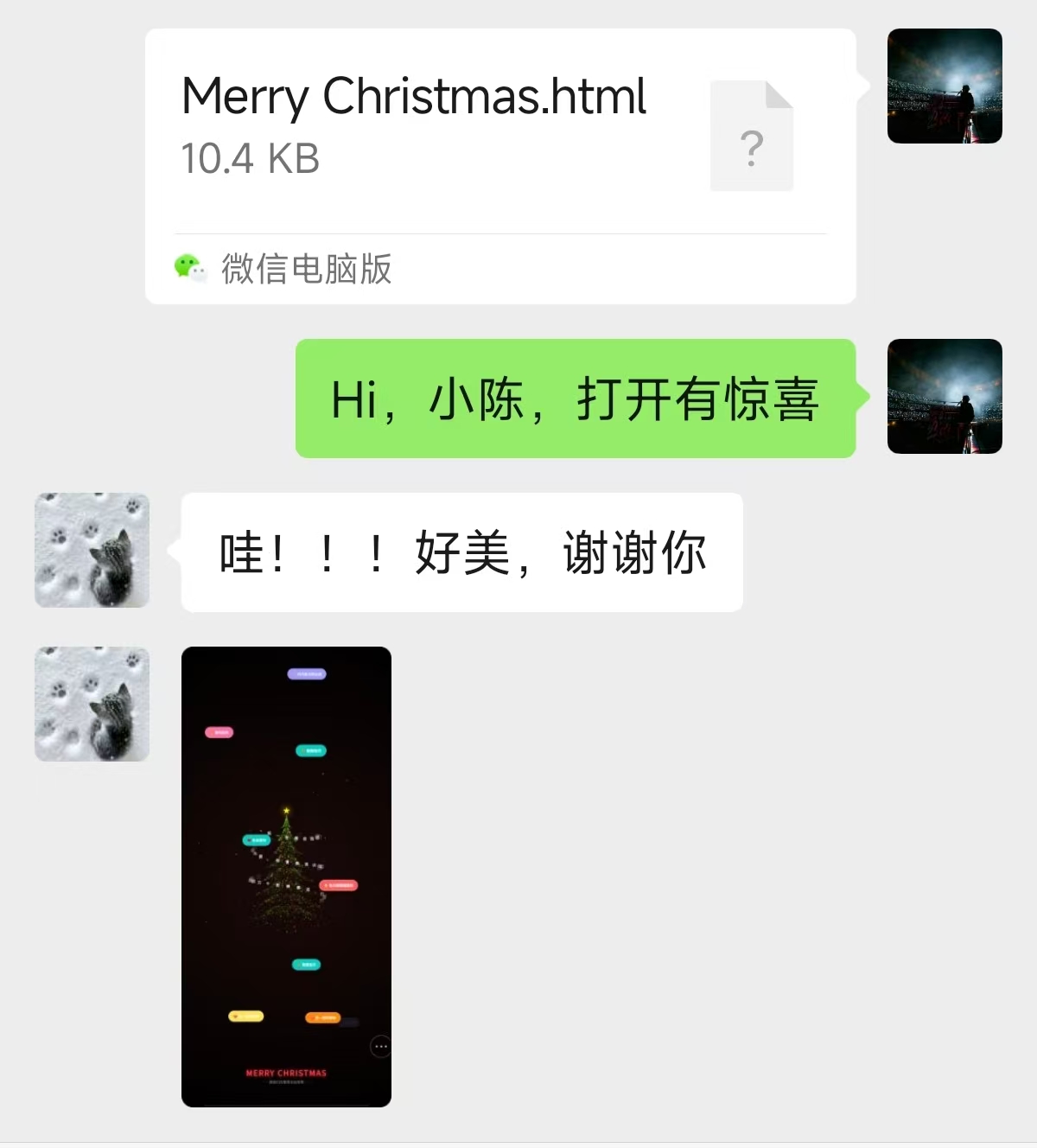
祝所有看到这篇文章的朋友圣诞快乐!愿这个小小的圣诞树,能给你的圣诞增添一份温暖,也愿开源精神能一直传递下去 ------ 分享、互助、共同成长。
如果这个代码帮到了你,不妨转发给更多需要的人
Merry Christmas 🎄!