lVS 负载均衡技术
一、LVS 简介
LVS(Linux Virtual Server)即 Linux 虚拟服务器,是由章文嵩博士主导的开源负载均衡项目,目前已被集成到 Linux 内核模块中。LVS 在 Linux 内核中实现了基于 IP 的数据请求负载均衡调度方案
终端用户从外部访问公司的负载均衡服务器,请求会发送给 LVS 调度器。调度器根据预设算法(如轮询)将请求分发给后端的某台 Web 服务器。若真实服务器连接相同存储并提供相同服务,则用户访问任意服务器所获得的服务内容一致,整个集群对用户透明。
LVS 支持三种工作模式:
- NAT 模式(Network Address Translation)
- DR 模式(Direct Routing)
- TUN 模式(IP Tunneling)
官方站点 :http://www.linuxvirtualserver.org
二、体系结构
LVS 集群系统由三部分组成:
- 负载均衡层(Load Balancer)
- 由一台或多台 Director Server 组成,安装 LVS 模块
- Director Server 根据路由表将用户请求分发给 Real Server
- 可安装监控模块(如 Ldirectord)检测 Real Server 健康状态
- 服务器群组层(Server Array)
- 由一组实际运行服务的机器(Real Server)组成,如 Web、MAIL、FTP 等
- Real Server 可通过 LAN 或 WAN 连接
- Director Server 也可兼任 Real Server
- 共享存储层(Shared Storage)
- 为所有 Real Server 提供共享存储和一致性内容
- 物理上通常由磁盘阵列设备组成,可通过 NFS 或集群文件系统(如 GFS、OCFS2)实现
支持系统:
- Director Server:Linux、FreeBSD(推荐 Linux)
- Real Server:几乎所有系统平台(Linux、Windows、Solaris、AIX、BSD 等)
三、LVS 管理工具
1. ipvs
- 内核中实现的 IP 层负载均衡模块
- 组成:IP 包处理、负载均衡算法、系统配置管理、虚拟服务器与真实服务器链表
2. ipvsadm
用户空间命令行工具,用于管理集群服务
常用命令:
bash
-A # 添加集群服务
-E # 修改集群服务
-D # 删除虚拟服务
-C # 清空整个表
-R # 从标准输入重载
-S # 保存值到标准输出
-a # 添加 Real Server
-e # 修改 Real Server
-d # 删除 Real Server
-L # 列出表
-t # TCP 服务
-u # UDP 服务
-r # 服务器地址主机和端口,只支持端口映射的LVS类型才允许此处使用和集群服务中的不同端口
-g # DR 模式
-i # TUN 模式
-m # NAT 模式
-w # 权重
-n # 数字格式显示 IP 和端口示例:
bash
ipvsadm -A -t 192.168.1.100:80 -s rr
ipvsadm -a -t 192.168.1.100:80 -r 192.168.1.20:80 -g
ipvsadm -Ln保存与重载配置:
bash
ipvsadm -Sn > /etc/sysconfig/ipvsadm
ipvsadm -R < /etc/sysconfig/ipvsadm
systemctl restart ipvsadm
四、LVS 工作模式及原理
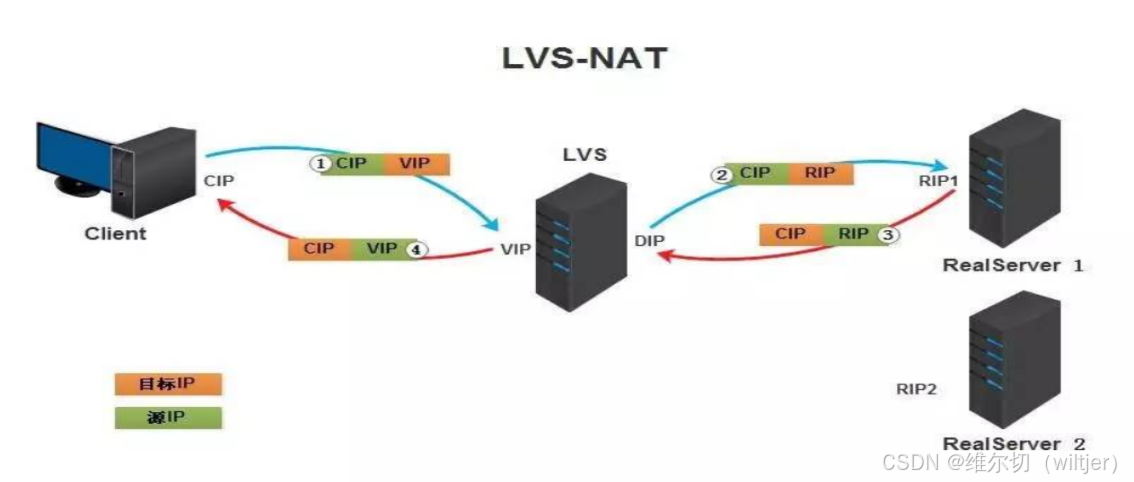
1. NAT 模式(Network Address Translation)
- 通过地址转换实现调度
- 请求和响应报文均需经 LB 处理,LB 易成为瓶颈
- 支持端口映射
- Real Server 网关必须指向 LVS
特点:
- 只需一个公网 IP
- 支持所有 TCP/IP 系统
- 扩展性有限(建议不超过 20 个节点)
2. DR 模式(Direct Routing)
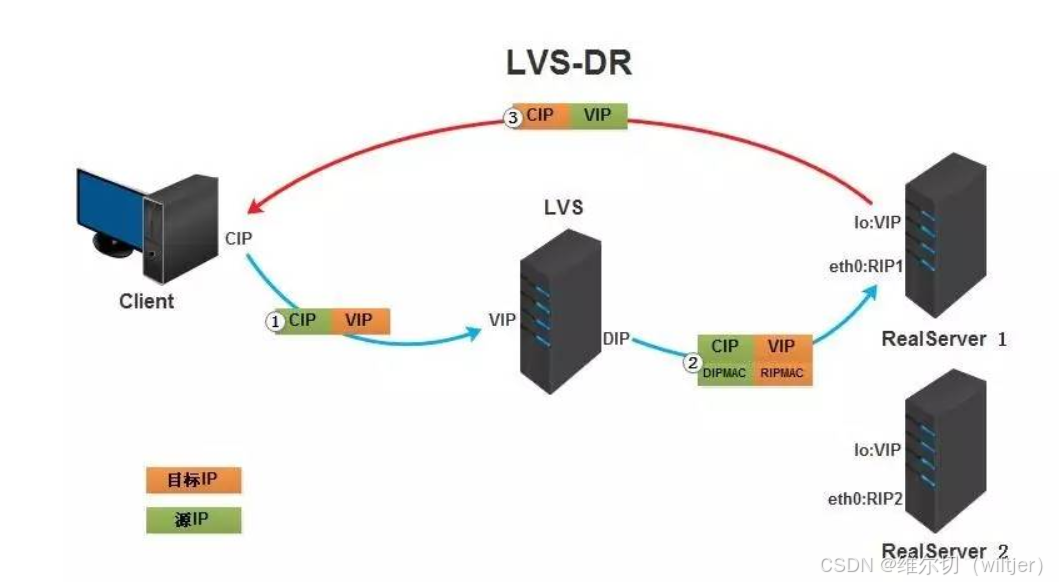
- 通过改写目标 MAC 地址实现调度
- 响应报文直接返回客户端,性能高
- 要求 LB 与 RS 在同一局域网
特点:
- 高性能,无隧道开销
- RS 需配置 VIP 并抑制 ARP 响应
3. TUN 模式(IP Tunneling)
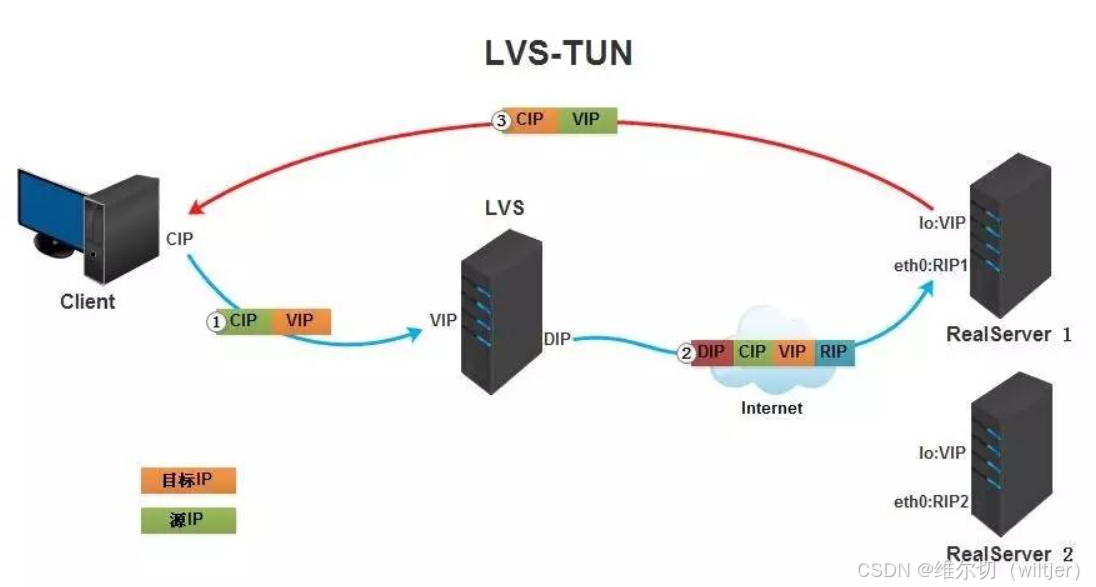
- 通过 IP 隧道封装请求报文
- 响应报文直接返回客户端
- 支持跨地域部署,RS 需有合法 IP
特点:
- 可跨网络部署
- 需服务器支持 IP Tunneling 协议
五、LVS 调度算法
静态调度算法:
- rr(Round Robin):轮询调度
- wrr(Weighted Round Robin):加权轮询
- sh(Source Hashing):基于源地址散列
- dh(Destination Hashing):基于目标地址散列
动态调度算法:
- lc(Least Connections):最少连接数
- wlc(Weighted Least Connections):加权最少连接数
- lblc(Locality-Based Least Connections):基于局部性的最少连接
- lblcr(Locality-Based Least Connections with Replication):带复制的基于局部性的最少连接
- sed(Shortest Expected Delay):最短预期延迟
- nq(Never Queue):永不排队
六、配置lvs-nat模式的httpd负载集群---http
环境说明
| 主机名称 | 网卡信息 | 安装应用 | 系统 |
|---|---|---|---|
| dr.example.com | dip:192.168.100.10/24--vip:172.16.30.10/24 | ipvsadm | CentOS7 |
| rs1.example.com | rip:192.168.100.20/24--gw:192.168.100.10 | httpd | CentOS7 |
| rs2.example.com | rip:192.168.100.30/24--gw:192.168.100.10 | httpd | CentOS7 |
| client.exampel.com | 172.16.30.20/24 | 无 | CentOS7 |
1.DR、RS1、RS2三台主机都关闭防火墙和selinux
略
2.配置ip信息
略
3.后端RS1和RS2部署WEB服务器
bash
RS1:
[root@rs1 ~]# yum -y install httpd
[root@rs1 ~]# echo RS1 > /var/www/html/index.html
[root@rs1 ~]# systemctl restart httpd.service
[root@rs1 ~]# systemctl enable httpd.service
bash
RS2:
[root@rs2 ~]# yum -y install httpd
[root@rs2 ~]# echo RS2 > /var/www/html/index.html
[root@rs2 ~]# systemctl restart httpd.service
[root@rs2 ~]# systemctl enable httpd.service
4.配置DR
- 开启IP转发功能
bash
[root@dr ~]# vim /etc/sysctl.conf
net.ipv4.ip_forward = 1
[root@dr ~]# sysctl -p
net.ipv4.ip_forward = 1- 安装ipvsadm并添加规则
bash
[root@dr ~]# yum -y install ipvsadm
[root@dr ~]# ipvsadm -A -t 172.16.30.10:80 -s rr
[root@dr ~]# ipvsadm -a -t 172.16.30.10:80 -r 192.168.100.20:80 -m
[root@dr ~]# ipvsadm -a -t 172.16.30.10:80 -r 192.168.100.30:80 -m
[root@dr ~]# ipvsadm -Ln
IP Virtual Server version 1.2.1 (size=4096)
Prot LocalAddress:Port Scheduler Flags
  -> RemoteAddress:Port           Forward Weight ActiveConn InActConn
TCP  172.16.30.10:80 rr
  -> 192.168.100.20:80            Masq    1      0          0
  -> 192.168.100.30:80            Masq    1      0          0

[root@dr ~]# ipvsadm -Sn > /etc/sysconfig/ipvsadm
[root@dr ~]# systemctl restart ipvsadm.service
[root@dr ~]# systemctl enable ipvsadm.service
5.客户端测试
bash
[root@client ~]# curl http://172.16.30.10
RS1
[root@client ~]# curl http://172.16.30.10
RS2
[root@client ~]# curl http://172.16.30.10
RS1
[root@client ~]# curl http://172.16.30.10
RS2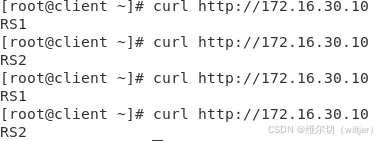
七、配置lvs-nat模式的httpd负载集群---https
1.在DR中生成一对密钥
bash
[root@dr ~]# cd /etc/pki/CA/

[root@dr CA]# (umask 077;openssl genrsa -out private/cakey.pem 2048)
Generating RSA private key, 2048 bit long modulus
..............+++
................................+++
e is 65537 (0x10001)

[root@dr CA]# openssl rsa -in private/cakey.pem -pubout
writing RSA key
-----BEGIN PUBLIC KEY-----
MIIBIjANBgkqhkiG9w0BAQEFAAOCAQ8AMIIBCgKCAQEAy5jU3wZ9ZQtWJlvpx61t
Fd4gVA4/fsh5hbkKqmf9XsOIRqGbw/0RfVOm7Q//NdtuhvvwJ1RolmceHb7a9aqv
TpJFvzOlGrY0ObdSReJUZlzXrFgr4jAzWGyu5CaJHUaZHg19QDb2dbk9jq1dHIxa
/sTeuWauGn2EqhsC2GKGYYEmqLGBfLXSIDz/72OGvrmKkAPFGg+trJ1RfUWp0OVy
rS/YaFv+XXSl1zDHpkhiYScW9GdNSuUfHcQL/iSOtmnZonkVDRLoDym1E2NQ9KvA
kg6aarz8W0V4Z2D37l85Eb2mIV8+g1nxLDPuY4ULFacFjLvY/0gbFDlolAJHFDP4
RQIDAQAB
-----END PUBLIC KEY-----

[root@dr CA]# openssl req -new -x509 -key private/cakey.pem -out cacert.pem -days 1024
You are about to be asked to enter information that will be incorporated
into your certificate request.
What you are about to enter is what is called a Distinguished Name or a DN.
There are quite a few fields but you can leave some blank
For some fields there will be a default value,
If you enter '.', the field will be left blank.
-----
Country Name (2 letter code) [XX]:CN
State or Province Name (full name) []:HB
Locality Name (eg, city) [Default City]:WH
Organization Name (eg, company) [Default Company Ltd]:LQ
Organizational Unit Name (eg, section) []:linux
Common Name (eg, your name or your server's hostname) []:server.example.com
Email Address []:yyh@example.com

[root@dr CA]# touch index.txt
[root@dr CA]# echo 01 > serial
2.在RS1中生成证书签署请求,并发送给CA
bash
[root@rs1 ~]# yum -y install mod_ssl
[root@rs1 ~]# mkdir /etc/httpd/ssl
[root@rs1 ~]# cd /etc/httpd/ssl/
[root@rs1 ssl]# (umask 077;openssl genrsa -out httpd.key 2048)
Generating RSA private key, 2048 bit long modulus
..............................................................................+++
..............+++
e is 65537 (0x10001)

[root@rs1 ssl]# openssl req -new -key httpd.key -days 1024 -out httpd.csr
You are about to be asked to enter information that will be incorporated
into your certificate request.
What you are about to enter is what is called a Distinguished Name or a DN.
There are quite a few fields but you can leave some blank
For some fields there will be a default value,
If you enter '.', the field will be left blank.
-----
Country Name (2 letter code) [XX]:CN
State or Province Name (full name) []:HB
Locality Name (eg, city) [Default City]:WH
Organization Name (eg, company) [Default Company Ltd]:LQ
Organizational Unit Name (eg, section) []:linux
Common Name (eg, your name or your server's hostname) []:rs1.example.com
Email Address []:yyh@example.com

Please enter the following 'extra' attributes
to be sent with your certificate request
A challenge password []:
An optional company name []:

[root@rs1 ssl]# ls
httpd.csr  httpd.key

[root@rs1 ssl]# scp httpd.csr root@192.168.100.10:/root/
The authenticity of host '192.168.100.10 (192.168.100.10)' can't be established.
ECDSA key fingerprint is SHA256:bc8pckdrnthbzRqp5xqp3pc3woSB44M7ii5AH0InEjI.
ECDSA key fingerprint is MD5:0d:cc:c8:38:2a:5f:6a:da:8f:f9:e9:54:87:8e:2c:2a.
Are you sure you want to continue connecting (yes/no)? yes
Warning: Permanently added '192.168.100.10' (ECDSA) to the list of known hosts.
root@192.168.100.10's password:
httpd.csr                                                                     100% 1033   440.1KB/s   00:00
3.CA签署证书并发给RS1
bash
[root@dr ~]# openssl ca -in httpd.csr -out httpd.crt -days 1024
Using configuration from /etc/pki/tls/openssl.cnf
Check that the request matches the signature
Signature ok
Certificate Details:
        Serial Number: 1 (0x1)
        Validity
            Not Before: Sep 22 08:49:44 2025 GMT
            Not After : Jul 12 08:49:44 2028 GMT
        Subject:
            countryName               = CN
            stateOrProvinceName       = HB
            organizationName          = LQ
            organizationalUnitName    = linux
            commonName                = rs1.example.com
            emailAddress              = yyh@example.com
        X509v3 extensions:
            X509v3 Basic Constraints:
                CA:FALSE
            Netscape Comment:
                OpenSSL Generated Certificate
            X509v3 Subject Key Identifier:
                FA:E9:89:4D:42:F6:F8:28:74:10:91:B1:91:C4:37:FB:2D:6D:8B:A0
            X509v3 Authority Key Identifier:
                keyid:88:B7:91:59:2C:9C:13:49:09:FB:BF:CF:80:85:06:09:B6:D7:C1:90
Certificate is to be certified until Jul 12 08:49:44 2028 GMT (1024 days)
Sign the certificate? [y/n]:y
1 out of 1 certificate requests certified, commit? [y/n]y
Write out database with 1 new entries
Data Base Updated
4.将CA签署的证书httpd.crt和服务器的证书cacert.pem发送给RS1
bash
[root@dr ~]# scp httpd.crt root@192.168.100.20:/etc/httpd/ssl
[root@dr ~]# scp /etc/pki/CA/cacert.pem root@192.168.100.20:/etc/httpd/ssl
5.RS2配置https
bash
[root@rs2 ~]# yum -y install mod_ssl
[root@rs2 ~]# mkdir /etc/httpd/ssl
6.RS1中把RS1的证书和密钥发送给RS2
bash
[root@rs1 ssl]# scp httpd.csr root@192.168.100.10:/root/7.在RS1中修改https的配置文件
bash
[root@rs1 ~]# vim /etc/httpd/conf.d/ssl.conf
SSLCertificateFile /etc/httpd/ssl/httpd.crt
SSLCertificateKeyFile /etc/httpd/ssl/httpd.key
SSLCACertificateFile /etc/httpd/ssl/cacert.pem

[root@rs1 ~]# systemctl restart httpd.service
[root@rs1 ~]# ss -tnl | grep 443
LISTEN     0      128         :::443                     :::*
8.在RS2中修改https的配置文件
bash
[root@rs2 ~]# vim /etc/httpd/conf.d/ssl.conf
SSLCertificateFile /etc/httpd/ssl/httpd.crt
SSLCertificateKeyFile /etc/httpd/ssl/httpd.key
SSLCACertificateFile /etc/httpd/ssl/cacert.pem

[root@rs2 ~]# systemctl restart httpd.service
[root@rs2 ~]# ss -tnl | grep 443
LISTEN     0      128         :::443                     :::*
9.在DR中添加规则
bash
[root@dr ~]# ipvsadm -A -t 172.16.30.10:443 -s rr
[root@dr ~]# ipvsadm -a -t 172.16.30.10:443 -r 192.168.100.20 -m
[root@dr ~]# ipvsadm -a -t 172.16.30.10:443 -r 192.168.100.30 -m
[root@dr ~]# ipvsadm -Ln
IP Virtual Server version 1.2.1 (size=4096)
Prot LocalAddress:Port Scheduler Flags
  -> RemoteAddress:Port           Forward Weight ActiveConn InActConn
TCP  172.16.30.10:80 rr
  -> 192.168.100.20:80            Masq    1      0          0
  -> 192.168.100.30:80            Masq    1      0          0
TCP  172.16.30.10:443 rr
  -> 192.168.100.20:443           Masq    1      0          0
  -> 192.168.100.30:443           Masq    1      0          0
[root@dr ~]# ipvsadm -Sn > /etc/sysconfig/ipvsadm
10.客户端测试
bash
[root@client ~]# curl -k https://172.16.30.10
RS2
[root@client ~]# curl -k https://172.16.30.10
RS1
[root@client ~]# curl -k https://172.16.30.10
RS2
[root@client ~]# curl -k https://172.16.30.10
RS1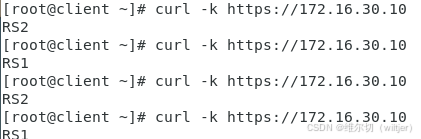
八、配置lvs-dr模式的httpd负载集群
环境说明
| 主机名称 | 网卡信息 | 系统 |
|---|---|---|
| dr.example.com | dip:192.168.100.10/24--vip:192.168.100.100/24 | CentOS7 |
| rs1.example.com | rip:192.168.100.20/24--vip:192.168.100.100/24 | CentOS7 |
| rs2.example.com | rip:192.168.100.30/24--vip:192.168.100.100/24 | CentOS7 |
| client.exampel.com | 192.168.100.200 | CentOS7 |
1.DR、RS1、RS2三台主机都关闭防火墙和selinux
略
2.配置ip信息
bash
[root@dr ~]# ifconfig lo 192.168.100.100/32 broadcast 192.168.100.100 netmask 255.255.255.255 up3.配置httpd
bash
[root@rs1 ~]# yum -y install httpd
[root@rs1 ~]# echo "RS1" > /var/www/html/index.html
[root@rs1 ~]# systemctl restart httpd.service
[root@rs1 ~]# systemctl enable httpd.service
bash
[root@rs2 ~]# yum -y install httpd
[root@rs2 ~]# echo "RS2" > /var/www/html/index.html
[root@rs2 ~]# systemctl restart httpd.service
[root@rs2 ~]# systemctl enable httpd.service
4.RS上配置arp内核参数
bash
[root@rs1 ~]# vim /etc/sysctl.conf
# 编辑内容
# 将对应网卡设置为只回应目标IP为自身接口地址的ARP请求
net.ipv4.conf.all.arp_ignore = 1
# 将ARP请求的源IP设置为所有接口的IP,也就是RIP
net.ipv4.conf.all.arp_announce = 2
net.ipv4.conf.lo.arp_ignore = 1
net.ipv4.conf.lo.arp_announce = 2

[root@rs1 ~]# sysctl -p
net.ipv4.conf.all.arp_ignore = 1
net.ipv4.conf.all.arp_announce = 2
net.ipv4.conf.lo.arp_ignore = 1
net.ipv4.conf.lo.arp_announce = 2
bash
[root@rs1 ~]# vim /etc/sysctl.conf
# 编辑内容
net.ipv4.conf.all.arp_ignore = 1
net.ipv4.conf.all.arp_announce = 2
net.ipv4.conf.lo.arp_ignore = 1
net.ipv4.conf.lo.arp_announce = 2

[root@rs1 ~]# sysctl -p
net.ipv4.conf.all.arp_ignore = 1
net.ipv4.conf.all.arp_announce = 2
net.ipv4.conf.lo.arp_ignore = 1
net.ipv4.conf.lo.arp_announce = 2
5.RS上配置VIP
bash
[root@rs1 ~]# ifconfig lo 192.168.100.100/32 broadcast 192.168.100.100 netmask 255.255.255.255 up

[root@rs2 ~]# ifconfig lo 192.168.100.100/32 broadcast 192.168.100.100 netmask 255.255.255.255 up
6.添加路由信息
bash
[root@rs1 ~]# route add -host 192.168.100.100/32 dev lo

[root@rs2 ~]# route add -host 192.168.100.100/32 dev lo
7.添加并保存规则
bash
[root@dr ~]# yum -y install ipvsadm

[root@dr ~]# ipvsadm -A -t 192.168.100.100:80 -s rr
[root@dr ~]# ipvsadm -a -t 192.168.100.100:80 -r 192.168.100.20:80 -g
[root@dr ~]# ipvsadm -a -t 192.168.100.100:80 -r 192.168.100.30:80 -g
[root@dr ~]# ipvsadm -Ln
IP Virtual Server version 1.2.1 (size=4096)
Prot LocalAddress:Port Scheduler Flags
  -> RemoteAddress:Port           Forward Weight ActiveConn InActConn
TCP  192.168.100.100:80 rr
  -> 192.168.100.20:80            Route   1      0          0
  -> 192.168.100.30:80            Route   1      0          0

[root@dr ~]# ipvsadm -Sn > /etc/sysconfig/ipvsadm
[root@dr ~]# systemctl restart ipvsadm.service
[root@dr ~]# systemctl enable ipvsadm.service
8.客户端验证
bash
[root@client ~]# curl http://192.168.100.100
RS2
[root@client ~]# curl http://192.168.100.100
RS1
[root@client ~]# curl http://192.168.100.100
RS2
[root@client ~]# curl http://192.168.100.100
RS1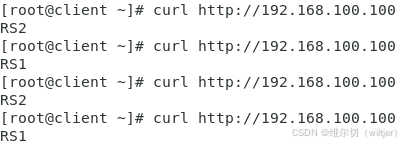
九、TUN模式
环境说明
| 主机名称 | 网卡信息 | 系统 |
|---|---|---|
| dr.example.com | dip:192.168.100.10/24--vip:192.168.100.55/24 | CentOS7 |
| rs1.example.com | rip:192.168.100.20/24--vip:192.168.100.55/24 | CentOS7 |
| rs2.example.com | rip:192.168.100.30/24--vip:192.168.100.55/24 | CentOS7 |
| client.exampel.com | 192.168.100.200 | CentOS7 |
1.DR、RS1、RS2三台主机都关闭防火墙和selinux
略
2.配置ip信息
bash
[root@dr ~]# ifconfig tunl0 192.168.100.55 broadcast 192.168.100.55 netmask 255.255.255.255 up
bash
[root@rs1 ~]# ifconfig tunl0 192.168.100.55 broadcast 192.168.100.55 netmask 255.255.255.255 up
bash
[root@rs2 ~]# ifconfig tunl0 192.168.100.55 broadcast 192.168.100.55 netmask 255.255.255.255 up3.开启IP转发
bash
[root@dr ~]# vim /etc/sysctl.conf
[root@dr ~]# sysctl -p
net.ipv4.ip_forward = 1
4.rs配置httpd
bash
[root@rs1 ~]# yum -y install httpd
[root@rs1 ~]# echo "RS1" > /var/www/html/index.html
[root@rs1 ~]# systemctl restart httpd.service
[root@rs1 ~]# systemctl enable httpd.service
bash
[root@rs2 ~]# yum -y install httpd
[root@rs2 ~]# echo "RS2" > /var/www/html/index.html
[root@rs2 ~]# systemctl restart httpd.service
[root@rs2 ~]# systemctl enable httpd.service
5.启用ipip模块
bash
[root@rs1 ~]# modprobe ipip
[root@rs1 ~]# lsmod | grep ipip
ipip                   13465  0
tunnel4                13252  1 ipip
ip_tunnel              25163  1 ipip
bash
[root@rs2 ~]# modprobe ipip
[root@rs2 ~]# lsmod | grep ipip
ipip                   13465  0
tunnel4                13252  1 ipip
ip_tunnel              25163  1 ipip
6.修改内核参数
bash
[root@rs1 ~]# vim /etc/sysctl.conf
[root@rs1 ~]# sysctl -p
net.ipv4.conf.tunl0.arp_ignore = 1
net.ipv4.conf.tunl0.arp_announce = 2
net.ipv4.conf.all.arp_ignore = 1
net.ipv4.conf.all.arp_announce = 2
net.ipv4.conf.tunl0.rp_filter = 0
net.ipv4.conf.all.rp_filter = 0
bash
[root@rs2 ~]# vim /etc/sysctl.conf
[root@rs2 ~]# sysctl -p
sysctl: /etc/sysctl.conf(11): invalid syntax, continuing...
sysctl: /etc/sysctl.conf(12): invalid syntax, continuing...
net.ipv4.conf.tunl0.arp_ignore = 1
net.ipv4.conf.tunl0.arp_announce = 2
net.ipv4.conf.all.arp_ignore = 1
net.ipv4.conf.all.arp_announce = 2
net.ipv4.conf.tunl0.rp_filter = 0
net.ipv4.conf.all.rp_filter = 0
7.DR上添加规则
bash
[root@dr ~]# yum -y install ipvsadm
[root@dr ~]# ipvsadm -A -t 192.168.100.55:80 -s rr
[root@dr ~]# ipvsadm -a -t 192.168.100.55:80 -r 192.168.100.20 -i
[root@dr ~]# ipvsadm -a -t 192.168.100.55:80 -r 192.168.100.30 -i
[root@dr ~]# ipvsadm -Ln
IP Virtual Server version 1.2.1 (size=4096)
Prot LocalAddress:Port Scheduler Flags
  -> RemoteAddress:Port           Forward Weight ActiveConn InActConn
TCP  192.168.100.55:80 rr
  -> 192.168.100.20:80            Tunnel  1      0          0
  -> 192.168.100.30:80            Tunnel  1      0          0
[root@dr ~]# ipvsadm -Sn > /etc/sysconfig/ipvsadm
[root@dr ~]# systemctl restart ipvsadm.service
8.客户端验证
bash
[root@client ~]# curl http://192.168.100.55
RS2
[root@client ~]# curl http://192.168.100.55
RS1
[root@client ~]# curl http://192.168.100.55
RS2
[root@client ~]# curl http://192.168.100.55
RS1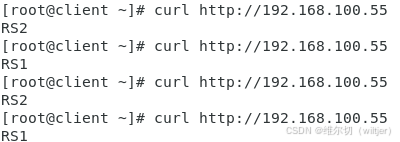
十、LVS 三种工作模式配置注意事项
1、NAT 模式配置注意事项
网络配置
- Real Server 网关必须指向 Director:这是 NAT 模式的关键要求
- Director 需要双网卡:一个公网 VIP,一个内网 DIP
- 开启 IP 转发
性能限制
- 扩展性有限:建议最多 10-20 个 Real Server 节点
- Director 可能成为瓶颈:所有请求和响应都经过 Director
端口映射
-
支持端口转换:客户端请求端口与 Real Server 服务端口可以不同
-
配置示例:
bash# 端口映射 ipvsadm -a -t VIP:8080 -r RIP:80 -m
2、DR 模式配置注意事项
ARP 抑制配置(关键步骤)
-
Real Server 上配置 ARP 参数:
bash# /etc/sysctl.conf net.ipv4.conf.all.arp_ignore = 1 net.ipv4.conf.all.arp_announce = 2 net.ipv4.conf.lo.arp_ignore = 1 net.ipv4.conf.lo.arp_announce = 2 -
配置顺序:先配置 ARP 参数,再配置 VIP
VIP 配置
-
Real Server 的 VIP 配置在 lo 接口:
bashifconfig lo:0 VIP netmask 255.255.255.255 up -
添加主机路由:
bashroute add -host VIP dev lo:0
网络要求
- 同一局域网:Director 和 Real Server 必须在同一网段
- 不需要开启 IP 转发:DR 模式在数据链路层工作
3、TUN 模式配置注意事项
IP 隧道配置
-
加载 ipip 模块:
bashmodprobe ipip -
配置 tunl0 接口:
bashifconfig tunl0 VIP netmask 255.255.255.255 up
内核参数配置
-
开启 IP 转发
-
ARP 抑制和过滤参数:
bashnet.ipv4.conf.tunl0.arp_ignore = 1 net.ipv4.conf.tunl0.arp_announce = 2 net.ipv4.conf.all.arp_ignore = 1 net.ipv4.conf.all.arp_announce = 2 net.ipv4.conf.tunl0.rp_filter = 0 net.ipv4.conf.all.rp_filter = 0
网络要求
- Real Server 需要公网 IP:响应直接返回客户端
- 可跨网络部署:支持不同地理位置的 Real Server
系统兼容性
-
主要支持 Linux 系统:需要内核支持 IP 隧道协议
-
添加主机路由:
bashroute add -host VIP dev lo:0
网络要求
- 同一局域网:Director 和 Real Server 必须在同一网段
- 不需要开启 IP 转发:DR 模式在数据链路层工作
3、TUN 模式配置注意事项
IP 隧道配置
-
加载 ipip 模块:
bashmodprobe ipip -
配置 tunl0 接口:
bashifconfig tunl0 VIP netmask 255.255.255.255 up
内核参数配置
-
开启 IP 转发
-
ARP 抑制和过滤参数:
bashnet.ipv4.conf.tunl0.arp_ignore = 1 net.ipv4.conf.tunl0.arp_announce = 2 net.ipv4.conf.all.arp_ignore = 1 net.ipv4.conf.all.arp_announce = 2 net.ipv4.conf.tunl0.rp_filter = 0 net.ipv4.conf.all.rp_filter = 0
网络要求
- Real Server 需要公网 IP:响应直接返回客户端
- 可跨网络部署:支持不同地理位置的 Real Server
系统兼容性
- 主要支持 Linux 系统:需要内核支持 IP 隧道协议
- Windows 支持有限:可能需要额外配置