概念
行为模式
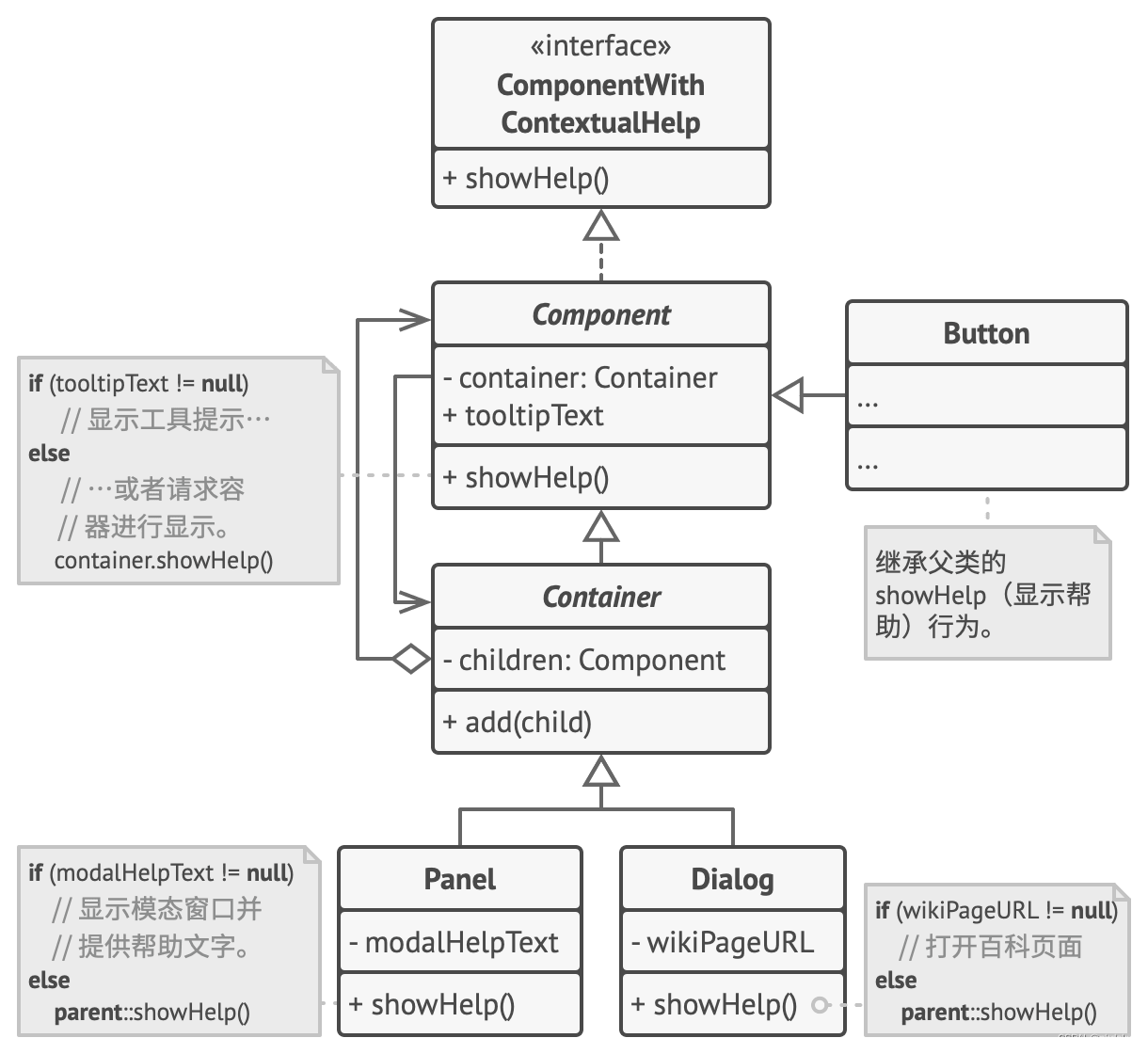
类图
代码
cpp
#include <iostream>
#include <vector>

using namespace std;

class ComponentWithContextualHelp {
public:
    virtual void ShowHelp() = 0;
};

class Component : public ComponentWithContextualHelp {
public:
    void ShowHelp() override {
        cout << "Component show help." << endl;
        if (tooltipText.empty()) {
            tooltipText = "Firstly assign Component show help.\n";
        } else {
            tooltipText = "Component help already shown.\n";
        }

        cout << tooltipText;
    }

private:
    string tooltipText;
};

class Container : public Component {
public:
    void ShowHelp() override {
        cout << "Container show help." << endl;
        for (const auto& child : children) {
            child->ShowHelp();
        }
    }

    void Add(Component* child) {
        children.emplace_back(child);
        child = this;
    }

protected:
    vector<Component*> children;
};

class Button : public Component {};

class Panel : public Container {
public:
    void ShowHelp() override {
        cout << "Panel show help." << endl;
        if (modalHelpText.empty()) {
            modalHelpText = "Firstly assign Panel show help.\n";
        } else {
            modalHelpText = "Panel help already shown.\n";
        }
        cout << modalHelpText;

        for (const auto& child : children) {
            child->ShowHelp();
        }
    }

private:
    string modalHelpText;
};

class Dialog : public Container {
public:
    void ShowHelp() override {
        cout << "Dialog show help." << endl;
        if (wikiPageURL.empty()) {
            wikiPageURL = "Firstly assign Dialog show help.\n";
        } else {
            wikiPageURL = "Dialog help already shown.\n";
        }
        cout << wikiPageURL;

        for (const auto& child : children) {
            child->ShowHelp();
        }
    }
private:
    string wikiPageURL;
};

int main(int argc, char *argv[]) {
    auto dialog = new Dialog();
    auto panel = new Panel();
    auto ok = new Button();
    auto cancel = new Button();

    panel->Add(ok);
    panel->Add(cancel);
    dialog->Add(panel);

    dialog->ShowHelp();

    delete dialog;
    delete panel;
    delete ok;
    delete cancel;

    return 0;
}