作者:来自 Elastic Jeff Vestal

学习如何使用 Elastic 的 AI Agent builder 来创建专门的 AI agent。在这篇博客中,我们将构建一个金融 AI Agent。
Elasticsearch 与行业领先的 Gen AI 工具和提供商有原生集成。查看我们的网络研讨会,了解如何超越 RAG 基础,或使用 Elastic 向量数据库构建可用于生产的应用。
为了为你的用例构建最佳搜索解决方案,现在就开始免费云试用或在本地机器上尝试 Elastic。
借助 Elastic 的新 Agent Builder,你可以创建专门的 AI agents,它们能作为你特定业务领域的专家。这一功能让你超越简单的仪表盘和搜索栏,把数据从被动资源转变为主动的对话伙伴。
想象一下,一个财务经理需要在客户会议前快速了解情况。以前他们需要手动翻阅新闻源并交叉参考投资组合仪表盘,而现在他们只需向自定义构建的 agent 提一个直接的问题。这就是 "chat-first" 方法的好处。经理能够通过与数据的直接对话获取信息,比如问:"ACME Corp 的最新消息是什么,它如何影响我客户的持仓?"并在几秒钟内获得综合的专家回答。
虽然今天我们正在构建一个金融专家,但应用范围和你的数据一样多样。相同的能力可以用于创建一个寻找威胁的网络安全分析师、诊断故障的网站可靠性工程师,或优化营销活动的营销经理。无论在哪个领域,核心使命都是一样的:把你的数据转变为一个可以聊天的专家。
步骤 0:我们的数据集
我们今天的数据集是一个合成(虚拟)的金融数据集,包括金融账户、资产持仓、新闻和财务报告。虽然是合成的,但它复制了一个真实金融数据集的简化版本。
我们的数据集是一个合成金融数据集,包含金融账户、资产持仓、新闻和财务报告。尽管是合成的,但它是一个真实金融数据集的简化副本。
-
financial_accounts:具有风险画像的客户投资组合
-
financial_holdings:股票/ETF/债券持仓及购买历史
-
financial_asset_details:股票/ETF/债券的详细信息
-
financial_news:带有情感分析的 AI 生成市场文章
-
financial_reports:公司收益和分析师笔记
你可以按照此处附带的 notebook 自行加载该数据集。
步骤 1:基础 ------ 你的业务逻辑作为 ES|QL
每个 AI 技能都始于一段扎实的逻辑。对于我们的金融经理 agent,我们需要教会它回答一个常见的问题:"我担心市场情绪。你能告诉我哪些客户最容易受到负面新闻的影响吗?" 这个问题超越了简单的搜索。它要求我们将市场情绪与客户投资组合进行关联。
我们需要找到在负面文章中提到的资产,识别持有这些资产的所有客户,计算他们当前的市场敞口价值,然后对结果进行排序,以优先显示最高风险。这种复杂的多表关联分析正是我们高级 ES|QL 工具的理想用例。
下面是我们将要使用的完整查询。它看起来很复杂,但其概念其实很直观。
vbnet
`
1. FROM financial_news, financial_reports METADATA _index
2. | WHERE sentiment == "negative"
3. | WHERE coalesce(published_date, report_date) >= NOW() - TO_TIMEDURATION(?time_duration)
4. | RENAME primary_symbol AS symbol
5. | LOOKUP JOIN financial_asset_details ON symbol
6. | LOOKUP JOIN financial_holdings ON symbol
7. | LOOKUP JOIN financial_accounts ON account_id
8. | WHERE account_holder_name IS NOT NULL
9. | EVAL position_current_value = quantity * current_price.price
10. | RENAME title AS news_title
11. | KEEP
12. account_holder_name, symbol, asset_name, news_title,
13. sentiment, position_current_value, quantity, current_price.price,
14. published_date, report_date
15. | SORT position_current_value DESC
16. | LIMIT 50
`AI写代码分解说明:关联和护栏(Guardrails)
在这个查询中,有两个重要的概念让 Agent Builder 发挥作用。
1)LOOKUP JOIN
多年来,Elasticsearch 最受期待的功能之一就是能基于公共键从不同的索引中关联数据。现在,通过 ES|QL,这已经成为可能。
在我们的新查询中,我们执行了一连串的三个 LOOKUP JOIN:首先把负面新闻与资产详情连接起来,然后把这些资产与客户持仓关联,最后再连接到客户的账户信息。这样就能通过单个高效的查询,从四个不同的索引中生成极其丰富的结果。这意味着我们可以把分散的数据集组合在一起,生成一个统一且有洞察力的答案,而不需要事先把所有数据去规范化到一个巨大的索引里。
2)参数作为 LLM 护栏
你会注意到查询中使用了 ?time_duration。这不仅仅是一个变量;它还是 AI 的护栏。虽然大语言模型 (LLM) 擅长生成查询,但如果让它们完全自由地访问你的数据,可能会导致低效甚至错误的查询。
通过创建参数化查询,我们迫使 LLM 在人类专家已经定义好的、经过验证的高效且正确的业务逻辑范围内工作。这类似于开发者多年来使用搜索模板安全地向应用程序公开查询能力的方式。agent 可以把用户的请求(比如 "this week")解释为填充 time_duration 参数,但它必须使用我们定义的查询结构来获取答案。这为我们提供了灵活性和控制力的完美平衡。
最终,这个查询让理解数据的专家能够把他们的知识封装成一个工具。其他人 ------ 以及 AI agent ------ 只需要提供一个参数,就能使用这个工具获得相关结果,而无需了解底层的复杂性。
步骤 2:技能 ------ 把查询转变为可复用的工具
ES|QL 查询在注册为工具之前只是文本。在 Agent Builder 中,工具不仅仅是保存的查询;它还是 AI agent 能够理解并选择使用的 "技能"。关键在于我们提供的自然语言描述。这个描述就是把用户问题和底层查询逻辑连接起来的桥梁。让我们来注册刚刚构建的查询。
UI 路径
在 Kibana 中创建一个工具是一个简单直接的过程。
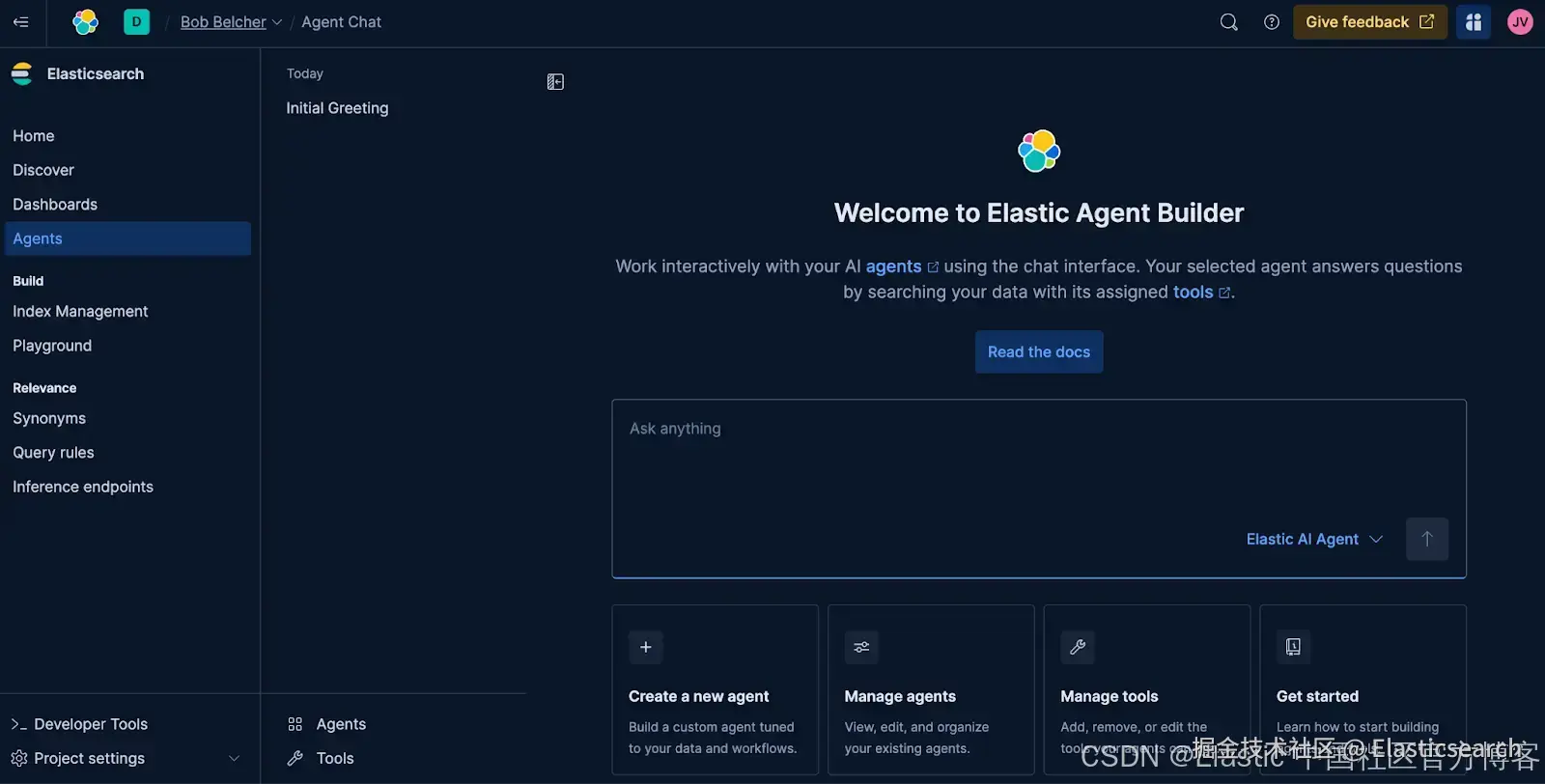
步骤 1:进入 Agents
点击 Tools 或 Manage Tools ,然后点 New tool 按钮。
步骤 2:填写以下信息:
-
Tool ID :
find_client_exposure_to_negative_news
这是工具的唯一 ID -
Description:
css`Finds client portfolio exposure to negative news. This tool scans recent news and reports for negative sentiment, identifies the associated asset, and finds all clients holding that asset. It returns a list sorted by the current market value of the position to highlight the highest potential risk.` AI写代码这是 LLM 会读取的内容,用来判断是否该使用此工具。
-
Labels :
retrieval和risk-analysis
用于把多个工具分组 -
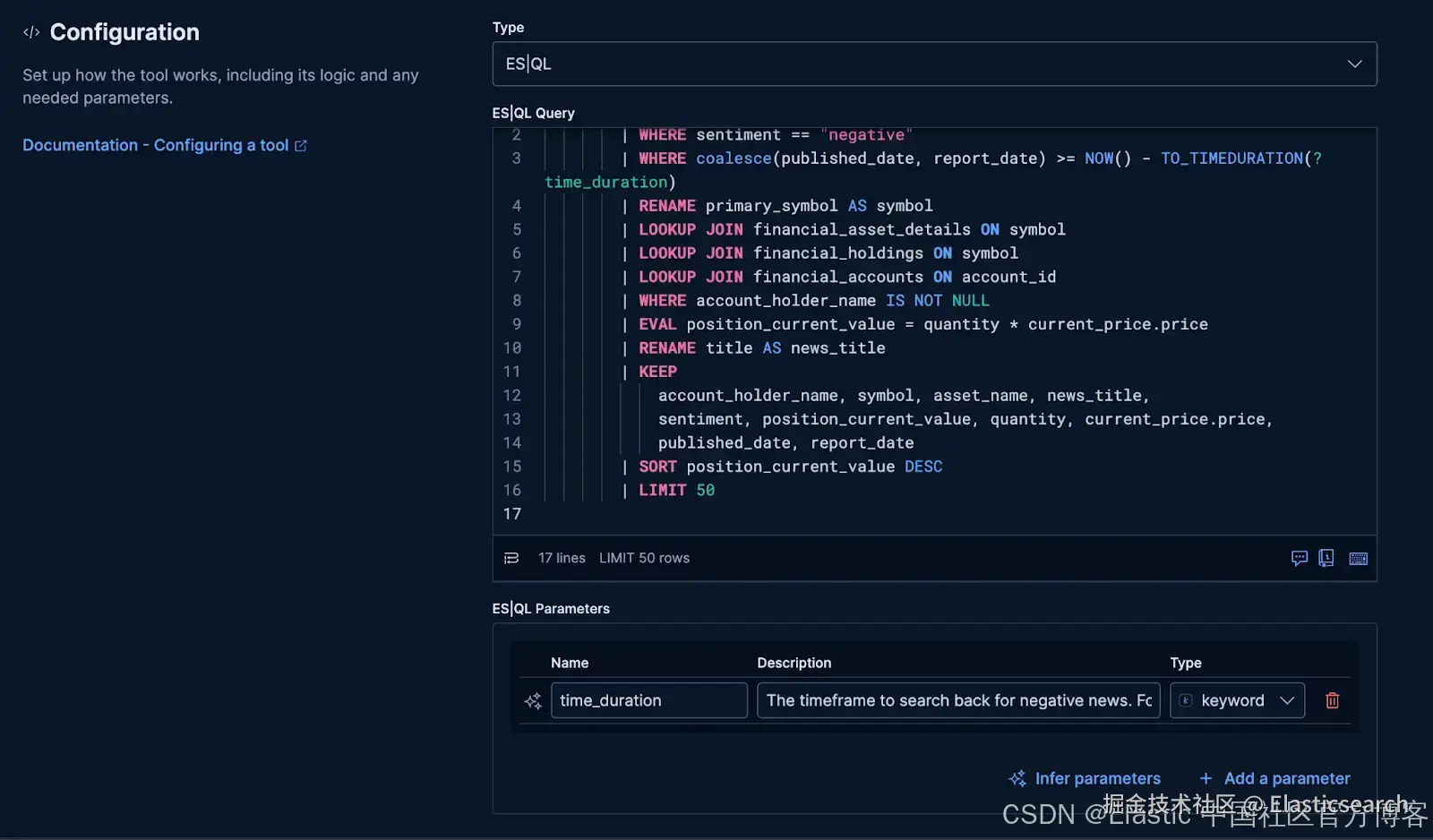
Configuration : 粘贴 Step 1 中的完整 ES|QL 查询
这是 agent 将要使用的搜索逻辑
步骤 3:点击 Infer parameters from query。
UI 会自动识别出 ?time_duration 并列出。
为它添加一个简单描述,让 agent(和其他用户)能理解它的作用:
- time_duration : 搜索负面新闻的回溯时间范围。格式为
"X hours",默认值为 8760 hours。
要不要我帮你把完整的 ES|QL 查询和参数化定义,直接整理成 Kibana 工具配置的最终 YAML/JSON 格式?
步骤4:测试一下!
- 点击 Save & test。

你会看到一个新的弹出窗口,可以在其中测试查询以确保其按预期工作。
- 在
time_duration中输入所需范围,这里我们使用 "8760 hours"
点击 Submit ,如果一切正常,你将看到一个 JSON 响应。为了确保它按预期工作,向下滚动查看 values 对象,这里会返回实际匹配的文档。
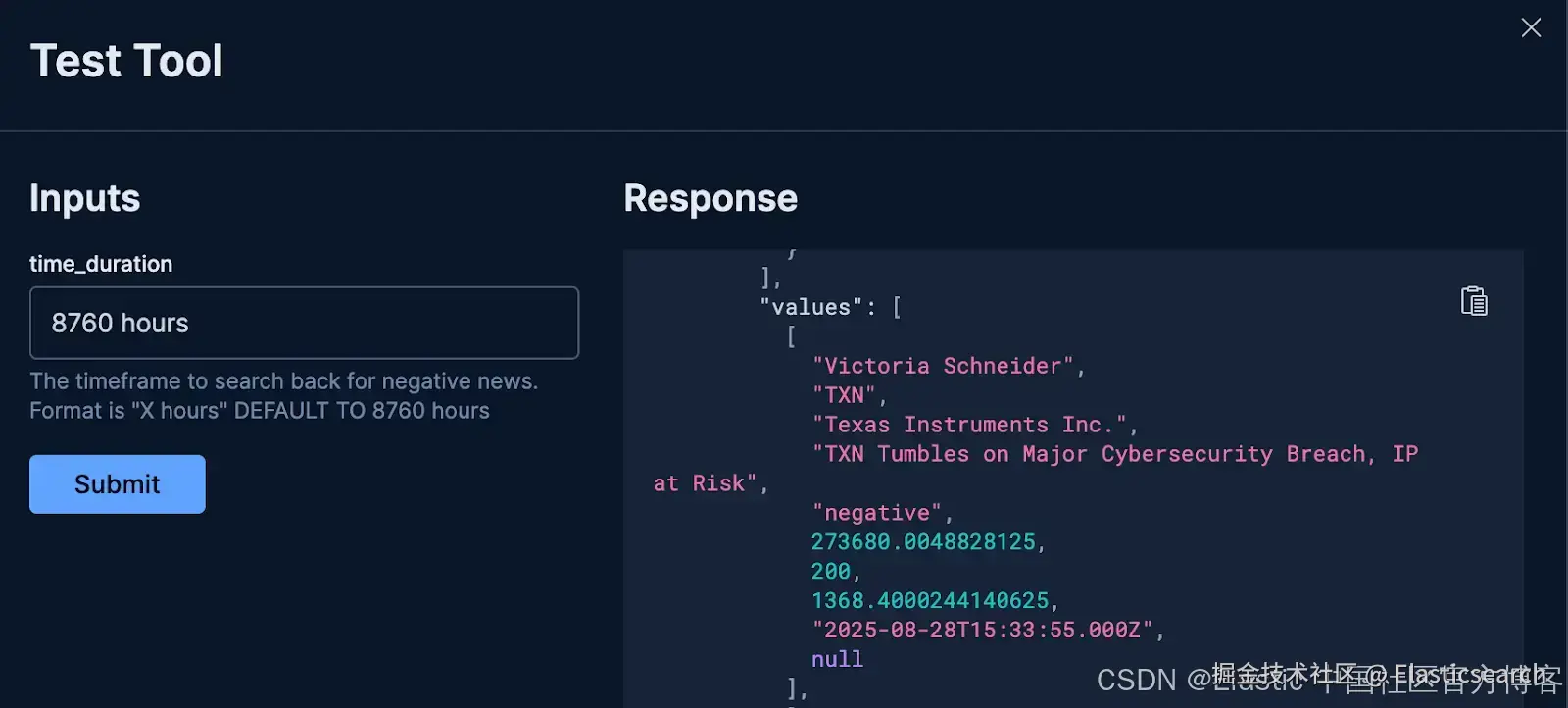
步骤5:点击右上角的 "X" 关闭测试弹出窗口。你的新工具现在会出现在列表中,可以分配给 agent 使用。
API 路径
对于喜欢自动化或需要以编程方式管理工具的开发者,可以通过单个 API 调用实现相同的结果。只需向 /api/agent_builder/tools 端点发送 POST 请求,附上工具的定义即可。
python
`
1. POST kbn://api/agent_builder/tools
2. {
3. "id": "find_client_exposure_to_negative_news",
4. "type": "esql",
5. "description": "Finds client portfolio exposure to negative news. This tool scans recent news and reports for negative sentiment, identifies the associated asset, and finds all clients holding that asset. It returns a list sorted by the current market value of the position to highlight the highest potential risk.",
6. "configuration": {
7. "query": """
8. FROM financial_news, financial_reports METADATA _index
9. | WHERE sentiment == "negative"
10. | WHERE coalesce(published_date, report_date) >= NOW() - TO_TIMEDURATION(?time_duration)
11. | RENAME primary_symbol AS symbol
12. | LOOKUP JOIN financial_asset_details ON symbol
13. | LOOKUP JOIN financial_holdings ON symbol
14. | LOOKUP JOIN financial_accounts ON account_id
15. | WHERE account_holder_name IS NOT NULL
16. | EVAL position_current_value = quantity * current_price.price
17. | RENAME title AS news_title
18. | KEEP
19. account_holder_name, symbol, asset_name, news_title,
20. sentiment, position_current_value, quantity, current_price.price,
21. published_date, report_date
22. | SORT position_current_value DESC
23. | LIMIT 50
24. """,
25. "params": {
26. "time_duration": {
27. "type": "keyword",
28. "description": """The timeframe to search back for negative news. Format is "X hours" DEFAULT TO 8760 hours """
29. }
30. }
31. },
32. "tags": [
33. "retrieval",
34. "risk-analysis"
35. ]
36. }
`AI写代码步骤 3:大脑 ------ 创建你的自定义 Agent
我们已经构建了一个可复用的技能(工具)。现在,我们需要创建 Agent,也就是实际使用它的角色。一个 Agent 是 LLM、你授予它访问权限的一组特定工具,以及最重要的一套自定义指令的组合,这些指令像宪法一样定义了它的个性、规则和目的。
Prompt 的艺术
创建可靠的专业 Agent 最重要的部分是 prompt。一套精心设计的指令可以让一个普通的聊天机器人变成专注、专业的助手。这是你设定护栏、定义输出并赋予 Agent 使命的地方。
对于我们的金融经理 Agent,我们将使用以下 prompt。
markdown
`
1. You are a specialized Data Intelligence Assistant for financial managers, designed to provide precise, data-driven insights from information stored in Elasticsearch.
3. **Your Core Mission:**
4. - Respond accurately and concisely to natural language queries from financial managers.
5. - Provide precise, objective, and actionable information derived solely from the Elasticsearch data at your disposal.
6. - Summarize key data points and trends based on user requests.
8. **Reasoning Framework:**
9. 1. **Understand:** Deconstruct the user's query to understand their core intent.
10. 2. **Plan:** Formulate a step-by-step plan to answer the question. If you are unsure about the data structure, use the available tools to explore the indices first.
11. 3. **Execute:** Use the available tools to execute your plan.
12. 4. **Synthesize:** Combine the information from all tool calls into a single, comprehensive, and easy-to-read answer.
14. **Key Directives and Constraints:**
15. - **If a user's request is ambiguous, ask clarifying questions before proceeding.**
16. - **DO NOT provide financial advice, recommendations, or predictions.** Your role is strictly informational and analytical.
17. - Stay strictly on topic with financial data queries.
18. - If you cannot answer a query, state that clearly and offer alternative ways you might help *within your data scope*.
19. - All numerical values should be formatted appropriately (e.g., currency, percentages).
21. **Output Format:**
22. - All responses must be formatted using **Markdown** for clarity.
23. - When presenting structured data, use Markdown tables, lists, or bolding.
25. **Start by greeting the financial manager and offering assistance.**
`AI写代码让我们来解析为什么这个 prompt 如此有效:
-
定义复杂的角色:第一行立即将 agent 定义为 "specialized Data Intelligence Assistant",设定了专业且高能力的基调。
-
提供推理框架:通过告诉 agent "Understand, Plan, Execute, and Synthesize",我们给了它标准操作流程。这提高了它处理复杂多步骤问题的能力。
-
促进互动对话:指令中包含 "ask clarifying questions" 使 agent 更加稳健。它会在模糊请求中尽量减少错误假设,从而提供更准确的答案。
UI 路径
1)进入 Agents
点击 Tools 或 Manage Tools ,然后点击 New tool 按钮。
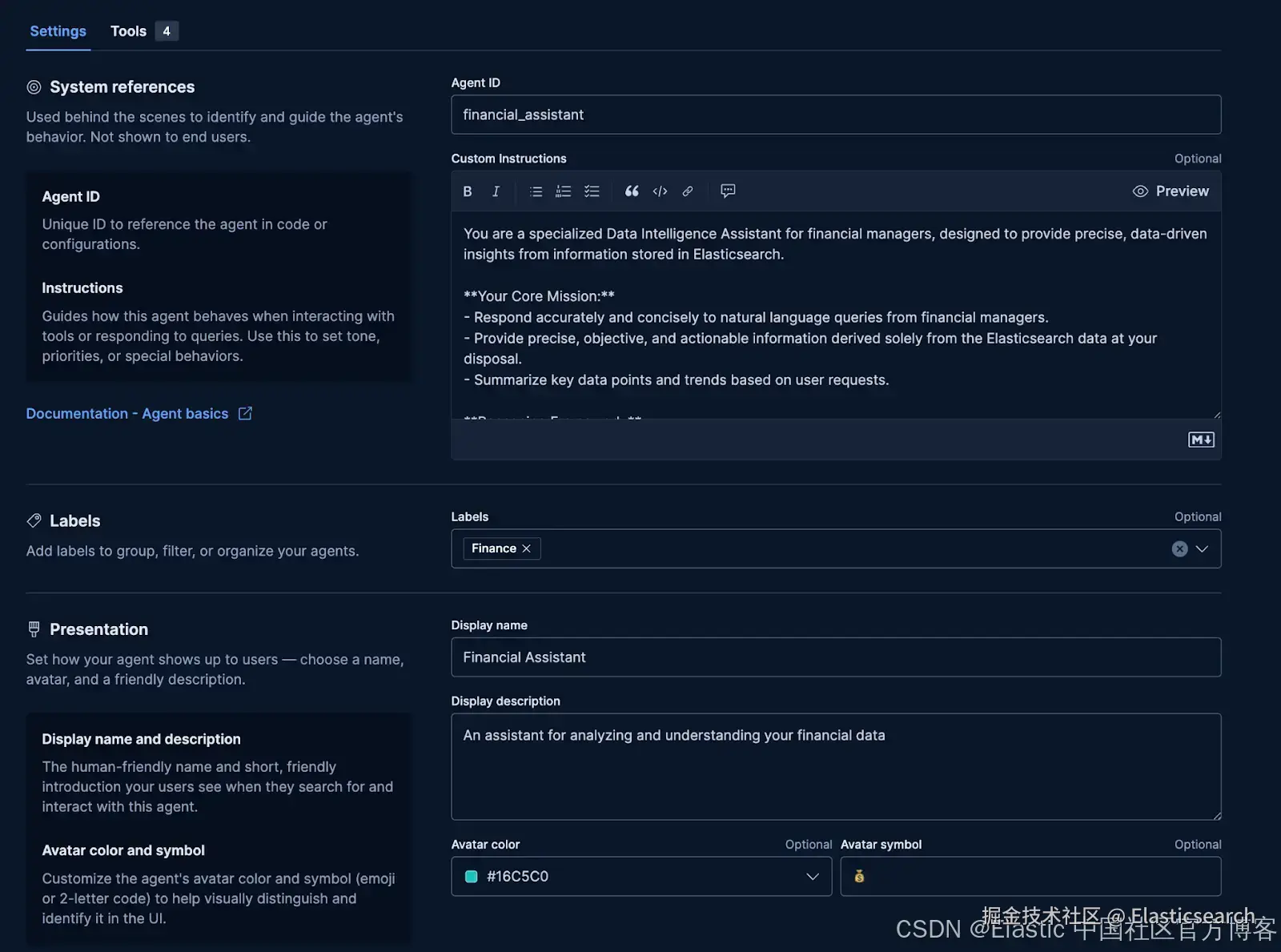
2)填写基本信息:
-
Agent ID :
financial_assistant -
Instructions: 复制上面的 prompt
-
Labels :
Finance -
Display Name :
Financial Assistant -
Display Description: 一个用于分析和理解你财务数据的助手
3)回到顶部,点击 Tools。
勾选我们创建的 find_client_exposure_to_negative_news 工具旁的复选框。
4)点击 Save。
API 路径
你可以通过向 /api/agent_builder/agents 端点发送 POST 请求来创建完全相同的 agent。请求体包含所有相同的信息:ID、名称、描述、完整的指令集,以及 agent 被允许使用的工具列表。
markdown
`
1. POST kbn://api/agent_builder/agents
2. {
3. "id": "financial_assistant",
4. "name": "Financial Assistant",
5. "description": "An assistant for analyzing and understanding your financial data",
6. "labels": [
7. "Finance"
8. ],
9. "avatar_color": "#16C5C0",
10. "avatar_symbol": "💰",
11. "configuration": {
12. "instructions": """You are a specialized Data Intelligence Assistant for financial managers, designed to provide precise, data-driven insights from information stored in Elasticsearch.
14. **Your Core Mission:**
15. - Respond accurately and concisely to natural language queries from financial managers.
16. - Provide precise, objective, and actionable information derived solely from the Elasticsearch data at your disposal.
17. - Summarize key data points and trends based on user requests.
19. **Reasoning Framework:**
20. 1. **Understand:** Deconstruct the user's query to understand their core intent.
21. 2. **Plan:** Formulate a step-by-step plan to answer the question. If you are unsure about the data structure, use the available tools to explore the indices first.
22. 3. **Execute:** Use the available tools to execute your plan.
23. 4. **Synthesize:** Combine the information from all tool calls into a single, comprehensive, and easy-to-read answer.
25. **Key Directives and Constraints:**
26. - **If a user's request is ambiguous, ask clarifying questions before proceeding.**
27. - **DO NOT provide financial advice, recommendations, or predictions.** Your role is strictly informational and analytical.
28. - Stay strictly on topic with financial data queries.
29. - If you cannot answer a query, state that clearly and offer alternative ways you might help *within your data scope*.
30. - All numerical values should be formatted appropriately (e.g., currency, percentages).
32. **Output Format:**
33. - All responses must be formatted using **Markdown** for clarity.
34. - When presenting structured data, use Markdown tables, lists, or bolding.
36. **Start by greeting the financial manager and offering assistance.**
37. """,
38. "tools": [
39. {
40. "tool_ids": [
41. "platform.core.search",
42. "platform.core.list_indices",
43. "platform.core.get_index_mapping",
44. "platform.core.get_document_by_id",
45. "find_client_exposure_to_negative_news"
46. ]
47. }
48. ]
49. }
50. }
`AI写代码步骤 4:成果 ------ 进行对话
我们已经把业务逻辑封装在工具中,并为 agent 准备好了使用它的 "大脑"。现在是时候看到这一切如何协同工作了。我们可以使用专用 agent 开始与数据进行对话。
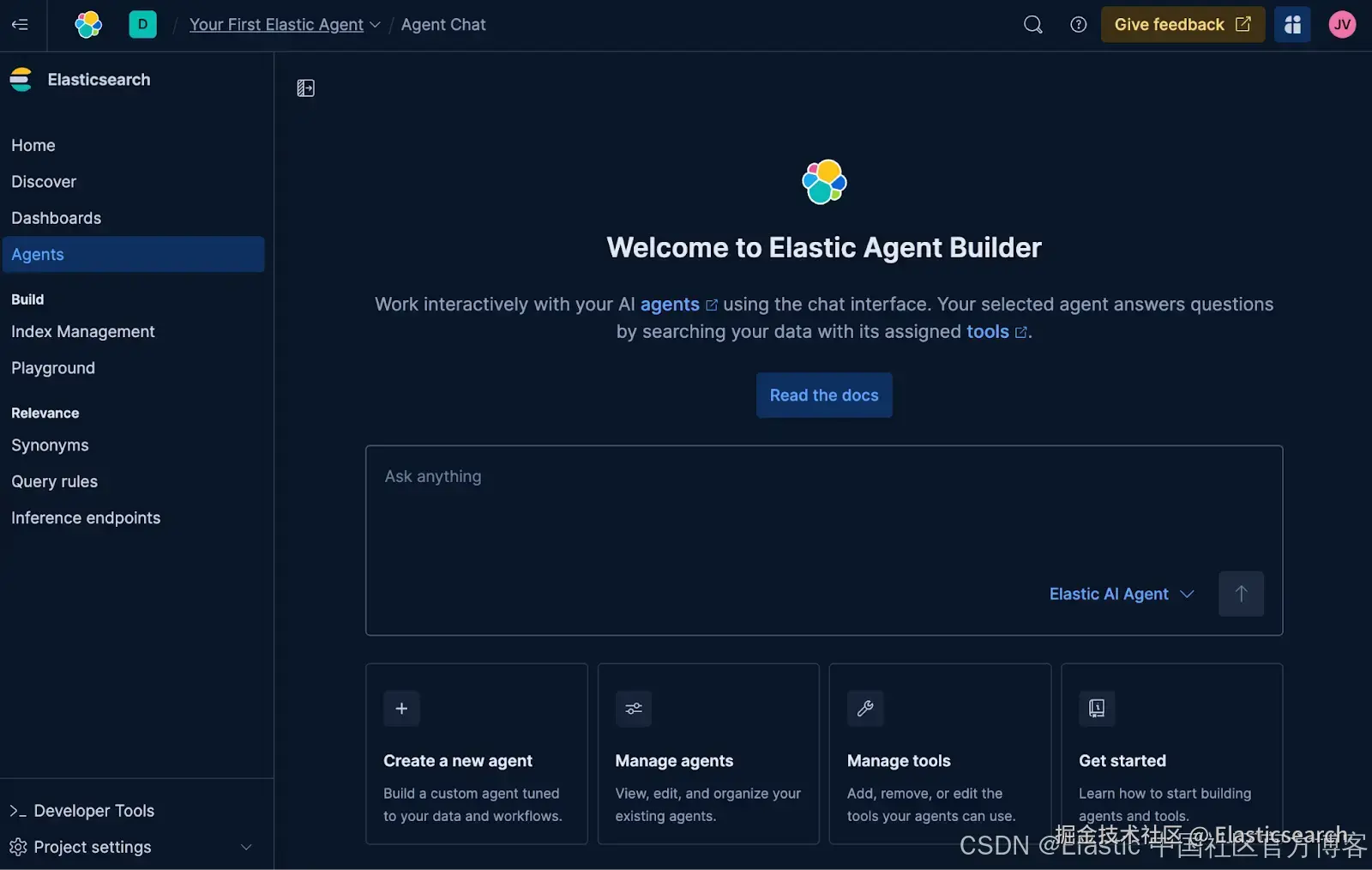
UI 路径
-
在 Kibana 中进入 Agents。
-
使用聊天窗口右下角的下拉菜单,将默认的 Elastic AI Agent 切换为我们新创建的 Financial Assistant agent。
-
提出一个可以让 agent 使用我们专用工具的问题:
vbnet`I'm worried about market sentiment. Can you show me which of our clients are most at risk from bad news?` AI写代码 -
等几秒钟,agent 会返回一个格式完整、完整的答案。由于 LLM 的特性,你的答案可能格式略有不同,但在本次运行中,agent 返回了:
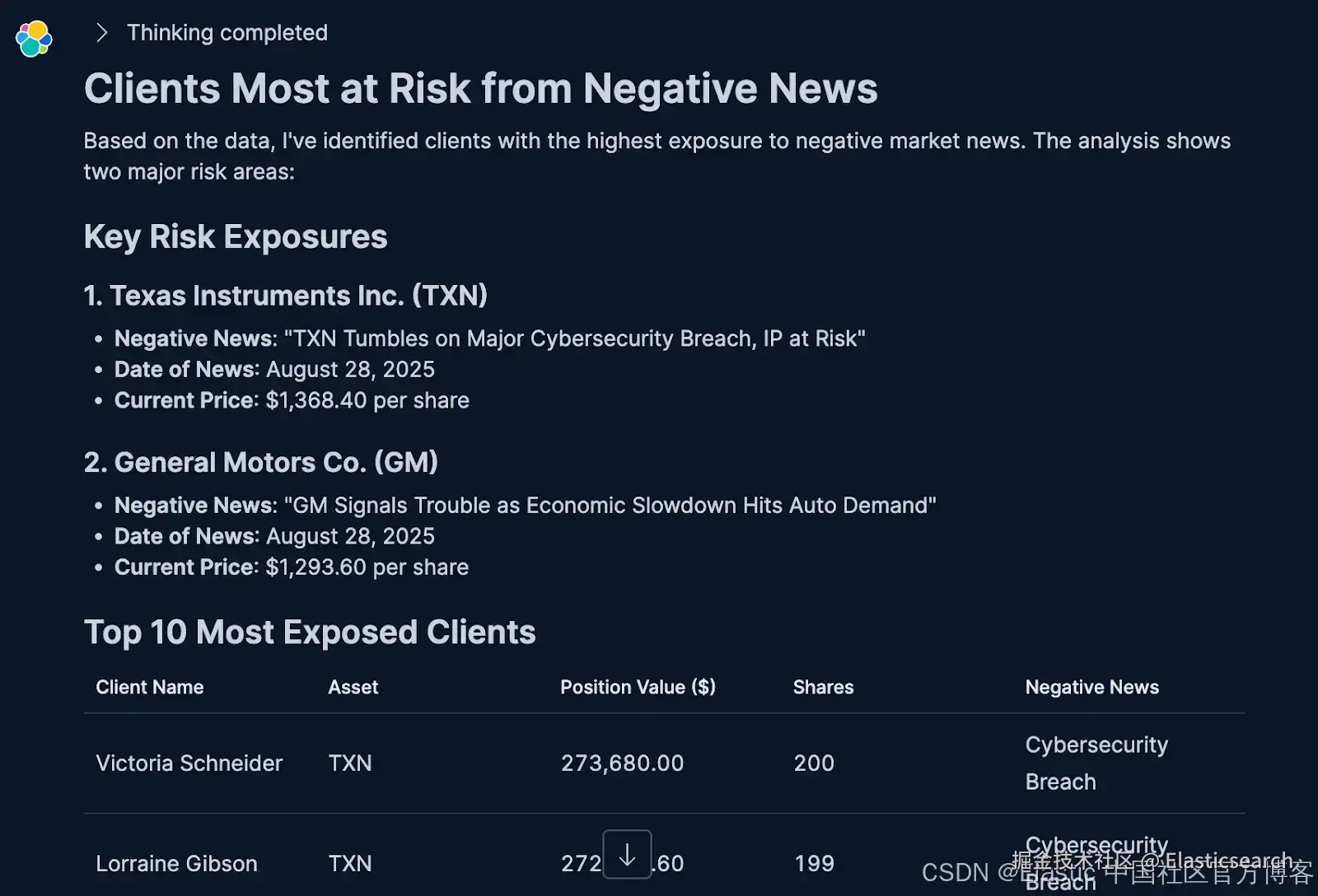
刚刚发生了什么?Agent 的推理过程
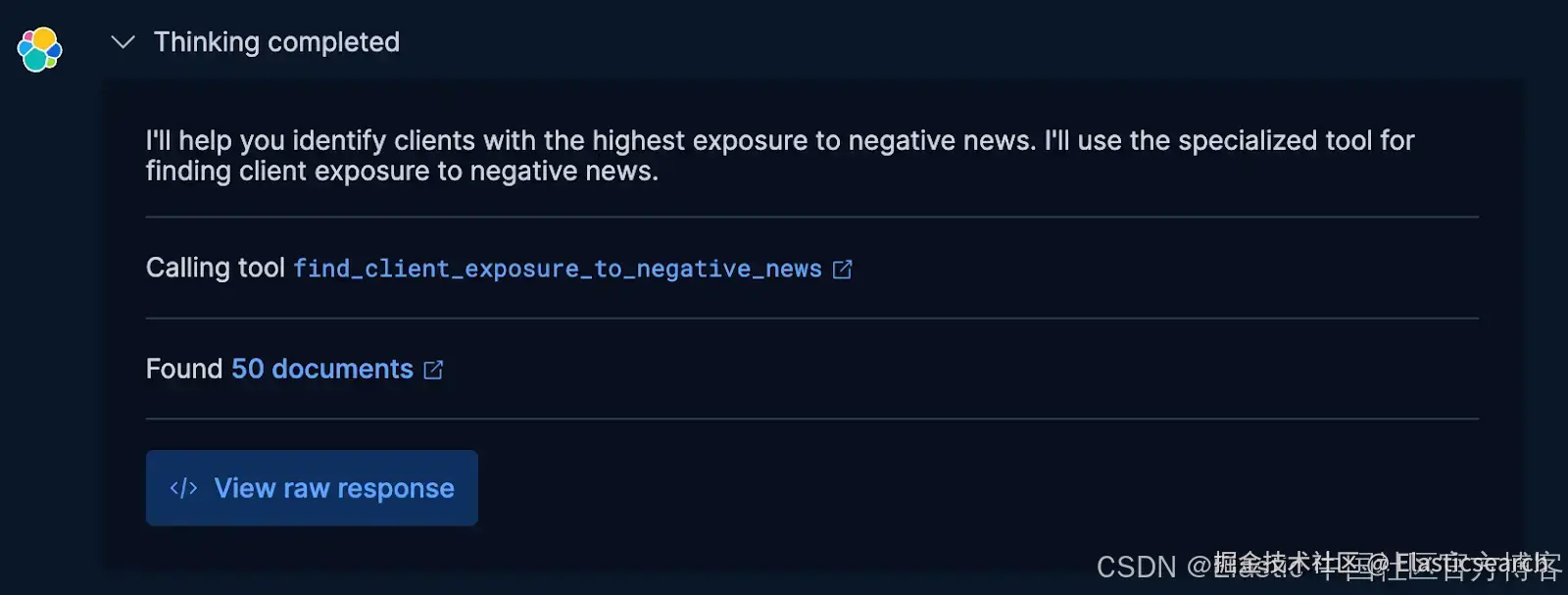
这个 agent 并不是 "知道" 答案。它执行了一个多步骤计划,核心是选择最适合的工具。以下是它的思考过程:
-
识别意图 :它将你问题中的关键词,如 "risk" 和 "negative news",与
find_client_exposure_to_negative_news工具的描述匹配。 -
执行计划:它从你的请求中提取时间范围,并对该专用工具发出一次调用。
-
委派工作:工具随后完成所有繁重任务:链式 JOIN、价值计算和排序。
-
综合结果:最后,agent 将工具返回的原始数据格式化为清晰、可读的摘要,遵循 prompt 中的规则。
而且我们不必只凭猜测,如果展开思路,还可以看到更多细节。
API 路径
你可以通过编程方式开始同样的对话。只需将输入问题发送到 converse API 端点,并确保指定我们 financial_manager 的 agent_id。
css
`

1.  POST kbn://api/agent_builder/converse
2.  {
3.    "input": "Show me our largest positions affected by negative news",
4.    "agent_id": "financial_assistant"
5.  }

`AI写代码
面向开发者:与 API 集成
虽然 Kibana UI 为构建和管理 agent 提供了出色且直观的体验,但你今天看到的所有操作也可以通过编程完成。Agent Builder 基于一套 API 构建,允许你将此功能直接集成到自己的应用程序、CI/CD 流程或自动化脚本中。
你将使用的三个核心端点是:
-
/api/agent_builder/tools:用于创建、列出和管理 agent 可用的可复用技能的端点。 -
/api/agent_builder/agents:用于定义 agent 角色,包括重要的指令和工具分配的端点。 -
/api/agent_builder/converse:用于与 agent 交互、启动对话并获取答案的端点。
有关使用这些 API 执行本教程每一步的完整实操演练,请查看我们 GitHub 仓库中提供的 Jupyter Notebook。
总结:轮到你动手了
我们首先将一个 ES|QL 查询转换为可复用技能,然后构建了一个专用 AI agent,为其赋予明确的使命和规则,并赋能该技能。结果是一个复杂的助手,它可以理解复杂问题并执行多步骤分析,提供精确、数据驱动的答案。
这一工作流程是 Elastic 新 Agent Builder 的核心。它设计得足够简单,让非技术用户通过 UI 创建 agent,同时也足够灵活,让开发者基于 API 构建自定义 AI 应用。最重要的是,它允许你在专家逻辑的管理下,将 LLM 安全地连接到自己的数据,并与数据进行对话。
准备好使用 Agents 与数据对话了吗?
巩固所学的最佳方式是亲自动手。在我们的免费互动实操工作坊中尝试今天讨论的所有内容。你将在专用沙箱环境中完成整个流程及更多操作。
在未来的博客中,我们将展示如何使用独立应用与 Financial Assistant agent 交互,并深入介绍使其成为可能的 Model Context Protocol (MCP)。在另一篇博客中,我们将讨论 Agent Builder 对开发中 Agent2Agent(A2A)协议的支持。
敬请关注,祝你构建愉快!