gitee地址:https://gitee.com/whltaoin_admin/hmtt_cloud-project
版本:1c600acd20d6787a187db4406befd60d7df92983
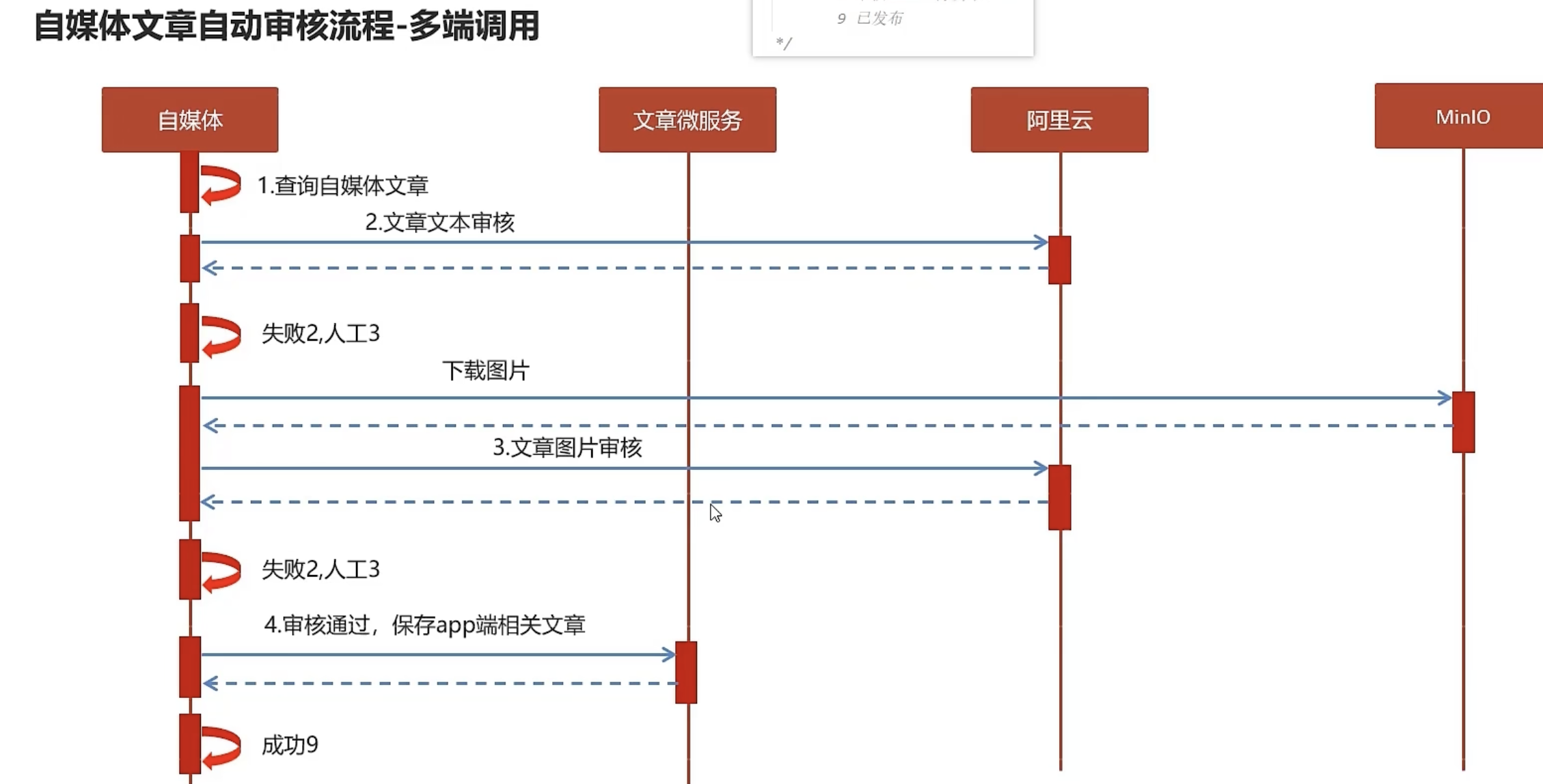
知识点一:文章自动审核流程
知识点二:腾讯云文本内容安全服务接入
简介:
腾讯文本内容安全(Text Moderation System,TMS)是一款文本内容智能识别审核服务,针对用户上传的文本进行内容安全识别并审核的安全服务,文本内容安全服务能够做到识别准确率高、召回率高,多维度覆盖不同类型的文本内容,同时产品将会持续更新审核服务识别标准及产品服务能力。
内容安全控制台
接入方式
本文选用SDK接入方法:https://cloud.tencent.com/document/product/1124/100983
API
云API示例中心:https://console.cloud.tencent.com/api/explorer?Product=tms&Version=2020-12-29&Action=TextModeration
SDK示例
SDK示例:https://console.cloud.tencent.com/api/explorer?Product=tms&Version=2020-12-29&Action=TextModeration
参数说明
集成项目
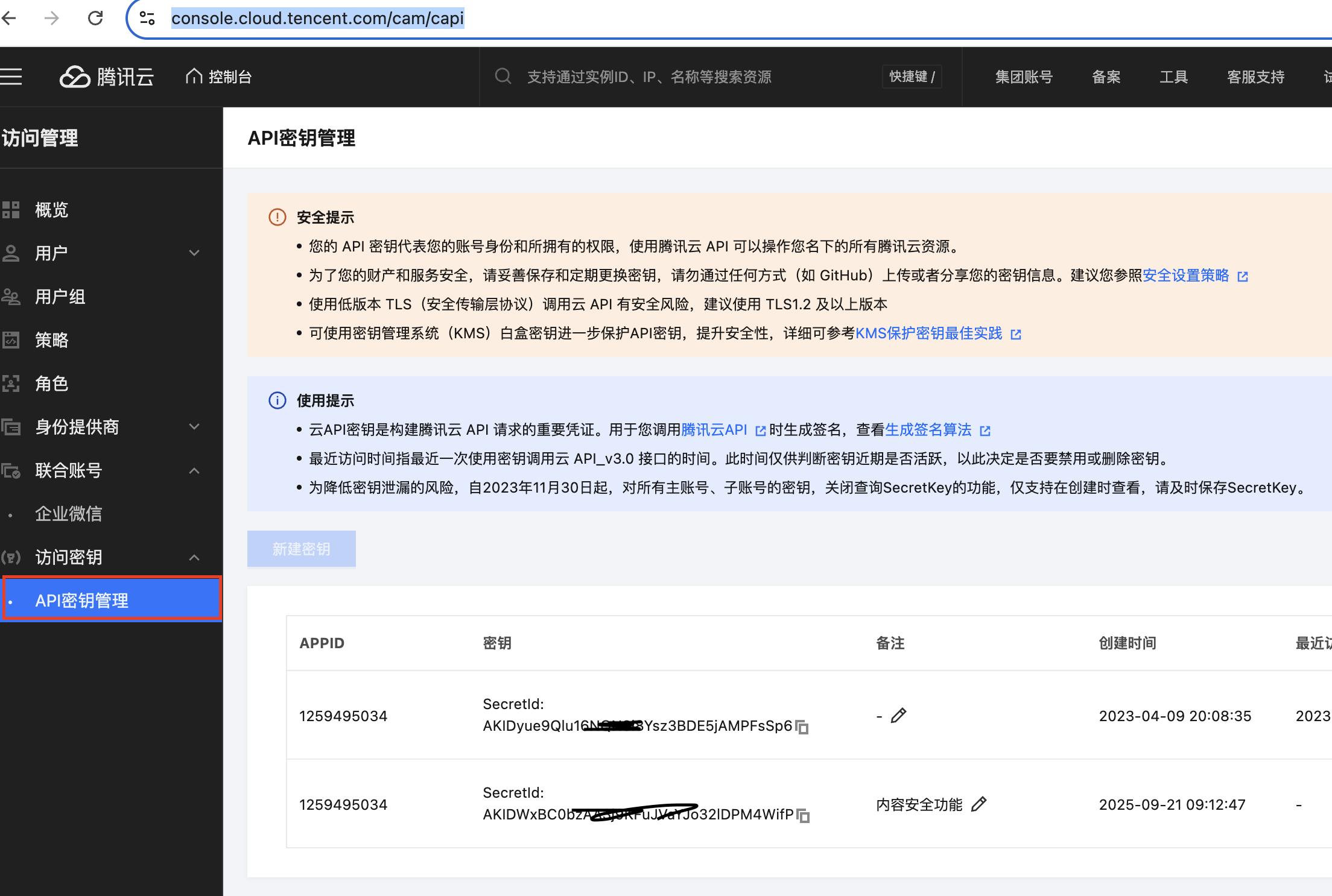
- 申请密钥:
- 倒入依赖
SDK包名称:tencentcloud-sdk-java-tms
版本:3.1.1321
使用条件:Java 7+
java
# 版本在maven生效需要时间,如获取不到对应的版本,可以调低版本号
  <dependency>
            <groupId>com.tencentcloudapi</groupId>
            <artifactId>tencentcloud-sdk-java-common</artifactId>
            <version>LATEST</version>
        </dependency>
        <dependency>
            <groupId>com.tencentcloudapi</groupId>
            <artifactId>tencentcloud-sdk-java-tms</artifactId>
            <version>LATEST</version>
        </dependency>
        <dependency>
            <groupId>com.alibaba</groupId>
            <artifactId>fastjson</artifactId>
</dependency>- 定义返回实体
JSON格式示例
java
{
	"Response": {
		"BizType": "0",
		"DataId": "123",
		"DetailResults": [
			{
				"Keywords": [
					"色情"
				],
				"Label": "Porn",
				"LibId": "12",
				"LibName": "Porn",
				"LibType": 0,
				"Score": 72,
				"Suggestion": "Review"
			},
			{
				"Keywords": [
					"色情"
				],
				"Label": "",
				"LibId": "1",
				"LibName": "Porn",
				"LibType": 2,
				"Score": 0,
				"Suggestion": "Block"
			}
		],
		"Extra": "xx",
		"Keywords": [
			"加我好友,给你发优惠券"
		],
		"Label": "Ad",
		"RequestId": "x2123-123123-123",
		"RiskDetails": [
			{
				"Label": "RiskAccount",
				"Level": 2
			}
		],
		"Score": 87,
		"Suggestion": "Block"
	}
}
java
package cn.varin.tencent.entity;

import lombok.Data;

@Data

public class TencentContentCheckResponseData {
    private String BizType;
    private String DataId;
    private String Extra;

    private String[] Keywords;
    private String Label;
    private String RequestId;
    private Integer Score;
    private String Suggestion;

}- 具体方法类定义
注意:腾讯云文本安全检测时,需要将文本内容转成base64编码格式
java
package cn.varin.tencent;

import cn.varin.tencent.entity.TencentContentCheckResponseData;
import com.alibaba.fastjson.JSON;
import com.alibaba.fastjson.JSONArray;
import com.alibaba.fastjson.JSONObject;
import com.aliyuncs.DefaultAcsClient;
import com.aliyuncs.IAcsClient;
import com.aliyuncs.exceptions.ClientException;
import com.aliyuncs.exceptions.ServerException;
import com.aliyuncs.green.model.v20180509.TextScanRequest;
import com.aliyuncs.http.FormatType;
import com.aliyuncs.http.HttpResponse;
import com.aliyuncs.profile.DefaultProfile;
import com.aliyuncs.profile.IClientProfile;
import lombok.Getter;
import lombok.Setter;
import org.springframework.boot.context.properties.ConfigurationProperties;
import org.springframework.stereotype.Component;
import com.tencentcloudapi.common.AbstractModel;

import java.util.*;


import com.tencentcloudapi.common.Credential;
import com.tencentcloudapi.common.profile.ClientProfile;
import com.tencentcloudapi.common.profile.HttpProfile;
import com.tencentcloudapi.common.exception.TencentCloudSDKException;
import com.tencentcloudapi.tms.v20201229.TmsClient;
import com.tencentcloudapi.tms.v20201229.models.*;

@Getter
@Setter
@Component
@ConfigurationProperties(prefix = "tencent")
public class GreenTextScan {

    private String accessKey;
    private String accessId;


    public  TencentContentCheckResponseData greeTextScan(String content) throws Exception {
        TencentContentCheckResponseData responseData =null;
        try{
            // 密钥信息从环境变量读取,需要提前在环境变量中设置 TENCENTCLOUD_SECRET_ID 和 TENCENTCLOUD_SECRET_KEY
            // 使用环境变量方式可以避免密钥硬编码在代码中,提高安全性
            // 生产环境建议使用更安全的密钥管理方案,如密钥管理系统(KMS)、容器密钥注入等
            // 请参见:https://cloud.tencent.com/document/product/1278/85305
            // 密钥可前往官网控制台 https://console.cloud.tencent.com/cam/capi 进行获取
            Credential cred = new Credential(accessId, accessKey);
            // 使用临时密钥示例
            // Credential cred = new Credential("SecretId", "SecretKey", "Token");
            // 实例化一个http选项,可选的,没有特殊需求可以跳过
            HttpProfile httpProfile = new HttpProfile();
            httpProfile.setEndpoint("tms.tencentcloudapi.com");
            // 实例化一个client选项,可选的,没有特殊需求可以跳过
            ClientProfile clientProfile = new ClientProfile();
            clientProfile.setHttpProfile(httpProfile);
            // 实例化要请求产品的client对象,clientProfile是可选的
            TmsClient client = new TmsClient(cred, "ap-shanghai", clientProfile);
            // 实例化一个请求对象,每个接口都会对应一个request对象
            TextModerationRequest req = new TextModerationRequest();

            String base64Content = Base64.getEncoder().encodeToString(content.getBytes());
            req.setContent(base64Content);

            // 返回的resp是一个TextModerationResponse的实例,与请求对象对应
            TextModerationResponse resp = client.TextModeration(req);
            // 输出json格式的字符串回包
            System.out.println(AbstractModel.toJsonString(resp));

          responseData = JSON.parseObject(AbstractModel.toJsonString(resp), TencentContentCheckResponseData.class);
//            System.out.println(o.getResponse());


        } catch (TencentCloudSDKException e) {
            System.out.println(e.toString());
        }
        return responseData;
    }

}- 调试返回结果示例
java
TencentContentCheckResponseData(BizType=0, DataId=, Extra=, Keywords=[], Label=Normal, RequestId=53d026e7-addf-45f9-80f0-50996afebada, Score=0, Suggestion=Pass)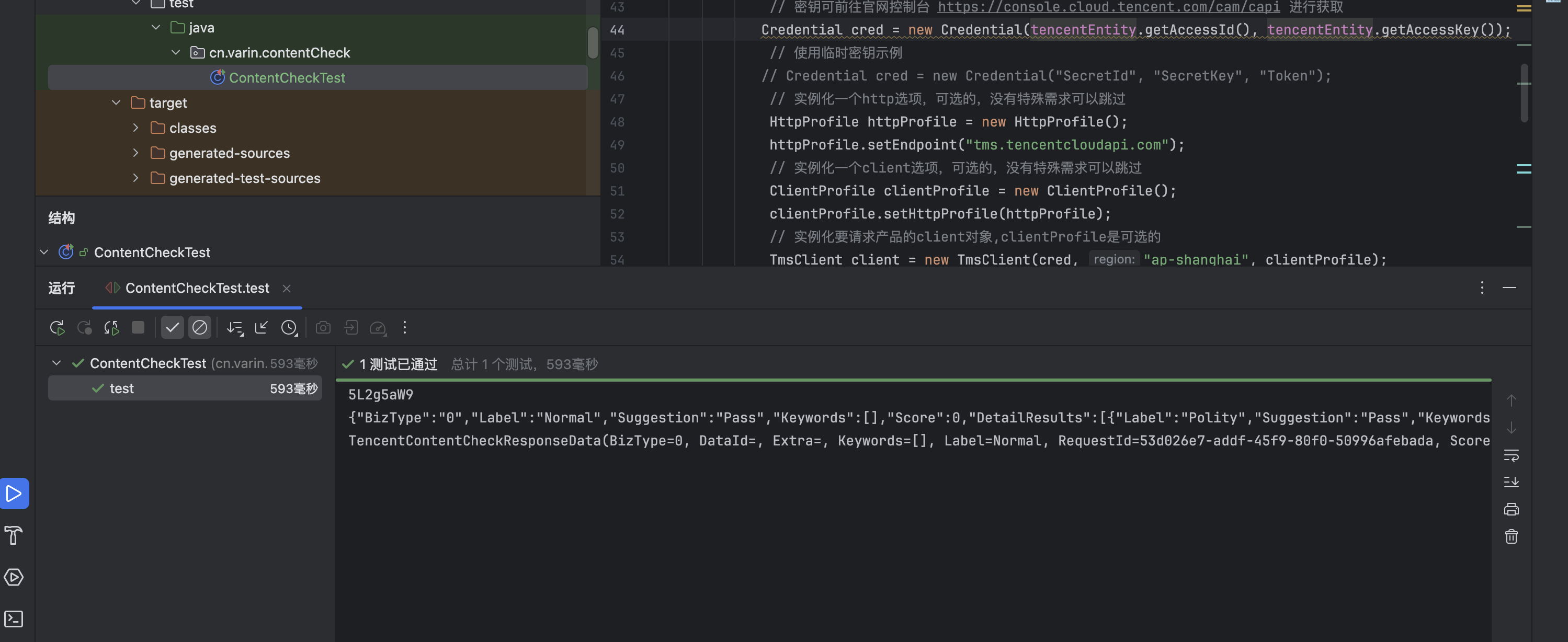
知识点三:腾讯云图片内容安全服务接入
简介:
腾讯图片内容安全(Image Moderation System,IMS)是一款采用前沿的图像识别算法,结合海量的违规图片数据进行训练建模,针对用户上传的图片进行内容安全识别并审核的安全服务,图片内容安全服务能够做到识别准确率高、召回率高,多维度覆盖不同类型的内容,同时产品将会持续更新审核服务识别标准及产品服务能力。
内容安全控制台
接入方式
本文选用SDK接入方法:https://cloud.tencent.com/document/product/1125/100989
API
云API示例中心:https://console.cloud.tencent.com/api/explorer?Product=ims&Version=2020-12-29&Action=ImageModeration
SDK示例
SDK示例:https://console.cloud.tencent.com/api/explorer?Product=ims&Version=2020-12-29&Action=ImageModeration
参数说明
集成项目
- 申请密钥:
- 倒入依赖
SDK包名称:tencentcloud-sdk-java-ims
版本:3.1.1321
使用条件:Java 7+
java
# 版本在maven生效需要时间,如获取不到对应的版本,可以调低版本号
  <dependency>
            <groupId>com.tencentcloudapi</groupId>
            <artifactId>tencentcloud-sdk-java-common</artifactId>
            <version>LATEST</version>
        </dependency>

<dependency>
    <groupId>com.tencentcloudapi</groupId>
    <artifactId>tencentcloud-sdk-java-ims</artifactId>
    <version>3.1.1312</version>
</dependency>
        <dependency>
            <groupId>com.alibaba</groupId>
            <artifactId>fastjson</artifactId>
</dependency>- 定义返回实体
JSON格式示例
java
{
	"Response": {
		"BizType": "0",
		"DataId": "123",
		"DetailResults": [
			{
				"Keywords": [
					"色情"
				],
				"Label": "Porn",
				"LibId": "12",
				"LibName": "Porn",
				"LibType": 0,
				"Score": 72,
				"Suggestion": "Review"
			},
			{
				"Keywords": [
					"色情"
				],
				"Label": "",
				"LibId": "1",
				"LibName": "Porn",
				"LibType": 2,
				"Score": 0,
				"Suggestion": "Block"
			}
		],
		"Extra": "xx",
		"Keywords": [
			"加我好友,给你发优惠券"
		],
		"Label": "Ad",
		"RequestId": "x2123-123123-123",
		"RiskDetails": [
			{
				"Label": "RiskAccount",
				"Level": 2
			}
		],
		"Score": 87,
		"Suggestion": "Block"
	}
}
java
package cn.varin.tencent.entity;

import lombok.Data;

@Data

public class TencentContentCheckResponseData {
    private String BizType;
    private String DataId;
    private String Extra;

    private String[] Keywords;
    private String Label;
    private String RequestId;
    private Integer Score;
    private String Suggestion;

}- 具体方法类定义
注意:腾讯云文本安全检测时,需要将文本内容转成base64编码格式
java
package cn.varin.tencent;

import cn.varin.tencent.entity.TencentContentCheckResponseData;
import com.alibaba.fastjson.JSON;
import com.alibaba.fastjson.JSONArray;
import com.alibaba.fastjson.JSONObject;
import com.aliyuncs.DefaultAcsClient;
import com.aliyuncs.IAcsClient;
import com.aliyuncs.exceptions.ClientException;
import com.aliyuncs.exceptions.ServerException;
import com.aliyuncs.green.model.v20180509.TextScanRequest;
import com.aliyuncs.http.FormatType;
import com.aliyuncs.http.HttpResponse;
import com.aliyuncs.profile.DefaultProfile;
import com.aliyuncs.profile.IClientProfile;
import lombok.Getter;
import lombok.Setter;
import org.springframework.boot.context.properties.ConfigurationProperties;
import org.springframework.stereotype.Component;
import com.tencentcloudapi.common.AbstractModel;

import java.util.*;


import com.tencentcloudapi.common.Credential;
import com.tencentcloudapi.common.profile.ClientProfile;
import com.tencentcloudapi.common.profile.HttpProfile;
import com.tencentcloudapi.common.exception.TencentCloudSDKException;
import com.tencentcloudapi.tms.v20201229.TmsClient;
import com.tencentcloudapi.tms.v20201229.models.*;

@Getter
@Setter
@Component
@ConfigurationProperties(prefix = "tencent")
public class GreenTextScan {

    private String accessKey;
    private String accessId;


    public  TencentContentCheckResponseData greeTextScan(String content) throws Exception {
        TencentContentCheckResponseData responseData =null;
        try{
            // 密钥信息从环境变量读取,需要提前在环境变量中设置 TENCENTCLOUD_SECRET_ID 和 TENCENTCLOUD_SECRET_KEY
            // 使用环境变量方式可以避免密钥硬编码在代码中,提高安全性
            // 生产环境建议使用更安全的密钥管理方案,如密钥管理系统(KMS)、容器密钥注入等
            // 请参见:https://cloud.tencent.com/document/product/1278/85305
            // 密钥可前往官网控制台 https://console.cloud.tencent.com/cam/capi 进行获取
            Credential cred = new Credential(accessId, accessKey);
            // 使用临时密钥示例
            // Credential cred = new Credential("SecretId", "SecretKey", "Token");
            // 实例化一个http选项,可选的,没有特殊需求可以跳过
            HttpProfile httpProfile = new HttpProfile();
            httpProfile.setEndpoint("tms.tencentcloudapi.com");
            // 实例化一个client选项,可选的,没有特殊需求可以跳过
            ClientProfile clientProfile = new ClientProfile();
            clientProfile.setHttpProfile(httpProfile);
            // 实例化要请求产品的client对象,clientProfile是可选的
            TmsClient client = new TmsClient(cred, "ap-shanghai", clientProfile);
            // 实例化一个请求对象,每个接口都会对应一个request对象
            TextModerationRequest req = new TextModerationRequest();

            String base64Content = Base64.getEncoder().encodeToString(content.getBytes());
            req.setContent(base64Content);

            // 返回的resp是一个TextModerationResponse的实例,与请求对象对应
            TextModerationResponse resp = client.TextModeration(req);
            // 输出json格式的字符串回包
            System.out.println(AbstractModel.toJsonString(resp));

          responseData = JSON.parseObject(AbstractModel.toJsonString(resp), TencentContentCheckResponseData.class);
//            System.out.println(o.getResponse());


        } catch (TencentCloudSDKException e) {
            System.out.println(e.toString());
        }
        return responseData;
    }

}- 调试返回结果示例
java
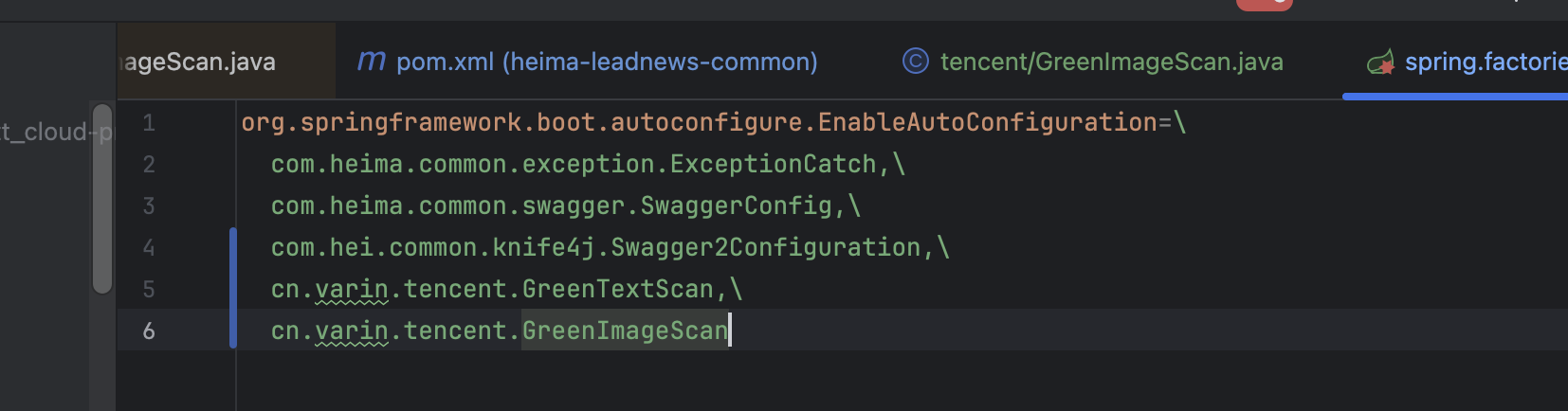
TencentContentCheckResponseData(BizType=0, DataId=, Extra=, Keywords=[], Label=Normal, RequestId=53d026e7-addf-45f9-80f0-50996afebada, Score=0, Suggestion=Pass)注意点:因为图片检测和内容检测的模块存在于comment中,但是他又需要注入,所以需要再****spring.factories
配置文件中,添加上这两个类的全限定类路径。
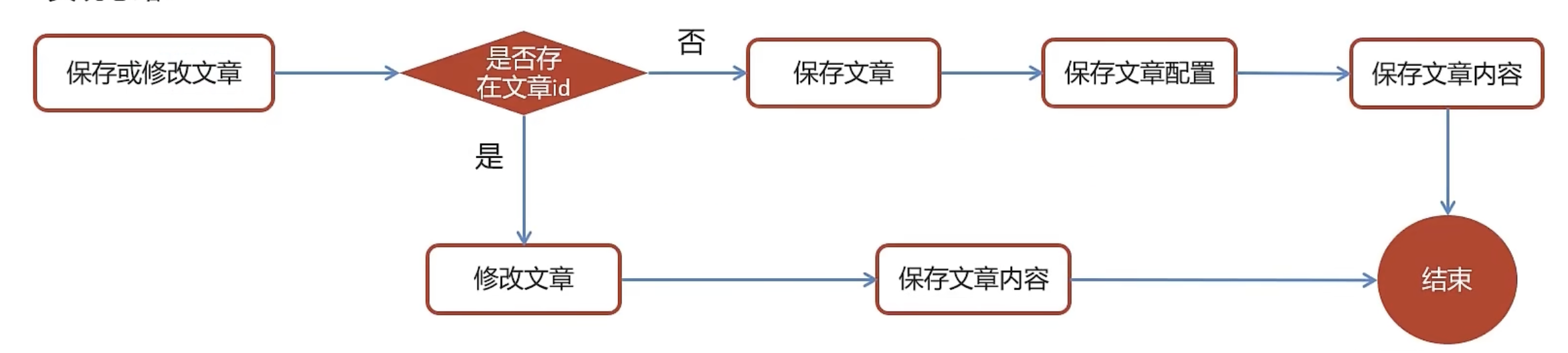
知识点四:app端文章保存
涉及到的数据库表
ap_article 文章信息表
ap_article_config 文章配置
ap_article_content 文章内容
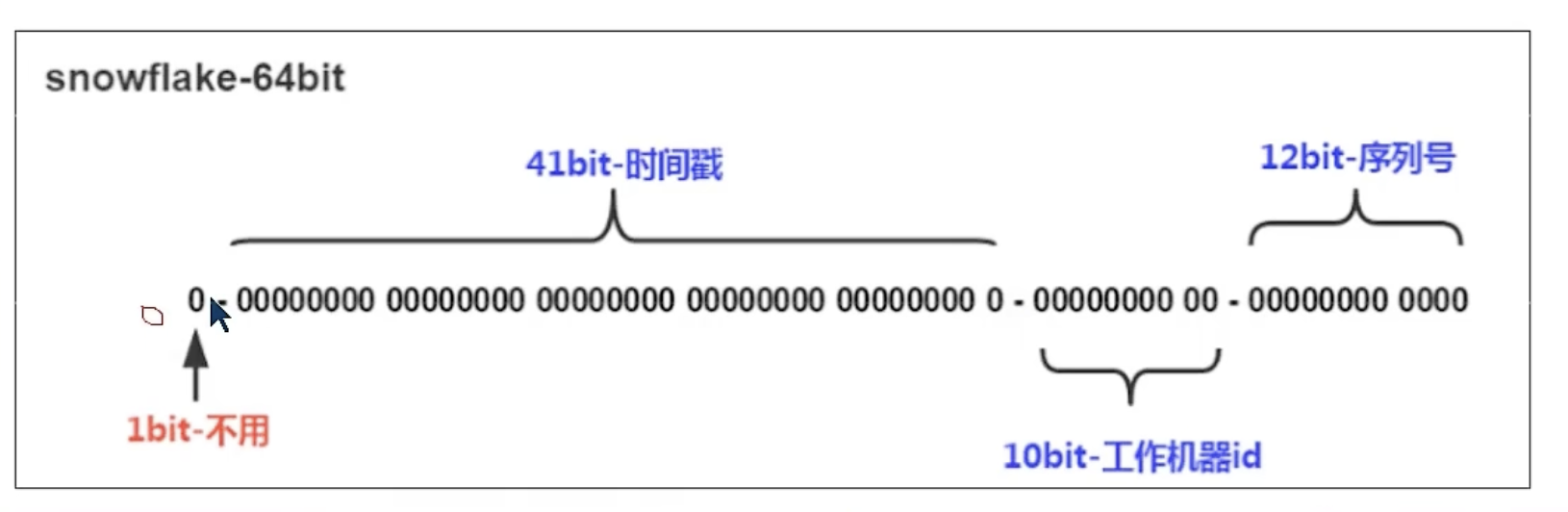
分布式ID-雪花算法使用
- 使用场景:在使用分库时,相同的表id可以出现重复,所有需要一个不会重复的id生成算法
- 特点:
- Long类型的ID
- 组成:
- 符号位:0
- 41位的毫秒数
- 10位工作机器
- 前五位是机房id,后五位时机器id
- 12位的序列化
实现思路
接口信息
返回信息
实现步骤
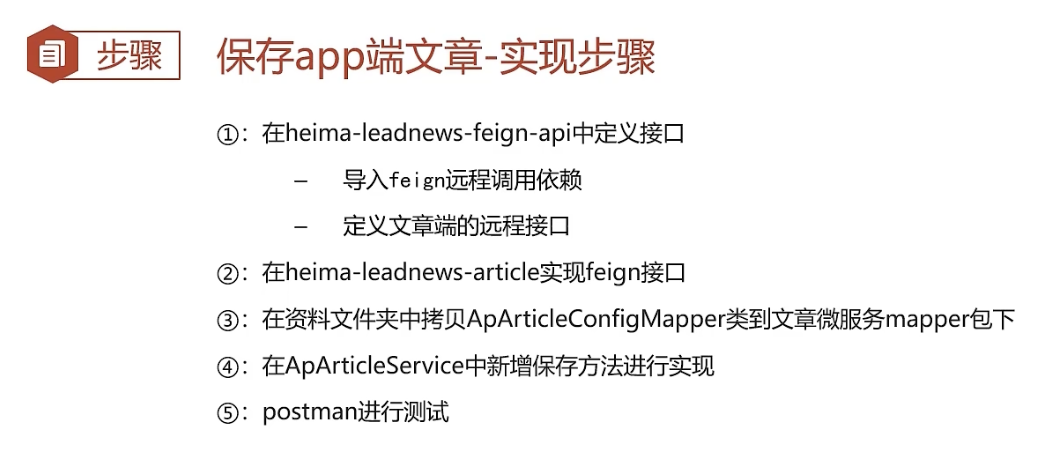
在feign模块中定义接口
- 倒入依赖
java
<dependency>
    <groupId>org.springframework.cloud</groupId>

    <artifactId>spring-cloud-starter-openfeign</artifactId>

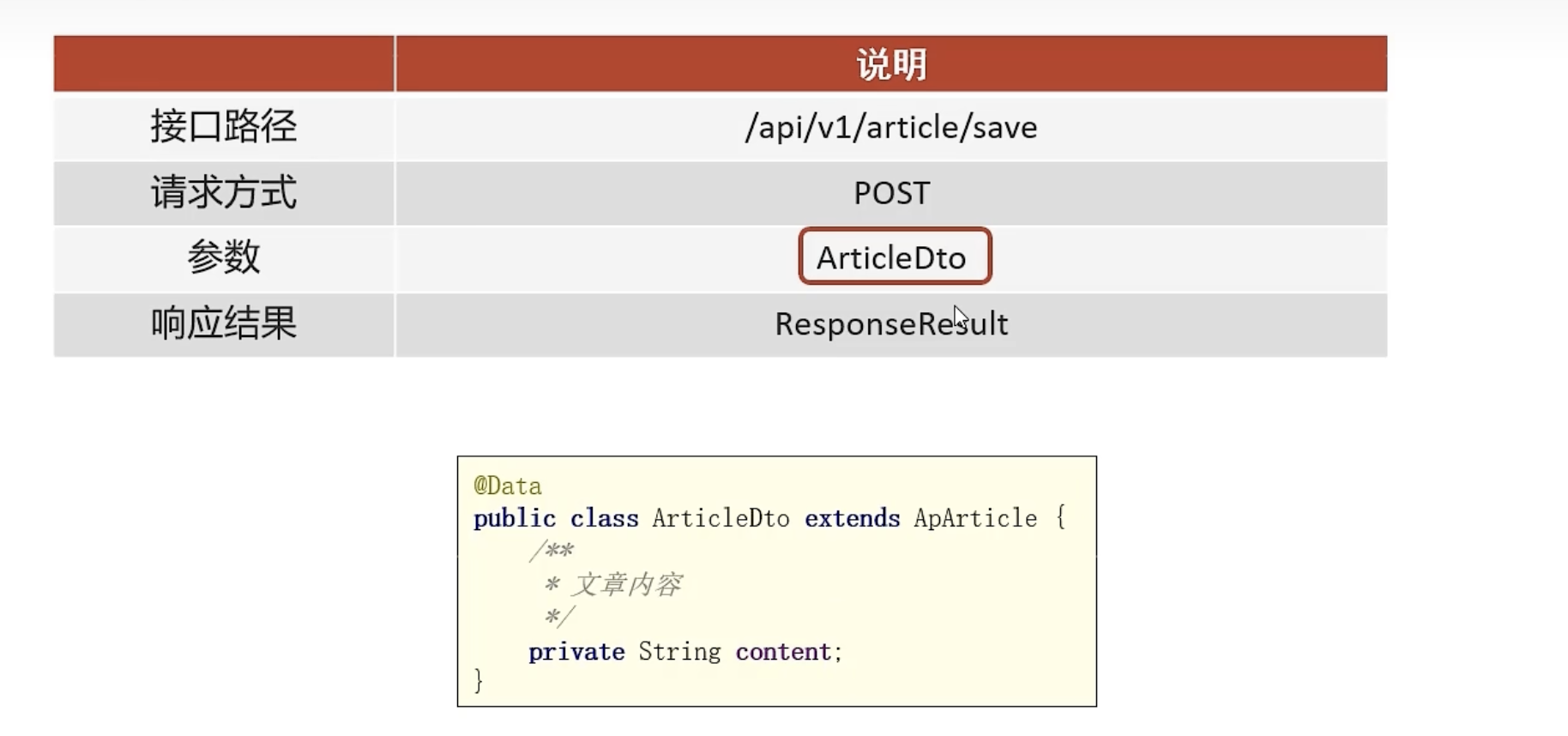
</dependency>- 建立apArticleDto实体
java
package com.heima.model.article.dtos;

import com.heima.model.article.pojos.ApArticle;
import lombok.Data;

@Data
public class ArticleDto  extends ApArticle {
    /**
     * 文章内容
     */
    private String content;
}- feign Article客户端
java
package cn.varin.apis.article;


import com.heima.model.article.dtos.ArticleDto;
import com.heima.model.article.pojos.ApArticleConfig;
import com.heima.model.common.dtos.ResponseResult;
import org.springframework.cloud.openfeign.FeignClient;
import org.springframework.web.bind.annotation.PostMapping;
import org.springframework.web.bind.annotation.RequestBody;

@FeignClient(value = "leadnews-article")
public interface IArticleClient {
    @PostMapping("/api/v1/article/save")
    ResponseResult save(@RequestBody ArticleDto dto);
}- 在article-service模块下田间feign包并实现IArticleClient
java
package com.heima.article.feign;

import cn.varin.apis.article.IArticleClient;
import com.heima.article.mapper.ApArticleConfigMapper;
import com.heima.article.service.ApArticleService;
import com.heima.model.article.dtos.ArticleDto;
import com.heima.model.common.dtos.ResponseResult;
import org.springframework.beans.factory.annotation.Autowired;
import org.springframework.web.bind.annotation.PostMapping;
import org.springframework.web.bind.annotation.RestController;

import javax.annotation.PostConstruct;

@RestController
public class ArtcleClient implements IArticleClient {
    @Autowired
    private ApArticleService apArticleService;

    @PostMapping("api/v1/article/save")
    @Override
    public ResponseResult save(ArticleDto dto) {
        return apArticleService.saveArticle(dto);
    }
}- 实现Article模块中的service方法
java
package com.heima.article.service.impl;

import com.baomidou.mybatisplus.core.toolkit.Wrappers;
import com.baomidou.mybatisplus.extension.service.impl.ServiceImpl;
import com.heima.article.mapper.ApArticleConfigMapper;
import com.heima.article.mapper.ApArticleContentMapper;
import com.heima.article.mapper.ApArticleMapper;
import com.heima.article.service.ApArticleService;
import com.heima.model.article.dtos.ArticleDto;
import com.heima.model.article.dtos.ArticleHomeDto;
import com.heima.model.article.pojos.ApArticle;
import com.heima.model.article.pojos.ApArticleConfig;
import com.heima.model.article.pojos.ApArticleContent;
import com.heima.model.common.dtos.ResponseResult;
import com.heima.model.common.enums.AppHttpCodeEnum;
import lombok.extern.slf4j.Slf4j;
import org.checkerframework.checker.units.qual.Temperature;
import org.springframework.beans.BeanUtils;
import org.springframework.beans.factory.annotation.Autowired;
import org.springframework.stereotype.Component;
import org.springframework.stereotype.Service;
import org.springframework.transaction.annotation.Transactional;

@Service
@Slf4j
@Transactional
public class ApArticleServiceImpl  extends ServiceImpl<ApArticleMapper, ApArticle>   implements ApArticleService {

    @Autowired
    private ApArticleMapper apArticleMapper;
    @Override
    public ResponseResult load(ArticleHomeDto dto, short type) {
        return ResponseResult.okResult(apArticleMapper.loadArticleList(dto,type));
    }

    @Autowired
    private ApArticleConfigMapper apArticleConfigMapper;
    @Autowired
    private ApArticleContentMapper apArticleContentMapper;;


    @Override
    public ResponseResult saveArticle(ArticleDto dto) {

        // 检查参数
        if (dto==null) {

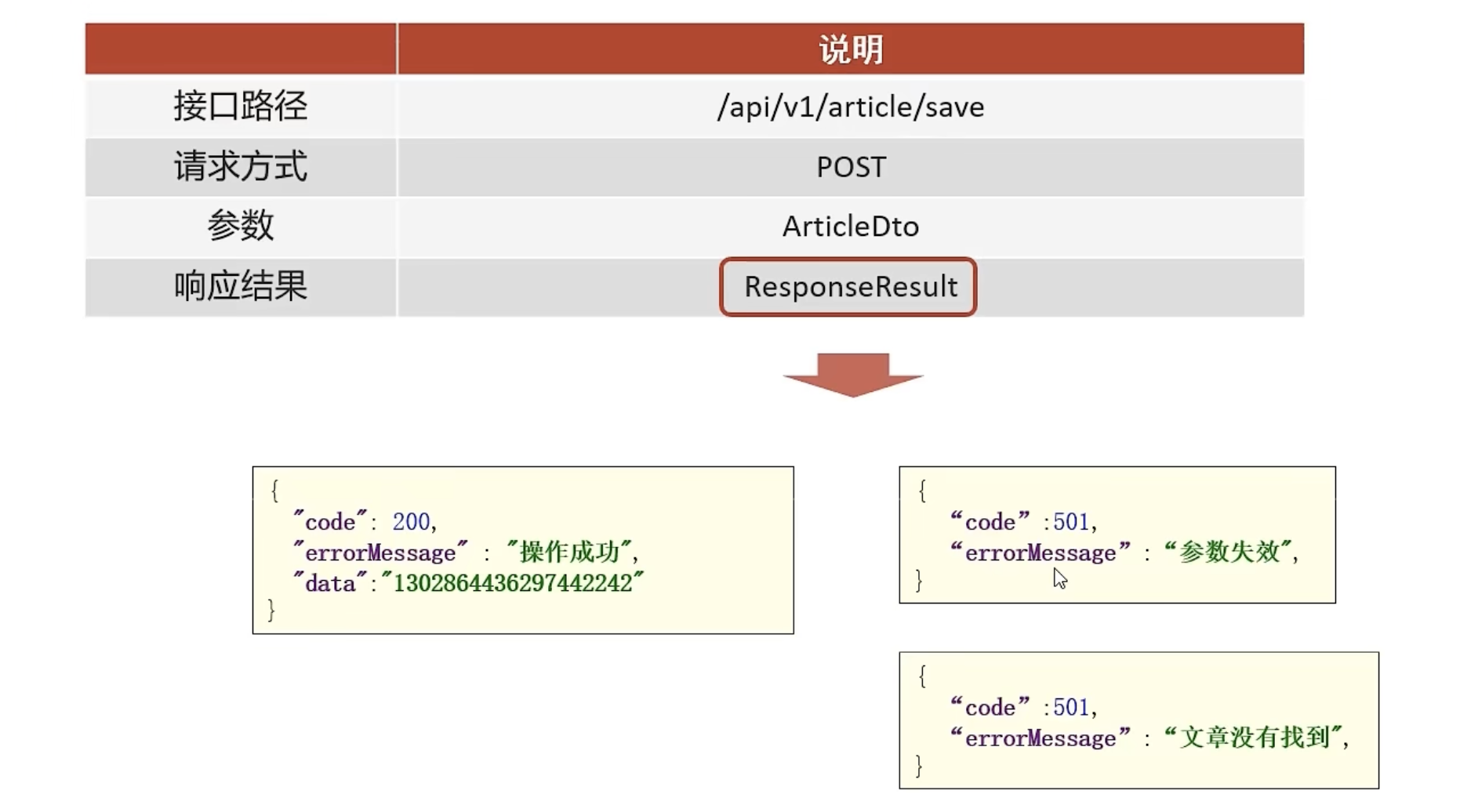
            return ResponseResult.errorResult(AppHttpCodeEnum.PARAM_INVALID);

        }

        ApArticle apArticle = new ApArticle();
        // 拷贝属性
        BeanUtils.copyProperties(dto, apArticle);
        // 判断是新增还是修改
        if (dto.getId()==null) {
            save(apArticle);
            // 文章配置信息保存
            ApArticleConfig apArticleConfig = new ApArticleConfig(apArticle.getId());
            apArticleConfigMapper.insert(apArticleConfig);
            // 文章内容保存
            ApArticleContent apArticleContent = new ApArticleContent();
            apArticleContent.setArticleId(apArticle.getId());
            apArticleContent.setContent(dto.getContent());
            apArticleContentMapper.insert(apArticleContent);


            // 新增
        }else{
          //   修改

            updateById(apArticle);
            ApArticleContent apArticleContent = apArticleContentMapper.selectOne(Wrappers.<ApArticleContent>lambdaQuery().eq(ApArticleContent::getArticleId, dto.getId()));

            apArticleContent.setContent(dto.getContent());
            apArticleContentMapper.updateById(apArticleContent);

        }


  return ResponseResult.okResult(apArticle.getId());
    }
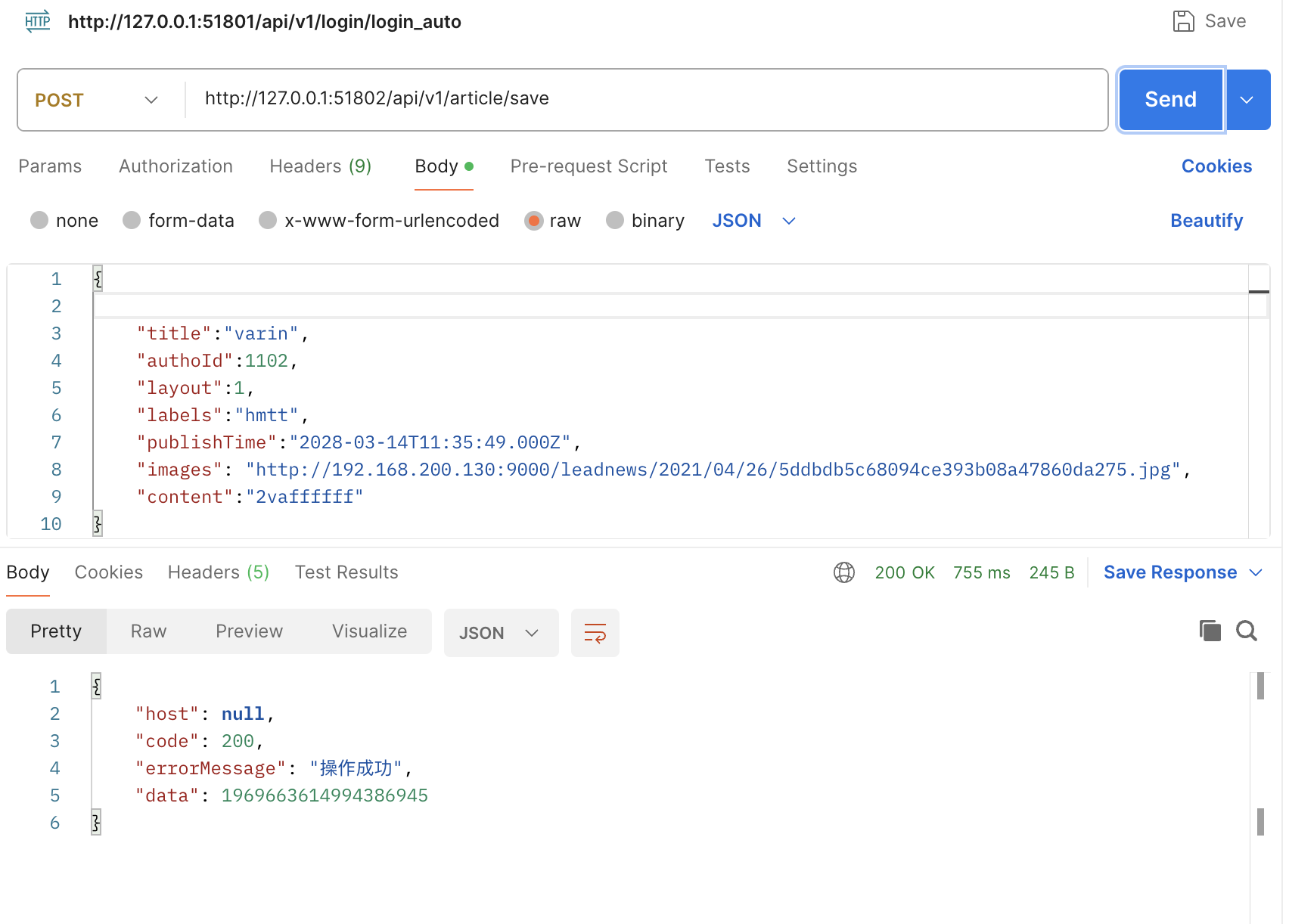
}- PostMan测试-新增
URL:http://127.0.0.1:51802/api/v1/article/save
注意点:在进行新增测试时,将属性id去除,因为在service层中的判断条件仅为:id==null,
存在id会直接进入到修改
- JSON
java
{
    "title":"varin",
    "authoId":1102,
    "layout":1,
    "labels":"hmtt",
    "publishTime":"2028-03-14T11:35:49.000Z",
    "images": "http://192.168.200.130:9000/leadnews/2021/04/26/5ddbdb5c68094ce393b08a47860da275.jpg",
    "content":"2vaffffff"
}
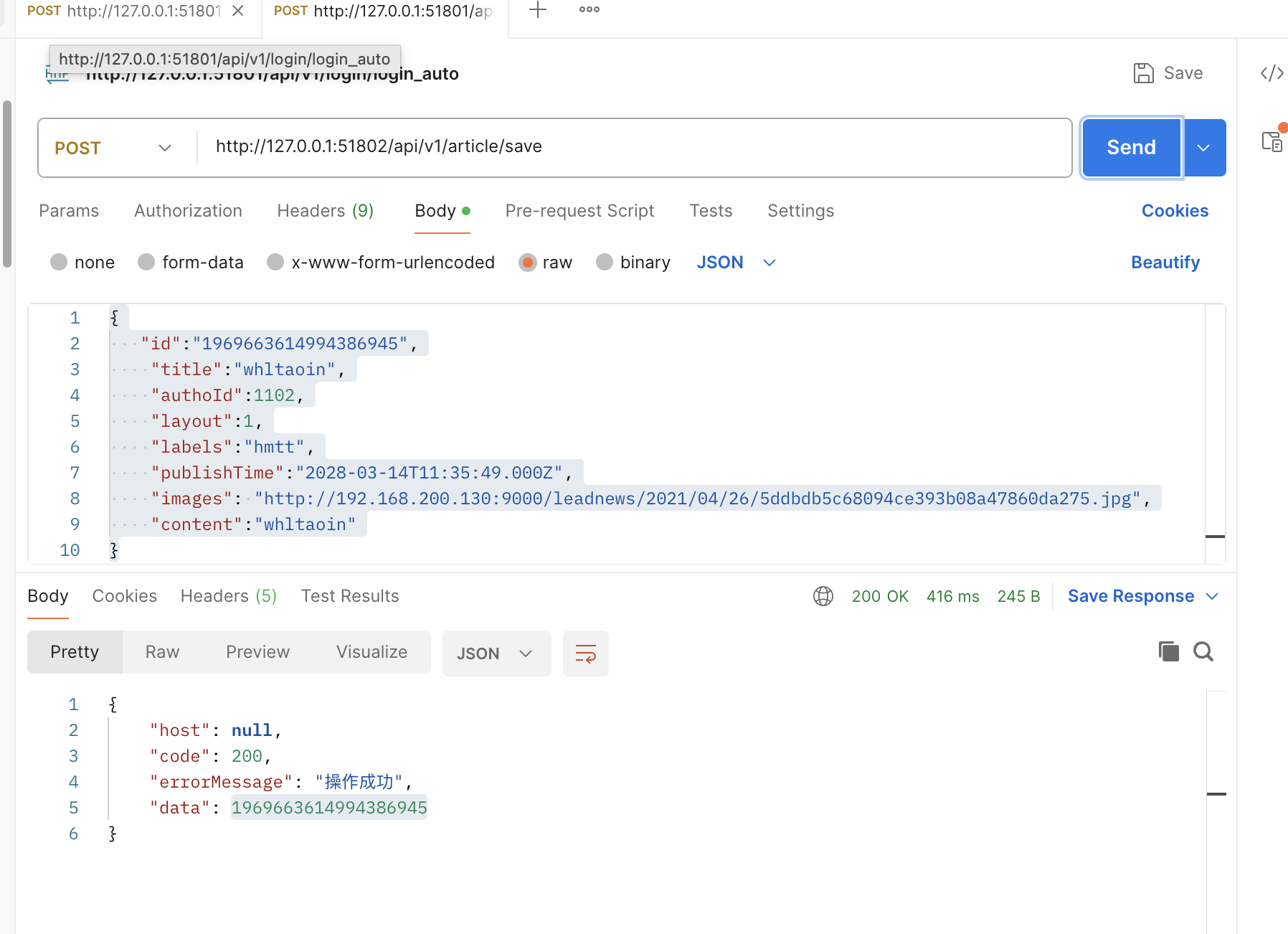
- PostMan测试-修改
- JSON
java
{
   "id":"1969663614994386945",
    "title":"whltaoin",
    "authoId":1102,
    "layout":1,
    "labels":"hmtt",
    "publishTime":"2028-03-14T11:35:49.000Z",
    "images": "http://192.168.200.130:9000/leadnews/2021/04/26/5ddbdb5c68094ce393b08a47860da275.jpg",
    "content":"whltaoin"
}
知识点五:文章审核实现
- 具体步骤:
- 在自媒体模块中建立一个处理类,WmNewsAutoScanSerivce
- 通过id获取到每条文章的具体信息
- 从getContent属性中,将文本和图片分别提取到对应的map集合中。
- 再分别建立图片和文本审核的方法进行审核。
实现思路:判断文章是否存在
判断文章状态是否为待审核
提取文本和图片
文本审核
图片审核
修改自媒体文章审核状态
java
package com.heima.wemedia.service.impl;

import cn.varin.tencent.GreenImageScan;
import cn.varin.tencent.GreenTextScan;
import cn.varin.tencent.entity.TencentContentCheckResponseData;
import com.alibaba.fastjson.JSONArray;
import com.heima.model.wemedia.pojos.WmNews;
import com.heima.wemedia.mapper.WmNewsMapper;
import com.heima.wemedia.service.WmNewAutoScanService;
import com.heima.wemedia.service.WmNewsService;
//import com.heima.wemedia.tencent.GreenTextScan;
import com.tencentcloudapi.common.exception.TencentCloudSDKException;
import lombok.extern.slf4j.Slf4j;
import org.apache.commons.lang3.StringUtils;
import org.apache.kafka.common.protocol.types.Field;
import org.springframework.beans.factory.annotation.Autowired;
import org.springframework.stereotype.Service;
import org.springframework.transaction.annotation.Transactional;

import java.util.*;

@Service
@Slf4j
@Transactional
public class WmNewAutoScanServiceImpl implements WmNewAutoScanService {
    @Autowired
    private WmNewsMapper wmNewsMapper;

    @Override
    public void AutoScanWmNews(Integer id) {
        // 1. 判断文章是否存在
        WmNews wmNews = wmNewsMapper.selectById(id);
        if(wmNews == null){
            throw new RuntimeException("WmNewAutoScanServiceImpl-文章不存在");
        }
        // 判断文章状态是否为待审核
        if (wmNews.getStatus().equals(WmNews.Status.SUBMIT.getCode())) {
            // 提取文本和图片
            Map<String, Object> map = handleTextAndImage(wmNews);
            // 文本审核
            Boolean textStatus =      textAutoScan(map,wmNews);

            if (textStatus) {
                // 文字已经违规,不需要再审核图片了
                return;
            }
            // 图片审核
            Boolean imageStatus =      imageAutoScan(map,wmNews);
            if (imageStatus) {return;}

            System.out.println("suceess");
            // 修改自媒体文章审核状态
            wmNews.setStatus((short)8);
            wmNewsMapper.updateById(wmNews);


        }


    }
    @Autowired
    private GreenImageScan greenImageScan;
    // 审核图片

    private Boolean imageAutoScan(Map<String, Object> map, WmNews wmNews) {
        boolean flag = false;
        List<String> images =(List<String>) map.get("images");
        for (String image : images) {
            try {
                TencentContentCheckResponseData responseData = greenImageScan.checkImageScan(image);
                if (!responseData.getSuggestion().equals("Pass")) {

                    flag = true;
                    wmNews.setStatus(WmNews.Status.FAIL.getCode());
                    wmNewsMapper.updateById(wmNews);
                    break;

                }
            } catch (TencentCloudSDKException e) {
                throw new RuntimeException(e);
            }
        }


        return flag;
    }

    @Autowired
    private GreenTextScan greenTextScan;
    // 审核文本

    private Boolean textAutoScan(Map<String, Object> map, WmNews wmNews) {
        Boolean flag = true;

        String result =map.get("text").toString();
        try {
            TencentContentCheckResponseData responseData = greenTextScan.greeTextScan(result);
            String suggestion = responseData.getSuggestion();
            if (suggestion.equals("Pass")) {
                flag = false;
            }else{
                flag = true;
                wmNews.setStatus(WmNews.Status.FAIL.getCode());
                wmNewsMapper.updateById(wmNews);
            }
            System.out.println(suggestion);

        } catch (Exception e) {
            throw new RuntimeException(e);
        }


        return flag;
    }

    // 提取文本和图片到map 中

    private Map<String, Object> handleTextAndImage(WmNews wmNews) {
        Map<String, Object> map = new HashMap<>();
        // 存储字符
        StringBuffer sb = new StringBuffer();
        sb.append(wmNews.getTitle());
        sb.append(wmNews.getLabels());
        // 存储图片
        List<String> images = new ArrayList<>();

        if (StringUtils.isNotBlank(wmNews.getContent())) {

            List<Map> maps = JSONArray.parseArray(wmNews.getContent(), Map.class);
            maps.forEach(item -> {
                if (item.get("type").equals("image")) {
                    images.add(item.get("value").toString());
                }else if (item.get("type").equals("text")) {
                    sb.append(item.get("value").toString());
                }
            });
            if (StringUtils.isNotBlank(wmNews.getImages())) {

                // 封面
                String[] split = wmNews.getImages().split(".");
               images.addAll(Arrays.asList(split));
            }


        }
        map.put("images", images);
        map.put("text", sb.toString());


        return map;
    }
}- 测试类:
java
package cn.varin;

import com.heima.wemedia.WemediaApplication;
import com.heima.wemedia.service.WmNewAutoScanService;
import com.tencentcloudapi.common.exception.TencentCloudSDKException;
import org.junit.Test;
import org.junit.runner.RunWith;
import org.junit.runner.Runner;
import org.springframework.beans.factory.annotation.Autowired;
import org.springframework.boot.test.context.SpringBootTest;
import org.springframework.test.context.junit4.SpringRunner;

@SpringBootTest(classes = WemediaApplication.class)
@RunWith(SpringRunner.class)
public class handleScanTest {
    @Autowired
    private WmNewAutoScanService wmNewAutoScanService;
    @Test
    public void wmNewAutoScanTest() {
        wmNewAutoScanService.AutoScanWmNews(6232);
    }
}- 测试结果:
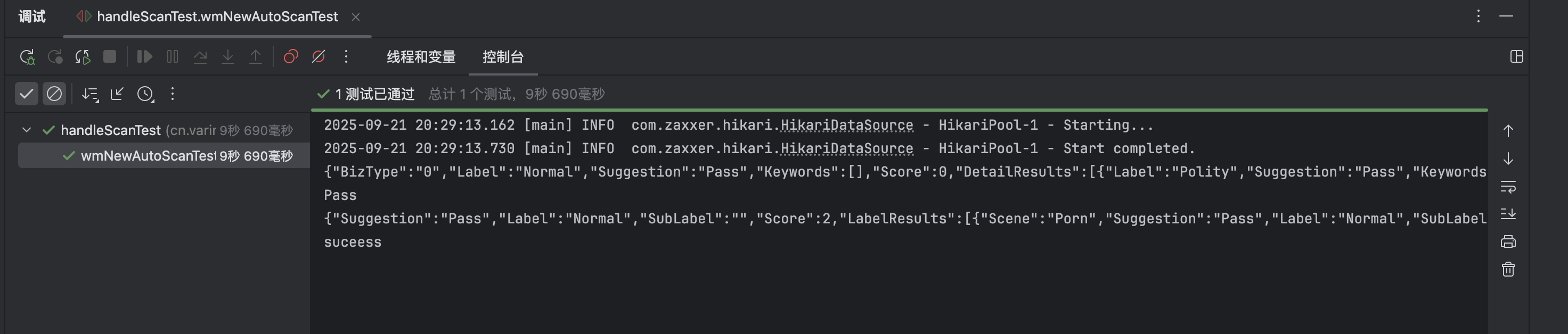
今天也要加油呀⛽️🎆