文章目录
-
- [方法一:使用 RabbitMQ Command Prompt(推荐)](#方法一:使用 RabbitMQ Command Prompt(推荐))
- [方法二:使用普通命令提示符(CMD)或 PowerShell](#方法二:使用普通命令提示符(CMD)或 PowerShell)
- [方法三:将 RabbitMQ 添加到系统环境变量 PATH(一劳永逸)](#方法三:将 RabbitMQ 添加到系统环境变量 PATH(一劳永逸))
- 注意事项
- 可能出现的问题
-
- [什么是 Erlang Cookie?](#什么是 Erlang Cookie?)
- 错误原因分析
- 解决方案
-
- [步骤 1:找到 `.erlang.cookie` 文件](#步骤 1:找到
.erlang.cookie文件) - [步骤 2:找到 RabbitMQ 服务使用的 `.erlang.cookie`](#步骤 2:找到 RabbitMQ 服务使用的
.erlang.cookie) - [步骤 3:确保两个 cookie 文件内容一致](#步骤 3:确保两个 cookie 文件内容一致)
- [步骤 4:统一 cookie 文件](#步骤 4:统一 cookie 文件)
- [步骤 5:重启 RabbitMQ 服务](#步骤 5:重启 RabbitMQ 服务)
- [步骤 6:再次运行命令](#步骤 6:再次运行命令)
- [步骤 1:找到 `.erlang.cookie` 文件](#步骤 1:找到
在 Windows 系统上使用rabbitmq相关命令,有以下几种方式,本文以 rabbitmqctl list_queues 命令为例:
方法一:使用 RabbitMQ Command Prompt(推荐)
这是最简单的方法,适用于通过官方安装程序安装的 RabbitMQ,安装后自带。
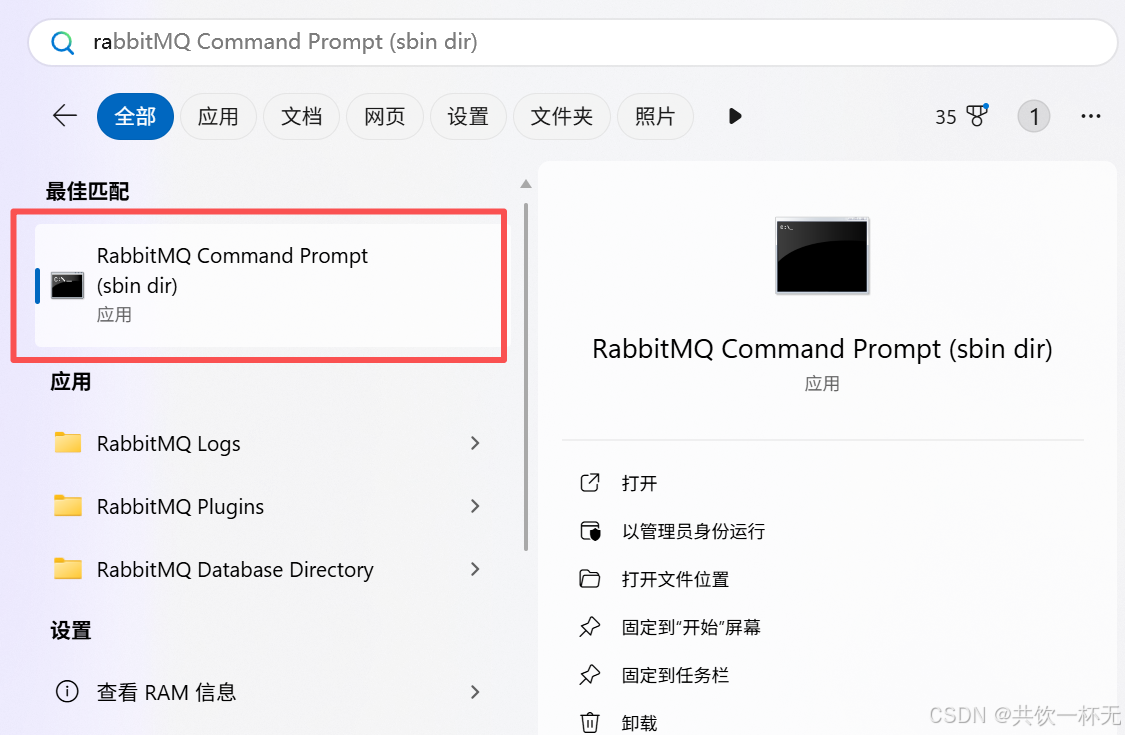
- 打开 RabbitMQ Command Prompt
- 点击 Windows 开始菜单。
- 找到 RabbitMQ Server 文件夹,或者检索可以看到。
- 点击其中的 "RabbitMQ Command Prompt"(或类似名称,如 "RabbitMQ Command Prompt (sbin dir)")。
- 执行命令
bash
rabbitmqctl list_queues name messages_ready messages_unacknowledged- 在打开的命令行窗口中,直接输入:
- 按回车执行。方法二:使用普通命令提示符(CMD)或 PowerShell
如果你不想使用专用的 RabbitMQ 命令提示符,可以手动指定路径。
- 打开 CMD 或 PowerShell
- 按
Win + R,输入cmd或powershell,然后回车。
- 按
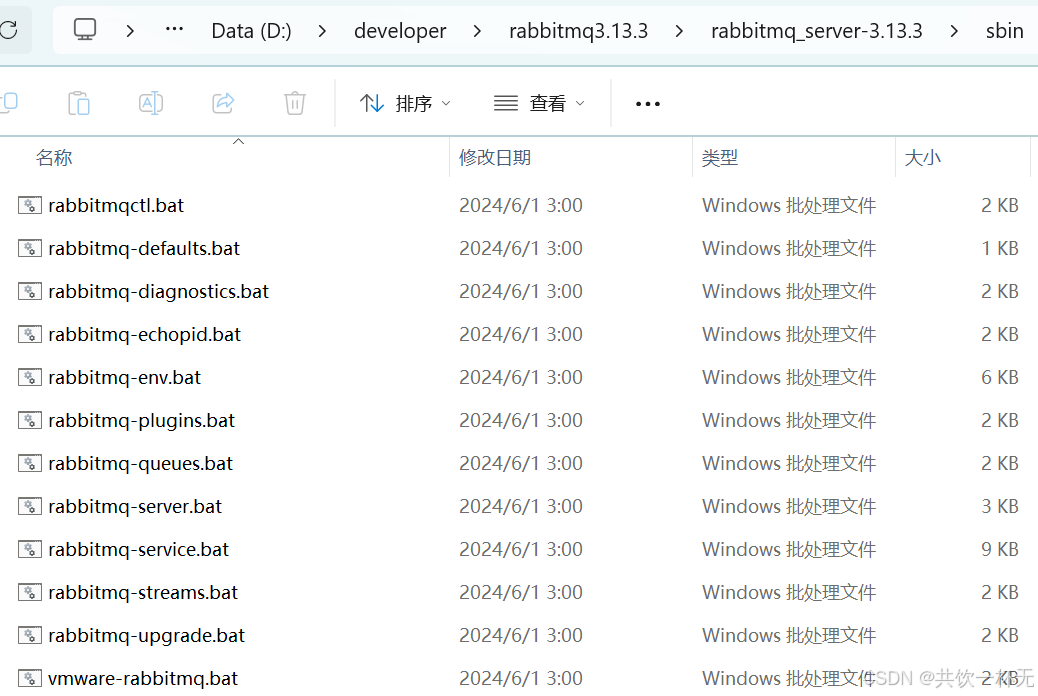
- 导航到 RabbitMQ 安装的 sbin 目录
bash
cd "D:\developer\rabbitmq3.13.3\rabbitmq_server-<版本号>\sbin"注意 :
<版本号>是你实际安装的版本,例如rabbitmq_server-3.13.3。你可以通过文件资源管理器查看具体名称。
- RabbitMQ 默认安装在 `C:\Program Files\RabbitMQ Server\`。
- 进入其 `sbin` 目录:- 执行命令
bash
rabbitmqctl.bat list_queues name messages_ready messages_unacknowledged注意 :在 Windows 上,脚本文件是
.bat后缀,所以是rabbitmqctl.bat,但通常直接输入rabbitmqctl也可以。
方法三:将 RabbitMQ 添加到系统环境变量 PATH(一劳永逸)
这样你就可以在任意位置运行命令。
- 添加环境变量
- 右键点击"此电脑"或"我的电脑" -> "属性"。
- 点击"高级系统设置"。
- 点击"环境变量"。
- 在"系统变量"中找到
Path,点击"编辑"。 - 点击"新建",然后添加 RabbitMQ 的
sbin目录路径,例如:- D:\developer\rabbitmq3.13.3\rabbitmq_server-3.13.3\sbin
- 点击"确定"保存所有设置。
- 重启 CMD/PowerShell
- 关闭并重新打开你的命令行窗口。
- 直接执行命令
bash
rabbitmqctl list_queues name messages_ready messages_unacknowledged- 现在你可以在任何目录下直接运行:注意事项
- 权限 :确保你以具有足够权限的用户身份运行命令提示符(通常是管理员权限,但通常普通用户也可以运行
rabbitmqctl)。 - RabbitMQ 服务 :确保 RabbitMQ 服务正在运行。你可以在"服务"管理器中检查
RabbitMQ服务的状态。 - 网络和节点 :
rabbitmqctl默认连接本地节点。如果你要管理远程节点,需要配置环境变量或使用--node参数。
可能出现的问题
如果执行中报如下错误:
D:\developer\rabbitmq3.13.3\rabbitmq_server-3.13.3\sbin>rabbitmqctl list_queues name messages_ready messages_unacknowledged
Error: unable to perform an operation on node 'rabbit@MrZhan'. Please see diagnostics information and suggestions below.
Most common reasons for this are:
Target node is unreachable (e.g. due to hostname resolution, TCP connection or firewall issues)
CLI tool fails to authenticate with the server (e.g. due to CLI tool's Erlang cookie not matching that of the server)
Target node is not running
In addition to the diagnostics info below:
See the CLI, clustering and networking guides on https://rabbitmq.com/documentation.html to learn more
Consult server logs on node rabbit@MrZhan
If target node is configured to use long node names, don't forget to use --longnames with CLI tools
DIAGNOSTICS
===========
attempted to contact: rabbit@MrZhan
rabbit@MrZhan:
connected to epmd (port 4369) on MrZhan
epmd reports node 'rabbit' uses port 25672 for inter-node and CLI tool traffic
TCP connection succeeded but Erlang distribution failed
suggestion: check if the Erlang cookie is identical for all server nodes and CLI tools
suggestion: check if all server nodes and CLI tools use consistent hostnames when addressing each other
suggestion: check if inter-node connections may be configured to use TLS. If so, all nodes and CLI tools must do that
suggestion: see the CLI, clustering and networking guides on https://rabbitmq.com/documentation.html to learn more
Current node details:
node name: 'rabbitmqcli-159-rabbit@MrZhan'
effective user's home directory: c:/Users/11876
Erlang cookie hash: QTxLXubDQ5UA1/9w86QRsA==
这个错误是 RabbitMQ 中非常典型的 节点连接和认证问题。错误信息明确指出:
TCP connection succeeded but Erlang distribution failed
suggestion: check if the Erlang cookie is identical for all server nodes and CLI tools
这意味着你的 rabbitmqctl 命令行工具虽然能连接到 RabbitMQ 节点的网络端口,但在 Erlang 层面的"节点间通信"失败了,最核心的原因是 Erlang Cookie 不匹配。
什么是 Erlang Cookie?
RabbitMQ 使用 Erlang 的分布式机制,所有节点(包括 CLI 工具)之间通信需要一个共享的"密钥"------即 Erlang Cookie 。这个 cookie 是一个文件(.erlang.cookie),必须在 所有 RabbitMQ 节点和 CLI 工具 上保持完全一致,否则无法通信。
错误原因分析
你的错误日志显示:
- CLI 工具尝试连接节点
rabbit@MrZhan。 - TCP 连接成功(说明端口 25672 没问题)。
- 但 Erlang 分布式通信失败。
- 提示:Erlang cookie 不匹配。
解决方案
步骤 1:找到 .erlang.cookie 文件
这个文件通常位于:
- Windows :
C:\Users\<你的用户名>\.erlang.cookie - 或者:
C:\Windows\.erlang.cookie - 有时在 Erlang 安装目录下。
在你的错误信息中,提到了:
plain
effective user's home directory: c:/Users/11876所以你应该去:
plain
c:\Users\11876\.erlang.cookie查看是否存在这个文件。
步骤 2:找到 RabbitMQ 服务使用的 .erlang.cookie
RabbitMQ 服务运行时也有自己的 cookie 文件。它通常位于:
plain
C:\Windows\System32\config\systemprofile\.erlang.cookie注意:这是 RabbitMQ 服务器运行时使用的 cookie,可能和你用户目录下的不一样。
步骤 3:确保两个 cookie 文件内容一致
- 打开
c:\Users\11876\.erlang.cookie(CLI 工具用的)。 - 打开
<font style="color:rgb(38, 44, 49);">C:\Windows\System32\config\systemprofile\.erlang.cookie</font>\.erlang.cookie(RabbitMQ 服务用的)。 - 比较两个文件的内容是否完全相同(包括大小写、空格等)。
步骤 4:统一 cookie 文件
- 推荐做法:将服务端的 cookie 文件内容复制到用户目录下,覆盖 CLI 工具使用的 cookie。
bash
copy C:\Windows\System32\config\systemprofile\.erlang.cookie\.erlang.cookie c:\Users\11876\.erlang.cookie- 或者反过来,但必须确保一致。
⚠️ 注意:
.erlang.cookie文件的权限在 Windows 上通常不是问题,但在某些系统上需要设置为只读或限制访问。
步骤 5:重启 RabbitMQ 服务
修改 cookie 后,必须重启 RabbitMQ 服务:
- 打开 "服务" 管理器(
services.msc)。 - 找到
RabbitMQ服务。 - 右键选择 重启。
步骤 6:再次运行命令
bash
rabbitmqctl list_queues name messages_ready messages_unacknowledged现在应该可以正常执行了。
本文内容到此结束了,
如有收获欢迎点赞👍收藏💖关注✔️,您的鼓励是我最大的动力。
如有错误❌疑问💬欢迎各位指出。
主页 :共饮一杯无的博客汇总👨💻保持热爱,奔赴下一场山海。🏃🏃🏃