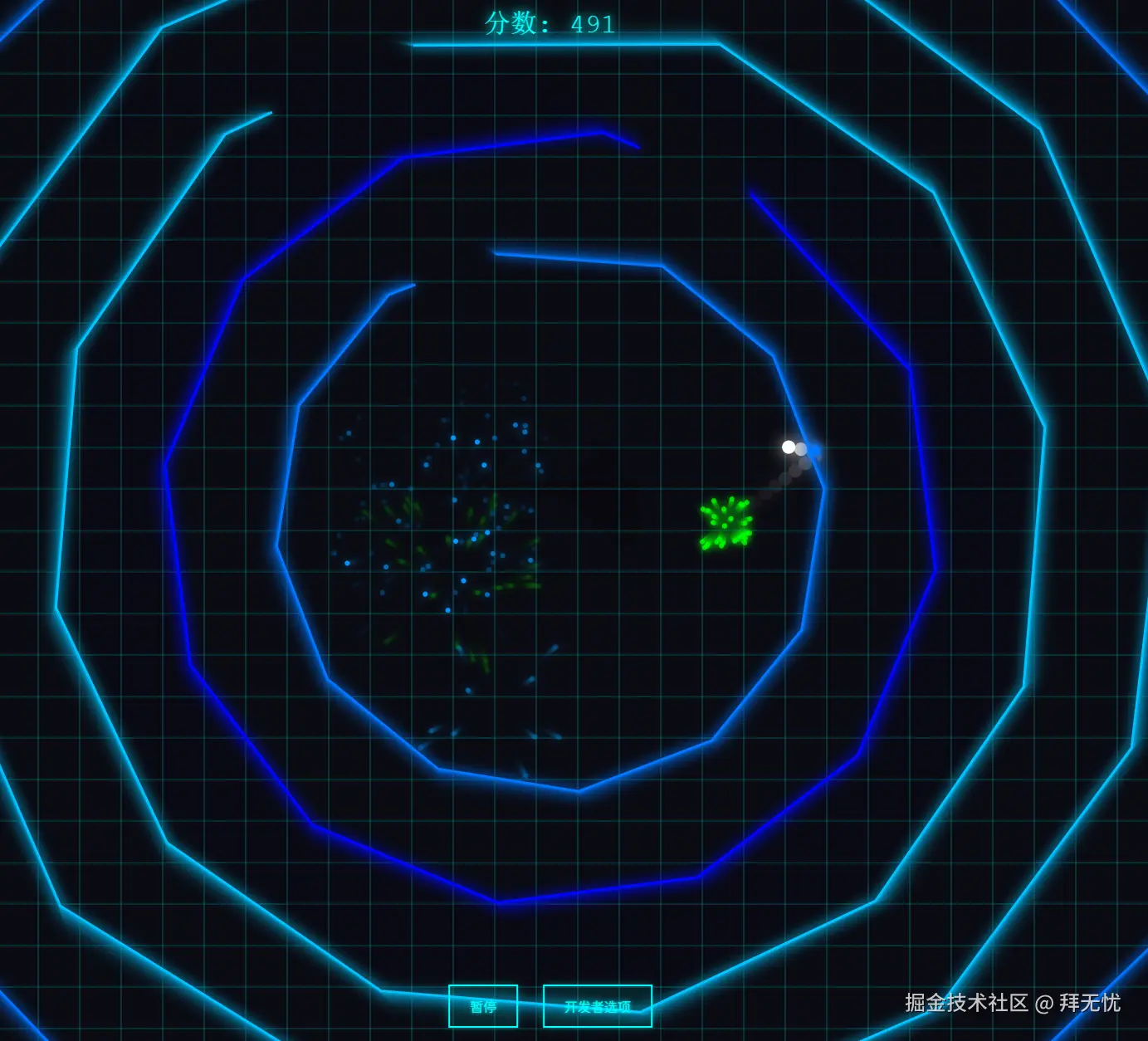
 说白了就是个"密室逃脱",只不过主角是个小球,密室是个不断缩小的多边形笼子。
整个思路可以分成这几块:
1. 搭建舞台和演员
-
舞台(Canvas) :就是那块黑色的画布,游戏里所有东西都在这上面画。
-
演员1:多边形笼子(Polygon) :
- 它是个"类"(Class),相当于一个"笼子"的生产图纸。
- 每个笼子生出来的时候都老大个儿,在屏幕外面,然后自带一个随机开的"门 "(缺口)。这个门的大小,咱们用一个变量
gapFactor来控制,比如0.6就是门占了整条边的60%。 - 它的核心任务就一个:不停地变小,往里收缩。如果缩到最小了小球还没跑出来,那游戏就结束。
-
演员2:小球(Ball) :
- 就是咱的主角,一个简单的对象,记录了它的位置、大小和速度。
- 它就负责一件事:根据自己的速度满世界乱撞。
2. 核心玩法:碰撞和逃脱(最关键的地方)
这是整个游戏最关键的地方,也是之前出 bug 的地方。咱们现在的思路非常直接,也更靠谱:
-
判断"摸没摸到墙" :咱们不再算小球到每条边的距离了,那个太复杂还容易出错。现在咱们就看一件事:小球的中心离笼子中心的距离。当这个距离差不多等于"笼子半径减去小球半径"时,就说明小球马上要撞墙了。
-
判断"是门还是墙?" :一旦"摸到墙"了,咱们立马就算出小球在笼子的哪个方向。就像看钟表一样,它是在3点钟方向还是9点钟方向?然后对比一下,这个方向是不是咱们预先给笼子设定的那个"门"的方向。
- 如果是门:太棒了!成功逃脱!立马给玩家加分,放一堆酷炫的粒子特效庆祝一下,然后这个笼子就光荣退休(从游戏里消失)。
- 如果是墙:那就"duang"一下弹开!
3. 解决 Bug 和优化体验
咱们针对之前的问题做了两个关键优化:
- 解决"异常逃逸" :因为咱们的判断机制改成了"一摸到墙就立刻判断",小球再也没机会在一帧之内直接"穿墙而过"了,这个 bug 就被彻底根治了。
- 解决"粘在墙上" :你提到的那个"贴着边一直跳"的问题,体验确实很差。咱们的解决办法是:在小球撞墙反弹的时候,除了正常的反弹力,再偷偷给它一个**"往外推"的小小力道**。这样能保证它每次反弹都会稍微偏离墙壁一点点,而不是完美地贴着墙走,玩起来就感觉清爽、利索多了。
4. 增加游戏性
最后,为了让它更好玩,咱们加了些"调味料":
- 点击加速:让玩家有点参与感,可以主动控制小球。
- 难度递增:笼子越出越快,缩得也越快,玩起来越来越刺激。
- 视觉效果:背景网格、发光效果、撞击和逃脱时的粒子特效,让游戏看起来更酷。
- UI界面:得分、开始、结束、重来,一个完整的游戏该有的都有了。
总的来说,就是创造一个不断缩小的危机(笼子),给一个唯一的生路(缺口),然后用一套简单可靠的物理规则(距离和角度判断)来模拟小球的逃脱过程,最后再加点特效和控制让它变得好玩。 就是这么个思路!
ini
<!DOCTYPE html>
<html lang="zh-CN">
<head>
  <meta charset="UTF-8">
  <meta name="viewport" content="width=device-width, initial-scale=1.0">
  <title>十二边形逃逸游戏</title>
  <style>
    * {
      margin: 0;
      padding: 0;
      box-sizing: border-box;
    }

    body {
      background: #0a0a0f;
      font-family: 'Courier New', monospace;
      overflow: hidden;
      color: #0ff;
    }

    #gameCanvas {
      display: block;
      background: radial-gradient(circle at center, #1a1a2e 0%, #0a0a0f 100%);
      cursor: pointer;
    }

    #ui {
      position: absolute;
      top: 0;
      left: 0;
      width: 100%;
      height: 100%;
      pointer-events: none;
    }

    #score {
      position: absolute;
      top: 20px;
      left: 50%;
      transform: translateX(-50%);
      font-size: 32px;
      color: #0ff;
      text-shadow: 0 0 10px #0ff, 0 0 20px #0ff;
      pointer-events: none;
    }

    #controls {
      position: absolute;
      bottom: 20px;
      left: 50%;
      transform: translateX(-50%);
      pointer-events: auto;
    }

    .btn {
      background: rgba(0, 255, 255, 0.1);
      border: 2px solid #0ff;
      color: #0ff;
      padding: 12px 24px;
      font-size: 16px;
      cursor: pointer;
      margin: 0 10px;
      text-shadow: 0 0 5px #0ff;
      box-shadow: 0 0 10px rgba(0, 255, 255, 0.3);
      transition: all 0.3s;
    }

    .btn:hover {
      background: rgba(0, 255, 255, 0.2);
      box-shadow: 0 0 20px rgba(0, 255, 255, 0.6);
    }

    #devPanel {
      position: absolute;
      top: 20px;
      right: 20px;
      background: rgba(10, 10, 15, 0.9);
      border: 1px solid #0ff;
      padding: 16px;
      pointer-events: auto;
      display: none;
    }

    #devPanel.show {
      display: block;
    }

    .control-group {
      margin: 8px 0;
      font-size: 12px;
    }

    .control-group label {
      display: block;
      margin-bottom: 4px;
      color: #0ff;
    }

    .control-group input {
      width: 100%;
      background: rgba(0, 255, 255, 0.1);
      border: 1px solid #0ff;
      color: #0ff;
      padding: 4px;
    }

    #gameOver {
      position: absolute;
      top: 50%;
      left: 50%;
      transform: translate(-50%, -50%);
      text-align: center;
      display: none;
      pointer-events: auto;
    }

    #gameOver.show {
      display: block;
    }

    #gameOver h1 {
      font-size: 48px;
      color: #f0f;
      text-shadow: 0 0 20px #f0f;
      margin-bottom: 20px;
    }

    #gameOver p {
      font-size: 24px;
      margin: 10px 0;
    }
  </style>
</head>
<body>
  <canvas id="gameCanvas"></canvas>

  <div id="ui">
    <div id="score">分数: 0</div>

    <div id="controls">
      <button class="btn" id="startBtn">开始游戏</button>
      <button class="btn" id="pauseBtn" style="display:none;">暂停</button>
      <button class="btn" id="devBtn">开发者选项</button>
    </div>

    <div id="devPanel">
      <div class="control-group">
        <label>多边形生成间隔 (ms): <span id="spawnIntervalVal">2000</span></label>
        <input type="range" id="spawnInterval" min="500" max="5000" value="2000" step="100">
      </div>
      <div class="control-group">
        <label>多边形缩小速度: <span id="shrinkSpeedVal">0.5</span></label>
        <input type="range" id="shrinkSpeed" min="0.1" max="2" value="0.5" step="0.1">
      </div>
      <div class="control-group">
        <label>小球初始速度: <span id="ballSpeedVal">3</span></label>
        <input type="range" id="ballSpeed" min="1" max="10" value="3" step="0.5">
      </div>
      <div class="control-group">
        <label>点击加速倍率: <span id="clickBoostVal">1.2</span></label>
        <input type="range" id="clickBoost" min="1" max="3" value="1.2" step="0.1">
      </div>
      <div class="control-group">
        <label>
          <input type="checkbox" id="increaseDifficulty" checked>
          难度递增
        </label>
      </div>
    </div>

    <div id="gameOver">
      <h1>游戏结束</h1>
      <p>最终分数: <span id="finalScore">0</span></p>
      <p>逃逸成功: <span id="escapedCount">0</span> 个</p>
      <button class="btn" id="restartBtn">重新开始</button>
    </div>
  </div>

  <script>
    // 获取画布和2D渲染上下文
    const canvas = document.getElementById('gameCanvas');
    const ctx = canvas.getContext('2d');

    // 设置画布大小为全屏
    canvas.width = window.innerWidth;
    canvas.height = window.innerHeight;

    // 游戏配置对象
    const config = {
      spawnInterval: 2000, // 多边形生成间隔 (ms)
      shrinkSpeed: 0.5,    // 多边形基础缩小速度
      ballSpeed: 3,        // 小球初始速度
      clickBoost: 1.2,     // 每次点击的速度增益倍率
      increaseDifficulty: true // 是否开启难度递增
    };

    // 游戏状态对象
    let gameState = {
      running: false,         // 游戏是否正在运行
      score: 0,               // 当前分数
      escapedCount: 0,        // 成功逃逸的多边形数量
      startTime: 0,           // 游戏开始时间戳
      lastSpawnTime: 0,       // 上一个多边形生成的时间戳
      polygons: [],           // 存储所有多边形对象的数组
      particles: []           // 存储所有粒子对象的数组
    };

    // 小球对象
    const ball = {
      x: canvas.width / 2,
      y: canvas.height / 2,
      radius: 8,
      vx: config.ballSpeed, // x轴速度
      vy: config.ballSpeed, // y轴速度
      maxSpeed: 15          // 最大速度限制
    };

    // 多边形类定义
    class Polygon {
      constructor() {
        this.sides = 12; // 边数
        this.x = canvas.width / 2; // 中心点x坐标
        this.y = canvas.height / 2; // 中心点y坐标
        this.radius = Math.max(canvas.width, canvas.height) * 0.7; // 初始半径
        this.rotation = Math.random() * Math.PI * 2; // 初始旋转角度
        this.gapIndex = Math.floor(Math.random() * this.sides); // 随机生成一个缺口边的索引

        this.gapFactor = 0.6;

        this.shrinkSpeed = config.shrinkSpeed; // 当前缩小速度
        this.color = `hsl(${Math.random() * 60 + 180}, 100%, 50%)`; // 随机颜色
        this.escaped = false; // 标记小球是否已从此多边形逃逸
        this.destroyed = false; // 标记多边形是否已被销毁
      }

      // 每帧更新多边形状态
      update() {
        this.radius -= this.shrinkSpeed; // 半径不断缩小
        this.rotation += 0.005; // 缓慢旋转

        // 当多边形缩小到非常小时,标记为销毁
        if (this.radius < 10) {
          this.destroyed = true;
          return true; // 返回true表示需要被移除
        }
        return false;
      }

      // 绘制多边形
      draw() {
        ctx.save(); // 保存当前绘图状态
        ctx.translate(this.x, this.y); // 将坐标原点移到多边形中心
        ctx.rotate(this.rotation); // 旋转画布

        const angleStep = (Math.PI * 2) / this.sides; // 计算每个顶点之间的角度

        ctx.strokeStyle = this.color;
        ctx.lineWidth = 3;
        ctx.shadowColor = this.color;
        ctx.shadowBlur = 15;

        ctx.beginPath(); // 开始绘制路径

        for (let i = 0; i < this.sides; i++) {
            // 计算当前边的起点和终点坐标
            const angle1 = angleStep * i;
            const x1 = Math.cos(angle1) * this.radius;
            const y1 = Math.sin(angle1) * this.radius;

            if (i === 0) {
                ctx.moveTo(x1, y1); // 移动到第一个顶点
            }

            const angle2 = angleStep * (i + 1);
            const x2 = Math.cos(angle2) * this.radius;
            const y2 = Math.sin(angle2) * this.radius;

            // 判断当前边是否是带缺口的边
            if (i === this.gapIndex) {
                // 计算缺口两端的点
                const gap_p1_x = x1 + (x2 - x1) * (1 - this.gapFactor) / 2;
                const gap_p1_y = y1 + (y2 - y1) * (1 - this.gapFactor) / 2;
                ctx.lineTo(gap_p1_x, gap_p1_y); // 绘制到缺口起点

                // 计算缺口结束的点,并移动画笔到该点,从而创建出缺口
                const gap_p2_x = x1 + (x2 - x1) * (1 + this.gapFactor) / 2;
                const gap_p2_y = y1 + (y2 - y1) * (1 + this.gapFactor) / 2;
                ctx.moveTo(gap_p2_x, gap_p2_y);
            } else {
                ctx.lineTo(x2, y2); // 绘制完整的边
            }
        }
        // 如果缺口不是最后一条边,需要将路径闭合
        if (this.gapIndex !== this.sides -1) {
             const startAngle = 0;
             const startX = Math.cos(startAngle) * this.radius;
             const startY = Math.sin(startAngle) * this.radius;
             ctx.lineTo(startX, startY);
        }

        ctx.stroke(); // 描边
        ctx.restore(); // 恢复之前保存的绘图状态
      }
    }

    // 粒子类定义(用于特效)
    class Particle {
      constructor(x, y, color) {
        this.x = x;
        this.y = y;
        this.vx = (Math.random() - 0.5) * 5; // 随机x轴速度
        this.vy = (Math.random() - 0.5) * 5; // 随机y轴速度
        this.life = 1; // 生命周期,从1到0
        this.color = color;
      }

      update() {
        this.x += this.vx;
        this.y += this.vy;
        this.life -= 0.02; // 生命周期递减
      }

      draw() {
        ctx.save();
        ctx.globalAlpha = this.life; // 透明度随生命周期变化
        ctx.fillStyle = this.color;
        ctx.shadowColor = this.color;
        ctx.shadowBlur = 10;
        ctx.beginPath();
        ctx.arc(this.x, this.y, 3, 0, Math.PI * 2);
        ctx.fill();
        ctx.restore();
      }
    }

    // 创建粒子特效的函数
    function createParticles(x, y, color, count = 20) {
      for (let i = 0; i < count; i++) {
        gameState.particles.push(new Particle(x, y, color));
      }
    }

    // 碰撞检测与处理函数 (核心逻辑)
    function checkCollision() {
      // 从后往前遍历所有多边形,方便在遍历过程中删除元素
      for (let i = gameState.polygons.length - 1; i >= 0; i--) {
        const poly = gameState.polygons[i];
        if (poly.escaped) continue; // 如果已经逃逸,则跳过

        // 1. 计算小球与多边形中心的距离
        const dx = ball.x - poly.x;
        const dy = ball.y - poly.y;
        const distFromCenter = Math.sqrt(dx * dx + dy * dy);

        // 2. 检查小球是否接触或穿过多边形边界
        if (distFromCenter >= poly.radius - ball.radius) {
          const angleStep = (Math.PI * 2) / poly.sides;

          // 3. 计算小球相对于多边形中心的角度,并考虑多边形的旋转
          const ballAngle = Math.atan2(dy, dx);
          let relativeAngle = ballAngle - poly.rotation;
          while (relativeAngle < 0) relativeAngle += Math.PI * 2; // 将角度标准化到 0-2π
          relativeAngle %= (Math.PI * 2);

          // 4. 根据角度判断小球在多边形的哪条边上
          const ballSideIndex = Math.floor(relativeAngle / angleStep);

          // 5. 判断小球是否在缺口位置
          if (ballSideIndex === poly.gapIndex) {
            // 在缺口位置,还需判断小球是否正在向外移动,才算成功逃逸
            const isMovingOutwards = (ball.vx * dx + ball.vy * dy) > 0;
            if (distFromCenter > poly.radius && isMovingOutwards) {
              poly.escaped = true;
              gameState.escapedCount++;
              gameState.score += Math.floor(poly.radius / 10);
              createParticles(ball.x, ball.y, '#0f0', 30); // 成功逃逸的绿色粒子特效
              gameState.polygons.splice(i, 1); // 移除已逃逸的多边形
            }
          } else {
            // 不在缺口位置,发生碰撞

            // ★★★ START: 碰撞逻辑修改 ★★★

            // a. 定义一个径向推力,防止小球粘在墙上。值越大,向外的推力越强。
            const radialPush = 0.5;

            // b. 计算碰撞点的法线向量 (从中心指向小球的单位向量)
            const normalX = dx / distFromCenter;
            const normalY = dy / distFromCenter;
            const dot = ball.vx * normalX + ball.vy * normalY; // 速度在法线上的投影

            // c. 计算纯粹的物理反射速度
            let reflectVx = ball.vx - 2 * dot * normalX;
            let reflectVy = ball.vy - 2 * dot * normalY;

            // d. 在反射速度的基础上,增加一个远离中心的径向推力
            reflectVx += normalX * radialPush;
            reflectVy += normalY * radialPush;

            // e. 碰撞后稍微加速
            const currentSpeed = Math.sqrt(reflectVx * reflectVx + reflectVy * reflectVy);
            const newSpeed = Math.min(Math.sqrt(ball.vx*ball.vx + ball.vy*ball.vy) * 1.05, ball.maxSpeed);

            // f. 标准化新的速度向量并应用最终速度
            if (currentSpeed > 0) {
              ball.vx = (reflectVx / currentSpeed) * newSpeed;
              ball.vy = (reflectVy / currentSpeed) * newSpeed;
            }

            // g. 将小球推回墙外,防止"嵌入"墙体
            const overlap = (poly.radius - ball.radius) - distFromCenter;
            ball.x += normalX * overlap;
            ball.y += normalY * overlap;

            // ★★★ END: 碰撞逻辑修改 ★★★

            createParticles(ball.x, ball.y, poly.color, 10); // 碰撞粒子特效
          }
        }
      }
    }

    // 更新小球位置
    function updateBall() {
      ball.x += ball.vx;
      ball.y += ball.vy;

      // 与屏幕边界的碰撞检测
      if (ball.x - ball.radius < 0 || ball.x + ball.radius > canvas.width) {
        ball.vx *= -1;
        ball.x = Math.max(ball.radius, Math.min(canvas.width - ball.radius, ball.x));
      }
      if (ball.y - ball.radius < 0 || ball.y + ball.radius > canvas.height) {
        ball.vy *= -1;
        ball.y = Math.max(ball.radius, Math.min(canvas.height - ball.radius, ball.y));
      }
    }

    // 绘制小球
    function drawBall() {
      ctx.save();
      ctx.fillStyle = '#fff';
      ctx.shadowColor = '#fff';
      ctx.shadowBlur = 20;
      ctx.beginPath();
      ctx.arc(ball.x, ball.y, ball.radius, 0, Math.PI * 2);
      ctx.fill();
      ctx.restore();
    }

    // 绘制背景网格
    function drawBackground() {
      ctx.fillStyle = 'rgba(10, 10, 15, 0.3)';
      ctx.fillRect(0, 0, canvas.width, canvas.height);

      ctx.strokeStyle = 'rgba(0, 255, 255, 0.1)';
      ctx.lineWidth = 1;
      const gridSize = 50;

      for (let x = 0; x < canvas.width; x += gridSize) {
        ctx.beginPath();
        ctx.moveTo(x, 0);
        ctx.lineTo(x, canvas.height);
        ctx.stroke();
      }

      for (let y = 0; y < canvas.height; y += gridSize) {
        ctx.beginPath();
        ctx.moveTo(0, y);
        ctx.lineTo(canvas.width, y);
        ctx.stroke();
      }
    }

    // 游戏主循环
    function gameLoop(timestamp) {
      if (!gameState.running) return; // 如果游戏暂停,则退出循环

      drawBackground(); // 绘制背景

      // 如果开启了难度递增
      if (config.increaseDifficulty) {
        const elapsed = (timestamp - gameState.startTime) / 1000; // 游戏已进行时间(秒)
        const difficultyMultiplier = 1 + elapsed * 0.05; // 难度系数

        // 增加现有每个多边形的缩小速度
        gameState.polygons.forEach(poly => {
          poly.shrinkSpeed = config.shrinkSpeed * difficultyMultiplier;
        });
      }

      // 根据难度动态调整多边形生成间隔
      const currentInterval = config.increaseDifficulty
        ? Math.max(500, config.spawnInterval - (timestamp - gameState.startTime) / 50)
        : config.spawnInterval;

      // 时间到了就生成一个新的多边形
      if (timestamp - gameState.lastSpawnTime > currentInterval) {
        gameState.polygons.push(new Polygon());
        gameState.lastSpawnTime = timestamp;
      }

      // 更新和绘制所有多边形
      for (let i = gameState.polygons.length - 1; i >= 0; i--) {
        const poly = gameState.polygons[i];
        const shouldEndGame = poly.update();

        // 如果多边形缩小到消失,并且小球没有逃出,游戏结束
        if (shouldEndGame && !poly.escaped) {
          endGame();
          return;
        }

        if (poly.destroyed) {
          gameState.polygons.splice(i, 1);
        } else {
          poly.draw();
        }
      }

      // 更新和绘制所有粒子
      for (let i = gameState.particles.length - 1; i >= 0; i--) {
        const particle = gameState.particles[i];
        particle.update();
        particle.draw();

        if (particle.life <= 0) {
          gameState.particles.splice(i, 1);
        }
      }

      // 更新、检测、绘制小球
      updateBall();
      checkCollision();
      drawBall();

      // 更新UI分数
      document.getElementById('score').textContent = `分数: ${gameState.score}`;

      // 请求下一帧动画
      requestAnimationFrame(gameLoop);
    }

    // 开始游戏函数
    function startGame() {
      // 初始化/重置游戏状态
      gameState = {
        running: true,
        score: 0,
        escapedCount: 0,
        startTime: performance.now(),
        lastSpawnTime: 0,
        polygons: [new Polygon()], // 游戏开始时就有一个多边形
        particles: []
      };

      // 重置小球位置和速度(初始方向随机)
      ball.x = canvas.width / 2;
      ball.y = canvas.height / 2;
      ball.vx = config.ballSpeed * (Math.random() > 0.5 ? 1 : -1);
      ball.vy = config.ballSpeed * (Math.random() > 0.5 ? 1 : -1);

      // 更新UI
      document.getElementById('startBtn').style.display = 'none';
      document.getElementById('pauseBtn').style.display = 'inline-block';
      document.getElementById('gameOver').classList.remove('show');

      // 启动游戏循环
      requestAnimationFrame(gameLoop);
    }

    // 暂停/继续游戏函数
    function pauseGame() {
      gameState.running = !gameState.running;
      document.getElementById('pauseBtn').textContent = gameState.running ? '暂停' : '继续';

      if (gameState.running) {
        // 恢复游戏时,要校准开始时间,以抵消暂停期间的时间
        gameState.startTime += performance.now() - gameState.pauseTime;
        requestAnimationFrame(gameLoop);
      } else {
        gameState.pauseTime = performance.now(); // 记录暂停的时刻
      }
    }

    // 游戏结束函数
    function endGame() {
      gameState.running = false;
      // 显示结束画面和最终分数
      document.getElementById('finalScore').textContent = gameState.score;
      document.getElementById('escapedCount').textContent = gameState.escapedCount;
      document.getElementById('gameOver').classList.add('show');
      // 更新UI按钮
      document.getElementById('pauseBtn').style.display = 'none';
      document.getElementById('startBtn').style.display = 'inline-block';
    }

    // 事件监听:点击画布给小球加速
    canvas.addEventListener('click', () => {
      if (!gameState.running) return;

      const speed = Math.sqrt(ball.vx * ball.vx + ball.vy * ball.vy);
      if (speed === 0) return; // 避免除以零
      const newSpeed = Math.min(speed * config.clickBoost, ball.maxSpeed);
      ball.vx = (ball.vx / speed) * newSpeed;
      ball.vy = (ball.vy / speed) * newSpeed;

      createParticles(ball.x, ball.y, '#ff0', 5); // 加速特效
    });

    // 事件监听:UI按钮
    document.getElementById('startBtn').addEventListener('click', startGame);
    document.getElementById('pauseBtn').addEventListener('click', pauseGame);
    document.getElementById('restartBtn').addEventListener('click', startGame);

    document.getElementById('devBtn').addEventListener('click', () => {
      document.getElementById('devPanel').classList.toggle('show');
    });

    // 事件监听:开发者面板控件
    document.getElementById('spawnInterval').addEventListener('input', (e) => {
      config.spawnInterval = parseInt(e.target.value);
      document.getElementById('spawnIntervalVal').textContent = e.target.value;
    });

    document.getElementById('shrinkSpeed').addEventListener('input', (e) => {
      config.shrinkSpeed = parseFloat(e.target.value);
      document.getElementById('shrinkSpeedVal').textContent = e.target.value;
    });

    document.getElementById('ballSpeed').addEventListener('input', (e) => {
      config.ballSpeed = parseFloat(e.target.value);
      document.getElementById('ballSpeedVal').textContent = e.target.value;
    });

    document.getElementById('clickBoost').addEventListener('input', (e) => {
      config.clickBoost = parseFloat(e.target.value);
      document.getElementById('clickBoostVal').textContent = e.target.value;
    });

    document.getElementById('increaseDifficulty').addEventListener('change', (e) => {
      config.increaseDifficulty = e.target.checked;
    });

    // 事件监听:浏览器窗口大小改变时,重设画布大小
    window.addEventListener('resize', () => {
      canvas.width = window.innerWidth;
      canvas.height = window.innerHeight;
    });

    // 初始绘制(游戏开始前)
    drawBackground();
    drawBall();
  </script>
</body>
</html>