拓扑图如下所示
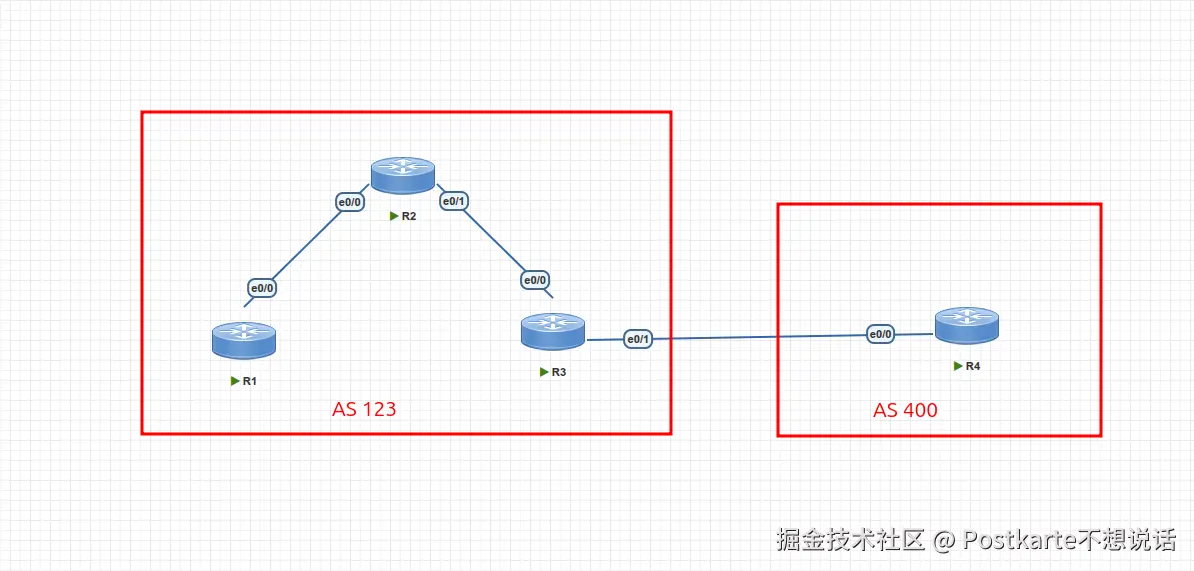
路由器的基本配置
R1
sh
R1#configure terminal
R1(config)#interface e0/0
R1(config-if)#ip add 10.1.12.1 255.255.255.0
R1(config-if)#no shutdown

R1(config-if)#interface lo0
R1(config-if)#ip address 1.1.1.1 255.255.255.0
R1(config-if)#no shutdown
R2
sh
R2(config)#interface e0/0
R2(config-if)#ip address 10.1.12.2 255.255.255.0
R2(config-if)#no shutdown

R2(config-if)#interface e0/1
R2(config-if)#ip address 10.1.23.2 255.255.255.0
R2(config-if)#no shutdown

R2(config-if)#interface lo0
R2(config-if)#ip address 2.2.2.2 255.255.255.0
R2(config-if)#no shutdown
R3
sh
R3(config)#interface e0/0
R3(config-if)#ip address 10.1.23.3 255.255.255.0
R3(config-if)#no shutdown

R3(config-if)#interface e0/1
R3(config-if)#ip address 10.1.34.3 255.255.255.0
R3(config-if)#no shutdown

R3(config-if)#interface lo0
R3(config-if)#ip address 3.3.3.3 255.255.255.0
R3(config-if)#no shutdown
R4
sh
Router(config)#interface e0/0
Router(config-if)#ip address 10.1.34.4 255.255.255.0
Router(config-if)#no shutdown

Router(config-if)#interface lo0
Router(config-if)#ip address 4.4.4.4 255.255.255.0
Router(config-if)#no shutdown
配置BGP
配置BGP邻居,我们使用直连建立BGP邻居关系,但是这种方式有缺点,当接口挂了以后BGP邻居就挂了。 比较好的方式是跑一个IGP路由协议,然后使用loopback接口进行邻居的建立。
R1
sh
R1(config)#router bgp 123

R1(config-router)#neighbor 10.1.12.2 remote-as 123
R2
sh
R2(config)#router bgp 123
R2(config-router)#neighbor 10.1.12.1 remote-as 123
R2(config-router)#neighbor 10.1.23.3 remote-as 123
R3
sh
R3(config)#router bgp 123
R3(config-router)#neighbor 10.1.23.2 remote-as 123
R3(config-router)#neighbor 10.1.34.4 remote-as 400
R4
sh
R4(config)#router bgp 400
R4(config-router)#neighbor 10.1.34.3 remote-as 123
配置完BGP后,我们可以查看下邻居关系是否正常建立
R2建立的邻居关系
sh
R2#show ip bgp summary
BGP router identifier 2.2.2.2, local AS number 123
BGP table version is 1, main routing table version 1

Neighbor        V           AS MsgRcvd MsgSent   TblVer  InQ OutQ Up/Down  State/PfxRcd
10.1.12.1       4          123      13      13        1    0    0 00:08:55        0
10.1.23.3       4          123       8       6        1    0    0 00:04:22        0
R3建立的邻居关系
sh
R3#show ip bgp summary
BGP router identifier 3.3.3.3, local AS number 123
BGP table version is 1, main routing table version 1

Neighbor        V           AS MsgRcvd MsgSent   TblVer  InQ OutQ Up/Down  State/PfxRcd
10.1.23.2       4          123       7       9        1    0    0 00:04:46        0
10.1.34.4       4          400       5       5        1    0    0 00:01:31        0
往BGP进行注入路由条目
在R4中配置
我们把4.4.4.0宣告进BGP
sh
R4(config)#router bgp 400
R4(config-router)#network 4.4.4.0 mask 255.255.255.0
查看下R4的BGP路由表
sh
R4#show ip bgp
BGP table version is 2, local router ID is 4.4.4.4
Status codes: s suppressed, d damped, h history, * valid, > best, i - internal,
              r RIB-failure, S Stale, m multipath, b backup-path, f RT-Filter,
              x best-external, a additional-path, c RIB-compressed,
              t secondary path,
Origin codes: i - IGP, e - EGP, ? - incomplete
RPKI validation codes: V valid, I invalid, N Not found

     Network          Next Hop            Metric LocPrf Weight Path
 *>   4.4.4.0/24       0.0.0.0                  0         32768 i
查看下R3的BGP路由表,可以看到学习到了R4通告的路由
sh
R3#show ip bgp
BGP table version is 2, local router ID is 3.3.3.3
Status codes: s suppressed, d damped, h history, * valid, > best, i - internal,
              r RIB-failure, S Stale, m multipath, b backup-path, f RT-Filter,
              x best-external, a additional-path, c RIB-compressed,
              t secondary path,
Origin codes: i - IGP, e - EGP, ? - incomplete
RPKI validation codes: V valid, I invalid, N Not found

     Network          Next Hop            Metric LocPrf Weight Path
 *>   4.4.4.0/24       10.1.34.4                0             0 400 i
因为该BGP路由最优会被装载进R3的路由表中
sh
R3#show ip route
Codes: L - local, C - connected, S - static, R - RIP, M - mobile, B - BGP
       D - EIGRP, EX - EIGRP external, O - OSPF, IA - OSPF inter area
       N1 - OSPF NSSA external type 1, N2 - OSPF NSSA external type 2
       E1 - OSPF external type 1, E2 - OSPF external type 2
       i - IS-IS, su - IS-IS summary, L1 - IS-IS level-1, L2 - IS-IS level-2
       ia - IS-IS inter area, * - candidate default, U - per-user static route
       o - ODR, P - periodic downloaded static route, H - NHRP, l - LISP
       a - application route
       + - replicated route, % - next hop override, p - overrides from PfR

Gateway of last resort is not set

      3.0.0.0/8 is variably subnetted, 2 subnets, 2 masks
C        3.3.3.0/24 is directly connected, Loopback0
L        3.3.3.3/32 is directly connected, Loopback0
      4.0.0.0/24 is subnetted, 1 subnets
B        4.4.4.0 [20/0] via 10.1.34.4, 00:06:26
      10.0.0.0/8 is variably subnetted, 4 subnets, 2 masks
C        10.1.23.0/24 is directly connected, Ethernet0/0
L        10.1.23.3/32 is directly connected, Ethernet0/0
C        10.1.34.0/24 is directly connected, Ethernet0/1
L        10.1.34.3/32 is directly connected, Ethernet0/1
在R3上ping一下4.4.4.4,可以ping通
sh
R3#ping 4.4.4.4
Type escape sequence to abort.
Sending 5, 100-byte ICMP Echos to 4.4.4.4, timeout is 2 seconds:
!!!!!
Success rate is 100 percent (5/5), round-trip min/avg/max = 1/1/1 ms
在R2上查看下bgp路由表,R3直接把下一跳的10.1.34.4路由发给了R2,但是R2到10.1.34.4不可达,R2此时ping不通4.4.4.4,同时R2也不会把这条路由传给它的bgp邻居。
sh
R2#show ip bgp
BGP table version is 1, local router ID is 2.2.2.2
Status codes: s suppressed, d damped, h history, * valid, > best, i - internal,
              r RIB-failure, S Stale, m multipath, b backup-path, f RT-Filter,
              x best-external, a additional-path, c RIB-compressed,
              t secondary path,
Origin codes: i - IGP, e - EGP, ? - incomplete
RPKI validation codes: V valid, I invalid, N Not found

     Network          Next Hop            Metric LocPrf Weight Path
 * i  4.4.4.0/24       10.1.34.4                0    100      0 400 i
在R4上配置一条默认路由
sh
R4(config)#ip route 0.0.0.0 0.0.0.0 10.1.34.3在R3上把传给R2的BGP路由的下一跳指定为自己
sh
R3(config)#router  bgp 123
R3(config-router)#neighbor 10.1.23.2 next-hop-self
查看R2的BGP路由
sh
R2#show ip bgp
BGP table version is 4, local router ID is 2.2.2.2
Status codes: s suppressed, d damped, h history, * valid, > best, i - internal,
              r RIB-failure, S Stale, m multipath, b backup-path, f RT-Filter,
              x best-external, a additional-path, c RIB-compressed,
              t secondary path,
Origin codes: i - IGP, e - EGP, ? - incomplete
RPKI validation codes: V valid, I invalid, N Not found

     Network          Next Hop            Metric LocPrf Weight Path
 *>i  4.4.4.0/24       10.1.23.3                0    100      0 400 i
R2可以ping通4.4.4.4了
sh
R2#ping 4.4.4.4
Type escape sequence to abort.
Sending 5, 100-byte ICMP Echos to 4.4.4.4, timeout is 2 seconds:
!!!!!
Success rate is 100 percent (5/5), round-trip min/avg/max = 1/1/2 ms
R1的BGP路由表因为水平分割原因导致是空的,可以把R1和R3之间建立一个IBGP的邻居关系。