1.组件定义
TypeScript
import useMultipleChunkUploadHook from "@/hooks/upload/useMultipleChunkUploadHook";

interface ChunkUploadProps {
    chunkSize?: number;
    enableDrag?: boolean;
}

const MultipleChunkUpload: React.FC<ChunkUploadProps> = ({
    chunkSize = 5,
    enableDrag = false,
}) => {
    chunkSize = chunkSize * 1024 * 1024;

    const {
        files,
        fileInputRef,
        dropContainerRef,
        dragActive,
        handFileChange,
        initChunkUpload,
        uploadAll,
        cancelUpload,
        resetUpload,
        handleDrag,
        handleDrop,
        handleDropZoneClick,
    } = useMultipleChunkUploadHook(chunkSize, enableDrag);

    return (
        <div className="flex flex-col w-full max-w-6xl mx-auto p-4 rounded-xl shadow-xl">
            {enableDrag && (
                <div
                    ref={dropContainerRef}
                    onClick={handleDropZoneClick}
                    onDragEnter={handleDrag}
                    onDragOver={handleDrag}
                    onDragLeave={handleDrag}
                    onDrop={handleDrop}
                    className={`mb-4 p-6 border-2 border-dashed rounded-md text-center transition-all ${
                        dragActive
                            ? "bg-blue-50 border-blue-500"
                            : "bg-gray-50 border-gray-300 hover:border-blue-600"
                    }`}
                >
                    <h3 className="text-lg font-semibold text-gray-700">
                        {dragActive ? "释放文件以上传" : "拖拽文件到此处"}
                    </h3>
                    <p className="text-gray-500 text-sm mt-2">
                        或点击此处选择多个文件
                    </p>
                </div>
            )}

            <input
                type="file"
                multiple
                ref={fileInputRef}
                className="mb-4 w-full hidden"
                onChange={handFileChange}
            />

            <div className="flex items-center gap-3 mb-3">
                <button
                    onClick={() => fileInputRef.current?.click()}
                    className="px-4 py-2 border-none text-white rounded-md font-medium bg-blue-400 hover:bg-blue-600 transition-colors duration-300"
                >
                    选择文件
                </button>

                <button
                    onClick={() => uploadAll()}
                    disabled={files.length === 0 || files.every(item => item.finished) }
                    className={`px-4 py-2 border-none font-medium rounded-md text-white ${
                        files.length === 0 || files.every(item => item.finished)
                            ? "bg-gray-300 cursor-not-allowed"
                            : "bg-green-400 hover:bg-green-600"
                    }`}
                >
                    上传所有
                </button>

                <button
                    onClick={resetUpload}
                    disabled={files.length === 0}
                    className={`px-4 py-2 border-none font-medium rounded-md text-white ${
                        files.length === 0
                            ? "bg-gray-300 cursor-not-allowed"
                            : "bg-gray-500 hover:bg-gray-600"
                    }`}
                >
                    重置所有
                </button>
            </div>

            <div className="overflow-x-auto">
                <table className="w-full text-sm text-left border rounded-lg">
                    <thead className="bg-gray-100 text-gray-600">
                        <tr>
                            <th className="py-2 px-3">名称</th>
                            <th className="py-2 px-3">大小</th>
                            <th className="py-2 px-3 w-56">进度</th>
                            <th className="py-2 px-3">状态</th>
                            <th className="py-2 px-3">操作</th>
                        </tr>
                    </thead>

                    <tbody>
                        {files.length === 0 && (
                            <tr>
                                <td
                                    colSpan={4}
                                    className="py-6 text-center text-gray-400"
                                >
                                    <h3>未选择文件</h3>
                                </td>
                            </tr>
                        )}

                        {files.map((item, index) => (
                            <tr
                                key={index}
                                className="odd:bg-white even:bg-gray-50 hover:bg-blue-50 transition-colors"
                            >
                                <td className="py-3 px-3 truncate max-w-[2/5]">
                                    <div className="text-sm">
                                        {item.file.name}
                                    </div>
                                </td>

                                <td>
                                    <div>
                                        {item.file.size >= 1024 * 1024
                                            ? `${(item.file.size /1024 /1024).toFixed(2)} MB`
                                            : `${(item.file.size / 1024).toFixed(2)} KB`
                                        }
                                    </div>
                                </td>

                                <td className="py-2 px-2 align-middle">
                                    <div className="flex items-center gap-2">
                                        <div className="relative flex-1 bg-gray-200 rounded-full h-4 overflow-hidden">
                                            <div
                                                className="absolute left-0 top-0 h-4 bg-blue-400 transition-all duration-300"
                                                style={{
                                                    width: `${item.progress}%`,
                                                }}
                                            />
                                        </div>
                                        <span className="text-xs text-gray-700 w-10 text-left">
                                            {item.progress}%
                                        </span>
                                    </div>
                                </td>

                                <td className="py-3 px-3 align-middle">
                                    <div className="text-sm">
                                        {item.statusMessage}
                                    </div>
                                </td>

                                <td className="py-2 px-2 align-middle">
                                    <div className="flex gap-2">
                                        {/* 单文件上传(保留) */}
                                        <button
                                            onClick={() =>
                                                initChunkUpload(index)
                                            }
                                            disabled={
                                                item.isUploading ||
                                                item.finished
                                            }
                                            className={`flex-1 py-1 px-1 text-xs border-none rounded-md text-white ${
                                                item.isUploading ||
                                                item.finished
                                                    ? "bg-gray-300 cursor-not-allowed"
                                                    : "bg-blue-500 hover:bg-blue-600"
                                            }`}
                                        >
                                            上传
                                        </button>

                                        <button
                                            onClick={() =>
                                                item.finished &&
                                                cancelUpload(index)
                                            }
                                            className={`flex-1 py-1 px-1 text-xs border-none rounded-md text-white ${
                                                item.finished
                                                    ? "bg-gray-300 cursor-not-allowed"
                                                    : "bg-red-400 hover:bg-red-600"
                                            }`}
                                        >
                                            取消
                                        </button>
                                    </div>
                                </td>
                            </tr>
                        ))}
                    </tbody>
                </table>
            </div>
        </div>
    );
};

export default MultipleChunkUpload;
2.组件hook
TypeScript
import axios, { ResultData } from "@/utils/axios";
import {
    calculateFileHash,
    createChunks,
    formatDuration,
    useClearInput,
} from "@/utils/toolsUtil";
import { ChangeEvent, useEffect, useRef, useState } from "react";

export interface FileUploadItem {
    file: File;
    fileId: string;
    progress: number;
    isUploading: boolean;
    statusMessage: string;
    abortController?: AbortController | null;
    finished?: boolean;
}

/**
 * 多文件分片上传
 *
 * @param chunkSize 分片大小
 * @param enableDrag 是否拖拽
 * @returns
 */
const useMultipleChunkUploadHook = (chunkSize: number, enableDrag: boolean) => {
    const [files, setFiles] = useState<FileUploadItem[]>([]);
    const fileInputRef = useRef<HTMLInputElement | null>(null);
    const dropContainerRef = useRef<HTMLDivElement | null>(null);
    const [dragActive, setDragActive] = useState(false);

    const handFileChange = (e: ChangeEvent<HTMLInputElement>) => {
        const selectedFiles = e.target.files;
        if (!selectedFiles || selectedFiles.length === 0) return;

        const fileArray = Array.from(selectedFiles).map((f) => ({
            file: f,
            fileId: "",
            progress: 0,
            isUploading: false,
            statusMessage: "待上传",
            abortController: null,
            finished: false,
        }));
        setFiles(fileArray);
    };

    const clearFileInput = () => {
        useClearInput(fileInputRef);
    };

    const updateFile = (index: number, patch: Partial<FileUploadItem>) => {
        setFiles((prev) =>
            prev.map((it, i) => (i === index ? { ...it, ...patch } : it))
        );
    };

    /**
     * 合并分片
     */
    const chunkMerge = async (
        fileName: string,
        uploadId: string,
        fileMD5: string,
        uploadStartTime: number,
        index: number
    ) => {
        try {
            const response: ResultData<any> = await axios.post(
                "/file/upload/merge",
                { fileName, uploadId, fileMD5 }
            );
            if (response.code === 200) {
                const uploadEndTime = performance.now();
                updateFile(index, {
                    statusMessage: `上传完成(耗时 ${formatDuration(
                        uploadEndTime - uploadStartTime
                    )})`,
                    progress: 100,
                    isUploading: false,
                    finished: true,
                });
            } else {
                updateFile(index, {
                    statusMessage: "分片合并失败",
                    isUploading: false,
                });
            }
        } catch (err) {
            updateFile(index, {
                statusMessage: "合并接口异常",
                isUploading: false,
            });
        }
    };

    const uploadSingle = async (index: number): Promise<void> => {
        const item = files[index];
        if (!item) return Promise.resolve();

        // 如果已经在上传或已完成,直接返回
        if (item.isUploading || item.finished) return;

        updateFile(index, {
            isUploading: true,
            statusMessage: "计算文件 MD5...",
            progress: 0,
        });

        const uploadStartTime = performance.now();
        const abortController = new AbortController();
        updateFile(index, { abortController });

        try {
            // 计算文件 MD5
            const entireFileMD5 = await calculateFileHash(item.file);
            updateFile(index, { statusMessage: "初始化上传任务..." });

            const formData = new FormData();
            formData.append("fileName", item.file.name);
            formData.append("fileSize", item.file.size.toString());
            formData.append("fileMD5", entireFileMD5);

            const response: ResultData<any> = await axios.post(
                "/file/upload/init",
                formData
            );

            if (response.code !== 200) {
                updateFile(index, {
                    statusMessage: "初始化失败",
                    isUploading: false,
                    abortController: null,
                });
                return;
            }

            const uploadId = response.data.uploadId;
            const serverUploadMD5 = response.data.uploadMD5;
            updateFile(index, {
                fileId: uploadId,
                statusMessage: "开始上传分片...",
            });

            // 分片上传
            const chunks = createChunks(item.file, chunkSize);
            const totalChunks = chunks.length;

            for (let i = 0; i < totalChunks; i++) {
                if (abortController.signal.aborted) {
                    updateFile(index, {
                        statusMessage: "已取消",
                        isUploading: false,
                        abortController: null,
                    });
                    return;
                }

                const chunk = chunks[i];
                const fd = new FormData();
                fd.append("file", chunk.chunk, item.file.name);
                fd.append("uploadId", uploadId);
                fd.append("fileMD5", serverUploadMD5 || entireFileMD5);
                fd.append("index", i.toString());

                await axios.post("/file/upload/chunk", fd, {
                    headers: {
                        "Content-Type": "multipart/form-data",
                    },
                    signal: abortController.signal,
                });

                const progress = Math.round(((i + 1) / totalChunks) * 100);
                updateFile(index, {
                    progress,
                    statusMessage: `分片上传 ${i + 1}/${totalChunks}`,
                });
            }

            // 所有分片上传完,通知合并
            updateFile(index, {
                statusMessage: "所有分片上传成功,正在合并...",
            });
            await chunkMerge(
                item.file.name,
                uploadId,
                serverUploadMD5 || entireFileMD5,
                uploadStartTime,
                index
            );
            updateFile(index, { abortController: null });
        } catch (err: any) {
            if (abortController.signal.aborted) {
                updateFile(index, {
                    statusMessage: "已取消",
                    isUploading: false,
                    abortController: null,
                });
            } else {
                updateFile(index, {
                    statusMessage: `上传失败: ${err?.message || "未知错误"}`,
                    isUploading: false,
                    abortController: null,
                });
            }
        }
    };

    const initChunkUpload = async (index: number) => {
        return uploadSingle(index);
    };

    const uploadAll = async (limit = 5) => {
        const total = files.length;
        if (total === 0) return;

        let idx = 0;
        let active = 0;

        return new Promise<void>((resolve) => {
            const next = () => {
                // 所有任务完成
                if (idx >= total && active === 0) {
                    resolve();
                    return;
                }

                while (active < limit && idx < total) {
                    const curIndex = idx++;
                    const item = files[curIndex];

                    // 跳过已完成
                    if (item.finished) {
                        next();
                        continue;
                    }

                    active++;
                    // 启动上传
                    uploadSingle(curIndex)
                        .catch(() => {
                            // 单文件错误已在uploadSingle内部处理
                        })
                        .finally(() => {
                            active--;
                            next();
                        });
                }
            };

            next();
        });
    };

    const cancelUpload = (index: number) => {
        const item = files[index];
        if (!item) return;
        if (item.abortController) {
            item.abortController.abort();
            updateFile(index, {
                isUploading: false,
                statusMessage: "取消中...",
            });
        } else {
            // 如果还没开启上传,直接标记为已取消
            updateFile(index, { isUploading: false, statusMessage: "已取消" });
        }
    };

    const resetUpload = () => {
        files.forEach((it, i) => {
            if (it.abortController) it.abortController.abort();
            updateFile(i, { abortController: null, isUploading: false });
        });
        setFiles([]);
        clearFileInput();
    };


    const handleDrag = (e: React.DragEvent) => {
        e.preventDefault();
        e.stopPropagation();
        setDragActive(e.type === "dragenter" || e.type === "dragover");
    };

    const handleDrop = (e: React.DragEvent) => {
        e.preventDefault();
        e.stopPropagation();
        setDragActive(false);

        if (!enableDrag) return;
        const dropped = Array.from(e.dataTransfer.files || []);
        if (dropped.length === 0) return;

        const fileArray = dropped.map((f) => ({
            file: f,
            fileId: "",
            progress: 0,
            isUploading: false,
            statusMessage: "待上传",
            abortController: null,
            finished: false,
        }));
        setFiles(fileArray);

        if (fileInputRef.current) {
            const dt = new DataTransfer();
            dropped.forEach((f) => dt.items.add(f));
            fileInputRef.current.files = dt.files;
            // 手动触发 change
            const ev = new Event("change", { bubbles: true });
            fileInputRef.current.dispatchEvent(ev);
        }
    };

    const handleDropZoneClick = () => {
        if (fileInputRef.current) fileInputRef.current.click();
    };

    useEffect(() => {
        const dropContainer = dropContainerRef.current;
        if (!dropContainer || !enableDrag) return;

        const handleDragOver = (e: DragEvent) => {
            e.preventDefault();
            e.stopPropagation();
            setDragActive(true);
        };
        const handleDragLeave = (e: DragEvent) => {
            e.preventDefault();
            e.stopPropagation();
            setDragActive(false);
        };

        dropContainer.addEventListener("dragover", handleDragOver);
        dropContainer.addEventListener("dragenter", handleDragOver);
        dropContainer.addEventListener("dragleave", handleDragLeave);
        dropContainer.addEventListener("drop", handleDrop as any);

        return () => {
            dropContainer.removeEventListener("dragover", handleDragOver);
            dropContainer.removeEventListener("dragenter", handleDragOver);
            dropContainer.removeEventListener("dragleave", handleDragLeave);
            dropContainer.removeEventListener("drop", handleDrop as any);
        };
    }, [enableDrag, files]);

    return {
        files,
        fileInputRef,
        dropContainerRef,
        dragActive,
        handFileChange,
        initChunkUpload,
        uploadAll,
        cancelUpload,
        resetUpload,
        handleDrag,
        handleDrop,
        handleDropZoneClick,
    };
};

export default useMultipleChunkUploadHook;
3.工具方法
TypeScript
import SparkMD5 from "spark-md5";

/**
 * 计算文件Hash
 *
 * @param file 文件对象
 * @returns 文件Hash值
 */
export const calculateFileHash = (file: File): Promise<string> => {
    return new Promise((resolve, reject) => {
        const reader = new FileReader();
        reader.onload = event => {
            if (event.target) {
                const spark = new SparkMD5.ArrayBuffer();
                spark.append(event.target.result as ArrayBuffer);
                const hash = spark.end();
                resolve(hash);
            } else {
                reject(new Error("Event target is null"));
            }
        };

        reader.onerror = event => {
            if (event.target) {
                reject(event.target.error);
            } else {
                reject(new Error("Event target is null"));
            }

        };
        reader.readAsArrayBuffer(file);
    });
};

/**
 * 文件创建分片
 *
 * @param file 文件对象
 * @param chunkSize 分片大小(单位:字节,默认为5MB)
 * @returns Blob数组
 */
export const createChunks = (file: File | null, chunkSize: number = 5 << 20): ChunkFile[] => {
    if (!file) {
        throw new Error("文件不能为空");
    }
    const filename = file.name;
    if (chunkSize <= 0 || chunkSize >= file.size) {
        return [{ fileName: filename, chunk: file }];
    }

    // 后缀
    const suffix = filename.substring(filename.lastIndexOf('.'));
    // 前缀
    const prefix = filename.replace(/\.[^.]+$/, '');

    const chunks: ChunkFile[] = [];
    let offset = 0;
    let index = 0;

    while (offset < file.size) {
        const chunk = file.slice(offset, Math.min(offset + chunkSize, file.size));
        const fileName = `${prefix}_chunk_${index}${suffix}`;
        chunks.push({ fileName: fileName, chunk });
        offset += chunkSize;
        index++;
    }

    return chunks;
};

/**
 * 耗时格式化函数
 *
 * @param seconds 耗时(毫秒)
 * @returns
 */
export const formatDuration = (milliseconds: number) => {
    if (milliseconds < 1000) {
        return `${milliseconds.toFixed(3)}毫秒`;
    }

    const seconds = milliseconds / 1000;
    if (seconds < 60) {
        return seconds < 10
            ? `${seconds.toFixed(3)}秒`
            : `${seconds.toFixed(2)}秒`;
    }

    const mins = Math.floor(seconds / 60);
    const secs = (seconds % 60);
    return `${mins}分${secs < 10 ? secs.toFixed(3) : secs.toFixed(2)}秒`;
};

type InputElement =
    | HTMLInputElement
    | HTMLTextAreaElement
    | HTMLSelectElement;

type InputRef =
    | React.RefObject<InputElement>
    | InputElement
    | string
    | null;

/**
 * 清空html文本框
 *
 * @param ref HTMLInputElement的引用或直接的HTMLInputElement
 * @param clearType 清除类型,默认为value
 */
export const useClearInput = (ref: InputRef, clearType: "value" | "text" | "full" = "value") => {
    let element: InputElement | null = null;

    if (typeof ref === "string") {
        element = document.querySelector(ref) as InputElement | null;
    } else if (ref && "current" in ref) {
        element = ref.current;
    } else if (
        ref instanceof HTMLInputElement ||
        ref instanceof HTMLTextAreaElement ||
        ref instanceof HTMLSelectElement
    ) {
        element = ref;
    }

    if (!element) return;

    if (element instanceof HTMLInputElement) {
        if (element.type === "file") {
            element.value = "";
        } else {
            element.value = "";
            if (clearType === "full") {
                element.placeholder = "";
                element.defaultValue = "";
            }
        }
    } else if (element instanceof HTMLTextAreaElement) {
        element.value = "";
        if (clearType === "full") {
            element.placeholder = "";
            element.defaultValue = "";
        }
    } else if (element instanceof HTMLSelectElement) {
        element.selectedIndex = 0;
        if (clearType === "full") {
            Array.from(element.attributes).forEach(attr => {
                if (attr.name.startsWith("data-")) {
                    element.removeAttribute(attr.name);
                }
            });
        }
    }

    const event = new Event("change", { bubbles: true });
    element.dispatchEvent(event);
};
typescript需要同时引入spark-md5与@types/spark-md5
bash
npm install spark-md5 @types/spark-md5 --save-dev4.组件使用
TypeScript
import MultipleChunkUpload from "@/components/multipleUpload";

/**
 * 多文件分片上传
 */
const MultipleChunkUploadPage: React.FC = () => {
    return (
        <>
            <div className="flex justify-center">
                <MultipleChunkUpload chunkSize={6} enableDrag={true} />
            </div>
        </>

    );
}

export default MultipleChunkUploadPage;
5.上传测试
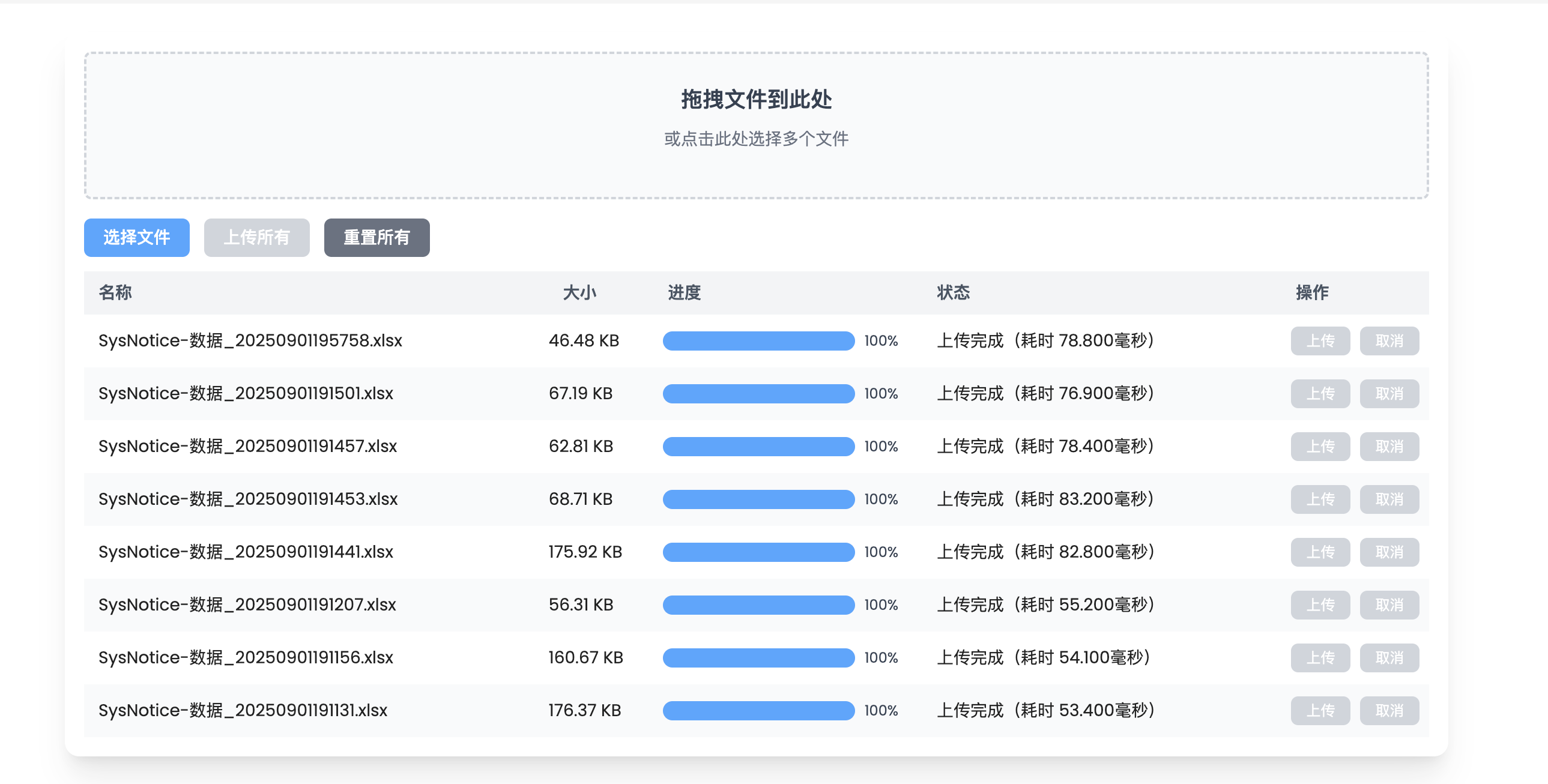
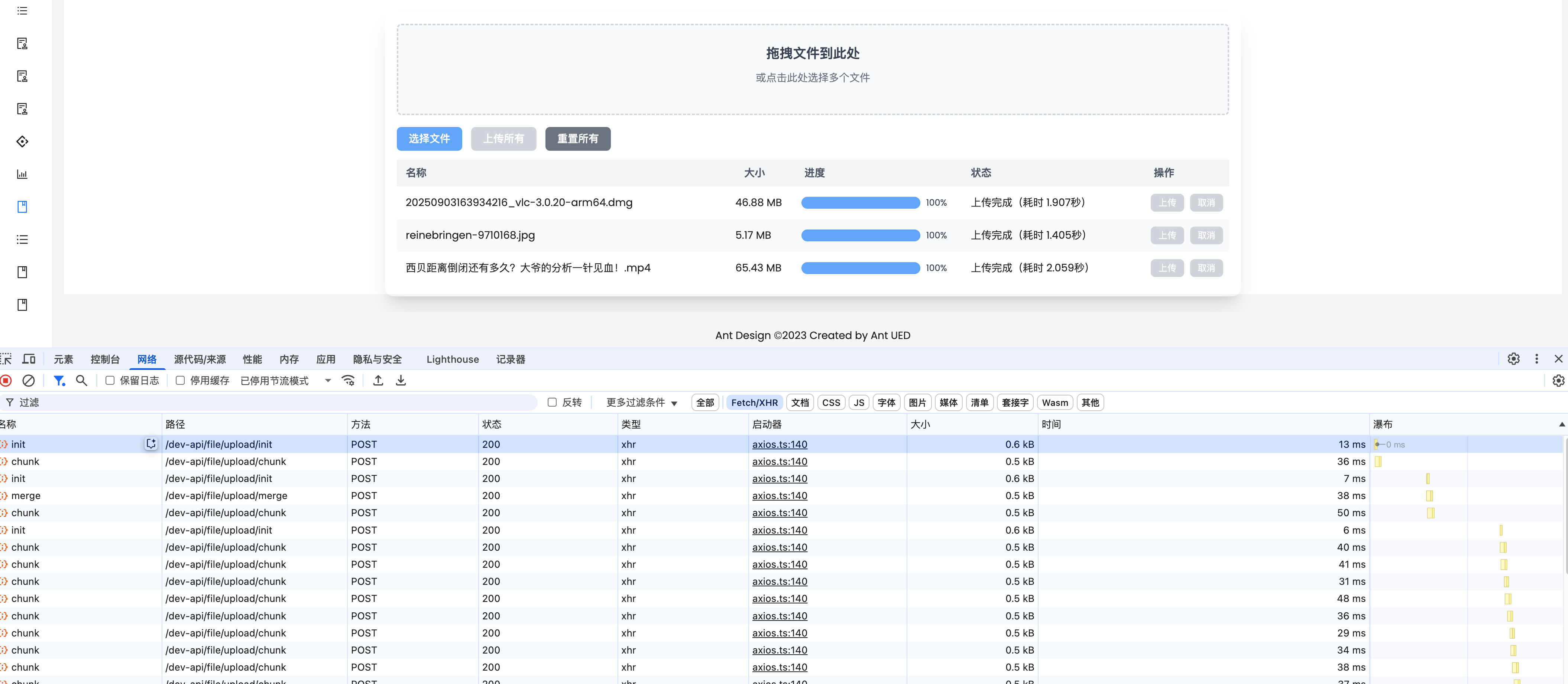
6.后端代码
后端请参见笔者的另一篇文章分片上传 https://blog.csdn.net/l244112311/article/details/151226362