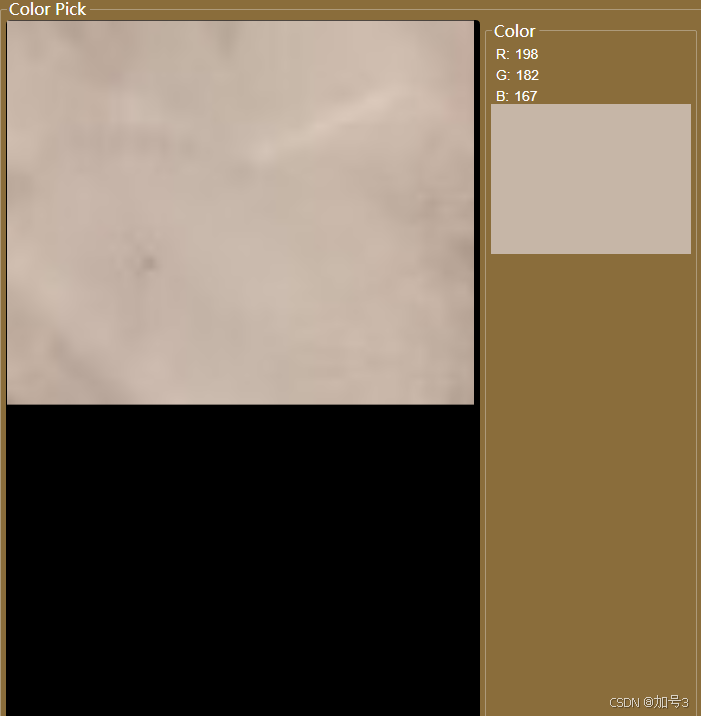
1.界面布局
cpp
 <GroupBox
     Padding="0"
     BorderThickness="0.1"
     Foreground="White"
     Header="Color Pick">
     <DockPanel>
         <GroupBox
             Margin="5,0,5,2"
             BorderThickness="0.1"
             DockPanel.Dock="Right"
             Foreground="White"
             Header="Color">
             <WrapPanel
                 Width="200"
                 DockPanel.Dock="Right"
                 Orientation="Vertical">
                 <WrapPanel Margin="5,5,0,0">
                     <Label
                         VerticalContentAlignment="Center"
                         Content="R:"
                         Foreground="White" />
                     <Label
                         Name="Label_R"
                         Margin="5,0,0,0"
                         VerticalContentAlignment="Center"
                         Content="0"
                         Foreground="White" />
                 </WrapPanel>
                 <WrapPanel Margin="5,5,0,0">
                     <Label
                         VerticalContentAlignment="Center"
                         Content="G:"
                         Foreground="White" />
                     <Label
                         Name="Label_G"
                         Margin="5,0,0,0"
                         VerticalContentAlignment="Center"
                         Content="0"
                         Foreground="White" />
                 </WrapPanel>
                 <WrapPanel Margin="5,5,0,0">
                     <Label
                         VerticalContentAlignment="Center"
                         Content="B:"
                         Foreground="White" />
                     <Label
                         Name="Label_B"
                         Margin="5,0,0,0"
                         VerticalContentAlignment="Center"
                         Content="0"
                         Foreground="White" />
                 </WrapPanel>
                 <WrapPanel Background="Black">
                     <Image
                         x:Name="Image_Clolor"
                         Width="200"
                         Height="150"
                         Margin="0" />
                 </WrapPanel>
             </WrapPanel>
         </GroupBox>
         <GroupBox
             Name="WrapPanel_Image"
             Padding="0,0,0,0"
             HorizontalContentAlignment="Stretch"
             VerticalContentAlignment="Stretch"
             Background="Black"
             BorderThickness="0"
             ClipToBounds="True"
             Cursor="Cross"
             DockPanel.Dock="Left">
             <Image
                 x:Name="Image_Img"
                 Width="{Binding ElementName=WrapPanel_Image, Path=ActualWidth}"
                 Height="{Binding ElementName=WrapPanel_Image, Path=ActualHeight}"
                 Margin="-5,0,0,0"
                 HorizontalAlignment="Left"
                 VerticalAlignment="Top"
                 ClipToBounds="True"
                 MouseWheel="Image_Img_MouseWheel"
                 PreviewMouseLeftButtonDown="Image_Img_PreviewMouseLeftButtonDown"
                 PreviewMouseLeftButtonUp="Image_Img_PreviewMouseLeftButtonUp"
                 PreviewMouseMove="Image_Img_PreviewMouseMove"
                 PreviewMouseRightButtonDown="Image_Img_PreviewMouseRightButtonDown"
                 RenderOptions.BitmapScalingMode="Fant"
                 Stretch="Uniform">
                 <Image.RenderTransform>
                     <TransformGroup>
                         <ScaleTransform x:Name="Image_Img_ScaleTransform" CenterX="0" CenterY="0" ScaleX="1" ScaleY="1" />
                         <TranslateTransform x:Name="Image_Img_TranslateTransform" X="0" Y="0" />
                     </TransformGroup>
                 </Image.RenderTransform>
             </Image>
         </GroupBox>
     </DockPanel>
 </GroupBox>
2.后台实现
csharp
 /// <summary>
 /// ColorPickerUserControl.xaml 的交互逻辑
 /// </summary>
 public partial class ColorPickerUserControl : UserControl
 {
     //图像原图
     private Bitmap originalBitmap;
     //缩放比率
     private double ScaleRatio = 0.2;
     //鼠标按下坐标
     private System.Windows.Point currentClickPoint = new System.Windows.Point(0, 0);
     //鼠标按下标识
     bool isImageLeftButtonDown = false;
     /// <summary>
     /// 当前选中颜色
     /// </summary>
     public System.Drawing.Color CurrentColor;

     public ColorPickerUserControl()
     {
         InitializeComponent();
     }
     /// <summary>
     /// 资源释放
     /// </summary>
     public void Dispose()
     {
         try
         {
             Image_Img.Source?.Freeze();
             Image_Img.Source = null;
             originalBitmap?.Dispose();
             originalBitmap = null;
             Image_Clolor.Source?.Freeze();
             Image_Clolor.Source = null;
         }
         catch (Exception ex)
         {
             throw new Exception(ex.Message);
         }
     }
     /// <summary>
     /// 加载图像
     /// </summary>
     /// <param name="fileName">图像文件路径</param>
     public void InitImage(string fileName)
     {
         try
         {
             Image_Img.Stretch = Stretch.Uniform;
             if (File.Exists(fileName))
             {
                 Task<BitmapImage> task = Task.Run(() =>
                 {
                     //后台读取图像,防止图像太大卡住主线程
                     using (var stream = File.OpenRead(fileName))
                     {
                         var bmp = new BitmapImage();
                         bmp.BeginInit();
                         bmp.StreamSource = stream;
                         bmp.CacheOption = BitmapCacheOption.OnLoad;
                         bmp.EndInit();
                         bmp.Freeze(); // 冻结对象以便跨线程访问
                         originalBitmap = new Bitmap(stream);
                         return bmp;
                     }
                 });
                 task.Wait();
                 Image_Img.Source = task.Result;
             }
         }
         catch (Exception ex)
         {
             throw new Exception(ex.Message);
         }
     }
     /// <summary>
     /// 加载图像
     /// </summary>
     /// <param name="bitmap">图像</param>
     public void InitImage(Bitmap bitmap)
     {
         try
         {
             originalBitmap?.Dispose();
             originalBitmap = null;
             originalBitmap = new Bitmap(bitmap);
             // 将Bitmap转换为WPF的BitmapImage
             BitmapImage bitmapImage;
             using (MemoryStream memory = new MemoryStream())
             {
                 bitmap.Save(memory, System.Drawing.Imaging.ImageFormat.Png);
                 memory.Position = 0;
                 bitmapImage = new BitmapImage();
                 bitmapImage.BeginInit();
                 bitmapImage.StreamSource = memory;
                 bitmapImage.CacheOption = BitmapCacheOption.OnLoad;
                 bitmapImage.EndInit();
             }
             Image_Img.Source = bitmapImage;
             bitmapImage?.Freeze();
             bitmapImage = null;
         }
         catch (Exception ex)
         {
             throw new Exception(ex.Message);
         }
     }

     /// <summary>
     /// 鼠标左键按下
     /// </summary>
     /// <param name="sender"></param>
     /// <param name="e"></param>
     private void Image_Img_PreviewMouseLeftButtonDown(object sender, MouseButtonEventArgs e)
     {
         try
         {
             if (e.ChangedButton != MouseButton.Left) return;
             var pos = e.GetPosition((System.Windows.Controls.Image)e.Source);
             currentClickPoint = pos;
             isImageLeftButtonDown = true;
             var img = ((System.Windows.Controls.Image)e.Source).Source as BitmapSource;
             ColorPicker(img, pos);
         }
         catch (Exception ex)
         {
             throw new Exception(ex.Message);
         }
     }
     /// <summary>
     /// 图像点转真实点
     /// </summary>
     /// <param name="thumbnailX"></param>
     /// <returns></returns>
     private double ToCamRealX(double thumbnailX)
     {
         return (thumbnailX / Image_Img.ActualWidth) * (double)(originalBitmap?.Width ?? 0);
     }
     /// <summary>
     /// 图像点转真实点
     /// </summary>
     /// <param name="thumbnailY"></param>
     /// <returns></returns>
     private double ToCamRealY(double thumbnailY)
     {
         return (thumbnailY / Image_Img.ActualHeight) * (double)(originalBitmap?.Height ?? 0);
     }
     /// <summary>
     /// 颜色拾取
     /// </summary>
     /// <param name="img"></param>
     /// <param name="pos"></param>
     /// <exception cref="Exception"></exception>
     protected void ColorPicker(BitmapSource img, System.Windows.Point pos)
     {
         try
         {
             int stride = img.PixelWidth * 4;
             int size = img.PixelHeight * stride;
             byte[] pixels = new byte[(int)size];

             img.CopyPixels(pixels, stride, 0);

             // Get pixel
             //屏幕坐标转图像坐标
             var x = (int)ToCamRealX(pos.X);
             var y = (int)ToCamRealY(pos.Y);

             int index = y * stride + 4 * x;

             byte red = pixels[index];
             byte green = pixels[index + 1];
             byte blue = pixels[index + 2];
             byte alpha = pixels[index + 3];

             System.Drawing.Color color = System.Drawing.Color.FromArgb(alpha, blue, green, red);
             Label_R.Content = color.R.ToString();
             Label_G.Content = color.G.ToString();
             Label_B.Content = color.B.ToString();
             //string ColorText = "#" + color.A.ToString("X2") + color.R.ToString("X2") + color.G.ToString("X2") + color.B.ToString("X2");
             ColorShow(color);
         }
         catch (Exception ex)
         {
             throw new Exception(ex.Message);
         }
     }
     /// <summary>
     /// 颜色显示
     /// </summary>
     /// <param name="color"></param>
     /// <exception cref="Exception"></exception>
     private void ColorShow(System.Drawing.Color color)
     {
         try
         {
             CurrentColor = color;
             int w = (int)Image_Clolor.Width;
             int h = (int)Image_Clolor.Height;
             Bitmap bitmap = new Bitmap(w, h, System.Drawing.Imaging.PixelFormat.Format32bppArgb);
             for (int x = 0; x < w; x++)
             {
                 for (int y = 0; y < h; y++)
                 {
                     bitmap.SetPixel(x, y, color);
                 }
             }
             BitmapImage bitmapImage;
             using (MemoryStream memory = new MemoryStream())
             {
                 bitmap.Save(memory, System.Drawing.Imaging.ImageFormat.Png);
                 memory.Position = 0;
                 bitmapImage = new BitmapImage();
                 bitmapImage.BeginInit();
                 bitmapImage.StreamSource = memory;
                 bitmapImage.CacheOption = BitmapCacheOption.OnLoad;
                 bitmapImage.EndInit();
             }
             Image_Clolor.Source = bitmapImage;
             bitmapImage?.Freeze();
             bitmapImage = null;
             bitmap.Dispose();
         }
         catch (Exception ex)
         {
             throw new Exception(ex.Message);
         }
     }
     /// <summary>
     /// 鼠标滚动缩放
     /// </summary>
     /// <param name="sender"></param>
     /// <param name="e"></param>
     private void Image_Img_MouseWheel(object sender, MouseWheelEventArgs e)
     {
         try
         {
             System.Windows.Point center = e.GetPosition(Image_Img);
             double scale = 0;
             if (e.Delta > 0)
             {
                 scale = Image_Img_ScaleTransform.ScaleX + ScaleRatio;
                 if (scale > 30)
                 {
                     return;
                 }
             }
             else
             {
                 scale = Image_Img_ScaleTransform.ScaleX - ScaleRatio;
                 if (scale < 0.5)
                 {
                     return;
                 }
             }
             //图像
             Image_Img_ScaleTransform.ScaleX = scale;
             Image_Img_ScaleTransform.ScaleY = scale;
         }
         catch
         {
         }
     }
     /// <summary>
     /// 鼠标移动
     /// </summary>
     /// <param name="sender"></param>
     /// <param name="e"></param>
     private void Image_Img_PreviewMouseMove(object sender, MouseEventArgs e)
     {
         try
         {
             if (isImageLeftButtonDown == true)
             {
                 if (e.LeftButton == MouseButtonState.Pressed)
                 {
                     //移动
                     System.Windows.Point newPoint = e.GetPosition(Image_Img);
                     double deltaX = newPoint.X - currentClickPoint.X;
                     double deltaY = newPoint.Y - currentClickPoint.Y;
                     //图像
                     Image_Img_TranslateTransform.X += deltaX;
                     Image_Img_TranslateTransform.Y += deltaY;
                 }
             }
         }
         catch
         {

         }
     }
     /// <summary>
     /// 鼠标放开
     /// </summary>
     /// <param name="sender"></param>
     /// <param name="e"></param>
     private void Image_Img_PreviewMouseLeftButtonUp(object sender, MouseButtonEventArgs e)
     {
         isImageLeftButtonDown = false;
     }
     /// <summary>
     /// 鼠标右键
     /// </summary>
     /// <param name="sender"></param>
     /// <param name="e"></param>
     private void Image_Img_PreviewMouseRightButtonDown(object sender, MouseButtonEventArgs e)
     {
         Recombination();
     }

     /// <summary>
     /// 重置图像大小
     /// </summary>
     private void Recombination()
     {
         try
         {
             //图像
             Image_Img_ScaleTransform.ScaleX = 1;
             Image_Img_ScaleTransform.ScaleY = 1;
             Image_Img_TranslateTransform.X = 0;
             Image_Img_TranslateTransform.Y = 0;
         }
         catch
         {
         }
     }

 }
3.效果