OpenXml合并word文档的表格单元格主要依靠单元格TabelCell的TableCellProperties的HorizontalMerge和 VerticalMerge这两个关键属性,HorizontalMerge用于水平方向的单元格合并,VerticalMerge用于垂直方向的单元格合并,它们都使用MergedCellValues枚举值,其中MergedCellValues.Restart表示开始合并,MergedCellValues.Continue表示被合并。
合并单元格主要由标记为Restart的起始单元格和一个或多个标记为Continue的后续单元格组成,起始单元格是合并区域的第一个单元格,该单元格的TableCellProperties的HorizontalMerge或VerticalMerge属性值为Restart,起始单元格之后的所有单元格都使用Continue 值,表明它们属于前一个起始单元格
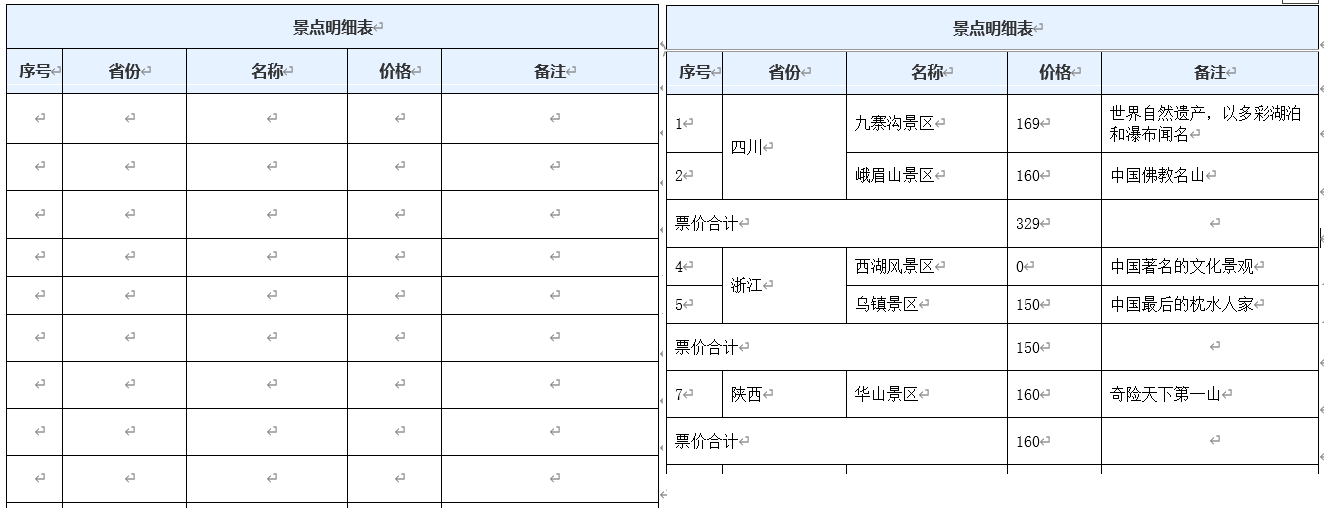
以省份景点统计为例,将同一省份的景点数据相邻显示,超过一行则将省份名称单元格合并,然后紧接一行计算同一省份的景点票价合计费用,主要代码、统计表格模板及统计表格数据如下所示:
csharp
int startRowIndex = 2;
int lineIndex = 0;
ScenicSpot rowData = null;
var totalRows = targetTable.Elements<TableRow>();
TableRow curRow = null;
IEnumerable<TableCell> cells = null;

foreach ( var records in m_lstScenicSpot.GroupBy(r=>r.Location))
{
    int dataCount = records.Count();
    decimal sum = records.Sum(r => r.TicketPrice);

    foreach (var record in records)
    {
        curRow = totalRows.ElementAt(startRowIndex + lineIndex);
        cells = curRow.Elements<TableCell>();

        FillTabelCellData(cells.ElementAt(0), Convert.ToString(lineIndex + 1));
        FillTabelCellData(cells.ElementAt(1), record.Location);
        FillTabelCellData(cells.ElementAt(2), record.Name);
        FillTabelCellData(cells.ElementAt(3), Convert.ToString(record.TicketPrice));
        FillTabelCellData(cells.ElementAt(4), record.Description);
        lineIndex++;
    }

    if (dataCount > 1)
    {
        MergeCellsVertically(totalRows.ToList(), 1, startRowIndex + lineIndex - dataCount, startRowIndex + lineIndex);
    }

    curRow = totalRows.ElementAt(startRowIndex + lineIndex);
    cells = curRow.Elements<TableCell>();
    FillTabelCellData(cells.ElementAt(0), "票价合计");
    FillTabelCellData(cells.ElementAt(3), sum.ToString());
    MergeCellsHorizontally(curRow, 0, 2);

    lineIndex++;
}
/// <summary>
/// 水平合并同一行内的连续单元格
/// </summary>
/// <param name="row">目标行</param>
/// <param name="startColumnIndex">起始列索引</param>
/// <param name="endColumnIndex">结束列索引</param>
private static void MergeCellsHorizontally(TableRow row, int startColumnIndex, int endColumnIndex)
{
    // 获取该行所有单元格
    var cells = row.Elements<TableCell>().ToList();

    // 确保起始索引有效,并且起始索引小于结束索引
    if (startColumnIndex < cells.Count && startColumnIndex < endColumnIndex)
    {
        TableCellProperties startCellProps = cells[startColumnIndex].GetFirstChild<TableCellProperties>() ?? new TableCellProperties();
        startCellProps.HorizontalMerge = new HorizontalMerge { Val = MergedCellValues.Restart };

        for (int i = startColumnIndex + 1; i <= endColumnIndex; i++)
        {
            var currentCell = cells.ElementAt(i);
            TableCellProperties cellProps = currentCell.GetFirstChild<TableCellProperties>() ?? new TableCellProperties();
            cellProps.HorizontalMerge = new HorizontalMerge { Val = MergedCellValues.Continue };
        }
    }
}

/// <summary>
/// 垂直合并不同行的同一列单元格
/// </summary>
/// <param name="rows">表格行集合</param>
/// <param name="columnIndex">要合并的列索引</param>
/// <param name="startRowIndex">起始行索引</param>
/// <param name="endRowIndex">结束行索引</param>
private static void MergeCellsVertically(List<TableRow> rows, int columnIndex, int startRowIndex, int endRowIndex)
{
    // 确保行索引有效
    if (startRowIndex < rows.Count && endRowIndex < rows.Count && startRowIndex <= endRowIndex)
    {
        // 获取起始行的目标单元格
        var startRowCells = rows[startRowIndex].Elements<TableCell>().ToList();
        // 获取结束行的目标单元格
        var endRowCells = rows[endRowIndex].Elements<TableCell>().ToList();

        if (columnIndex < startRowCells.Count && columnIndex < endRowCells.Count)
        {
            TableCellProperties startCellProps = startRowCells[columnIndex].GetFirstChild<TableCellProperties>() ?? new TableCellProperties();
            startCellProps.VerticalMerge = new VerticalMerge { Val = MergedCellValues.Restart };

            // 在被合并的后续单元格设置 VerticalMerge
            for (int i = startRowIndex + 1; i <= endRowIndex; i++)
            {
                var currentRowCells = rows[i].Elements<TableCell>().ToList();
                if (columnIndex < currentRowCells.Count)
                {
                    TableCellProperties mergeCellProps = currentRowCells[columnIndex].GetFirstChild<TableCellProperties>() ?? new TableCellProperties();
                    // 设置 VerticalMerge 属性,值为Continue 表示这是垂直合并的一部分
                    mergeCellProps.VerticalMerge = new VerticalMerge { Val = MergedCellValues.Continue };
                }
            }
        }
    }
}
参考文献
1https://github.com/dotnet/Open-XML-SDK
2https://learn.microsoft.com/zh-cn/office/open-xml/open-xml-sdk