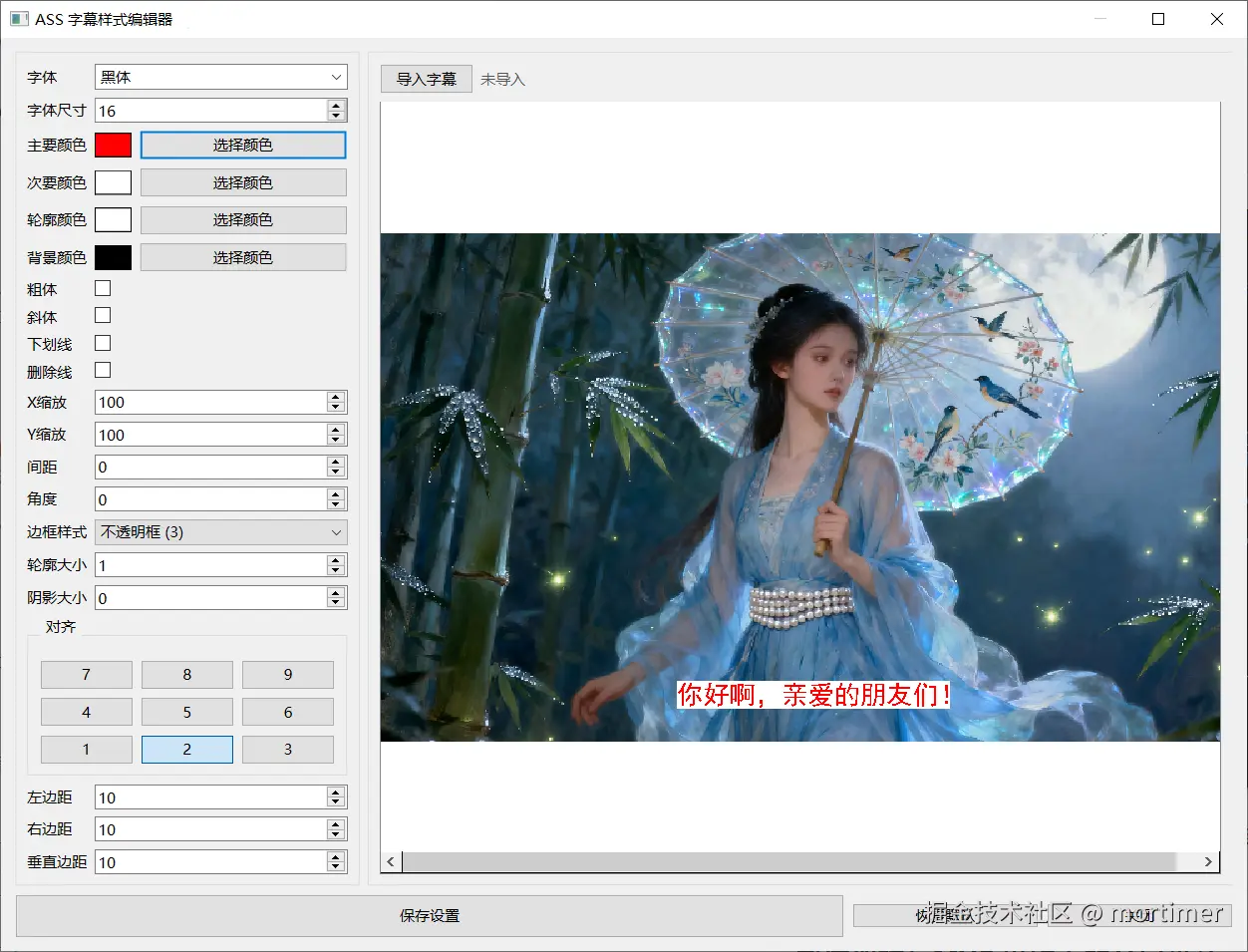
为什么要做一个 ASS 样式编辑器?
在视频翻译、字幕制作、AI 配音后处理等场景中,ASS(Advanced SubStation Alpha) 是事实上的工业标准字幕格式。它不仅支持丰富样式(颜色、描边、阴影、旋转、缩放),还支持卡拉 OK、动画等高级效果。
但问题在于:
- Aegisub 等专业工具门槛高,普通用户不敢碰;
- 命令行工具无法实时预览;
于是,我决定用 Python + PySide6 做一个:
轻量、可冻结、可嵌入、实时预览、支持导入 SRT/ASS/VTT 并一键导出带样式的 ASS 文件 的编辑器。
这篇文章将带你完整走一遍这个项目的 设计思路、核心代码、难点攻克与经验总结。
整体架构:MVC 思维下的分层设计
text
┌─────────────────┐
│   UI 层 (PySide6)│ ← 表单 + 预览 + 按钮
├─────────────────┤
│  业务逻辑层      │ ← 样式 ↔ 控件同步、导入/导出
├─────────────────┤
│  数据模型层       │ ← JSON 持久化、ASS 格式生成
└─────────────────┘
我没有使用复杂框架,而是用 清晰的类职责划分 实现可维护性:
| 类 | 职责 |
|---|---|
ASSStyleDialog |
主窗口、控件管理、事件协调 |
ColorPicker |
ASS 颜色字符串 ↔ QColor 双向转换 |
PreviewWidget |
使用 QGraphicsScene 实时绘制字幕效果 |
convert_and_save_ass() |
字幕格式解析 + ASS 结构生成 |
为什么不用 QSS 而是 QGraphicsView?
因为 ASS 字幕需要 描边、阴影、旋转、缩放、字母间距 等复杂排版,QLabel/QSS 无法精确控制。因此选择
QPainterPath + QGraphicsPathItem实现像素级渲染。
核心模块拆解
1. 颜色系统:ASS 颜色格式的"坑"
ASS 颜色是 BGR + Alpha ,且以 &HAA BB GG RR& 表示:
python
&HFF0000FF&  → 蓝色,不透明
&H80FF0000&  → 红色,半透明
难点:
- Qt 使用 ARGB
- 需要支持 6 位和 8 位 十六进制
- 用户选择后要实时回写 ASS 字符串
解决方案:ColorPicker 封装
python
@staticmethod
def parse_color(color_str):
    hex_str = color_str[2:-1].upper()  # 去掉 &H 和 &
    if len(hex_str) == 6:
        a, b, g, r = 0, *map(lambda x: int(x, 16), [hex_str[i:i+2] for i in range(0,6,2)])
    elif len(hex_str) == 8:
        a, b, g, r = map(lambda x: int(x, 16), [hex_str[i:i+2] for i in range(0,8,2)])
return QColor(r, g, b, 255 - a) # Alpha 反转易错点:
- 忘记
255 - a导致透明度反了 - 未处理
&HFFFFFF&(6 位)情况 - 直接用
QColor.fromString会失败
2. 实时预览:用 QGraphicsScene 画出"真·ASS 效果"
python
path = QPainterPath()
path.addText(0, 0, font, text)
实现步骤:
- 填充文字 →
QGraphicsPathItem(fill_item) - 描边 →
QPainterPathStroker().createStroke()→ 再填充 - 阴影 → 复制描边+填充,偏移
(Shadow, Shadow) - 不透明框(BorderStyle=3) →
QGraphicsRectItem - 变换 →
QTransform().scale().rotate()
关键代码:
python
stroker = QPainterPathStroker()
stroker.setWidth(outline * 2)
outline_path = stroker.createStroke(path)
为什么乘 2?
因为
createStroke是向外扩展width/2,所以要outline * 2才等于 ASS 的视觉描边宽度。
易错点:
- 阴影也需要描边,否则会"漏白"
- 变换要作用在 所有图层(含阴影),否则错位
setPos(x, y)必须在变换后,否则坐标系混乱
3. 导入字幕:支持 SRT / ASS / VTT 三种格式
设计目标:
- 一键导入 → 显示文件名
- 点击保存 → 自动生成
{原名}-edit.ass(避免覆盖可能的同名字幕) - 样式写入
[V4+ Styles]
实现思路:
| 格式 | 解析策略 |
|---|---|
.ass |
直接复制 [Events] 中的 Dialogue: 行 |
.srt |
按数字块解析时间戳(, → .) |
.vtt |
按 --> 分隔,时间格式类似 SRT |
关键转换函数:
python
def parse_time_srt(t):  # "00:00:02,034" → "0:00:02.03"
    h, m, sms = t.split(':')
    s, ms = sms.replace(',', '.').split('.')
    return f"{int(h):d}:{int(m):d}:{int(s):d}.{ms.ljust(2,'0')[:2]}"
为什么不保留毫秒第三位?
ASS 只支持 centisecond(两位),多余的截断即可。
保存逻辑:样式 + 字幕 → 新 ASS 文件
python
def save_settings(self):
    style = self.get_current_style()
    # 1. 保存到 JSON
    # 2. 若有导入字幕 → 生成 -edit.ass
生成 ASS 文件结构:
ass
[Script Info]
ScriptType: v4.00+

[V4+ Styles]
Format: Name, Fontname, ...
Style: Default,Arial,16,&H00FFFFFF&,...

[Events]
Format: Layer, Start, End, Style, ...
Dialogue: 0,0:00:01.23,0:00:03.45,Default,,0,0,0,,你好啊
注意:
- 样式只写一个 (
Default),所有对话引用它 - 编码统一 UTF-8
UI 设计:不好看但凑合的界面
布局结构:
text
┌─ 左侧表单 (QFormLayout) ─┐
│ 字体 | 尺寸 | 颜色 ×4     │
│ 粗体 | 斜体 | 下划线      │
│ 对齐 9宫格               │
│ 边距 | 缩放 | 旋转       │
└────────────────────────┘
┌─ 右侧预览 (QGraphicsView) ─┐
│  [导入字幕] 文件名         │
│  ┌─────────────────────┐  │
│  │     实时预览区域      │  │
│  └─────────────────────┘  │
└──────────────────────────┘
小技巧:
QGroupBox+margin-top控制标题间距QPushButton().setCheckable(True)实现 9 宫格对齐QLabel显示导入文件名 +setToolTip显示路径
打包与部署:冻结为单个 exe
pyinstaller -w -F appedit.py
python
IS_FROZEN = getattr(sys, 'frozen', False)
ROOT_DIR = Path(sys.executable).parent if IS_FROZEN else Path(__file__).parent
关键:
preview.png、ass.json放在可执行文件同目录- 使用
PyInstaller --onefile --add-data "assets;assets"打包
七、易错点总结
| 问题 | 原因 | 解决方案 |
|---|---|---|
| 颜色透明度反了 | ASS Alpha 是 255 - Qt.alpha |
255 - a |
| 描边太细/太粗 | stroker.setWidth(outline) 应为 outline * 2 |
乘 2 |
| 导入后预览空白 | update_preview 未触发 |
valueChanged.connect 确保连接 |
打包后找不到 preview.png |
路径写死 __file__ |
用 sys.executable |
| SRT 时间戳格式错误 | , 未转 . |
正则替换 |
| 中文路径乱码 | 打开文件未指定编码 | utf-8 + try gbk |
九、写在最后:代码是沟通,设计是思考
这个项目虽小,但包含了:
- 跨平台 GUI 开发
- 复杂格式解析
- 实时图形渲染
- 文件 I/O 与编码处理
- 打包部署
你也可以 fork 这份代码,嵌入到你的视频处理流程中,让用户"所见即所得"地调字幕样式。
全部源码都在这一个单文件中,
pip install pyside6后即可启动
python
import sys
import json
import os
from PySide6.QtWidgets import (
QDialog, QVBoxLayout, QHBoxLayout, QPushButton, QLabel, QFormLayout,
QFontComboBox, QSpinBox, QCheckBox, QComboBox, QColorDialog, QGridLayout,
QGroupBox, QApplication, QWidget, QGraphicsView, QGraphicsScene, QGraphicsPixmapItem,
QGraphicsTextItem, QGraphicsRectItem, QGraphicsPathItem,QSpacerItem,QSizePolicy
)
from PySide6.QtGui import QColor, QPixmap, QFont, QPen, QBrush, QPainterPath, QTransform, QPainterPathStroker,QIcon
from PySide6.QtCore import Qt, Signal,QSize
from pathlib import Path
from PySide6.QtWidgets import QFileDialog
IS_FROZEN = True if getattr(sys, 'frozen', False) else False
ROOT_DIR= Path(sys.executable).parent.as_posix() if IS_FROZEN else Path(__file__).parent.as_posix()
os.environ['PATH'] = ROOT_DIR +os.pathsep+f'{ROOT_DIR}/ffmpeg'+os.pathsep + os.environ.get("PATH", "")
JSON_FILE = f'{ROOT_DIR}/ass.json'
PREVIEW_IMAGE = f'{ROOT_DIR}/preview.png'
DEFAULT_STYLE = {
'Name': 'Default',
'Fontname': 'Arial',
'Fontsize': 16,
'PrimaryColour': '&H00FFFFFF&',
'SecondaryColour': '&H00FFFFFF&',
'OutlineColour': '&H00000000&',
'BackColour': '&H00000000&',
'Bold': 0,
'Italic': 0,
'Underline': 0,
'StrikeOut': 0,
'ScaleX': 100,
'ScaleY': 100,
'Spacing': 0,
'Angle': 0,
'BorderStyle': 1,
'Outline': 1,
'Shadow': 0,
'Alignment': 2,
'MarginL': 10,
'MarginR': 10,
'MarginV': 10,
'Encoding': 1
}
class ColorPicker(QWidget):
colorChanged = Signal()
def __init__(self, color_str, parent=None):
super().__init__(parent)
self.setLayout(QHBoxLayout())
self.layout().setContentsMargins(0, 0, 0, 0)
self.color_swatch = QLabel()
self.color_swatch.setFixedSize(30, 20)
self.color_swatch.setStyleSheet("border: 1px solid black;")
self.button = QPushButton('选择颜色')
self.layout().addWidget(self.color_swatch)
self.layout().addWidget(self.button)
self.color = self.parse_color(color_str)
self.update_swatch()
self.button.clicked.connect(self.choose_color)
@staticmethod
def parse_color(color_str):
if not color_str.startswith('&H') or not color_str.endswith('&'):
return QColor(255, 255, 255, 255)
hex_str = color_str[2:-1].upper()
if len(hex_str) == 6:
a = 0
b = int(hex_str[0:2], 16)
g = int(hex_str[2:4], 16)
r = int(hex_str[4:6], 16)
elif len(hex_str) == 8:
a = int(hex_str[0:2], 16)
b = int(hex_str[2:4], 16)
g = int(hex_str[4:6], 16)
r = int(hex_str[6:8], 16)
else:
return QColor(255, 255, 255, 255)
return QColor(r, g, b, 255 - a)
def to_ass_color(self):
r = self.color.red()
g = self.color.green()
b = self.color.blue()
a = 255 - self.color.alpha()
return f'&H{a:02X}{b:02X}{g:02X}{r:02X}&'
def choose_color(self):
dialog = QColorDialog(self.color, self)
dialog.setOption(QColorDialog.ShowAlphaChannel, True)
if dialog.exec():
self.color = dialog.currentColor()
self.update_swatch()
self.colorChanged.emit()
def update_swatch(self):
self.color_swatch.setStyleSheet(f"background-color: rgba({self.color.red()},{self.color.green()},{self.color.blue()},{self.color.alpha()}); border: 1px solid black;")
class PreviewWidget(QGraphicsView):
def __init__(self, parent=None):
super().__init__(parent)
self.scene = QGraphicsScene()
self.setScene(self.scene)
self.background_item = None
self.items = []
self.load_background()
def load_background(self):
if Path(PREVIEW_IMAGE).exists():
pixmap = QPixmap(PREVIEW_IMAGE)
self.background_item = QGraphicsPixmapItem(pixmap)
self.background_item.setZValue(-10)
self.scene.addItem(self.background_item)
self.setSceneRect(self.background_item.boundingRect())
else:
self.setSceneRect(0, 0, 640, 360) # Default size if no image
def clear_items(self):
for item in self.items:
self.scene.removeItem(item)
self.items = []
def update_preview(self, style):
self.clear_items()
text = '你好啊,亲爱的朋友们!'
font = QFont(style['Fontname'], style['Fontsize'])
font.setBold(bool(style['Bold']))
font.setItalic(bool(style['Italic']))
font.setUnderline(bool(style['Underline']))
font.setStrikeOut(bool(style['StrikeOut']))
font.setLetterSpacing(QFont.AbsoluteSpacing, style['Spacing'])
if isinstance(style['PrimaryColour'], str):
primary_color = ColorPicker.parse_color(style['PrimaryColour'])
else:
primary_color = style['PrimaryColour']
if isinstance(style['OutlineColour'], str):
outline_color = ColorPicker.parse_color(style['OutlineColour'])
else:
outline_color = style['OutlineColour']
if isinstance(style['BackColour'], str):
back_color = ColorPicker.parse_color(style['BackColour'])
else:
back_color = style['BackColour']
path = QPainterPath()
path.addText(0, 0, font, text)
text_rect = path.boundingRect()
effective_outline = style['Outline'] if style['BorderStyle'] == 1 else 0
shadow_item = None
back_rect = None
outline_item = None
fill_item = QGraphicsPathItem(path)
fill_item.setPen(Qt.NoPen)
fill_item.setBrush(QBrush(primary_color))
self.scene.addItem(fill_item)
self.items.append(fill_item)
main_item = fill_item
if effective_outline > 0:
stroker = QPainterPathStroker()
stroker.setWidth(effective_outline * 2)
stroker.setCapStyle(Qt.RoundCap)
stroker.setJoinStyle(Qt.RoundJoin)
outline_path = stroker.createStroke(path)
outline_item = QGraphicsPathItem(outline_path)
outline_item.setPen(Qt.NoPen)
outline_item.setBrush(QBrush(outline_color))
self.scene.addItem(outline_item)
self.items.append(outline_item)
outline_item.setZValue(-1)
main_item = outline_item
if style['BorderStyle'] == 3:
box_padding = style['Outline']
box_rect = text_rect.adjusted(-box_padding, -box_padding, box_padding, box_padding)
back_rect = QGraphicsRectItem(box_rect)
back_rect.setBrush(QBrush(outline_color)) # BorderStyle 3 使用 OutlineColour 作为背景框颜色
back_rect.setPen(Qt.NoPen)
self.scene.addItem(back_rect)
self.items.append(back_rect)
back_rect.setZValue(-1)
fill_item.setZValue(1)
# Shadow
if style['Shadow'] > 0:
if style['BorderStyle'] == 1:
shadow_path = QPainterPath()
shadow_path.addText(0, 0, font, text)
stroker = QPainterPathStroker()
stroker.setWidth(effective_outline * 2)
stroker.setCapStyle(Qt.RoundCap)
stroker.setJoinStyle(Qt.RoundJoin)
widened_shadow = stroker.createStroke(shadow_path) + shadow_path
shadow_item = QGraphicsPathItem(widened_shadow)
shadow_item.setPen(Qt.NoPen)
shadow_item.setBrush(QBrush(back_color))
self.scene.addItem(shadow_item)
self.items.append(shadow_item)
shadow_item.setZValue(-2)
elif style['BorderStyle'] == 3:
box_padding = style['Outline']
shadow_rect = text_rect.adjusted(-box_padding, -box_padding, box_padding, box_padding)
shadow_item = QGraphicsRectItem(shadow_rect)
shadow_item.setBrush(QBrush(back_color))
shadow_item.setPen(Qt.NoPen)
self.scene.addItem(shadow_item)
self.items.append(shadow_item)
shadow_item.setZValue(-2)
# Transformations
transform = QTransform()
transform.scale(style['ScaleX'] / 100.0, style['ScaleY'] / 100.0)
transform.rotate(style['Angle'])
# Apply transform to main items
for item in self.items:
if shadow_item is None or item != shadow_item:
item.setTransform(transform)
if style['Shadow'] > 0:
shadow_item.setTransform(transform)
# Position
scene_rect = self.sceneRect()
# Use text bounding for alignment
text_bounding = fill_item.mapToScene(fill_item.boundingRect()).boundingRect()
width = text_bounding.width()
height = text_bounding.height()
align = style['Alignment']
margin_l = style['MarginL']
margin_r = style['MarginR']
margin_v = style['MarginV']
if align in [1, 4, 7]: # Left
x = margin_l
elif align in [3, 6, 9]: # Right
x = scene_rect.width() - width - margin_r
else: # Center
x = (scene_rect.width() - width) / 2
if align in [7, 8, 9]: # Top
y = margin_v
elif align in [1, 2, 3]: # Bottom
y = scene_rect.height() - height - margin_v
else: # Middle
y = (scene_rect.height() - height) / 2
# Set pos for main items
fill_item.setPos(x, y)
if outline_item:
outline_item.setPos(x, y)
if back_rect:
back_rect.setPos(x, y)
if style['Shadow'] > 0:
shadow_item.setPos(x + style['Shadow'], y + style['Shadow'])
class ASSStyleDialog(QDialog):
def __init__(self, parent=None):
super().__init__(parent)
self.setWindowTitle('ASS 字幕样式编辑器 - pyVideoTrans.com')
self.setWindowFlags(self.windowFlags() | Qt.WindowMaximizeButtonHint)
self.resize(1000, 600)
self.setModal(True)
self.subtitle_path = None # 导入的字幕文件完整路径
self.subtitle_lines = [] # 原始字幕行(list[str])
self.main_layout = QVBoxLayout(self)
# Split layout for form and preview
content_layout = QHBoxLayout()
# Form for style properties
self.form_group = QGroupBox('')
self.form_layout = QFormLayout()
# Font
self.font_combo = QFontComboBox()
self.font_combo.currentFontChanged.connect(self.update_preview)
self.form_layout.addRow('字体', self.font_combo)
# Font size
self.font_size_spin = QSpinBox()
self.font_size_spin.setRange(1, 200)
self.font_size_spin.valueChanged.connect(self.update_preview)
self.form_layout.addRow('字体尺寸', self.font_size_spin)
# Colors
self.primary_color_picker = ColorPicker(DEFAULT_STYLE['PrimaryColour'])
self.primary_color_picker.colorChanged.connect(self.update_preview)
self.form_layout.addRow("主要颜色", self.primary_color_picker)
self.secondary_color_picker = ColorPicker(DEFAULT_STYLE['SecondaryColour'])
self.secondary_color_picker.colorChanged.connect(self.update_preview)
self.form_layout.addRow("次要颜色", self.secondary_color_picker)
self.outline_color_picker = ColorPicker(DEFAULT_STYLE['OutlineColour'])
self.outline_color_picker.colorChanged.connect(self.update_preview)
self.form_layout.addRow('轮廓颜色', self.outline_color_picker)
self.back_color_picker = ColorPicker(DEFAULT_STYLE['BackColour'])
self.back_color_picker.colorChanged.connect(self.update_preview)
self.form_layout.addRow('背景颜色', self.back_color_picker)
# Bold, Italic, Underline, StrikeOut
self.bold_check = QCheckBox()
self.bold_check.stateChanged.connect(self.update_preview)
self.form_layout.addRow('粗体', self.bold_check)
self.italic_check = QCheckBox()
self.italic_check.stateChanged.connect(self.update_preview)
self.form_layout.addRow('斜体', self.italic_check)
self.underline_check = QCheckBox()
self.underline_check.stateChanged.connect(self.update_preview)
self.form_layout.addRow('下划线', self.underline_check)
self.strikeout_check = QCheckBox()
self.strikeout_check.stateChanged.connect(self.update_preview)
self.form_layout.addRow('删除线', self.strikeout_check)
# ScaleX, ScaleY
self.scale_x_spin = QSpinBox()
self.scale_x_spin.setRange(1, 1000)
self.scale_x_spin.valueChanged.connect(self.update_preview)
self.form_layout.addRow('X缩放', self.scale_x_spin)
self.scale_y_spin = QSpinBox()
self.scale_y_spin.setRange(1, 1000)
self.scale_y_spin.valueChanged.connect(self.update_preview)
self.form_layout.addRow("Y缩放", self.scale_y_spin)
# Spacing
self.spacing_spin = QSpinBox()
self.spacing_spin.setRange(-100, 100)
self.spacing_spin.valueChanged.connect(self.update_preview)
self.form_layout.addRow("间距", self.spacing_spin)
# Angle
self.angle_spin = QSpinBox()
self.angle_spin.setRange(-360, 360)
self.angle_spin.valueChanged.connect(self.update_preview)
self.form_layout.addRow('角度', self.angle_spin)
# BorderStyle
self.border_style_combo = QComboBox()
self.border_style_combo.addItems(['轮廓 (1)', '不透明框 (3)'])
self.border_style_combo.currentIndexChanged.connect(self.update_preview)
self.form_layout.addRow('边框样式', self.border_style_combo)
# Outline (border size)
self.outline_spin = QSpinBox()
self.outline_spin.setRange(0, 10)
self.outline_spin.valueChanged.connect(self.update_preview)
self.form_layout.addRow('轮廓大小', self.outline_spin)
# Shadow
self.shadow_spin = QSpinBox()
self.shadow_spin.setRange(0, 10)
self.shadow_spin.valueChanged.connect(self.update_preview)
self.form_layout.addRow('阴影大小', self.shadow_spin)
# Alignment
self.alignment_group = QGroupBox('对齐')
self.alignment_group.setStyleSheet("QGroupBox { margin-bottom: 12px;margin-top:12px }") # 标题上留空
self.alignment_layout = QGridLayout()
self.alignment_buttons = []
for i in range(1, 10):
btn = QPushButton(str(i))
btn.setCheckable(True)
btn.clicked.connect(lambda checked, val=i: self.set_alignment(val))
self.alignment_buttons.append(btn)
positions = [(0,0,7), (0,1,8), (0,2,9),
(1,0,4), (1,1,5), (1,2,6),
(2,0,1), (2,1,2), (2,2,3)]
for row, col, val in positions:
self.alignment_layout.addWidget(self.alignment_buttons[val-1], row, col)
self.alignment_group.setLayout(self.alignment_layout)
self.alignment_group.setStyleSheet("""
QGroupBox {
margin-top: 14px;
padding-top: 10px;
}
QGroupBox::title {
subcontrol-origin: margin;
subcontrol-position: top left;
left: 10px;
padding: 0 3px;
}
""")
self.form_layout.addRow(self.alignment_group)
# Margins
self.margin_l_spin = QSpinBox()
self.margin_l_spin.setRange(0, 1000)
self.margin_l_spin.valueChanged.connect(self.update_preview)
self.form_layout.addRow('左边距', self.margin_l_spin)
self.margin_r_spin = QSpinBox()
self.margin_r_spin.setRange(0, 1000)
self.margin_r_spin.valueChanged.connect(self.update_preview)
self.form_layout.addRow('右边距', self.margin_r_spin)
self.margin_v_spin = QSpinBox()
self.margin_v_spin.setRange(0, 1000)
self.margin_v_spin.valueChanged.connect(self.update_preview)
self.form_layout.addRow('垂直边距', self.margin_v_spin)
self.form_group.setLayout(self.form_layout)
content_layout.addWidget(self.form_group)
# Preview
self.preview_group = QGroupBox('')
preview_layout = QVBoxLayout()
# ---------- 顶部一行(导入按钮 + 文件名) ----------
top_bar = QHBoxLayout()
self.import_btn = QPushButton('导入字幕')
self.import_btn.setCursor(Qt.PointingHandCursor)
self.import_btn.clicked.connect(self.import_subtitle)
top_bar.addWidget(self.import_btn)
self.subtitle_label = QLabel('未导入')
self.subtitle_label.setStyleSheet('color: #555;')
top_bar.addWidget(self.subtitle_label)
top_bar.addStretch() # 右侧留空
preview_layout.addLayout(top_bar)
# -----------------------------------------------------
self.preview_widget = PreviewWidget()
preview_layout.addWidget(self.preview_widget)
self.preview_group.setLayout(preview_layout)
content_layout.addWidget(self.preview_group)
self.main_layout.addLayout(content_layout)
# Buttons
self.buttons_layout = QHBoxLayout()
self.save_btn = QPushButton('保存设置')
self.save_btn.setCursor(Qt.PointingHandCursor)
self.save_btn.clicked.connect(self.save_settings)
self.save_btn.setMinimumSize(QSize(200, 35))
self.restore_btn = QPushButton('恢复默认')
self.restore_btn.clicked.connect(self.restore_defaults)
self.restore_btn.setMaximumSize(QSize(150, 20))
self.restore_btn.setCursor(Qt.PointingHandCursor)
self.close_btn = QPushButton('关闭')
self.close_btn.clicked.connect(self.close)
self.close_btn.setMaximumSize(QSize(150, 20))
self.close_btn.setCursor(Qt.PointingHandCursor)
self.buttons_layout.addWidget(self.save_btn)
self.buttons_layout.addWidget(self.restore_btn)
self.buttons_layout.addWidget(self.close_btn)
self.main_layout.addLayout(self.buttons_layout)
# Load settings if exist
self.load_settings()
self.update_preview()
def import_subtitle(self):
"""打开文件对话框,选择 .srt / .ass / .vtt 文件并读取内容"""
file_path, _ = QFileDialog.getOpenFileName(
self,
'导入字幕文件',
'',
'Subtitle Files (*.srt *.ass *.vtt);;All Files (*)'
)
if not file_path:
return
try:
with open(file_path, 'r', encoding='utf-8') as f:
lines = f.readlines()
except UnicodeDecodeError:
# 有些文件可能是 gbk 编码
with open(file_path, 'r', encoding='gbk') as f:
lines = f.readlines()
self.subtitle_path = file_path
self.subtitle_lines = [line.rstrip('\n') for line in lines]
# 更新按钮文字 & 标签
file_name = Path(file_path).name
self.import_btn.setText('重新导入')
self.subtitle_label.setText(file_name)
self.subtitle_label.setToolTip(file_path)
def set_alignment(self, value):
for btn in self.alignment_buttons:
btn.setChecked(False)
self.alignment_buttons[value-1].setChecked(True)
self.update_preview()
def get_alignment(self):
for i, btn in enumerate(self.alignment_buttons):
if btn.isChecked():
return i + 1
return 2 # Default
def load_settings(self):
self.blockSignals(True)
try:
if Path(JSON_FILE).exists():
with open(JSON_FILE, 'r') as f:
style = json.load(f)
else:
style = DEFAULT_STYLE
self.font_combo.setCurrentFont(style.get('Fontname', 'Arial'))
self.font_size_spin.setValue(style.get('Fontsize', 16))
self.primary_color_picker.color = ColorPicker.parse_color(style.get('PrimaryColour', '&H00FFFFFF&'))
self.primary_color_picker.update_swatch()
self.secondary_color_picker.color = ColorPicker.parse_color(style.get('SecondaryColour', '&H00FFFFFF&'))
self.secondary_color_picker.update_swatch()
self.outline_color_picker.color = ColorPicker.parse_color(style.get('OutlineColour', '&H00000000&'))
self.outline_color_picker.update_swatch()
self.back_color_picker.color = ColorPicker.parse_color(style.get('BackColour', '&H00000000&'))
self.back_color_picker.update_swatch()
self.bold_check.setChecked(bool(style.get('Bold', 0)))
self.italic_check.setChecked(bool(style.get('Italic', 0)))
self.underline_check.setChecked(bool(style.get('Underline', 0)))
self.strikeout_check.setChecked(bool(style.get('StrikeOut', 0)))
self.scale_x_spin.setValue(style.get('ScaleX', 100))
self.scale_y_spin.setValue(style.get('ScaleY', 100))
self.spacing_spin.setValue(style.get('Spacing', 0))
self.angle_spin.setValue(style.get('Angle', 0))
self.border_style_combo.setCurrentIndex(0 if style.get('BorderStyle', 1) == 1 else 1)
self.outline_spin.setValue(style.get('Outline', 1))
self.shadow_spin.setValue(style.get('Shadow', 0))
self.set_alignment(style.get('Alignment', 2))
self.margin_l_spin.setValue(style.get('MarginL', 10))
self.margin_r_spin.setValue(style.get('MarginR', 10))
self.margin_v_spin.setValue(style.get('MarginV', 10))
finally:
self.blockSignals(False)
def save_settings(self):
style = self.get_current_style()
with open(JSON_FILE, 'w') as f:
json.dump(style, f, indent=4)
# 如果已经导入字幕 → 转换为 ASS 并保存为 "原名-edit.ass"
if self.subtitle_path and self.subtitle_lines:
self.convert_and_save_ass(style)
def convert_and_save_ass(self, style: dict):
"""
将 self.subtitle_lines(srt/ass/vtt)转换为 ASS 格式,
把 style 写入 [V4+ Styles],保存为 {原文件名}-edit.ass
"""
import re
from datetime import timedelta
src_path = Path(self.subtitle_path)
new_path = src_path.parent / f'{src_path.stem}-edit.ass'
ass_lines = [
'[Script Info]',
'; Script generated by pyVideoTrans ASS Style Editor',
'Title: Edited Subtitle',
'ScriptType: v4.00+',
'Collisions: Normal',
'PlayResX: 640',
'PlayResY: 360',
'',
'[V4+ Styles]',
'Format: Name, Fontname, Fontsize, PrimaryColour, SecondaryColour, OutlineColour, BackColour, '
'Bold, Italic, Underline, StrikeOut, ScaleX, ScaleY, Spacing, Angle, BorderStyle, '
'Outline, Shadow, Alignment, MarginL, MarginR, MarginV, Encoding',
f'Style: {style["Name"]},{style["Fontname"]},{style["Fontsize"]},'
f'{style["PrimaryColour"]},{style["SecondaryColour"]},'
f'{style["OutlineColour"]},{style["BackColour"]},'
f'{"-1" if style["Bold"] else "0"},'
f'{"-1" if style["Italic"] else "0"},'
f'{"-1" if style["Underline"] else "0"},'
f'{"-1" if style["StrikeOut"] else "0"},'
f'{style["ScaleX"]},{style["ScaleY"]},{style["Spacing"]},{style["Angle"]},'
f'{style["BorderStyle"]},{style["Outline"]},{style["Shadow"]},'
f'{style["Alignment"]},{style["MarginL"]},{style["MarginR"]},'
f'{style["MarginV"]},{style["Encoding"]}',
'',
'[Events]',
'Format: Layer, Start, End, Style, Name, MarginL, MarginR, MarginV, Effect, Text',
]
ext = src_path.suffix.lower()
if ext == '.ass':
# ASS 直接复制 Events 部分(只保留 Dialogue 行)
in_events = False
for line in self.subtitle_lines:
line = line.strip()
if line.startswith('[Events]'):
in_events = True
continue
if in_events and line.startswith('Dialogue:'):
ass_lines.append(line)
# 跳过其它段落
else:
# SRT / VTT → 统一解析为时间戳 + 文本
def parse_time_srt(t: str) -> str:
"""00:00:02,034 → 0:00:02.03"""
h, m, s_ms = t.split(':')
s, ms = s_ms.replace(',', '.').split('.')
return f'{int(h):d}:{int(m):d}:{int(s):d}.{ms.ljust(2, "0")[:2]}'
def parse_time_vtt(t: str) -> str:
"""00:00:02.034 → 0:00:02.03"""
return t.split('.')[0] + '.' + t.split('.')[1][:2].ljust(2, '0')
i = 0
while i < len(self.subtitle_lines):
line = self.subtitle_lines[i].strip()
# SRT: 数字行
# VTT: --> 分隔行
if ext == '.srt' and line.isdigit():
i += 1
time_line = self.subtitle_lines[i].strip()
start_end = re.split(r'\s*-->\s*', time_line)
if len(start_end) != 2:
i += 1
continue
start = parse_time_srt(start_end[0])
end = parse_time_srt(start_end[1])
i += 1
text = []
while i < len(self.subtitle_lines) and self.subtitle_lines[i].strip():
text.append(self.subtitle_lines[i].strip())
i += 1
dialogue = f'Dialogue: 0,{start},{end},{style["Name"]},,0,0,0,,{" ".join(text)}'
ass_lines.append(dialogue)
elif ext == '.vtt' and '-->' in line:
start_end = re.split(r'\s*-->\s*', line)
start = parse_time_vtt(start_end[0])
end = parse_time_vtt(start_end[1])
i += 1
text = []
while i < len(self.subtitle_lines) and self.subtitle_lines[i].strip():
text.append(self.subtitle_lines[i].strip())
i += 1
dialogue = f'Dialogue: 0,{start},{end},{style["Name"]},,0,0,0,,{" ".join(text)}'
ass_lines.append(dialogue)
else:
i += 1
# 4. 写入文件
with open(new_path, 'w', encoding='utf-8') as f:
f.write('\n'.join(ass_lines) + '\n')
# 弹窗提示
from PySide6.QtWidgets import QMessageBox
QMessageBox.information(self, '保存成功',
f'字幕已保存为:\n{new_path}')
def restore_defaults(self):
style = DEFAULT_STYLE
self.blockSignals(True)
try:
self.font_combo.setCurrentFont(style['Fontname'])
self.font_size_spin.setValue(style['Fontsize'])
self.primary_color_picker.color = ColorPicker.parse_color(style['PrimaryColour'])
self.primary_color_picker.update_swatch()
self.secondary_color_picker.color = ColorPicker.parse_color(style['SecondaryColour'])
self.secondary_color_picker.update_swatch()
self.outline_color_picker.color = ColorPicker.parse_color(style['OutlineColour'])
self.outline_color_picker.update_swatch()
self.back_color_picker.color = ColorPicker.parse_color(style['BackColour'])
self.back_color_picker.update_swatch()
self.bold_check.setChecked(bool(style['Bold']))
self.italic_check.setChecked(bool(style['Italic']))
self.underline_check.setChecked(bool(style['Underline']))
self.strikeout_check.setChecked(bool(style['StrikeOut']))
self.scale_x_spin.setValue(style['ScaleX'])
self.scale_y_spin.setValue(style['ScaleY'])
self.spacing_spin.setValue(style['Spacing'])
self.angle_spin.setValue(style['Angle'])
self.border_style_combo.setCurrentIndex(0 if style['BorderStyle'] == 1 else 1)
self.outline_spin.setValue(style['Outline'])
self.shadow_spin.setValue(style['Shadow'])
self.set_alignment(style['Alignment'])
self.margin_l_spin.setValue(style['MarginL'])
self.margin_r_spin.setValue(style['MarginR'])
self.margin_v_spin.setValue(style['MarginV'])
finally:
self.blockSignals(False)
self.update_preview()
with open(JSON_FILE, 'w') as f:
json.dump(style, f, indent=4)
# 恢复默认时清掉已导入的字幕
self.subtitle_path = None
self.subtitle_lines = []
self.import_btn.setText('导入字幕')
self.subtitle_label.setText('未导入')
def get_current_style(self):
style = {
'Name': 'Default',
'Fontname': self.font_combo.currentText(),
'Fontsize': self.font_size_spin.value(),
'PrimaryColour': self.primary_color_picker.to_ass_color(),
'SecondaryColour': self.secondary_color_picker.to_ass_color(),
'OutlineColour': self.outline_color_picker.to_ass_color(),
'BackColour': self.back_color_picker.to_ass_color(),
'Bold': 1 if self.bold_check.isChecked() else 0,
'Italic': 1 if self.italic_check.isChecked() else 0,
'Underline': 1 if self.underline_check.isChecked() else 0,
'StrikeOut': 1 if self.strikeout_check.isChecked() else 0,
'ScaleX': self.scale_x_spin.value(),
'ScaleY': self.scale_y_spin.value(),
'Spacing': self.spacing_spin.value(),
'Angle': self.angle_spin.value(),
'BorderStyle': 1 if self.border_style_combo.currentIndex() == 0 else 3,
'Outline': self.outline_spin.value(),
'Shadow': self.shadow_spin.value(),
'Alignment': self.get_alignment(),
'MarginL': self.margin_l_spin.value(),
'MarginR': self.margin_r_spin.value(),
'MarginV': self.margin_v_spin.value(),
'Encoding': 1
}
return style
def update_preview(self):
style = self.get_current_style()
self.preview_widget.update_preview(style)
if __name__=='__main__':
app = QApplication(sys.argv)
win=ASSStyleDialog()
win.show()
sys.exit(app.exec())