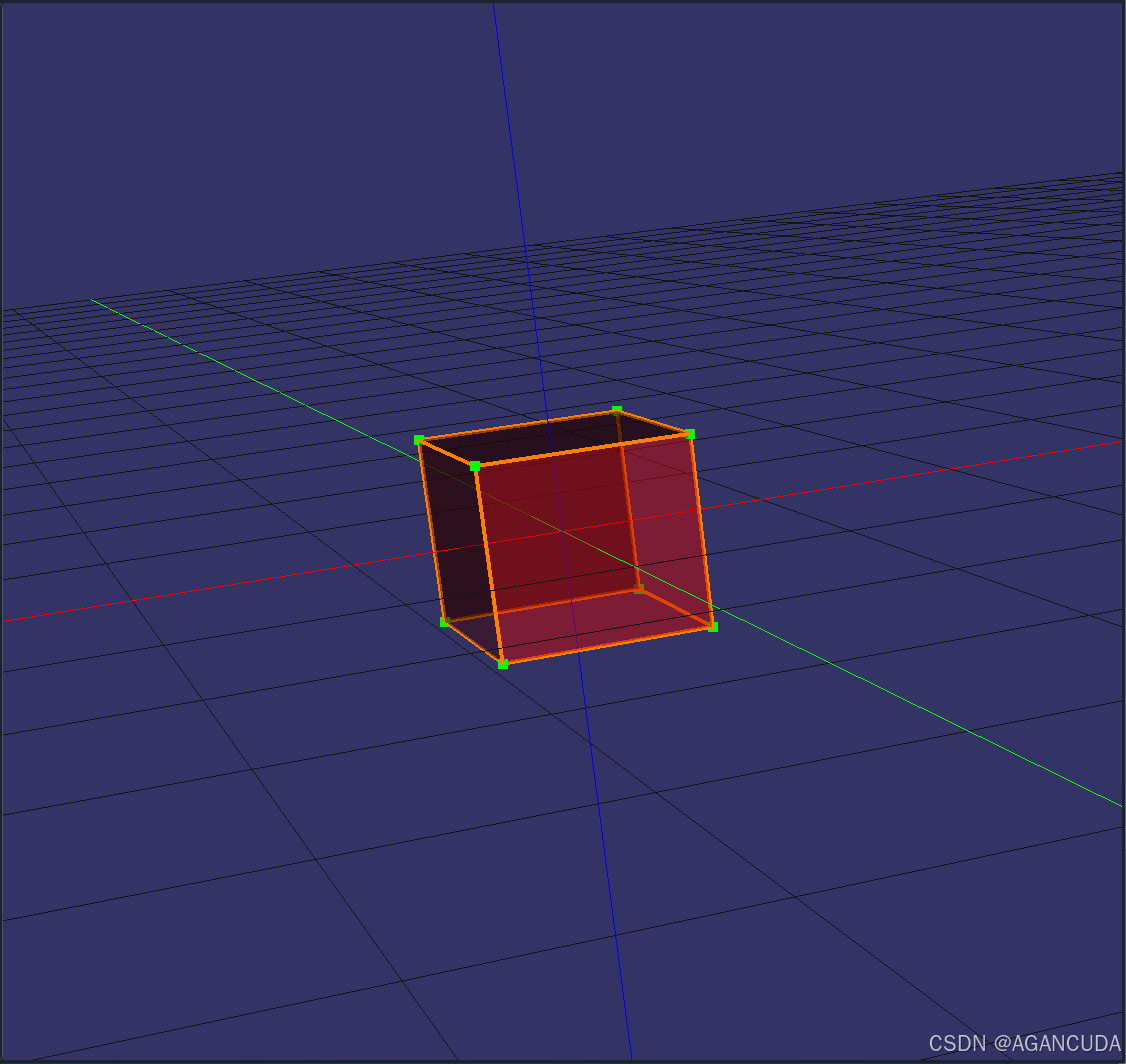
osg点云显示类贴出
//**********************************************************************
//                       osg仿真显示工具
//                                               @阿甘整理 20250828
//**********************************************************************
#pragma once
#include <QtCore/QtCore>
#include <QtWidgets/QtWidgets>
#include <osgQOpenGL/osgQOpenGLWidget>
#include <osg/Geode>
#include <osg/MatrixTransform>
#include <pcl/point_cloud.h>
#include <pcl/point_types.h>

//osg点云显示
class osgCloud : public QWidget
{
    Q_OBJECT
public:
    osgCloud(QWidget* parent = nullptr);
    ~osgCloud(void);
protected slots:
    //OsgQOpenGLWidget延迟加载 测试仿真显示
    void initWindow();
    //测试加载psd
    void loadPcd(void);
public:
    //加载显示点云
    void loadCloud(pcl::PointCloud<pcl::PointXYZ>::Ptr pCloud);
    //保存点云到文件
    void saveCloud(pcl::PointCloud<pcl::PointXYZ>::Ptr cloud, const std::string name);
    //清空点云
    void removeAllPointClouds();
private:
    osgQOpenGLWidget* _pOsgQOpenGLWidget;
    osgViewer::Viewer* pViewer;
    osg::ref_ptr<osg::Geode> geode;
    osg::ref_ptr<osg::MatrixTransform> transform;
    QGridLayout* m_mylay;
};
实现部分
#include "osgCloud.h"
#include <osg/Node>
#include <osg/LineWidth>
#include <osg/ShapeDrawable>
#include <osg/Geode>
#include <osg/Matrixd>
#include <osg/Camera>
#include <osg/Point>
#include <osg/MatrixTransform>
#include <osg/Geometry>
#include <osg/BlendFunc>
#include <osg/Material>
#include <osg/StateSet>
#include <osgDB/ReadFile>
#include <osgViewer/View>
#include <osgViewer/Viewer>
#include <osgGA/TrackballManipulator>
#include <osgText/Text>
#include <osgUtil/Optimizer>
#include <osg/Multisample>
#pragma execution_character_set("utf-8")
#include <pcl/io/pcd_io.h>
#include <pcl/common/centroid.h>
#include <pcl/point_types.h>
#include <pcl/point_cloud.h>
#include <pcl/point_types.h>
#include <pcl/io/ply_io.h>


osgCloud::osgCloud(QWidget* parent): QWidget(parent)
{
    transform = new osg::MatrixTransform();
    geode = new osg::Geode;
    _pOsgQOpenGLWidget = new osgQOpenGLWidget(parent);
    m_mylay = new QGridLayout(this);
    m_mylay->setSpacing(0);
    m_mylay->setMargin(0);
    m_mylay->setContentsMargins(0, 0, 0, 0);
    m_mylay->addWidget(_pOsgQOpenGLWidget);
    _pOsgQOpenGLWidget->setGeometry(this->geometry());
    //_pOsgQOpenGLWidget延迟加载
    connect(_pOsgQOpenGLWidget, SIGNAL(initialized()), this, SLOT(initWindow()));
}

osgCloud::~osgCloud(void)
{
}

void osgCloud::initWindow(void)
{
    //return loadPcd();
    //创建坐标系网格
    auto createInfiniteGrid = [](float gridSize = 1.0f, int gridCount = 20)->osg::ref_ptr<osg::Node>
    {
        osg::Group* root = new osg::Group();
        osg::StateSet* stateset = root->getOrCreateStateSet();

        // 网格线设置(浅灰色细线)
        osg::LineWidth* gridLineWidth = new osg::LineWidth(1.0f);
        stateset->setAttribute(gridLineWidth);

        // 创建XY平面网格
        osg::Geometry* gridGeometry = new osg::Geometry();
        osg::Vec3Array* vertices = new osg::Vec3Array();

        // 生成网格线顶点(双向无限延伸)
        float halfSize = gridSize * gridCount;
        for (int i = -gridCount; i <= gridCount; ++i)
        {
            if (i == 0)
            {
                continue;  //排除掉下x y轴
            }
            float pos = i * gridSize;
            // X方向线
            vertices->push_back(osg::Vec3(-halfSize, pos, 0));
            vertices->push_back(osg::Vec3(halfSize, pos, 0));
            // Y方向线
            vertices->push_back(osg::Vec3(pos, -halfSize, 0));
            vertices->push_back(osg::Vec3(pos, halfSize, 0));
        }

        gridGeometry->setVertexArray(vertices);
        osg::Vec4Array* colors = new osg::Vec4Array();
        colors->push_back(osg::Vec4(0.8f, 0.8f, 0.8f, 0.5f)); // 浅灰色半透明
        gridGeometry->setColorArray(colors);
        gridGeometry->setColorBinding(osg::Geometry::BIND_OVERALL);
        gridGeometry->addPrimitiveSet(new osg::DrawArrays(osg::PrimitiveSet::LINES, 0, vertices->size()));

        osg::Geode* gridGeode = new osg::Geode();
        gridGeode->addDrawable(gridGeometry);
        root->addChild(gridGeode);

        return root;
    };
    //创建X Y Z坐标系
    auto create3DCoordinateSystem = [](float axisLength = 10.0f)->osg::ref_ptr<osg::Node>
    {
        osg::Group* root = new osg::Group();
        osg::StateSet* stateset = root->getOrCreateStateSet();

        // 设置线宽(加粗效果)
        osg::LineWidth* lineWidth = new osg::LineWidth(1.0f);   //线粗
        stateset->setAttribute(lineWidth);


        // 定义轴半径和箭头尺寸
        //float axisRadius = axisLength * 0.02f;
        //float arrowRadius = axisRadius * 2.0f;
        //float arrowHeight = axisLength * 0.1f;

        // 创建坐标轴函数
        auto createAxis = [&](osg::Vec3 dir, osg::Vec4 color, std::string label)
        {
            osg::Geode* geode = new osg::Geode();
            // 坐标轴线
            osg::Geometry* geom = new osg::Geometry();
            // 禁用光照 就没有旋转到反面变黑色的问题了
            geom->getOrCreateStateSet()->setMode(GL_LIGHTING, osg::StateAttribute::OFF);
            osg::Vec3Array* vertices = new osg::Vec3Array();
            vertices->push_back(dir * -axisLength);
            vertices->push_back(dir * axisLength);
            geom->setVertexArray(vertices);
            osg::Vec4Array* colors = new osg::Vec4Array();
            colors->push_back(color);
            geom->setColorArray(colors);
            geom->setColorBinding(osg::Geometry::BIND_OVERALL);
            geom->addPrimitiveSet(new osg::DrawArrays(osg::PrimitiveSet::LINES, 0, vertices->size()));//2
            geode->addDrawable(geom);
            // 坐标轴标签
            osgText::Text* text = new osgText::Text();
            //text->setFont("arial.ttf");
            text->setCharacterSize(1.0f);
            text->setPosition(dir * (axisLength + 1));
            text->setText(label);
            text->setColor(color);
            text->setAlignment(osgText::Text::CENTER_CENTER);
            geode->addDrawable(text);
            return geode;
        };

        // 创建XYZ三轴
        root->addChild(createAxis(osg::Vec3(2, 0, 0), osg::Vec4(1, 0, 0, 1), "X"));
        root->addChild(createAxis(osg::Vec3(0, 2, 0), osg::Vec4(0, 1, 0, 1), "Y"));
        root->addChild(createAxis(osg::Vec3(0, 0, 2), osg::Vec4(0, 0, 1, 1), "Z"));

        return root;
    };

    pViewer = _pOsgQOpenGLWidget->getOsgViewer();
    pViewer->getCamera()->setClearColor(osg::Vec4(0.2f, 0.2f, 0.2f, 1.0f)); // 浅灰色背景

    transform->addChild(createInfiniteGrid());              //创建网格
    transform->addChild(create3DCoordinateSystem());        //创建xyz坐标轴
    transform->addChild(geode);
    osgGA::TrackballManipulator* manipulator = new osgGA::TrackballManipulator();
    manipulator->setVerticalAxisFixed(false);               // 允许自由旋转
    manipulator->setWheelZoomFactor(-0.1);                  // 反转滚动灵敏度 默认0.1改为-0.1
    pViewer->setCameraManipulator(manipulator);
    //pViewer->setCameraManipulator(new osgGA::TrackballManipulator);
    pViewer->setSceneData(transform);
    pViewer->getCameraManipulator()->setHomePosition(
        osg::Vec3d(8, 8, 8),        // 眼睛位置           数字越大相机越远
        osg::Vec3d(0, 0, 0),        // 观察点(原点)
        osg::Vec3d(0, 1, 0)         // 上方向
    );
    pViewer->home();
}

void osgCloud::loadPcd(void)
{
    //加载pcd测试
    auto osgPointCloudNode = [&](osgViewer::Viewer * pViewer)
    {
        const std::string pcd_file = "mouse.pcd";
        //osg::ref_ptr<osg::Node> createPointCloudNode(const std::string& pcd_file)
        // 读取PCD文件
        pcl::PointCloud<pcl::PointXYZ>::Ptr cloud(new pcl::PointCloud<pcl::PointXYZ>);
        if (pcl::io::loadPCDFile<pcl::PointXYZ>(pcd_file, *cloud) == -1)
        {
            std::cerr << "无法加载PCD文件: " << pcd_file << std::endl;
            return nullptr;
        }
        // 创建OSG几何体
        osg::ref_ptr<osg::Geometry> geometry(new osg::Geometry);
        osg::ref_ptr<osg::Vec3Array> vertices(new osg::Vec3Array);
        osg::ref_ptr<osg::Vec4Array> colors(new osg::Vec4Array);
        // 填充顶点和颜色数据
        for (const auto& point : cloud->points)
        {
            vertices->push_back(osg::Vec3(point.x, point.y, point.z));
            colors->push_back(osg::Vec4(1.0f, 0.5f, 0.0f, 1.0f)); // 橙色点
        }
        geometry->setVertexArray(vertices);
        geometry->setColorArray(colors);
        geometry->setColorBinding(osg::Geometry::BIND_PER_VERTEX);
        geometry->addPrimitiveSet(new osg::DrawArrays(osg::PrimitiveSet::POINTS, 0, vertices->size()));
        geometry->getOrCreateStateSet()->setMode(GL_LIGHTING, osg::StateAttribute::OFF);      //禁用光照
        // 创建Geode节点并添加几何体
        osg::ref_ptr<osg::Geode> geode(new osg::Geode);
        geode->addDrawable(geometry);
        pViewer->setCameraManipulator(new osgGA::TrackballManipulator);
        pViewer->setSceneData(geode);
    };
    //测试加载
    pViewer = _pOsgQOpenGLWidget->getOsgViewer();
    //测试加载pcd
    osgPointCloudNode(pViewer);
}

void osgCloud::loadCloud(pcl::PointCloud<pcl::PointXYZ>::Ptr pCloud)
{
    if (pCloud->points.size() != 0)
    {
        //计算点云中心
        Eigen::Vector4f centroid;
        pcl::compute3DCentroid(*pCloud, centroid);
        // 创建OSG几何体
        osg::ref_ptr<osg::Geometry> geometry(new osg::Geometry);
        osg::ref_ptr<osg::Vec3Array> vertices(new osg::Vec3Array);
        osg::ref_ptr<osg::Vec4Array> colors(new osg::Vec4Array);
        osg::Vec3f currpt;
        // 填充顶点和颜色数据
        for (const auto& point : pCloud->points)
        {
            //减去中心坐标使点云居中
            vertices->push_back(osg::Vec3f(point.x - centroid[0], point.y - centroid[1], point.z - centroid[2]));
            colors->push_back(osg::Vec4(1.0f, 0.5f, 0.0f, 1.0f)); // 橙色点
        }
        geometry->setVertexArray(vertices);
        geometry->setColorArray(colors);
        geometry->setColorBinding(osg::Geometry::BIND_PER_VERTEX);
        //设置点大小
        osg::ref_ptr<osg::Point> mypoint = new osg::Point;
        mypoint->setSize(3.0f);
        geometry->getOrCreateStateSet()->setAttribute(mypoint);
        geometry->addPrimitiveSet(new osg::DrawArrays(osg::PrimitiveSet::POINTS, 0, vertices->size()));
        geometry->getOrCreateStateSet()->setMode(GL_LIGHTING, osg::StateAttribute::OFF);      //禁用光照
        removeAllPointClouds();
        //添加到主视图
        geode->addDrawable(geometry);
        //pViewer->getCameraManipulator()->setHomePosition(
        //    osg::Vec3d(48, 48, 48),        // 眼睛位置           数字越大相机越远
        //    osg::Vec3d(0, 0, 0),        // 观察点(原点)
        //    osg::Vec3d(0, 1, 0)         // 上方向
        //);
        //pViewer->home();
    }
    else {
        QMessageBox::about(this, "error", "error!");
    }
}

void osgCloud::saveCloud(pcl::PointCloud<pcl::PointXYZ>::Ptr cloud, const std::string name)
{
    pcl::io::savePCDFileBinary(name, *cloud);
}

void osgCloud::removeAllPointClouds()
{
    if (!geode)
        return;

    // 移除所有Drawable
    geode->removeDrawables(0, geode->getNumDrawables());

    // 若需清空Geometry顶点数据
    for (unsigned int i = 0; i < geode->getNumDrawables(); ++i)
    {
        osg::Geometry* geom = dynamic_cast<osg::Geometry*>(geode->getDrawable(i));
        if (geom)
        {
            geom->setVertexArray(new osg::Vec3Array);
            geom->dirtyDisplayList();
        }
    }
}
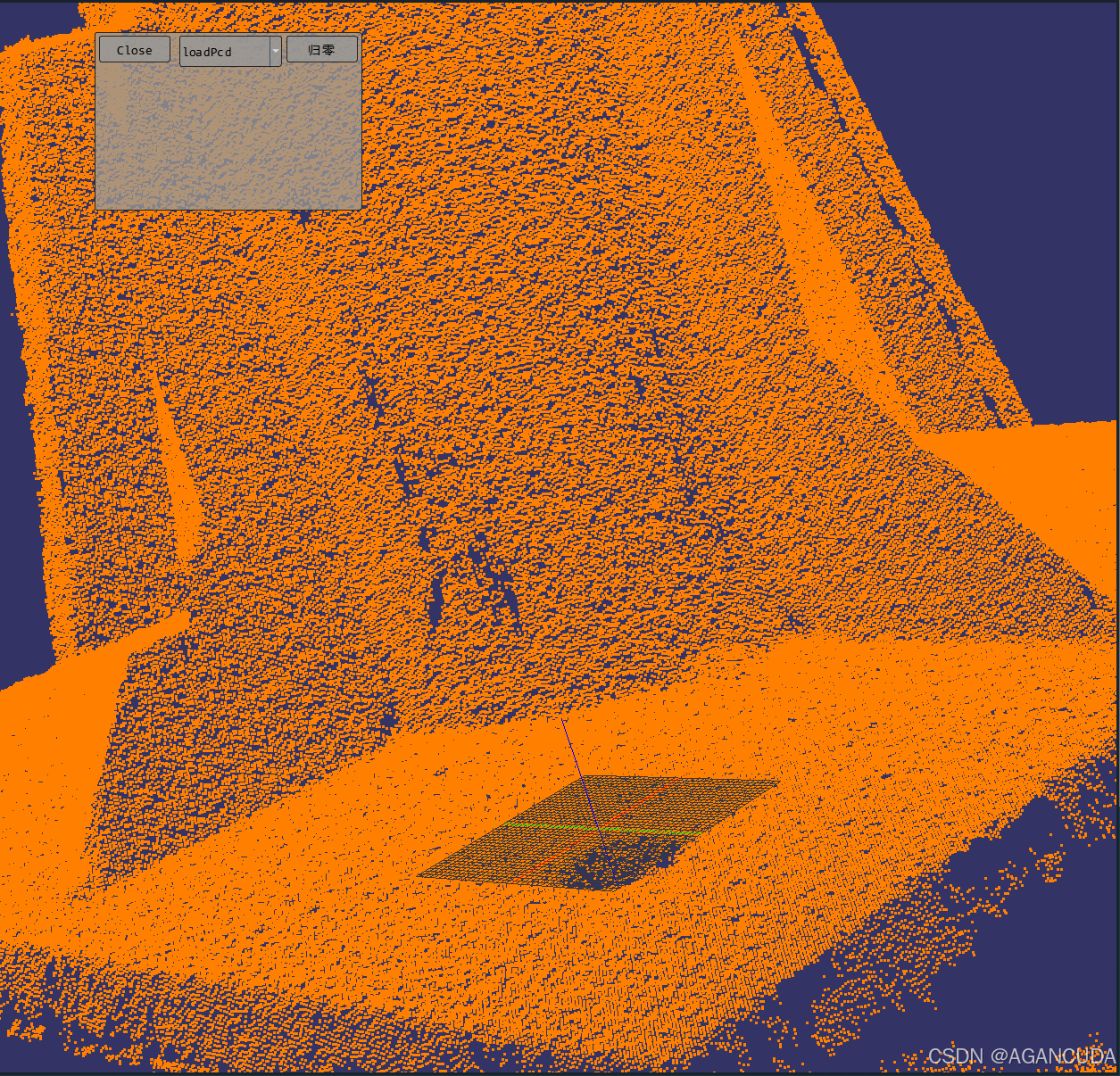
效果是这样的