Safetensors:一种新的用于安全地存储张量(tensors)的简单文件格式 ,与pickle不同,速度很快(零拷贝),由Hugging Face开发。源码地址: https://github.com/huggingface/safetensors ,最新发布版本为v0.7.0,license为Apache-2.0。
安装:
bash
pip install safetensors格式:
-
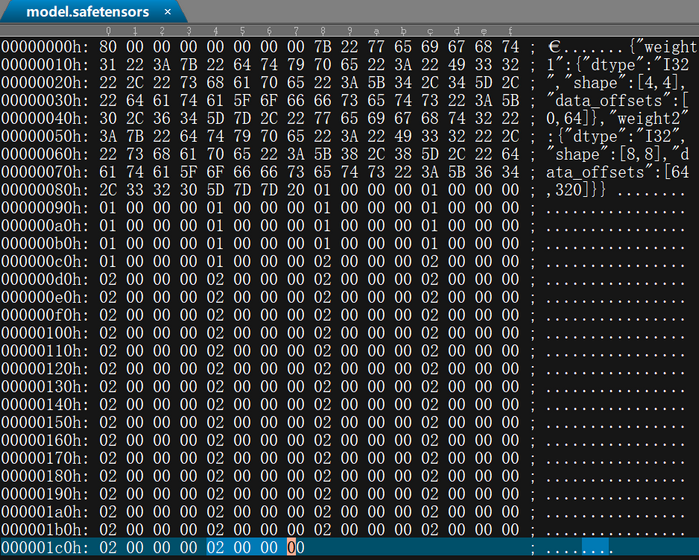
8字节:N,一个无符号小端序(little-endian)64位整数 ,包含头部的大小。
-
N字节:一个表示头部的JSON UTF-8字符串。
头部数据必须以"{"字符(0x7B)开头。
头部数据可以以空格(0x20)填充。
头部是一个字典:{"TENSOR_NAME": {"dtype": "F16", "shape": 1, 16, 256, "data_offsets": BEGIN, END}, "NEXT_TENSOR_NAME": {...}, ...}
data_offsets指向相对于字节缓冲区开头的张量数据位置(不是文件中的绝对位置),BEGIN为起始偏移量,END为后一个偏移量(张量总字节大小 = END - BEGIN)。
允许使用特殊键__metadata__来存储自由格式的字符串到字符串的映射。不允许使用任意JSON格式,所有值都必须是字符串。
- 文件其余部分:字节缓冲区。
注意:
-
不允许重复键。并非所有解析器都支持此规则。
-
通常,JSON子集由serde_json隐式决定。某些特殊情况(例如UTF-8字符串中表示整数、换行符和转义符的特殊方式)可能会在以后进行修改。这样做仅出于安全考虑。
-
不会检查张量值,特别是文件中可能包含NaN和+/-Inf。
-
允许空张量(一维为0的张量)。它们不会在数据缓冲区中存储任何数据,但会在头部保留大小信息。它们实际上并不包含很多值,但由于从传统张量库(例如torch、tensorflow、numpy等)的角度来看,它们是有效的张量,因此被接受。
-
允许零秩(0-rank)张量(形状为\[\]的张量),它们只是一个标量。
-
字节缓冲区必须完全索引,并且不能包含空位。这可以防止创建多语言文件。
-
字节序:小端序。
-
顺序:'C'或行优先。
-
出现了一些小于1字节的数据类型,这使得对齐变得棘手。对于这些数据类型,可能需要使用非传统的API。
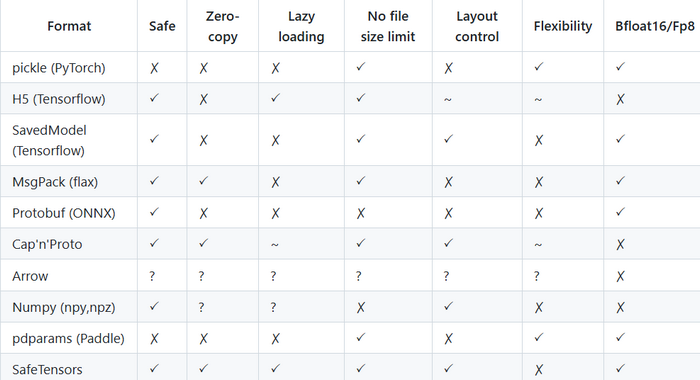
Safetensors与其它文件格式对比,如下图所示:来自于官方截图
save_file函数声明如下:
python
def save_file(
    tensors: Dict[str, torch.Tensor],
    filename: Union[str, os.PathLike],
    metadata: Optional[Dict[str, str]] = None,
):
    """
    Saves a dictionary of tensors into raw bytes in safetensors format.

    Args:
        tensors (`Dict[str, torch.Tensor]`):
            The incoming tensors. Tensors need to be contiguous and dense.
        filename (`str`, or `os.PathLike`):
            The filename we're saving into.
        metadata (`Dict[str, str]`, *optional*, defaults to `None`):
            Optional text only metadata you might want to save in your header.
            For instance it can be useful to specify more about the underlying
            tensors. This is purely informative and does not affect tensor loading.

    Returns:
        `None`
    """
注 :在源码bindings/python/py_src/safetensors目录下,不同的.py文件中如tensorflow.py, torch.py等均有save_file函数的声明,区别在于它们适配不同的深度学习框架中的张量数据和文件格式,如TensorFlow、PyTorch。这些.py文件是Safetensors在不同框架下的接口文件,封装了框架特定的行为,并提供了统一的API供Python使用。如上声明是为PyTorch框架设计的。
load_file函数声明如下:
python
def load_file(
    filename: Union[str, os.PathLike], device: Union[str, int] = "cpu"
) -> Dict[str, torch.Tensor]:
    """
    Loads a safetensors file into torch format.

    Args:
        filename (`str`, or `os.PathLike`):
            The name of the file which contains the tensors
        device (`Union[str, int]`, *optional*, defaults to `cpu`):
            The device where the tensors need to be located after load.
            available options are all regular torch device locations.

    Returns:
        `Dict[str, torch.Tensor]`: dictionary that contains name as key, value as `torch.Tensor`
    """

    result = {}
    with safe_open(filename, framework="pt", device=device) as f:
        for k in f.offset_keys():
            result[k] = f.get_tensor(k)
return result注:
-
同save_file函数一样,为适配不同的深度学习框架,在多个.py文件中存在声明。如上声明是为PyTorch框架设计的。
-
load_file函数内都会调用Safetensors的safe_open类 。load_file函数会一次性加载整个model.safetensors文件到内存;而safe_open类是底层API,可以按需加载,适合大模型。目前safe_open中的framework支持的str有:pt、tf、paddle、np、mlx、flax。
测试代码如下:
python
import colorama
import torch
from safetensors import safe_open
from safetensors.torch import save_file, load_file

def main():
	tensor1 = torch.ones((4, 4), dtype=torch.int32)
	tensor2 = torch.zeros((8, 8), dtype=torch.int32)
	tensor2.fill_(2)
	name = "model.safetensors"

	tensors = {
		"weight1": tensor1,
		"weight2": tensor2
	}
	save_file(tensors, name)

	tensors1 = load_file(name)
	print(f"tensors1: {tensors1}")

	tensors2 = {}
	with safe_open(name, framework="pt", device="cpu") as f:
		for key in f.keys():
			print(f"key: {key}")
			tensors2[key] = f.get_tensor(key)
	print(f"tensors: {tensors2}")

if __name__ == "__main__":
	colorama.init(autoreset=True)

	main()

	print(colorama.Fore.GREEN + "====== execution completed ======")
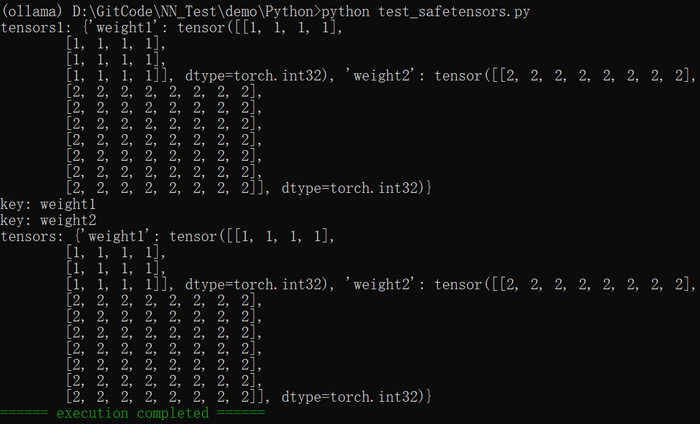
执行结果如下图所示:
使用UE打开model.safetensors结果如下图所示: