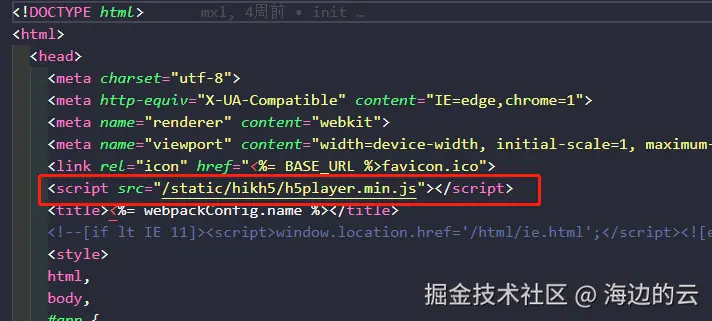
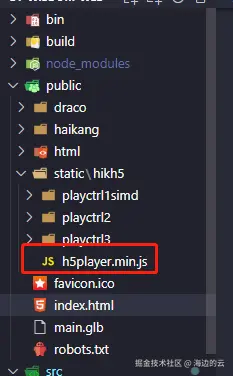
1.在public中放入js
视口大小
css
init() {
  // 设置播放容器的宽高并监听窗口大小变化
  window.addEventListener("resize", () => {
    this.player.JS_Resize();
  });
},
// 媒体查询设置窗口的大小
@media screen and (max-width: 1990px) {
  #player {
    width: calc(100vw - 16px);
    height: calc((90vw - 16px) * 5 / 8);
  }
  #control {
    width: calc(100vw - 10px);
    height: 50px;
    margin-top: -3px;
    position: relative;
    z-index: 1;
    background-color: rgb(62, 61, 66, 0.8);
    display: flex;
    align-items: center;
    justify-content: space-between;
    padding: 0 20px;
  }
}

@media screen and (min-width: 750px) {
  #player {
    width: calc(70vw - 8px);
    height: calc((70vw - 8px) * 5 / 8);
  }
  #control {
    width: calc(70vw - 10px);
    height: 50px;
    background-color: rgb(62, 61, 66, 0.8);
    margin-top: -3px;
    position: relative;
    z-index: 1;
    display: flex;
    align-items: center;
    justify-content: space-between;
    padding: 0 20px;
  }
}
监控点树形列表
ini
 // 查询区域列表v2
    getNodesByParams() {
      this.forwardParams.requestMethod = "post";
      this.forwardParams.url =
        process.env.VUE_APP_BASE_URL + "/api/irds/v2/region/nodesByParams";
      this.forwardParams.paramType = "body";
      this.forwardParams.params = {
        resourceType: "camera",
        pageNo: "1",
        pageSize: "100",
      };
      getHik(this.forwardParams).then((res) => {
        const jsonStr = res.data;
        const data = JSON.parse(jsonStr);
        console.log("区域列表", data.data.list);
        const nodeList = data.data.list;
        this.getCameraOnline(nodeList);
      });
    },

    // 获取监控点列表
    getCameraOnline(nodeList) {
      this.forwardParams.requestMethod = "post";
      this.forwardParams.url =
        process.env.VUE_APP_BASE_URL + "/api/resource/v2/camera/search";
      this.forwardParams.paramType = "body";
      this.forwardParams.params = {
        pageNo: "1",
        pageSize: "100",
      };
      getHik(this.forwardParams).then((res) => {
        const jsonStr = res.data;
        const data = JSON.parse(jsonStr);
        if (data.data) {
          // console.log("视频列表", data.data.list);
          const cameraList = data.data.list;

          const newCodeArray = cameraList.map((camera) => ({
            name: camera.name,
            parentIndexCode: camera.regionIndexCode,
            indexCode: camera.indexCode,
            cameraType: camera.cameraType,
          }));

          const tree = [...newCodeArray, ...nodeList];
          this.treeData = this.handleTree(tree, "indexCode", "parentIndexCode");
          // console.log("treeData", this.treeData);
        }
      });
    },
获取视频流
kotlin
 handleNodeClick(data) {
       this.count++;

      if (this.count % 2 === 0) {
        // 偶数次点击的逻辑
        console.log('偶数次点击');
         console.log("data", data);
        // 球机弹出云台控制卡片
      if (data.cameraType === 2) {
        this.allowClick = true;
        this.customTreeStyle.minHeight = "55%";
      } else {
        this.allowClick = false;
        this.customTreeStyle.minHeight = "95%";
      }
      //码流类型,0:主码流 1:子码流 2:第三码流 参数不填,默认为主码流
      if (this.splitNum === 3) {
        this.streamType = 1;
      } else {
        this.streamType = 0;
      }

      this.cameraIndexCode = data.indexCode;
      this.forwardParams.requestMethod = "post";
      this.forwardParams.url =
        process.env.VUE_APP_BASE_URL + "/api/video/v2/cameras/previewURLs";
      this.forwardParams.paramType = "body";
      this.forwardParams.params = {
        cameraIndexCode: data.indexCode,
        streamType: this.streamType,
        protocol: "ws",
        transmode: 1,
        expand: "transcode=0",
        streamform: "ps",
      };
      getHik(this.forwardParams).then((res) => {
        const jsonStr = res.data;
        const data = JSON.parse(jsonStr);
        console.log("视频流", data.data.url);
        const url = data.data.url;
        this.urls.realplay = url;
        this.realplay(); // 预览视频方法
      });
      }

    },
云台控制
ini
 // 云台操作
    controlling(command) {

      this.forwardParams.requestMethod = "post";
      this.forwardParams.url =
        process.env.VUE_APP_BASE_URL + "/api/video/v1/ptzs/controlling";
      this.forwardParams.paramType = "body";
      this.forwardParams.params = {
        cameraIndexCode: this.cameraIndexCode,
        action: 0,
        command: command,
        presetIndex: 20,
      };
      getHik(this.forwardParams).then((res) => {
        const jsonStr = res.data;
        const data = JSON.parse(jsonStr);
        console.log("云台操作", data.msg);
      });
    },
分屏暂停切窗口 文档中写