项目使用electron-forge 打包工具,但是不能实现新版本安装之后自动打开软件。 需要使用electron-builder。
在项目基础上,增加一下代码。
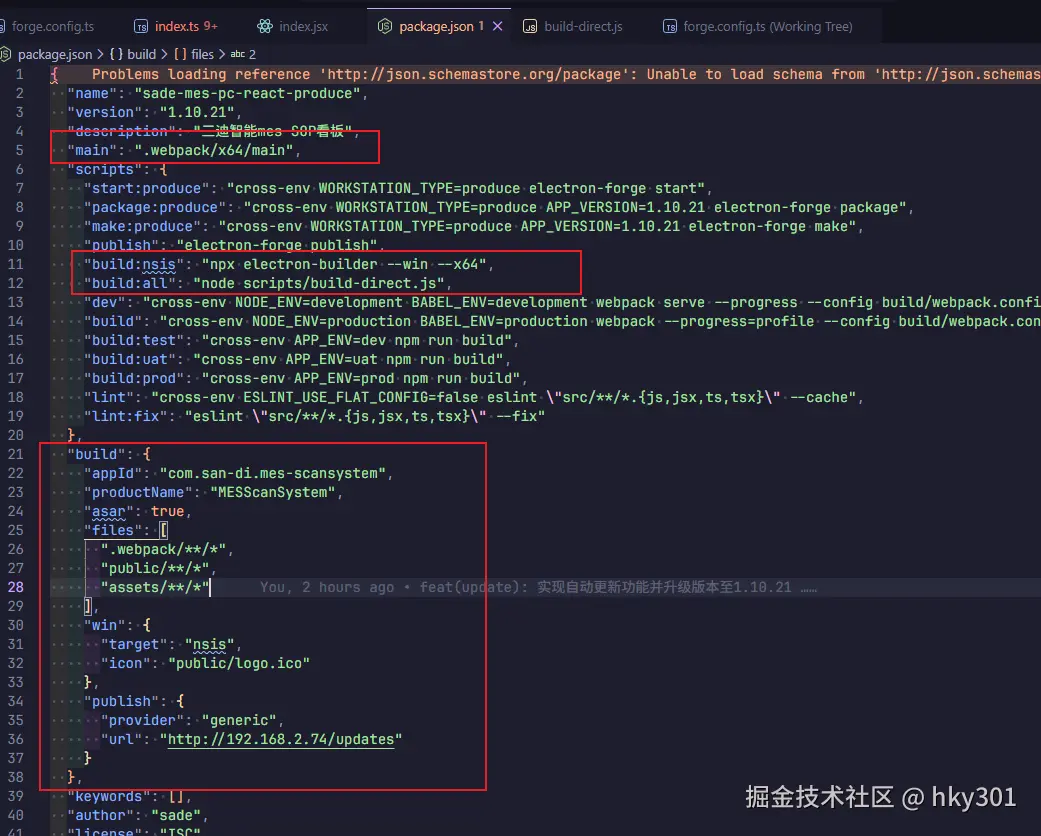
创建build-direct.js
js
// scripts/build-direct.js
const { spawn } = require('child_process')
const fs = require('fs')
const path = require('path')

const WEBPACK_DIR = path.join(__dirname, '..', '.webpack', 'x64')
const MAIN_FILE = path.join(WEBPACK_DIR, 'main')
const RENDERER_DIR = path.join(WEBPACK_DIR, 'renderer', 'main_window')

console.log('🚀 开始构建:Forge → electron-builder (直接使用 .webpack)')

// 启动 Forge package,但不因它失败而中断
const forge = spawn('npm', ['run', 'package:produce'], {
  stdio: 'inherit',
  shell: true
})

let forgeExited = false
// let forgeSuccess = false

forge.on('close', (code) => {
  forgeExited = true
  // forgeSuccess = code === 0
  console.log(`📦 Forge 进程退出,code=${code}`)
  checkAndBuild()
})

// 等待最多 90 秒,只要文件存在就继续
const maxWait = 90000
const startTime = Date.now()

function checkAndBuild() {
  const elapsed = Date.now() - startTime
  if (!forgeExited && elapsed < maxWait) {
    // 还没超时,稍后重试
    setTimeout(checkAndBuild, 2000)
    return
  }

  // 检查 .webpack 是否完整
  const ready =
    fs.existsSync(MAIN_FILE) &&
    fs.existsSync(path.join(RENDERER_DIR, 'index.html')) &&
    fs.existsSync(path.join(RENDERER_DIR, 'preload.js'))

  if (ready) {
    console.log('✅ .webpack/x64/ 已就绪,继续执行 electron-builder...')
    runElectronBuilder()
  } else {
    console.error('❌ .webpack/x64/ 未生成或不完整,无法继续')
    process.exit(1)
  }
}

function runElectronBuilder() {
  const { execSync } = require('child_process')
  try {
    execSync('npx electron-builder --win --x64', {
      stdio: 'inherit',
      cwd: path.join(__dirname, '..')
    })
    console.log('\n🎉 构建成功!')
  } catch (err) {
    console.error('💥 electron-builder 失败', err)
    process.exit(1)
  }
}
electron 入口文件
ts
import { app, BrowserWindow, globalShortcut, ipcMain, Menu, session } from 'electron'
import { autoUpdater } from 'electron-updater'
import os from 'os'
import path from 'path'
import winston from 'winston'
require('winston-daily-rotate-file')
// This allows TypeScript to pick up the magic constants that's auto-generated by Forge's Webpack
// plugin that tells the Electron app where to look for the Webpack-bundled app code (depending on
// whether you're running in development or production).
declare const MAIN_WINDOW_WEBPACK_ENTRY: string
declare const MAIN_WINDOW_PRELOAD_WEBPACK_ENTRY: string

// ========================================================================
// 核心:自定义格式化工具,用于解析堆栈并添加代码位置
// ========================================================================
// const addSourceLocation = winston.format((info) => {
//   const stack = new Error().stack.split('\n')

//   // 从堆栈信息中找到调用logger的那一行代码
//   // 我们需要跳过winston内部的调用堆栈
//   let callerInfo = ''
//   for (let i = 1; i < stack.length; i++) {
//     // 过滤掉winston模块自身和Node.js内部模块的堆栈信息
//     if (!stack[i].includes('node_modules/winston') && !stack[i].includes('node:internal')) {
//       callerInfo = stack[i].trim()
//       break
//     }
//   }

//   // 从堆栈行中提取文件名和行号 (例如: /path/to/your/file.js:123:45)
//   const match = /\((.*):(\d+):\d+\)$/.exec(callerInfo) || /at (.*):(\d+):\d+$/.exec(callerInfo)
//   if (match) {
//     const [, filePath, line] = match
//     // 我们只取文件名,而不是完整的绝对路径,让日志更整洁
//     info.location = `${path.basename(filePath)}:${line}`
//   }

//   return info
// })

const logDir = path.join(app.getPath('userData'), 'logs')

const dailyRotateFileTransport = new winston.transports.DailyRotateFile({
  level: 'info',
  filename: path.join(logDir, '%DATE%-app.log'), // %DATE% 会被替换为日期
  datePattern: 'YYYY-MM-DD', // 日期格式
  zippedArchive: true, // 归档旧日志时进行压缩
  maxSize: '20m', // 单个日志文件最大尺寸
  maxFiles: '14d' // 最多保留14天的日志文件
})

// 日志格式规范 文件名:行号|函数名|[接口地址]|数据
// demo: log.info(`index:88|reportStatus|${JSON.stringify({'navigator.onLine': false,networkStatus: true})}`)
const logger = winston.createLogger({
  format: winston.format.combine(
    // winston.format.colorize(),
    winston.format.timestamp({
      format: 'YYYY-MM-DD HH:mm:ss'
    }),
    // addSourceLocation(), // 应用我们自定义的工具
    // winston.format.printf((info) => `->${info.timestamp}|${info.level}|${info.location}|${info.message}`)
    winston.format.printf((info) => `->${info.timestamp}|${info.level}|${info.message}`)
  ),
  transports: [new winston.transports.Console(), dailyRotateFileTransport]
})

// Handle creating/removing shortcuts on Windows when installing/uninstalling.
if (require('electron-squirrel-startup')) {
  app.quit()
}

// 设置开机自启动
const setAutoLaunch = () => {
  app.setLoginItemSettings({
    openAtLogin: true, // 启用开机自启动
    path: process.execPath, // 应用程序的可执行文件路径
    // args: ['--autostart'],     // 启动时的命令行参数
    // enabled: true,             // 启用此登录项
    name: '三迪智能mes' // 应用名称
    // openAsHidden: true,        // 启动时隐藏窗口
  })
}

// ========================
// 自动更新 - 定时检查逻辑
// ========================
let updateCheckInterval: NodeJS.Timeout | null = null

let mainWindow: BrowserWindow | null = null

const createWindow = (): void => {
  session.defaultSession.webRequest.onHeadersReceived((details, callback) => {
    callback({
      responseHeaders: {
        ...details.responseHeaders,
        'Content-Security-Policy': [
          "default-src 'self'; script-src 'self' 'unsafe-inline' 'unsafe-eval'; connect-src *; style-src 'self' 'unsafe-inline'; img-src 'self' data:"
        ]
      }
    })
  })

  // 设置开机自启动
  setAutoLaunch()

  ipcMain.handle('get-local-ip', () => {
    const networkInterfaces = os.networkInterfaces()
    for (const name of Object.keys(networkInterfaces)) {
      for (const net of networkInterfaces[name]!) {
        // Skip over non-IPv4 and internal (i.e. 127.0.0.1) addresses
        if (net.family === 'IPv4' && !net.internal) {
          return net.address // 找到并返回第一个 IPv4 地址
        }
      }
    }
    return '127.0.0.1' // 如果没找到,返回默认地址
  })

  // 监听来自渲染进程的'log'事件
  ipcMain.on('log', (event, { level, message }) => {
    if (logger[level]) {
      logger[level](message)
    } else {
      logger.info(message) // 如果级别不存在,默认为info
    }
  })

  // ipcMain.handle('get-workstation-type', () => {
  //   return process.env.WORKSTATION_TYPE;
  // })

  // Create the browser window.
  mainWindow = new BrowserWindow({
    title: 'MES扫码系统',
    width: 1600,
    height: 700,
    alwaysOnTop: true, // 添加这一行来设置窗口始终置顶
    fullscreen: true, // <-- 关键设置:启动时即全屏
    frame: false, // 无边框
    webPreferences: {
      contextIsolation: true, // 启用上下文隔离,隔离预加载脚本和前端页面,建立安全桥梁
      nodeIntegration: false, // 决定了渲染进程能否直接使用 Node.js 的功能
      preload: MAIN_WINDOW_PRELOAD_WEBPACK_ENTRY
    }
  })

  // ---------------------> 开始添加自定义快捷键 <---------------------

  // 定义一个快捷键,'CommandOrControl' 会在 macOS 上映射为 Command,在 Windows/Linux 上映射为 Control
  const customShortcut = 'CommandOrControl+F12'

  // 注册全局快捷键
  const ret = globalShortcut.register(customShortcut, () => {
    console.log(`快捷键 "${customShortcut}" 被按下`)

    // 检查窗口是否存在且可见
    if (mainWindow) {
      // 使用 toggleDevTools() 来打开或关闭开发者工具
      mainWindow.webContents.toggleDevTools()
    }
  })

  if (!ret) {
    console.log('快捷键注册失败')
  }

  // 检查快捷键是否注册成功
  console.log(`快捷键 "${customShortcut}" 是否注册成功: ${globalShortcut.isRegistered(customShortcut)}`)

  // ---------------------> 自定义快捷键添加结束 <---------------------

  // 监听来自渲染器进程的 最小化窗口
  ipcMain.on('minimize-window', () => {
    mainWindow.minimize()
  })

  // 监听来自渲染器进程的 'close-app' 消息
  ipcMain.on('close-app', () => {
    app.quit()
  })

  const menu = Menu.buildFromTemplate([])
  Menu.setApplicationMenu(menu)

  // and load the index.html of the app.
  mainWindow.loadURL(MAIN_WINDOW_WEBPACK_ENTRY)

  if (process.env.NODE_ENV === 'development') {
    // Open the DevTools.
    mainWindow.webContents.openDevTools()
  }

  ipcMain.on('quit-and-install', () => {
    autoUpdater.quitAndInstall(true, true) // 立即退出并安装
  })
}

// ===== 自动更新逻辑(Squirrel.Windows 专用) =====
if (app.isPackaged) {
  const server = 'http://192.168.2.74' // 内网更新服务器
  const url = `${server}/updates` // 必须以 /updates 结尾

  // 设置更新地址(Squirrel 要求格式为 RELEASES 文件所在目录)
  autoUpdater.setFeedURL(url)
}

const startAutoUpdateCheck = () => {
  // 避免重复启动
  if (updateCheckInterval) {
    return
  }

  const checkForUpdatesSilently = () => {
    if (!app.isPackaged) {
      return
    } // 开发模式不检查

    logger.info('开始定时检查更新...')
    autoUpdater.checkForUpdatesAndNotify().catch((err) => {
      logger.error(`自动更新检查失败: ${err.message}`)
    })
  }

  // 立即检查一次
  checkForUpdatesSilently()

  // 每 30 分钟检查一次(30 * 60 * 1000 = 1,800,000 ms)
  const INTERVAL_MS = 10 * 1000
  updateCheckInterval = setInterval(checkForUpdatesSilently, INTERVAL_MS)
}

// ===== Squirrel 更新事件监听 =====
autoUpdater.on('error', (error) => {
  console.error('[Update] Error:', error.message)
})

autoUpdater.on('checking-for-update', () => {
  console.log('[Update] Checking for update...')
})

autoUpdater.on('update-available', () => {
  console.log('[Update] Update available.')
  // 可通过 IPC 通知渲染进程
  mainWindow?.webContents.send('update-available')
})

autoUpdater.on('update-not-available', () => {
  console.log('[Update] Update not available.')
  mainWindow?.webContents.send('update-not-available')
})

autoUpdater.on('update-downloaded', (info) => {
  logger.info(`[AutoUpdate] 新版本已下载完成: ${info.version},即将自动重启安装...`)

  // 关键:静默安装并自动重启
  setImmediate(() => {
    autoUpdater.quitAndInstall(true, true)
  })
})

// This method will be called when Electron has finished
// initialization and is ready to create browser windows.
// Some APIs can only be used after this event occurs.
app.on('ready', () => {
  createWindow()
  // 启动自动更新检查(传入 mainWindow 可选,这里我们不需要)
  startAutoUpdateCheck()
})

// 在应用退出前,注销所有快捷键,这是一个好习惯
app.on('will-quit', () => {
  globalShortcut.unregisterAll()
})

// Quit when all windows are closed, except on macOS. There, it's common
// for applications and their menu bar to stay active until the user quits
// explicitly with Cmd + Q.
app.on('window-all-closed', () => {
  if (process.platform !== 'darwin') {
    app.quit()
  }
})

app.on('activate', () => {
  // On OS X it's common to re-create a window in the app when the
  // dock icon is clicked and there are no other windows open.
  if (BrowserWindow.getAllWindows().length === 0) {
    createWindow()
  }
})

// In this file you can include the rest of your app's specific main process
// code. You can also put them in separate files and import them here.