效果图
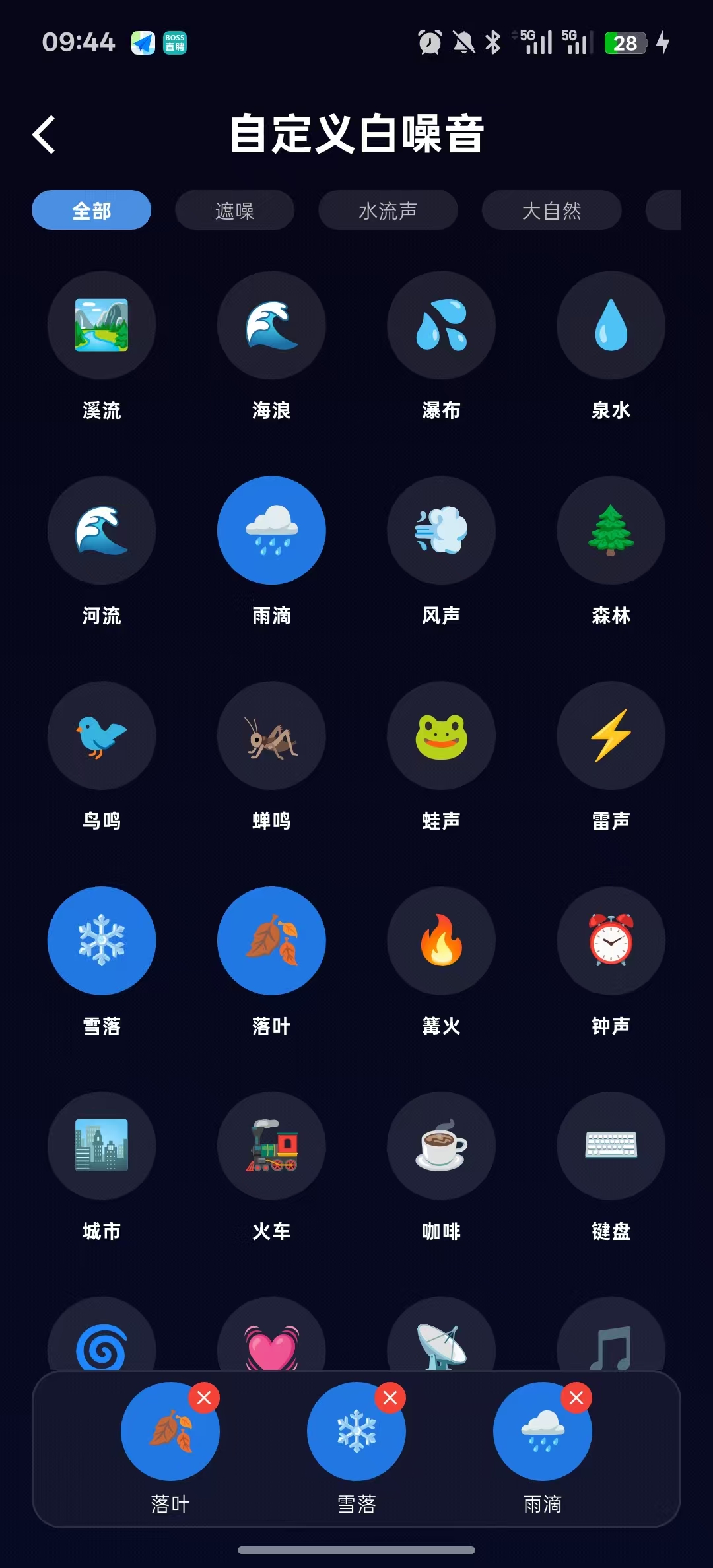
详细解释
这页面有横向导航栏供用户选择,左右滑动查看所有分类,可以选择三个子项,当已选满3个时,再选择新的音效会自动 替换最早选择的那一个。
哈希码
1.概念:类似身份证号码,在Dart中,所有对象都继承自 Object 类 ,而 Object 类里就有一个默认的 hashCode 属性。所以每个对象都有一个哈希码。
2.默认的哈希码是怎么生成的?
Dart
// Dart的默认hashCode生成(简化理解):
int get hashCode {
  return 基于内存地址的随机数;
}
3.作用:一般用来比较两个对象是否相同
数据结构
Dart
WhiteNoiseItem {
  String name;      // 白噪音名称
  String icon;      // 图标emoji
  String category;  // 所属分类
}
数据流向
Dart
静态数据 (_whiteNoiseItems)
    ↓
用户选择分类 (_selectedCategoryIndex)
    ↓
筛选显示 (_getFilteredItems())
    ↓
用户选择/取消 (_selectedNoises)
    ↓
UI更新 (setState)
业务逻辑层
Dart
1. 选择逻辑
最大支持选择3个白噪音

采用循环替换策略:超过3个时替换最早选择的一项

点击已选项会移除

2. 分类筛选
"全部"显示所有数据

其他分类显示对应数据

使用List.where()进行数据筛选

3. 比较去重
分层结构
Dart
CustomWhiteNoise (StatefulWidget)
├── 数据层 (Model)
│   └── WhiteNoiseItem
├── 业务逻辑层 (ViewModel)
│   ├── _getFilteredItems()
│   ├── _onNoiseSelected()
│   └── _removeSelectedNoise()
├── 视图层 (View)
│   ├── _buildCategoryTabs()
│   ├── _buildWhiteNoiseGrid()
│   └── _buildSelectedNoisesDisplay()
└── 组件层 (Components)
    ├── _buildNoiseItem()
    ├── _buildSelectedNoiseItem()
    └── _buildEmptySlot()
实现步骤
1.定义变量:分类标签组、标记用户选中的子项、存储选中的白噪音列表
Dart
final List<String> _categories = ['全部', '遮噪', '水流声', '大自然', '生活',"冥想"];// 分类标签数据

int _selectedCategoryIndex = 0; //用户选中的目录子项,默认选中全部

// 选中的白噪音列表(最多3个)
List<WhiteNoiseItem> _selectedNoises = [];
2.定义白噪音数据模型
Dart
class WhiteNoiseItem {
  final String name; //名称
  final String icon; //图标
  final String category; //所属分类

  //构造函数
  WhiteNoiseItem({
    required this.name,
    required this.icon,
    required this.category,
  });

  ///以下方法防止重复添加(因为白噪音项目最多选中3个),
  @override
  bool operator ==(Object other) => //两个子项是否相等 (operator==表示我要重新定义等于号)
      identical(this, other) || //情况1:完全是同一个对象
          other is WhiteNoiseItem && runtimeType == other.runtimeType && name == other.name; //情况二:都是WhiteNoiseItem类型,且类型完全相同,名字完全相同,则认定是统一对象

  @override
  int get hashCode => name.hashCode; //这个对象的哈希码等于它的名字的哈希码
}
3.准备网格列表数据:白噪音数据
Dart
  // 准备白噪音数据
  final List<WhiteNoiseItem> _whiteNoiseItems = [

    // 水流声类别
    WhiteNoiseItem(name: '溪流', icon: '🏞️', category: '水流声'),
    WhiteNoiseItem(name: '海浪', icon: '🌊', category: '水流声'),
    WhiteNoiseItem(name: '瀑布', icon: '💦', category: '水流声'),
    WhiteNoiseItem(name: '泉水', icon: '💧', category: '水流声'),
    WhiteNoiseItem(name: '河流', icon: '🌊', category: '水流声'),
    WhiteNoiseItem(name: '雨滴', icon: '🌧️', category: '水流声'),

    // 大自然类别
    WhiteNoiseItem(name: '风声', icon: '💨', category: '大自然'),
    WhiteNoiseItem(name: '森林', icon: '🌲', category: '大自然'),
    WhiteNoiseItem(name: '鸟鸣', icon: '🐦', category: '大自然'),
    WhiteNoiseItem(name: '蝉鸣', icon: '🦗', category: '大自然'),
    WhiteNoiseItem(name: '蛙声', icon: '🐸', category: '大自然'),
    WhiteNoiseItem(name: '雷声', icon: '⚡', category: '大自然'),
    WhiteNoiseItem(name: '雪落', icon: '❄️', category: '大自然'),
    WhiteNoiseItem(name: '落叶', icon: '🍂', category: '大自然'),

    // 生活类别
    WhiteNoiseItem(name: '篝火', icon: '🔥', category: '生活'),
    WhiteNoiseItem(name: '钟声', icon: '⏰', category: '生活'),
    WhiteNoiseItem(name: '城市', icon: '🏙️', category: '生活'),
    WhiteNoiseItem(name: '火车', icon: '🚂', category: '生活'),
    WhiteNoiseItem(name: '咖啡', icon: '☕', category: '生活'),
    WhiteNoiseItem(name: '键盘', icon: '⌨️', category: '生活'),
    WhiteNoiseItem(name: '风扇', icon: '🌀', category: '生活'),
    WhiteNoiseItem(name: '心跳', icon: '💓', category: '生活'),

    // 遮噪类别
    WhiteNoiseItem(name: '白噪', icon: '📡', category: '遮噪'),
    WhiteNoiseItem(name: '粉噪', icon: '🎵', category: '遮噪'),
    WhiteNoiseItem(name: '棕噪', icon: '🔊', category: '遮噪'),
    WhiteNoiseItem(name: '紫噪', icon: '🎶', category: '遮噪'),
    WhiteNoiseItem(name: '灰噪', icon: '🔇', category: '遮噪'),

    // 冥想类别
    WhiteNoiseItem(name: '禅钟', icon: '🛎️', category: '冥想'),
    WhiteNoiseItem(name: '钵音', icon: '🥣', category: '冥想'),
    WhiteNoiseItem(name: '经诵', icon: '📿', category: '冥想'),
    WhiteNoiseItem(name: '风铃', icon: '🎐', category: '冥想'),
    WhiteNoiseItem(name: '静心', icon: '🧘', category: '冥想'),
    WhiteNoiseItem(name: '呼吸', icon: '🌬️', category: '冥想'),


    // 动物声音
    WhiteNoiseItem(name: '猫咪', icon: '🐱', category: '生活'),
    WhiteNoiseItem(name: '狗狗', icon: '🐶', category: '生活'),
    WhiteNoiseItem(name: '鸟儿', icon: '🐦', category: '大自然'),
    WhiteNoiseItem(name: '海豚', icon: '🐬', category: '大自然'),
    WhiteNoiseItem(name: '鲸鱼', icon: '🐋', category: '大自然'),
    WhiteNoiseItem(name: '狗吠', icon: '🐕', category: '生活'),

    // 天气声音
    WhiteNoiseItem(name: '暴雨', icon: '⛈️', category: '大自然'),
    WhiteNoiseItem(name: '细雨', icon: '🌦️', category: '大自然'),
    WhiteNoiseItem(name: '风雪', icon: '🌨️', category: '大自然'),
    WhiteNoiseItem(name: '晴天', icon: '☀️', category: '大自然'),

    // 乐器声音
    WhiteNoiseItem(name: '钢琴', icon: '🎹', category: '生活'),
    WhiteNoiseItem(name: '吉他', icon: '🎸', category: '生活'),
    WhiteNoiseItem(name: '笛子', icon: '🎵', category: '生活'),
    WhiteNoiseItem(name: '鼓声', icon: '🥁', category: '生活'),

  ];
4.构建页面架构,渐变的底面、分类的标签栏、白噪音网格列表
Dart
     Container(
        width: double.infinity,
        height: double.infinity,
        decoration: const BoxDecoration(
          gradient: LinearGradient(
            begin: Alignment.topCenter,
            end: Alignment.bottomCenter,
            colors: [
              Color(0xFF060618),
              Color(0xFF070A23),
            ],
          ),
        ),
        child: Column(
          children: [

            // 分类标签栏
            _buildCategoryTabs(),
            const SizedBox(height: 20),

            // 白噪音网格列表
            Expanded(
              child: _buildWhiteNoiseGrid(),
            ),

          ],
        ),
      ),
5.构建分类标签栏:设定高为20,宽为无限大的区域里面设置横向滚动列表
Dart
 Widget _buildCategoryTabs() {
    return Container( //构建标签栏的整个区域
      height: 20,
      padding: const EdgeInsets.symmetric(horizontal: 16),
      child: ListView.builder(
        scrollDirection: Axis.horizontal, //横向滚动
        itemCount: _categories.length, //子项长度
        itemBuilder: (context, index) { //自动传入子项构建
          final isSelected = _selectedCategoryIndex == index; //判断当前标签是否选中
          return Container(
            margin: const EdgeInsets.only(right: 12),
            child: GestureDetector(
              onTap: () {
                setState(() {
                  _selectedCategoryIndex = index; //更新选中状态,比如用户选中第二项的时候,这个列表的UI将重新构建,绘制选中第二项的UI
                });
              },
              child: Container( //列表的单个子项UI
                padding: const EdgeInsets.symmetric(horizontal: 20),
                decoration: BoxDecoration(
                  color: isSelected ? const Color(0xFF4A90E2) :  Colors.white.withOpacity(0.1),
                  borderRadius: BorderRadius.circular(10),
                ),
                child: Center(
                  child: Text(
                    _categories[index], //显示分类名称
                    style: TextStyle(
                      color: isSelected ? Colors.white : Colors.white.withOpacity(0.7),
                      fontSize: 10,
                      fontWeight: isSelected ? FontWeight.bold : FontWeight.normal,
                    ),
                  ),
                ),
              ),
            ),
          );
        },
      ),
    );
}注用户点击其他子项的数据流
Dart
1. 用户点击第二个标签(index = 1)
2. setState被调用
3. _selectedCategoryIndex 的值从 0 → 1
4. Flutter标记此Widget为"脏"(需要重建)
5. 框架调度重建任务
6. _buildCategoryTabs() 方法被重新调用
7. ListView.builder 重新构建所有标签项
8. 每个标签项根据新的 _selectedCategoryIndex 判断选中状态
6.获取筛选后的音效列表
Dart
  List<WhiteNoiseItem> _getFilteredItems() {
    // 1. 先获取当前选中的分类索引
    final selectedIndex = _selectedCategoryIndex;

    // 2. 判断是否选择了"全部"分类
    final isAllSelected = selectedIndex == 0;

    // 3. 如果选择了"全部",直接使用所有数据
    if (isAllSelected) {
      return _whiteNoiseItems;
    }
    // 4. 否则,筛选对应分类的数据
    else {
      // 获取选中的分类名称
      final selectedCategoryName = _categories[selectedIndex];

      // 筛选数据:只保留分类匹配的项
      return _whiteNoiseItems.where((item) {  //where()筛选方法,(item)列表中的每个音效
        return item.category == selectedCategoryName; //子项的分类等于选中的分类
      }).toList(); //.toList 把筛选出来的东西打包成列表
    }
  }
7.构建白噪音网格列表
Dart
Widget _buildWhiteNoiseGrid() {
    //获取筛选后的列表
    final filteredItems = _getFilteredItems();

    return Padding(
      padding: const EdgeInsets.symmetric(horizontal: 16),
      child: Column(
        children: [

          // 网格列表
          Expanded(
            child: GridView.builder(
              gridDelegate: const SliverGridDelegateWithFixedCrossAxisCount(
                crossAxisCount: 4, //每行显示4个
                crossAxisSpacing: 15, //列间距
                mainAxisSpacing: 25, //行间距
                childAspectRatio: 0.9, //子项宽高比
              ),
              itemCount: filteredItems.length, //动态数据长度
              itemBuilder: (context, index) { //构建每个网格项
                final item = filteredItems[index];  //获取当前目录子项的数据
                final isSelected = _selectedNoises.contains(item); //检查是否已经被选中:检查当前这个音效(item),是否在已选音效列表(_selectedNoises)中,根据返回的bool值UI做相应的更改

                return _buildNoiseItem(item, index, isSelected); //传入、下标、选中状态
              },
            ),
          ),

          // 选中的白噪音显示区域
          if (_selectedNoises.isNotEmpty) _buildSelectedNoisesDisplay(),
        ],
      ),
    );
}注contains是怎么跟已经点击的子项做比较的
Dart
==========================调用链=========================
// 你写的代码:
_selectedNoises.contains(item)

// Dart内部实际上执行:
_selectedNoises.contains(item) {
  // 内部会调用:
  item.hashCode;           // ⭐ 调用你的hashCode getter
  item == otherItem;       // ⭐ 调用你的operator==方法
}

规定:所有"比较两个对象是否相等"的操作,必须使用对象的==方法


=======================完整的调用链=====================

用户操作
    ↓
_selectedNoises.contains(item)  // 你写的代码
    ↓
Dart的List.contains()方法执行
    ↓
内部循环:for each element in list
    ↓
调用:element == item  ⭐ 这里调用你的operator==
    ↓
你的operator==方法执行:比较name
    ↓
返回比较结果
    ↓
contains() 返回 true/false
8.构建单个白噪音项
Dart
  Widget _buildNoiseItem(WhiteNoiseItem item, int index, bool isSelected) {
    return GestureDetector(
      //子项点击事件
      onTap: () {
        _onNoiseSelected(item, isSelected);
      },
      child: Column(
        mainAxisAlignment: MainAxisAlignment.center,
        children: [
          // 图标
          Container(
            width: 55,
            height: 55,
            decoration: BoxDecoration(
              color: isSelected ? const Color(0xFF2178E3) : Colors.white.withOpacity(0.1),
              borderRadius: BorderRadius.circular(30),
            ),
            child: Center(
              child: Text(
                item.icon,
                style: const TextStyle(fontSize: 24),
              ),
            ),
          ),
          const SizedBox(height: 8),

          // 名称
          Text(
            item.name,
            style: TextStyle(
              color: Colors.white,
              fontSize: 10,
              fontWeight: FontWeight.bold,
            ),
          ),
        ],
      ),
    );
  }
9.白噪音选中处理
Dart
  void _onNoiseSelected(WhiteNoiseItem item, bool isSelected) {
    setState(() {
      if (isSelected) {
        // 如果已经选中,则移除
        _selectedNoises.remove(item);
        print('⏹️ 移除白噪音: ${item.name}');
      } else {
        // 如果未选中,则添加(循环替换逻辑)
        if (_selectedNoises.length < 3) {
          // 如果还有空位,直接添加
          _selectedNoises.add(item);
          print('🎵 添加白噪音: ${item.name}');
        } else {
          // 如果已满3个,替换第一个
          final removedItem = _selectedNoises.removeAt(0);
          _selectedNoises.add(item);
          print('🔄 替换白噪音: ${removedItem.name} -> ${item.name}');
        }
      }
    });

    // 播放/停止逻辑
    if (!isSelected) {
      print('▶️ 开始播放: ${item.name}');
      // TODO: 实现播放逻辑
    } else {
      print('⏹️ 停止播放: ${item.name}');
      // TODO: 实现停止播放逻辑
    }
}注为什么总是能替换最早的那个子项
Dart
=====================removeAt============================

// 初始:_selectedNoises = [A, B, C]
//         索引:0(A), 1(B), 2(C)

_selectedNoises.removeAt(0);
// 移除索引0的元素(A)
// 结果:_selectedNoises = [B, C]
// B自动变成索引0,C变成索引1

====================替换完整流程===========================
// 初始状态(按添加顺序):
_selectedNoises = [
  '溪流',  // 最早添加(索引0) ⭐ 会被替换
  '海浪',  // 第二个添加(索引1)
  '森林'   // 最新添加(索引2)
];

// 用户点击第4个音效:'鸟鸣'
if (_selectedNoises.length < 3) {
  // 不满3个 → 直接添加
} else {
  // 已满3个 → 替换第一个
  final removedItem = _selectedNoises.removeAt(0);  // 移除'溪流'
  _selectedNoises.add('鸟鸣');  // 添加'鸟鸣'
}

// 结果:
_selectedNoises = ['海浪', '森林', '鸟鸣'];
// '溪流'被移除,'鸟鸣'加在最后
10.构建选中的白噪音显示区域
Dart
  Widget _buildSelectedNoisesDisplay() {
    return Container(
      height: 80,
      margin: const EdgeInsets.only(bottom: 20),
      decoration: BoxDecoration(
        color: Colors.white.withOpacity(0.05),
        borderRadius: BorderRadius.circular(15),
        border: Border.all(color: Colors.white.withOpacity(0.1)),
      ),
      child: Row(
        mainAxisAlignment: MainAxisAlignment.spaceEvenly,
        children: [
          // 显示最多3个选中的白噪音
          for (int i = 0; i < 3; i++) //i=0,1,2
            i < _selectedNoises.length //检查这个位置有没有子项
                ? _buildSelectedNoiseItem(_selectedNoises[i], i) //有,则显示子项
                : _buildEmptySlot(i), //没有,则显示空位
        ],
      ),
    );
  }
11.构建选中的白噪音项
Dart
  Widget _buildSelectedNoiseItem(WhiteNoiseItem item, int index) {
    return GestureDetector(
      onTap: () => _removeSelectedNoise(index), //点击子项本身则移除
      child: Column(
        mainAxisAlignment: MainAxisAlignment.center,
        children: [
          Stack(
            children: [
              //图标
              Container(
                width: 50,
                height: 50,
                decoration: BoxDecoration(
                  color: const Color(0xFF2178E3),
                  borderRadius: BorderRadius.circular(25),
                ),
                child: Center(
                  child: Text(
                    item.icon,
                    style: const TextStyle(fontSize: 20),
                  ),
                ),
              ),
              // 红色的移除按钮
              Positioned(
                top: 0,
                right: 0,
                child: Container(
                  width: 16,
                  height: 16,
                  decoration: const BoxDecoration(
                    color: Colors.red,
                    shape: BoxShape.circle,
                  ),
                  child: const Icon(
                    Icons.close,
                    color: Colors.white,
                    size: 12,
                  ),
                ),
              ),
            ],
          ),
          const SizedBox(height: 4),
          Text(
            item.name,
            style: const TextStyle(
              color: Colors.white,
              fontSize: 10,
            ),
          ),
        ],
      ),
    );
  }
12.构建空槽位
Dart
Widget _buildEmptySlot(int index) {
    return Column(
      mainAxisAlignment: MainAxisAlignment.center,
      children: [
        //图标
        Container(
          width: 50,
          height: 50,
          decoration: BoxDecoration(
            color: Colors.white.withOpacity(0.1),
            borderRadius: BorderRadius.circular(25),
            border: Border.all(color: Colors.white.withOpacity(0.3), width: 1),
          ),
          child: const Icon(
            Icons.add,
            color: Colors.white54,
            size: 20,
          ),
        ),
        const SizedBox(height: 4),
        //标题
        Text(
          '空位 ${index + 1}',
          style: TextStyle(
            color: Colors.white.withOpacity(0.5),
            fontSize: 10,
          ),
        ),
      ],
    );
  }
13.移除选中白噪音子项的方法
Dart
  void _removeSelectedNoise(int index) {
    setState(() {
      final removedItem = _selectedNoises.removeAt(index);
      print('🗑️ 移除白噪音: ${removedItem.name}');
      // TODO: 停止播放该白噪音
    });
  }
代码实例
Dart
import 'package:flutter/cupertino.dart';
import 'package:flutter/material.dart';
import 'package:mate/bluetooth/headset.dart';
import '../generated/l10n.dart';

class CustomWhiteNoise extends StatefulWidget {
  //final Headset device;
  const CustomWhiteNoise({super.key,
    //required this.device
  });

  @override
  State<StatefulWidget> createState() => _CustomWhiteNoiseState();
}

class _CustomWhiteNoiseState extends State<CustomWhiteNoise> {

  final List<String> _categories = ['全部', '遮噪', '水流声', '大自然', '生活',"冥想"];// 分类标签数据

  int _selectedCategoryIndex = 0; //用户选中的目录子项,默认选中全部

  // 选中的白噪音列表(最多3个)
  List<WhiteNoiseItem> _selectedNoises = [];

  // 准备白噪音数据
  final List<WhiteNoiseItem> _whiteNoiseItems = [

    // 水流声类别
    WhiteNoiseItem(name: '溪流', icon: '🏞️', category: '水流声'),
    WhiteNoiseItem(name: '海浪', icon: '🌊', category: '水流声'),
    WhiteNoiseItem(name: '瀑布', icon: '💦', category: '水流声'),
    WhiteNoiseItem(name: '泉水', icon: '💧', category: '水流声'),
    WhiteNoiseItem(name: '河流', icon: '🌊', category: '水流声'),
    WhiteNoiseItem(name: '雨滴', icon: '🌧️', category: '水流声'),

    // 大自然类别
    WhiteNoiseItem(name: '风声', icon: '💨', category: '大自然'),
    WhiteNoiseItem(name: '森林', icon: '🌲', category: '大自然'),
    WhiteNoiseItem(name: '鸟鸣', icon: '🐦', category: '大自然'),
    WhiteNoiseItem(name: '蝉鸣', icon: '🦗', category: '大自然'),
    WhiteNoiseItem(name: '蛙声', icon: '🐸', category: '大自然'),
    WhiteNoiseItem(name: '雷声', icon: '⚡', category: '大自然'),
    WhiteNoiseItem(name: '雪落', icon: '❄️', category: '大自然'),
    WhiteNoiseItem(name: '落叶', icon: '🍂', category: '大自然'),

    // 生活类别
    WhiteNoiseItem(name: '篝火', icon: '🔥', category: '生活'),
    WhiteNoiseItem(name: '钟声', icon: '⏰', category: '生活'),
    WhiteNoiseItem(name: '城市', icon: '🏙️', category: '生活'),
    WhiteNoiseItem(name: '火车', icon: '🚂', category: '生活'),
    WhiteNoiseItem(name: '咖啡', icon: '☕', category: '生活'),
    WhiteNoiseItem(name: '键盘', icon: '⌨️', category: '生活'),
    WhiteNoiseItem(name: '风扇', icon: '🌀', category: '生活'),
    WhiteNoiseItem(name: '心跳', icon: '💓', category: '生活'),

    // 遮噪类别
    WhiteNoiseItem(name: '白噪', icon: '📡', category: '遮噪'),
    WhiteNoiseItem(name: '粉噪', icon: '🎵', category: '遮噪'),
    WhiteNoiseItem(name: '棕噪', icon: '🔊', category: '遮噪'),
    WhiteNoiseItem(name: '紫噪', icon: '🎶', category: '遮噪'),
    WhiteNoiseItem(name: '灰噪', icon: '🔇', category: '遮噪'),

    // 冥想类别
    WhiteNoiseItem(name: '禅钟', icon: '🛎️', category: '冥想'),
    WhiteNoiseItem(name: '钵音', icon: '🥣', category: '冥想'),
    WhiteNoiseItem(name: '经诵', icon: '📿', category: '冥想'),
    WhiteNoiseItem(name: '风铃', icon: '🎐', category: '冥想'),
    WhiteNoiseItem(name: '静心', icon: '🧘', category: '冥想'),
    WhiteNoiseItem(name: '呼吸', icon: '🌬️', category: '冥想'),


    // 动物声音
    WhiteNoiseItem(name: '猫咪', icon: '🐱', category: '生活'),
    WhiteNoiseItem(name: '狗狗', icon: '🐶', category: '生活'),
    WhiteNoiseItem(name: '鸟儿', icon: '🐦', category: '大自然'),
    WhiteNoiseItem(name: '海豚', icon: '🐬', category: '大自然'),
    WhiteNoiseItem(name: '鲸鱼', icon: '🐋', category: '大自然'),
    WhiteNoiseItem(name: '狗吠', icon: '🐕', category: '生活'),

    // 天气声音
    WhiteNoiseItem(name: '暴雨', icon: '⛈️', category: '大自然'),
    WhiteNoiseItem(name: '细雨', icon: '🌦️', category: '大自然'),
    WhiteNoiseItem(name: '风雪', icon: '🌨️', category: '大自然'),
    WhiteNoiseItem(name: '晴天', icon: '☀️', category: '大自然'),

    // 乐器声音
    WhiteNoiseItem(name: '钢琴', icon: '🎹', category: '生活'),
    WhiteNoiseItem(name: '吉他', icon: '🎸', category: '生活'),
    WhiteNoiseItem(name: '笛子', icon: '🎵', category: '生活'),
    WhiteNoiseItem(name: '鼓声', icon: '🥁', category: '生活'),

  ];


  @override
  Widget build(BuildContext context) {
    return Scaffold(
      backgroundColor: Colors.transparent,
      appBar: AppBar(
        leading: IconButton(
            onPressed: () => Navigator.pop(context),
            icon: const Icon(Icons.arrow_back_ios, color: Colors.white)
        ),
        title: Text(
          '自定义白噪音',
          style: const TextStyle(color: Colors.white, fontWeight: FontWeight.bold),
        ),
        centerTitle: true,
        backgroundColor: const Color(0xFF060618),
      ),
      body: Container(
        width: double.infinity,
        height: double.infinity,
        decoration: const BoxDecoration(
          gradient: LinearGradient(
            begin: Alignment.topCenter,
            end: Alignment.bottomCenter,
            colors: [
              Color(0xFF060618),
              Color(0xFF070A23),
            ],
          ),
        ),
        child: Column(
          children: [

            // 分类标签栏
            _buildCategoryTabs(),
            const SizedBox(height: 20),

            // 白噪音网格列表
            Expanded(
              child: _buildWhiteNoiseGrid(),
            ),

          ],
        ),
      ),
    );
  }

  //====================================构建分类标签栏============================
  Widget _buildCategoryTabs() {
    return Container( //构建标签栏的整个区域
      height: 20,
      padding: const EdgeInsets.symmetric(horizontal: 16),
      child: ListView.builder(
        scrollDirection: Axis.horizontal, //横向滚动
        itemCount: _categories.length, //子项长度
        itemBuilder: (context, index) { //自动传入子项构建
          final isSelected = _selectedCategoryIndex == index; //判断当前标签是否选中
          return Container(
            margin: const EdgeInsets.only(right: 12),
            child: GestureDetector(
              onTap: () {
                setState(() {
                  _selectedCategoryIndex = index; //更新选中状态,比如用户选中第二项的时候,这个列表的UI将重新构建,绘制选中第二项的UI
                });
              },
              child: Container( //列表的单个子项UI
                padding: const EdgeInsets.symmetric(horizontal: 20),
                decoration: BoxDecoration(
                  color: isSelected ? const Color(0xFF4A90E2) :  Colors.white.withOpacity(0.1),
                  borderRadius: BorderRadius.circular(10),
                ),
                child: Center(
                  child: Text(
                    _categories[index], //显示分类名称
                    style: TextStyle(
                      color: isSelected ? Colors.white : Colors.white.withOpacity(0.7),
                      fontSize: 10,
                      fontWeight: isSelected ? FontWeight.bold : FontWeight.normal,
                    ),
                  ),
                ),
              ),
            ),
          );
        },
      ),
    );
  }


  //==========================获取筛选后的音效列表===============================
  List<WhiteNoiseItem> _getFilteredItems() {
    // 1. 先获取当前选中的分类索引
    final selectedIndex = _selectedCategoryIndex;

    // 2. 判断是否选择了"全部"分类
    final isAllSelected = selectedIndex == 0;

    // 3. 如果选择了"全部",直接使用所有数据
    if (isAllSelected) {
      return _whiteNoiseItems;
    }
    // 4. 否则,筛选对应分类的数据
    else {
      // 获取选中的分类名称
      final selectedCategoryName = _categories[selectedIndex];

      // 筛选数据:只保留分类匹配的项
      return _whiteNoiseItems.where((item) {  //where()筛选方法,(item)列表中的每个音效
        return item.category == selectedCategoryName; //子项的分类等于选中的分类
      }).toList(); //.toList 把筛选出来的东西打包成列表
    }
  }

  //=================================构建白噪音网格================================
  Widget _buildWhiteNoiseGrid() {
    //获取筛选后的列表
    final filteredItems = _getFilteredItems();

    return Padding(
      padding: const EdgeInsets.symmetric(horizontal: 16),
      child: Column(
        children: [

          // 网格列表
          Expanded(
            child: GridView.builder(
              gridDelegate: const SliverGridDelegateWithFixedCrossAxisCount(
                crossAxisCount: 4, //每行显示4个
                crossAxisSpacing: 15, //列间距
                mainAxisSpacing: 25, //行间距
                childAspectRatio: 0.9, //子项宽高比
              ),
              itemCount: filteredItems.length, //动态数据长度
              itemBuilder: (context, index) { //构建每个网格项
                final item = filteredItems[index];  //获取当前目录子项的数据
                final isSelected = _selectedNoises.contains(item); //检查是否已经被选中:检查当前这个音效(item),是否在已选音效列表(_selectedNoises)中,根据返回的bool值UI做相应的更改

                return _buildNoiseItem(item, index, isSelected); //传入子项、下标、选中状态
              },
            ),
          ),

          // 选中的白噪音显示区域
          if (_selectedNoises.isNotEmpty) _buildSelectedNoisesDisplay(),
        ],
      ),
    );
  }

  // ========================单个白噪音项======================================
  Widget _buildNoiseItem(WhiteNoiseItem item, int index, bool isSelected) {
    return GestureDetector(
      //子项点击事件
      onTap: () {
        _onNoiseSelected(item, isSelected);
      },
      child: Column(
        mainAxisAlignment: MainAxisAlignment.center,
        children: [
          // 图标
          Container(
            width: 55,
            height: 55,
            decoration: BoxDecoration(
              color: isSelected ? const Color(0xFF2178E3) : Colors.white.withOpacity(0.1),
              borderRadius: BorderRadius.circular(30),
            ),
            child: Center(
              child: Text(
                item.icon,
                style: const TextStyle(fontSize: 24),
              ),
            ),
          ),
          const SizedBox(height: 8),

          // 名称
          Text(
            item.name,
            style: TextStyle(
              color: Colors.white,
              fontSize: 10,
              fontWeight: FontWeight.bold,
            ),
          ),
        ],
      ),
    );
  }

  //=============================白噪音选中处理====================================
  void _onNoiseSelected(WhiteNoiseItem item, bool isSelected) {
    setState(() {
      if (isSelected) {
        // 如果已经选中,则移除
        _selectedNoises.remove(item);
        print('⏹️ 移除白噪音: ${item.name}');
      } else {
        // 如果未选中,则添加(循环替换逻辑)
        if (_selectedNoises.length < 3) {
          // 如果还有空位,直接添加
          _selectedNoises.add(item);
          print('🎵 添加白噪音: ${item.name}');
        } else {
          // 如果已满3个,替换第一个
          final removedItem = _selectedNoises.removeAt(0);
          _selectedNoises.add(item);
          print('🔄 替换白噪音: ${removedItem.name} -> ${item.name}');
        }
      }
    });

    // 播放/停止逻辑
    if (!isSelected) {
      print('▶️ 开始播放: ${item.name}');
      // TODO: 实现播放逻辑
    } else {
      print('⏹️ 停止播放: ${item.name}');
      // TODO: 实现停止播放逻辑
    }
  }


  //============================构建选中的白噪音显示区域============================
  Widget _buildSelectedNoisesDisplay() {
    return Container(
      height: 80,
      margin: const EdgeInsets.only(bottom: 20),
      decoration: BoxDecoration(
        color: Colors.white.withOpacity(0.05),
        borderRadius: BorderRadius.circular(15),
        border: Border.all(color: Colors.white.withOpacity(0.1)),
      ),
      child: Row(
        mainAxisAlignment: MainAxisAlignment.spaceEvenly,
        children: [
          // 显示最多3个选中的白噪音
          for (int i = 0; i < 3; i++) //i=0,1,2
            i < _selectedNoises.length //检查这个位置有没有子项
                ? _buildSelectedNoiseItem(_selectedNoises[i], i) //有,则显示子项
                : _buildEmptySlot(i), //没有,则显示空位
        ],
      ),
    );
  }

  //=============================选中的白噪音项===================================
  Widget _buildSelectedNoiseItem(WhiteNoiseItem item, int index) {
    return GestureDetector(
      onTap: () => _removeSelectedNoise(index), //点击子项本身则移除
      child: Column(
        mainAxisAlignment: MainAxisAlignment.center,
        children: [
          Stack(
            children: [
              //图标
              Container(
                width: 50,
                height: 50,
                decoration: BoxDecoration(
                  color: const Color(0xFF2178E3),
                  borderRadius: BorderRadius.circular(25),
                ),
                child: Center(
                  child: Text(
                    item.icon,
                    style: const TextStyle(fontSize: 20),
                  ),
                ),
              ),
              // 红色的移除按钮
              Positioned(
                top: 0,
                right: 0,
                child: Container(
                  width: 16,
                  height: 16,
                  decoration: const BoxDecoration(
                    color: Colors.red,
                    shape: BoxShape.circle,
                  ),
                  child: const Icon(
                    Icons.close,
                    color: Colors.white,
                    size: 12,
                  ),
                ),
              ),
            ],
          ),
          const SizedBox(height: 4),
          Text(
            item.name,
            style: const TextStyle(
              color: Colors.white,
              fontSize: 10,
            ),
          ),
        ],
      ),
    );
  }

  //=======================================构建空槽位=============================
  Widget _buildEmptySlot(int index) {
    return Column(
      mainAxisAlignment: MainAxisAlignment.center,
      children: [
        //图标
        Container(
          width: 50,
          height: 50,
          decoration: BoxDecoration(
            color: Colors.white.withOpacity(0.1),
            borderRadius: BorderRadius.circular(25),
            border: Border.all(color: Colors.white.withOpacity(0.3), width: 1),
          ),
          child: const Icon(
            Icons.add,
            color: Colors.white54,
            size: 20,
          ),
        ),
        const SizedBox(height: 4),
        //标题
        Text(
          '空位 ${index + 1}',
          style: TextStyle(
            color: Colors.white.withOpacity(0.5),
            fontSize: 10,
          ),
        ),
      ],
    );
  }


  //=======================移除选中的白噪音======================================
  void _removeSelectedNoise(int index) {
    setState(() {
      final removedItem = _selectedNoises.removeAt(index);
      print('🗑️ 移除白噪音: ${removedItem.name}');
      // TODO: 停止播放该白噪音
    });
  }


}

//====================================白噪音数据模型===============================
class WhiteNoiseItem {
  final String name; //名称
  final String icon; //图标
  final String category; //所属分类

  //构造函数
  WhiteNoiseItem({
    required this.name,
    required this.icon,
    required this.category,
  });

  ///(白噪音项目最多选中3个)以下方法防止重复添加,
  @override
  bool operator ==(Object other) => //两个子项是否相等 (operator==表示我要重新定义等于号)
      identical(this, other) || //情况1:完全是同一个对象
          other is WhiteNoiseItem && runtimeType == other.runtimeType && name == other.name; //情况二:都是WhiteNoiseItem类型,且类型完全相同,名字完全相同,则认定是统一对象

  @override
  int get hashCode => name.hashCode; //这个对象的哈希码等于它的名字的哈希码
}