网络拓扑
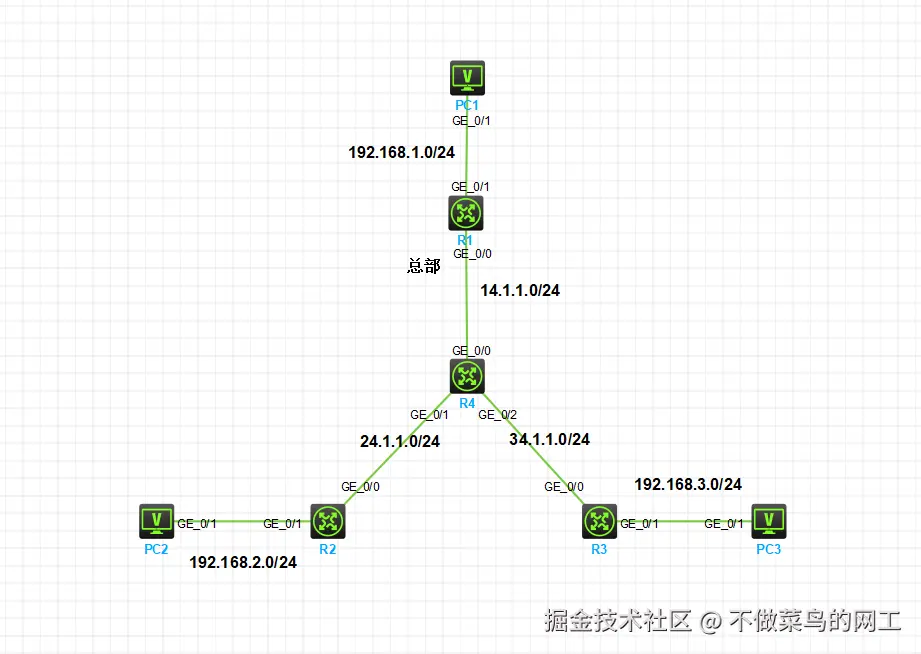
- R1设备模拟企业总部 R2、R3模拟企业分支机构。R4模拟运营商设备。现要求PC2、PC3通过分支机构路由设备ipsec与总部PC1互通
- R2、R3可不携带公网IP地址、只需R1总部路由器携带公网IP。在分支机构不携带公网IP情况下,实际为隧道自动ipsec-nat穿越
隧道建立失败的几种情况
- 隧道初始建立需要流量激活 试着长ping查看隧道建立情况
- ipsec、ike 协商配置两端不一致,或者配置存在错误
- 感兴趣流两端配置不对称、或者感兴趣匹配失败
- 两端密钥不一致
- ipsec、ike的sa缓存 尝试情况sa的情况
reset ike sa
如果任然存在问题、可以进行debug排障
terminal debugging
debugging ike sa
debugging ipsec sa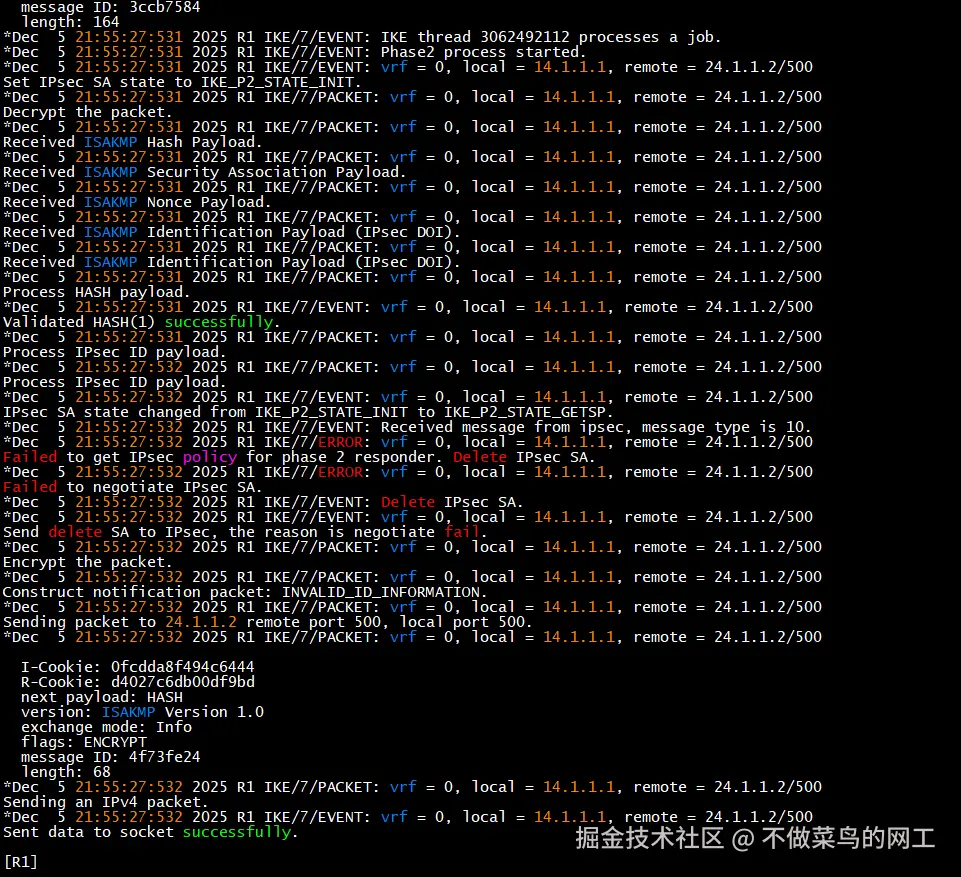
配置命令
R1
csharp
======第一步 配置互联地址、出口nat======
#
interface GigabitEthernet0/0
 port link-mode route
 combo enable copper
 ip address 14.1.1.1 255.255.255.0
 nat outbound
#
interface GigabitEthernet0/1
 port link-mode route
 combo enable copper
 ip address 192.168.1.254 255.255.255.0

=====第二步 配置ipsec感兴趣流以及nat匹配处理=====
#
acl number 3000
 rule 0 deny ip source 192.168.0.0 0.0.255.255
 rule 50 permit ip
#
acl number 3010  // 注意隧道两端感兴趣流匹配规则需要对称
 rule 0 permit ip source 192.168.1.0 0.0.0.255 destination 192.168.2.0 0.0.0.255
 rule 5 permit ip source 192.168.1.0 0.0.0.255 destination 192.168.3.0 0.0.0.255
 rule 50 deny ip
#
interface GigabitEthernet0/0
  nat outbound 3000

=====第三步 配置ipsec相关配置=====
#
ipsec transform-set 1
 esp encryption-algorithm 3des-cbc   // 配置加密算法
 esp authentication-algorithm md5    // 配置认证算法
#
ipsec policy-template toFenzhi 1     // 配置安全策略模板
 transform-set 1
 security acl 3010                   // 关联感兴趣流
 local-address 14.1.1.1              // 本地地址、对端ipsec需添加remote-address 否则隧道建立失败
 ike-profile toFenzhi
#
ipsec policy toFenzhi 1 isakmp template toFenzhi    // 基于模板建立ipsec隧道
#
ike profile toFenzhi
 keychain key                       // 关联预共享密钥
 match remote identity address 0.0.0.0 0.0.0.0    // 匹配所有的IP地址
 proposal 1
#
ike proposal 1
#
ike keychain key
 pre-shared-key address 0.0.0.0 0.0.0.0 key simple 123456   // ipsec两端密钥需一致

===== 第四步 互联网出口应用=====
#
interface GigabitEthernet0/0
 ipsec apply policy toFenzhi
R2、R3配置
ini
======第一步 配置互联地址、出口nat======
#
acl number 3000
 rule 0 deny ip source 192.168.0.0 0.0.255.255
 rule 50 permit ip
#
interface GigabitEthernet0/0
 port link-mode route
 combo enable copper
 ip address 24.1.1.2 255.255.255.0
 nat outbound 3000
#
interface GigabitEthernet0/1
 port link-mode route
 combo enable copper
 ip address 192.168.2.254 255.255.255.0

=====第二步 配置ipsec感兴趣流=====
#
acl number 3010          // 感兴趣流需对称*
 rule 0 permit ip source 192.168.2.0 0.0.0.255 destination 192.168.1.0 0.0.0.255
 rule 5 permit ip source 192.168.2.0 0.0.0.255 destination 192.168.3.0 0.0.0.255
 rule 50 deny ip

=====第三步 配置ipsec相关配置=====
#
ipsec transform-set 1
 esp encryption-algorithm 3des-cbc
 esp authentication-algorithm md5
#
ipsec policy toR1 1 isakmp
 transform-set 1
 security acl 3010
 remote-address 14.1.1.1     // 需要配置远端地址*
 ike-profile toR1
#
ike profile toR1
 keychain key
 match remote identity address 0.0.0.0 0.0.0.0
 proposal 1
#
ike proposal 1
#
ike keychain key
 pre-shared-key address 0.0.0.0 0.0.0.0 key simple 123456

===== 第四步 互联网出口应用=====
#
interface GigabitEthernet0/0
 ipsec apply policy toR1
R3唯一的区别在感兴趣流与互联地址配置、此处贴感兴趣流配置
bash
#
acl number 3010   // R3感兴趣流配置
 rule 0 permit ip source 192.168.3.0 0.0.0.255 destination 192.168.1.0 0.0.0.255
 rule 5 permit ip source 192.168.3.0 0.0.0.255 destination 192.168.2.0 0.0.0.255
 rule 50 deny ip
最终效果
连通性测试 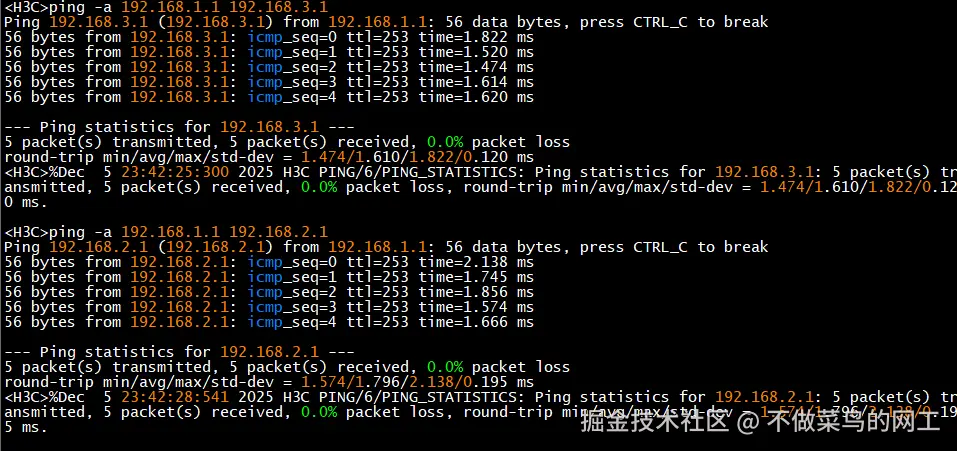
查看ipsec隧道 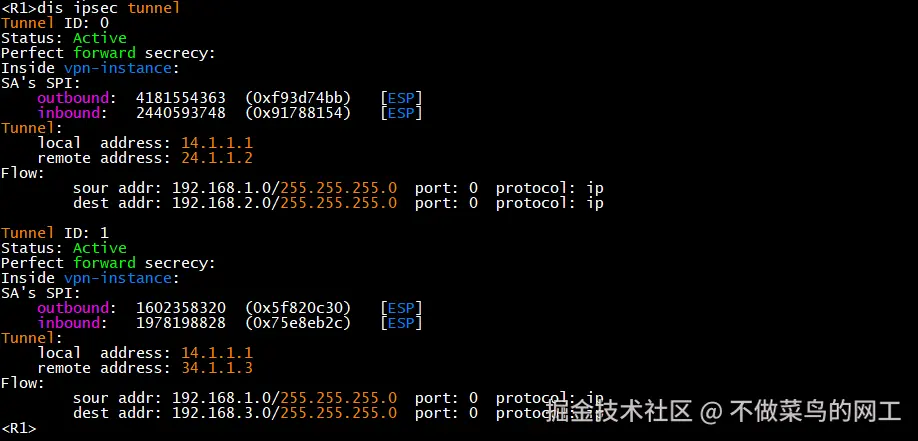
查看ike-sa 