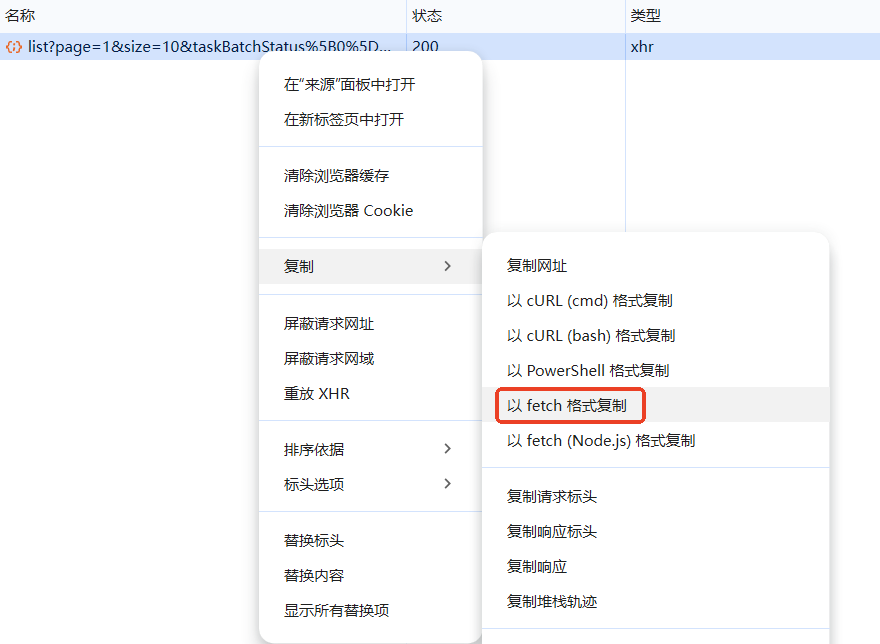
1. 打开chrome的开发者工具,切换到网络
在某个具体请求上点右键------》复制------》以fetch格式复制:
javascript
fetch("http://localhost:8080/sjob/job/batch/list?page=1&size=10&taskBatchStatus%5B0%5D=3&datetimeRange%5B0%5D=2025-11-28T00%3A00%3A00&datetimeRange%5B1%5D=2025-12-05T23%3A59%3A59", {
  "headers": {
    "accept": "application/json, text/plain, */*",
    "accept-language": "zh-CN,zh;q=0.9",
    "cache-control": "no-cache",
    "pragma": "no-cache",
    "sec-ch-ua": "\"Chromium\";v=\"142\", \"Google Chrome\";v=\"142\", \"Not_A Brand\";v=\"99\"",
    "sec-ch-ua-mobile": "?0",
    "sec-ch-ua-platform": "\"Windows\"",
    "sec-fetch-dest": "empty",
    "sec-fetch-mode": "cors",
    "sec-fetch-site": "same-origin",
    "timeout": "6000",
    "x-request-id": "7ZKcv84NlWjBt7oRI96J8"
  },
  "referrer": "http://localhost:8080/sjob/",
  "body": null,
  "method": "GET",
  "mode": "cors",
  "credentials": "omit"
});
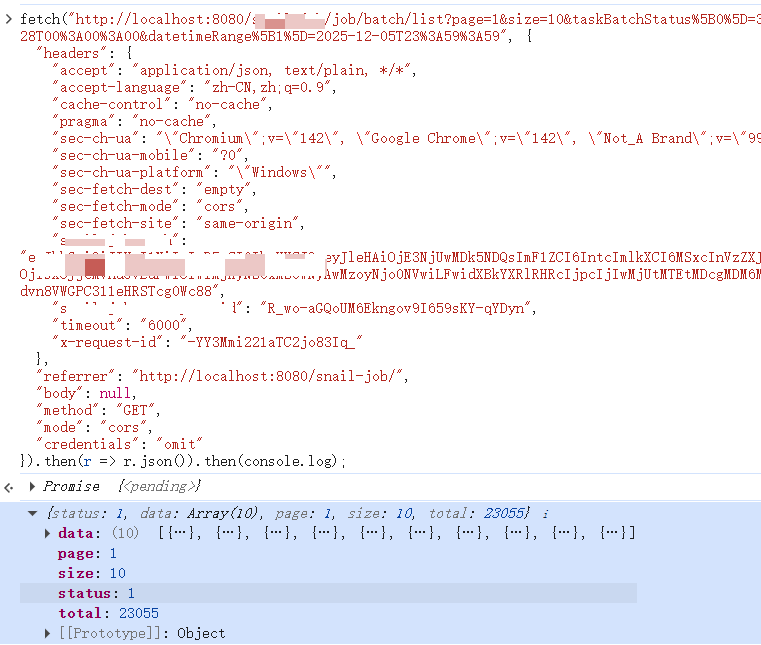
2. 修改参数,然后到控制台执行
为了在控制台方便查看结果,追加 .then(r => r.json()).then(console.log);
结果就会打印出来了。
javascript
fetch("http://localhost:8080/sjob/job/batch/list?page=2&size=10&taskBatchStatus%5B0%5D=3&datetimeRange%5B0%5D=2025-11-28T00%3A00%3A00&datetimeRange%5B1%5D=2025-12-05T23%3A59%3A59", {
  "headers": {
    "accept": "application/json, text/plain, */*",
    "accept-language": "zh-CN,zh;q=0.9",
    "cache-control": "no-cache",
    "pragma": "no-cache",
    "sec-ch-ua": "\"Chromium\";v=\"142\", \"Google Chrome\";v=\"142\", \"Not_A Brand\";v=\"99\"",
    "sec-ch-ua-mobile": "?0",
    "sec-ch-ua-platform": "\"Windows\"",
    "sec-fetch-dest": "empty",
    "sec-fetch-mode": "cors",
    "sec-fetch-site": "same-origin",
    "timeout": "6000",
    "x-request-id": "7ZKcv84NlWjBt7oRI96J8"
  },
  "referrer": "http://localhost:8080/sjob/",
  "body": null,
  "method": "GET",
  "mode": "cors",
  "credentials": "omit"
}).then(r => r.json()).then(console.log);