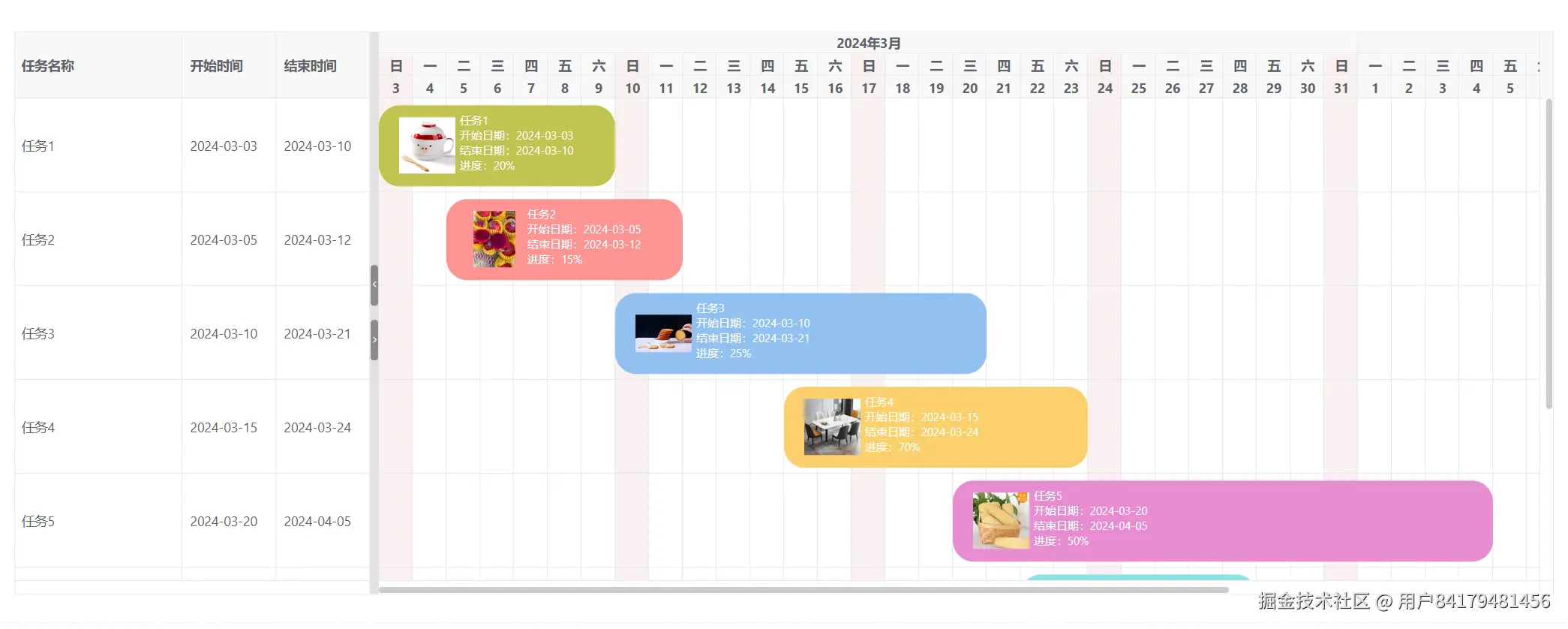
vxe-gantt 甘特图实现产品进度列表,自定义任务条样式和提示信息
查看官网:gantt.vxeui.com/
gitbub:github.com/x-extends/v...
gitee:gitee.com/x-extends/v...
效果
代码
通过 task-view-config.viewStyle.cellStyle 设置任务视图单元格样式,使用 taskBar、taskBarTooltip 插槽来自定义模板
html
<template>
  <div>
    <vxe-gantt v-bind="ganttOptions">
      <template #task-bar="{ row }">
        <div class="custom-task-bar" :style="{ backgroundColor: row.bgColor }">
          <div class="custom-task-bar-img">
            <vxe-image :src="row.imgUrl" width="60" height="60"></vxe-image>
          </div>
          <div>
            <div>{{ row.title }}</div>
            <div>开始日期:{{ row.start }}</div>
            <div>结束日期:{{ row.end }}</div>
            <div>进度:{{ row.progress }}%</div>
          </div>
        </div>
      </template>

      <template #task-bar-tooltip="{ row }">
        <div>
          <div>任务名称:{{ row.title }}</div>
          <div>开始时间:{{ row.start }}</div>
          <div>结束时间:{{ row.end }}</div>
          <div>进度:{{ row.progress }}%</div>
        </div>
      </template>
    </vxe-gantt>
  </div>
</template>

<script setup>
import { reactive } from 'vue'

const ganttOptions = reactive({
  border: true,
  height: 600,
  cellConfig: {
    height: 100
  },
  taskViewConfig: {
    tableStyle: {
      width: 380
    },
    showNowLine: true,
    scales: [
      { type: 'month' },
      {
        type: 'day',
        headerCellStyle ({ dateObj }) {
          // 周日高亮
          if (dateObj.e === 0) {
            return {
              backgroundColor: '#f9f0f0'
            }
          }
          return {}
        }
      },
      {
        type: 'date',
        headerCellStyle ({ dateObj }) {
          // 周日高亮
          if (dateObj.e === 0) {
            return {
              backgroundColor: '#f9f0f0'
            }
          }
          return {}
        }
      }
    ],
    viewStyle: {
      cellStyle ({ dateObj }) {
        // 周日高亮
        if (dateObj.e === 0) {
          return {
            backgroundColor: '#f9f0f0'
          }
        }
        return {}
      }
    }
  },
  taskBarConfig: {
    showTooltip: true,
    barStyle: {
      round: true
    }
  },
  columns: [
    { field: 'title', title: '任务名称' },
    { field: 'start', title: '开始时间', width: 100 },
    { field: 'end', title: '结束时间', width: 100 }
  ],
  data: [
    { id: 10001, title: '任务1', start: '2024-03-03', end: '2024-03-10', progress: 20, bgColor: '#c1c452', imgUrl: 'https://vxeui.com/resource/productImg/product9.png' },
    { id: 10002, title: '任务2', start: '2024-03-05', end: '2024-03-12', progress: 15, bgColor: '#fd9393', imgUrl: 'https://vxeui.com/resource/productImg/product8.png' },
    { id: 10003, title: '任务3', start: '2024-03-10', end: '2024-03-21', progress: 25, bgColor: '#92c1f1', imgUrl: 'https://vxeui.com/resource/productImg/product1.png' },
    { id: 10004, title: '任务4', start: '2024-03-15', end: '2024-03-24', progress: 70, bgColor: '#fad06c', imgUrl: 'https://vxeui.com/resource/productImg/product3.png' },
    { id: 10005, title: '任务5', start: '2024-03-20', end: '2024-04-05', progress: 50, bgColor: '#e78dd2', imgUrl: 'https://vxeui.com/resource/productImg/product11.png' },
    { id: 10006, title: '任务6', start: '2024-03-22', end: '2024-03-29', progress: 38, bgColor: '#8be1e6', imgUrl: 'https://vxeui.com/resource/productImg/product7.png' },
    { id: 10007, title: '任务7', start: '2024-03-28', end: '2024-04-04', progress: 24, bgColor: '#78e6d1', imgUrl: 'https://vxeui.com/resource/productImg/product5.png' },
    { id: 10008, title: '任务8', start: '2024-04-05', end: '2024-04-18', progress: 65, bgColor: '#edb695', imgUrl: 'https://vxeui.com/resource/productImg/product4.png' }
  ]
})
</script>

<style lang="scss" scoped>
.custom-task-bar {
  display: flex;
  flex-direction: row;
  padding: 8px 16px;
  width: 100%;
  font-size: 12px;
}
.custom-task-bar-img {
  display: flex;
  flex-direction: row;
  align-items: center;
  justify-content: center;
  width: 70px;
  height: 70px;
}
</style>