1: 效果展示
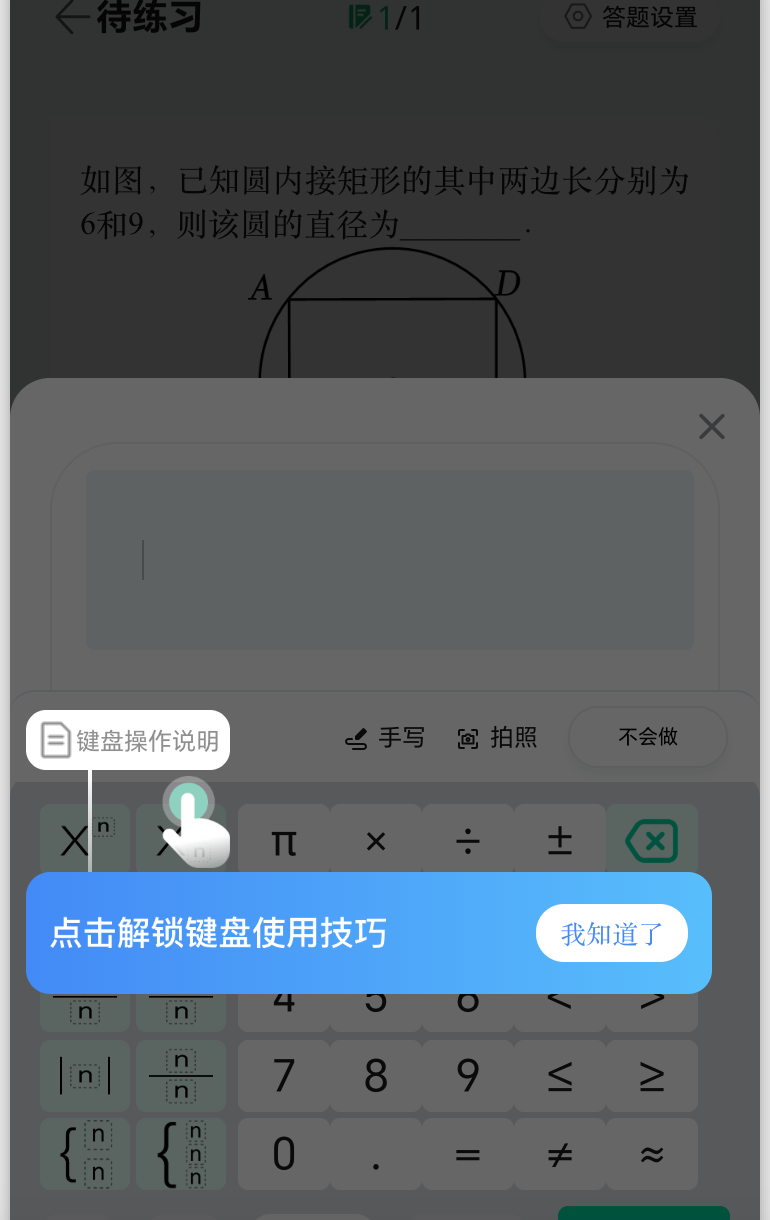
2: 页面使用
<template>
 <!-- 新手引导 -->
    <BKTour :open.sync="tourOpen" :steps="steps" :onFinish="handleTourFinish" :Z_INDEX="90000" :Z_INDEX_MASK="80000">
      <template #default="{ step, bound, zIndex, onNext }">
        <TourOperate :id="step.id" :bound="bound" :zIndex="zIndex" :onNext="onNext" />
      </template>
    </BKTour>
</template>
<script>
export default {
  data() {
    return {
      tourOpen: false, // 是否展示新手引导
      steps: [], // 新手引导步骤
      needNoviceGuide: uni.getStorageSync('NEED_NOVICE_GUIDE_SUBJECT') // 新手指南是否已经展示过标识【新手引导只展示一次】
    }
  },
  methods: {
    // 显示新手引导
    showTour() {
      if (!this.needNoviceGuide) {
        return
      }
      setTimeout(() => {
        uni.pageScrollTo({ scrollTop: 0, duration: 0 })
        this.steps = this.initTourSteps()
        this.tourOpen = true
      }, 500)
    },
    // 初始化新手引导步骤对象obj
    initTourSteps() {
      return [
        // 键盘操作说明
        {
          id: 'keyboardOperateInstructionRef', // 需要新手引导步骤的元素id
          target: () => ({
            tourClose: () => {
              this.keyboardOperateInstructionBoxStyle = {}
            },
            tourOpen: (zIndex) =>
              (new Promise((resolve, reject) => {
                uni
                  .createSelectorQuery()
                  .select(`.keyboard_scope`) //.keyboard_scope是引导步骤的元素class,获取改元素的坐标等信息
                  .boundingClientRect((res) => {
                    //
                    if (res) {
                      this.keyboardOperateInstructionBoxStyle = { zIndex, background: '#FFF', borderRadius: '10px' }
                      resolve(res)
                    } else {
                      reject(new Error(`keyboard_scope 未找到元素`))
                    }
                  })
                  .exec()
              }))
          }),
          show: true
        }
      ].filter((item) => item.show !== false)
    },
     // 最后一步的回调方法
     async handleTourFinish() {
       this.needNoviceGuide = false // 关闭新手引导
       uni.setStorageSync('NEED_NOVICE_GUIDE_SUBJECT', false) // 设置新手引导已被触发标识
     },
  }
};
</script>
3: 新手引导弹窗组件
TourOperate组件(需更具需要自定义元素步骤)
<template>
  <view class="tourOperateStyle" :style="{ zIndex: props.zIndex }">
    <!--键盘操作说明 -->
    <view
      v-if="props.id === 'keyboardOperateInstructionRef'"
      class="step step0"
      :style="{
        top: `${props.bound.bottom}px`,
        left: `${props.bound.left}px`
      }"
    >
      <image class="icon_tour_operate_finger" src="https://wwxq.wanweiedu.com/static/home/2025-03-28/icon_tour_operate_finger.png" />
      <view class="line" />
      <view class="content">
        <view class="wrapper">
          <image
            class="icon_tour_operate_step0"
            src="https://wwxq.wanweiedu.com/static/keyboard/icon_tour_operate_step0.png"
            mode="heightFix"
          />
          <!-- <view class="text">随时为你解决学习困惑!</view> -->
        </view>

        <view class="button" @click="props.onNext">我知道了</view>
      </view>
    </view>
  </view>
</template>

<script lang="ts" setup>
import { usePad } from '@/@wmeimob/hooks/usePad'
import { divide } from 'number-precision'

interface ITourOperateProps {
  /** 标记 */
  id: string
  /** 层级 */
  zIndex: number
  /** 目标位置信息 */
  bound: UniApp.NodeInfo
  /** 下一步 */
  onNext(): void
}

const props = withDefaults(defineProps<ITourOperateProps>(), {})

const { isPad } = usePad()

/** rpx 转换到 px 的最大支持宽度,超过后不再进行转换, 768 - 1*/
const rpxMaxWidth = 767


/** 超过这个屏幕宽度即认定为 Pad 竖屏方向, 768 - 1*/
const padVerticalWidth = 767


/** 超过这个屏幕宽度即认定为 Pad 横屏方向, 1024 - 1*/
const padHorizontalWidth = 1023

/**
 * 设计稿转实际尺寸
 * @param rpx 750设计稿尺寸对应的尺寸
 */
const rpxToPx => (rpx: number) {
  const systemInfo = uni.getSystemInfoSync()
  const { windowWidth } = systemInfo

  if (windowWidth >= rpxMaxWidth) {
    return divide(rpx, 2)
  }

  const ratio = systemInfo.windowWidth / 750
  return Math.floor(rpx * ratio)
}
</script>

<style lang="scss" scoped>
 @import '~@wmeimob/style/mixins.scss';

.tourOperateStyle {
  position: fixed;
  left: 0;
  top: 0;
  width: 100%;
  height: 100%;
}

.line {
  width: 4rpx;
  height: 103rpx;
  background-image: linear-gradient(180deg, #fff 0%, rgba(255, 255, 255, 0.5) 100%);
}

.step {
  position: absolute;
  width: 686rpx;
}

.step0 {
  .icon_tour_operate_finger {
    position: absolute;
    left: 128rpx;
    top: 6rpx;
    width: 84rpx;
    height: 92rpx;
  }

  .line {
    margin-left: 62rpx;
  }

  .icon_tour_operate_step0 {
    display: block;
    // height: 48rpx;
    height: 32rpx;
    margin-bottom: 2rpx;
  }
}

.step1 {
  .line {
    margin-left: 62rpx;
  }
}

.step2 {
  transform: translateY(-100%);

  .line {
    margin-left: 108rpx;
  }
}

.step3 {
  bottom: 60px; // tabbar 高度

  .line {
    position: fixed;
    bottom: 60px;
  }

  .content {
    margin-bottom: 103rpx;
  }

  .text {
    white-space: nowrap;
  }

  .button {
    margin: 0;
  }
}

.content {
  display: flex;
  justify-content: space-between;
  align-items: center;
  min-height: 122rpx;
  background: linear-gradient(90deg, #438af6 0%, #58befb 100%);
  border-radius: 24rpx;
  box-sizing: border-box;
  padding: 24rpx;
}

.text {
  font-family: Alibaba PuHuiTi, Alibaba PuHuiTi;
  font-weight: 500;
  font-size: 28rpx;
  color: #ffffff;
  line-height: 48rpx;
}

.button {
  flex: none;
  display: flex;
  justify-content: center;
  align-items: center;
  width: 152rpx;
  height: 58rpx;
  background: #ffffff;
  border-radius: 48rpx;

  font-family: Alibaba PuHuiTi, Alibaba PuHuiTi;
  font-weight: 500;
  font-size: 26rpx;
  color: #448bf6;
  line-height: 48rpx;

  margin-left: 24rpx;
}

</style>
4: 新手引导公共组件
BKTour.vue
<template>
  <view class="tourStyle">
    <BKOverlay :show="overlay" :zIndexMask="Z_INDEX_MASK"/>
    <view v-if="overlay" class="tour_mask" :style="{ zIndex: props.Z_INDEX + 10 }" @touchmove.stop.prevent="handleTouchMove">
      <slot
        v-if="overlay"
        :current="index"
        :step="computedCurrentStep()"
        :bound="currentBound"
        :zIndex="props.Z_INDEX + 12"
        :isFinish="computedIsFinished()"
        :onNext="() => handleNextStep(index + 1)"
      />
    </view>
  </view>
</template>

<script lang="ts" setup>
import { useSuperLock } from '@/@wmeimob/hooks/useSuperLock'
import { ref, watch } from '@vue/composition-api'

interface ITourStep {
  id: string
  target(): {
    tourOpen(zIndex: number): Promise<UniApp.NodeInfo>
    tourClose(): void
  }
}

interface ITourProps {
  open?: boolean
  steps: ITourStep[]
  onFinish?(): void
  Z_INDEX?: any
  Z_INDEX_MASK?: any
}

const props = withDefaults(defineProps<ITourProps>(), {
  steps: () => [],
  Z_INDEX: 9000
})

const emit = defineEmits<{
  'update:open': [show: boolean]
}>()

const overlay = ref(false)
const index = ref(-1)
const currentBound = ref<UniApp.NodeInfo>({})

const computedCurrentStep = () => props.steps[index.value]

const computedIsFinished = () => props.open && index.value === props.steps.length - 1

// const Z_INDEX = 9000


const [handleNextStep] = useSuperLock((nextIndex: number) => {
  const hadNext = !!props.steps[nextIndex]

  if (!hadNext) {
    props.steps.forEach((step) => step.target()?.tourClose?.())
    emit('update:open', false)
    props.onFinish?.()
    return
  }

  index.value = nextIndex

  props.steps.forEach(async (step, idx) => {
    if (idx !== index.value) {
      step.target?.()?.tourClose()
      return
    }

    if (step.target) {
      const bound = (await queryTarget(() => step.target()?.tourOpen(props.Z_INDEX))) ?? {}
      currentBound.value = bound
    }
  })
})

watch(
  () => props.open,
  async (show) => {
    overlay.value = show

    if (!show) {
      index.value = -1
      return
    }

    handleNextStep(0)
  },
  { immediate: true }
)

function queryTarget(get: () => Promise<UniApp.NodeInfo>) {
  return new Promise((resolve) => {
    let count = 3
    async function loop() {
      count--

      if (count <= 0) {
        resolve({})
        return
      }

      const res = await get()

      if (res) {
        resolve(res)
        return
      }

      setTimeout(() => {
        loop()
      }, 100)
    }

    loop()
  })
}


function handleTouchMove() {
  return false
}
</script>

<style lang="scss" scoped>
  /* pad 支持的最小宽度 */
  $pad-width: 580px;

  /* figma 像素除以 2,并转为 rpx 单位 */
  @function rem($px) {
    @return $px * 2 * 1rpx;
  }

.tourStyle {
}

.tour_mask {
  position: fixed;
  top: 0;
  left: 0;
  z-index: 9000; // 高于 overly
  width: 100%;
  height: 756px;
}
</style>
overlay.vue
<template>
  <view class="overlayStyle">
    <view
      v-if="props.show"
      class="mask"

      :style="{ opacity: props.show ? props.opacity : 0, zIndex: props.zIndexMask ? props.zIndexMask : 8021}"
      @touchmove.stop.prevent="handleTouchMove"
      @click.stop="handleMaskClick"
    />

    <view v-if="props.show" class="overlay_content" @touchmove.stop.prevent="handleTouchMove">
      <slot />
    </view>
  </view>
</template>

<script lang="ts" setup>

interface IOverlayProps {
  /** 是否显示 */
  show: boolean
  /**
   * 遮罩透明度,0 ~ 1
   * @default 0.6
   */
  opacity?: number
  /** 点击遮罩 */
  onClick?(): void
  /** 在遮罩上滑动 */
  onTouchMove?(): void
  zIndexMask?: any
}

const props = withDefaults(defineProps<IOverlayProps>(), {
  show: false,
  opacity: 0.6,
  onTouchMove: () => {}
})

function handleMaskClick() {
  props.onClick?.()
}

function handleTouchMove() {
  props.onTouchMove()
  return false
}
</script>

<style lang="scss" scoped>
 /* pad 支持的最小宽度 */
 $pad-width: 580px;

 /* figma 像素除以 2,并转为 rpx 单位 */
 @function rem($px) {
    @return $px * 2 * 1rpx;
 }

.mask {
  position: fixed;
  left: 0;
  top: 0;
  width: 100vw;
  height: 100vh;
  z-index: 8021;
  opacity: 1;
  transition: opacity 200ms linear;
  background: #000;
}

.overlay_content {
  position: relative;
  z-index: 8022;
  // pointer-events: auto;
}
</style>
useSuperLock.ts
import { ref } from '@vue/composition-api'

/**
 * 超级锁钩子。未运行完毕锁。500毫秒运行一次锁。运行成功500毫秒后才能运行锁。
 *
 * @param setLoading
 * @param fun
 */
export function useSuperLock<T extends (...args: any) => any>(fun: T, delay = 300) {
  const lock = ref(false)
  const lastDate = ref<Date>()

  const fn: T = (async (...args: Parameters<T>) => {
    if (lock.value) {
      return
    }

    const nowDate = new Date()
    if (lastDate.value && nowDate.getTime() - lastDate.value.getTime() <= delay) {
      return
    }

    lastDate.value = nowDate
    lock.value = true

    let returnValue: any
    try {
      returnValue = await fun.apply(null, args)
    } catch (error) {
      lock.value = false
      throw error
    }

    setTimeout(() => {
      lock.value = false
    }, delay)

    return returnValue
  }) as T

  return [fn, lock] as const
}