前提:
技术栈:vue3+ant组件库
前端实现功能:全局图标点击和拖拽吸附侧边功能。点击图标弹出对话框,对话框支持自由拖拽和调节大小。对话框中实现基础问答,复制答案,会话整理等。
后端接口实现:对话标题修改,对话内容返回等等。
注意:难在对项目中页面优化适配功能。目前测试没有bug,仅供参考。
功能效果:
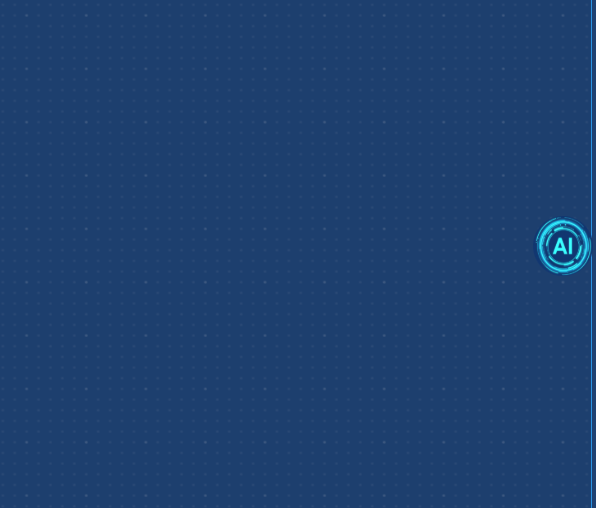
1.全局图标点击和拖拽左右吸附侧边功能。
鼠标拖拽,判断距离左右两侧那里更近就吸附哪边。
实现代码:
1.处理了鼠标拖拽和鼠标单击的不同。
2.处理了边界问题和吸附问题。
3.处理了自适应问题,确保图标在可视区域内。
javascript
<template>
	<div class="draggableIconDom" ref="draggableIconDom">
		<div
			ref="draggableIcon"
			class="draggable-icon"
			:style="iconStyle"
			@mousedown="startDrag"
			@touchstart="startDragTouch"
		>
			<img :src="imgUrl" alt="全局图标" class="icon-img" />
		</div>
		<deepseekModal ref="aiModal"></deepseekModal>
	</div>
</template>

<script setup>
	import imgUrl from '@/assets/images/deepseek.png'
	import { viewTagsStore } from '@/store'
	import deepseekModal from '@/components/AIModal/deepSeekAIModal.vue'

	const storeTags = viewTagsStore()
	const draggableIcon = ref(null)
	const draggableIconDom = ref(null)
	const aiModal = ref(null)

	// 基础状态
	const state = reactive({
		isDragging: false,
		startX: 0,
		startY: 0,
		offsetX: 0,
		offsetY: 0,
		x: 0,
		y: 0,
		transition: 'all 0.3s ease',
		snapState: 'right', // 'left', 'right', 'none'
		dragThreshold: 5, // 拖动阈值,小于此值视为点击
		hasMoved: false, // 标记是否已经移动
		lastClickTime: 0 // 上次点击时间,用于防止双击
	})

	// 响应式图标尺寸
	const iconSize = computed(() => {
		// 根据窗口宽度动态调整图标大小
		const baseSize = 60
		const minSize = 40
		const maxSize = 80

		let size = baseSize
		if (windowSize.width < 768) {
			size = Math.max(minSize, baseSize * 0.8)
		} else if (windowSize.width > 1920) {
			size = Math.min(maxSize, baseSize * 1.2)
		}

		return {
			width: size,
			height: size
		}
	})

	// 窗口边界
	const windowBounds = computed(() => {
		return {
			width: windowSize.width,
			height: windowSize.height
		}
	})

	// 有效边界
	const validBounds = computed(() => {
		const buffer = 10
		return {
			minX: buffer,
			maxX: windowBounds.value.width - iconSize.value.width - buffer,
			minY: buffer,
			maxY: windowBounds.value.height - iconSize.value.height - buffer
		}
	})

	// 图标样式
	const iconStyle = computed(() => ({
		left: `${state.x}px`,
		top: `${state.y}px`,
		transition: state.transition,
		cursor: state.isDragging ? 'grabbing' : 'grab',
		transform: state.isDragging ? 'scale(1.1)' : 'scale(1)',
		width: `${iconSize.value.width}px`,
		height: `${iconSize.value.height}px`
	}))

	// 限制位置在有效边界内
	const constrainToBounds = (x, y) => {
		return {
			x: Math.max(validBounds.value.minX, Math.min(x, validBounds.value.maxX)),
			y: Math.max(validBounds.value.minY, Math.min(y, validBounds.value.maxY))
		}
	}

	// 计算吸附位置
	const getSnapPosition = (currentX, currentY) => {
		const iconCenterX = currentX + iconSize.value.width / 2
		const distanceToLeft = iconCenterX
		const distanceToRight = windowBounds.value.width - iconCenterX

		let snapX, snapSide

		if (distanceToLeft < distanceToRight) {
			snapSide = 'left'
			snapX = validBounds.value.minX
		} else {
			snapSide = 'right'
			snapX = validBounds.value.maxX
		}

		return { x: snapX, y: currentY, side: snapSide }
	}

	// 开始拖拽(鼠标)
	const startDrag = (e) => {
		// 只允许点击图标本身(.draggable-icon)时触发拖拽,排除子组件区域
		if (e.target !== draggableIcon.value && !draggableIcon.value.contains(e.target)) {
			return
		}
		e.preventDefault() // 只阻止默认行为(如文本选中),不阻止冒泡
		if (e.button !== 0) return // 只响应左键

		state.isDragging = true
		state.hasMoved = false
		const rect = draggableIcon.value.getBoundingClientRect()

		state.startX = e.clientX
		state.startY = e.clientY
		state.offsetX = e.clientX - rect.left
		state.offsetY = e.clientY - rect.top
		state.transition = 'none'

		document.addEventListener('mousemove', handleDrag)
		document.addEventListener('mouseup', stopDrag)
	}

	// 开始拖拽(触摸)
	const startDragTouch = (e) => {
		if (e.target !== draggableIcon.value && !draggableIcon.value.contains(e.target)) {
			return
		}
		e.preventDefault()
		if (e.touches.length !== 1) return

		state.isDragging = true
		state.hasMoved = false
		const rect = draggableIcon.value.getBoundingClientRect()
		const touch = e.touches[0]

		state.startX = touch.clientX
		state.startY = touch.clientY
		state.offsetX = touch.clientX - rect.left
		state.offsetY = touch.clientY - rect.top
		state.transition = 'none'

		document.addEventListener('touchmove', handleDragTouch, { passive: false })
		document.addEventListener('touchend', stopDragTouch)
	}

	// 处理拖拽(鼠标)
	const handleDrag = (e) => {
		if (!state.isDragging) return

		let newX = e.clientX - state.offsetX
		let newY = e.clientY - state.offsetY

		// 检查是否移动超过阈值
		const deltaX = Math.abs(e.clientX - state.startX)
		const deltaY = Math.abs(e.clientY - state.startY)
		if (deltaX > state.dragThreshold || deltaY > state.dragThreshold) {
			state.hasMoved = true
		}

		const constrained = constrainToBounds(newX, newY)
		state.x = constrained.x
		state.y = constrained.y
	}

	// 处理拖拽(触摸)
	const handleDragTouch = (e) => {
		if (!state.isDragging) return
		e.preventDefault()

		const touch = e.touches[0]
		let newX = touch.clientX - state.offsetX
		let newY = touch.clientY - state.offsetY

		// 检查是否移动超过阈值
		const deltaX = Math.abs(touch.clientX - state.startX)
		const deltaY = Math.abs(touch.clientY - state.startY)
		if (deltaX > state.dragThreshold || deltaY > state.dragThreshold) {
			state.hasMoved = true
		}

		const constrained = constrainToBounds(newX, newY)
		state.x = constrained.x
		state.y = constrained.y
	}

	// 停止拖拽(鼠标)
	const stopDrag = (e) => {
		if (!state.isDragging) return

		state.isDragging = false
		state.transition = 'all 0.3s ease'

		document.removeEventListener('mousemove', handleDrag)
		document.removeEventListener('mouseup', stopDrag)

		// 检查是否是有效的点击目标
		const isClickTarget = e.target === draggableIcon.value || draggableIcon.value.contains(e.target)

		// 如果移动距离很小且是有效点击目标,视为点击
		if (!state.hasMoved && isClickTarget) {
			const now = Date.now()
			if (now - state.lastClickTime > 300) {
				state.lastClickTime = now
				openModal()
			}
		} else if (state.hasMoved) {
			// 如果发生了移动(拖拽),进行吸附处理
			const snapPos = getSnapPosition(state.x, state.y)
			state.x = snapPos.x
			state.y = snapPos.y
			state.snapState = snapPos.side
		}

		// 重置移动状态
		state.hasMoved = false
	}

	// 停止拖拽(触摸)
	const stopDragTouch = (e) => {
		if (!state.isDragging) return

		state.isDragging = false
		state.transition = 'all 0.3s ease'

		document.removeEventListener('touchmove', handleDragTouch)
		document.removeEventListener('touchend', stopDragTouch)

		// 检查是否是有效的点击目标
		let isClickTarget = false
		if (e.changedTouches && e.changedTouches.length > 0) {
			const touch = e.changedTouches[0]
			const targetElement = document.elementFromPoint(touch.clientX, touch.clientY)
			isClickTarget = targetElement === draggableIcon.value || draggableIcon.value.contains(targetElement)
		}

		// 如果移动距离很小且是有效点击目标,视为点击
		if (!state.hasMoved && isClickTarget) {
			const now = Date.now()
			if (now - state.lastClickTime > 300) {
				state.lastClickTime = now
				openModal()
			}
		} else if (state.hasMoved) {
			// 如果发生了移动(拖拽),进行吸附处理
			const snapPos = getSnapPosition(state.x, state.y)
			state.x = snapPos.x
			state.y = snapPos.y
			state.snapState = snapPos.side
		}

		// 重置移动状态
		state.hasMoved = false
	}

	// 打开模态框
	const openModal = () => {
		storeTags.AIModalOpenChange(true)
	}
	// 窗口尺寸状态
	const windowSize = reactive({
		width: 0,
		height: 0
	})
	// 更新窗口尺寸
	const updateWindowSize = () => {
		windowSize.width = window.innerWidth
		windowSize.height = window.innerHeight
	}

	// 窗口大小变化处理
	const handleResize = () => {
		updateWindowSize()

		nextTick(() => {
			// 确保图标在可视区域内
			const constrained = constrainToBounds(state.x, state.y)
			state.x = constrained.x
			state.y = constrained.y

			// 重新计算吸附位置
			if (state.snapState !== 'none') {
				const snapPos = getSnapPosition(state.x, state.y)
				state.x = snapPos.x
				state.snapState = snapPos.side
			}
		})
	}

	onMounted(() => {
		updateWindowSize()

		if (draggableIcon.value) {
			// 初始位置在右下角
			const initX = windowBounds.value.width - iconSize.value.width - 20
			const initY = windowBounds.value.height - iconSize.value.height - 20
			const constrained = constrainToBounds(initX, initY)
			state.x = constrained.x
			state.y = constrained.y

			// 初始吸附到右侧
			const snapPos = getSnapPosition(state.x, state.y)
			state.x = snapPos.x
			state.snapState = snapPos.side
		}

		window.addEventListener('resize', handleResize)

		// 组件卸载时清理监听
		return () => {
			window.removeEventListener('resize', handleResize)
		}
	})
</script>
<style scoped>
	.draggableIconDom {
		position: fixed;
		top: 0;
		left: 0;
		z-index: 999;
		pointer-events: auto;
		width: fit-content; /* 仅适配子元素宽度 */
		height: fit-content; /* 仅适配子元素高度 */
	}

	.draggable-icon {
		position: fixed;
		z-index: 9999;
		user-select: none;
		pointer-events: auto;
		line-height: 0;
		border-radius: 50%;
		display: flex;
		align-items: center;
		justify-content: center;
		transition:
			width 0.3s ease,
			height 0.3s ease;
	}

	.icon-img {
		width: 100%;
		height: 100%;
		border-radius: 50%;
		transition: transform 0.2s;
		display: block;
	}

	.draggable-icon:hover .icon-img {
		transform: scale(1.05);
	}

	.draggable-icon:active .icon-img {
		transform: scale(0.95);
	}

	.icon-pulse {
		position: absolute;
		top: 0;
		left: 0;
		width: 100%;
		height: 100%;
		border-radius: 50%;
		background: transparent;
		opacity: 0;
		transition: opacity 0.3s;
	}

	.icon-pulse.active {
		opacity: 1;
		animation: pulse 2s infinite;
	}

	@keyframes pulse {
		0% {
			box-shadow: 0 0 0 0 rgba(74, 144, 226, 0.7);
		}
		70% {
			box-shadow: 0 0 0 10px rgba(74, 144, 226, 0);
		}
		100% {
			box-shadow: 0 0 0 0 rgba(74, 144, 226, 0);
		}
	}

	/* 响应式设计 */
	@media (max-width: 768px) {
		.draggable-icon {
			width: 50px !important;
			height: 50px !important;
		}
	}

	@media (max-width: 480px) {
		.draggable-icon {
			width: 44px !important;
			height: 44px !important;
		}
	}
</style>
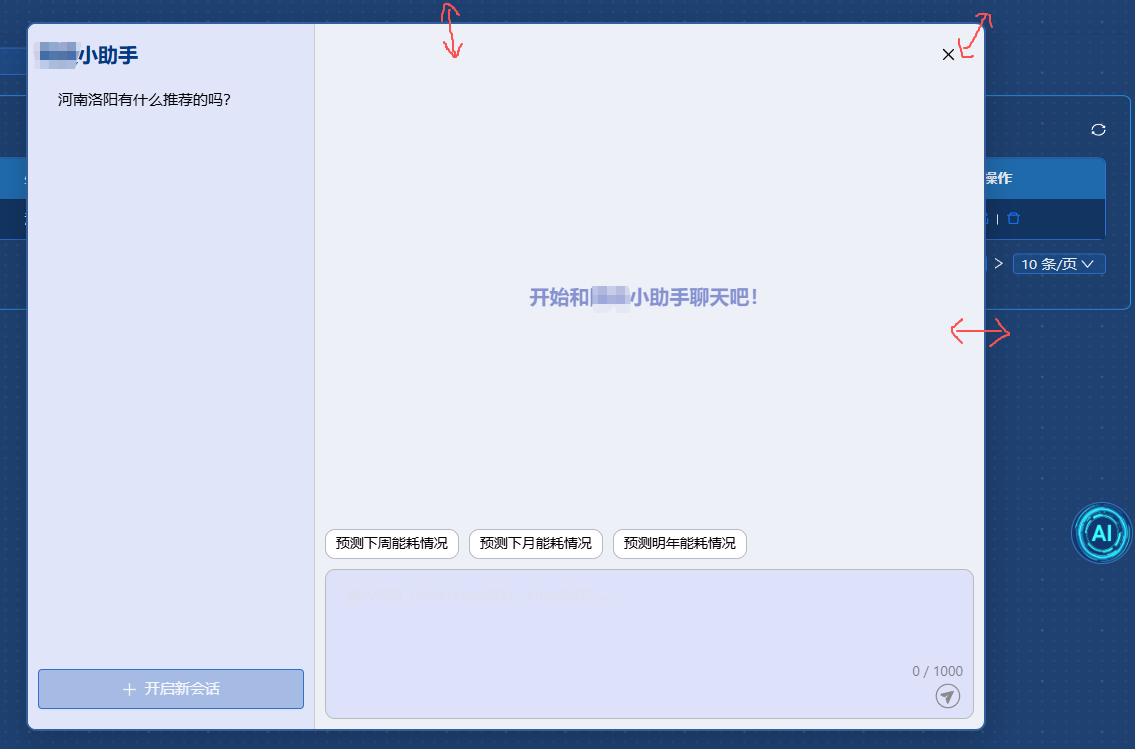
2.点击图标弹出对话框,对话框支持自由拖拽和调节大小。
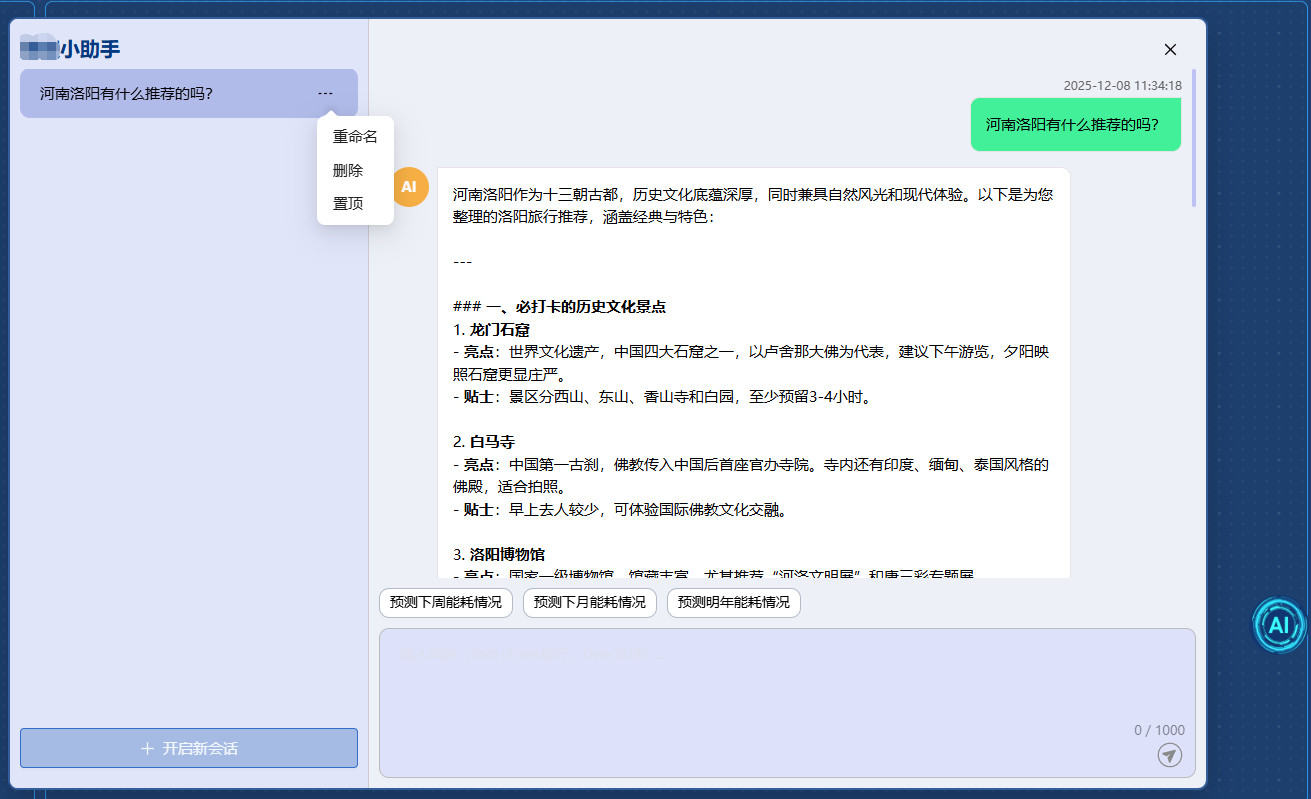
3.对话框中实现基础问答,复制答案,会话整理
实现代码:
1.实现窗口大小变化处理弹窗尺寸。
2.实现拖拽和缩放。
javascript
<template>
<div
v-if="open"
class="chat-container"
ref="chatContainer"
:style="{
width: containerWidth + 'px',
height: containerHeight + 'px',
top: containerTop + 'px',
left: containerLeft + 'px'
}"
@mousedown="startResize"
>
<div class="leftDom">
<div class="chat-header1" @mousedown.stop="startDrag">降碳小助手</div>
<div class="headerTitle"></div>
<div class="sessionList">
<div
v-for="item in leftSessionList"
:key="item.id"
class="sessionItem"
@click="sessionActiveChange(item)"
:class="{ sessionSelect: item.id == sessionActive }"
>
<div class="stickIcon"><PushpinOutlined v-show="item.top == 1" /></div>
<div
class="content footprion-ellipsis"
:title="item.sessionName"
@mouseenter="handleMouseEnter(item.id)"
@mouseleave="handleMouseLeave(item.id)"
v-if="!reNameShow[item.id]"
>
{{ item.sessionName }}
</div>
<a-input
v-else
v-model:value="sessionName"
@blur.stop="!isEnterTrigger && handleConfirm(item, 'blur')"
@keydown.enter.exact.stop.prevent="handleEnter(item)"
autocomplete="off"
placeholder="回车修改内容"
class="w-full"
@mousedown.stop
/>
<div @mouseenter="itemHoverStatus[item.id] = true" @mouseleave="itemHoverStatus[item.id] = false">
<a-dropdown class="moreButton" :placement="placement" arrow trigger="hover">
<DashOutlined v-show="itemHoverStatus[item.id] || String(item.id) == String(sessionActive)" />
<template #overlay>
<a-menu>
<a-menu-item>
<div @click.stop="reNameClick(item)">重命名</div>
</a-menu-item>
<a-menu-item>
<div @click.stop="delectSessionName(item)">删除</div>
</a-menu-item>
<a-menu-item>
<div @click.stop="stick(item)">{{ item.top == 0 ? '置顶' : '取消置顶' }}</div>
</a-menu-item>
</a-menu>
</template>
</a-dropdown>
</div>
</div>
</div>
<div class="sendButton">
<a-button class="w-full h-full" @click="newSession"><PlusOutlined />开启新会话</a-button>
</div>
<!-- <div class="endTime">当前数据截止至{{}}-----</div> -->
</div>
<div class="rightDom">
<div @mousedown.stop="startDrag" class="chat-header2">
<div class="closeButton" @click="closeChange" :disabled="false">
<CloseOutlined />
</div>
</div>
<div class="sendDom AiTitleContent" v-if="!sessionActive">开始和降碳小助手聊天吧!</div>
<div class="sendDom" v-else>
<div v-for="item in chatList" :key="item.id">
<!-- 用户提问:右对齐 -->
<div class="sendRight-date">
{{ item.createTime }}
</div>
<div class="sendDom-right">
<div class="sendDom-bubble right-bubble">
<div class="sendDom-content" v-html="formatContent(item.sentMessage)"></div>
</div>
</div>
<!-- 助手回答:左对齐 -->
<div class="sendDom-left">
<div class="sendDom-avatar">AI</div>
<div class="sendDom-bubble left-bubble">
<div
class="sendDom-content"
ref="leftIntter"
v-if="item.returnMessage"
v-html="formatContent(item.returnMessage)"
></div>
<div class="sendDom-content" v-else>
<loading-outlined v-if="isLoading" />
<div v-else>暂停请求</div>
</div>
<a-divider class="left-line" />
<div class="flex justify-between">
<div class="declaration"><SoundOutlined /> 本回答由 AI 生成,内容仅供参考,请仔细甄别。</div>
<CopyOutlined class="copy-icon" id="copy-btn" @click="copyInnter(item)" />
</div>
</div>
</div>
</div>
</div>
<div class="templateDom">
<div v-for="item in templateListData" :key="item.id" class="exTitle" @click="exTitleChange(item.title)">
{{ item.title }}
</div>
</div>
<div class="textArea">
<a-textarea
v-model:value="userInput"
@keydown.enter.exact.prevent="sendMessage"
:placeholder="'输入消息(Shift+Enter换行,Enter发送)...'"
class="message-input h-4/6"
show-count
:maxlength="1000"
@mousedown.stop
/>
<div class="buttonDom">
<div class="sendButton" :title="'发送'" v-if="!isLoading">
<UiwSend v-if="userInput" @click="sendMessage" /><UiwSend2 v-else />
</div>
<div class="sendButton" :title="'生成中'" v-else>
<!-- <UiwStop2 @click="sendStop"></UiwStop2> -->
<LoadingOutlined />
</div>
</div>
</div>
</div>
</div>
</template>
<script setup name="deepSeekAIModal">
import { ref, onMounted, nextTick, watch, onUnmounted, computed } from 'vue'
import { Modal, message } from 'ant-design-vue'
import { globalStore, viewTagsStore } from '@/store'
import tool from '@/utils/tool'
import UiwSend from '@/assets/icons/uiw/UiwSend.vue'
import UiwSend2 from '@/assets/icons/uiw/UiwSend2.vue'
import UiwStop2 from '@/assets/icons/uiw/UiwStop2.vue'
const storeTags = viewTagsStore()
import AIModalApi from '@/api/auth/AIModalApi'
import Clipboard from 'clipboard'
// 窗口尺寸状态
const windowSize = reactive({
width: window.innerWidth,
height: window.innerHeight
})
// 容器尺寸和位置状态
const chatContainer = ref(null)
const containerWidth = ref(0)
const containerHeight = ref(0)
const containerTop = ref(0)
const containerLeft = ref(0)
// 响应式尺寸计算
const responsiveSize = computed(() => {
const { width: winWidth, height: winHeight } = windowSize
// 根据窗口大小计算合适的弹窗尺寸
let width = Math.min(winWidth * 0.8, 1200) // 最大为窗口宽度的80%,不超过1200px
let height = Math.min(winHeight * 0.8, 900) // 最大为窗口高度的80%,不超过900px
// 最小尺寸限制
width = Math.max(width, 600)
height = Math.max(height, 500)
return { width, height }
})
// 最小尺寸限制
const minHeight = computed(() => 500)
const minWidth = computed(() => 600)
// 拖拽和缩放状态
const isDragging = ref(false)
const dragStartPos = ref({ x: 0, y: 0 })
const isResizing = ref(false)
const resizeDir = ref('')
const resizeStartPos = ref({ x: 0, y: 0 })
const resizeStartSize = ref({ width: 0, height: 0 })
const edgeSize = 5
const placement = ref('bottomLeft')
// 更新窗口尺寸
const updateWindowSize = () => {
windowSize.width = window.innerWidth
windowSize.height = window.innerHeight
}
// 窗口大小变化处理 - 只调整尺寸
const handleWindowResize = () => {
updateWindowSize()
// 如果弹窗打开状态,重新计算尺寸和位置
if (open.value) {
nextTick(() => {
// 获取新的响应式尺寸
const { width: respWidth, height: respHeight } = responsiveSize.value
// 更新弹窗尺寸
containerWidth.value = respWidth
containerHeight.value = respHeight
// 重新居中弹窗
centerModal()
// 确保弹窗在可视区域内
constrainToBounds()
})
}
}
// 限制弹窗在可视区域内
const constrainToBounds = () => {
const { width: winWidth, height: winHeight } = windowSize
// 确保弹窗不会超出屏幕边界
containerLeft.value = Math.max(0, Math.min(containerLeft.value, winWidth - containerWidth.value))
containerTop.value = Math.max(0, Math.min(containerTop.value, winHeight - containerHeight.value))
// 确保弹窗尺寸不会小于最小值
containerWidth.value = Math.max(minWidth.value, Math.min(containerWidth.value, winWidth))
containerHeight.value = Math.max(minHeight.value, Math.min(containerHeight.value, winHeight))
}
// 居中显示弹窗
const centerModal = () => {
const { width: respWidth, height: respHeight } = responsiveSize.value
containerWidth.value = respWidth
containerHeight.value = respHeight
containerTop.value = Math.max(0, (windowSize.height - respHeight) / 2)
containerLeft.value = Math.max(0, (windowSize.width - respWidth) / 2)
}
// 初始化
onMounted(() => {
sessionActive.value = ''
deepSeekSessionPage()
// 监听全局点击事件
document.addEventListener('mousemove', handleMouseMove)
document.addEventListener('mouseup', handleMouseUp)
window.addEventListener('resize', handleWindowResize)
// 初始化窗口尺寸
updateWindowSize()
})
// 清理事件监听
onUnmounted(() => {
document.removeEventListener('mousemove', handleMouseMove)
document.removeEventListener('mouseup', handleMouseUp)
window.removeEventListener('resize', handleWindowResize)
})
// 开始拖拽(顶部导航栏)
const startDrag = (e) => {
if (e.target.closest('.chat-header1') || e.target.closest('.chat-header2')) {
e.preventDefault()
isDragging.value = true
dragStartPos.value = {
x: e.clientX - containerLeft.value,
y: e.clientY - containerTop.value
}
if (chatContainer.value) {
chatContainer.value.style.cursor = 'grabbing'
}
}
}
// 处理鼠标移动(拖拽和缩放)
const handleMouseMove = (e) => {
// 处理拖拽
if (isDragging.value) {
let newLeft = e.clientX - dragStartPos.value.x
let newTop = e.clientY - dragStartPos.value.y
// 边界检查,确保窗口不会移出屏幕
const { width: winWidth, height: winHeight } = windowSize
newLeft = Math.max(0, newLeft)
newLeft = Math.min(winWidth - containerWidth.value, newLeft)
newTop = Math.max(0, newTop)
newTop = Math.min(winHeight - containerHeight.value, newTop)
containerLeft.value = newLeft
containerTop.value = newTop
return
}
// 处理缩放
if (isResizing.value && resizeDir.value) {
const dx = e.clientX - resizeStartPos.value.x
const dy = e.clientY - resizeStartPos.value.y
let newWidth = resizeStartSize.value.width
let newHeight = resizeStartSize.value.height
let newLeft = containerLeft.value
let newTop = containerTop.value
const { width: winWidth, height: winHeight } = windowSize
switch (resizeDir.value) {
case 'right':
newWidth = Math.max(minWidth.value, Math.min(resizeStartSize.value.width + dx, winWidth - newLeft))
break
case 'left':
newWidth = Math.max(minWidth.value, Math.min(resizeStartSize.value.width - dx, winWidth - newLeft))
newLeft = Math.max(0, resizeStartPos.value.x - (newWidth - resizeStartSize.value.width))
break
case 'bottom':
newHeight = Math.max(minHeight.value, Math.min(resizeStartSize.value.height + dy, winHeight - newTop))
break
case 'top':
newHeight = Math.max(minHeight.value, Math.min(resizeStartSize.value.height - dy, winHeight - newTop))
newTop = Math.max(0, resizeStartPos.value.y - (newHeight - resizeStartSize.value.height))
break
case 'bottom-right':
newWidth = Math.max(minWidth.value, Math.min(resizeStartSize.value.width + dx, winWidth - newLeft))
newHeight = Math.max(minHeight.value, Math.min(resizeStartSize.value.height + dy, winHeight - newTop))
break
case 'bottom-left':
newWidth = Math.max(minWidth.value, Math.min(resizeStartSize.value.width - dx, winWidth - newLeft))
newHeight = Math.max(minHeight.value, Math.min(resizeStartSize.value.height + dy, winHeight - newTop))
newLeft = Math.max(0, resizeStartPos.value.x - (newWidth - resizeStartSize.value.width))
break
case 'top-right':
newWidth = Math.max(minWidth.value, Math.min(resizeStartSize.value.width + dx, winWidth - newLeft))
newHeight = Math.max(minHeight.value, Math.min(resizeStartSize.value.height - dy, winHeight - newTop))
newTop = Math.max(0, resizeStartPos.value.y - (newHeight - resizeStartSize.value.height))
break
case 'top-left':
newWidth = Math.max(minWidth.value, Math.min(resizeStartSize.value.width - dx, winWidth - newLeft))
newHeight = Math.max(minHeight.value, Math.min(resizeStartSize.value.height - dy, winHeight - newTop))
newLeft = Math.max(0, resizeStartPos.value.x - (newWidth - resizeStartSize.value.width))
newTop = Math.max(0, resizeStartPos.value.y - (newHeight - resizeStartSize.value.height))
break
}
// 边界检查
newLeft = Math.max(0, newLeft)
newLeft = Math.min(winWidth - newWidth, newLeft)
newTop = Math.max(0, newTop)
newTop = Math.min(winHeight - newHeight, newTop)
containerWidth.value = newWidth
containerHeight.value = newHeight
containerLeft.value = newLeft
containerTop.value = newTop
return
}
// 检测鼠标是否在边缘,显示相应光标
if (chatContainer.value) {
const rect = chatContainer.value.getBoundingClientRect()
const x = e.clientX
const y = e.clientY
resizeDir.value = ''
chatContainer.value.style.cursor = 'default'
const isLeft = x >= rect.left && x <= rect.left + edgeSize
const isRight = x >= rect.right - edgeSize && x <= rect.right
const isTop = y >= rect.top && y <= rect.top + edgeSize
const isBottom = y >= rect.bottom - edgeSize && y <= rect.bottom
if (isLeft && isTop) {
resizeDir.value = 'top-left'
chatContainer.value.style.cursor = 'nwse-resize'
} else if (isRight && isTop) {
resizeDir.value = 'top-right'
chatContainer.value.style.cursor = 'nesw-resize'
} else if (isLeft && isBottom) {
resizeDir.value = 'bottom-left'
chatContainer.value.style.cursor = 'nesw-resize'
} else if (isRight && isBottom) {
resizeDir.value = 'bottom-right'
chatContainer.value.style.cursor = 'nwse-resize'
} else if (isLeft) {
resizeDir.value = 'left'
chatContainer.value.style.cursor = 'ew-resize'
} else if (isRight) {
resizeDir.value = 'right'
chatContainer.value.style.cursor = 'ew-resize'
} else if (isTop) {
resizeDir.value = 'top'
chatContainer.value.style.cursor = 'ns-resize'
} else if (isBottom) {
resizeDir.value = 'bottom'
chatContainer.value.style.cursor = 'ns-resize'
}
}
}
// 开始缩放
const startResize = (e) => {
// 只有点击边缘(resizeDir有值)且不是消息区域时,才执行缩放逻辑
if (resizeDir.value) {
e.preventDefault()
isResizing.value = true
resizeStartPos.value = { x: e.clientX, y: e.clientY }
resizeStartSize.value = {
width: containerWidth.value,
height: containerHeight.value
}
}
}
// 结束拖拽和缩放
const handleMouseUp = () => {
if (isDragging.value) {
isDragging.value = false
if (chatContainer.value) {
chatContainer.value.style.cursor = 'default'
}
}
if (isResizing.value) {
isResizing.value = false
}
}
// 关闭弹窗
const open = ref(false)
const closeChange = () => {
storeTags.AIModalOpenChange(false)
}
// 格式化AI内容
const formatContent = (content) => {
if (!content) return ''
console.log('content', content)
return (
content
// 替换所有换行符(包括 \n、\r\n、\r)
.replace(/\r?\n|\r/g, '<br/>')
// 处理可能的转义换行符(如果后端返回 \\n)
.replace(/\\n/g, '<br/>')
//原有格式处理(加粗、斜体)
.replace(/\*\*(.*?)\*\*/g, '<strong>$1</strong>')
.replace(/\*(.*?)\*/g, '<em>$1</em>')
)
}
//左侧会话列表数据
const itemHoverStatus = ref({})
const handleMouseEnter = (itemId) => {
itemHoverStatus.value[itemId] = true
}
// 鼠标离开容器(完全离开父组件和下拉框)
const handleMouseLeave = (itemId) => {
itemHoverStatus.value[itemId] = false
}
const leftSessionList = ref([])
const deepSeekSessionPage = async () => {
try {
const res = await AIModalApi.getDeepSeekSessionPage()
leftSessionList.value = res.records
res.records.forEach((item) => {
itemHoverStatus.value[item.id] = false // 明确初始值,确保响应式
})
await nextTick()
} catch {}
}
const sessionActive = ref('')
const sessionActiveChange = (item) => {
sessionActive.value = item.id
sessionIdClick()
}
//修改选中会话title
const sessionName = ref('')
const reNameShow = ref({})
const reNameClick = (item) => {
sessionName.value = item.sessionName
reNameShow.value[item.id] = true
}
//置顶
const stick = async (item) => {
console.log('item', item)
if (item.top == 0) {
await AIModalApi.deepseekSessionEdit({
id: item.id,
top: 1
})
} else {
await AIModalApi.deepseekSessionEdit({
id: item.id,
top: 0
})
}
deepSeekSessionPage()
}
const isEnterTrigger = ref(false)
const handleEnter = async (item) => {
isEnterTrigger.value = true // 标记为回车触发
await handleConfirm(item, 'enter') // 执行确认逻辑
// 重置标记(避免后续失焦误触发)
setTimeout(() => {
isEnterTrigger.value = false
}, 100)
}
const handleConfirm = (item, trigger) => {
// 输入为空时不触发
if (!sessionName.value.trim()) {
message.warning('标题不能为空')
// 失焦时如果输入为空,恢复显示原标题(可选)
if (trigger === 'blur') {
sessionName.value = item.sessionName // 假设item有原标题字段
reNameShow.value[item.id] = false
}
return
}
Modal.confirm({
title: `是否要将标题修改为:${sessionName.value}`,
onOk: async () => {
try {
await AIModalApi.deepseekSessionEdit({
id: item.id,
sessionName: sessionName.value
})
// message.success('修改成功')
return Promise.resolve()
} catch (error) {
// message.warning('修改失败')
} finally {
deepSeekSessionPage() // 刷新列表
reNameShow.value[item.id] = false // 隐藏输入框,显示文本
}
},
onCancel() {
sessionName.value = item.sessionName
reNameShow.value[item.id] = false
}
})
}
//删除会话
const delectSessionName = (item) => {
Modal.confirm({
title: `是否要删除'${item.sessionName}'这一项`,
onOk: async () => {
try {
await AIModalApi.deepseekSessionDelete([
{
id: item.id
}
])
sessionActive.value = ''
return Promise.resolve()
} catch (error) {
message.warning('删除失败')
} finally {
deepSeekSessionPage()
chatList.value = []
}
},
onCancel() {
console.log('取消删除')
}
})
}
//添加新会话
const newSession = () => {
sessionActive.value = ''
chatList.value = []
}
//右侧
const userInput = ref('')
const isLoading = ref(false)
const tempMessageId = ref(null)
//控制器实例
const abortController = ref(null)
const sendMessage = async () => {
scrollToBottom()
if (!userInput.value.trim()) return
const tempId = Date.now()
const inputValue = userInput.value
userInput.value = ''
tempMessageId.value = tempId
// 创建新的AbortController实例
abortController.value = new AbortController()
const { signal } = abortController.value
isLoading.value = true
const userMessage = {
id: tempId,
sentMessage: inputValue.trim(),
createTime: new Date().toLocaleString()
}
chatList.value.push(userMessage)
await nextTick()
try {
// 新会话,就赋值
if (!sessionActive.value) {
const sessionRes = await AIModalApi.deepseekSessionDeleteAdd({ sessionName: inputValue })
deepSeekSessionPage()
sessionActive.value = sessionRes
}
try {
const requestData = {
message: userMessage.sentMessage,
sessionId: sessionActive.value || ''
}
// 将signal传入请求配置
const res = await AIModalApi.getdeepseekApi(requestData, { signal })
isLoading.value = false
// 替换加载消息为实际回复
const index = chatList.value.findIndex((item) => item.id == tempId)
if (index !== -1) {
chatList.value.splice(index, 1, {
id: Date.now(),
sentMessage: inputValue.trim(),
returnMessage: res,
createTime: new Date().toLocaleString()
})
}
} catch (error) {
// 忽略中断错误,处理其他错误
if (error.name !== 'AbortError') {
const index = chatList.value.findIndex((item) => item.id === tempId)
if (index !== -1) {
chatList.value.splice(index, 1, {
id: Date.now(),
sentMessage: inputValue.trim(),
returnMessage: '服务器繁忙,请稍后再试。',
createTime: new Date().toLocaleString()
})
}
}
} finally {
tempMessageId.value = null
isLoading.value = false // 确保重置加载状态
abortController.value = null // 清空控制器
await nextTick()
scrollToBottom()
}
} catch {
message.warning('新增会话失败。')
}
}
// 修改sendStop方法,实现中断请求
const sendStop = () => {
if (abortController.value) {
// 中断当前请求
abortController.value.abort()
// 立即更新加载状态
isLoading.value = false
// 清除临时消息的加载状态
if (tempMessageId.value) {
const index = chatList.value.findIndex((item) => item.id === tempMessageId.value)
if (index !== -1) {
chatList.value.splice(index, 1, {
id: Date.now(),
sentMessage: chatList.value[index].sentMessage,
returnMessage: '请求已取消',
createTime: new Date().toLocaleString()
})
}
tempMessageId.value = null
}
abortController.value = null
}
}
// 滚动到底部的方法
const scrollToBottom = () => {
const sendDom = document.querySelector('.sendDom')
if (sendDom) {
sendDom.scrollTop = sendDom.scrollHeight
}
}
// 监听窗口打开状态
watch(
() => storeTags.AIModalOpen,
(newValue) => {
open.value = newValue
if (newValue) {
centerModal()
deepSeekSessionPage()
}
},
{ immediate: true }
)
//聊天区
const chatList = ref([])
const sessionIdClick = async () => {
if (sessionActive.value) {
const res = await AIModalApi.getdeepSeekLogQueryBySessionId({ sessionId: sessionActive.value })
chatList.value = res
}
}
//文本复制
const leftIntter = ref(null)
const copyInnter = async (item) => {
try {
if (!leftIntter.value) {
message.error('复制失败:未找到内容')
return
}
const content = item.returnMessage
if (!content.trim()) {
message.warn('没有可复制的内容')
return
}
// 写入剪贴板
await navigator.clipboard.writeText(content)
message.success('复制成功!')
} catch (error) {
message.error('复制失败,请重试')
}
}
const templateListData = [
{ id: 1, title: '预测下周能耗情况' },
{ id: 2, title: '预测下月能耗情况' },
{ id: 3, title: '预测明年能耗情况' }
]
const exTitleChange = (value) => {
userInput.value = value
sendMessage()
}
</script>
<style scoped lang="less">
.chat-container {
display: flex;
position: absolute;
background-color: #eef0f8;
border: 2px solid rgba(5, 56, 131, 0.8);
border-radius: 10px;
z-index: 999;
width: 100%;
touch-action: none;
overflow: hidden;
user-select: text !important;
-webkit-user-select: text !important;
pointer-events: auto;
min-width: 600px;
min-height: 500px;
box-shadow: 0 10px 30px rgba(0, 0, 0, 0.2);
.leftDom {
width: 30%;
border-right: 1px solid #ccc;
height: 100%;
padding: 10px;
box-sizing: border-box;
background-color: #e1e5fa;
display: flex;
flex-direction: column;
min-width: 180px;
.chat-header1 {
height: 40px;
font-size: 20px;
cursor: pointer;
display: flex;
align-items: center;
font-weight: bold;
color: #053883;
}
.sessionList {
flex: 1;
overflow: hidden;
overflow-y: auto;
min-height: 200px;
.sessionItem {
height: 50px;
line-height: 50px;
padding: 0 10px;
margin-bottom: 5px;
border-radius: 10px;
display: flex;
justify-content: space-between;
align-items: center;
transition: all 0.2s ease;
.content {
flex: 1;
overflow: hidden;
text-overflow: ellipsis;
white-space: nowrap;
}
.iconMore {
cursor: pointer;
}
.moreButton {
width: 30px;
margin: 0 auto;
pointer-events: auto;
}
.stickIcon {
color: #8d8d8d;
margin-right: 10px;
display: flex;
align-items: center;
}
}
.sessionItem:hover {
background-color: #aab4e7de;
transform: translateY(-1px);
}
.sessionSelect {
background-color: #aab4e7de;
}
}
.sendButton {
height: 40px;
margin: 10px 0;
min-height: 40px;
:deep(.ant-btn) {
height: 100%;
display: flex;
align-items: center;
justify-content: center;
}
}
.endTime {
height: 20px;
color: #5e5e5e;
font-size: 12px;
text-align: center;
}
}
.rightDom {
width: 70%;
height: 100%;
padding: 10px;
display: flex;
flex-direction: column;
box-sizing: border-box;
min-width: 420px;
.chat-header2 {
height: 40px;
line-height: 40px;
cursor: pointer;
display: flex;
justify-content: flex-end;
.closeButton {
width: 50px;
text-align: center;
font-size: 16px;
transition: all 0.2s ease;
border-radius: 5px;
&:hover {
background-color: rgba(0, 0, 0, 0.1);
}
}
}
.AiTitleContent {
display: flex;
justify-content: center;
align-items: center;
font-size: 20px;
color: #1026a077;
height: 100%;
font-weight: bold;
}
.loadingSend {
color: #000;
}
.sendDom {
flex: 1;
overflow-y: auto;
box-sizing: border-box;
padding: 10px;
min-height: 300px;
.sendRight-date {
display: flex;
justify-content: flex-end;
font-size: 12px;
color: #666;
margin-bottom: 5px;
}
.sendDom-left,
.sendDom-right {
display: flex;
align-items: flex-start;
gap: 8px;
margin-bottom: 15px;
}
.sendDom-left {
justify-content: flex-start;
.left-line {
background-color: rgb(0, 0, 0);
margin: 10px 0;
}
.declaration {
display: flex;
color: rgb(53, 182, 92);
font-size: 12px;
align-items: center;
}
.copy-icon {
cursor: pointer;
color: #666;
transition: color 0.2s;
&:hover {
color: #1890ff;
}
}
}
.sendDom-right {
justify-content: flex-end;
}
.sendDom-avatar {
width: 40px;
height: 40px;
border-radius: 50%;
background-color: #f8b045;
display: flex;
align-items: center;
justify-content: center;
color: #fff;
flex-shrink: 0;
font-weight: bold;
font-size: 14px;
}
.sendDom-bubble {
max-width: 80%;
padding: 15px;
border-radius: 10px;
box-sizing: border-box;
position: relative;
word-wrap: break-word;
}
.right-bubble {
background-color: #41f098;
border: 1px solid #e5e5e5;
border-top-right-radius: 0px;
}
.left-bubble {
width: 80%;
background-color: #ffffff;
border: 1px solid #e5e5e5;
border-top-left-radius: 0px;
}
.sendDom-content {
line-height: 1.5;
}
}
.textArea {
height: 150px;
border: 1px solid rgb(187, 187, 187);
background-color: #dde1fa;
padding: 10px;
border-radius: 10px;
box-sizing: border-box;
min-height: 120px;
display: flex;
flex-direction: column;
:deep(.ant-input) {
flex: 1;
resize: none;
}
.buttonDom {
display: flex;
width: 100%;
justify-content: flex-end;
cursor: pointer;
margin-top: 15px;
.sendButton {
width: 30px;
height: 30px;
display: flex;
align-items: center;
justify-content: center;
border-radius: 5px;
transition: all 0.2s;
&:hover {
background-color: rgba(0, 0, 0, 0.1);
}
.icon {
font-size: 10px;
width: 30px;
height: 30px;
}
}
}
}
::v-deep(textarea),
::v-deep(.ant-input:focus) {
border: none !important;
box-shadow: none !important;
background: transparent;
}
}
::-webkit-scrollbar-thumb {
background-color: #8183f170 !important;
border-radius: 0.02083rem;
}
::-webkit-scrollbar-track {
background-color: #8c878700;
border-radius: 0.02083rem;
}
}
:deep(.ant-pagination.ant-pagination-simple .ant-pagination-simple-pager input) {
background: rgba(255, 0, 0, 0) !important;
}
:deep(.ant-pagination) {
color: #000 !important;
}
:deep(.ant-input) {
color: #000;
border: 1px solid rgb(141, 141, 141);
}
.templateDom {
width: 100%;
max-height: 50px;
overflow-x: auto;
overflow-y: hidden;
display: flex;
margin-top: 10px;
min-height: 40px;
.exTitle {
width: fit-content;
border: 1px solid rgba(7, 32, 70, 0.3);
border-radius: 10px;
font-size: 14px;
padding: 5px 10px;
white-space: nowrap;
margin-right: 10px;
margin-bottom: 10px;
cursor: pointer;
transition: all 0.2s;
background: white;
&:hover {
background: #f0f0f0;
transform: translateY(-1px);
}
}
}
</style>