在前端导出 Word 文档的场景中,自定义页眉(尤其是包含复杂表格布局的页眉)是常见需求。本文将聚焦标准 JD 库项目中,如何通过docx库实现固定结构的自定义页眉表格,结合实际代码,拆解从表格布局设计、样式配置到最终集成的完整流程。
一、需求核心:自定义页眉表格的目标
本次导出功能的页眉表格需满足以下要求:
- 布局:4 列 2 行结构,第二列合并两行显示核心信息
- 内容:包含标识文本(VOSS、Job Description)、职位名称、版本信息(Issue No.)、日期(Issue Date)、编制人(Compiled By)、审批人(Approved By)
- 样式:统一边框、文字居中对齐、固定列宽比例、垂直居中布局
- 适配:页眉在文档每一页顶部显示,与正文内容分离
二、技术选型与依赖准备
1. 核心依赖
docx@9.5.1:负责 Word 文档结构构建、表格和样式定义(选择该版本是因为 API 稳定,适配前端动态导入)file-saver:处理 Blob 对象转文件下载
2. 依赖安装
npm install docx@9.5.1 file-saver --save3. 动态导入优化
为避免初始打包体积过大,在导出函数内动态导入docx库:
const handleExportJd = async () => {
  try {
    // 动态导入docx核心模块(仅导出时加载)
    const docx = await import('docx');
    const {
      Table, TableRow, TableCell, TextRun, Paragraph,
      WidthType, BorderStyle, AlignmentType, Header
    } = docx;
    // 后续页眉表格构建逻辑...
  } catch (error) {
    console.error('导出Word失败:', error);
    antdApp.message.error('导出Word失败,请检查文档内容格式');
  }
};
三、核心组件(DOM)
<div className={styles.rightPane}>
            <Typography.Title className={styles.JdTitle} level={5}>
              <span className={styles.JdBasTitleText}>基础信息</span>
              <div className={styles.JdButton}>
                <Button className={styles.JdExportButton} onClick={handleExportJd} disabled={!selectedJdDescription}><img src="https://xingge-ai.oss-cn-shenzhen.aliyuncs.com/fusi/down_icon.png" alt="导出JD" width={14} height={14} />导出JD</Button>
              </div>
            </Typography.Title>
            <div className={styles.infoContainer}>
              <div className={styles.infoRow}>
                <div className={styles.infoItem}>
                  <span className={styles.infoLabel}>Issue No.</span>
                  <Input value="001-F002" disabled style={{ width: 150, marginLeft: 10 }} />
                </div>
                <div className={styles.infoItem}>
                  <span className={styles.infoLabel}>Issue Date.</span>
                  <Input value="2024/9/21" disabled style={{ width: 150, marginLeft: 10 }} />
                </div>
              </div>
              <div className={styles.infoRow}>
                <div className={styles.infoItem}>
                  <span className={styles.infoLabel}>Compiled By</span>
                  <Input value={compiledBy} onChange={(e) => setCompiledBy(e.target.value)} style={{ width: 150, marginLeft: 10 }} />
                </div>
                <div className={styles.infoItem}>
                  <span className={styles.infoLabel}>Approved By</span>
                  <Input value={approvedBy} onChange={(e) => setApprovedBy(e.target.value)} style={{ width: 150, marginLeft: 10 }} />
                </div>
              </div>
            </div>
            <Typography.Title className={styles.JdTitle} level={5}>
              <span className={styles.JdTitleText}>JD描述</span>
            </Typography.Title>
            <Spin spinning={rowLoading}>
              <Input.TextArea
                value={selectedJdDescription}
                onChange={(e) => setSelectedJdDescription(e.target.value)}
                autoSize={{ minRows: 27 }}
                placeholder="暂无JD描述"
              />
            </Spin>
          </div>
其中 selectedJdDescription 的内容是根据左侧点击表格行 -> 调用 detail 接口获取 documentId/segmentId,再请求子块内容(获取接口中 content 的 Markdown 内容 ---正文内容)
四、自定义页眉表格的核心实现
1. 表格结构设计(4 列 2 行)
先明确表格的布局规则,确保各列宽比例合理、内容分区清晰:
| 列索引(宽比例) | 第 1 行内容 | 第 2 行内容 | 特殊配置 |
|---|---|---|---|
| 列 1(25%) | VOSS(标识文本) | Job Description + 职位描述 | 独立两行 |
| 列 2(35%) | 职位名称(从选中 JD 提取) | - | 合并两行(rowSpan=2) |
| 列 3(20%) | Issue No. + 编号(001-F002) | Compiled By + 输入值 | 独立两行 |
| 列 4(20%) | Issue Date + 日期(2024/9/21) | Approved By + 输入值 | 独立两行 |
2. 关键配置:表格样式与布局约束
2.1 统一样式定义(复用性优化)
提前定义表格边框、文字大小、对齐方式等公共样式,避免重复代码:
// 表格边框样式(统一加粗黑色边框)
const tableBorder = {
  style: BorderStyle.SINGLE,
  size: 3,
  color: '000000'
};

// 文字基础样式(根据内容重要性区分大小)
const titleTextStyle = { bold: true, size: 45, color: '#FF00FF' }; // VOSS标识
const subtitleTextStyle = { bold: true, size: 20 }; // 标签文本(如Issue No.)
const contentTextStyle = { size: 18 }; // 内容文本(如编号、日期)
const positionTextStyle = { bold: true, size: 28, color: '#000000' }; // 职位名称
2.2 表格行与单元格实现
通过TableRow和TableCell组件构建结构,重点处理列合并、宽高约束、对齐方式:
// 提取职位名称(从选中的JD内容中获取)
const positionName = selectedJdDescription
  ? selectedJdDescription.split('\n').filter(line => line.trim() !== '')[0]?.trim()
  : '未获取职位信息';

// 构建页眉表格
const headerTable = new Table({
  width: { size: 100, type: WidthType.PERCENTAGE }, // 表格占满页面宽度
  border: tableBorder, // 统一表格边框
  rows: [
    // 第一行(包含VOSS、职位名称、Issue No.、Issue Date)
    new TableRow({
      height: { value: 800, type: 'dxa' }, // 行高(dxa为Word内部单位,800≈28px)
      children: [
        // 列1:VOSS标识(水平+垂直居中)
        new TableCell({
          width: { size: 25, type: WidthType.PERCENTAGE },
          borders: { top: tableBorder, bottom: tableBorder, left: tableBorder, right: tableBorder },
          verticalAlign: 'center', // 垂直居中
          children: [
            new Paragraph({
              children: [new TextRun({ text: 'VOSS', ...titleTextStyle })],
              alignment: AlignmentType.CENTER // 水平居中
            })
          ]
        }),
        // 列2:职位名称(合并两行,垂直居中)
        new TableCell({
          rowSpan: 2, // 合并两行
          width: { size: 35, type: WidthType.PERCENTAGE },
          borders: { top: tableBorder, bottom: tableBorder, left: tableBorder, right: tableBorder },
          verticalAlign: 'center',
          children: [
            new Paragraph({
              children: [new TextRun({ text: positionName, ...positionTextStyle })],
              alignment: AlignmentType.CENTER
            })
          ]
        }),
        // 列3:Issue No. 与编号
        new TableCell({
          width: { size: 20, type: WidthType.PERCENTAGE },
          borders: { top: tableBorder, bottom: tableBorder, left: tableBorder, right: tableBorder },
          verticalAlign: 'center',
          children: [
            new Paragraph({
              children: [new TextRun({ text: 'Issue No.', ...subtitleTextStyle })],
              alignment: AlignmentType.CENTER,
              spacing: { after: 25 } // 文字间距
            }),
            new Paragraph({
              children: [new TextRun({ text: '001-F002', ...contentTextStyle })],
              alignment: AlignmentType.CENTER
            })
          ]
        }),
        // 列4:Issue Date 与日期
        new TableCell({
          width: { size: 20, type: WidthType.PERCENTAGE },
          borders: { top: tableBorder, bottom: tableBorder, left: tableBorder, right: tableBorder },
          verticalAlign: 'center',
          children: [
            new Paragraph({
              children: [new TextRun({ text: 'Issue Date', ...subtitleTextStyle })],
              alignment: AlignmentType.CENTER,
              spacing: { after: 25 }
            }),
            new Paragraph({
              children: [new TextRun({ text: '2024/9/21', ...contentTextStyle })],
              alignment: AlignmentType.CENTER
            })
          ]
        })
      ]
    }),
    // 第二行(包含Job Description、Compiled By、Approved By)
    new TableRow({
      height: { value: 600, type: 'dxa' },
      children: [
        // 列1:Job Description + 职位描述
        new TableCell({
          width: { size: 25, type: WidthType.PERCENTAGE },
          borders: { top: tableBorder, bottom: tableBorder, left: tableBorder, right: tableBorder },
          verticalAlign: 'center',
          children: [
            new Paragraph({
              children: [new TextRun({ text: 'Job Description', ...subtitleTextStyle })],
              alignment: AlignmentType.CENTER,
              spacing: { after: 15 }
            }),
            new Paragraph({
              children: [new TextRun({ text: '职位描述', ...contentTextStyle })],
              alignment: AlignmentType.CENTER
            })
          ]
        }),
        // 列3:Compiled By(编制人,绑定页面输入值)
        new TableCell({
          width: { size: 20, type: WidthType.PERCENTAGE },
          borders: { top: tableBorder, bottom: tableBorder, left: tableBorder, right: tableBorder },
          verticalAlign: 'center',
          children: [
            new Paragraph({
              children: [new TextRun({ text: 'Compiled By', ...subtitleTextStyle })],
              alignment: AlignmentType.CENTER,
              spacing: { after: 25 }
            }),
            new Paragraph({
              children: [new TextRun({ text: compiledBy || '未填写', ...contentTextStyle })],
              alignment: AlignmentType.CENTER
            })
          ]
        }),
        // 列4:Approved By(审批人,绑定页面输入值)
        new TableCell({
          width: { size: 20, type: WidthType.PERCENTAGE },
          borders: { top: tableBorder, bottom: tableBorder, left: tableBorder, right: tableBorder },
          verticalAlign: 'center',
          children: [
            new Paragraph({
              children: [new TextRun({ text: 'Approved By', ...subtitleTextStyle })],
              alignment: AlignmentType.CENTER,
              spacing: { after: 25 }
            }),
            new Paragraph({
              children: [new TextRun({ text: approvedBy || '未填写', ...contentTextStyle })],
              alignment: AlignmentType.CENTER
            })
          ]
        })
      ]
    })
  ]
});
3. 页眉与文档集成
将构建好的表格包装为 Word 页眉,并配置到文档中,确保每一页都显示该页眉:
// 3.1 处理 JD 内容,转换为 Word 标准格式(同步放大文字大小)
const jdParagraphs = [];
const lines = selectedJdDescription.split('\n');
let firstHeadingFound = false;

for (let i = 0; i < lines.length; i++) {
  const line = lines[i];
  const trimmedLine = line.trim();

  if (trimmedLine === '') {
    // 空行:保留间距,优化阅读体验
    jdParagraphs.push(new Paragraph({
      spacing: { after: 80 }, // 空行间距(dxa单位,80≈2.8px)
    }));
  } else if (trimmedLine.startsWith('# ')) {
    // 一级标题:除首个标题外,其余标题前添加分页符
    if (firstHeadingFound) {
      jdParagraphs.push(new PageBreak()); // 分页符,标题独立起页
    } else {
      firstHeadingFound = true; // 标记已找到首个标题
    }
    // 一级标题样式:加粗、放大字号、左对齐、底部间距
    jdParagraphs.push(new Paragraph({
      children: [new TextRun({
        text: trimmedLine.slice(2), // 移除Markdown前缀 "# "
        bold: true,
        size: 24, // 字体大小(24=12pt,放大后更醒目)
        color: "#000000",
        font: "Arial"
      })],
      heading: HeadingLevel.HEADING_1, // 绑定Word一级标题样式(支持目录生成)
      spacing: { after: 150 }, // 标题底部间距(150≈5.3px)
      alignment: AlignmentType.LEFT,
    }));
  } else if (trimmedLine.startsWith('- ')) {
    // 列表项:添加项目符号、放大字号、保留间距
    jdParagraphs.push(new Paragraph({
      children: [new TextRun({
        text: trimmedLine.slice(2), // 移除Markdown前缀 "- "
        size: 20, // 字体大小(20=10pt,适配阅读)
        color: "#333333",
        font: "Arial"
      })],
      bullet: { level: 0 }, // 一级项目符号(实心圆点)
      spacing: { after: 80 }, // 列表项底部间距
      alignment: AlignmentType.LEFT,
    }));
  } else {
    // 普通文本:放大字号、左对齐、统一间距
    jdParagraphs.push(new Paragraph({
      children: [new TextRun({
        text: trimmedLine,
        size: 20, // 字体大小(20=10pt,比默认放大更易读)
        color: "#333333",
        font: "Arial"
      })],
      spacing: { after: 80 }, // 文本行底部间距
      alignment: AlignmentType.LEFT,
    }));
  }
}

// 3.2 包装页眉(default 表示所有页面共用该页眉)
const header = new Header({
  children: [headerTable], // 传入之前构建的4列2行页眉表格
  margin: { top: 50, bottom: 50 } // 页眉内边距(优化与正文间距)
});

// 3.3 创建Word文档,整合页眉与格式化正文
const doc = new Document({
  sections: [
    {
      // 页面配置:适配页眉高度,设置合理边距
      properties: {
        page: {
          margin: {
            top: 1800, // 顶部边距(1800≈63px,预留页眉空间)
            bottom: 900, // 底部边距(900≈31.5px)
            left: 1260, // 左侧边距(1260≈44px)
            right: 1260, // 右侧边距(1260≈44px)
          },
          size: {
            width: 11906, // A4纸宽度(默认值,适配标准打印)
            height: 16838, // A4纸高度(默认值)
          }
        }
      },
      headers: { default: header }, // 绑定全局页眉(所有页面显示)
      children: [
        // 正文内容:先添加分页符(避免页眉与正文重叠),再导入格式化后的段落
        new PageBreak(),
        ...jdParagraphs // 展开处理后的JD正文段落
      ]
    }
  ]
});

// 3.4 生成Blob对象并触发下载
const blob = await Packer.toBlob(doc); // 将文档打包为Blob
const fileName = `${positionName}_JD_${formattedIssueDate}.docx`; // 文件名:职位名称_日期.docx
saveAs(blob, fileName); // 调用file-saver下载文件
message.success('JD文档导出成功!');
五、handleExportJd 完整逻辑
const handleExportJd = async () => {
    try {
      // 动态导入 docx 库(适配 9.5.1 版本)
      const docx = await import('docx');
      const {
        Document,
        Packer,
        TextRun,
        Paragraph,
        Table,
        TableRow,
        TableCell,
        WidthType,
        BorderStyle,
        AlignmentType,
        HeadingLevel,
        Header,
        SectionType,
        PageBreak
      } = docx;

      // 从 selectedJdDescription 中提取第一个非空行作为职位名称
      const getPositionName = () => {
        if (!selectedJdDescription) return '未获取职位信息';
        // 按换行符分割,过滤空行和纯空格行
        const lines = selectedJdDescription.split('\n').filter(line => line.trim() !== '');
        // 返回第一个非空行的内容(去除前后空格)
        return lines.length > 0 ? lines[0].trim() : '未获取职位信息';
      };
      const positionName = getPositionName();

      // 创建页眉表格
      const headerTable = new Table({
        rows: [
          new TableRow({
            height: { value: 800, type: 'dxa' }, // 增加行高(dxa 为 Word 内部单位)
            children: [
              // 第一列第一行:仅显示 VOSS
              new TableCell({
                children: [
                  new Paragraph({
                    children: [new TextRun({ text: 'VOSS', bold: true, size: 45, color: '#FF00FF' })],
                    alignment: AlignmentType.CENTER, // 水平居中
                    spacing: { after: 0 },
                  }),
                ],
                width: { size: 25, type: WidthType.PERCENTAGE },
                borders: {
                  top: { style: BorderStyle.SINGLE, size: 3, color: '000000' },
                  bottom: { style: BorderStyle.SINGLE, size: 3, color: '000000' },
                  left: { style: BorderStyle.SINGLE, size: 3, color: '000000' },
                  right: { style: BorderStyle.SINGLE, size: 3, color: '000000' },
                },
                verticalAlign: 'center',
              }),
              // 第二列:合并行显示提取的职位名称
              new TableCell({
                rowSpan: 2,
                children: [
                  new Paragraph({
                    children: [new TextRun({
                      text: positionName,
                      bold: true,
                      size: 28,
                      color: '#000000'
                    })],
                    alignment: AlignmentType.CENTER,
                    spacing: { after: 40 },
                  })
                ],
                width: { size: 35, type: WidthType.PERCENTAGE },
                borders: {
                  top: { style: BorderStyle.SINGLE, size: 3, color: '000000' },
                  bottom: { style: BorderStyle.SINGLE, size: 3, color: '000000' },
                  left: { style: BorderStyle.SINGLE, size: 3, color: '000000' },
                  right: { style: BorderStyle.SINGLE, size: 3, color: '000000' },
                },
                verticalAlign: 'center',
              }),
              // 第三列第一行:Issue No.
              new TableCell({
                children: [
                  new Paragraph({
                    children: [new TextRun({ text: 'Issue No.', bold: true, size: 20 })],
                    alignment: AlignmentType.CENTER,
                    spacing: { after: 25 },
                  }),
                  new Paragraph({
                    children: [new TextRun({ text: '001-F002', size: 18 })],
                    alignment: AlignmentType.CENTER,
                  }),
                ],
                width: { size: 20, type: WidthType.PERCENTAGE },
                borders: {
                  top: { style: BorderStyle.SINGLE, size: 3, color: '000000' },
                  bottom: { style: BorderStyle.SINGLE, size: 3, color: '000000' },
                  left: { style: BorderStyle.SINGLE, size: 3, color: '000000' },
                  right: { style: BorderStyle.SINGLE, size: 3, color: '000000' },
                },
                verticalAlign: 'center',
              }),
              // 第四列第一行:Issue Date
              new TableCell({
                children: [
                  new Paragraph({
                    children: [new TextRun({ text: 'Issue Date', bold: true, size: 20 })],
                    alignment: AlignmentType.CENTER,
                    spacing: { after: 25 },
                  }),
                  new Paragraph({
                    children: [new TextRun({ text: '2024/9/21', size: 18 })],
                    alignment: AlignmentType.CENTER,
                  }),
                ],
                width: { size: 20, type: WidthType.PERCENTAGE },
                borders: {
                  top: { style: BorderStyle.SINGLE, size: 3, color: '000000' },
                  bottom: { style: BorderStyle.SINGLE, size: 3, color: '000000' },
                  left: { style: BorderStyle.SINGLE, size: 3, color: '000000' },
                  right: { style: BorderStyle.SINGLE, size: 3, color: '000000' },
                },
                verticalAlign: 'center',
              }),
            ],
          }),
          new TableRow({
            height: { value: 600, type: 'dxa' },
            children: [
              // 第一列第二行:显示 Job Description 和 职位描述(保持居中)
              new TableCell({
                children: [
                  new Paragraph({
                    children: [new TextRun({ text: 'Job Description', bold: true, size: 20 })],
                    alignment: AlignmentType.CENTER,
                    spacing: { after: 15 },
                  }),
                  new Paragraph({
                    children: [new TextRun({ text: '职位描述', size: 18 })],
                    alignment: AlignmentType.CENTER,
                  }),
                ],
                width: { size: 25, type: WidthType.PERCENTAGE },
                borders: {
                  top: { style: BorderStyle.SINGLE, size: 3, color: '000000' },
                  bottom: { style: BorderStyle.SINGLE, size: 3, color: '000000' },
                  left: { style: BorderStyle.SINGLE, size: 3, color: '000000' },
                  right: { style: BorderStyle.SINGLE, size: 3, color: '000000' },
                },
                verticalAlign: 'center',
              }),
              // 第三列第二行:Compiled By
              new TableCell({
                children: [
                  new Paragraph({
                    children: [new TextRun({ text: 'Compiled By', bold: true, size: 20 })],
                    alignment: AlignmentType.CENTER,
                    spacing: { after: 25 },
                  }),
                  new Paragraph({
                    children: [new TextRun({ text: compiledBy || '未填写', size: 18 })],
                    alignment: AlignmentType.CENTER,
                  }),
                ],
                width: { size: 20, type: WidthType.PERCENTAGE },
                borders: {
                  top: { style: BorderStyle.SINGLE, size: 3, color: '000000' },
                  bottom: { style: BorderStyle.SINGLE, size: 3, color: '000000' },
                  left: { style: BorderStyle.SINGLE, size: 3, color: '000000' },
                  right: { style: BorderStyle.SINGLE, size: 3, color: '000000' },
                },
                verticalAlign: 'center',
              }),
              // 第四列第二行:Approved By
              new TableCell({
                children: [
                  new Paragraph({
                    children: [new TextRun({ text: 'Approved By', bold: true, size: 20 })],
                    alignment: AlignmentType.CENTER,
                    spacing: { after: 25 },
                  }),
                  new Paragraph({
                    children: [new TextRun({ text: approvedBy || '未填写', size: 18 })],
                    alignment: AlignmentType.CENTER,
                  }),
                ],
                width: { size: 20, type: WidthType.PERCENTAGE },
                borders: {
                  top: { style: BorderStyle.SINGLE, size: 3, color: '000000' },
                  bottom: { style: BorderStyle.SINGLE, size: 3, color: '000000' },
                  left: { style: BorderStyle.SINGLE, size: 3, color: '000000' },
                  right: { style: BorderStyle.SINGLE, size: 3, color: '000000' },
                },
                verticalAlign: 'center',
              }),
            ],
          }),
        ],
        width: { size: 100, type: WidthType.PERCENTAGE },
        border: { style: BorderStyle.SINGLE, size: 3, color: '000000' },
      });

      // 将表格包装成页眉对象
      const header = new Header({
        children: [headerTable],
      });

      // 处理 JD 内容,转换为 Word 段落(同步放大文字大小)
      const jdParagraphs = [];
      const lines = selectedJdDescription.split('\n');
      let firstHeadingFound = false;

      for (let i = 0; i < lines.length; i++) {
        const line = lines[i];
        const trimmedLine = line.trim();

        if (trimmedLine === '') {
          // 空行(调整间距)
          jdParagraphs.push(new Paragraph({
            spacing: { after: 80 },
          }));
        } else if (trimmedLine.startsWith('# ')) {
          // 一级标题,前添加分页符(除了第一个标题)
          if (firstHeadingFound) {
            jdParagraphs.push(new PageBreak());
          } else {
            firstHeadingFound = true;
          }
          jdParagraphs.push(new Paragraph({
            children: [new TextRun({ text: trimmedLine.slice(2), bold: true, size: 24 })],
            heading: HeadingLevel.HEADING_1,
            spacing: { after: 150 },
            alignment: AlignmentType.LEFT,
          }));
        } else if (trimmedLine.startsWith('- ')) {
          // 列表项
          jdParagraphs.push(new Paragraph({
            children: [new TextRun({ text: trimmedLine.slice(2), size: 20 })],
            bullet: { level: 0 },
            spacing: { after: 80 },
            alignment: AlignmentType.LEFT,
          }));
        } else {
          // 普通文本
          jdParagraphs.push(new Paragraph({
            children: [new TextRun({ text: trimmedLine, size: 20 })],
            spacing: { after: 80 },
            alignment: AlignmentType.LEFT,
          }));
        }
      }

      // 创建文档(调整页面边距以适应放大的表格)
      const doc = new Document({
        sections: [
          {
            properties: {
              page: {
                margin: {
                  top: 1800, // 增加顶部边距(适应放大后的页眉)
                  bottom: 900,
                  left: 1260,
                  right: 1260,
                },
              },
            },
            // 设置页眉(每一页显示)
            headers: {
              default: header,
            },
            children: [
              new PageBreak(), // 标题后分页
              ...jdParagraphs,
            ],
          },
        ],
      });

      // 导出文档
      const blob = await Packer.toBlob(doc);
      const fileName = positionName !== '未获取职位信息' ? `${positionName}_JD.docx` : 'JD文档.docx';
      saveAs(blob, fileName);
      antdApp.message.success('导出 Word 成功');
    } catch (error) {
      console.error('导出 Word 失败:', error);
      antdApp.message.error('导出 Word 失败,请检查文档内容格式');
    }
  };
如果遇到发送给其他人(windows、mac)打不开或者不兼容
const handleExportJd = async () => {
    try {
      // 动态导入 docx 库
      const docx = await import('docx');
      const {
        Document,
        Packer,
        TextRun,
        Paragraph,
        Table,
        TableRow,
        TableCell,
        WidthType,
        BorderStyle,
        AlignmentType,
        HeadingLevel,
        Header,
        PageBreak,
      } = docx;

      // 从 selectedJdDescription 中提取第一个非空行作为职位名称
      const getPositionName = () => {
        if (!selectedJdDescription) return '未获取职位信息';
        const lines = selectedJdDescription.split('\n').filter(line => line.trim() !== '');
        return lines.length > 0 ? lines[0].trim() : '未获取职位信息';
      };
      const positionName = getPositionName();

      // 创建页眉表格
      const headerTable = new Table({
        rows: [
          new TableRow({
            children: [
              // 第一列第一行:仅显示 VOSS
              new TableCell({
                children: [
                  new Paragraph({
                    children: [new TextRun({ text: 'VOSS', bold: true, size: 35, color: '#FF00FF' })],
                    alignment: AlignmentType.CENTER,
                  }),
                ],
                width: { size: 25, type: WidthType.PERCENTAGE },
                borders: {
                  top: { style: BorderStyle.SINGLE, size: 2, color: '000000' },
                  bottom: { style: BorderStyle.SINGLE, size: 2, color: '000000' },
                  left: { style: BorderStyle.SINGLE, size: 2, color: '000000' },
                  right: { style: BorderStyle.SINGLE, size: 2, color: '000000' },
                },
              }),
              // 第二列:合并行显示提取的职位名称
              new TableCell({
                rowSpan: 2,
                children: [
                  new Paragraph({
                    children: [new TextRun({
                      text: positionName,
                      bold: true,
                      size: 22,
                      color: '#000000'
                    })],
                    alignment: AlignmentType.CENTER,
                  })
                ],
                width: { size: 35, type: WidthType.PERCENTAGE },
                borders: {
                  top: { style: BorderStyle.SINGLE, size: 2, color: '000000' },
                  bottom: { style: BorderStyle.SINGLE, size: 2, color: '000000' },
                  left: { style: BorderStyle.SINGLE, size: 2, color: '000000' },
                  right: { style: BorderStyle.SINGLE, size: 2, color: '000000' },
                },
                verticalAlign: AlignmentType.CENTER, // 设置垂直居中对齐
              }),
              // 第三列第一行:Issue No.
              new TableCell({
                children: [
                  new Paragraph({
                    children: [new TextRun({ text: 'Issue No.', bold: true, size: 18 })],
                    alignment: AlignmentType.CENTER,
                  }),
                  new Paragraph({
                    children: [new TextRun({ text: issueNo || '未填写', size: 16 })],
                    alignment: AlignmentType.CENTER,
                  }),
                ],
                width: { size: 20, type: WidthType.PERCENTAGE },
                borders: {
                  top: { style: BorderStyle.SINGLE, size: 2, color: '000000' },
                  bottom: { style: BorderStyle.SINGLE, size: 2, color: '000000' },
                  left: { style: BorderStyle.SINGLE, size: 2, color: '000000' },
                  right: { style: BorderStyle.SINGLE, size: 2, color: '000000' },
                },
              }),
              // 第四列第一行:Issue Date
              new TableCell({
                children: [
                  new Paragraph({
                    children: [new TextRun({ text: 'Issue Date', bold: true, size: 18 })],
                    alignment: AlignmentType.CENTER,
                  }),
                  new Paragraph({
                    children: [new TextRun({ text: issueDate || '未填写', size: 16 })],
                    alignment: AlignmentType.CENTER,
                  }),
                ],
                width: { size: 20, type: WidthType.PERCENTAGE },
                borders: {
                  top: { style: BorderStyle.SINGLE, size: 2, color: '000000' },
                  bottom: { style: BorderStyle.SINGLE, size: 2, color: '000000' },
                  left: { style: BorderStyle.SINGLE, size: 2, color: '000000' },
                  right: { style: BorderStyle.SINGLE, size: 2, color: '000000' },
                },
              }),
            ],
          }),
          new TableRow({
            children: [
              // 第一列第二行:显示 Job Description 和 职位描述
              new TableCell({
                children: [
                  new Paragraph({
                    children: [new TextRun({ text: 'Job Description', bold: true, size: 18 })],
                    alignment: AlignmentType.CENTER,
                  }),
                  new Paragraph({
                    children: [new TextRun({ text: '职位描述', size: 16 })],
                    alignment: AlignmentType.CENTER,
                  }),
                ],
                width: { size: 25, type: WidthType.PERCENTAGE },
                borders: {
                  top: { style: BorderStyle.SINGLE, size: 2, color: '000000' },
                  bottom: { style: BorderStyle.SINGLE, size: 2, color: '000000' },
                  left: { style: BorderStyle.SINGLE, size: 2, color: '000000' },
                  right: { style: BorderStyle.SINGLE, size: 2, color: '000000' },
                },
              }),
              // 第三列第二行:Compiled By
              new TableCell({
                children: [
                  new Paragraph({
                    children: [new TextRun({ text: 'Compiled By', bold: true, size: 18 })],
                    alignment: AlignmentType.CENTER,
                  }),
                  new Paragraph({
                    children: [new TextRun({ text: compiledBy || '未填写', size: 16 })],
                    alignment: AlignmentType.CENTER,
                  }),
                ],
                width: { size: 20, type: WidthType.PERCENTAGE },
                borders: {
                  top: { style: BorderStyle.SINGLE, size: 2, color: '000000' },
                  bottom: { style: BorderStyle.SINGLE, size: 2, color: '000000' },
                  left: { style: BorderStyle.SINGLE, size: 2, color: '000000' },
                  right: { style: BorderStyle.SINGLE, size: 2, color: '000000' },
                },
              }),
              // 第四列第二行:Approved By
              new TableCell({
                children: [
                  new Paragraph({
                    children: [new TextRun({ text: 'Approved By', bold: true, size: 18 })],
                    alignment: AlignmentType.CENTER,
                  }),
                  new Paragraph({
                    children: [new TextRun({ text: approvedBy || '未填写', size: 16 })],
                    alignment: AlignmentType.CENTER,
                  }),
                ],
                width: { size: 20, type: WidthType.PERCENTAGE },
                borders: {
                  top: { style: BorderStyle.SINGLE, size: 2, color: '000000' },
                  bottom: { style: BorderStyle.SINGLE, size: 2, color: '000000' },
                  left: { style: BorderStyle.SINGLE, size: 2, color: '000000' },
                  right: { style: BorderStyle.SINGLE, size: 2, color: '000000' },
                },
              }),
            ],
          }),
        ],
        width: { size: 100, type: WidthType.PERCENTAGE },
      });

      // 将表格包装成页眉对象,简化配置以确保兼容性
      const header = new Header({
        children: [headerTable],
        // 设置页眉的边距和定位
        properties: {
          headerPosition: {
            value: 0, // 距离页面顶部的距离
          },
        },
      });

      // 处理 JD 内容,转换为 Word 段落
      const jdParagraphs = [];
      const lines = selectedJdDescription.split('\n');
      let firstHeadingFound = false;

      for (const line of lines) {
        const trimmedLine = line.trim();

        if (trimmedLine === '') {
          // 空行
          jdParagraphs.push(new Paragraph({ spacing: { after: 50 } }));
        } else if (trimmedLine.startsWith('# ')) {
          // 一级标题
          if (firstHeadingFound) {
            jdParagraphs.push(new PageBreak());
          } else {
            firstHeadingFound = true;
          }
          jdParagraphs.push(new Paragraph({
            children: [new TextRun({ text: trimmedLine.slice(2), bold: true, size: 22 })],
            heading: HeadingLevel.HEADING_1,
            spacing: { after: 100 },
          }));
        } else if (trimmedLine.startsWith('- ')) {
          // 列表项
          jdParagraphs.push(new Paragraph({
            children: [new TextRun({ text: trimmedLine.slice(2), size: 18 })],
            bullet: { level: 0 },
            spacing: { after: 50 },
          }));
        } else {
          // 普通文本
          jdParagraphs.push(new Paragraph({
            children: [new TextRun({ text: trimmedLine, size: 18 })],
            spacing: { after: 50 },
          }));
        }
      }

      // 创建文档
      const doc = new Document({
        sections: [
          {
            properties: {
              page: {
                margin: {
                  top: 1800, // 增加顶部边距以确保页眉能正确显示
                  bottom: 800,
                  left: 1000,
                  right: 1000,
                },
              },
              // 确保所有页面都使用相同的页眉配置
              headerFooter: {
                differentFirstPage: false,
                differentOddEven: false,
              },
            },
            // 为所有页面类型都设置相同的页眉
            headers: {
              default: header,
              first: header,
              even: header,
              odd: header,
            },
            children: [...jdParagraphs],
          },
        ],
      });

      // 导出文档 - 使用更可靠的方式处理 blob
      const blob = await Packer.toBlob(doc);
      const fileName = positionName !== '未获取职位信息' ? `${positionName}_JD.docx` : 'JD文档.docx';

      try {
        // 确保blob类型正确
        const docxBlob = new Blob([blob], { type: 'application/vnd.openxmlformats-officedocument.wordprocessingml.document' });

        // 使用标准的下载方法,避免依赖外部库
        const url = window.URL.createObjectURL(docxBlob);
        const a = document.createElement('a');
        a.href = url;
        a.download = fileName;
        document.body.appendChild(a);

        // 触发下载
        if (document.createEvent) {
          const event = document.createEvent('MouseEvents');
          event.initEvent('click', true, true);
          a.dispatchEvent(event);
        } else {
          a.click();
        }

        // 清理
        setTimeout(() => {
          document.body.removeChild(a);
          window.URL.revokeObjectURL(url);
        }, 100);

        antdApp.message.success('导出 Word 成功');
      } catch (downloadError) {
        console.error('下载文件失败:', downloadError);

        // 降级处理:尝试直接打开blob
        const url = window.URL.createObjectURL(blob);
        window.open(url, '_blank');
        antdApp.message.info('导出成功,文件已在新窗口打开');
      }
    } catch (error) {
      console.error('导出 Word 失败:', error);
      // 提供更详细的错误信息
      if (error instanceof Error) {
        console.error('Error message:', error.message);
        console.error('Error stack:', error.stack);
      }
      antdApp.message.error('导出 Word 失败,请检查文档内容格式');
    }
  };
仅供参考!!!
六、关键技术点总结
- 列合并实现 :通过
TableCell的rowSpan属性实现跨行合并,适用于需要纵向占用多行的内容(如职位名称)。 - 宽高控制 :列宽使用
WidthType.PERCENTAGE(百分比)确保适配不同页面尺寸,行高使用dxa单位(Word 原生单位)确保精度。 - 对齐方式 :结合
verticalAlign: 'center'(垂直居中)和AlignmentType.CENTER(水平居中),实现表格内容的完全居中。 - 样式复用:提取公共样式(边框、文字大小),降低代码冗余,便于后续维护。
七、注意事项
docx库的单位差异:dxa是 Word 内部长度单位(1pt≈20dxa),设置行高时需注意换算,避免页眉过高或过低。- 边框样式一致性:需为每个单元格单独设置边框(或通过表格全局边框配置),避免出现边框缺失。
- 动态导入兼容性:确保
docx版本与导入方式匹配(v9.5.1 支持 ES 模块动态导入),避免版本冲突。
八、最终呈现效果
下载到本地之后打开即可:
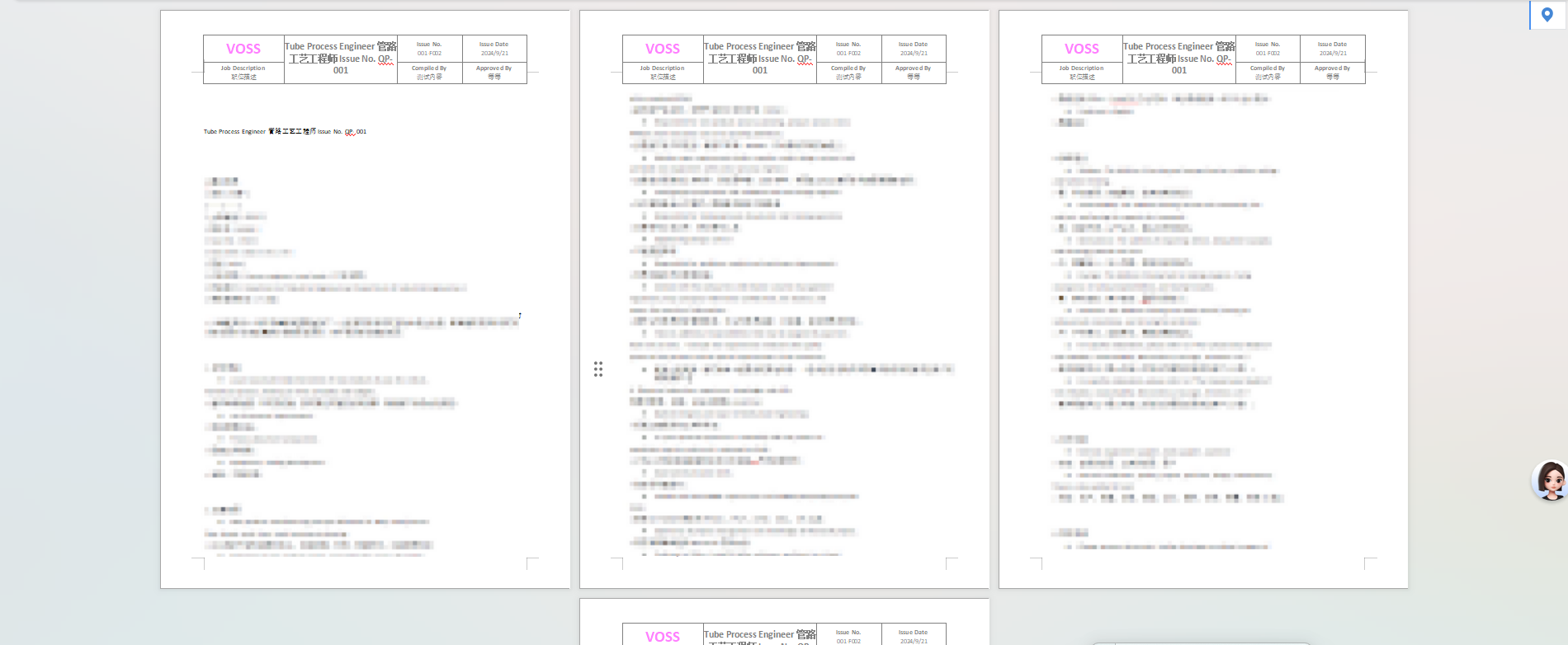
通过以上方案,可实现结构固定、样式统一、数据动态的自定义页眉表格,满足 Word 导出场景中的复杂页眉需求,同时保证导出文档的专业性和规范性。
注意**⚠****:**本文主要是针对如何实现 word 文档页眉表格形式的设置,其余逻辑以及业务需自行修改!!!