需求:
- 某学校三年级共有三个班:三年一班、三年二班、三年三班
- 每个班有N个人
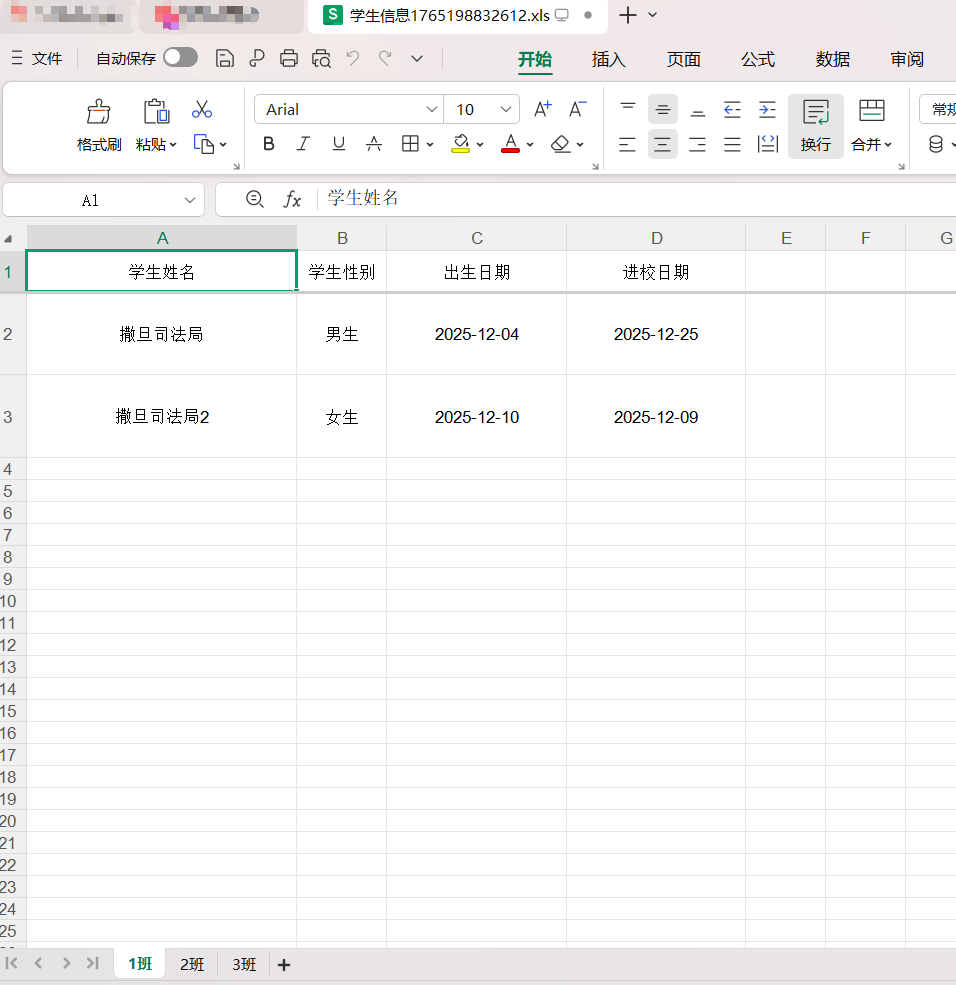
以班级为单位,导出所有人的名单,导出到一个Excel文件中,分不同的Sheet页
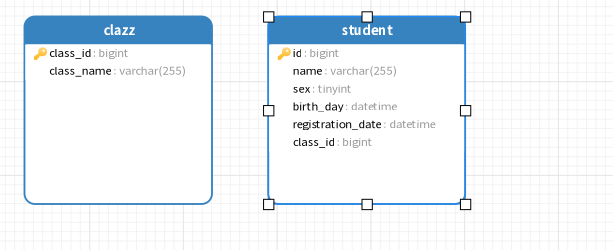
数据库表
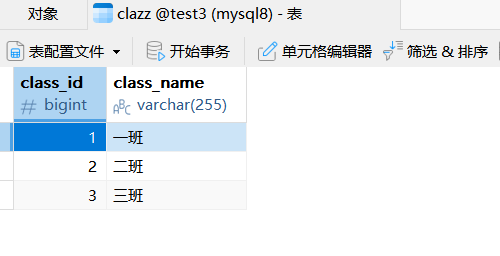
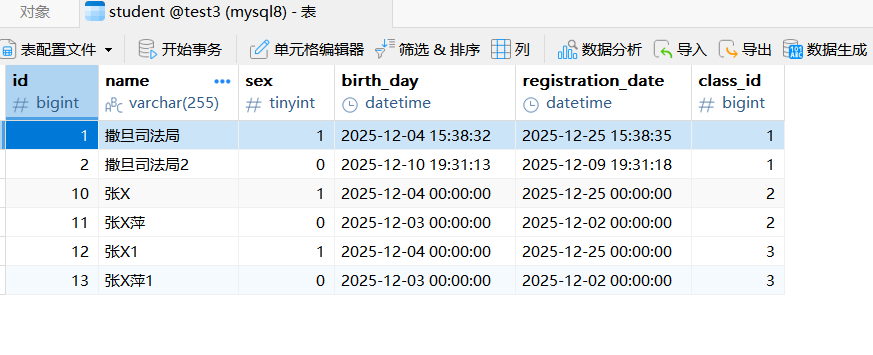
数据
结果
Controller层
java
@GetMapping("exportMultiSheetClassWithStudents")
    public void exportMultiSheetClassWithStudents(HttpServletResponse response){

        List<Clazz> clazzList = clazzService.list();
        List<Long> clazzIds = clazzList.stream().map(e -> e.getClassId()).collect(Collectors.toList());
        if (CollectionUtil.isNotEmpty(clazzIds)){

             //用in一次查出,减少数据库查询次数
             LambdaQueryWrapper<Student> studentLambdaQueryWrapper =
                     new LambdaQueryWrapper<Student>().in(CollectionUtil.isNotEmpty(clazzList),Student::getClassId,clazzIds);
             List<Student> students = studentService.list(studentLambdaQueryWrapper);

             //Student->转StudentMultiSheetExportEntity
            List<StudentMultiSheetExportEntity> studentMultiSheetExportEntities = students.stream().map(e -> {

                StudentMultiSheetExportEntity studentMultiSheetExportEntity = new StudentMultiSheetExportEntity();
                BeanUtil.copyProperties(e, studentMultiSheetExportEntity);
                return studentMultiSheetExportEntity;

            }).collect(Collectors.toList());

            //根据班级分组
            Map<Long, List<StudentMultiSheetExportEntity>> studentMultiSheetMap = studentMultiSheetExportEntities.stream().collect(Collectors.groupingBy(StudentMultiSheetExportEntity::getClassId));

            // 将sheet1和sheet2使用得map进行包装
            List<Map<String, Object>> sheetsList = new ArrayList<>();
            for (Map.Entry<Long, List<StudentMultiSheetExportEntity>> studentListEntry : studentMultiSheetMap.entrySet()) {

                // 创建参数对象
                ExportParams exportParams = new ExportParams();
                String clazzName = studentListEntry.getKey()+"班";
                // 设置sheet得名称
                exportParams.setSheetName(clazzName);

                // 创建sheet使用得map
                Map<String,Object> dataMap = new HashMap<>(4);
                // title的参数为ExportParams类型
                dataMap.put("title",exportParams);
                // 对应的实体类型必须是带@Excel注解的实体不是数据库实体,用数据库实体会报错
                dataMap.put("entity", StudentMultiSheetExportEntity.class);
                // sheet中要填充得数据
                dataMap.put("data",studentListEntry.getValue());

                sheetsList.add(dataMap);
            }

            Workbook workbook = ExcelExportUtil.exportExcel(sheetsList, ExcelType.HSSF);

            ExcelUtil.downLoadExcel("学生信息"+ System.currentTimeMillis() +".xls",response,workbook);

        }


    }
student实体
java
@Data
@EqualsAndHashCode(callSuper = false)
public class Student implements Serializable {

    private static final long serialVersionUID = 1L;

    //这里要写,否则会报错
    @TableId(type = IdType.AUTO)
    private Long id;

    private String name;

    private Integer sex;

    private LocalDateTime birthDay;

    private LocalDateTime registrationDate;

    private Long classId;


}
StudentMultiSheetExportEntity实体
java
@Data
public class StudentMultiSheetExportEntity implements java.io.Serializable{

    /**
     * id
     */
    private Long id;
    /**
     * 学生姓名
     */
    @Excel(name = "学生姓名", height = 20, width = 30, isImportField = "true_st")
    private String        name;
    /**
     * 学生性别
     */
    @Excel(name = "学生性别", replace = { "男_1", "女_0" }, suffix = "生", isImportField = "true_st")
    private int           sex;

    @Excel(name = "出生日期", databaseFormat = "yyyy-MM-dd HH:mm:ss", format = "yyyy-MM-dd", isImportField = "true_st", width = 20)
    private LocalDateTime birthDay;

    @Excel(name = "进校日期", databaseFormat = "yyyy-MM-dd HH:mm:ss", format = "yyyy-MM-dd")
    private LocalDateTime registrationDate;

    @ExcelIgnore
    private Long classId;

}
ExcelUtil
java
public class ExcelUtil {

    public static void downLoadExcel(String fileName, HttpServletResponse response, Workbook workbook) {
        try {
            // 告诉浏览器用什么软件可以打开此文件
            response.setHeader("content-Type", "application/vnd.ms-excel");
            //设置浏览器响应头对应的Content-disposition
            response.setHeader("Content-Disposition",
                    "attachment;filename=" + URLEncoder.encode(fileName, "UTF-8"));
            //编码
            response.setCharacterEncoding("UTF-8");
            workbook.write(response.getOutputStream());
        } catch (IOException e) {
            e.printStackTrace();
        }finally {
            try {
                workbook.close();
            } catch (IOException e) {
                e.printStackTrace();
            }
        }
    }

}