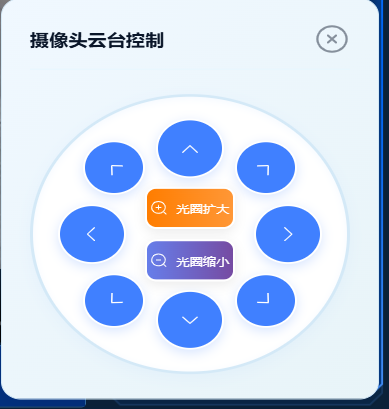
组件代码PtzControl.vue文件
<!-- src/components/PtzControl.vue -->
<template>
  <div v-if="visible" class="ptz-container">
    <div class="ptz-popup">
      <div class="ptz-header">
        <span class="ptz-title">摄像头云台控制</span>
        <!-- 放大的关闭按钮 -->
        <el-icon class="ptz-close" @click="handleClose">
          <CircleClose />
        </el-icon>
      </div>
      <div class="ptz-wheel" ref="wheelRef">
        <!-- 上 -->
        <div
          class="ptz-btn ptz-dir-btn ptz-up"
          @click="handlePtzControl('up')"
          :class="{ active: activeDir === 'up' }"
        >
          <el-icon class="icon"><ArrowUp /></el-icon>
        </div>
        <!-- 下 -->
        <div
          class="ptz-btn ptz-dir-btn ptz-down"
          @click="handlePtzControl('down')"
          :class="{ active: activeDir === 'down' }"
        >
          <el-icon class="icon"><ArrowDown /></el-icon>
        </div>
        <!-- 左 -->
        <div
          class="ptz-btn ptz-dir-btn ptz-left"
          @click="handlePtzControl('left')"
          :class="{ active: activeDir === 'left' }"
        >
          <el-icon class="icon"><ArrowLeft /></el-icon>
        </div>
        <!-- 右 -->
        <div
          class="ptz-btn ptz-dir-btn ptz-right"
          @click="handlePtzControl('right')"
          :class="{ active: activeDir === 'right' }"
        >
          <el-icon class="icon"><ArrowRight /></el-icon>
        </div>
        <!-- 左上:ArrowUp 旋转 -45度 -->
        <div
          class="ptz-btn ptz-dir-btn ptz-diag-btn ptz-up-left"
          @click="handlePtzControl('upLeft')"
          :class="{ active: activeDir === 'upLeft' }"
        >
          <el-icon class="icon rotate-up-left"><ArrowUp /></el-icon>
        </div>
        <!-- 右上:ArrowUp 旋转 45度 -->
        <div
          class="ptz-btn ptz-dir-btn ptz-diag-btn ptz-up-right"
          @click="handlePtzControl('upRight')"
          :class="{ active: activeDir === 'upRight' }"
        >
          <el-icon class="icon rotate-up-right"><ArrowUp /></el-icon>
        </div>
        <!-- 左下:ArrowUp 旋转 -135度 -->
        <div
          class="ptz-btn ptz-dir-btn ptz-diag-btn ptz-down-left"
          @click="handlePtzControl('downLeft')"
          :class="{ active: activeDir === 'downLeft' }"
        >
          <el-icon class="icon rotate-down-left"><ArrowUp /></el-icon>
        </div>
        <!-- 右下:ArrowUp 旋转 135度 -->
        <div
          class="ptz-btn ptz-dir-btn ptz-diag-btn ptz-down-right"
          @click="handlePtzControl('downRight')"
          :class="{ active: activeDir === 'downRight' }"
        >
          <el-icon class="icon rotate-down-right"><ArrowUp /></el-icon>
        </div>

        <!-- 光圈控制按钮组 -->
        <div class="ptz-center-group">
          <div
            class="ptz-iris-btn iris-enlarge"
            @click="handlePtzControl('IRIS_ENLARGE')"
            :class="{ active: activeDir === 'IRIS_ENLARGE' }"
          >
            <el-icon class="icon"><ZoomIn /></el-icon>
            <span class="text">光圈扩大</span>
          </div>
          <div
            class="ptz-iris-btn iris-reduce"
            @click="handlePtzControl('IRIS_REDUCE')"
            :class="{ active: activeDir === 'IRIS_REDUCE' }"
          >
            <el-icon class="icon"><ZoomOut /></el-icon>
            <span class="text">光圈缩小</span>
          </div>
        </div>
      </div>
    </div>
  </div>
</template>

<script setup>
import { ref, watch, defineProps, defineEmits } from 'vue';
import {
  ArrowUp, ArrowDown, ArrowLeft, ArrowRight,
  CircleClose, ZoomIn, ZoomOut
} from '@element-plus/icons-vue';

const props = defineProps({
  visible: {
    type: Boolean,
    default: false
  }
});

const emit = defineEmits(['close', 'ptz-control']);

const activeDir = ref('');
const wheelRef = ref(null);
let debounceTimer = null;

const handlePtzControl = (dir) => {
  clearTimeout(debounceTimer);
  activeDir.value = dir;
  debounceTimer = setTimeout(() => {
    activeDir.value = '';
  }, 500);
  emit('ptz-control', dir);
};

const handleClose = () => {
  emit('close');
};

watch([() => props.visible], () => {
  if (props.visible && wheelRef.value) {
    const size = Math.min(window.innerWidth * 0.4, 320);
    wheelRef.value.style.width = `${size}px`;
    wheelRef.value.style.height = `${size}px`;
  }
}, { immediate: true });
</script>

<style scoped>
/* 基础重置 */
:deep(.el-icon) {
  font-size: inherit;
}

/* 容器:定位到页面右下角 */
.ptz-container {
  position: fixed;
  bottom: 20px;    /* 距离底部20px */
  right: 30px;     /* 距离右侧20px */
  z-index: 9999;
  /* 取消居中的transform */
  transform: none !important;
}

/* 弹窗容器:添加自定义背景色 + 增强视觉效果 */
.ptz-popup {
  /* 自定义背景色(浅蓝白,可根据需求调整) */
  background: #f0f8ff !important;
  /* 背景渐变增强 */
  background: linear-gradient(135deg, #f0f8ff 0%, #e8f4f8 100%) !important;
  border-radius: 20px;
  padding: 28px;
  box-shadow: 0 10px 40px rgba(0, 16, 40, 0.15);
  width: fit-content;
  /* 边框颜色适配背景 */
  border: 1px solid #d4e9f7;
}

/* 弹窗头部 */
.ptz-header {
  display: flex;
  justify-content: space-between;
  align-items: center;
  margin-bottom: 28px;
  padding-bottom: 16px;
  border-bottom: 1px solid #e6f7ff;
}

.ptz-title {
  font-size: 19px;
  font-weight: 600;
  color: #0a1629;
  letter-spacing: 0.2px;
}

/* 放大的关闭按钮 */
.ptz-close {
  font-size: 36px !important;
  color: #86909c;
  cursor: pointer;
  border-radius: 50%;
  transition: color 0.2s ease, background-color 0.2s ease;
}

.ptz-close:hover {
  color: #4080ff !important;
  background-color: #e8f4ff !important;
}

/* 云台圆盘容器:背景色适配弹窗 */
.ptz-wheel {
  position: relative;
  width: 320px;
  height: 320px;
  border-radius: 50%;
  /* 圆盘背景色与弹窗呼应 */
  background: #ffffff;
  border: 3px solid #d4e9f7;
  box-shadow:
    inset 0 2px 8px rgba(145, 200, 255, 0.1),
    0 4px 16px rgba(64, 128, 255, 0.05);
  user-select: none;
  margin: 0 auto;
}

/* 方向按钮:无动画 */
.ptz-dir-btn {
  position: absolute;
  width: 68px;
  height: 68px;
  border-radius: 50%;
  background: #4080ff;
  color: white;
  display: flex;
  align-items: center;
  justify-content: center;
  cursor: pointer;
  transition: background 0.25s ease, box-shadow 0.25s ease;
  box-shadow: 0 4px 12px rgba(64, 128, 255, 0.2);
  border: 2px solid #ffffff;
  z-index: 10;
  transform: none !important;
}

.ptz-dir-btn:hover {
  background: #2673e6;
  box-shadow: 0 6px 16px rgba(38, 115, 230, 0.25);
}

.ptz-dir-btn.active {
  background: #00b42a;
  box-shadow: 0 4px 12px rgba(0, 180, 42, 0.25);
}

/* 按钮图标基础样式 */
.ptz-dir-btn .icon {
  font-size: 22px;
  font-weight: 500;
  display: inline-block; /* 必须加,否则旋转不生效 */
  transform-origin: center center; /* 以中心旋转 */
}

/* 斜向按钮大小 */
.ptz-diag-btn {
  width: 62px;
  height: 62px;
}

/* 旋转样式:纯单个箭头实现斜向 */
.rotate-up-left {
  transform: rotate(-45deg); /* 左上:向上箭头左转45度 */
}
.rotate-up-right {
  transform: rotate(45deg); /* 右上:向上箭头右转45度 */
}
.rotate-down-left {
  transform: rotate(-135deg); /* 左下:向上箭头左转135度(等价于向下箭头左转45度) */
}
.rotate-down-right {
  transform: rotate(135deg); /* 右下:向上箭头右转135度(等价于向下箭头右转45度) */
}

/* 方向按钮定位(calc居中) */
.ptz-up {
  top: 25px;
  left: calc(50% - 34px);
}

.ptz-down {
  bottom: 25px;
  left: calc(50% - 34px);
}

.ptz-left {
  left: 25px;
  top: calc(50% - 34px);
}

.ptz-right {
  right: 25px;
  top: calc(50% - 34px);
}

.ptz-up-left {
  top: 50px;
  left: 50px;
}

.ptz-up-right {
  top: 50px;
  right: 50px;
}

.ptz-down-left {
  bottom: 50px;
  left: 50px;
}

.ptz-down-right {
  bottom: 50px;
  right: 50px;
}

/* 中心光圈控制按钮组 */
.ptz-center-group {
  position: absolute;
  top: 50%;
  left: 50%;
  transform: translate(-50%, -50%);
  display: flex;
  flex-direction: column;
  gap: 12px;
  z-index: 8;
}

/* 光圈按钮样式 */
.ptz-iris-btn {
  width: 90px;
  height: 48px;
  border-radius: 12px;
  color: white;
  display: flex;
  align-items: center;
  justify-content: center;
  cursor: pointer;
  transition: all 0.25s ease;
  box-shadow: 0 4px 12px rgba(0, 0, 0, 0.08);
  border: 2px solid #ffffff;
  font-size: 14px;
}

.iris-enlarge {
  background: linear-gradient(90deg, #ff7d00, #ff9736);
}

.iris-enlarge:hover {
  background: linear-gradient(90deg, #ff6a00, #ff8a14);
  box-shadow: 0 6px 16px rgba(255, 106, 0, 0.2);
  transform: scale(1.05);
}

.iris-reduce {
  background: linear-gradient(90deg, #667eea, #764ba2);
}

.iris-reduce:hover {
  background: linear-gradient(90deg, #5a67d8, #6b46c1);
  box-shadow: 0 6px 16px rgba(90, 103, 216, 0.2);
  transform: scale(1.05);
}

.ptz-iris-btn.active {
  background: linear-gradient(90deg, #00b42a, #36d399);
  box-shadow: 0 4px 12px rgba(0, 180, 42, 0.25);
  transform: scale(0.98);
}

.ptz-iris-btn .icon {
  font-size: 18px;
  margin-right: 8px;
  transform: none !important; /* 重置光圈图标旋转 */
}

.ptz-iris-btn .text {
  font-size: 13px;
  font-weight: 500;
  letter-spacing: 0.3px;
}

/* 移动端适配:右下角定位也适配 */
@media (max-width: 768px) {
  .ptz-container {
    bottom: 10px;
    right: 10px;
  }

  .ptz-popup {
    padding: 20px;
    border-radius: 16px;
  }

  .ptz-wheel {
    width: 240px !important;
    height: 240px !important;
  }

  .ptz-dir-btn {
    width: 56px;
    height: 56px;
  }

  .ptz-diag-btn {
    width: 50px;
    height: 50px;
  }

  .ptz-iris-btn {
    width: 80px;
    height: 44px;
  }

  /* 移动端关闭按钮 */
  .ptz-close {
    font-size: 32px !important;
    padding: 12px !important;
  }

  /* 移动端按钮定位 */
  .ptz-up {
    top: 15px;
    left: calc(50% - 28px);
  }
  .ptz-down {
    bottom: 15px;
    left: calc(50% - 28px);
  }
  .ptz-left {
    left: 15px;
    top: calc(50% - 28px);
  }
  .ptz-right {
    right: 15px;
    top: calc(50% - 28px);
  }
  .ptz-up-left, .ptz-up-right {
    top: 35px;
  }
  .ptz-down-left, .ptz-down-right {
    bottom: 35px;
  }
}

/* 暗黑模式适配:背景色也适配 */
@media (prefers-color-scheme: dark) {
  .ptz-popup {
    /* 暗黑模式背景色 */
    background: #1a2634 !important;
    background: linear-gradient(135deg, #1a2634 0%, #1e293b 100%) !important;
    border-color: #334155;
  }

  .ptz-header {
    border-bottom-color: #334155;
  }

  .ptz-title {
    color: #f1f5f9;
  }

  .ptz-wheel {
    background: #273449;
    border-color: #334155;
  }

  .ptz-close {
    color: #94a3b8 !important;
  }

  .ptz-close:hover {
    color: #60a5fa !important;
    background-color: #273449 !important;
  }
}
</style>
使用:
<template>
  <div class="videoSurveillance">
    <div class="shoutoutBtn" @click="deviceControll">云台控制</div>


    <PtzControl
      :visible="ptzVisible"
      @close="handlePtzClose"
      @ptz-control="handlePtzControl"
    />
  </div>
</template>
<script setup lang="ts">
const currentNodeKey = ref<string | number>('');
// 控制云台组件显示/隐藏
const ptzVisible = ref(false);
/**
 * 点击按钮显示云台控制组件
 */
const deviceControll = () => {
  if (!currentNodeKey.value) {
    ElMessage.warning('请先选择设备!');
    return;
  }
  ptzVisible.value = true;
};
/**
 * 关闭云台控制组件
 */
const handlePtzClose = () => {
  ptzVisible.value = false;
};
/**
 * 接收云台控制指令(子组件传递)
 * @param {string} dir 控制方向:up/down/left/right/upLeft/upRight/downLeft/downRight/stop
 */
async function handlePtzControl(dir) {
  // 这里写实际的云台控制逻辑(调用后端接口)
  console.log('云台控制指令:', dir);

  // 示例:根据方向调用不同接口
  switch (dir) {
    case 'up':
      await deviceControl({ ptzCmd: 'UP', deviceCode: currentNodeKey.value });
      break;
    case 'down':
      await deviceControl({ ptzCmd: 'DOWN', deviceCode: currentNodeKey.value});
      break;
    case 'left':
      await deviceControl({ ptzCmd: 'LEFT', deviceCode: currentNodeKey.value });
      break;
    case 'right':
      await deviceControl({ ptzCmd: 'RIGHT', deviceCode: currentNodeKey.value });
      break;
    case 'upLeft':
      await deviceControl({ ptzCmd: 'LEFT_UP', deviceCode: currentNodeKey.value });
      break;
    case 'upRight':
      await deviceControl({ ptzCmd: 'RIGHT_UP', deviceCode: currentNodeKey.value });
      break;
    case 'downLeft':
      await deviceControl({ ptzCmd: 'LEFT_DOWN', deviceCode: currentNodeKey.value });
      break;
    case 'downRight':
      await deviceControl({ ptzCmd: 'RIGHT_DOWN', deviceCode: currentNodeKey.value });
      break;
    case 'IRIS_ENLARGE':
      await deviceControl({ ptzCmd: 'IRIS_ENLARGE', deviceCode: currentNodeKey.value });
      break;
    case 'IRIS_REDUCE':
      await deviceControl({ ptzCmd: 'IRIS_REDUCE', deviceCode: currentNodeKey.value });
      break;
    default:
      break;
  }
};
</script>