作者:来自 Elastic JINA
新的 2B 视觉语言模型在多语言 VQA(Visual Question Answering - 视觉问答)上达到 SOTA(state of the art - 最先进的水平),在仅文本任务中无灾难性遗忘。
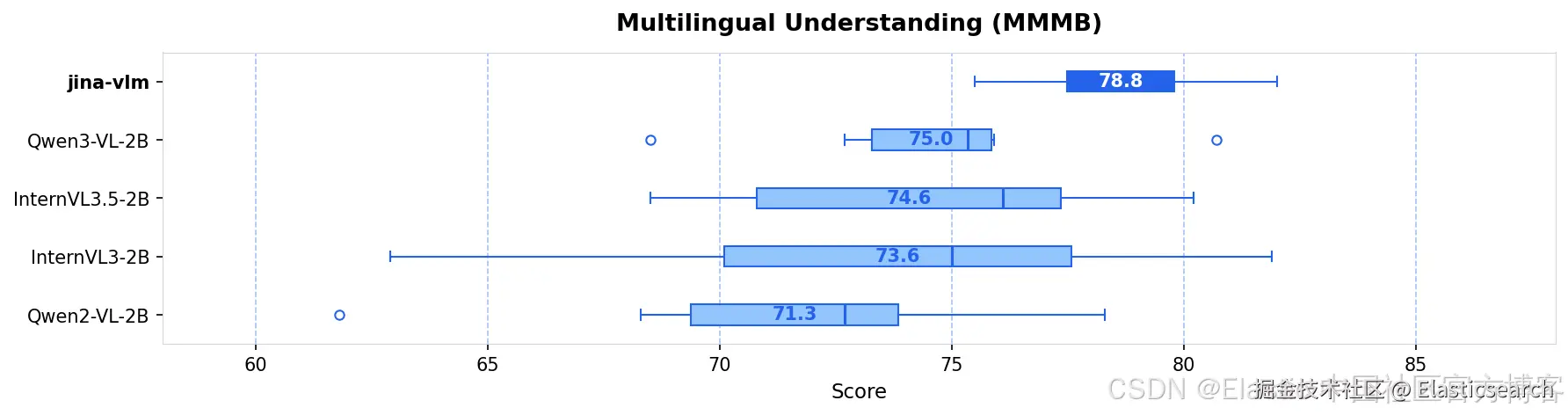
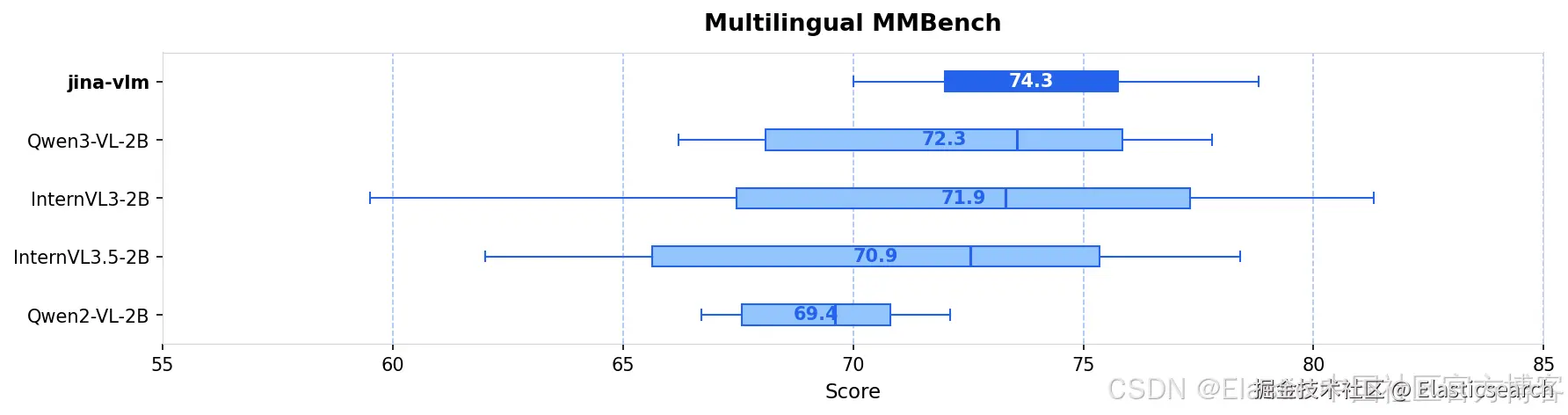
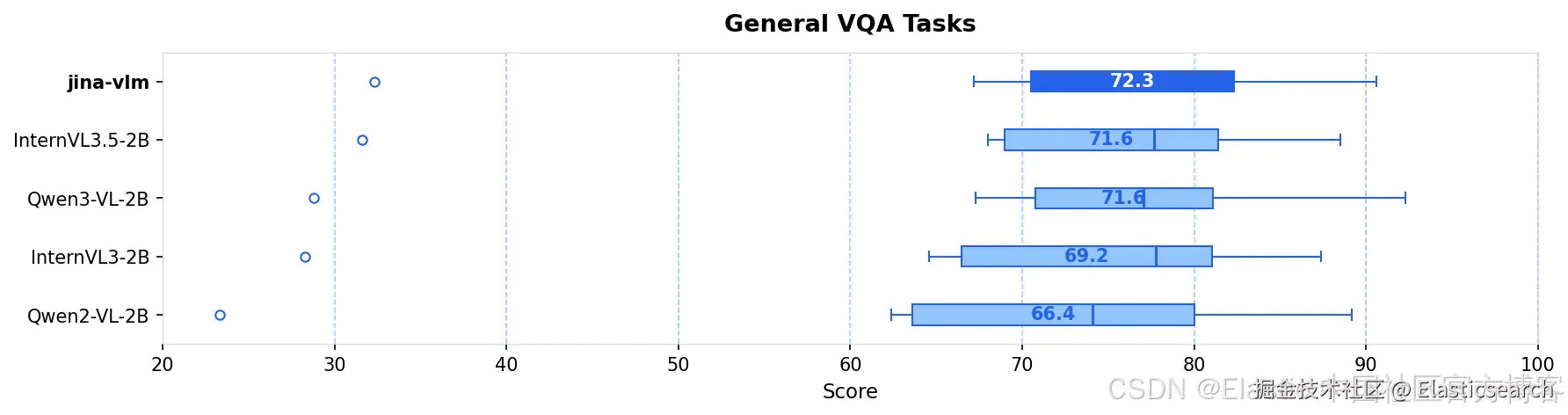
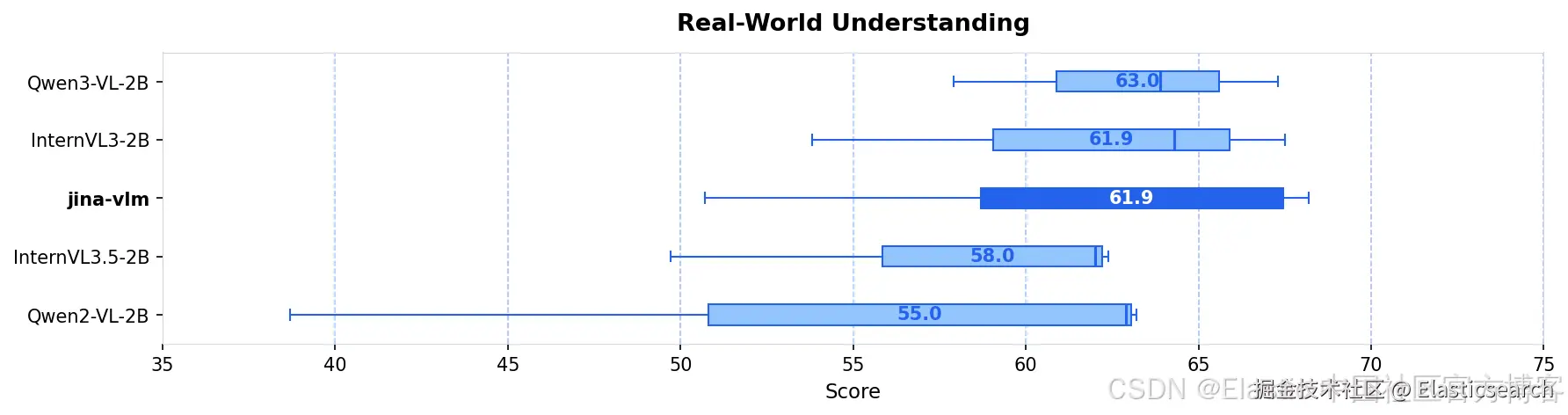
我们发布了jina-vlm,这是一款 2.4B 参数的视觉语言模型,在开放的 2B 级 VLM 中实现了多语言视觉问答的 SOTA。通过将 SigLIP2 视觉编码器与 Qwen3 语言骨干通过 attention-pooling 连接器结合,jina-vlm 在保持足够高效、可在消费级硬件上运行的同时,在 29 种语言中提供了强劲表现。
| Model | Size | VQA Avg | MMMB | Multi. MMB | DocVQA | OCRBench |
|---|---|---|---|---|---|---|
| jina-vlm | 2.4B | 72.3 | 78.8 | 74.3 | 90.6 | 778 |
| Qwen2-VL-2B | 2.1B | 66.4 | 71.3 | 69.4 | 89.2 | 809 |
| Qwen3-VL-2B | 2.8B | 71.6 | 75.0 | 72.3 | 92.3 | 858 |
| InternVL3-2B | 2.2B | 69.2 | 73.6 | 71.9 | 87.4 | 835 |
| InternVL3.5-2B | 2.2B | 71.6 | 74.6 | 70.9 | 88.5 | 836 |
架构
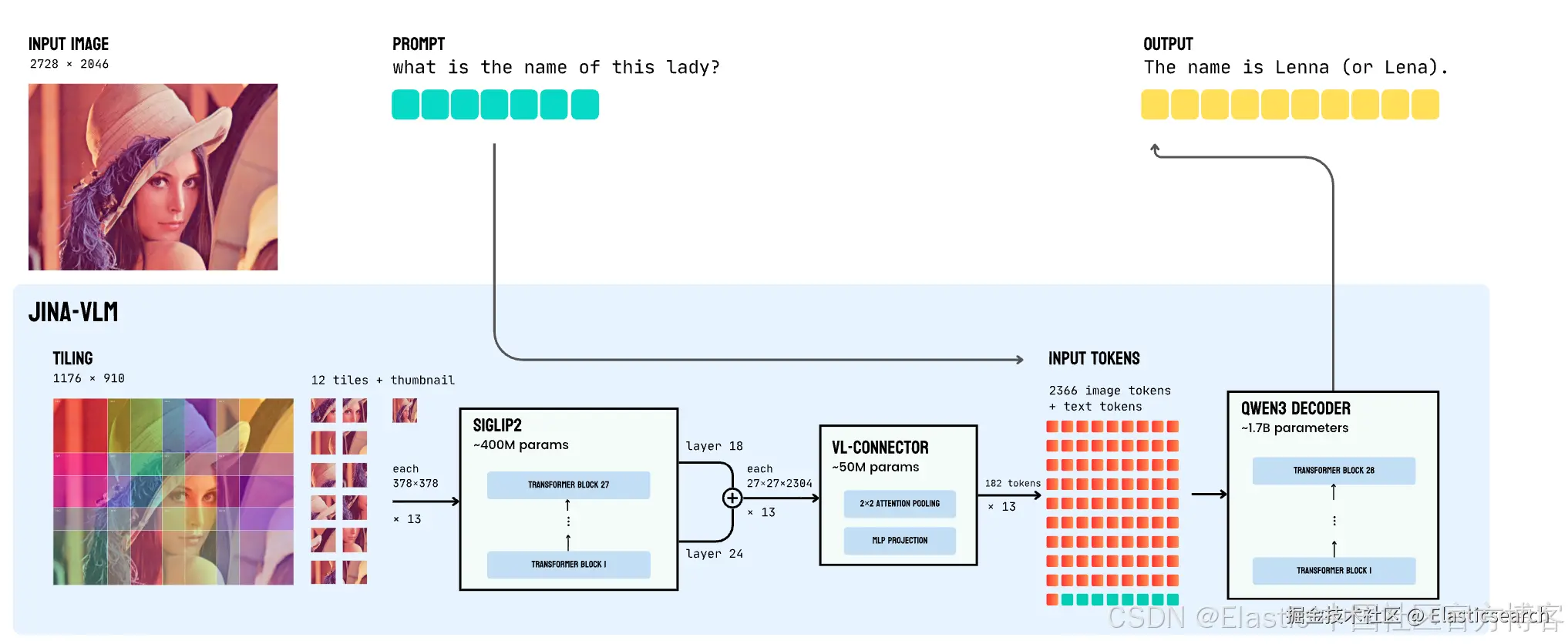
两个挑战限制了 VLM 的实际部署:多语言能力在视觉适配过程中通常会下降,高质量 VLM 仍然计算成本高。jina-vlm 通过谨慎的架构选择解决了这两个问题 ------ 我们的 attention-pooling connector 将视觉 tokens 减少了 4×,性能影响最小 ------ 以及显式保留多语言能力的训练方案。
关键的架构创新是我们的 vision-language connector。不是将每个 tile 的 729 个视觉 tokens 全部传给语言模型,而是应用 2×2 attention pooling,将其减少到 182 个 tokens ------ 4× 减少且信息损失最小。该 connector 工作方式如下:
- 多层特征融合:我们连接 ViT 层 18 和 24(倒数第三层和倒数第九层)的特征,同时捕捉精细空间细节和高层语义。
- Attention pooling:对于每个 2×2 patch 邻域,我们将邻域特征取均值作为 query,然后应用 cross-attention 生成单一池化表示。
- SwiGLU 投影:池化特征通过 gated linear unit 投影到语言模型维度。
这种效率提升如下所述:
| Metric | No Pooling | With Pooling | Reduction |
|---|---|---|---|
| Visual tokens (12 tiles + thumbnail) | 9,477 | 2,366 | 4.0× |
| LLM prefill FLOPs | 27.2 TFLOPs | 6.9 TFLOPs | 3.9× |
| KV-cache memory | 2.12 GB | 0.53 GB | 4.0× |
由于 ViT 对每个 tile 的处理不受 pooling 影响,这些节省仅适用于语言模型,而语言模型在推理过程中是主要开销。
训练流程
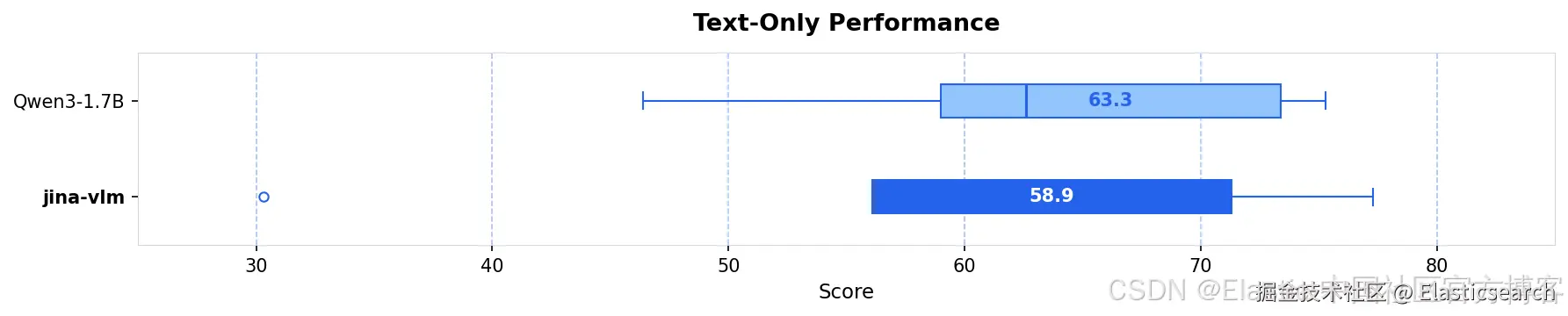
VLM 训练中的一个常见失败模式是灾难性遗忘:语言模型在适应视觉输入时丧失纯文本能力。对于多语言模型尤其明显,因为视觉适配可能降低非英语语言的性能。
我们通过两阶段训练流程,并结合显式多语言数据和纯文本保留来解决这一问题。
阶段 1:对齐训练
第一阶段专注于跨语言语义对齐,使用覆盖多样视觉领域的 caption 数据集:自然场景、文档、信息图表和图示。关键是包括 15% 的纯文本数据以保持 backbone 的语言理解能力。connector 使用比 encoder 和 decoder 更高的学习率 (2e-4) 和更短的 warmup,使其快速适应,而预训练组件变化较慢。
阶段 2:指令微调
第二阶段训练 VQA 和推理任务的指令跟随能力。我们结合了涵盖学术 VQA、文档理解、OCR、数学和推理的公开数据集,以及纯文本指令数据以保持语言能力。
组合数据约包括 500 万多模态样本和 120 亿文本 tokens,覆盖 29 种语言,其中约一半为英语,其余包括中文、阿拉伯语、德语、西班牙语、法语、意大利语、日语、韩语、葡萄牙语、俄语、土耳其语、越南语、泰语、印尼语、印地语、孟加拉语等。
入门
通过 Jina API
我们提供一个 OpenAI 兼容的 API,地址为 api-beta-vlm.jina.ai。
从 URL 获取图片
| Format | Example |
|---|---|
| HTTP/HTTPS URL | https://example.com/image.jpg |
| Base64 data URI | data:image/jpeg;base64,/9j/4AAQ... |
arduino
`
1. curl https://api-beta-vlm.jina.ai/v1/chat/completions \
2. -H "Content-Type: application/json" \
3. -H "Authorization: Bearer $JINA_API_KEY" \
4. -d '{
5. "model": "jina-vlm",
6. "messages": [{
7. "role": "user",
8. "content": [
9. {"type": "text", "text": "Describe this image"},
10. {"type": "image_url", "image_url": {"url": "https://example.com/photo.jpg"}}
11. ]
12. }]
13. }'
`AI写代码本地图片 (base64)
arduino
`
1. curl https://api-beta-vlm.jina.ai/v1/chat/completions \
2. -H "Content-Type: application/json" \
3. -H "Authorization: Bearer $JINA_API_KEY" \
4. -d '{
5. "model": "jina-vlm",
6. "messages": [{
7. "role": "user",
8. "content": [
9. {"type": "text", "text": "What is in this image?"},
10. {"type": "image_url", "image_url": {"url": "data:image/jpeg;base64,'$(base64 -i image.jpg)'"}}
11. ]
12. }]
13. }'
`AI写代码纯文本查询
arduino
`

1.  curl https://api-beta-vlm.jina.ai/v1/chat/completions \
2.    -H "Content-Type: application/json" \
3.    -H "Authorization: Bearer $JINA_API_KEY" \
4.    -d '{
5.      "model": "jina-vlm",
6.      "messages": [{"role": "user", "content": "What is the capital of France?"}]
7.    }'

`AI写代码
流式响应
添加 "stream": true 以在生成 token 时接收输出:
arduino
`

1.  curl https://api-beta-vlm.jina.ai/v1/chat/completions \
2.    -H "Content-Type: application/json" \
3.    -H "Authorization: Bearer $JINA_API_KEY" \
4.    -d '{
5.      "model": "jina-vlm",
6.      "stream": true,
7.      "messages": [{"role": "user", "content": "Write a haiku about coding"}]
8.    }'

`AI写代码
当服务冷启动时,你会收到:
markdown
`

1.  {
2.    "error": {
3.      "message": "Model is loading, please retry in 30-60 seconds. Cold start takes ~30s after the service scales up.",
4.      "code": 503
5.    }
6.  }

`AI写代码
等待后重试你的请求。
通过 CLI
HuggingFace 仓库包含一个 infer.py 脚本用于快速实验:
bash
`
1. # Single image
2. python infer.py -i image.jpg -p "What's in this image?"
4. # Streaming output
5. python infer.py -i image.jpg -p "Describe this image" --stream
7. # Multiple images
8. python infer.py -i img1.jpg -i img2.jpg -p "Compare these images"
10. # Text-only
11. python infer.py -p "What is the capital of France?"
`AI写代码通过 Transformers
ini
`
1. from transformers import AutoModelForCausalLM, AutoProcessor
2. import torch
3. from PIL import Image
5. # Load model and processor
6. model = AutoModelForCausalLM.from_pretrained(
7. "jinaai/jina-vlm",
8. torch_dtype=torch.bfloat16,
9. trust_remote_code=True,
10. device_map="auto"
11. )
12. processor = AutoProcessor.from_pretrained(
13. "jinaai/jina-vlm",
14. trust_remote_code=True
15. )
17. # Load an image
18. image = Image.open("document.png")
20. # Create the conversation
21. messages = [
22. {
23. "role": "user",
24. "content": [
25. {"type": "image", "image": image},
26. {"type": "text", "text": "What is the main topic of this document?"}
27. ]
28. }
29. ]
31. # Process and generate
32. inputs = processor.apply_chat_template(
33. messages,
34. add_generation_prompt=True,
35. tokenize=True,
36. return_dict=True,
37. return_tensors="pt"
38. ).to(model.device)
40. outputs = model.generate(**inputs, max_new_tokens=256, do_sample=False)
41. response = processor.decode(outputs[0], skip_special_tokens=True)
42. print(response)
`AI写代码结论
jina-vlm 表明,小型 VLM 通过谨慎的架构和训练选择,也能实现强大的跨语言视觉理解。attention-pooling connector 提供 4× token 减少且性能影响最小,在多模态训练中加入纯文本数据可保留语言能力,否则这些能力会下降。
我们注意到当前方法的几个局限性:
- Tiling 开销:处理随 tile 数线性增加。对于超高分辨率图像,这可能变得显著。此外,tiling 可能影响需要整体场景理解的任务,如对象计数或跨 tile 边界的空间推理。全局缩略图可部分缓解,但原生分辨率方法可能更适合此类任务。
- 多图像推理:在多图像基准上的性能较弱,因为该场景下训练数据有限。优化简洁视觉响应似乎与多步推理冲突,如 MMLU-Pro 性能下降所示。
未来工作可探索更高效的分辨率处理、针对计数和空间任务的优化,并研究我们的多语言训练方案是否可迁移到更大规模模型。