前言
❝
CSV 作为一种以逗号分隔符存储文本数据格式,可以很方便的存储点数据。在 GIS 开发中,经常需要进行数据的转换处理,其中常见的便是将 CSV 转换为 Shp数据进行展示。
本篇教程在之前一系列文章的基础上讲解
- 1、GDAL 简介1
- 2、GDAL 下载安装2
- 3、GDAL 开发起步3
如果你还没有看过,建议从以上内容开始。
1. 开发环境
本文使用如下开发环境,以供参考。
时间:2025年
系统:Windows 11
Python:3.11.7
GDAL:3.11.1
2. 导入依赖
CSV作为一种矢量数据格式,可以使用矢量库OGR进行处理,以实现CSV数据从文本格式转换为Shp格式。其中还涉及坐标定义,所以还需要引入osr模块。
javascript
from osgeo import ogr,osr
import os
import csv
3. 创建字符编码文件
定义一个方法CreateCpgFile2Encode用于创建Shapefile数据字符编码文件。由于属性数据在读取、写入过程中经常会出现中文乱码问题,所以创建一个.cpg文件用于指定字符编码。
python
"""
说明:创建.cpg文件指定字符编码
参数:
    -shpPath:Shp文件路径
    -encoding:Shp文件字符编码
"""
def CreateCpgFile2Encode(shpPath,encoding):
    fileName = os.path.splitext(shpPath)[0]
    cpgFile = fileName + ".cpg"

    with open(cpgFile,"w",encoding=encoding) as f:
        f.write(encoding)
        print(f"成功创建编码文件: {cpgFile}")
4. 数据转换
定义一个方法Csv2Shp(csvPath,shpPath,lonField="longitude",latField="latitude",encoding="UTF-8")用于将CSV数据转换为Shp数据。
python
"""
说明:将CSV文件转换为Shapfile文件
参数:
    -csvPath:CSV文件路径
    -shpPath:Shp文件路径
    -lonField:经度字段
    -latField:纬度字段
    -encoding:CSV 文件编码
"""
def Csv2Shp(csvPath,shpPath,lonField="longitude",latField="latitude",encoding="UTF-8"):在进行CSV数据格式转换之前,需要检查数据路径是否存在。
lua
# 检查文件是否存在
if os.path.exists(csvPath):
    print("CSV 文件存在。")
else:
    print("CSV 文件不存在,请重新选择文件!")
return通过GetDriverByName获取Shp数据驱动,并使用os.path.exists方法检查Shp文件是否已经创建,如果存在则将其删除。
python
# 注册所有驱动
ogr.RegisterAll()

# 添加Shp数据源
shpDriver = ogr.GetDriverByName('ESRI Shapefile')

if os.path.exists(shpPath):
    try:
        shpDriver.DeleteDataSource(shpPath)
        print("文件已删除!")
    except Exception as e:
        print(f"文件删除出错:{e}")
return False接着创建Shp数据源和空间参考,数据坐标系这里定义为4326。
python
# 创建Shp数据源
shpDataSource = shpDriver.CreateDataSource(shpPath)
if shpDataSource is None:
    print("无法创建Shp数据源,请检查文件!")
    return false
# 创建空间参考
srs = osr.SpatialReference()
srs.ImportFromEPSG(4326)然后使用CreateLayer方法创建一个点图层,读取CSV行数据,并且将属性字段名称、属性字段值以及几何对象写入Shapefile文件,在数据读取完成之后调用CreateCpgFile2Encode方法创建字符编码文件。
ini
# 创建点图层
layer = shpDataSource.CreateLayer("points",srs,ogr.wkbPoint)

# 读取 CSV 并创建字段
try:
    with open(csvPath,"r",encoding=encoding) as CsvFile:
        reader = csv.DictReader(CsvFile)

        fieldnames  = reader.fieldnames

        # 创建属性字段
        fieldObj = {}

        for field in fieldnames:
            if field not in [lonField, latField]:
                # 创建字段定义
                fieldDefn = ogr.FieldDefn(field, ogr.OFTString)
                fieldDefn.SetWidth(254)
                # 直接创建字段,不要存储 FieldDefn 对象
                layer.CreateField(fieldDefn)

        CsvFile.seek(0)
        # 跳过标题行,重新开始读取
        next(reader)

        # 添加要素
        featureCount = 0
        for row in reader:
            try:
                lon = float(row[lonField])
                lat = float(row[latField])
            except (ValueError,KeyError):
                continue

            # 创建要素
            feature = ogr.Feature(layer.GetLayerDefn())

            # 设置属性
            for field in fieldnames:
                if field not in [lonField, latField]:
                    feature.SetField(field, str(row[field]))

            # 创建几何
            point = ogr.Geometry(ogr.wkbPoint)
            point.AddPoint(lon,lat)
            feature.SetGeometry(point)

            # 保存要素
            layer.CreateFeature(feature)
            feature = None
            featureCount += 1
        print(f"成功转换【{featureCount}】个要素")
except Exception as e:
    print(f"转换过程出错:{e}")
    return False
finally:
    shpDataSource = None
    CreateCpgFile2Encode(shpPath,"UTF-8")

return True
程序执行成功显示如下: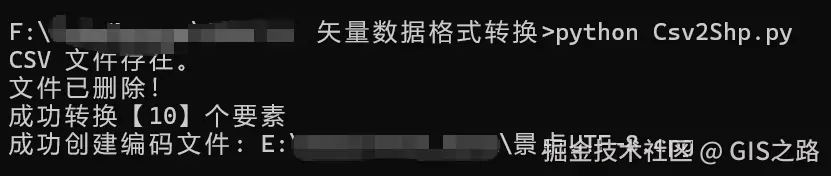
5. 完整代码
注:请将数据路径替换为自己的实际路径,并更换目标字符编码
python
from osgeo import ogr,osr
import os
import csv

# 启用异常处理(推荐)
ogr.UseExceptions()

# 设置Shapefile的编码为GBK
# os.environ['SHAPE_ENCODING'] = "UTF-8"
os.environ['SHAPE_ENCODING'] = "ISO-8859-1"

# 如果是通过 pip 安装的,可能需要找到对应位置
os.environ['PROJ_LIB'] = r'D:ProgramsPythonPython311Libsite-packagesosgeodataproj'

"""
说明:将CSV文件转换为Shapfile文件
参数:
    -csvPath:CSV文件路径
    -shpPath:Shp文件路径
    -lonField:经度字段
    -latField:纬度字段
    -encoding:CSV 文件编码
"""
def Csv2Shp(csvPath,shpPath,lonField="longitude",latField="latitude",encoding="UTF-8"):
    # 检查文件是否存在
    if os.path.exists(csvPath):
        print("CSV 文件存在。")
    else:
        print("CSV 文件不存在,请重新选择文件!")
        return

    # 注册所有驱动
    ogr.RegisterAll()

    # 添加Shp数据源
    shpDriver = ogr.GetDriverByName('ESRI Shapefile')
    if os.path.exists(shpPath):
        try:
            shpDriver.DeleteDataSource(shpPath)
            print("文件已删除!")
        except Exception as e:
            print(f"文件删除出错:{e}")
            return False

    # 创建Shp数据源
    shpDataSource = shpDriver.CreateDataSource(shpPath)
    if shpDataSource is None:
        print("无法创建Shp数据源,请检查文件!")
        return false

    # 创建空间参考
    srs = osr.SpatialReference()
    srs.ImportFromEPSG(4326)

    # 创建点图层
    layer = shpDataSource.CreateLayer("points",srs,ogr.wkbPoint)

    # 读取 CSV 并创建字段
    try:
        with open(csvPath,"r",encoding=encoding) as CsvFile:
            reader = csv.DictReader(CsvFile)

            fieldnames  = reader.fieldnames

            # 创建属性字段
            fieldObj = {}

            for field in fieldnames:
                if field not in [lonField, latField]:
                    # 创建字段定义
                    fieldDefn = ogr.FieldDefn(field, ogr.OFTString)
                    fieldDefn.SetWidth(254)
                    # 直接创建字段,不要存储 FieldDefn 对象
                    layer.CreateField(fieldDefn)

            CsvFile.seek(0)
            # 跳过标题行,重新开始读取
            next(reader)

            # 添加要素
            featureCount = 0
            for row in reader:
                try:
                    lon = float(row[lonField])
                    lat = float(row[latField])
                except (ValueError,KeyError):
                    continue

                # 创建要素
                feature = ogr.Feature(layer.GetLayerDefn())

                # 设置属性
                for field in fieldnames:
                    if field not in [lonField, latField]:
                        feature.SetField(field, str(row[field]))
                # 创建几何
                point = ogr.Geometry(ogr.wkbPoint)
                point.AddPoint(lon,lat)
                feature.SetGeometry(point)

                # 保存要素
                layer.CreateFeature(feature)
                feature = None
                featureCount += 1
            print(f"成功转换【{featureCount}】个要素")
    except Exception as e:
        print(f"转换过程出错:{e}")
        return False
    finally:
        shpDataSource = None
        CreateCpgFile2Encode(shpPath,"UTF-8")

    return True

"""
说明:创建.cpg文件指定字符编码
参数:
    -shpPath:Shp文件路径
    -encoding:Shp文件字符编码
"""
def CreateCpgFile2Encode(shpPath,encoding):
    fileName = os.path.splitext(shpPath)[0]
    cpgFile = fileName + ".cpg"

    with open(cpgFile,"w",encoding=encoding) as f:
        f.write(encoding)
        print(f"成功创建编码文件: {cpgFile}")

if __name__  == "__main__":

    csvPath = "E:\data\test_data\景点.csv"
    shpPath = "E:\data\test_data\景点.shp"

    lonField = "LNGQ"
    latField = "LATQ"

    encoding = "ISO-8859-1"
    # encoding = "UTF-8"

    Csv2Shp(csvPath,shpPath,lonField,latField,encoding)
❝
OpenLayers示例数据下载,请回复关键字:ol数据
全国信息化工程师-GIS 应用水平考试资料,请回复关键字:GIS考试
❝【GIS之路】 已经接入了智能助手,欢迎关注,欢迎提问。
欢迎访问我的博客网站-长谈GIS :
http://shanhaitalk.com
都看到这了,不要忘记点赞、收藏 + 关注 哦 !
本号不定时更新有关 GIS开发 相关内容,欢迎关注 !