采用 uniapp 实现的一款时间范围选择器,不依赖任何第三方库,纯JS、CSS、HTML实现。支持 vue2、vue3;适配 web、H5、微信小程序(其他平台小程序未测试过,可自行尝试)
可到插件市场下载尝试:https://ext.dcloud.net.cn/plugin?id=26171
- 示例
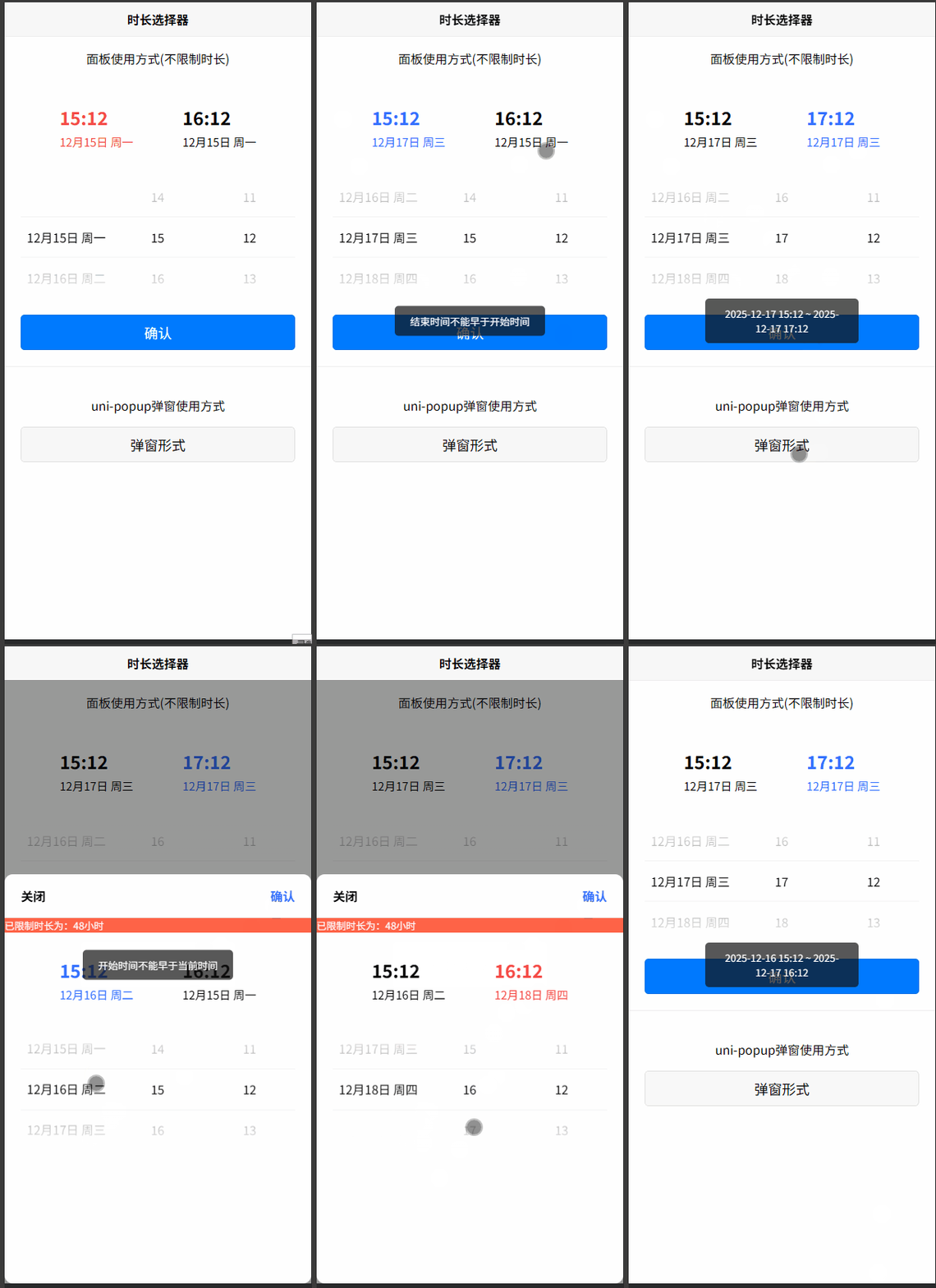
H5示例:
微信小程序示例:
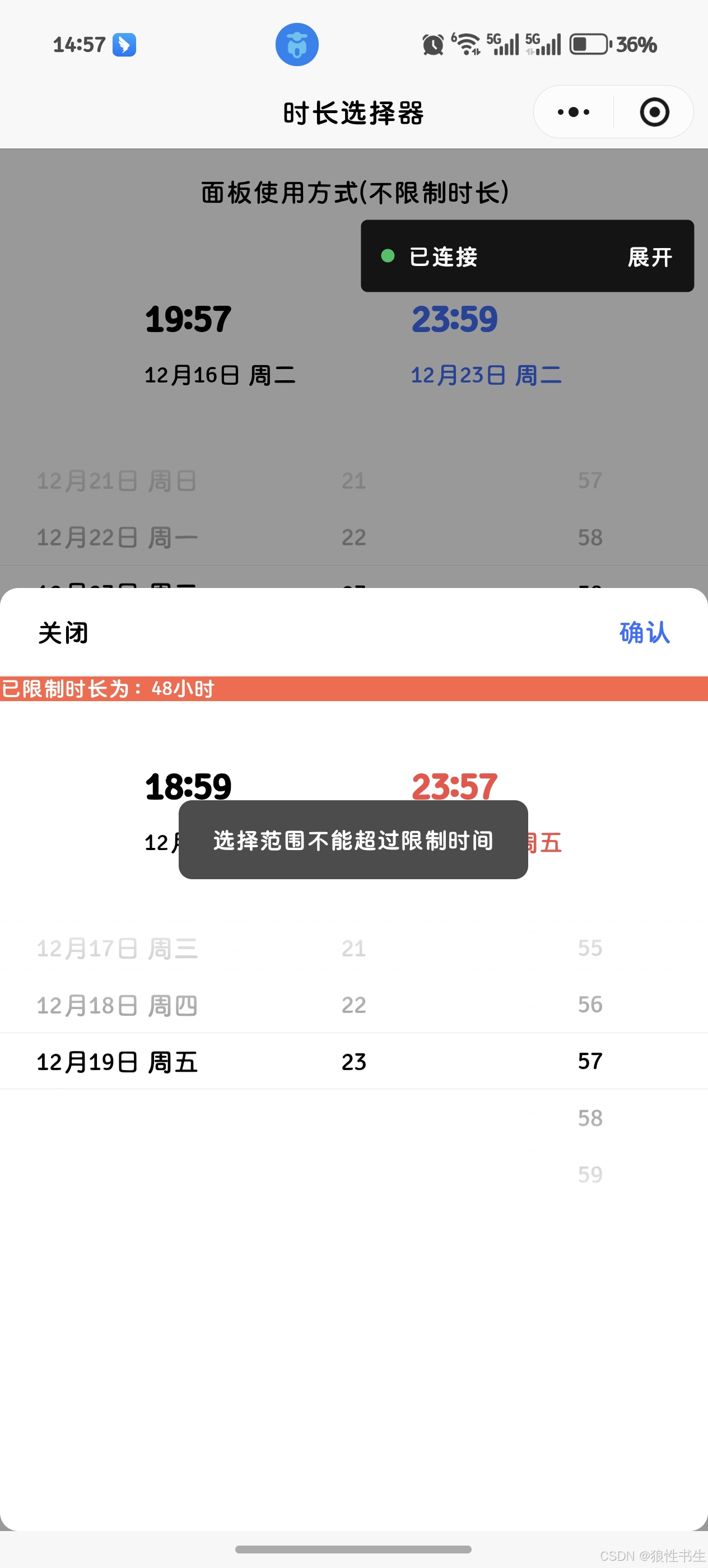
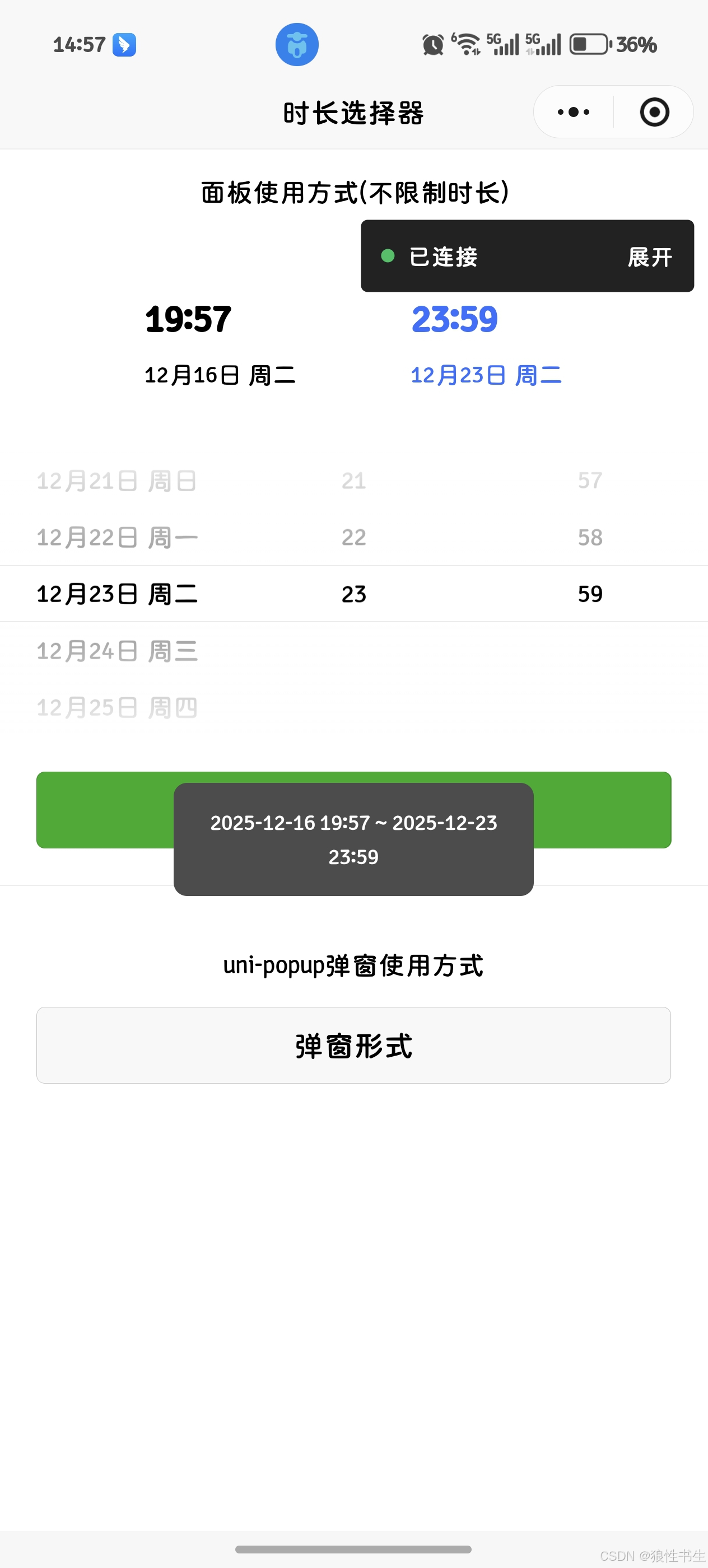
props 属性
value
默认值
js
value: {
    type: Object,
    default: () => ({}),
}
// 数据格式要求:
{
  startDate: this.formatDate(new Date()),  // 起始点日期
  startHour: this.getCurrentHour(),  // 起始点小时
  startMinute: this.getCurrentMinute(),  // 起始点分钟
  endDate: this.formatDate(new Date()),  // 终点日期
  endHour: this.getNextHour(),  // 终点小时
  endMinute: this.getCurrentMinute(),  // 终点分钟
}
limitUseTime
范围限制时长(单位为小时)
js
limitUseTime: {
    type: Number,
    default: 0,
}
tabIndex
选中的时间块索引(起始时间块索引为 1,终点时间块索引为 2)
js
tabIndex: {
    type: Number,
    default: 1,
}
事件
@change
通过暴露给外部的 onConfirm 方法来触发,返回最终正确的时间范围
@error
返回错误的时间范围提示
使用示例
vue2 使用示例
javascript
<template>
  <view class="container">
    <view style="border-top: 1rpx solid #eee">
      <view>
        <view class="h1 flex-center">面板使用方式(不限制时长)</view>
        <wo-time-len
          ref="time-dom-0"
          :value="this.dateTimeForm"
          :limit-use-time="0"
          :tab-index="this.tabIndex"
          @change="onChange"
          @error="onError"
        ></wo-time-len>
      </view>
      <view style="padding: 40rpx">
        <button type="primary" @click="confirmOne">确认</button>
      </view>
    </view>

    <view style="padding: 40rpx; border-top: 1rpx solid #eee">
      <view class="h1 flex-center">uni-popup弹窗使用方式</view>
      <button @click="onOpen">弹窗形式</button>
    </view>
    <uni-popup ref="customTimePop" type="bottom">
      <view
        style="border-radius: 20rpx; background-color: white; height: 1000rpx"
      >
        <view
          style="
            display: flex;
            justify-content: space-between;
            padding: 30rpx 40rpx;
            font-weight: 600;
            border-bottom: 1rpx solid #eee;
          "
        >
          <view @click="onClose">关闭</view>
          <view style="color: #3370ff" @click="confirmTwo">确认</view>
        </view>
        <view style="background-color: tomato; color: white; font-size: 24rpx"
          >已限制时长为:{{ this.limitUseTime }}小时</view
        >
        <wo-time-len
          ref="time-dom-1"
          :value="this.dateTimeForm"
          :limit-use-time="this.limitUseTime"
          :tab-index="this.tabIndex"
          @change="onChange"
          @error="onError"
        ></wo-time-len>
      </view>
    </uni-popup>
  </view>
</template>

<script>
export default {
  data() {
    return {
      dateTimeForm: {
        startDate: this.formatDate(new Date()),
        startHour: this.getCurrentHour(),
        startMinute: this.getCurrentMinute(),
        endDate: this.formatDate(new Date()),
        endHour: this.getNextHour(),
        endMinute: this.getCurrentMinute(),
      },
      limitUseTime: 48,
      tabIndex: 1,
    };
  },
  methods: {
    pad(num) {
      return num < 10 ? "0" + num : num;
    },
    formatDate(date, fmt = "YYYY-MM-DD") {
      const d = new Date(date);
      const year = d.getFullYear();
      const month = this.pad(d.getMonth() + 1);
      const day = this.pad(d.getDate());
      if (fmt === "YYYY-MM-DD") return `${year}-${month}-${day}`;
      if (fmt === "MM月DD日") return `${month}月${day}日`;
      return `${year}-${month}-${day}`;
    },
    getCurrentHour() {
      const now = new Date();
      return now.getHours();
    },
    getNextHour() {
      const now = new Date();
      return (now.getHours() + 1) % 24;
    },
    getCurrentMinute() {
      const now = new Date();
      return now.getMinutes();
    },
    onChange(data) {
      uni.showToast({
        title: `${data.startDate} ${this.pad(data.startHour)}:${this.pad(
          data.startMinute
        )} ~ ${data.endDate} ${this.pad(data.endHour)}:${this.pad(
          data.endMinute
        )}`,
        icon: "none",
      });
      this.$refs.customTimePop.close();
      console.log("选择结果:", data);
    },
    onError(msg) {
      console.log("消息L:", msg);
    },
    confirmOne() {
      this.$refs["time-dom-0"].onConfirm();
    },
    confirmTwo() {
      this.$refs["time-dom-1"].onConfirm();
    },
    onOpen() {
      this.$refs.customTimePop.open();
    },
    onClose() {
      this.$refs.customTimePop.close();
    },
  },
};
</script>

<style scoped>
.h1 {
  font-size: 1em;
  text-align: center;
  padding: 1em 0;
}

.flex-center {
  display: flex;
  justify-content: center;
  align-items: center;
}

.tip-popup {
  width: 560rpx;
  height: max-content;
  border-radius: 20rpx;
  background: #fff;
}

.tip {
  color: #333;
  font-size: 28rpx;
  font-weight: 600;
}
</style>
vue3 使用示例
javascript
<template>
  <view class="container">
    <view style="border-top: 1rpx solid #eee">
      <view>
        <view class="h1 flex-center">面板使用方式(不限制时长)</view>
        <wo-time-len
          ref="timeDom0"
          :value="dateTimeForm"
          :limit-use-time="0"
          :tab-index="tabIndex"
          @change="onChange"
          @error="onError"
        ></wo-time-len>
      </view>
      <view style="padding: 40rpx">
        <button type="primary" @click="confirmOne">确认</button>
      </view>
    </view>

    <view style="padding: 40rpx; border-top: 1rpx solid #eee">
      <view class="h1 flex-center">uni-popup弹窗使用方式</view>
      <button @click="onOpen">弹窗形式</button>
    </view>
    <uni-popup ref="customTimePop" type="bottom">
      <view
        style="border-radius: 20rpx; background-color: white; height: 1000rpx"
      >
        <view
          style="
            display: flex;
            justify-content: space-between;
            padding: 30rpx 40rpx;
            font-weight: 600;
            border-bottom: 1rpx solid #eee;
          "
        >
          <view @click="onClose">关闭</view>
          <view style="color: #3370ff" @click="confirmTwo">确认</view>
        </view>
        <view style="background-color: tomato; color: white; font-size: 24rpx"
          >已限制时长为:{{ limitUseTime }}小时</view
        >
        <wo-time-len
          ref="timeDom1"
          :value="dateTimeForm"
          :limit-use-time="limitUseTime"
          :tab-index="tabIndex"
          @change="onChange"
          @error="onError"
        ></wo-time-len>
      </view>
    </uni-popup>
  </view>
</template>

<script setup>
import { ref, reactive } from "vue";

const customTimePop = ref();
const timeDom0 = ref();
const timeDom1 = ref();

function pad(num) {
  return num < 10 ? "0" + num : num;
}

function formatDate(date, fmt = "YYYY-MM-DD") {
  const d = new Date(date);
  const year = d.getFullYear();
  const month = pad(d.getMonth() + 1);
  const day = pad(d.getDate());
  if (fmt === "YYYY-MM-DD") return `${year}-${month}-${day}`;
  if (fmt === "MM月DD日") return `${month}月${day}日`;
  return `${year}-${month}-${day}`;
}

function getCurrentHour() {
  const now = new Date();
  return now.getHours();
}
function getNextHour() {
  const now = new Date();
  return (now.getHours() + 1) % 24;
}
function getCurrentMinute() {
  const now = new Date();
  return now.getMinutes();
}

const dateTimeForm = reactive({
  startDate: formatDate(new Date()),
  startHour: getCurrentHour(),
  startMinute: getCurrentMinute(),
  endDate: formatDate(new Date()),
  endHour: getNextHour(),
  endMinute: getCurrentMinute(),
});
const limitUseTime = ref(48);
const tabIndex = ref(1);

function onChange(data) {
  uni.showToast({
    title: `${data.startDate} ${pad(data.startHour)}:${pad(
      data.startMinute
    )} ~ ${data.endDate} ${pad(data.endHour)}:${pad(data.endMinute)}`,
    icon: "none",
  });
  customTimePop.value.close();
  console.log("选择结果:", data);
}
function onError(msg) {
  console.log("消息L:", msg);
}
function confirmOne() {
  timeDom0.value.onConfirm();
}
function confirmTwo() {
  timeDom1.value.onConfirm();
}
function onOpen() {
  customTimePop.value.open();
}
function onClose() {
  customTimePop.value.close();
}
</script>

<style scoped>
.h1 {
  font-size: 1em;
  text-align: center;
  padding: 1em 0;
}

.flex-center {
  display: flex;
  justify-content: center;
  align-items: center;
}

.tip-popup {
  width: 560rpx;
  height: max-content;
  border-radius: 20rpx;
  background: #fff;
}

.tip {
  color: #333;
  font-size: 28rpx;
  font-weight: 600;
}
</style>