解决 macOS 26.1 The application “xxxx” can’t be opened. 问题

报错如下:

bash 复制代码
"xxx.app" is damaged and can't be opened. You should move it to the Trash.

The application "Charles" can't be opened.

非 M 系列芯片可以通过下面的命令解决:

bash 复制代码
sudo xattr -rd com.apple.quarantine /Applications/xxx.app	

M 芯片解决方法:

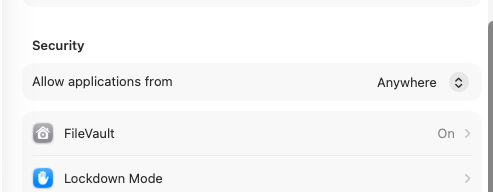
  1. 先确保允许任何来源软件
bash 复制代码
sudo spctl --master-disable    # 设置隐私中,允许任何来源软件

可从设置中查看状态:

  1. 尝试修复这个软件
bash 复制代码
sudo xattr -rc /Applications/xxx.app     # "修复" 所有未知来源的 app 

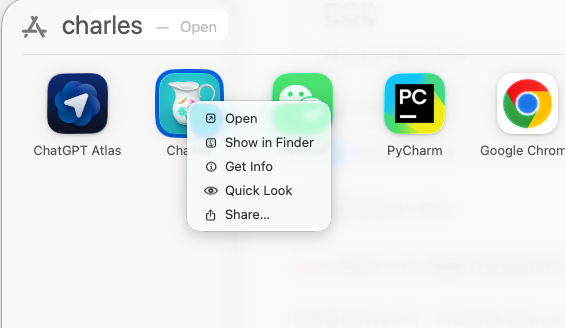
如果直接打开不行,可以尝试 按住 Ctrl 然后右键单击该软件选择 Open。
相关推荐
pe7er4 天前
macOS 应用无法打开(权限问题)解决方案
macos·mac
harmful_sheep6 天前
mac生效的终端查看
macos
iOS门童7 天前
macOS 应用"已损坏"无法打开?一文搞懂 Gatekeeper 与解决方案
macos
NPE~7 天前
[工具分享]Maccy —— 优雅的 macOS 剪贴板历史管理工具
macos·教程·工具·实用工具
差不多程序员7 天前
Mac安装OpenClaw-cn保姆级教程
macos
dzl843947 天前
mac 安装python
开发语言·python·macos
Bruce_Liuxiaowei7 天前
在 macOS 上通过 Docker 本地安装 OpenClaw 完整教程
macos·docker·容器·openclaw
阿捏利7 天前
详解Mach-O(十五)Mach-O __DATA_CONST
macos·ios·c/c++·mach-o
ShikiSuen7 天前
macOS 的 CpLk 中英切换卡顿的元凶在 InputMethodKit 本身
macos
xiayutian_c7 天前
如虎添翼-MacOS
macos