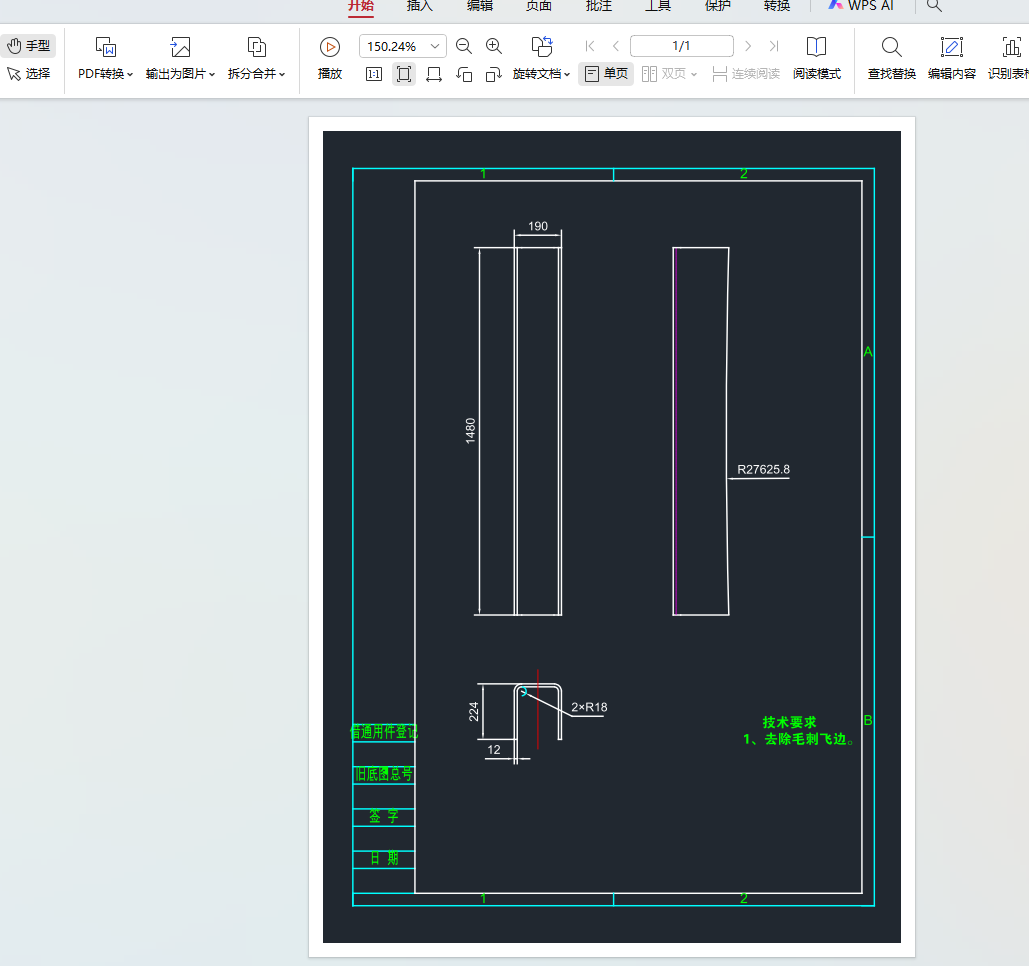
替换所有文本样式中的字体为 gbcbig.shx
for style in doc.styles:
style.dxf.font = 'gbcbig.shx'
python
import ezdxf
from ezdxf.addons.drawing import RenderContext, Frontend
from ezdxf.addons.drawing.matplotlib import MatplotlibBackend
from ezdxf.addons.drawing.config import Configuration, LineweightPolicy
import matplotlib.pyplot as plt
import tkinter as tk
from tkinter import filedialog, simpledialog
import os
import subprocess
import sys
import time

# 添加常量
SHOW_TIMING = False

def dxf_to_pdf(dxf_path, pdf_path):
    """将DXF文件转换为PDF,并将所有字体替换为gbcbig.shx"""
    # 读取 DXF 文件
    doc = ezdxf.readfile(dxf_path)

    # 替换所有文本样式中的字体为 gbcbig.shx
    for style in doc.styles:
        style.dxf.font = 'gbcbig.shx'

    # 创建渲染配置 - 完整的线宽控制
    config = Configuration(
        lineweight_scaling=0.05,  # 缩放因子,值越小线条越细
        min_lineweight=0.05,      # 最小线宽(单位:1/300英寸)
        lineweight_policy=LineweightPolicy.ABSOLUTE  # 使用绝对线宽策略
    )

    # 创建渲染环境 - 设置固定DPI确保一致性
    fig = plt.figure(dpi=300)
    ax = fig.add_axes([0, 0, 1, 1])

    # 创建后端渲染器
    backend = MatplotlibBackend(ax)
    backend.configure(config)  # 显式配置后端

    context = RenderContext(doc)

    # 传入配置到前端
    frontend = Frontend(context, backend, config=config)

    # 渲染图形
    frontend.draw_layout(doc.modelspace())
    backend.finalize()

    # 保存为 PDF - 使用相同DPI
    fig.savefig(pdf_path, format='pdf', bbox_inches='tight', dpi=300)
    plt.close(fig)

def open_file(filepath):
    """跨平台打开文件"""
    if sys.platform.startswith('darwin'):  # macOS
        subprocess.call(['open', filepath])
    elif sys.platform.startswith('win'):   # Windows
        os.startfile(filepath)
    elif sys.platform.startswith('linux'): # Linux
        subprocess.call(['xdg-open', filepath])

def is_valid_dxf(dxf_path):
    """验证DXF文件是否有效"""
    try:
        doc = ezdxf.readfile(dxf_path)
        return True
    except Exception:
        return False

def convert_dwg_to_dxf(dwg_file_path):
    """
    使用ODA File Converter将DWG文件转换为DXF文件

    Args:
        dwg_file_path (str): DWG文件路径

    Returns:
        dict: 转换结果,包含状态和DXF文件路径或错误信息
    """
    start_time = time.time()
    try:
        # 检查DWG文件是否存在
        if not os.path.exists(dwg_file_path):
            return {
                "status": "error",
                "message": f"DWG文件不存在: {dwg_file_path}"
            }

        # 获取文件目录和文件名
        dwg_dir = os.path.dirname(dwg_file_path)
        dwg_filename = os.path.basename(dwg_file_path)
        dxf_filename = dwg_filename.replace('.dwg', '.dxf')
        dxf_file_path = dwg_file_path.replace('.dwg', '.dxf')
        if dxf_file_path == dwg_file_path:
            dxf_file_path = f"{dwg_file_path}.dxf"

        # 创建输出目录(如果不存在)
        output_dir = os.path.dirname(dxf_file_path)
        os.makedirs(output_dir, exist_ok=True)

        # 参数定义(按官方规范)
        TEIGHA_PATH = "ODAFileConverter"
        INPUT_FOLDER = dwg_dir
        OUTPUT_FOLDER = output_dir
        OUTVER = "ACAD2018"           # 输入版本(如原文件是 ACAD2018)
        OUTFORMAT = "DXF"             # 输出格式:只能是 DXF / DWG / DXB
        RECURSIVE = "0"
        AUDIT = "1"
        INPUTFILTER = "*.DWG"         # 只处理DWG文件

        # 构建命令(注意顺序!)
        cmd = [
            TEIGHA_PATH,
            INPUT_FOLDER,
            OUTPUT_FOLDER,
            OUTVER,           # 输入版本
            OUTFORMAT,        # 输出格式 ← 必须是 DXF/DWG/DXB
            RECURSIVE,
            AUDIT,
            INPUTFILTER
        ]

        print(f"执行命令: {' '.join(cmd)}")

        # 执行转换命令
        result = subprocess.run(cmd, shell=True, capture_output=True, text=True, timeout=120)

        # 打印调试信息
        print("ODA 输出:", result.stdout)
        print("ODA 错误:", result.stderr)

        if result.returncode == 0:
            # 检查DXF文件是否生成
            if os.path.exists(dxf_file_path):
                # 验证DXF文件是否有效
                if is_valid_dxf(dxf_file_path):
                    response = {
                        "status": "success",
                        "message": f"DWG文件已成功转换为DXF: {dxf_file_path}",
                        "dxf_path": dxf_file_path
                    }
                    if SHOW_TIMING:
                        response["processing_time"] = time.time() - start_time
                    return response
                else:
                    response = {
                        "status": "error",
                        "message": f"生成的DXF文件结构不完整或损坏: {dxf_file_path}"
                    }
                    if SHOW_TIMING:
                        response["processing_time"] = time.time() - start_time
                    return response
            else:
                response = {
                    "status": "error",
                    "message": f"转换完成但未生成DXF文件。请检查输出目录: {output_dir}"
                }
                if SHOW_TIMING:
                        response["processing_time"] = time.time() - start_time
                return response
        else:
            response = {
                "status": "error",
                "message": f"ODA转换失败: {result.stderr}"
            }
            if SHOW_TIMING:
                response["processing_time"] = time.time() - start_time
            return response

    except subprocess.TimeoutExpired:
        response = {
            "status": "error",
            "message": "转换超时"
        }
        if SHOW_TIMING:
            response["processing_time"] = time.time() - start_time
        return response
    except FileNotFoundError:
        response = {
            "status": "error",
            "message": "未找到ODAFileConverter命令,请确保ODA File Converter已正确安装并加入PATH"
        }
        if SHOW_TIMING:
            response["processing_time"] = time.time() - start_time
        return response
    except Exception as e:
        response = {
            "status": "error",
            "message": f"转换过程中发生错误: {str(e)}"
        }
        if SHOW_TIMING:
            response["processing_time"] = time.time() - start_time
        return response

def convert_single_cad_file():
    """转换单个CAD文件(DXF或DWG)为PDF"""
    # 创建隐藏的根窗口
    root = tk.Tk()
    root.withdraw()  # 隐藏主窗口
    root.attributes('-topmost', True)  # 确保对话框置顶显示

    # 选择文件夹
    folder_path = filedialog.askdirectory(
        title="选择包含CAD文件的文件夹"
    )

    if not folder_path:
        print("未选择文件夹,程序退出")
        root.destroy()
        return

    # 输入搜索条件
    search_criteria = simpledialog.askstring(
        "输入搜索条件",
        "请输入要查找的文件名关键词:"
    )

    if not search_criteria:
        print("未输入搜索条件,程序退出")
        root.destroy()
        return

    root.destroy()

    # 查找匹配的文件
    matched_files = []
    for root_dir, dirs, files in os.walk(folder_path):
        for file in files:
            if file.lower().endswith(('.dxf', '.dwg')) and search_criteria in file:
                full_path = os.path.join(root_dir, file)
                matched_files.append(full_path)

    if not matched_files:
        print(f"未找到包含 '{search_criteria}' 的CAD文件")
        return

    # 优化文件选择逻辑:如果有同名的DXF文件,优先使用DXF文件
    optimized_files = {}
    for file_path in matched_files:
        base_name = os.path.splitext(os.path.basename(file_path))[0]
        ext = os.path.splitext(file_path)[1].lower()

        if base_name not in optimized_files:
            optimized_files[base_name] = file_path
        else:
            # 如果已经存在该文件名的条目,检查扩展名优先级
            existing_ext = os.path.splitext(optimized_files[base_name])[1].lower()
            # DXF优先级高于DWG
            if ext == '.dxf' and existing_ext == '.dwg':
                optimized_files[base_name] = file_path

    # 转换为列表
    final_files = list(optimized_files.values())

    # 如果找到多个匹配文件,让用户选择
    if len(final_files) > 1:
        print(f"找到 {len(final_files)} 个匹配的文件:")
        for i, file_path in enumerate(final_files, 1):
            print(f"{i}. {os.path.basename(file_path)}")

        try:
            choice = int(input("请输入要转换的文件编号: "))
            if 1 <= choice <= len(final_files):
                selected_file = final_files[choice - 1]
            else:
                print("无效的选择,程序退出")
                return
        except ValueError:
            print("输入无效,程序退出")
            return
    else:
        selected_file = final_files[0]
        print(f"找到文件: {os.path.basename(selected_file)}")

    pdf_path = None  # 初始化pdf_path变量

    try:
        # 获取文件扩展名
        file_ext = os.path.splitext(selected_file)[1].lower()

        if file_ext == '.dxf':
            # 直接处理DXF文件
            pdf_path = os.path.splitext(selected_file)[0] + ".pdf"
            print(f"正在转换: {os.path.basename(selected_file)}")
            dxf_to_pdf(selected_file, pdf_path)
            print(f"转换完成: {pdf_path}")

        elif file_ext == '.dwg':
            # 处理DWG文件:先转换为DXF,再转换为PDF
            print(f"正在转换DWG文件: {os.path.basename(selected_file)}")
            conversion_result = convert_dwg_to_dxf(selected_file)

            if conversion_result["status"] == "success":
                dxf_path = conversion_result["dxf_path"]
                pdf_path = os.path.splitext(dxf_path)[0] + ".pdf"
                print(f"正在生成PDF: {os.path.basename(pdf_path)}")
                dxf_to_pdf(dxf_path, pdf_path)
                print(f"转换完成: {pdf_path}")
            else:
                print(f"DWG转换失败: {conversion_result['message']}")
                return  # 转换失败则不继续执行

    except Exception as e:
        print(f"转换失败 {selected_file}: {e}")
        return  # 转换失败则不继续执行

    # 如果转换成功且生成了PDF文件,则打开它
    if pdf_path and os.path.exists(pdf_path):
        try:
            print(f"正在打开PDF文件: {os.path.basename(pdf_path)}")
            open_file(pdf_path)
        except Exception as e:
            print(f"打开PDF文件失败: {e}")
    else:
        print("PDF文件未生成或不存在")

# 运行查找并转换版本
if __name__ == "__main__":
    convert_single_cad_file()