注:本文内容仅作示例,无针对故意。
规则示例,寥寥无几,仅供参考。
如有内容异常,请自行搜索校对。
广告过滤规则配置
1 语法速查表
| 符号 | 等价写法 | 作用域 | 优先级 |
|---|---|---|---|
### |
##id |
ID 元素 | 高 |
## |
##任意 CSS 选择器 |
任意元素 | 中 |
常见伪类
:nth-child(n)父节点下第 n 个子节点(计数不区分标签)。:first-child等价于:nth-child(1)。:last-child父节点最后一个子节点。
易错提醒
div.a:nth-child(3) 表示"父节点下第 3 个子节点,且该节点必须是 div 同时带 class=a",而非"同类 div 中的第 3 个"。
2 站点规则示例
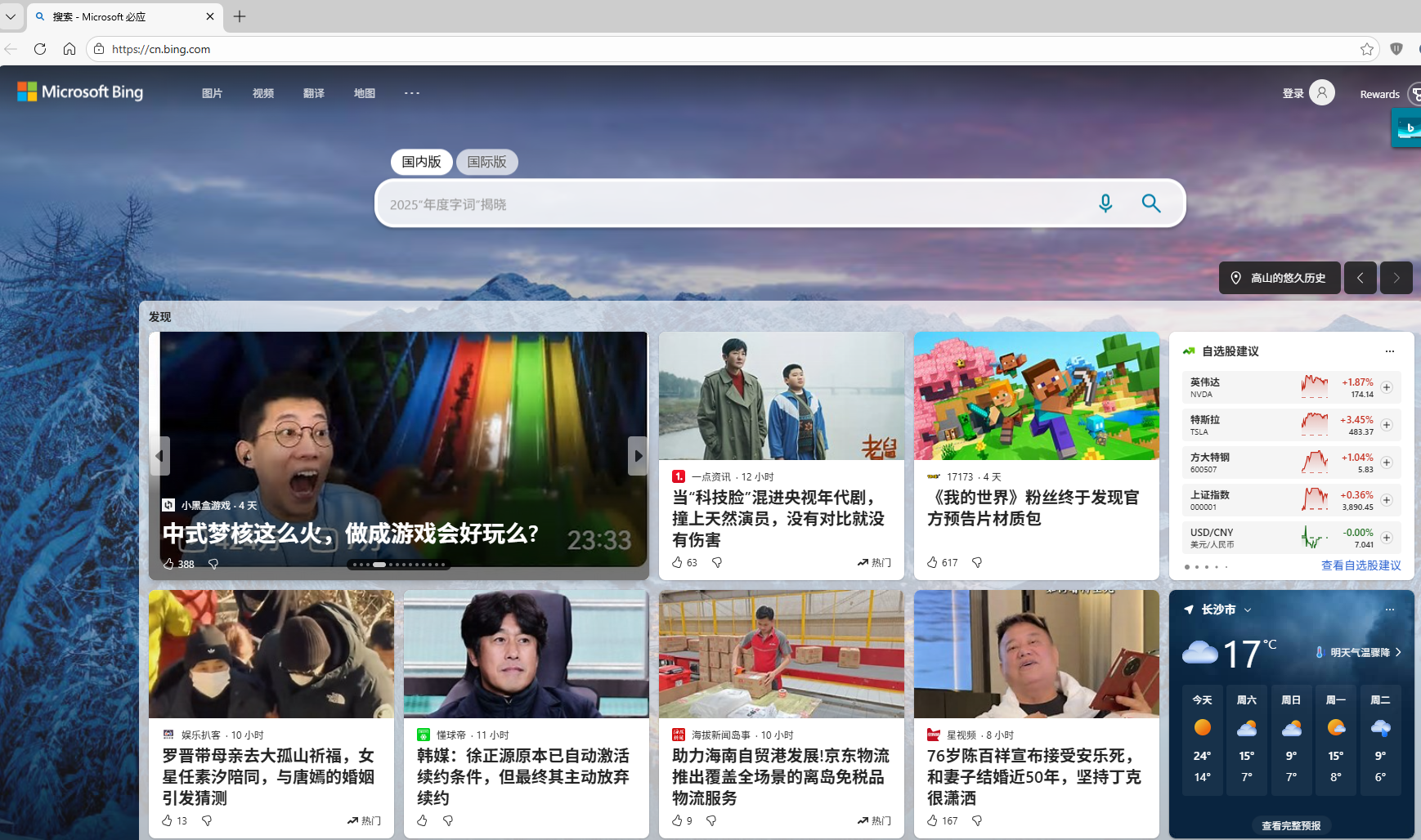
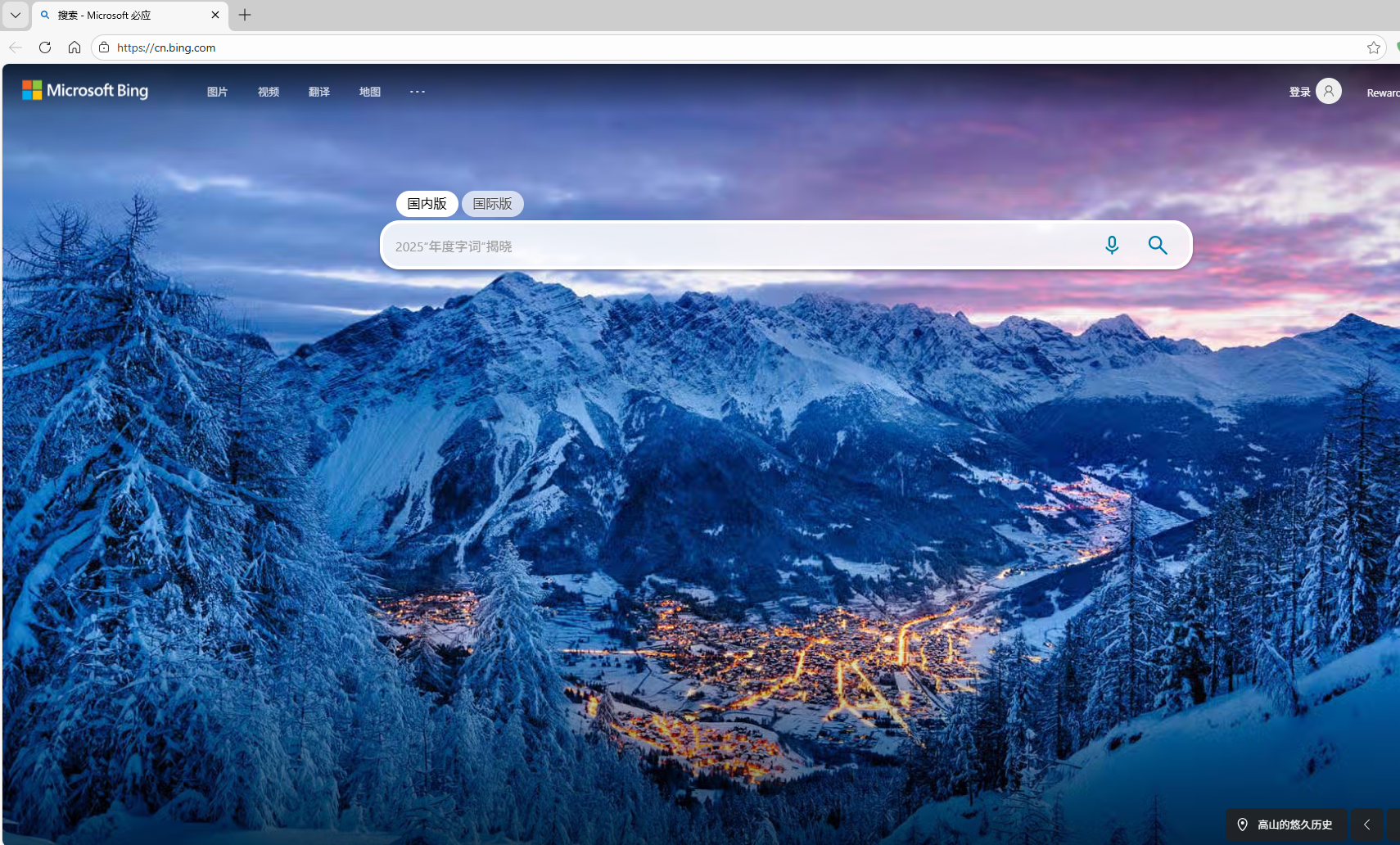
仅以 bing 示例上图,后续效果不上图。
2.1 必应搜索(cn.bing.com / bing.com)
cn.bing.com###tob_container                          顶部广告容器
cn.bing.com###b_results > li.b_ans.b_top.b_nwsAns:first-child   首条资讯卡片
cn.bing.com###vs_cont > div.vs:nth-child(2)          视觉搜索第 2 模块
cn.bing.com###vs_cont > div.vs:nth-child(3)          视觉搜索第 3 模块
cn.bing.com###vs_cont > div.vs:nth-child(3) > div.modules_wrapper > div.moduleCont:last-child
cn.bing.com###vs_cont > div.vs:nth-child(3) > div.modules_wrapper > div.moduleCont:nth-child(2)
cn.bing.com###widget_container ... bing-homepage-feed  主页信息流
cn.bing.com###sb_feedback                             反馈横幅
bing.com###vs_cont > div.vs:nth-child(3)             国际版同步屏蔽
2.2 效果对比
应用规则前原状
应用规则生效后
2.2 简书(jianshu.com)
jianshu.com###__next > div._21bLU4._3kbg6I:nth-child(2) > div._3VRLsv > aside._2OwGUo:last-child ...
jianshu.com###__next ... aside._2OwGUo:nth-child(2) ...
jianshu.com###__next ... div._gp-ck:first-child > section.ouvJEz:nth-child(2)
2.3 搜狐(sohu.com)
sohu.com###hot-news
sohu.com###allseeList
sohu.com###articleAllsee
sohu.com###commentList > div > div.new-comment
sohu.com###main-news > div.clear
sohu.com###right-side-bar ... hot-atlas:last-child
sohu.com###topScrollPic
sohu.com###article-container ... 左侧两张广告图
2.4 网易(163.com)
163.com###contain ... div.post_recommends.js-tab-mod:last-child
163.com###right_recommend_list > div.item:nth-child(2)
163.com###right_recommend_list > div.item:nth-child(3)
163.com###right_recommend_list > div.item:nth-child(4)
163.com###right_recommend_list > div.item:last-child
163.com###right_recommend_list > div.item:first-child > a.item_img:first-child
2.5 其他
......
3 一键导入配置
UTF-8 编码,直接复制到"自定义规则"即可。
ini
[必应]
cn.bing.com###tob_container
cn.bing.com###b_results > li.b_ans.b_top.b_nwsAns:first-child
cn.bing.com###vs_cont > div.vs:nth-child(2)
cn.bing.com###vs_cont > div.vs:nth-child(3)
cn.bing.com###vs_cont > div.vs:nth-child(3) > div.modules_wrapper > div.moduleCont:last-child
cn.bing.com###vs_cont > div.vs:nth-child(3) > div.modules_wrapper > div.moduleCont:nth-child(2)
cn.bing.com###widget_container > div.peregrine-widgets:last-child > fluent-design-system-provider > bing-homepage-feed
cn.bing.com###sb_feedback
bing.com###vs_cont > div.vs:nth-child(3)

[简书]
jianshu.com###__next > div._21bLU4._3kbg6I:nth-child(2) > div._3VRLsv > aside._2OwGUo:last-child > div:last-child > div > section._3Z3nHf:first-child
jianshu.com###__next > div._21bLU4._3kbg6I:nth-child(2) > div._3VRLsv > aside._2OwGUo:nth-child(2) > div:last-child > div.ant-affix:last-child > section._3Z3nHf:first-child
jianshu.com###__next > div._21bLU4._3kbg6I:nth-child(2) > div._3VRLsv > div._gp-ck:first-child > section.ouvJEz:nth-child(2)

[搜狐]
sohu.com###\39 edj1r > div
sohu.com###allseeList
sohu.com###articleAllsee
sohu.com###commentList > div > div.new-comment
sohu.com###hot-news
sohu.com###main-news > div.clear
sohu.com###main-news > div.clear > div.news-wrapper:nth-child(3) > div.news-box.clear:first-child
sohu.com###main-news > div.clear > div.news-wrapper:nth-child(3) > div.news-box.clear:nth-child(2)
sohu.com###right-side-bar > div > div:nth-child(5) > div.clearfix.hot-atlas:last-child
sohu.com###topScrollPic
sohu.com###article-container > div.left.main:nth-child(3) > div:nth-child(2) > a > div:first-child > a > img
sohu.com###article-container > div.column.left.left-author-sogou-god:first-child > a > div:first-child > a > img

[网易]
163.com###contain > div.post_main:first-child > div.post_recommends.js-tab-mod:last-child
163.com###right_recommend_list > div.item:last-child
163.com###right_recommend_list > div.item:nth-child(4)
163.com###right_recommend_list > div.item:nth-child(3)
163.com###right_recommend_list > div.item:nth-child(2)
163.com###right_recommend_list > div.item:first-child > a.item_img:first-child
163.com###right_recommend_list > div.item:first-child > a.item_img:first-child > img
4 导入步骤(通用)
- 打开扩展 → 设置 → 自定义规则。
- 粘贴上节配置 → 保存。
- 刷新目标页面,元素消失即生效。
| 工具 | 入口 | 支持格式 | 备注 |
|---|---|---|---|
| uBlock Origin | 仪表盘 → 过滤器 → 自定义 | ABP / 元素隐藏 | 即时生效 |
| AdGuard 扩展 | 设置 → 过滤器 → 用户规则 | AdGuard / ABP | 即时生效 |
| AdGuard Home | 过滤器 → DNS 封锁清单 | Hosts / DNS | 需保存并重启服务 |
| Brave | 设置 → shields → 内容过滤 | ABP | 刷新页面生效 |
5 规则维护
5.1 修改流程
需求 → 审查元素 → 写规则 → 测试 → 归档。
5.2 常用模板
- 隐藏元素:
example.com##div.ad-banner - 拦截域名:
||ad.example.com^ - 放行白名单:
@@||analytics.example.com^$domain=trustedsite.com
5.3 性能提示
- 避免
div > div > div > ...过深嵌套。 - 同域规则合并,减少匹配次数。
- 定期用"Logger"面板检查失效规则并删除。
5.4 版本管理
- 将自定义规则保存为
myfilter.txt,放 GitHub 私有仓库,按日期打 Tag。 - 订阅官方列表(EasyList、EasyList China)做底库,自定义规则做增量覆盖。
6 常见疑问
Q:规则不生效
A:检查选择器是否被脚本动态改 class;换用 :nth-of-type 或 xpath 语法。
Q:临时放行
A:在 Logger 里点击对应拦截记录 → 创建 @@ 例外规则。
其他可参照:
- 广告拦截 | 去除网址跟踪参数长尾巴-CSDN博客
https://blog.csdn.net/u013669912/article/details/130476029