系列文章目录
文章目录
前言
一、约瑟夫环问题
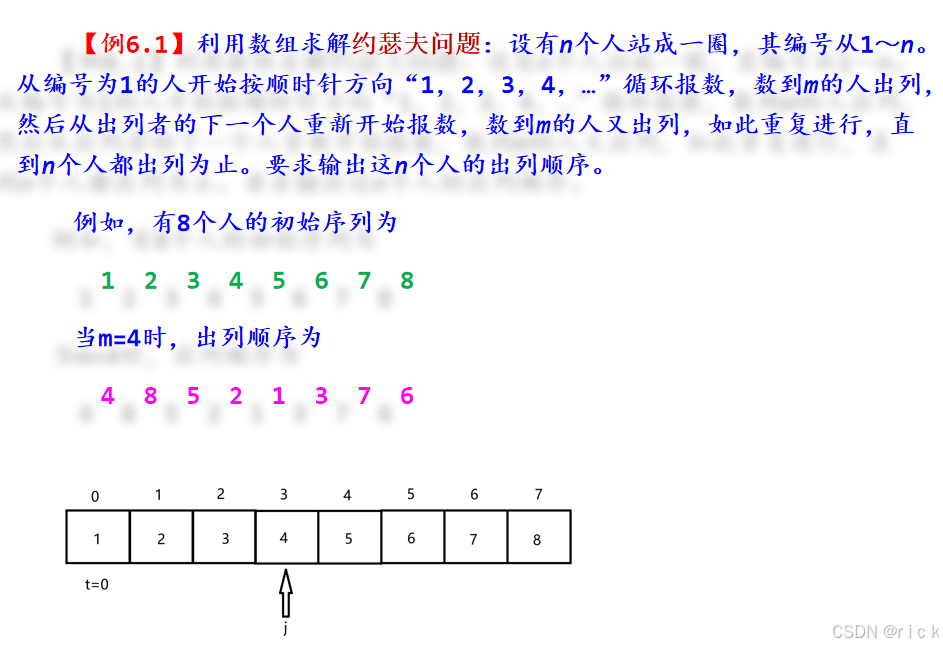
核心代码
c
//用一维数组p[0..n-1]存放n个人(1,2,...,n)
void josephus(int n,int m)
{  int p[MaxSize];
   int i,j,t;
   for (i=0;i<n;i++)		//构建初始序列(1,2,...,n)
     p[i]=i+1;
   t=0;				//首次报数的起始位置
   printf("出列顺序:");
   for (i=n;i>=1;i--)	  	//i为数组p中当前的人数,出列一次,人数减1
   {  t=(t+m-1)%i;		//t为出列者的编号
      printf("%d ",p[t]);	//编号为t的元素出列
      for (j=t+1;j<=i-1;j++)	//后面的元素前移一个位置
        p[j-1]=p[j];
   }
   printf("\n");
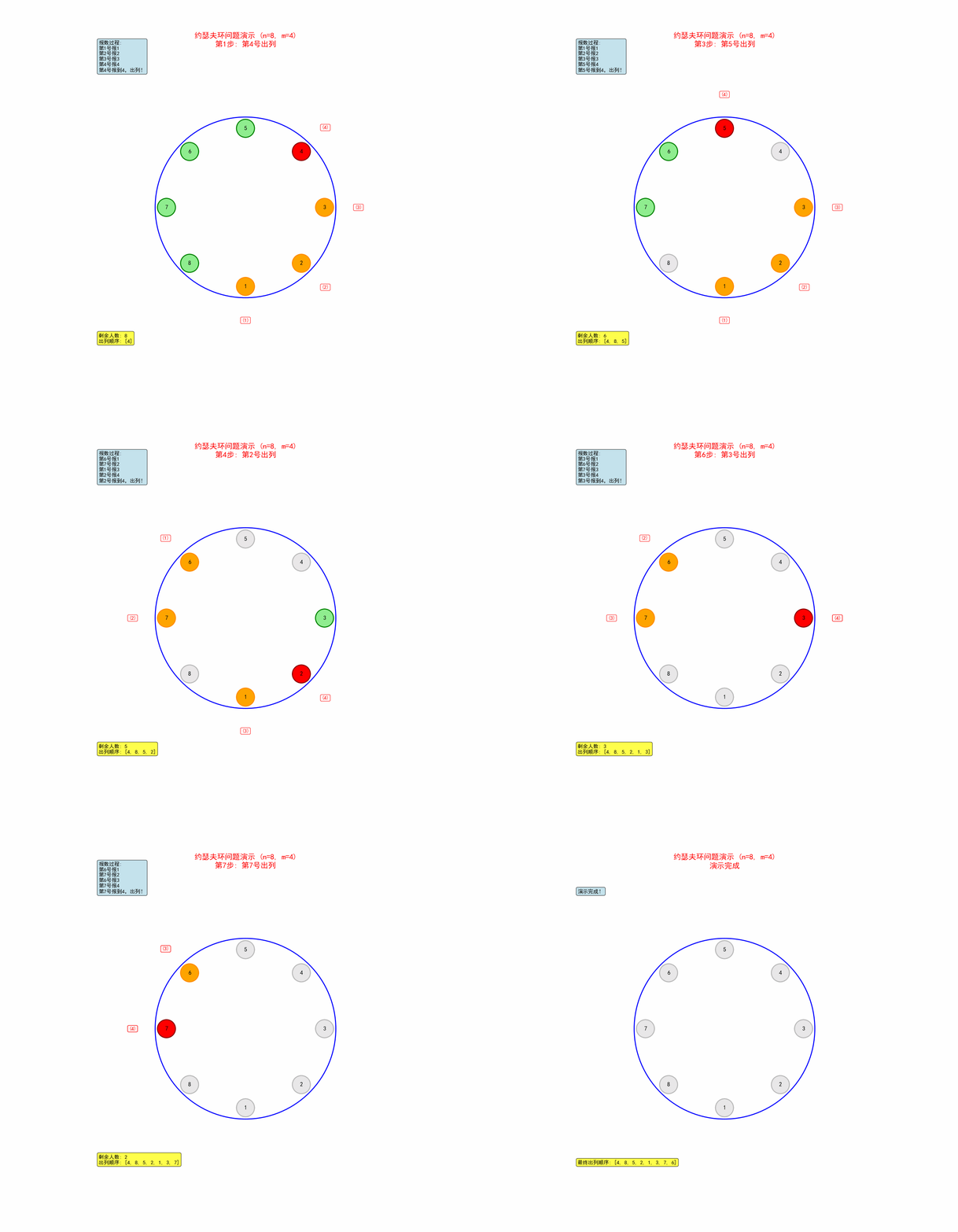
}代码实现的动态展示图,通过cursor实现
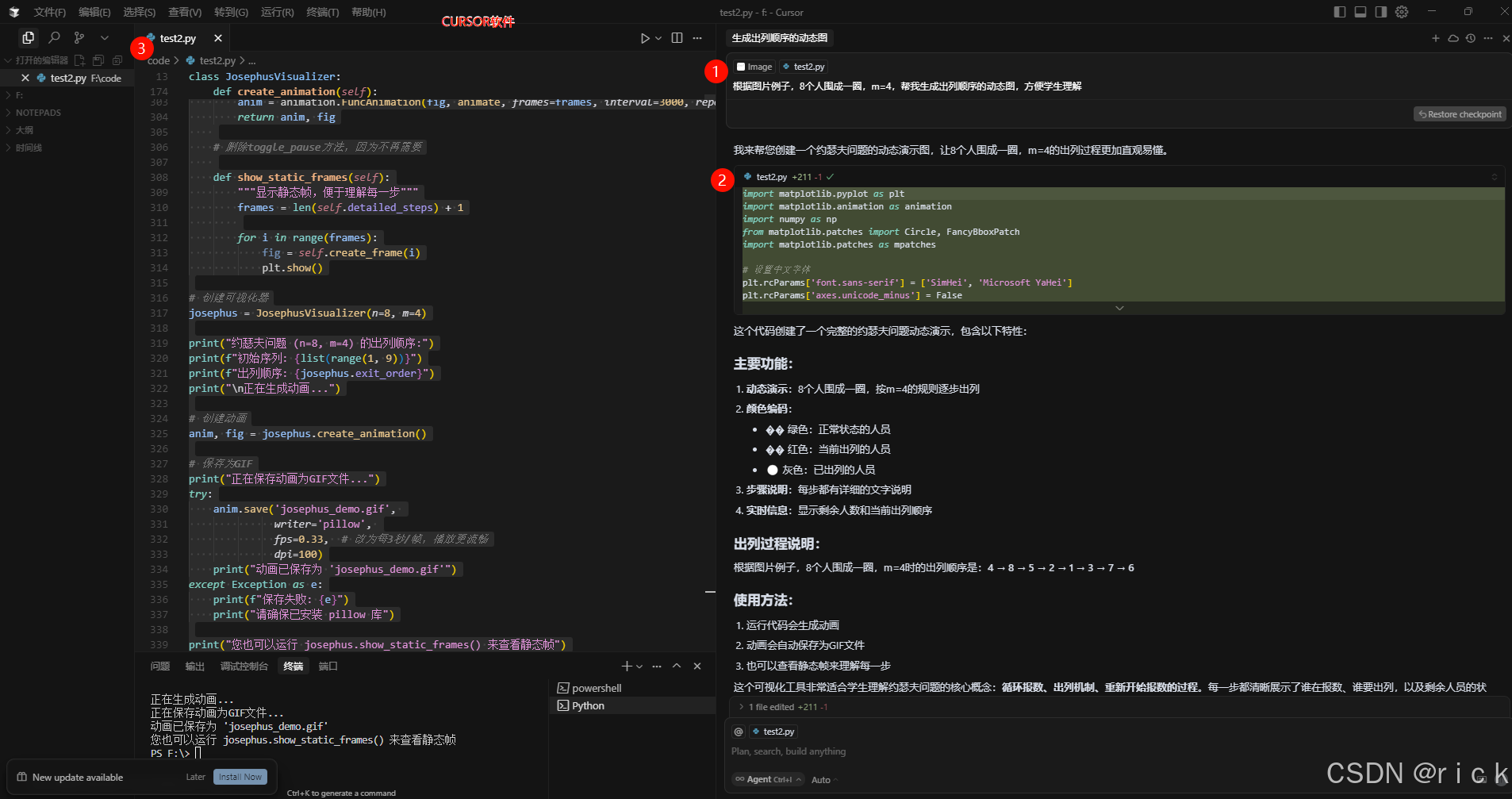
python
import matplotlib.pyplot as plt
import matplotlib.animation as animation
import numpy as np
from matplotlib.patches import Circle, FancyBboxPatch
import matplotlib.patches as mpatches
from matplotlib.widgets import Button
import matplotlib.patches as patches

# 设置中文字体
plt.rcParams['font.sans-serif'] = ['SimHei', 'Microsoft YaHei']
plt.rcParams['axes.unicode_minus'] = False

class JosephusVisualizer:
    def __init__(self, n=8, m=4):
        self.n = n
        self.m = m
        self.people = list(range(1, n+1))  # 人员编号
        self.current_index = 0  # 当前报数位置
        self.count = 1  # 当前报数
        self.exited = []  # 已出列的人员
        self.remaining = self.people.copy()  # 剩余人员
        self.animation_frames = []
        self.is_paused = False  # 暂停状态

        # 计算出列顺序
        self.exit_order = self.calculate_exit_order()

        # 生成详细的演示步骤
        self.detailed_steps = self.generate_detailed_steps()

    def calculate_exit_order(self):
        """计算约瑟夫问题的出列顺序"""
        people = list(range(1, self.n + 1))
        exit_order = []
        index = 0

        while people:
            index = (index + self.m - 1) % len(people)
            exit_order.append(people.pop(index))

        return exit_order

    def generate_detailed_steps(self):
        """生成详细的演示步骤,包括报数过程"""
        detailed_steps = []
        people = list(range(1, self.n + 1))
        index = 0
        step_num = 1

        while people:
            step_info = {
                'step': step_num,
                'remaining': people.copy(),
                'current_index': index,
                'counting_sequence': [],
                'exit_person': None
            }

            # 生成报数序列
            counting = []
            for i in range(self.m):
                current_person = people[(index + i) % len(people)]
                counting.append((current_person, i + 1))
            step_info['counting_sequence'] = counting
            step_info['exit_person'] = people[(index + self.m - 1) % len(people)]

            detailed_steps.append(step_info)

            # 移除出列的人
            index = (index + self.m - 1) % len(people)
            people.pop(index)
            step_num += 1

        return detailed_steps

    def create_frame(self, frame_num):
        """创建动画帧"""
        fig, ax = plt.subplots(figsize=(14, 12))
        ax.set_xlim(-7, 7)
        ax.set_ylim(-7, 7)
        ax.set_aspect('equal')

        # 标题
        title = f"约瑟夫问题演示 (n={self.n}, m={self.m})\n"
        if frame_num < len(self.detailed_steps):
            step_info = self.detailed_steps[frame_num]
            title += f"第{step_info['step']}步: 第{step_info['exit_person']}号出列"
        else:
            title += "演示完成"
        ax.set_title(title, fontsize=16, fontweight='bold', color='red')

        # 绘制圆圈
        circle = Circle((0, 0), 4, fill=False, color='blue', linewidth=2)
        ax.add_patch(circle)

        # 计算人员位置
        positions = []
        for i in range(self.n):
            angle = 2 * np.pi * i / self.n - np.pi/2  # 从12点钟方向开始
            x = 3.5 * np.cos(angle)
            y = 3.5 * np.sin(angle)
            positions.append((x, y))

        # 绘制人员
        for i, (x, y) in enumerate(positions):
            person_num = i + 1

            # 确定颜色和样式
            if frame_num < len(self.detailed_steps):
                step_info = self.detailed_steps[frame_num]

                if person_num not in step_info['remaining']:
                    # 已出列 - 灰色
                    color = 'lightgray'
                    edgecolor = 'gray'
                    alpha = 0.5
                elif person_num == step_info['exit_person']:
                    # 当前出列 - 红色
                    color = 'red'
                    edgecolor = 'darkred'
                    alpha = 1.0
                elif person_num in [p[0] for p in step_info['counting_sequence']]:
                    # 正在报数 - 橙色
                    color = 'orange'
                    edgecolor = 'darkorange'
                    alpha = 1.0
                else:
                    # 正常 - 绿色
                    color = 'lightgreen'
                    edgecolor = 'green'
                    alpha = 1.0
            else:
                # 演示完成
                color = 'lightgray'
                edgecolor = 'gray'
                alpha = 0.5

            # 绘制人员圆圈
            person = Circle((x, y), 0.4, facecolor=color, edgecolor=edgecolor, alpha=alpha, linewidth=2)
            ax.add_patch(person)

            # 添加编号
            ax.text(x, y, str(person_num), ha='center', va='center', fontsize=12, fontweight='bold')

            # 如果正在报数,显示报数
            if frame_num < len(self.detailed_steps):
                step_info = self.detailed_steps[frame_num]
                for person, count in step_info['counting_sequence']:
                    if person == person_num:
                        ax.text(x, y-0.6, f"({count})", ha='center', va='center',
                               fontsize=10, fontweight='bold', color='red')

        # 添加说明文字
        if frame_num < len(self.detailed_steps):
            step_info = self.detailed_steps[frame_num]
            info_text = f"剩余人数: {len(step_info['remaining'])}\n"
            info_text += f"出列顺序: {[s['exit_person'] for s in self.detailed_steps[:frame_num+1]]}"

            # 报数过程说明
            counting_text = "报数过程:\n"
            for person, count in step_info['counting_sequence']:
                counting_text += f"第{person}号报{count}\n"
            counting_text += f"第{step_info['exit_person']}号报到{self.m},出列!"
        else:
            info_text = f"最终出列顺序: {[s['exit_person'] for s in self.detailed_steps]}"
            counting_text = "演示完成!"

        ax.text(-6.5, -6, info_text, fontsize=11, bbox=dict(boxstyle="round,pad=0.3", facecolor="yellow", alpha=0.7))
        ax.text(-6.5, 6, counting_text, fontsize=11, bbox=dict(boxstyle="round,pad=0.3", facecolor="lightblue", alpha=0.7))

        ax.axis('off')
        return fig

    def create_animation(self):
        """创建完整动画,包含暂停按钮"""
        frames = len(self.detailed_steps) + 1  # 包括初始状态

        fig, ax = plt.subplots(figsize=(14, 12))
        ax.set_xlim(-7, 7)
        ax.set_ylim(-7, 7)
        ax.set_aspect('equal')

        # 删除暂停按钮相关代码

        def animate(frame_num):
            # 删除暂停检查
            ax.clear()
            ax.set_xlim(-7, 7)
            ax.set_ylim(-7, 7)
            ax.set_aspect('equal')

            # 标题
            title = f"约瑟夫环问题演示 (n={self.n}, m={self.m})\n"
            if frame_num < len(self.detailed_steps):
                step_info = self.detailed_steps[frame_num]
                title += f"第{step_info['step']}步: 第{step_info['exit_person']}号出列"
            else:
                title += "演示完成"
            ax.set_title(title, fontsize=16, fontweight='bold', color='red')

            # 绘制圆圈
            circle = Circle((0, 0), 4, fill=False, color='blue', linewidth=2)
            ax.add_patch(circle)

            # 计算人员位置
            positions = []
            for i in range(self.n):
                angle = 2 * np.pi * i / self.n - np.pi/2
                x = 3.5 * np.cos(angle)
                y = 3.5 * np.sin(angle)
                positions.append((x, y))

            # 绘制人员
            for i, (x, y) in enumerate(positions):
                person_num = i + 1

                if frame_num < len(self.detailed_steps):
                    step_info = self.detailed_steps[frame_num]

                    if person_num not in step_info['remaining']:
                        color = 'lightgray'
                        edgecolor = 'gray'
                        alpha = 0.5
                    elif person_num == step_info['exit_person']:
                        color = 'red'
                        edgecolor = 'darkred'
                        alpha = 1.0
                    elif person_num in [p[0] for p in step_info['counting_sequence']]:
                        color = 'orange'
                        edgecolor = 'darkorange'
                        alpha = 1.0
                    else:
                        color = 'lightgreen'
                        edgecolor = 'green'
                        alpha = 1.0
                else:
                    color = 'lightgray'
                    edgecolor = 'gray'
                    alpha = 0.5

                person = Circle((x, y), 0.4, facecolor=color, edgecolor=edgecolor, alpha=alpha, linewidth=2)
                ax.add_patch(person)
                ax.text(x, y, str(person_num), ha='center', va='center', fontsize=12, fontweight='bold')

                # 修复报数显示覆盖问题:调整报数数字的位置
                if frame_num < len(self.detailed_steps):
                    step_info = self.detailed_steps[frame_num]
                    for person, count in step_info['counting_sequence']:
                        if person == person_num:
                            # 使用更大的偏移距离,确保不重叠
                            base_offset = 1.5  # 基础偏移距离

                            # 根据人数和位置进一步调整
                            if self.n <= 6:
                                # 人数少时使用更大的偏移
                                offset_distance = base_offset + 0.5
                            else:
                                offset_distance = base_offset

                            # 计算报数数字的偏移位置 - 向外偏移
                            angle = 2 * np.pi * i / self.n - np.pi/2
                            # 向外偏移,确保在圆圈外
                            offset_x = offset_distance * np.cos(angle)
                            offset_y = offset_distance * np.sin(angle)

                            text_x = x + offset_x
                            text_y = y + offset_y

                            # 确保报数数字在安全位置
                            distance_from_center = np.sqrt(text_x**2 + text_y**2)
                            min_safe_distance = 5.0  # 最小安全距离

                            if distance_from_center < min_safe_distance:
                                # 向外调整到安全距离
                                scale_factor = min_safe_distance / distance_from_center
                                text_x = text_x * scale_factor
                                text_y = text_y * scale_factor

                            # 添加背景框,使报数数字更清晰
                            ax.text(text_x, text_y, f"({count})", ha='center', va='center',
                                   fontsize=11, fontweight='bold', color='red',
                                   bbox=dict(boxstyle="round,pad=0.2", facecolor="white", alpha=0.8, edgecolor="red"))

            # 添加说明文字
            if frame_num < len(self.detailed_steps):
                step_info = self.detailed_steps[frame_num]
                info_text = f"剩余人数: {len(step_info['remaining'])}\n"
                info_text += f"出列顺序: {[s['exit_person'] for s in self.detailed_steps[:frame_num+1]]}"

                counting_text = "报数过程:\n"
                for person, count in step_info['counting_sequence']:
                    counting_text += f"第{person}号报{count}\n"
                counting_text += f"第{step_info['exit_person']}号报到{self.m},出列!"
            else:
                info_text = f"最终出列顺序: {[s['exit_person'] for s in self.detailed_steps]}"
                counting_text = "演示完成!"

            ax.text(-6.5, -6, info_text, fontsize=11, bbox=dict(boxstyle="round,pad=0.3", facecolor="yellow", alpha=0.7))
            ax.text(-6.5, 6, counting_text, fontsize=11, bbox=dict(boxstyle="round,pad=0.3", facecolor="lightblue", alpha=0.7))

            ax.axis('off')

        anim = animation.FuncAnimation(fig, animate, frames=frames, interval=3000, repeat=True)
        return anim, fig

    # 删除toggle_pause方法,因为不再需要

    def show_static_frames(self):
        """显示静态帧,便于理解每一步"""
        frames = len(self.detailed_steps) + 1

        for i in range(frames):
            fig = self.create_frame(i)
            plt.show()

# 创建可视化器
josephus = JosephusVisualizer(n=8, m=4)

print("约瑟夫问题 (n=8, m=4) 的出列顺序:")
print(f"初始序列: {list(range(1, 9))}")
print(f"出列顺序: {josephus.exit_order}")
print("\n正在生成动画...")

# 创建动画
anim, fig = josephus.create_animation()

# 保存为GIF
print("正在保存动画为GIF文件...")
try:
    anim.save('josephus_demo.gif',
              writer='pillow',
              fps=0.33,  # 改为每3秒/帧,播放更流畅
              dpi=100)
    print("动画已保存为 'josephus_demo.gif'")
except Exception as e:
    print(f"保存失败: {e}")
    print("请确保已安装 pillow 库")

print("您也可以运行 josephus.show_static_frames() 来查看静态帧")
# 删除暂停按钮相关提示

# 显示动画
plt.show()
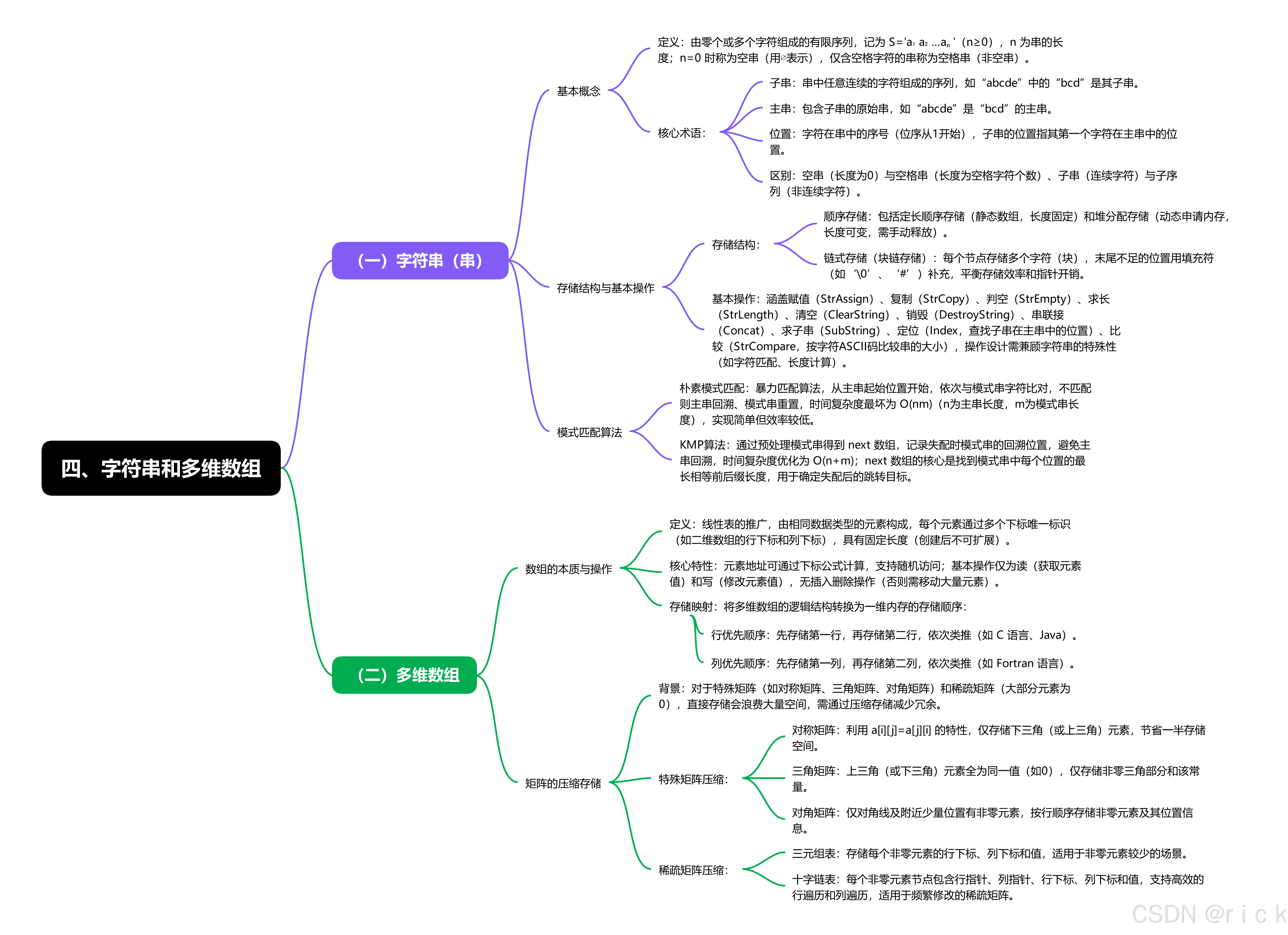
2023级王同学做的思维导图,做得比较全,我贴上来。
总结
提示:这里对文章进行总结:
例如:以上就是今天要讲的内容,本文仅仅简单介绍约瑟夫环的问题。