📅 我们继续 50 个小项目挑战!------ DrawingApp 组件
仓库地址:https://gitee.com/hhm-hhm/50days50projects.git
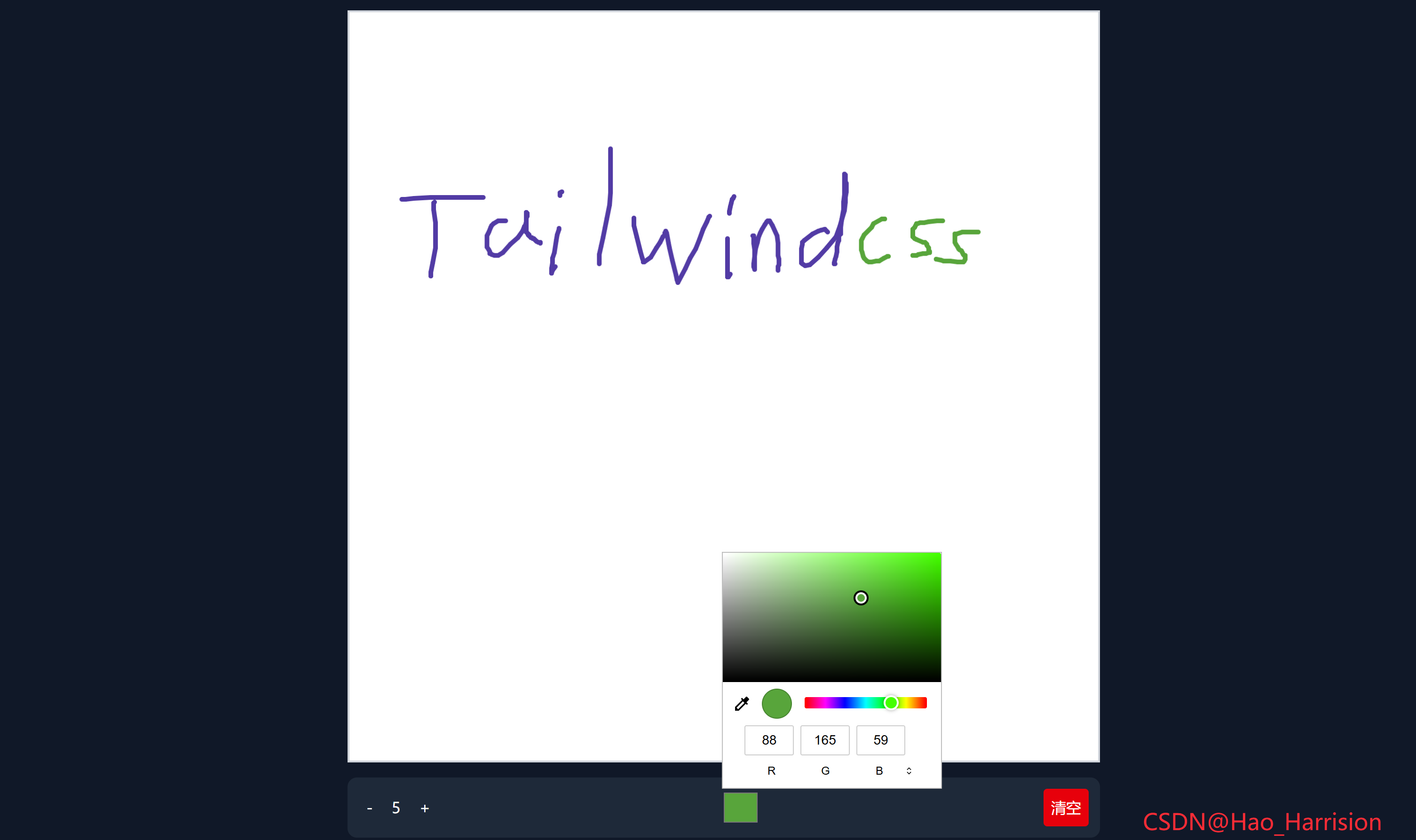
构建一个简单的在线画板应用。用户可以自由绘制图形、调节画笔粗细、选择颜色,并支持一键清空画布。
🌀 组件目标
- 创建一个固定尺寸的画布区域
- 支持鼠标点击拖动进行绘画
- 提供按钮控制画笔粗细(+ / -)
- 使用原生
<input type="color">选择画笔颜色 - 提供"清空"按钮重置画布内容
- 使用 TailwindCSS 快速构建现代 UI 界面
🔧 DrawingApp.tsx组件实现
TypeScript
import React, { useRef, useEffect, useState } from 'react'

const DrawingApp: React.FC = () => {
    // Refs
    const canvasRef = useRef<HTMLCanvasElement>(null)
    const isDrawingRef = useRef(false) // 使用 ref 避免 draw 闭包问题
    const lastXRef = useRef(0)
    const lastYRef = useRef(0)
    const ctxRef = useRef<CanvasRenderingContext2D | null>(null)

    // State
    const [brushSize, setBrushSize] = useState<number>(5)
    const [brushColor, setBrushColor] = useState<string>('#000000')

    // 初始化画布
    useEffect(() => {
        const canvas = canvasRef.current
        if (!canvas) return

        // 设置画布尺寸为显示尺寸(避免模糊)
        const dpr = window.devicePixelRatio || 1
        const rect = canvas.getBoundingClientRect()
        canvas.width = rect.width * dpr
        canvas.height = rect.height * dpr

        const ctx = canvas.getContext('2d')
        if (!ctx) return

        // 缩放上下文以适配高清屏
        ctx.scale(dpr, dpr)
        ctx.lineCap = 'round'
        ctx.lineJoin = 'round'

        ctxRef.current = ctx
    }, [])

    // 开始绘制(仅左键)
    const startDrawing = (e: React.MouseEvent<HTMLCanvasElement>) => {
        if (e.button !== 0) return // 只响应左键
        const canvas = canvasRef.current
        if (!canvas) return

        const rect = canvas.getBoundingClientRect()
        const x = e.clientX - rect.left
        const y = e.clientY - rect.top

        lastXRef.current = x
        lastYRef.current = y
        isDrawingRef.current = true
    }

    // 绘制中
    const draw = (e: React.MouseEvent<HTMLCanvasElement>) => {
        if (!isDrawingRef.current || !ctxRef.current) return

        const canvas = canvasRef.current
        if (!canvas) return

        const rect = canvas.getBoundingClientRect()
        const x = e.clientX - rect.left
        const y = e.clientY - rect.top

        const ctx = ctxRef.current
        ctx.beginPath()
        ctx.moveTo(lastXRef.current, lastYRef.current)
        ctx.lineTo(x, y)
        ctx.strokeStyle = brushColor
        ctx.lineWidth = brushSize
        ctx.stroke()

        lastXRef.current = x
        lastYRef.current = y
    }

    // 停止绘制
    const stopDrawing = () => {
        isDrawingRef.current = false
    }

    // 控制画笔大小
    const increaseBrushSize = () => {
        setBrushSize((prev) => Math.min(prev + 1, 50))
    }
    const decreaseBrushSize = () => {
        setBrushSize((prev) => Math.max(prev - 1, 1))
    }

    // 清空画布
    const clearCanvas = () => {
        const canvas = canvasRef.current
        const ctx = ctxRef.current
        if (!canvas || !ctx) return

        ctx.clearRect(
            0,
            0,
            canvas.width / (window.devicePixelRatio || 1),
            canvas.height / (window.devicePixelRatio || 1)
        )
    }

    return (
        <div className="flex min-h-screen items-center justify-center bg-gray-900">
            <div className="flex flex-col items-center">
                {/* 🎨 画板区域 */}
                <canvas
                    ref={canvasRef}
                    className="aspect-square w-[800px] border-2 border-gray-300 bg-white"
                    onMouseDown={startDrawing}
                    onMouseMove={draw}
                    onMouseUp={stopDrawing}
                    onMouseLeave={stopDrawing}
                    onContextMenu={(e) => e.preventDefault()} // 禁用右键菜单
                />

                {/* 🛠️ 工具栏 */}
                <div className="mt-4 flex w-[800px] items-center justify-between rounded-lg bg-gray-800 p-3">
                    {/* 粗细调节 */}
                    <div className="flex items-center">
                        <button
                            onClick={decreaseBrushSize}
                            className="rounded p-2 text-white hover:bg-gray-700"
                            disabled={brushSize <= 1}>
                            -
                        </button>
                        <span className="mx-3 text-white">{brushSize}</span>
                        <button
                            onClick={increaseBrushSize}
                            className="rounded p-2 text-white hover:bg-gray-700"
                            disabled={brushSize >= 50}>
                            +
                        </button>
                    </div>

                    {/* 🎨 颜色选择 */}
                    <input
                        type="color"
                        value={brushColor}
                        onChange={(e) => setBrushColor(e.target.value)}
                        className="h-10 w-10 cursor-pointer appearance-none rounded border-0 bg-transparent"
                    />

                    {/* 清空画布 */}
                    <button
                        onClick={clearCanvas}
                        className="rounded bg-red-600 p-2 text-white hover:bg-red-700">
                        清空
                    </button>
                </div>
            </div>
            <div className="fixed right-20 bottom-5 text-2xl text-red-500">CSDN@Hao_Harrision</div>
        </div>
    )
}

export default DrawingApp
🔍 关键技术说明
1. 使用 useRef 管理可变状态
isDrawing,lastX,lastY使用ref而非state,避免draw函数因闭包捕获旧值。ctx也用ref缓存,避免重复获取。
2. 高 DPI 屏幕适配(防模糊)
- 获取
devicePixelRatio并放大 canvas 尺寸; - 同时缩放绘图上下文(
ctx.scale(dpr, dpr)); - 清空时需除以
dpr得到逻辑尺寸。
3. 坐标计算
- 使用
getBoundingClientRect()获取 canvas 位置; clientX/Y - rect.left/top得到相对于 canvas 的坐标。
4. 事件处理
onMouseDown/onMouseMove等使用 React 事件系统;onContextMenu阻止默认右键菜单。
5. 无障碍与 UX
- 按钮添加
disabled状态(当画笔已达最小/最大); - 颜色选择器移除浏览器默认样式:
appearance-none+border-0。
💡 可选增强建议
| 功能 | 实现方式 |
|---|---|
| 移动端支持 | 添加 onTouchStart / onTouchMove 等事件 |
| 撤销功能 | 保存 canvas 快照到栈中 |
| 导出图片 | 使用 canvas.toDataURL() |
| 自定义背景 | 在 clearCanvas 中填充背景色或图案 |
🎨 TailwindCSS 样式重点讲解
| 类名 | 作用 |
|---|---|
min-h-screen |
设置最小高度为视口高度 |
items-center, justify-center |
Flexbox 居中对齐布局 |
bg-gray-900 |
设置深色背景 |
aspect-square |
保持画布为正方形比例 |
w-[800px] |
固定宽度为 800px |
border-2, border-gray-300 |
边框样式 |
bg-white |
画布背景色 |
rounded-lg, p-3 |
工具栏圆角与内边距 |
hover:bg-gray-700 |
按钮悬停变色 |
ext-white |
白色文字 |
cursor-pointer |
鼠标悬停变为手型 |
h-10, w-10 |
设置颜色选择器大小 |
| [🎯 TailwindCSS 样式说明] |
🦌 路由组件 + 常量定义
router/index.tsx中 children数组中添加子路由
TypeScript
{
    path: '/',
    element: <App />,
    children: [
       ...
      {
                path: '/DrawingApp',
                lazy: () =>
                    import('@/projects/DrawingApp.tsx').then((mod) => ({
                        Component: mod.default,
                    })),
            },
    ],
 },
constants/index.tsx 添加组件预览常量
TypeScript
import demo22Img from '@/assets/pic-demo/demo-22.png'
省略部分....
export const projectList: ProjectItem[] = [
    省略部分....
     {
        id: 22,
        title: 'DrawingApp',
        image: demo22Img,
        link: 'DrawingApp',
    },
🚀 小结
你可以进一步扩展此组件的功能,例如:
- ✅ 支持保存画布内容为图片(
canvas.toDataURL()) - ✅ 添加撤销/重做功能(记录历史快照)
- ✅ 支持触控设备(如 iPad 或触摸屏)
- ✅ 封装为独立组件(支持 props 传入默认颜色或大小)
📅 明日预告: 我们将完成KineticLoader组件,一个很有意思的旋转加载动画。🚀
原文链接:https://blog.csdn.net/qq_44808710/article/details/149150719
每天造一个轮子,码力暴涨不是梦!🚀