在 vivo、Apple、Tesla 等官网中,经常能看到这样一种效果:
www.vivo.com.cn/vivo/iqoo15...
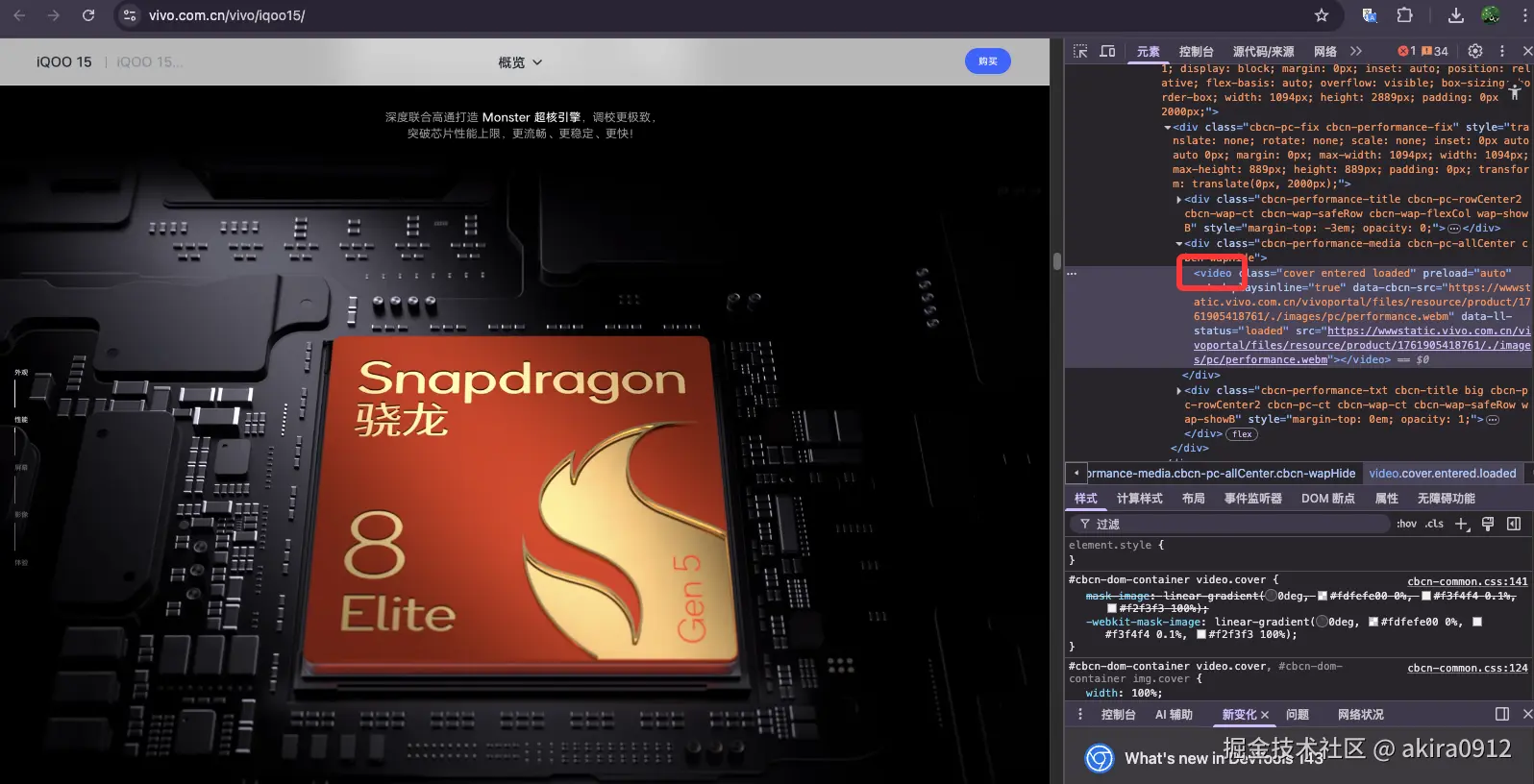
页面向下滚动,视频一点点向前播放
页面向上回滚,视频又一点点倒退
视频没播放完,页面无法继续向下滚动
这种效果看起来像「视频跟着滚动播放」,但本质并不是播放,而是 seek。
本文将会复刻这个效果,完整拆解 滚动控制视频播放的实现方式 ,以及 GSAP 在其中到底发挥了什么作用。
一、这类效果本质上是在做什么?
先说结论:
滚动控制视频 ≠ 播放视频
滚动控制视频 = 用滚动不断 seek 视频
在 HTML5 中:video.currentTime = 3.2;
这一次赋值操作,就叫 seek ------ 也就是把视频播放头强制跳转到某个时间点。
而滚动驱动视频时,代码会不断执行:
scroll → currentTime → currentTime → currentTime
也就是说:滚动控制视频是一个"高频 seek"的极端使用场景
二、一次 seek,浏览器内部发生了什么?
当你设置:
js
video.currentTime = 4.5;浏览器并不是"立刻显示第 4.5 秒那一帧",而是要经历:
- 找到离 4.5 秒最近的关键帧(I-frame)
- 从关键帧开始解码
- 解码中间的 P / B 帧
- 渲染当前画面
这也是为什么:
- 关键帧越少,seek 越慢
- 滚动越频繁,视频越容易抖
三、GSAP 的代码到底有没有用到 seek?
答案是:有,而且用得非常多。
来看一段最常见的 GSAP + ScrollTrigger 写法:
js
gsap.registerPlugin(ScrollTrigger);

const video = document.querySelector("video");
video.pause();

video.addEventListener("loadedmetadata", () => {
  gsap.to(video, {
    currentTime: video.duration,
    ease: "none",
    scrollTrigger: {
      trigger: ".scroll-video",
      start: "top top",
      end: "bottom bottom",
      scrub: true,
      pin: true
    }
  });
});这段代码并没有绕开 seek,它做的事情是:
arduino
ScrollTrigger 监听滚动
↓
计算滚动进度(0 ~ 1)
↓
GSAP 根据进度更新 currentTime
↓
video.currentTime 被不断赋值(seek)
所以可以明确地说:
GSAP 并没有避免 seek,而是系统性地管理了 seek
四、GSAP 真正解决的是什么问题?
如果不用 GSAP,很多人会写成这样:
ini
window.addEventListener("scroll", () => {
  video.currentTime = calcByScroll();
});
这种写法的问题在于:
- scroll 触发频率不可控
- 同一帧内可能多次 seek
- 惯性滚动、回弹难处理
- iOS / Mac 触控板体验差
GSAP ScrollTrigger 的核心价值
1️⃣ 把滚动抽象成"稳定的进度"
GSAP 把滚动统一抽象成:
progress = 0 → 1
开发者不再关心 scrollTop、offset、临界点误差。
2️⃣ 用 requestAnimationFrame 控制更新频率
GSAP 内部保证:
一帧最多更新一次 currentTime
避免了"seek 风暴"。
3️⃣ scrub 实现正反向严格同步
vbnet
scrub: true意味着:
- 向下滚 → 视频前进
- 向上滚 → 视频回退
- 停止滚动 → 视频停在当前帧
这是纯原生 scroll 非常难稳定实现的。
4️⃣ pin 实现滚动锁定
pin: true
视频播放完之前,当前 section 会被固定:
自然实现「视频没播完,页面不能继续滚」
五、为什么视频编码仍然是关键?
GSAP 只能决定 什么时候 seek ,
但 seek 快不快、准不准,取决于视频本身。
官网级方案通常会在制作阶段:
diff
-g 1让视频 每一帧都是关键帧,以保证:
- 高频 seek 不回退
- 滚动和画面严格同步
这也是为什么滚动视频效果往往需要配合 ffmpeg 做素材处理。
六、一个总结模型
可以用一句话总结整套方案:
滚动控制视频不是在播放视频,而是在用滚动驱动 seek。
GSAP 的作用不是消灭 seek,而是让 seek 变得可控、稳定,并与滚动严格同步。
七、结语
- ✅ 滚动视频效果一定会用到 seek
- ✅ GSAP 解决的是"节奏"和"同步"问题
- ❌ GSAP 无法替代视频编码优化
- 🔥 官网级体验 = GSAP + 合理滚动距离 + 正确的视频编码
最后代码贴在这里,复刻了iQOO官网页面中的两个视频滚动,css就不贴了。
js
//子组件
'use client';

import { useEffect, useRef, useId } from 'react';
import { gsap } from 'gsap';
import { ScrollTrigger } from 'gsap/ScrollTrigger';

if (typeof window !== 'undefined') {
  gsap.registerPlugin(ScrollTrigger);
}

interface ScrollVideoProps {
  videoSrc: string;
  duration: number;
  className?: string;
}

export default function ScrollVideo({ videoSrc, duration, className = '' }: ScrollVideoProps) {
  const sectionRef = useRef<HTMLElement>(null);
  const videoRef = useRef<HTMLVideoElement>(null);
  const triggerId = useId();

  // 8px per frame, 60fps
  const scrollHeight = duration * 60 * 8;

  useEffect(() => {
    const video = videoRef.current;
    const section = sectionRef.current;
    if (!video || !section) return;

    video.pause();
    video.currentTime = 0;

    let st: ScrollTrigger | null = null;

    const handleLoadedMetadata = () => {
      st?.kill();

      st = ScrollTrigger.create({
        trigger: section,
        start: 'top top',
        end: 'bottom bottom',
        scrub: 0.2,
        id: triggerId,
        onUpdate: (self) => {
          if (video.readyState >= 1) {
            video.currentTime = self.progress * video.duration;
          }
        },
      });
    };

    if (video.readyState >= 1) {
      handleLoadedMetadata();
    } else {
      video.addEventListener('loadedmetadata', handleLoadedMetadata);
    }

    return () => {
      video.removeEventListener('loadedmetadata', handleLoadedMetadata);
      st?.kill();
    };
  }, [triggerId, duration]);

  return (
    <section
      ref={sectionRef}
      className={`scroll-video ${className}`}
      style={{ height: `${scrollHeight}px` }}
    >
      <div className="sticky top-0 h-screen w-full overflow-hidden">
        <video
          ref={videoRef}
          muted
          playsInline
          preload="auto"
          className="w-full h-full object-cover pointer-events-none"
        >
          <source src={videoSrc} type="video/webm" />
        </video>
      </div>
    </section>
  );
}


//父组件
import ScrollVideo from '@/components/ScrollVideo';

export default function Home() {
  return (
    <main className="bg-black">
      {/* Hero Section */}
      <section className="h-screen flex items-center justify-center">
        <div className="text-center text-white">
          <h1 className="text-5xl md:text-7xl font-bold mb-6">
            企业官网
          </h1>
          <p className="text-xl md:text-2xl text-gray-300 mb-8">
            向下滚动体验视频效果
          </p>
          <div className="animate-bounce">
            <svg
              className="w-8 h-8 mx-auto text-white"
              fill="none"
              stroke="currentColor"
              viewBox="0 0 24 24"
            >
              <path
                strokeLinecap="round"
                strokeLinejoin="round"
                strokeWidth={2}
                d="M19 14l-7 7m0 0l-7-7m7 7V3"
              />
            </svg>
          </div>
        </div>
      </section>

      {/* Scroll Video 1 - 8秒 */}
      <ScrollVideo
        videoSrc="/video.webm"
        duration={8}
        className="bg-black"
      />

      {/* Scroll Video 2 - 4秒 */}
      <ScrollVideo
        videoSrc="/performance.webm"
        duration={4}
        className="bg-black"
      />

      {/* Content Section */}
      <section className="min-h-screen flex items-center justify-center bg-gradient-to-b from-black to-gray-900">
        <div className="text-center text-white max-w-4xl px-6">
          <h2 className="text-4xl md:text-5xl font-bold mb-8">
            创新科技
          </h2>
          <p className="text-lg md:text-xl text-gray-300 leading-relaxed">
            我们致力于为用户提供最前沿的技术体验,
            通过不断创新,打造卓越的产品与服务。
          </p>
        </div>
      </section>

      {/* Footer */}
      <footer className="py-12 bg-gray-900 text-center text-gray-400">
        <p>© 2025 企业官网. All rights reserved.</p>
      </footer>
    </main>
  );
}