vant实现自定义日期时间选择器(年月日时分秒)
1 背景
使用vant作为UI组件时,需要一个日期时间选择器,vant中有Dateicker和TimePicker,可以将两个组件组合封装使用,但是处理传入参数和传出参数稍显麻烦,所以使用Picker封装一个简单的日期时间选择器。
2 要求
- 可以传入初始值
- 可以选择年,年月,年月日,年月日时,年月日时分,年月日时分秒
- 可以限定选择的最大日期和最小日期
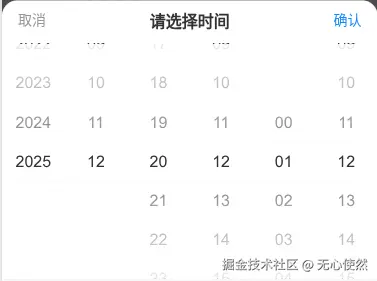
3 实现
封装:
javascript
// DateTimePicker.vue
<template>
    <van-picker
        ref="picker"
        title="请选择时间"
        :columns="columns"
        @change="handleChange"
        @cancel="handleCancel"
        @confirm="handleConfirm"
        v-model="values"
    />
</template>
<script setup lang="ts">
const props = defineProps({
    // 显示的列数量共6列(年月日时分秒)
    columnCount: {
        type: Number,
        default: 6,
    },
    // 可以选择的最小日期
    minDate: {
        type: Date,
        default: new Date(new Date().getFullYear() - 10, 1, 1, 0, 0, 0),
    },
    // 可以选择的最大日期
    maxDate: {
        type: Date,
        default: new Date(new Date().getFullYear() + 10, 11, 31, 23, 59, 59),
    },
});

const values = defineModel({
    get(val) {
        let param = val;
        if (Array.isArray(param)) {
            if (param.length > 0) {
                return param.map(i => i.toString().padStart(2, '0'));
            }
            param = new Date();
        } else if (!param) {
            param = new Date();
        }
        const date = new Date(param);
        const Y = date.getFullYear().toString();
        const M = (date.getMonth() + 1).toString().padStart(2, '0'); //实际月份
        const D = date.getDate().toString().padStart(2, '0');
        const h = date.getHours().toString().padStart(2, '0');
        const m = date.getMinutes().toString().padStart(2, '0');
        const s = date.getSeconds().toString().padStart(2, '0');

        return [Y, M, D, h, m, s];
    },
});

const columns = ref([]); //所有时间列

const maxDateArray = computed(() => getDateArray(props.maxDate));

onBeforeMount(() => {
    getColumns();
});

const getColumns = () => {
    const options = [
        {
            radix: props.maxDate.getFullYear() - props.minDate.getFullYear() + 1,
            base: props.minDate.getFullYear(),
        },
        {
            radix: 12,
            base: 1,
        },
        {
            radix: getCountDays(values.value[0], values.value[1]),
            base: 1,
        },
        {
            radix: 24,
            base: 0,
        },
        {
            radix: 60,
            base: 0,
        },
        {
            radix: 60,
            base: 0,
        },
    ].slice(0, props.columnCount);
    options.forEach((item, index) => {
        columns.value.push(fillData(index, item.radix, item.base));
    });
};

const fillData = (index, radix, baseNum = 0) => {
    return Object.keys(new Array(radix).fill()).map(item => ({
        text: (Number(item) + baseNum).toString().padStart(2, '0'),
        value: (Number(item) + baseNum).toString().padStart(2, '0'),
        disabled: Number(item) + baseNum > maxDateArray.value[index],
    }));
};

const getCountDays = (year, month) => {
    //获取某年某月最后1天
    return new Date(year, month, 0).getDate();
};

const getDateArray = param => {
    const date = new Date(param);
    const Y = date.getFullYear();
    const M = date.getMonth() + 1; //实际月份
    const D = date.getDate();
    const h = date.getHours();
    const m = date.getMinutes();
    const s = date.getSeconds();

    return [Y, M, D, h, m, s];
};

const handleChange = ({ selectedValues, columnIndex }) => {
    const dateArray = [...selectedValues].map((i, idx) => {
        if (idx == 1) {
            return Number(i) - 1;
        }
        return Number(i);
    });
    const maxDate = maxDateArray.value.map((i, idx) => {
        if (idx == 1) {
            return Number(i) - 1;
        }
        return i;
    });

    if (columnIndex <= 1 && columns.value.length > 2) {
        const lastDay = getCountDays(Number(selectedValues[0]), Number(selectedValues[1]));
        columns.value[2] = fillData(2, lastDay, 1);

        if (lastDay < Number(selectedValues[2])) {
            //切换年列或者月列时,因为每月的天可能不同,所以天列需要重置
            values.value = values.value
                .map((item, idx) => {
                    if (idx === 2) {
                        return lastDay.toString();
                    }
                    return item;
                })
                .slice(0, props.columnCount);
        }
    }

    if (
        new Date(...dateArray.slice(0, columnIndex + 1)).getTime() <
        new Date(...maxDate.slice(0, columnIndex + 1)).getTime()
    ) {
        for (let i = columnIndex + 1; i < columns.value.length; i++) {
            columns.value[i].forEach(k => {
                k.disabled = false;
            });
        }
    } else {
        for (let i = columnIndex + 1; i < columns.value.length; i++) {
            columns.value[i].forEach(k => {
                if (Number(k.value) > maxDateArray.value[i]) {
                    k.disabled = true;
                }
            });
        }
        if (new Date(...dateArray).getTime() > new Date(...maxDate).getTime()) {
            values.value = maxDateArray.value.slice(0, props.columnCount);
        }
    }
};

const handleCancel = () => {
    emit('cancel');
};

const handleConfirm = ({ selectedValues }) => {
    emit(
        'confirm',
        (selectedValues.slice(0, 3).join('-') + ' ' + selectedValues.slice(3).join(':')).trim()
    );
};

const emit = defineEmits(['confirm', 'cancel']);
</script>
调用:
javascript
// index.vue
<template>
<van-button type="primary" @click="handleClick">选择日期</van-button>
<van-popup v-model:show="showPicker" round position="bottom">
<DateTimePicker
    v-model="values"
    :maxDate="maxDate"
    @cancel="handleCancel"
    @confirm="handleConfirm"
/>
</van-popup>
</template>
<script setup lang="ts">
const maxDate = new Date();
const showPicker = ref(false);
const values = ref(['2025','12','23','12','01','12']);//设置初始日期时间
const handleConfirm = () => {
     //点击确定的事件
     showPicker.value = false;
}

const handleCancel = () => {
    //点击取消的事件,比如关闭弹框
    showPicker.value = false;
}

const handleClick = () => {
     showPicker.value = true;
}
 </script>