概览:
大约是几天的时间,完成了java从0到1的基本功能实践,包括:一个文本框、一个多行文本框、一个LIST框、一个MODAL模态窗口、读写文本文件、读写随机文件、JAVA和SWING定时器任务、多线程类和接口实践、还有一个用JNA实现的调用freebasic的DLL
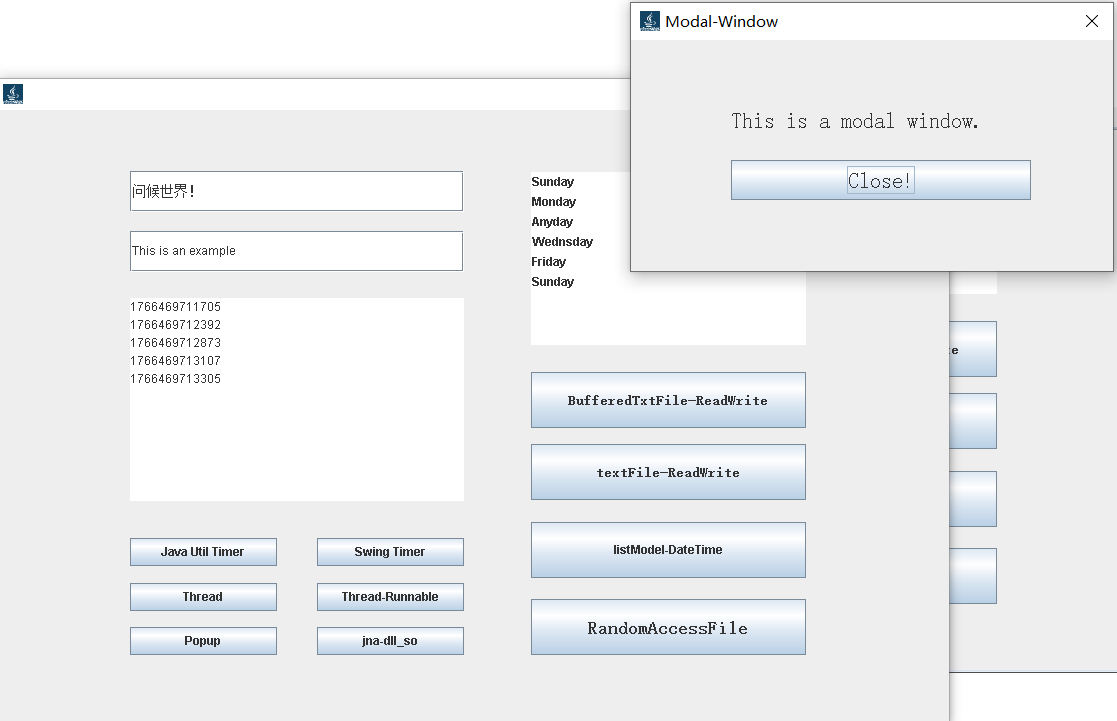
上述功能是在jbuilder2008R2上实践的(Eclipse的其它版本操作起来是类似的),使用的原配jdk,也就是sun的jdk6版本。jbuilder集成度高,自带Interbase和blackfish服务器,且相对轻便易安装,CSDN学习资料也比较丰富。
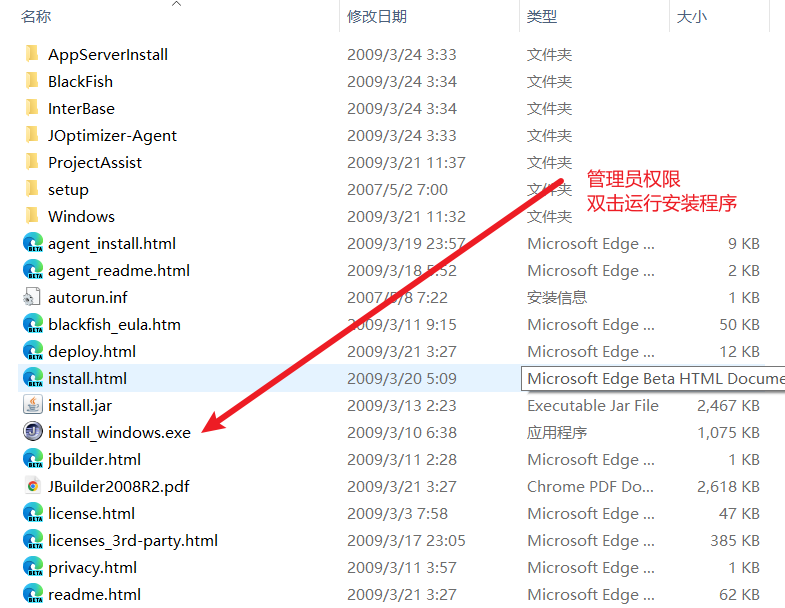
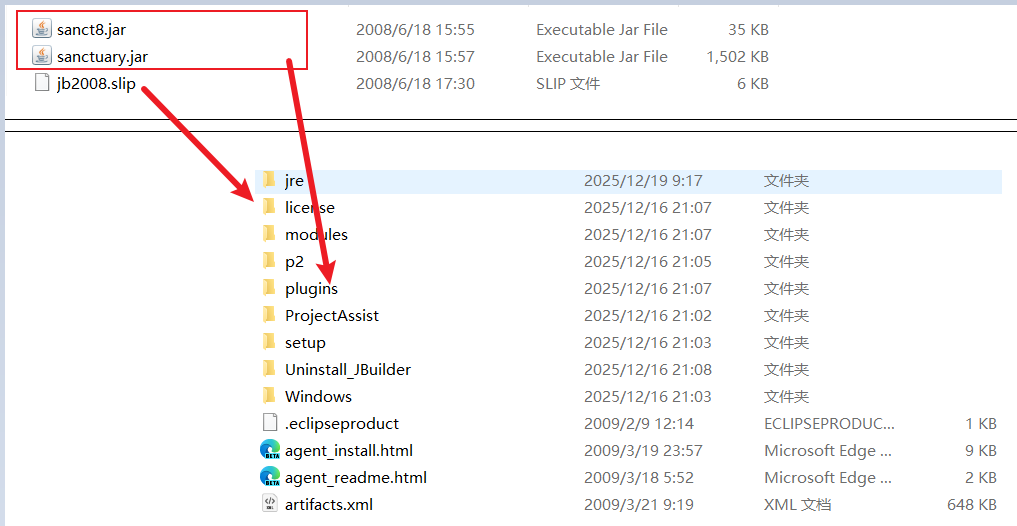
安装比较简单,管理员权限运行安装程序,安装好后处理一下三个文件的位置,倒入jb2008r2.slip文件就可以正常运行了(安装细节网上博文之述备矣,此处略过)。
- 基本功能设计与实现
只Hello World是不够的,上手java还是先创建个form,然后摆控件,暂时不要把时间花在layout样式布局上,绝对位置先摆控件,这样上手简单、效果好。
(1)建个java project类似下面的样子
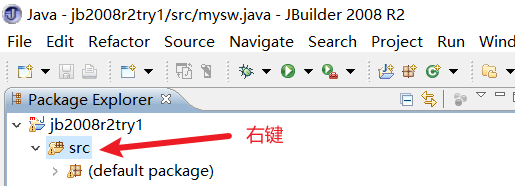
(2) 在src那地方右键进入设计器
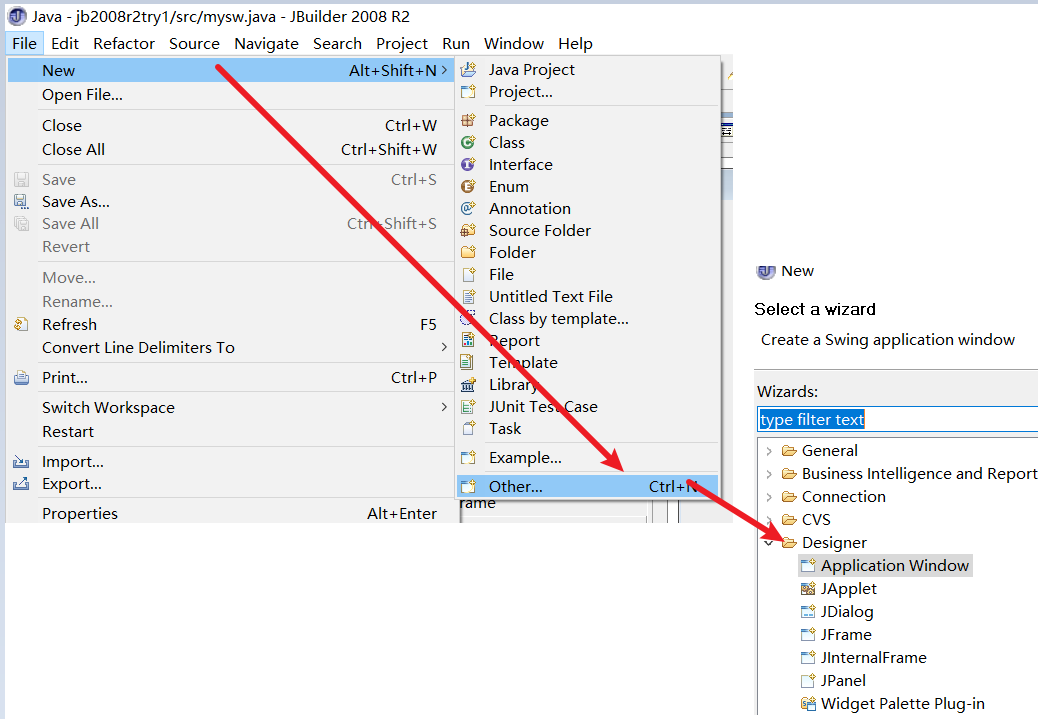
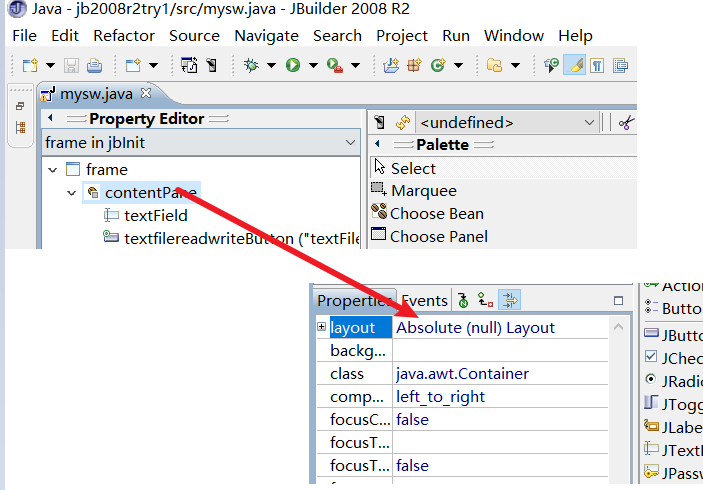
然后就是设计form了,java swing里叫做 jframe,jframe只是个frame,它里面有个contentPane,窗体上的控件都挂在它上面,而不是frame框上。contentPane的layout选Absolute,也是不要布局、任意摆放(几款布局器样式留给以后有时间了再习练)。
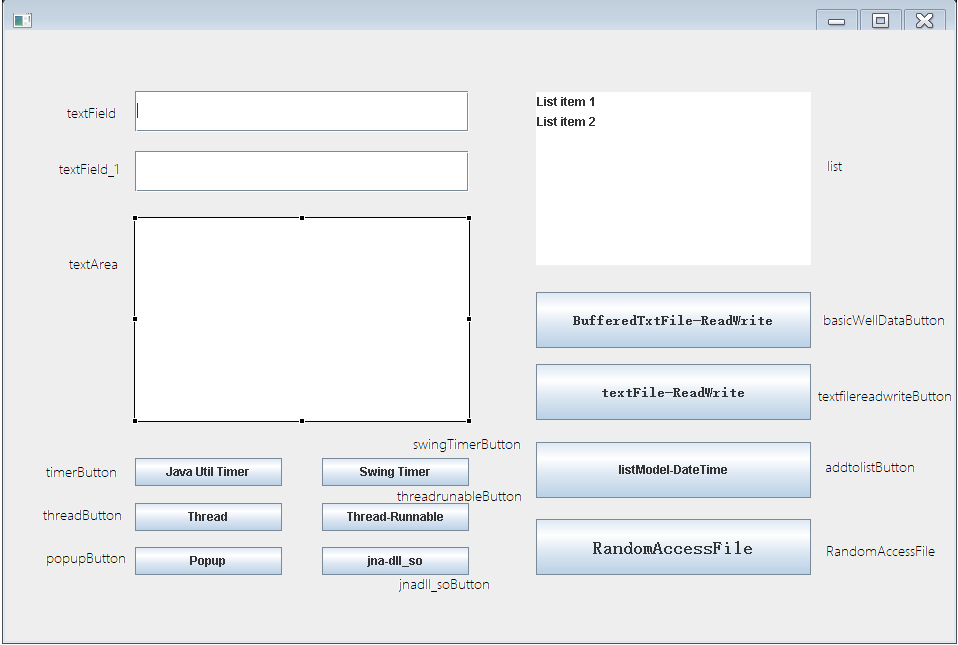
(3)在contentPane上摆控件
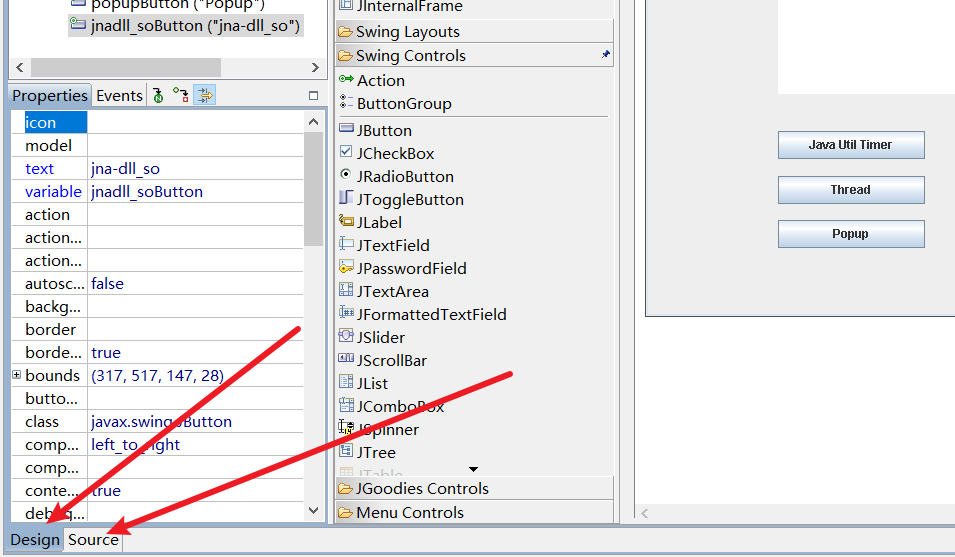
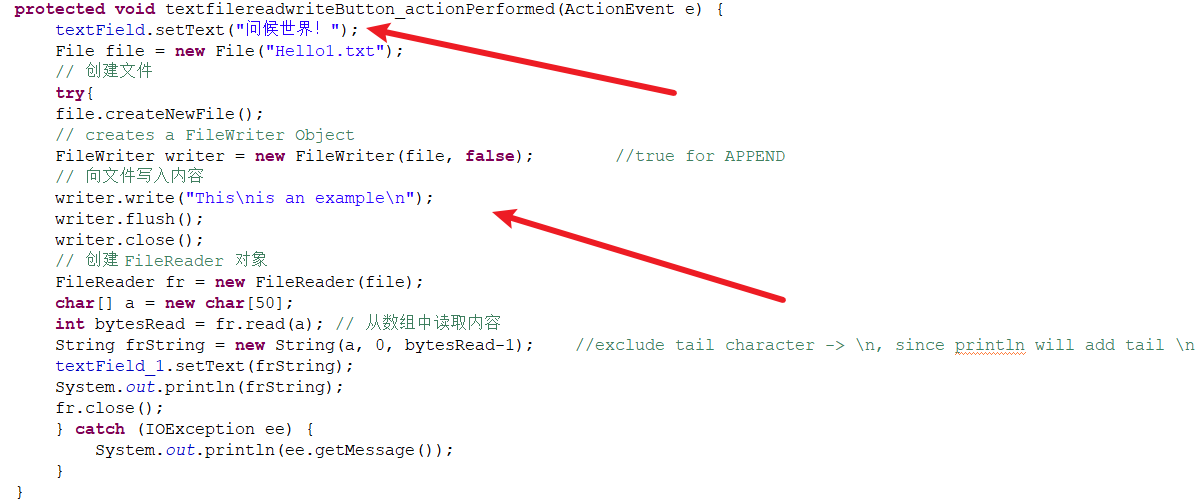
(4)在左下角切换设计和代码,双击textfilereadwriteButton并在textField中"问候世界!"
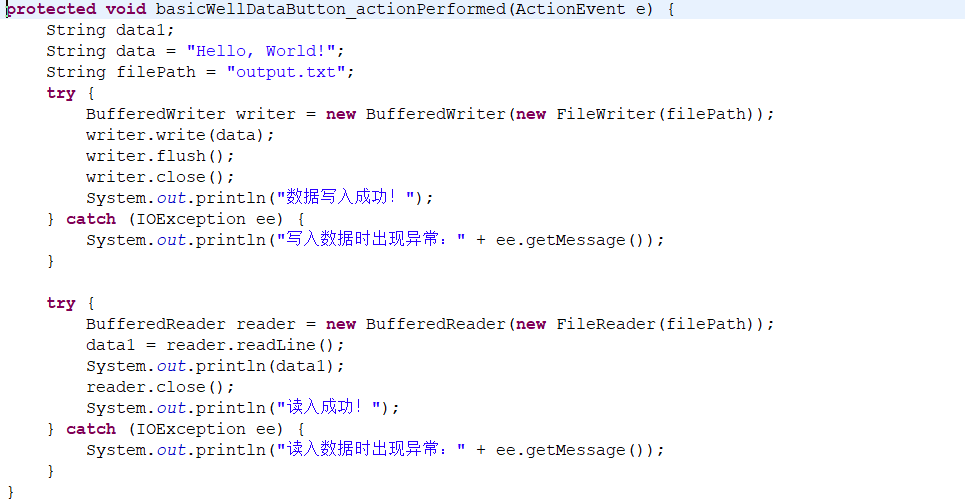
文本文件可以用buffered的方式,操作更方便。
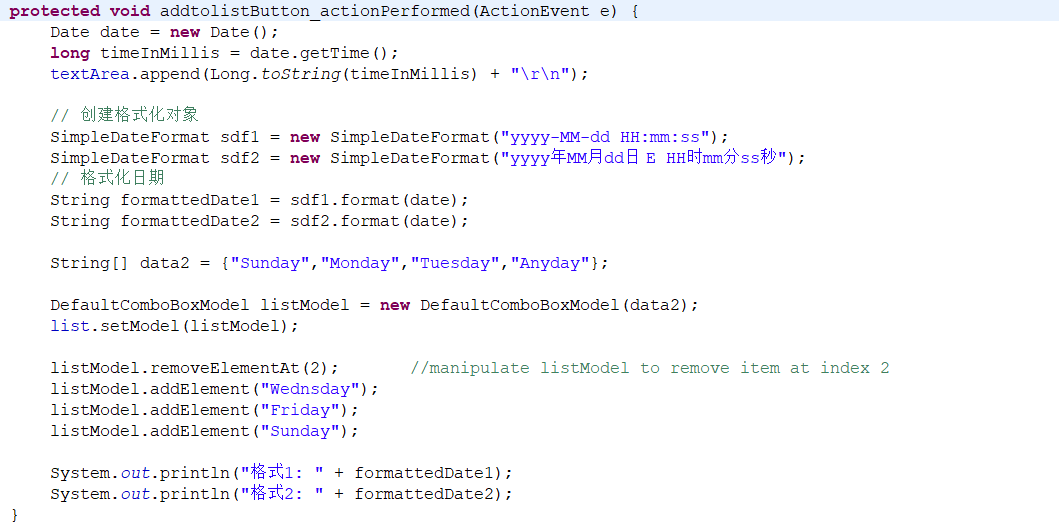
操作list框要先建listmodel,设定了listmodel的list框通过listmodel操作
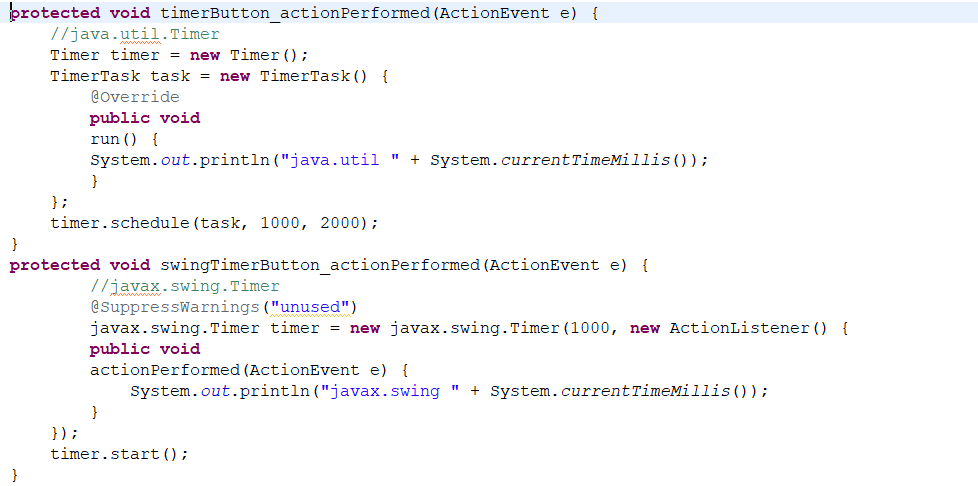
java timer 和 swing timer,一个定周期执行,一个减计数执行,用途稍有区别。new ActionListener是对ActionListener类的实例化,那actionperformed则是对类中方法的override实现,所以写出来就下面的样子了。
Thread类和runnable接口的实现,以及modal模态窗口的实现不单独说了,后面我都贴到完整代码里,一看就清楚了。
- 调用外部freebasic写的DLL(linux下是.libxxxxx.so)
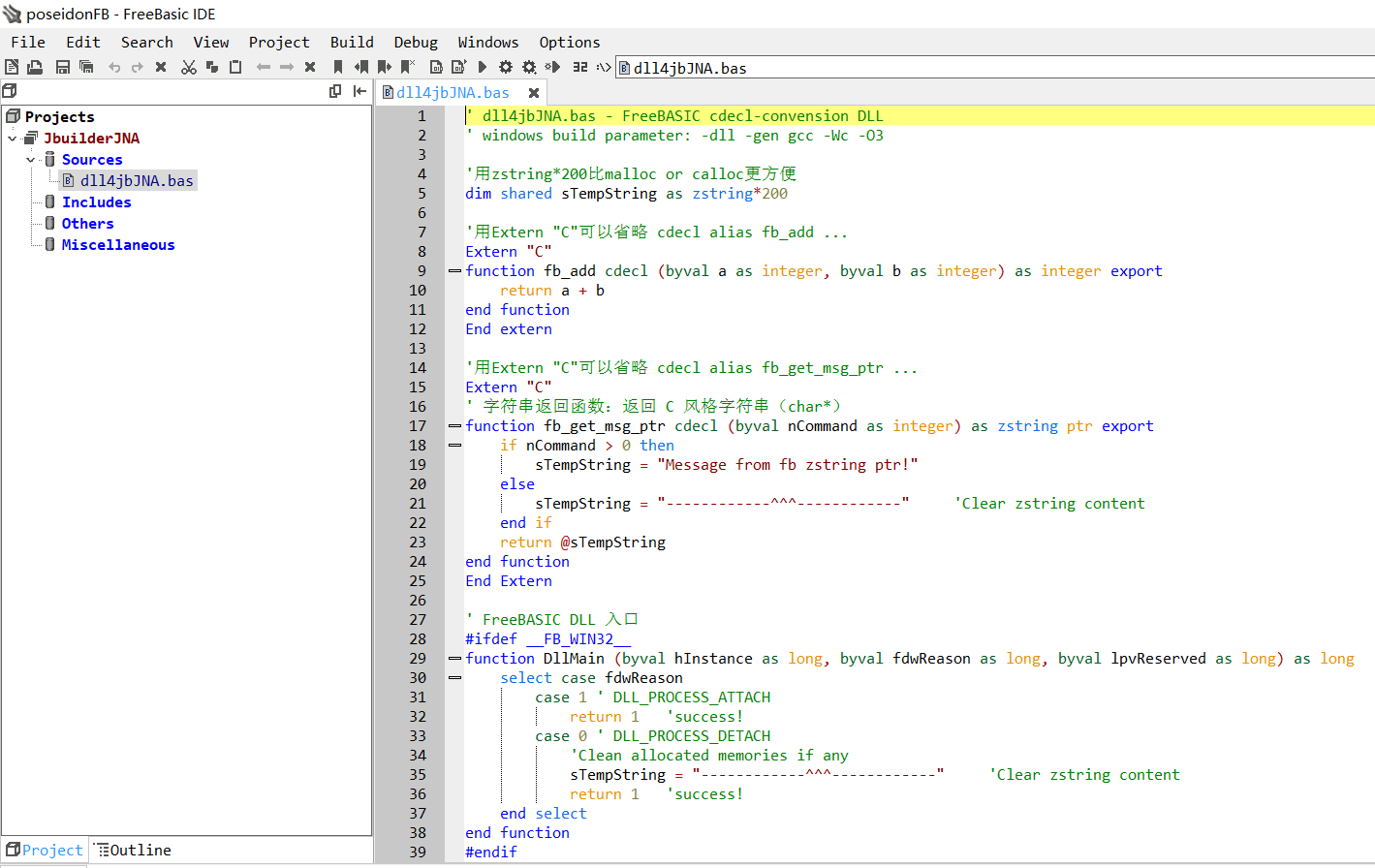
(1)freebasic DLL,
(1.1)要用cdel约定,用Extern "c" ...... End extern,或fb_add cdel alias ... 方式都行,当然下面的两种都用也行。函数后面加上export
(1.2)cdel约定调用方负责清理,防止内存信息泄露。在window平台上,一是在dll卸载中清理,二是在函数中清理,当dll卸载后不要让信息留在丢弃的内存中,防止无意泄露。freebasic有zstring,和c的字节数组类似,它不需要alloc,直接dim shared后定长度即可,非常方便。在linux平台或macOs上,动态库卸载和windows可能不一样,那就在函数中清理。当主程序结束,dll内存被收回,信息已经被提前处理掉了。
(2) jna 本地调用(需要在maven站点下载sun的jna库),调入dll后做接口,通过接口调用dll函数。
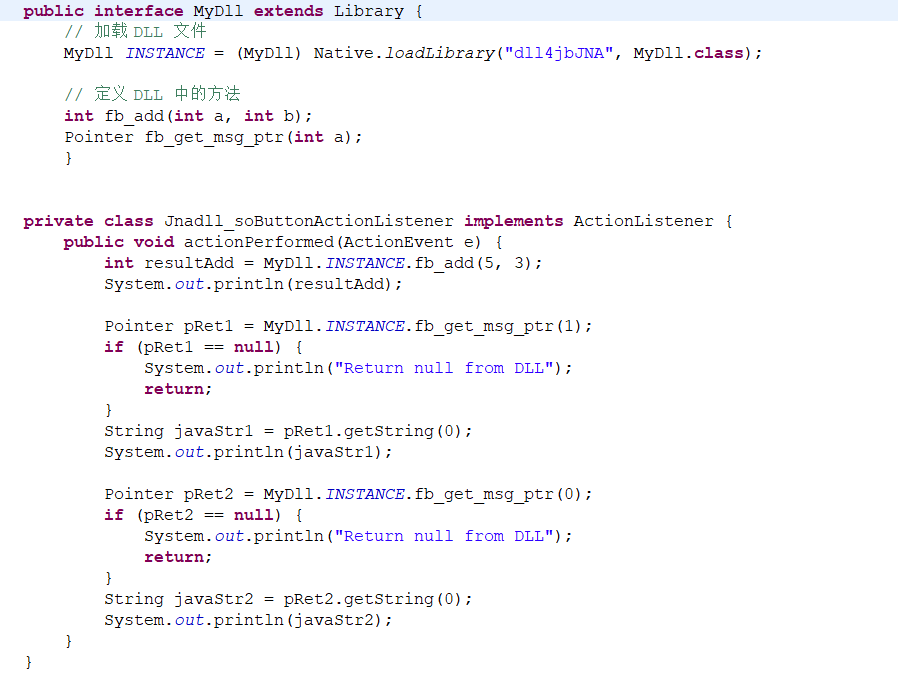
从0到1基本上达成目标,从1到100就要努力了,尤其jee网络那堆东西,还是要迎接新挑战的。下面是完整的 java 代码。
java
import java.nio.*;
import java.io.*;
import java.util.ArrayList;
import java.util.List;
import java.util.Timer;

import java.text.SimpleDateFormat;
import java.util.Date;
import javax.swing.DefaultComboBoxModel;

import java.awt.BorderLayout;
import java.awt.Color;
import java.awt.EventQueue;
import java.awt.Font;
import java.awt.Toolkit;
import java.awt.event.ActionEvent;
import java.awt.event.ActionListener;
import javax.swing.JButton;

import javax.swing.JFrame;
import javax.swing.JLabel;
import javax.swing.JList;
import javax.swing.JPanel;
import javax.swing.JTextArea;
import javax.swing.JTextField;
import javax.swing.ListSelectionModel;
import javax.swing.UIManager;

import java.util.*;
import javax.swing.*;
import java.awt.*;

import gnu.io.*;
import gnu.io.CommPortIdentifier;
import gnu.io.SerialPort;

import javax.comm.*;
import java.sql.*;

import com.sun.jna.Memory;
import com.sun.jna.Platform;
import com.sun.jna.Native;
import com.sun.jna.Library;
import com.sun.jna.Pointer;
import com.sun.jna.Structure;
import com.sun.jna.ptr.IntByReference;

public class mysw {

	private JFrame frame;

	private final JTextField textField = new JTextField();
	private final JButton textfilereadwriteButton = new JButton();
	private final JButton basicWellDataButton = new JButton();
	private final JTextField textField_1 = new JTextField();
	private final JButton addtolistButton = new JButton();
	private final JTextArea textArea = new JTextArea();
	private final JList list = new JList();
	private final JButton RandomAccessFile = new JButton();
	private final JButton timerButton = new JButton();
	private final JButton swingTimerButton = new JButton();
	private final JButton threadButton = new JButton();
	private final JButton threadrunableButton = new JButton();
	private final JButton popupButton = new JButton();
	private final JButton jnadll_soButton = new JButton();
	/**
	 * Launch the application
	 * @param args
	 */
	public static void main(String args[]) {
		EventQueue.invokeLater(new Runnable() {
			public void run() {
				try {
					mysw window = new mysw();
					window.frame.setVisible(true);
				} catch (Exception e) {
					e.printStackTrace();
				}
			}
		});
	}

	/**
	 * Create the application
	 */
	public mysw() {
		jbInit();
	}

	/**
	 * Initialize the contents of the frame
	 */
	private void jbInit() {
		frame = new JFrame();
		frame.setResizable(false);
		frame.getContentPane().setLayout(null);
		frame.setBounds(100, 100, 955, 646);
		frame.setDefaultCloseOperation(JFrame.EXIT_ON_CLOSE);
		Image newIcon = Toolkit.getDefaultToolkit().getImage("HotJava.png");
		frame.setIconImage(newIcon);
		frame.repaint();

		//center frame to screen
		Dimension screenSize = Toolkit.getDefaultToolkit().getScreenSize();
		int x = (int)(screenSize.getWidth() - frame.getWidth())/2;
		int y = (int)(screenSize.getHeight() - frame.getHeight())/2;
		frame.setLocation(x, y);

		frame.getContentPane().add(textField);
		textField.setFont(new Font("宋体", Font.PLAIN, 14));
		textField.setBounds(130, 61, 334, 41);

		frame.getContentPane().add(textfilereadwriteButton);
		textfilereadwriteButton.setFont(new Font("宋体", Font.BOLD, 14));
		textfilereadwriteButton.addActionListener(new TextfilereadwriteButtonActionListener());
		textfilereadwriteButton.setText("textFile-ReadWrite");
		textfilereadwriteButton.setBounds(531, 334, 275, 56);

		frame.getContentPane().add(basicWellDataButton);
		basicWellDataButton.addActionListener(new BasicWellDataButtonActionListener());
		basicWellDataButton.setFont(new Font("宋体", Font.BOLD, 14));
		basicWellDataButton.setText("BufferedTxtFile-ReadWrite");
		basicWellDataButton.setBounds(531, 262, 275, 56);

		frame.getContentPane().add(textField_1);
		textField_1.setBounds(130, 121, 334, 41);
		//list.removeAll();

		frame.getContentPane().add(addtolistButton);
		addtolistButton.addActionListener(new AddtolistButtonActionListener());
		addtolistButton.setText("listModel-DateTime");
		addtolistButton.setBounds(531, 412, 275, 56);

		frame.getContentPane().add(textArea);
		textArea.setBounds(130, 188, 334, 203);

		frame.getContentPane().add(list);
		list.setSelectionMode(ListSelectionModel.SINGLE_SELECTION);
		list.setBounds(531, 62, 275, 173);

		frame.getContentPane().add(RandomAccessFile);
		RandomAccessFile.setFont(new Font("宋体", Font.BOLD, 18));
		RandomAccessFile.addActionListener(new RandomAccessFileActionListener());
		RandomAccessFile.setText("RandomAccessFile");
		RandomAccessFile.setBounds(531, 489, 275, 56);

		frame.getContentPane().add(timerButton);
		timerButton.addActionListener(new TimerButtonActionListener());
		timerButton.setText("Java Util Timer");
		timerButton.setBounds(130, 428, 147, 28);

		frame.getContentPane().add(swingTimerButton);
		swingTimerButton.addActionListener(new SwingTimerButtonActionListener());
		swingTimerButton.setText("Swing Timer");
		swingTimerButton.setBounds(317, 428, 147, 28);

		frame.getContentPane().add(threadButton);
		threadButton.addActionListener(new ThreadButtonActionListener());
		threadButton.setText("Thread");
		threadButton.setBounds(130, 473, 147, 28);

		frame.getContentPane().add(threadrunableButton);
		threadrunableButton.addActionListener(new ThreadrunableButtonActionListener());
		threadrunableButton.setText("Thread-Runnable");
		threadrunableButton.setBounds(317, 473, 147, 28);

		frame.getContentPane().add(popupButton);
		popupButton.addActionListener(new PopupButtonActionListener());
		popupButton.setText("Popup");
		popupButton.setBounds(130, 517, 147, 28);

		frame.getContentPane().add(jnadll_soButton);
		jnadll_soButton.addActionListener(new Jnadll_soButtonActionListener());
		jnadll_soButton.setText("jna-dll_so");
		jnadll_soButton.setBounds(317, 517, 147, 28);
	}
	private class TextfilereadwriteButtonActionListener implements ActionListener {
		public void actionPerformed(ActionEvent e) {
			textfilereadwriteButton_actionPerformed(e);
		}
	}
	private class BasicWellDataButtonActionListener implements ActionListener {
		public void actionPerformed(ActionEvent e) {
			basicWellDataButton_actionPerformed(e);
		}
	}
	private class AddtolistButtonActionListener implements ActionListener {
		public void actionPerformed(ActionEvent e) {
			addtolistButton_actionPerformed(e);
		}
	}
	private class RandomAccessFileActionListener implements ActionListener {
		public void actionPerformed(ActionEvent e) {
			randomAccessFile_actionPerformed(e);
		}
	}
	private class TimerButtonActionListener implements ActionListener {
		public void actionPerformed(ActionEvent e) {
			timerButton_actionPerformed(e);
		}
	}
	private class SwingTimerButtonActionListener implements ActionListener {
		public void actionPerformed(ActionEvent e) {
			swingTimerButton_actionPerformed(e);
		}
	}
	private class ThreadButtonActionListener implements ActionListener {
		public void actionPerformed(ActionEvent e) {
			threadButton_actionPerformed(e);
		}
	}
	private class ThreadrunableButtonActionListener implements ActionListener {
		public void actionPerformed(ActionEvent e) {
			threadrunableButton_actionPerformed(e);
		}
	}
	private class PopupButtonActionListener implements ActionListener {
		public void actionPerformed(ActionEvent e) {
			popupButton_actionPerformed(e);
		}
	}


	public interface MyDll extends Library {
		// 加载 DLL 文件
		MyDll INSTANCE = (MyDll) Native.loadLibrary("dll4jbJNA", MyDll.class);

		// 定义 DLL 中的方法
		int fb_add(int a, int b);
		Pointer fb_get_msg_ptr(int a);
		}


	private class Jnadll_soButtonActionListener implements ActionListener {
		public void actionPerformed(ActionEvent e) {
			int resultAdd = MyDll.INSTANCE.fb_add(5, 3);
			System.out.println(resultAdd);

			Pointer pRet1 = MyDll.INSTANCE.fb_get_msg_ptr(1);
			if (pRet1 == null) {
				System.out.println("Return null from DLL");
				return;
			}
			String javaStr1 = pRet1.getString(0);
			System.out.println(javaStr1);

			Pointer pRet2 = MyDll.INSTANCE.fb_get_msg_ptr(0);
			if (pRet2 == null) {
				System.out.println("Return null from DLL");
				return;
			}
			String javaStr2 = pRet2.getString(0);
			System.out.println(javaStr2);
		}
	}

	protected void textfilereadwriteButton_actionPerformed(ActionEvent e) {
		textField.setText("问候世界!");
        File file = new File("Hello1.txt");
        // 创建文件
        try{
        file.createNewFile();
        // creates a FileWriter Object
        FileWriter writer = new FileWriter(file, false);		//true for APPEND
        // 向文件写入内容
        writer.write("This\nis an example\n");
        writer.flush();
        writer.close();
        // 创建 FileReader 对象
        FileReader fr = new FileReader(file);
        char[] a = new char[50];
        int bytesRead = fr.read(a); // 从数组中读取内容
        String frString = new String(a, 0, bytesRead-1);	//exclude tail character -> \n, since println will add tail \n
        textField_1.setText(frString);
        System.out.println(frString);
        fr.close();
        } catch (IOException ee) {
        	System.out.println(ee.getMessage());
        }
	}

	protected void basicWellDataButton_actionPerformed(ActionEvent e) {
		String data1;
		String data = "Hello, World!";
        String filePath = "output.txt";
        try {
            BufferedWriter writer = new BufferedWriter(new FileWriter(filePath));
            writer.write(data);
            writer.flush();
            writer.close();
            System.out.println("数据写入成功!");
        } catch (IOException ee) {
            System.out.println("写入数据时出现异常:" + ee.getMessage());
        }

        try {
            BufferedReader reader = new BufferedReader(new FileReader(filePath));
            data1 = reader.readLine();
            System.out.println(data1);
            reader.close();
            System.out.println("读入成功!");
        } catch (IOException ee) {
            System.out.println("读入数据时出现异常:" + ee.getMessage());
        }
	}
	protected void addtolistButton_actionPerformed(ActionEvent e) {
		Date date = new Date();
		long timeInMillis = date.getTime();
		textArea.append(Long.toString(timeInMillis) + "\r\n");

        // 创建格式化对象
        SimpleDateFormat sdf1 = new SimpleDateFormat("yyyy-MM-dd HH:mm:ss");
        SimpleDateFormat sdf2 = new SimpleDateFormat("yyyy年MM月dd日 E HH时mm分ss秒");
        // 格式化日期
        String formattedDate1 = sdf1.format(date);
        String formattedDate2 = sdf2.format(date);

        String[] data2 = {"Sunday","Monday","Tuesday","Anyday"};

        DefaultComboBoxModel listModel = new DefaultComboBoxModel(data2);
        list.setModel(listModel);

        listModel.removeElementAt(2);		//manipulate listModel to remove item at index 2
        listModel.addElement("Wednsday");
        listModel.addElement("Friday");
        listModel.addElement("Sunday");

        System.out.println("格式1: " + formattedDate1);
        System.out.println("格式2: " + formattedDate2);
	}
	protected void randomAccessFile_actionPerformed(ActionEvent e) {
		try {
		RandomAccessFile file = new RandomAccessFile("Random.txt","rw");
		file.write("Hello random a long string follows to get and to write Hello random a long string follows to get and to write".getBytes());
		file.seek(0);
		byte[] buffer = new byte[1024];
		//int bytesRead = file.read(buffer);
		int bytesRead = file.read(buffer, 2, 15);	//read at file pointer, but put at offset in buffer
		//System.out.println(new String(buffer, 0, bytesRead));
		System.out.println(new String(buffer, 2, bytesRead));	//build string begin at cell 2
		file.close();
		} catch (IOException ee) {ee.printStackTrace();
		  }finally {
           }
		  }
	public void myTask() {
		System.out.println(System.currentTimeMillis());
	}

	protected void timerButton_actionPerformed(ActionEvent e) {
		//java.util.Timer
		Timer timer = new Timer();
		TimerTask task = new TimerTask() {
			@Override
			public void
			run() {
			System.out.println("java.util " + System.currentTimeMillis());
			}
		};
		timer.schedule(task, 1000, 2000);
	}
	protected void swingTimerButton_actionPerformed(ActionEvent e) {
		    //javax.swing.Timer
			@SuppressWarnings("unused")
			javax.swing.Timer timer = new javax.swing.Timer(1000, new ActionListener() {
			public void
			actionPerformed(ActionEvent e) {
				System.out.println("javax.swing " + System.currentTimeMillis());
			}
		});
		timer.start();
	}
	protected void threadButton_actionPerformed(ActionEvent e) {
		MyThread thread = new MyThread();
		thread.start();
	}
	protected void threadrunableButton_actionPerformed(ActionEvent e) {
		Thread thread = new Thread(new MyRunnable());
		thread.start();
	}

	//procedure for modal window
	public static void MyDialog(JFrame parent) {
		final JDialog dialog = new JDialog(parent, "Modal-Window", true);
		dialog.getContentPane().setLayout(null);
	    dialog.setSize(500,278);
	    dialog.setLocationRelativeTo(parent);

	    JButton closeButton = new JButton("Close!");
	    closeButton.addActionListener(new ActionListener() {
	    	public void
	    	actionPerformed(ActionEvent e) {
	    		dialog.dispose();
	    	}
	    }
	    );
	    JLabel label = new JLabel("This is a modal window.");
	    Font font = new Font("宋体",Font.PLAIN,22);
	    label.setFont(font); closeButton.setFont(font);

	    dialog.getContentPane().add(label);
	    dialog.getContentPane().add(closeButton);

	    label.setBounds(100, 60, 300, 40);
	    closeButton.setBounds(100, 120, 300, 40);

	    label.setVisible(true); closeButton.setVisible(true);
	    dialog.setVisible(true);
	}

	protected void popupButton_actionPerformed(ActionEvent e) {
		MyDialog(frame);
	}
}

class MyThread extends Thread {
	public void run() {
		System.out.println("Thread test");
	}
}

class MyRunnable implements Runnable {
	public void run() {
		System.out.println("Thread runnable test");
	}
}
感谢谢CSDN的博友们,我从他们的博文里学到很多东西,也下载了许多他们上传的习练和软件,这背后受益于长期的CSDN "VIP"身份,否则网上到处乱找就太消耗时间了。