
效果图
注册 hiPrint
在 main.ts 中进行注册
typescript
import { disAutoConnect, hiPrintPlugin } from '@/plugins/hiprint/index';

// 先不要自动连接打印组件,调用打印再去连接
disAutoConnect();

app.use(hiPrintPlugin);
定义配置字段
typescript
const baseMessage = {
    id: 1,
    title: '基本信息',
    fields: [
      { label: '打印用户', value: 'printUser' },
      { label: '打印时间', value: 'printTime' },
      { label: '包裹数量', value: 'packageNum' },
      { label: 'SKU 数量', value: 'skuNum' },
      { label: '货品总数', value: 'stockGoodsNum' },
      { label: '仓库', value: 'warehouseName' },
    ],
};
定义模板数据
typescript
const orderTotal = {
    printUser: '拣货员1',
    printTime: '2025-01-01 18:00:00',
    packageNum: '2',
    skuNum: '3',
    stockGoodsNum: '6',
    warehouseName: '货代深圳仓',
};
定义渲染模板
vue
<!-- RenderPickTemplate -->
<template>
  <div>
     <!-- 根据传入的数据进行渲染 -->
  </div>
</template>
<script lang="ts" setup>
interface Field {
    label: string;
    value: string;
}
interface FieldList {
    id: number;
    title: string;
    fields: Field;
}
interface Props {
    fieldList: FieldList;
    selectedField: string[];
    data: {[key: string]: any };
}

const props = defineProps<Props>();
</script>
下载和打印拣货单
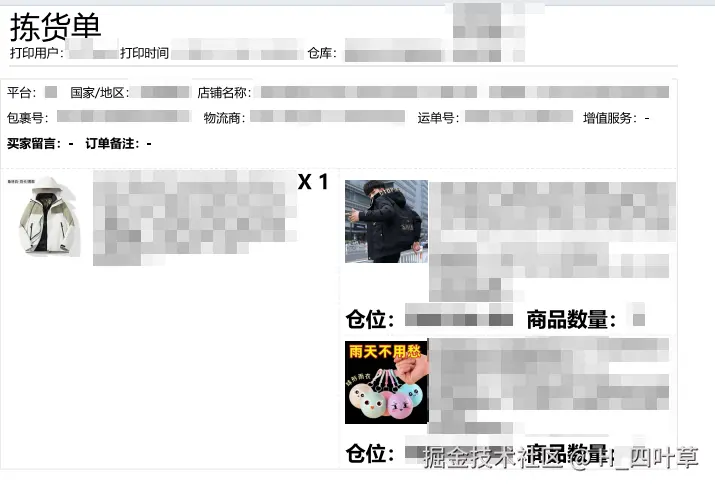
原理:
- 第一步需要将 vue 组件转化成 HTML。这一步是关键
typescript
import { h, render } from 'vue';
import RenderPickTemplate from './RenderPickTemplate.vue';
export const customFormatter = (
  data: { [key: string]: any }, // 需要打印的数据
  selectedField: string[], // 选中的字段
  fieldList: FieldList,   // 完整的字段列表
) => {
   const container = document.createElement('div');
   const vnode = h(RenderPickTemplate, {
    data,
    selectedField,
    fieldList,
   });
   render(vnode, container);
   const html = container.firstElementChild.innerHTML;
   return html;
}- 第二步生成 hiPrint 支持的渲染对象
typescript
export const getTemplateRendFunc = (html: string, type?: string) => {
  const sizeMap: any = {
    A4: {
      width: 210,
      height: 296.6,
      printElementsWidth: 500,
    },
  };

  let size = {
    width: 100,
    height: 150,
    printElementsWidth: 300,
  };
  if (type && sizeMap[type]) {
    size = sizeMap[type];
  }

  return {
    panels: [
      {
        index: 0,
        name: 1,
        ...size,
        printElements: [
          {
            options: {
              left: 0,
              top: 0,
              width: size.printElementsWidth,
              options: {
                html,
              },
              formatter: (title: string, data: any, customOptions: any) => {
                const { options } = customOptions;
                // 将 html 给到 hiPrint 进行渲染
                return options.html;
              },
            },
            printElementType: {
              type: 'longText',
            },
          },
        ],
      },
    ],
  }
}- 第三步借助打印组件将渲染对象打印或下载下来
typescript
// 根据模板创建 hiprint 实例
const hiprintTemplate = new hiprint.PrintTemplate({
    template: json,
});

// 开始打印
hiprintTemplate.print2(null, {
  printer: printer, // printer:若为空,则根据打印组件配置的打印机进行打印
});

 // 成功
hiprintTemplate.on('printSuccess', function() {
  done();
});

 // 失败
hiprintTemplate.on('printError', function() {
  done();
  console.log('打印失败');
});
优化:批量打印
typescript
import { hiprint } from '@/plugins/hiprint/index';
export const batchPrint = (printDataList: Array<PrintData>, printer?: string) => {
  const len = printDataList.length;

  // @ts-ignore
  const runner = new TaskRunner();
  runner.setConcurrency(1); // 同时执行数量

  const task = [];
  const tasksKey = `open${Date.now()}`;
  for (let i = 0; i < len; i++) {
    let key = `task_${i}`;
    const printData = printDataList[i];

    task.push((done: Function) => {
      realPrint(runner, done, key, `${i + 1}`, printData, tasksKey, printer);
    });
  }

  // 开始任务
  runner.addMultiple(task);
  runner.start();
};

const realPrint = (runner: any, done: Function, key: string, i: string, printData: PrintData, tasksKey: string, printer: string) => {
  if (printData.type === 'template') {
    // 根据模板创建 hiprint 实例
    const hiprintTemplate = new hiprint.PrintTemplate({
      template: printData.template,
    });

    // 开始打印
    hiprintTemplate.print2(printData.data, {
      printer: printer
    });

    // 成功
    hiprintTemplate.on('printSuccess', function() {
      done();
    });

    // 失败
    hiprintTemplate.on('printError', function() {
      done();
      console.log('打印失败');
    });
  } else if (printData.type === 'online') {
    printOnlinePdf(printData.online as string, printer, (state: string) => {
      done();
      if (state === 'error') {
        console.log('打印线上 pdf 失败');
      }
    });
  }
};

// 打印线上 PDF
export const printOnlinePdf = (url: string, printer?: string, callback?: Function) => {
  let params = {
    type: 'url_pdf',
    templateId: 'online_pdf_1',
    pdf_path: url,
  }
  if (printer) {
    params = Object.assign(params, {
      printer,
    })
  }

  hiprint.hiwebSocket.send(params);
  hiprint.hiwebSocket.socket.on('success', () => {
    if (typeof callback === 'function') {
      callback('success');
    }
  });
  hiprint.hiwebSocket.socket.on('error', () => {
    if (typeof callback === 'function') {
      callback('error');
    }
  });
};
使用
typescript
batchPrint(
    [
      {
        type: 'template',
        template: json,
      },
    ],
    type === 'download' ? 'Microsoft Print to PDF' : '',
);
扩展:直接拖拽组件实现打印下载

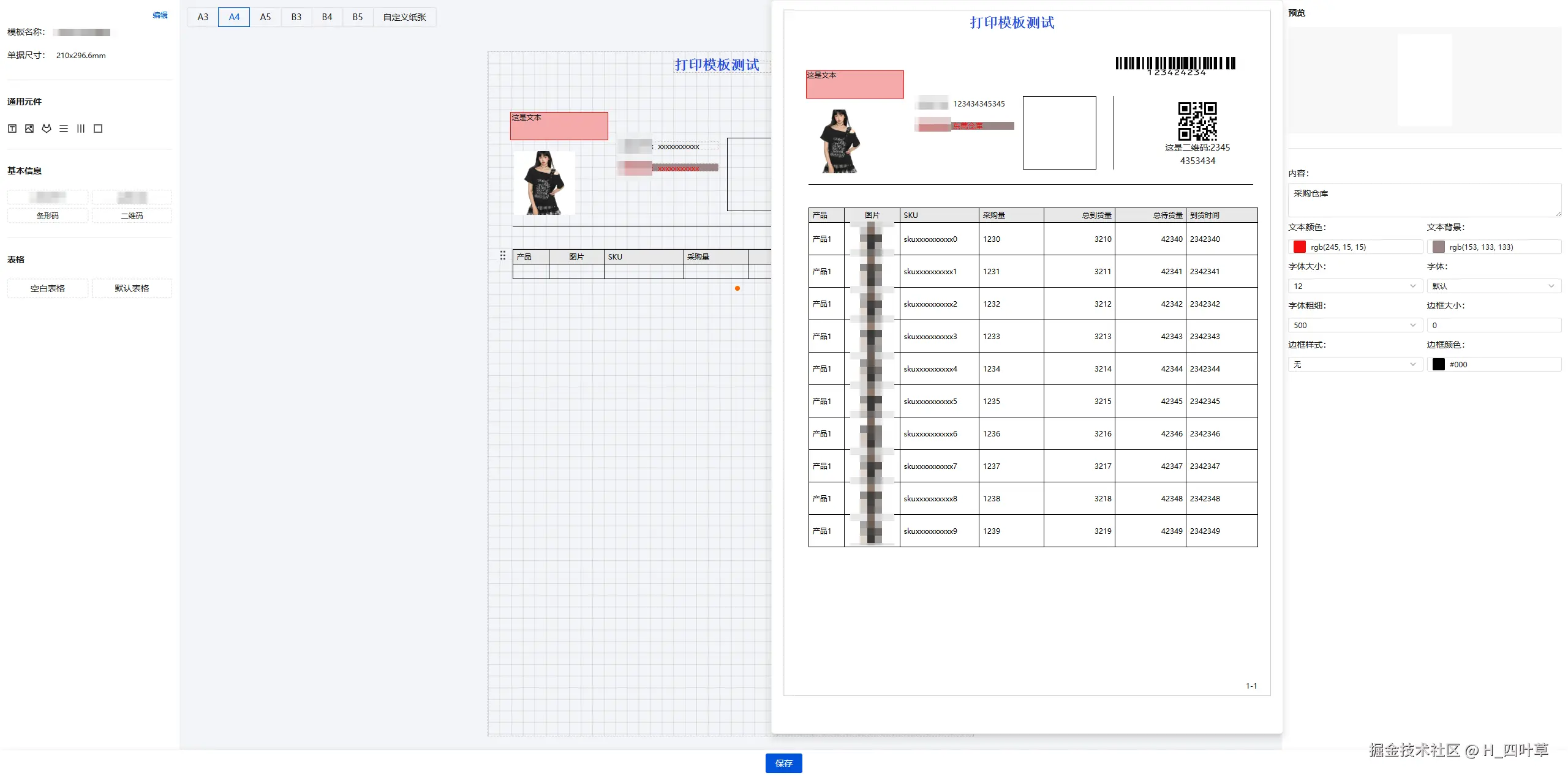
该部分内容篇幅比较大,后续会重新出一篇文章。。。。