一、组件功能:
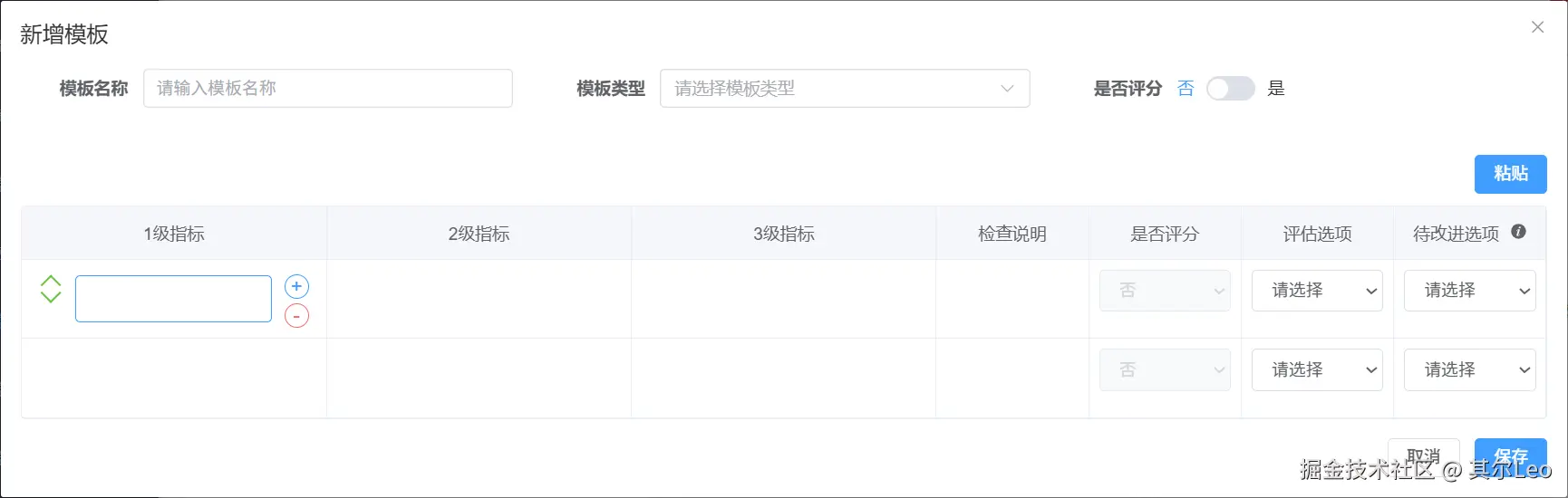
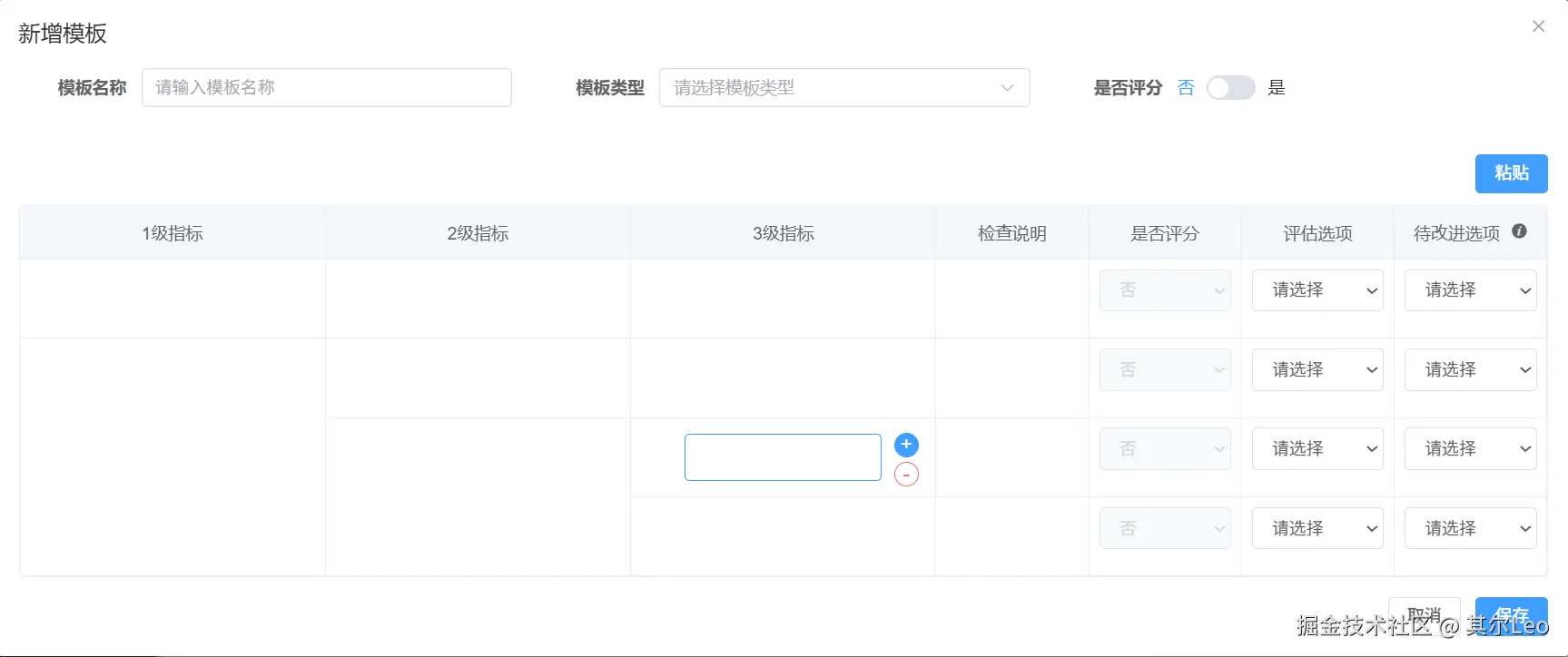
- 动态添加空行
- 添加的空行属于子级的话,父级会自动合并
二、效果图展示
- 图片依次对应:默认界面-一级指标添加-二级指标添加-三级指标添加


三、代码实现
vue
<template>
  <div class="indicator-table" @click.stop>
    <table class="table">
      <thead>
        <tr>
          <th v-for="header in headers" :key="header" :style="{ width: getHeaderWidth(header) }">
            <span v-if="header !== '待改进选项'">{{ header }}</span>
            <span v-else>
              {{ header }}
              <el-tooltip content="指定触发整改机制的选项值。在实际督导结果选中该值时,系统会判定该指标'未达标',并会在报告中列入待改进清单。" placement="top">
                <el-icon style="margin-left: 5px; cursor: pointer;"><InfoFilled /></el-icon>
              </el-tooltip>
            </span>
          </th>
        </tr>
      </thead>
      <tbody>
        <template v-for="(rowGroup, groupIndex) in rowGroups" :key="groupIndex">
          <tr v-for="(row, rowIndexInGroup) in rowGroup.rows" :key="row.id">

            <td v-if="row.showLevel1" :rowspan="getLevel1Rowspan(groupIndex)" class="level-cell"
              :class="{ 'is-active': isCellActive('level1', groupIndex, rowIndexInGroup) }"
              @click.stop="setActiveCell('level1', groupIndex, rowIndexInGroup)">
              <div class="cell-wrapper">
                <div class="control-side left-side" v-show="isCellActive('level1', groupIndex, rowIndexInGroup)">
                  <div class="move-icon up" @click.stop="moveRowUp(groupIndex, rowIndexInGroup)"></div>
                  <div class="move-icon down" @click.stop="moveRowDown(groupIndex, rowIndexInGroup)"></div>
                </div>

                <div class="input-area">
                  <input v-model="rowGroup.level1" type="text" class="clean-input" placeholder="">
                </div>

                <div class="control-side right-side" v-show="isCellActive('level1', groupIndex, rowIndexInGroup)">
                  <button @click.stop="addLevel1(groupIndex)" class="circle-btn btn-add" title="新增">+</button>
                  <button @click.stop="removeLevel1(groupIndex)" class="circle-btn btn-remove" title="删除">-</button>
                </div>
              </div>
            </td>

            <td v-if="row.showLevel2" :rowspan="getLevel2Rowspan(groupIndex, row.level2Id)" class="level-cell"
              :class="{ 'is-active': isCellActive('level2', groupIndex, rowIndexInGroup) }"
              @click.stop="setActiveCell('level2', groupIndex, rowIndexInGroup)">
              <div class="cell-wrapper">
                <div class="control-side left-side" v-show="isCellActive('level2', groupIndex, rowIndexInGroup)">
                  <div v-if="!row.showLevel1" class="move-group">
                    <div class="move-icon up" @click.stop="moveRowUp(groupIndex, rowIndexInGroup)"></div>
                    <div class="move-icon down" @click.stop="moveRowDown(groupIndex, rowIndexInGroup)"></div>
                  </div>
                </div>

                <div class="input-area">
                  <input v-model="row.level2" type="text" class="clean-input" placeholder=""
                    @input="updateLevel2Content(groupIndex, row.level2Id, row.level2)">
                </div>

                <div class="control-side right-side" v-show="isCellActive('level2', groupIndex, rowIndexInGroup)">
                  <button @click.stop="addLevel2(groupIndex, rowIndexInGroup)" class="circle-btn btn-add">+</button>
                  <button @click.stop="removeLevel2(groupIndex, rowIndexInGroup)"
                    class="circle-btn btn-remove">-</button>
                </div>
              </div>
            </td>

            <td class="level-cell" :class="{ 'is-active': isCellActive('level3', groupIndex, rowIndexInGroup) }"
              @click.stop="setActiveCell('level3', groupIndex, rowIndexInGroup)">
              <div class="cell-wrapper">
                <div class="control-side left-side" v-show="isCellActive('level3', groupIndex, rowIndexInGroup)">
                  <div v-if="!row.showLevel1 && !row.showLevel2" class="move-group">
                    <div class="move-icon up" @click.stop="moveRowUp(groupIndex, rowIndexInGroup)"></div>
                    <div class="move-icon down" @click.stop="moveRowDown(groupIndex, rowIndexInGroup)"></div>
                  </div>
                </div>

                <div class="input-area">
                  <input v-model="row.level3" type="text" class="clean-input" placeholder="">
                </div>

                <div class="control-side right-side" v-show="isCellActive('level3', groupIndex, rowIndexInGroup)">
                  <button @click.stop="addLevel3(groupIndex, rowIndexInGroup)" class="circle-btn btn-add">+</button>
                  <button @click.stop="removeLevel3(groupIndex, rowIndexInGroup)"
                    class="circle-btn btn-remove">-</button>
                </div>
              </div>
            </td>

            <td class="content-cell">
              <div class="input-area">
                <input v-model="row.checkInstructions" type="text" class="clean-input" placeholder="">
              </div>
            </td>

            <td class="content-cell">
              <select
                v-model="row.isScore"
                class="clean-select"
                :disabled="!props.isTemplateScoring"
                :class="{ 'is-disabled': !props.isTemplateScoring }"
              >
                <option value="">请选择</option>
                <option value="是">是</option>
                <option value="否">否</option>
              </select>
            </td>

            <td class="content-cell">
              <select
                v-model="row.evaluation"
                class="clean-select"
                :disabled="row.isScore === '是'"
                :class="{ 'is-disabled': row.isScore === '是' }"
              >
                <option value="">请选择</option>
                <option value="好/坏">好/坏</option>
                <option value="优/良/中/差">优/良/中/差</option>
                <option value="有/无">有/无</option>
                <option value="肯定/否定">肯定/否定</option>
                <option value="是/否">是/否</option>
              </select>
            </td>

            <td class="content-cell">
              <select
                v-model="row.improvement"
                class="clean-select"
                :disabled="row.isScore === '是'"
                :class="{ 'is-disabled': row.isScore === '是' }"
              >
                <option value="">请选择</option>
                <option v-for="option in getImprovementOptions(row.evaluation)" :key="option" :value="option">
                  {{ option }}
                </option>
              </select>
            </td>
          </tr>
        </template>
      </tbody>
    </table>
  </div>
</template>

<script setup lang="ts">
import { ref, onMounted, onUnmounted, watch } from 'vue'
import { InfoFilled } from '@element-plus/icons-vue'
import { ElTooltip } from 'element-plus'

// --- 类型定义 ---
interface TableRow {
  id: number
  level2: string
  level3: string
  isScore: string
  checkInstructions: string
  evaluation: string
  improvement: string
  showLevel1: boolean
  showLevel2: boolean
  level2Id: string
}

interface RowGroup {
  id: number
  level1: string
  rows: TableRow[]
}

// --- 新增:接收父组件传来的 isScore ---
const props = defineProps<{
  isTemplateScoring?: boolean // 接收父组件的评分状态
}>()

// --- 状态定义 ---
const headers = ref(['1级指标', '2级指标', '3级指标', '检查说明', '是否评分', '评估选项', '待改进选项'])
const rowGroups = defineModel<RowGroup[]>({ required: true })
let idCounter = 0

// 当前激活的单元格坐标
const activeCell = ref<{ field: string, groupIdx: number, rowIdx: number } | null>(null)

// --- 样式辅助 ---
const getHeaderWidth = (header: string) => {
  if (header.includes('指标')) return '20%'
  if (header === '检查说明') return 'auto'
  return '10%'
}

/**
 * 根据评估选项的值,解析并返回待改进选项的列表。
 * @param evaluationString 来自 row.evaluation 的值 (例如: '优/良/中/差')
 * @returns 选项字符串数组 (例如: ['优', '良', '中', '差'])
 */
const getImprovementOptions = (evaluationString: string): string[] => {
  if (!evaluationString) {
    return []
  }
  // 使用 '/' 分割字符串来获取单个选项
  return evaluationString.split('/')
}

// --- 核心交互逻辑 ---

// 判断单元格是否处于编辑状态
const isCellActive = (field: string, groupIdx: number, rowIdx: number) => {
  return activeCell.value?.field === field &&
    activeCell.value?.groupIdx === groupIdx &&
    activeCell.value?.rowIdx === rowIdx
}

// 设置激活单元格
const setActiveCell = (field: string, groupIdx: number, rowIdx: number) => {
  activeCell.value = { field, groupIdx, rowIdx }
}

// 点击外部清除激活状态
const handleClickOutside = () => {
  activeCell.value = null
}

const generateNewRow = (showLevel1: boolean = true, showLevel2: boolean = true, level2Id?: string): TableRow => ({
  id: idCounter++,
  level2: '',
  level3: '',
  checkInstructions: '',
  isScore: props.isTemplateScoring ? '是' : '否',
  evaluation: '',
  improvement: '',
  showLevel1,
  showLevel2,
  level2Id: level2Id || `level2_${idCounter}`
})

const generateNewGroup = (): RowGroup => ({
  id: idCounter++,
  level1: '',
  rows: [generateNewRow(true, true)]
})

const getLevel1Rowspan = (groupIndex: number): number => rowGroups.value[groupIndex].rows.length

const getLevel2RowCount = (groupIndex: number, level2Id: string): number => {
  const group = rowGroups.value[groupIndex]
  return group.rows.filter(row => row.level2Id === level2Id).length
}

const getLevel2Rowspan = (groupIndex: number, level2Id: string): number => getLevel2RowCount(groupIndex, level2Id)

const updateLevel2Content = (groupIndex: number, level2Id: string, content: string) => {
  const group = rowGroups.value[groupIndex]
  group.rows.forEach(row => {
    if (row.level2Id === level2Id) row.level2 = content
  })
}

const initializeTable = () => {
  if (!rowGroups.value || rowGroups.value.length === 0) {
    rowGroups.value = [generateNewGroup()]
  }
}

const addLevel1 = (groupIndex: number) => {
  const newGroup = generateNewGroup()
  rowGroups.value.splice(groupIndex + 1, 0, newGroup)
}

const removeLevel1 = (groupIndex: number) => {
  if (rowGroups.value.length <= 1) return alert('至少保留一个1级指标')
  rowGroups.value.splice(groupIndex, 1)
  // 删除后清除焦点,避免索引错位报错
  activeCell.value = null
}

const addLevel2 = (groupIndex: number, rowIndexInGroup: number) => {
  const group = rowGroups.value[groupIndex]
  const currentRow = group.rows[rowIndexInGroup]
  let insertIndex = rowIndexInGroup
  for (let i = rowIndexInGroup + 1; i < group.rows.length; i++) {
    if (group.rows[i].level2Id === currentRow.level2Id) insertIndex = i
    else break
  }
  const newLevel2Id = `level2_${Date.now()}_${Math.random().toString(36).substr(2, 9)}`
  const newRow: TableRow = {
    id: idCounter++,
    level2: '',
    level3: '',
    checkInstructions: '',
    isScore: props.isTemplateScoring ? '是' : '否',
    evaluation: '',
    improvement: '',
    showLevel1: false,
    showLevel2: true,
    level2Id: newLevel2Id
  }
  group.rows.splice(insertIndex + 1, 0, newRow)
  adjustDisplayStates(groupIndex)
}

const getLevel2GroupCount = (groupIndex: number): number => {
  const group = rowGroups.value[groupIndex]
  const uniqueIds = new Set(group.rows.map(r => r.level2Id))
  return uniqueIds.size
}

const removeLevel2 = (groupIndex: number, rowIndexInGroup: number) => {
  const group = rowGroups.value[groupIndex]
  const currentRow = group.rows[rowIndexInGroup]
  if (getLevel2GroupCount(groupIndex) <= 1) return alert('至少保留一个2级指标')
  group.rows = group.rows.filter(row => row.level2Id !== currentRow.level2Id)
  adjustDisplayStates(groupIndex)
  activeCell.value = null
}

const addLevel3 = (groupIndex: number, rowIndexInGroup: number) => {
  const group = rowGroups.value[groupIndex]
  const currentRow = group.rows[rowIndexInGroup]
  const newRow = generateNewRow(false, false, currentRow.level2Id)
  newRow.level2 = currentRow.level2 // 建议显式加上这一句,确保文本同步
  group.rows.splice(rowIndexInGroup + 1, 0, newRow)
}

const removeLevel3 = (groupIndex: number, rowIndexInGroup: number) => {
  const group = rowGroups.value[groupIndex]
  const currentRow = group.rows[rowIndexInGroup]
  const level2Rows = group.rows.filter(row => row.level2Id === currentRow.level2Id)
  if (level2Rows.length <= 1 && rowGroups.value.length <= 1) return alert('至少保留一个3级指标')
  group.rows.splice(rowIndexInGroup, 1)
  const remainingRows = group.rows.filter(row => row.level2Id === currentRow.level2Id)
  if (remainingRows.length > 0) {
    const firstIndex = group.rows.findIndex(row => row.level2Id === currentRow.level2Id)
    if (firstIndex >= 0) {
      group.rows[firstIndex].showLevel2 = true
      if (firstIndex === 0) group.rows[firstIndex].showLevel1 = true
    }
  }
  activeCell.value = null
}

const moveRowUp = (groupIndex: number, rowIndexInGroup: number) => {
  return
  // const group = rowGroups.value[groupIndex]
  // if (rowIndexInGroup === 0) {
  //   if (groupIndex > 0) {
  //     const prevGroup = rowGroups.value[groupIndex - 1]
  //     const row = group.rows.splice(rowIndexInGroup, 1)[0]
  //     row.showLevel1 = false
  //     row.showLevel2 = true
  //     prevGroup.rows.push(row)
  //   }
  //   return
  // }
  // const temp = group.rows[rowIndexInGroup - 1]
  // group.rows[rowIndexInGroup - 1] = group.rows[rowIndexInGroup]
  // group.rows[rowIndexInGroup] = temp
  // adjustDisplayStates(groupIndex)
}

const moveRowDown = (groupIndex: number, rowIndexInGroup: number) => {
  return
  // const group = rowGroups.value[groupIndex]
  // if (rowIndexInGroup === group.rows.length - 1) {
  //   if (groupIndex < rowGroups.value.length - 1) {
  //     const nextGroup = rowGroups.value[groupIndex + 1]
  //     const row = group.rows.splice(rowIndexInGroup, 1)[0]
  //     row.showLevel1 = true
  //     row.showLevel2 = true
  //     nextGroup.rows.unshift(row)
  //   }
  //   return
  // }
  // const temp = group.rows[rowIndexInGroup + 1]
  // group.rows[rowIndexInGroup + 1] = group.rows[rowIndexInGroup]
  // group.rows[rowIndexInGroup] = temp
  // adjustDisplayStates(groupIndex)
}

const adjustDisplayStates = (groupIndex: number) => {
  const group = rowGroups.value[groupIndex]
  const level2Groups: { [key: string]: TableRow[] } = {}
  group.rows.forEach(row => {
    if (!level2Groups[row.level2Id]) level2Groups[row.level2Id] = []
    level2Groups[row.level2Id].push(row)
  })
  group.rows.forEach(row => {
    row.showLevel1 = false
    row.showLevel2 = false
  })
  let currentIndex = 0
  Object.keys(level2Groups).forEach(level2Id => {
    const level2Rows = level2Groups[level2Id]
    if (level2Rows.length > 0) {
      level2Rows[0].showLevel1 = (currentIndex === 0)
      level2Rows[0].showLevel2 = true
    }
    currentIndex += level2Rows.length
  })
  if (group.rows.length > 0) group.rows[0].showLevel1 = true
}

watch(
  // 监听整个 v-model 绑定的数组
  () => rowGroups.value,
  (newValue) => {
    // 确保在数据被清空时,组件能立即初始化为默认行
    if (!newValue || newValue.length === 0) {
      // 避免无限循环,只在父组件传入空数据时执行初始化
      initializeTable();
    }
  },
  // deep: true 用于监听对象内部变化,但在这里监听数组长度变化
  { immediate: true }
);

// --- 新增:监听父组件评分开关的变化 ---
watch(() => props.isTemplateScoring, (newVal) => {
  // 遍历所有分组和所有行
  if (rowGroups.value) {
    rowGroups.value.forEach(group => {
      group.rows.forEach(row => {
        if (newVal === false) {
          // 1. 父组件关:强制变否
          row.isScore = '否'
        } else {
          // 2. 父组件开:如果是 '否' 或 空,自动切回 '是'
          if (row.isScore === '否' || row.isScore === '') {
            row.isScore = '是'
          }
        }
      })
    })
  }
}, { immediate: true }) // immediate: true 确保组件加载时先执行一次判断

// --- 监听 isScore 变化,控制 evaluation 和 improvement 状态 ---
watch(
  () => rowGroups.value,
  (newValue) => {
    if (newValue) {
      newValue.forEach(group => {
        group.rows.forEach(row => {
          if (row.isScore === '是') {
            // 当选择"是"时,清空评估选项和待改进选项的值
            row.evaluation = ''
            row.improvement = ''
          }
        })
      })
    }
  },
  { deep: true } // 需要深度监听数组内部每个 row 的 isScore 变化
)

// 生命周期
onMounted(() => {
  initializeTable()
  document.addEventListener('click', handleClickOutside)
})

onUnmounted(() => {
  document.removeEventListener('click', handleClickOutside)
})


defineExpose({
  addLevel1,
  removeLevel1,
  initializeTable
})
</script>

<style scoped>
/* 样式保持不变 */
.indicator-table {
  width: 100%;
  border: 1px solid #ebeef5;
  border-radius: 4px;
  background: #fff;
}

.table {
  width: 100%;
  border-collapse: collapse;
  table-layout: fixed;
  /* 固定列宽,防止跳动 */
}

th {
  background-color: #f5f7fa;
  color: #606266;
  font-weight: 500;
  padding: 12px 8px;
  font-size: 14px;
  border-bottom: 1px solid #ebeef5;
  border-right: 1px solid #ebeef5;
}

td {
  border-bottom: 1px solid #ebeef5;
  border-right: 1px solid #ebeef5;
  padding: 8px;
  /* 恢复基础 padding 以容纳有边框的 select */
  vertical-align: top;
  height: 100%;
  transition: background-color 0.2s;
}

/* 单元格容器布局 */
.cell-wrapper {
  display: flex;
  align-items: flex-start;
  /* 顶部对齐 */
  min-height: 48px;
  /* 保证最小高度 */
  padding: 0;
  /* padding 转移到 td */
  width: 100%;
  box-sizing: border-box;
}

/* 左右控制区域 */
.control-side {
  display: flex;
  flex-direction: column;
  justify-content: center;
  align-items: center;
  width: 32px;
  /* 固定宽度 */
  flex-shrink: 0;
  gap: 4px;
  padding-top: 4px;
  /* 微调垂直对齐 */
}

.left-side {
  margin-right: 4px;
}

.right-side {
  margin-left: 4px;
}

/* 输入区域 */
.input-area {
  flex: 1;
  display: flex;
  align-items: center;
  min-width: 0;
  align-self: stretch;
  /* 撑满高度 */
}

/* 核心:输入框样式 */
.clean-input {
  width: 100%;
  border: 1px solid transparent;
  /* 默认透明边框 */
  background: transparent;
  padding: 8px;
  border-radius: 4px;
  font-size: 14px;
  color: #606266;
  outline: none;
  transition: all 0.2s;
  line-height: 1.5;
}


/* 激活状态下的输入框 (图2效果) */
.is-active .clean-input {
  border-color: #409eff;
  background-color: #fff;
}

.clean-input:focus {
  border-color: #409eff;
  background-color: #fff;
}

.clean-select {
  /* 基础填充和尺寸 */
  width: 100%;
  padding: 8px 12px;
  font-size: 14px;
  color: #606266;
  outline: none;
  cursor: pointer;
  line-height: 1.2;

  /* 边框和背景 (根据图片要求) */
  border: 1px solid #dcdfe6;
  /* 浅灰色边框 */
  border-radius: 4px;
  /* 圆角 */
  background-color: #ffffff;
  transition: border-color 0.2s;
}

.clean-select:hover {
  border-color: #c0c4cc;
  /* 悬停时边框颜色稍深 */
}

.clean-select:focus {
  border-color: #409eff;
  /* 聚焦时使用蓝色强调 */
}

/* --- 图标与按钮样式 (保持不变) --- */

/* 移动箭头图标 (纯CSS实现绿色 Chevron) */
.move-icon {
  width: 12px;
  height: 12px;
  cursor: pointer;
  position: relative;
  border-left: 2px solid #67c23a;
  border-top: 2px solid #67c23a;
  transform-origin: center;
}

.move-icon:hover {
  opacity: 0.8;
}

.move-icon.up {
  transform: rotate(45deg) translate(2px, 2px);
  margin-bottom: -2px;
}

.move-icon.down {
  transform: rotate(225deg) translate(2px, 2px);
  margin-top: -2px;
}

/* 圆形操作按钮 */
.circle-btn {
  width: 20px;
  height: 20px;
  border-radius: 50%;
  border: 1px solid;
  background: #fff;
  display: flex;
  align-items: center;
  justify-content: center;
  cursor: pointer;
  font-size: 16px;
  line-height: 1;
  padding: 0;
  transition: all 0.2s;
}

.btn-add {
  border-color: #409eff;
  color: #409eff;
}

.btn-add:hover {
  background-color: #409eff;
  color: #fff;
}

.btn-remove {
  border-color: #f56c6c;
  color: #f56c6c;
}

.btn-remove:hover {
  background-color: #f56c6c;
  color: #fff;
}

/* 新增:禁用状态样式 */
.clean-select.is-disabled {
  background-color: #f5f7fa;
  color: #c0c4cc;
  cursor: not-allowed;
}

/* 移动端适配 */
@media (max-width: 768px) {
  .cell-wrapper {
    flex-wrap: nowrap;
  }

  .control-side {
    width: 24px;
  }
}
</style>