一、在utils文件夹下面建计算zoom的js文件(resizeMixins.js),如果使用elemen-ui框架,解决框架里面定位的相关问题(element-zoom-bug.js)
a.resizeMixins.js的js
javascript
// 混入代码
import "@/utils/element-zoom-bug.js";
export default {
  data() {
    return {
      resizeData: {
        width: 1920, //设计稿宽
        height: 1080, //设计稿高
        ratio: 16 / 9, //比例
      },
    };
  },
  created() {
    this.setBodyZoom();
    // window.addEventListener("resize", this.setBodyZoom, false);
    // window.addEventListener(
    //   "pageshow",
    //   function (e) {
    //     if (e.persisted) {
    //       // 浏览器后退的时候重新计算
    //       this.setBodyZoom();
    //     }
    //   },
    //   false
    // );
  },
  beforeDestroy() {
    // window.removeEventListener("reisze", this.setBodyZoom());
  },
  methods: {
    initAutofitByWidth(designWidth, designHeight, selector) {
      const el = document.querySelector(selector || "body");
      el.style.zoom = 1; // 初始缩放为1
      this.initGlobalVar(1);
      const calcScale = () => {
        const screenWidth = window.innerWidth;
        const scale = screenWidth / designWidth; // 宽度缩放比例
        el.style.zoom = scale;
        this.updateGlobalVar(scale);
      };

      // 初始化并监听窗口变化
      calcScale();
      window.addEventListener("resize", calcScale);
      // 保存清理函数
      el._autofitCleanup = () => {
        window.removeEventListener("resize", calcScale);
        document.documentElement.style.removeProperty("--scale-ratio");
        el.style.zoom = "1"; // 恢复默认缩放
      };
    },
    initGlobalVar(initialScale) {
      let style = document.getElementById("global-scale-style");
      if (!style) {
        style = document.createElement("style");
        style.id = "global-scale-style"; // 添加唯一标识
        document.head.appendChild(style);
      }
      style.textContent = `:root { --scale-ratio: ${initialScale}; }`;
    },
    updateGlobalVar(newScale) {
      const style = document.getElementById("global-scale-style");
      if (style) {
        style.textContent = `:root { --scale-ratio: ${newScale}; }`;
      }
    },
    /**
     * 判断当前是否为高版本 Chrome(>127)
     * 高版本 Chrome 在 body 缩放后,getBoundingClientRect 返回的坐标未同步缩放,
     * 需要手动修正,否则点击、拖拽等位置会偏移。
     */
    isChromeHighVersion() {
      const ua = navigator.userAgent.toLowerCase();
      const chromeIndex = ua.indexOf("chrome");
      if (chromeIndex > -1) {
        const version = ua.substring(chromeIndex + 7);
        const majorVersion = parseInt(version.split(".")[0], 10);
        return majorVersion > 127;
      }
      return false;
    },
    zoomPlugin() {
      // 保存浏览器原生的 getBoundingClientRect 方法,后续需要用它计算缩放后的坐标
      const originalGetBoundingClientRect =
        Element.prototype.getBoundingClientRect;

      if (!this.isChromeHighVersion()) {
        return;
      }
      Element.prototype.getBoundingClientRect = function () {
        const rect = originalGetBoundingClientRect.call(this);
        const zoom = Number(document.body.style.zoom || 1);
        const newRect = new DOMRect(
          // 可自行修改
          rect.x / zoom,
          rect.y / zoom,
          rect.width / zoom,
          rect.height / zoom
        );
        return newRect;
      };
    },
    setBodyZoom() {
      this.$nextTick(() => {
        this.initAutofitByWidth(1920, 1080, "body");
        this.zoomPlugin();
      });
    },
    //等比缩放高度铺满
    refreshScale() {
      const bodyStyle = document.createElement("style");
      bodyStyle.innerHTML = `body{width:${this.resizeData.width}px; height:${this.resizeData.height}px!important;background-image: none;background-color: #000517 !important;overflow: hidden;}`;
      document.documentElement.firstElementChild.appendChild(bodyStyle);
      let docWidth = document.documentElement.clientWidth;
      let docHeight = document.documentElement.clientHeight;
      const designWidth = this.resizeData.width,
        designHeight = this.resizeData.height,
        heightRatio = docHeight / designHeight;
      document.body.style =
        "transform:scale(" +
        heightRatio +
        ");transform-origin:left top;margin-left: " +
        (docWidth - designWidth * heightRatio) / 2 +
        "px";
    },
    //// 等比缩放宽度铺满
    refreshScaleWidth() {
      const bodyStyle = document.createElement("style");
      bodyStyle.innerHTML = `body{width:${this.resizeData.width}px; height:${this.resizeData.height}px!important;background-image: none;background-color: #000517 !important;overflow: hidden;}`;
      document.documentElement.firstElementChild.appendChild(bodyStyle);
      let docWidth = document.documentElement.clientWidth;
      const designWidth = this.resizeData.width,
        widthRatio = docWidth / designWidth;
      document.body.style =
        "transform:scale(" + widthRatio + ");transform-origin:left top;";
    },
    //// 全屏铺满    根据宽度100% 高度压缩改变  或者高度100%  宽度压缩改变
    refreshScaleFullh() {
      const bodyStyle = document.createElement("style");
      bodyStyle.innerHTML = `body{width:${this.resizeData.width}px; height:${this.resizeData.height}px!important;background-image: none;background-color: #000517 !important;overflow: hidden;}`;
      document.documentElement.firstElementChild.appendChild(bodyStyle);
      let docWidth = document.documentElement.clientWidth;
      let docHeight = document.documentElement.clientHeight;

      const designWidth = this.resizeData.width,
        designHeight = this.resizeData.height,
        widthRatio = docWidth / designWidth,
        heightRatio = docHeight / designHeight;
      document.body.style =
        "transform:scale(" +
        widthRatio +
        "," +
        heightRatio +
        ");transform-origin:left top;";
    },
    //根据宽度100% 高度不压缩
    refreshScaleFull() {
      let baseWidth = document.documentElement.clientWidth;
      let baseHeight = document.documentElement.clientHeight;
      let appStyle = document.getElementById("app").style;
      let realRatio = baseWidth / baseHeight;
      let designRatio = this.resizeData.ratio;
      let scaleRate = baseWidth / this.resizeData.width;
      if (realRatio > designRatio) {
        scaleRate = baseHeight / this.resizeData.height;
      }
      appStyle.transformOrigin = "left top";
      appStyle.transform = `scale(${scaleRate}) translateX(0%)`;
      appStyle.width = `${baseWidth / scaleRate}px`;
      //然后高度 自适应  里面内容根据flex 跟百分比计算
    },
  },
};
b. element-zoom-bug.js内容
javascript
//element-ui框架里面的模块
import Popper from "element-ui/lib/utils/popper";

const root = window;

// 重写此方法,以解决 body zoom 导致 ElementUI 所有 popper 相关元素错位的问题
// bug 产生原因:因为此方法依赖 `document.documentElement.clientWidth` 和 `document.documentElement.clientHeight`
// 而这两个值是 body 缩放之前的宽度和高度,换句话说,这两个值与 `zoom` 无关
// 所以解决方案的思路就是:重写此方法,将这两个值换成能有效获取实际宽高的方式即可
// 我的方案是换成了 `document.body.getBoundingClientRect()` 的 `width` 和 `height`
// 但这个逻辑依赖于 `body` 本身的宽高,所以请根据自己的情况换成更合适你的方案食用~
Popper.prototype._getBoundaries = function (data, padding, boundariesElement) {
  // NOTE: 1 DOM access here
  var boundaries = {};
  var width, height;
  if (boundariesElement === "window") {
    var body = root.document.body,
      html = root.document.documentElement;

    height = Math.max(
      body.scrollHeight,
      body.offsetHeight,
      html.clientHeight,
      html.scrollHeight,
      html.offsetHeight
    );
    width = Math.max(
      body.scrollWidth,
      body.offsetWidth,
      html.clientWidth,
      html.scrollWidth,
      html.offsetWidth
    );

    boundaries = {
      top: 0,
      right: width,
      bottom: height,
      left: 0,
    };
  } else if (boundariesElement === "viewport") {
    var offsetParent = getOffsetParent(this._popper);
    var scrollParent = getScrollParent(this._popper);
    var offsetParentRect = getOffsetRect(offsetParent);

    // Thanks the fucking native API, `document.body.scrollTop` & `document.documentElement.scrollTop`
    var getScrollTopValue = function getScrollTopValue(element) {
      return element == document.body
        ? Math.max(document.documentElement.scrollTop, document.body.scrollTop)
        : element.scrollTop;
    };
    var getScrollLeftValue = function getScrollLeftValue(element) {
      return element == document.body
        ? Math.max(
            document.documentElement.scrollLeft,
            document.body.scrollLeft
          )
        : element.scrollLeft;
    };

    // if the popper is fixed we don't have to substract scrolling from the boundaries
    var scrollTop =
      data.offsets.popper.position === "fixed"
        ? 0
        : getScrollTopValue(scrollParent);
    var scrollLeft =
      data.offsets.popper.position === "fixed"
        ? 0
        : getScrollLeftValue(scrollParent);

    boundaries = {
      top: 0 - (offsetParentRect.top - scrollTop),
      // right: root.document.documentElement.clientWidth - (offsetParentRect.left - scrollLeft),
      right:
        root.document.body.getBoundingClientRect().width -
        (offsetParentRect.left - scrollLeft),
      // bottom: root.document.documentElement.clientHeight - (offsetParentRect.top - scrollTop),
      bottom:
        root.document.body.getBoundingClientRect().height -
        (offsetParentRect.top - scrollTop),
      left: 0 - (offsetParentRect.left - scrollLeft),
    };
  } else {
    if (getOffsetParent(this._popper) === boundariesElement) {
      boundaries = {
        top: 0,
        left: 0,
        right: boundariesElement.clientWidth,
        bottom: boundariesElement.clientHeight,
      };
    } else {
      boundaries = getOffsetRect(boundariesElement);
    }
  }
  boundaries.left += padding;
  boundaries.right -= padding;
  boundaries.top = boundaries.top + padding;
  boundaries.bottom = boundaries.bottom - padding;
  return boundaries;
};

// 注:以下 function 为上面重写 function 的依赖,均完整复制自 Popper.js

/**
 * Returns the offset parent of the given element
 * @function
 * @ignore
 * @argument {Element} element
 * @returns {Element} offset parent
 */
function getOffsetParent(element) {
  // NOTE: 1 DOM access here
  var offsetParent = element.offsetParent;
  return offsetParent === root.document.body || !offsetParent
    ? root.document.documentElement
    : offsetParent;
}

/**
 * Returns the scrolling parent of the given element
 * @function
 * @ignore
 * @argument {Element} element
 * @returns {Element} offset parent
 */
function getScrollParent(element) {
  var parent = element.parentNode;

  if (!parent) {
    return element;
  }

  if (parent === root.document) {
    // Firefox puts the scrollTOp value on `documentElement` instead of `body`, we then check which of them is
    // greater than 0 and return the proper element
    if (root.document.body.scrollTop || root.document.body.scrollLeft) {
      return root.document.body;
    } else {
      return root.document.documentElement;
    }
  }

  // Firefox want us to check `-x` and `-y` variations as well
  if (
    ["scroll", "auto"].indexOf(getStyleComputedProperty(parent, "overflow")) !==
      -1 ||
    ["scroll", "auto"].indexOf(
      getStyleComputedProperty(parent, "overflow-x")
    ) !== -1 ||
    ["scroll", "auto"].indexOf(
      getStyleComputedProperty(parent, "overflow-y")
    ) !== -1
  ) {
    // If the detected scrollParent is body, we perform an additional check on its parentNode
    // in this way we'll get body if the browser is Chrome-ish, or documentElement otherwise
    // fixes issue #65
    return parent;
  }
  return getScrollParent(element.parentNode);
}

/**
 * Get CSS computed property of the given element
 * @function
 * @ignore
 * @argument {Eement} element
 * @argument {String} property
 */
function getStyleComputedProperty(element, property) {
  // NOTE: 1 DOM access here
  var css = root.getComputedStyle(element, null);
  return css[property];
}

/**
 * Get the position of the given element, relative to its offset parent
 * @function
 * @ignore
 * @param {Element} element
 * @return {Object} position - Coordinates of the element and its `scrollTop`
 */
function getOffsetRect(element) {
  var elementRect = {
    width: element.offsetWidth,
    height: element.offsetHeight,
    left: element.offsetLeft,
    top: element.offsetTop,
  };

  elementRect.right = elementRect.left + elementRect.width;
  elementRect.bottom = elementRect.top + elementRect.height;

  // position
  return elementRect;
}

/**
 * Get offsets to the popper
 * @method
 * @memberof Popper
 * @access private
 * @param {Element} popper - the popper element
 * @param {Element} reference - the reference element (the popper will be relative to this)
 * @returns {Object} An object containing the offsets which will be applied to the popper
 */
Popper.prototype._getOffsets = function (popper, reference, placement) {
  placement = placement.split("-")[0];
  var popperOffsets = {};

  popperOffsets.position = this.state.position;
  var isParentFixed = popperOffsets.position === "fixed";

  //
  // Get reference element position
  //
  var referenceOffsets = getOffsetRectRelativeToCustomParent(
    reference,
    getOffsetParent(popper),
    isParentFixed
  );

  //
  // Get popper sizes
  //
  var popperRect = getOuterSizes(popper);

  //
  // Compute offsets of popper
  //

  // depending by the popper placement we have to compute its offsets slightly differently
  if (["right", "left"].indexOf(placement) !== -1) {
    popperOffsets.top =
      referenceOffsets.top +
      referenceOffsets.height / 2 -
      popperRect.height / 2;
    if (placement === "left") {
      popperOffsets.left = referenceOffsets.left - popperRect.width;
    } else {
      popperOffsets.left = referenceOffsets.right;
    }
  } else {
    popperOffsets.left =
      referenceOffsets.left + referenceOffsets.width / 2 - popperRect.width / 2;
    if (placement === "top") {
      popperOffsets.top = referenceOffsets.top - popperRect.height;
    } else {
      popperOffsets.top = referenceOffsets.bottom;
    }
  }

  // Add width and height to our offsets object
  popperOffsets.width = popperRect.width;
  popperOffsets.height = popperRect.height;

  return {
    popper: popperOffsets,
    reference: referenceOffsets,
  };
};
/**
 * Given an element and one of its parents, return the offset
 * @function
 * @ignore
 * @param {HTMLElement} element
 * @param {HTMLElement} parent
 * @return {Object} rect
 */
function getOffsetRectRelativeToCustomParent(element, parent, fixed) {
  var elementRect = getBoundingClientRect(element);
  var parentRect = getBoundingClientRect(parent,fixed);

  if (fixed) {
    var scrollParent = getScrollParent(parent);
    parentRect.top += scrollParent.scrollTop;
    parentRect.bottom += scrollParent.scrollTop;
    parentRect.left += scrollParent.scrollLeft;
    parentRect.right += scrollParent.scrollLeft;
  }

  var rect = {
    top: elementRect.top - parentRect.top,
    left: elementRect.left - parentRect.left,
    bottom: elementRect.top - parentRect.top + elementRect.height,
    right: elementRect.left - parentRect.left + elementRect.width,
    width: elementRect.width,
    height: elementRect.height,
  };
  return rect;
}
/**
 * Get the outer sizes of the given element (offset size + margins)
 * @function
 * @ignore
 * @argument {Element} element
 * @returns {Object} object containing width and height properties
 */
function getOuterSizes(element) {
  // NOTE: 1 DOM access here
  var _display = element.style.display,
    _visibility = element.style.visibility;
  element.style.display = "block";
  element.style.visibility = "hidden";
  var calcWidthToForceRepaint = element.offsetWidth;

  // original method
  var styles = root.getComputedStyle(element);
  var x = parseFloat(styles.marginTop) + parseFloat(styles.marginBottom);
  var y = parseFloat(styles.marginLeft) + parseFloat(styles.marginRight);
  var result = {
    width: element.offsetWidth + y,
    height: element.offsetHeight + x,
  };

  // reset element styles
  element.style.display = _display;
  element.style.visibility = _visibility;
  return result;
}

function getBoundingClientRect(element,fixed) {
  var rect = element.getBoundingClientRect();

  // whether the IE version is lower than 11
  var isIE = navigator.userAgent.indexOf("MSIE") != -1;

  // fix ie document bounding top always 0 bug
  var rectTop =
    isIE && element.tagName === "HTML" ? -element.scrollTop : rect.top;
  var zoom = window.getComputedStyle(document.body).zoom;
  const visualtop = fixed?rectTop * zoom:rectTop; // 视觉左偏移(物理像素)
  return {
    left: rect.left,
    top: visualtop,
    right: rect.right,
    bottom: rect.bottom,
    width: rect.right - rect.left,
    height: rect.bottom - rectTop,
  };
}
二、在App.vue中引用,使用mixins全局注入。由于resizeMixins.js在created生命周期内调了this.setBodyZoom();这块只需要引入即可。
javascript
<script>
import resizeMixins from '@/utils/resizeMixins';
export default {
mixins:[resizeMixins],
}
</script>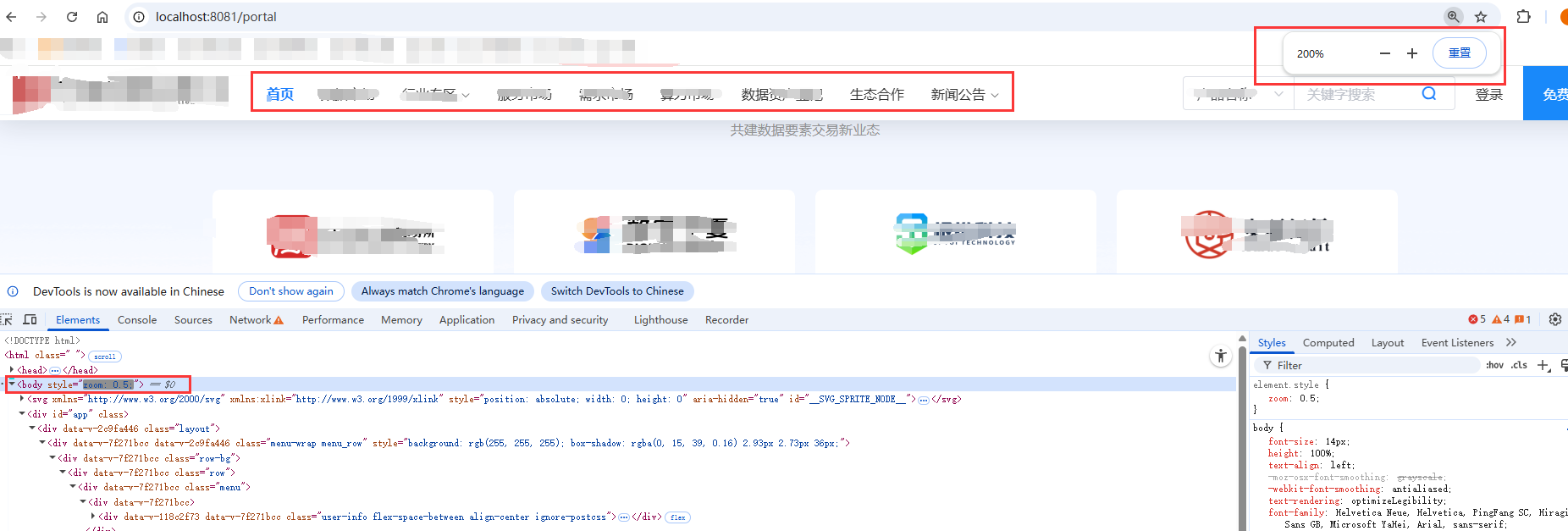
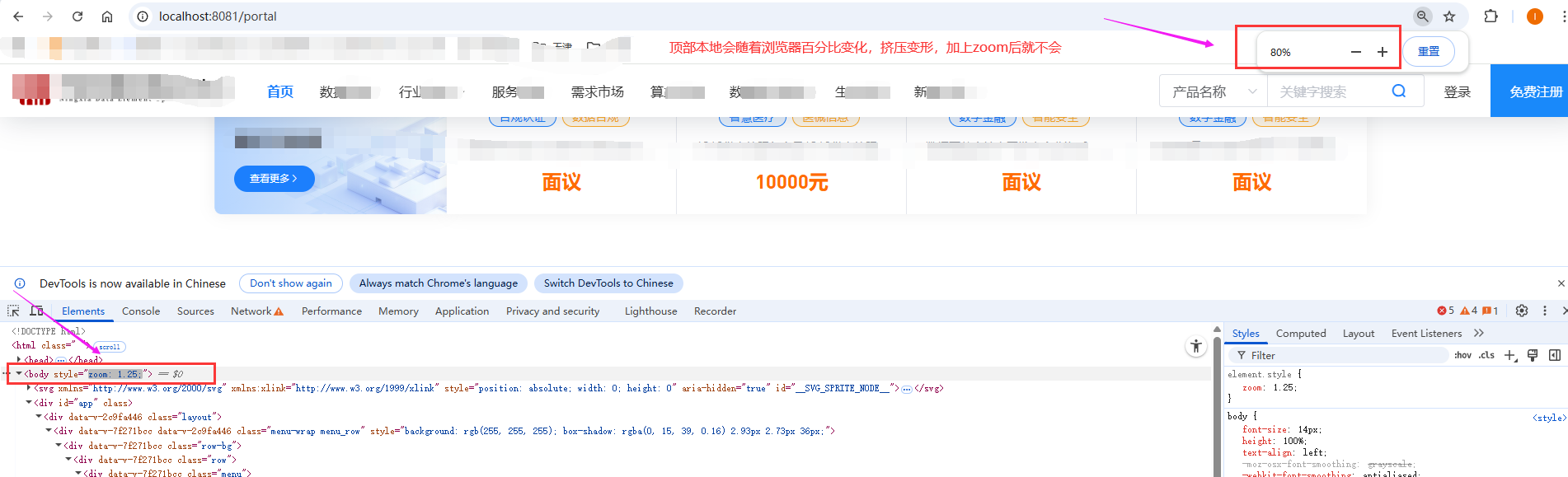
以上是项目中使用的zoom的情况,希望大家一键三连!