文章目录
一、可编辑表格
可编辑表格是数据管理系统中的重要组件,它将数据展示与编辑功能融为一体,使用户能够直接在表格界面中修改数据内容。通过纯前端技术实现的可编辑表格,无需复杂的后端支持即可提供流畅的数据编辑体验,特别适用于数据录入、修改等场景。本文将介绍如何使用 HTML、CSS 和 JavaScript 实现一个可编辑表格。
二、效果演示
本系统采用简洁的三段式布局:顶部为表格标题区域,中间为主要的表格编辑区域,底部为状态栏区域。用户可以直接在表格单元格中编辑数据,通过键盘快捷键进行导航,实时查看数据变化状态。
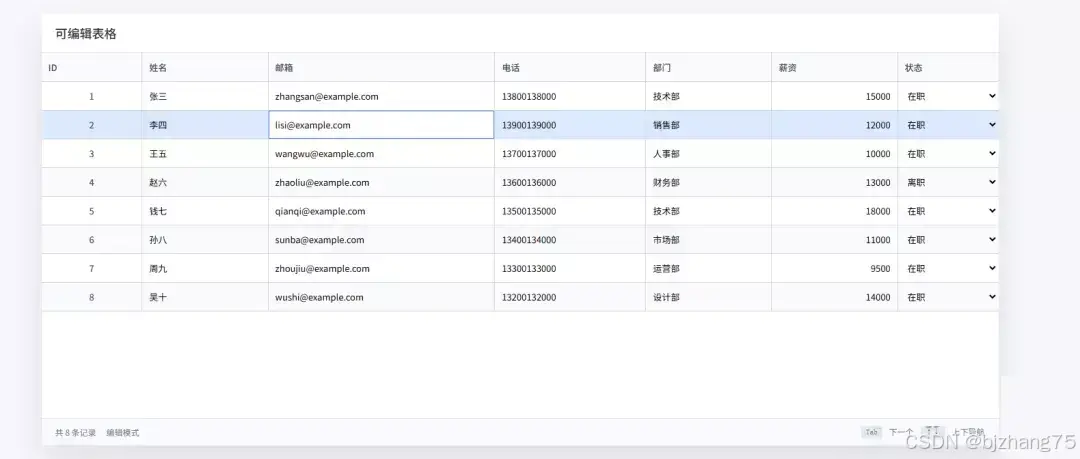
三、系统分析
1、页面结构
页面包含三个主要区域:表格头部、表格编辑区域和状态栏。
1.1、表格编辑区域
表格编辑区域是整个应用的核心,包含一个可滚动的表格,表格中的每个单元格都支持直接编辑。
html
<div class="table-wrapper" id="tableWrapper">
  <table class="data-table" id="dataTable">
    <thead>
    <tr>
      <th data-column="id" style="width: 80px;">ID</th>
      <th data-column="name" style="width: 100px;">姓名</th>
      <th data-column="email" style="width: 180px;">邮箱</th>
      <th data-column="phone" style="width: 120px;">电话</th>
      <th data-column="department" style="width: 100px;">部门</th>
      <th data-column="salary" style="width: 100px;">薪资</th>
      <th data-column="status" style="width: 80px;">状态</th>
    </tr>
    </thead>
    <tbody id="tableBody"></tbody>
  </table>
</div>
1.2、状态栏区域
状态栏区域显示表格统计信息、编辑模式提示和键盘快捷键说明。
html
<div class="status-bar">
  <div class="nav-info">
    <span id="recordInfo">共 0 条记录</span>
    <span>编辑模式</span>
  </div>
  <div class="status-message" id="statusMessage"></div>
  <div class="shortcuts">
    <span class="shortcut">Tab</span> 下一个
    <span class="shortcut">↑↓</span> 上下导航
  </div>
</div>
2、核心功能实现
2.1定义全局变量
originalData 用于保存表格的初始数据,currentData 用于存储当前表格的实时数据,selectedRows 用于跟踪当前选中的行。
javascript
let originalData = [
  {id: 1, name: '张三', email: 'zhangsan@example.com', phone: '13800138000', department: '技术部', salary: 15000, status: '在职'},
  {id: 2, name: '李四', email: 'lisi@example.com', phone: '13900139000', department: '销售部', salary: 12000, status: '在职'},
  // ...
];

let currentData = [...originalData];
let selectedRows = new Set();
2.2渲染表格
renderTable() 函数负责根据 currentData 中的数据动态生成表格界面,每个单元格都包含一个输入框或选择框,支持直接编辑。
javascript
function renderTable() {
  const tbody = document.getElementById('tableBody');
  tbody.innerHTML = '';

  currentData.forEach((row, rowIndex) => {
    const tr = document.createElement('tr');
    tr.dataset.rowIndex = rowIndex;
    if (selectedRows.has(rowIndex)) tr.classList.add('selected');

    const columns = [
      { key: 'id', cls: 'id-input', input: 'text' },
      { key: 'name', cls: '', input: 'text' },
      { key: 'email', cls: '', input: 'text' },
      { key: 'phone', cls: '', input: 'text' },
      { key: 'department', cls: '', input: 'text' },
      { key: 'salary', cls: 'number-input', input: 'text' }
    ];

    columns.forEach(col => {
      const td = document.createElement('td');
      td.innerHTML = `<input type="${col.input}" class="always-edit ${col.cls}" value="${row[col.key]}" onchange="updateCell(${rowIndex}, '${col.key}', this.value)" onfocus="selectCell(${rowIndex}, '${col.key}', this.value)">`;
      tr.appendChild(td);
    });
    // 状态列
    const statusTd = document.createElement('td');
    const statusOptions = ['在职', '离职'];
    statusTd.innerHTML = `<select class="status-select" onchange="updateCell(${rowIndex}, 'status', this.value)" onfocus="selectCell(${rowIndex}, 'status', this.value)">
                ${statusOptions.map(option => `<option value="${option}" ${row.status === option ? 'selected' : ''}>${option}</option>`).join('')}
              </select>`;
    tr.appendChild(statusTd);

    tbody.appendChild(tr);
  });
}
2.3更新单元格数据
updateCell() 函数处理单元格数据更新,包括数据验证和状态提示。
javascript
function updateCell(rowIndex, column, value) {
  const originalValue = currentData[rowIndex][column];
  if (column === 'id' || column === 'salary') value = parseInt(value) || 0;

  if (value !== originalValue) {
    if (column === 'id') {
      const newId = parseInt(value);
      const existingIds = currentData.map(row => row.id).filter((id, index) => index !== rowIndex);
      if (existingIds.includes(newId)) {
        showStatusMessage('错误:ID已存在!', 'error');
        renderTable();
        return;
      }
    }
    currentData[rowIndex][column] = value;
    const rowId = currentData[rowIndex].id;
    showStatusMessage(`ID ${rowId}: 已更新 ${column} = ${value}`, 'success');
  }
}
2.4键盘导航功能
系统实现了完整的键盘导航功能,支持 Tab 键、方向键和 Ctrl+S 快捷键。
javascript
document.addEventListener('keydown', function(event) {
  if ((event.ctrlKey || event.metaKey) && event.key === 's') {
    // Ctrl+S 保存
    event.preventDefault();
    if (window.currentEditRow !== undefined &&
      window.currentEditColumn !== undefined &&
      window.currentEditValue !== undefined) {
      const activeElement = document.activeElement;
      const newValue = activeElement.value;
      updateCell(window.currentEditRow, window.currentEditColumn, newValue);
    }
  } else if (['ArrowUp', 'ArrowDown', 'Tab'].includes(event.key)) {
    // 键盘导航
    if (document.activeElement.tagName === 'INPUT' || document.activeElement.tagName === 'SELECT') {
      event.preventDefault();
      if (event.key === 'ArrowUp' || event.key === 'ArrowDown') {
        handleArrowNavigation(event.key);
      } else if (event.key === 'Tab') {
        handleTabNavigation(event.shiftKey);
      }
    }
  }
});
四、扩展建议
- 数据持久化:增加保存和加载功能,将表格数据保存到本地存储或服务器
- 数据导入导出:支持从CSV、Excel文件导入数据,或将表格数据导出为多种格式
- 批量操作:支持多选行进行批量编辑、删除等操作
- 排序和筛选:增加列排序和数据筛选功能
- 撤销重做:实现编辑历史记录,支持撤销和重做操作
五、完整代码
git地址:https://gitee.com/ironpro/hjdemo/blob/master/table-edit/index.html
html
<!DOCTYPE html>
<html lang="zh-CN">
<head>
  <meta charset="utf-8">
  <meta name="viewport" content="width=device-width, initial-scale=1.0">
  <title>可编辑表格</title>
  <style>
      * {
          margin: 0;
          padding: 0;
          box-sizing: border-box;
      }
      body {
          background-color: #f5f7fa;
          min-height: 100vh;
          padding: 20px;
          overflow: hidden;
      }
      .container {
          max-width: 1400px;
          margin: 0 auto;
          background: white;
          border-radius: 15px;
          box-shadow: 0 20px 40px rgba(0, 0, 0, 0.1);
          height: calc(100vh - 40px);
          display: flex;
          flex-direction: column;
      }
      .header {
          background: #ffffff;
          color: #333;
          padding: 15px 20px;
          display: flex;
          justify-content: space-between;
          align-items: center;
          flex-shrink: 0;
          border-bottom: 1px solid #e1e5eb;
      }
      .header h1 {
          font-size: 18px;
          font-weight: 500;
      }
      .table-wrapper {
          flex: 1;
          overflow: auto;
          position: relative;
          padding-bottom: 5px;
      }
      .table-wrapper::-webkit-scrollbar {
          width: 6px;
          height: 6px;
      }
      .table-wrapper::-webkit-scrollbar-track {
          background: #f1f5f9;
      }
      .table-wrapper::-webkit-scrollbar-thumb {
          background: #cbd5e1;
          border-radius: 3px;
      }
      .table-wrapper::-webkit-scrollbar-thumb:hover {
          background: #94a3b8;
      }
      .data-table {
          width: 100%;
          border-collapse: collapse;
          font-size: 13px;
          table-layout: fixed;
      }
      .data-table thead {
          position: sticky;
          top: 0;
          z-index: 10;
      }
      .data-table thead::after {
          content: "";
          position: absolute;
          left: 0;
          right: 0;
          bottom: 0;
          height: 1px;
          background: #d1d5db;
          z-index: 11;
      }
      .data-table th {
          background: #f8fafc;
          color: #374151;
          padding: 12px 10px;
          text-align: left;
          font-weight: 500;
          cursor: pointer;
          user-select: none;
          white-space: nowrap;
          overflow: hidden;
          text-overflow: ellipsis;
          border-right: 1px solid #d1d5db;
      }
      .data-table th:hover {
          background: #f1f5f9;
      }
      .data-table td {
          padding: 0;
          border: 1px solid #d1d5db;
          border-top: none;
          border-left: none;
          position: relative;
          height: 40px;
          overflow: hidden;
      }
      .data-table tbody tr:last-child td {
          border-bottom: 1px solid #d1d5db;
      }
      .data-table th:last-child, .data-table td:last-child {
          border-right: none;
      }
      .data-table tr:nth-child(even) {
          background: #f9fafb;
      }
      .data-table tr:hover {
          background: #f1f5f9 !important;
      }
      .data-table tr.selected {
          background: #dbeafe !important;
      }
      .always-edit {
          width: 100%;
          height: 100%;
          border: none;
          padding: 10px;
          font-size: 13px;
          font-family: inherit;
          background: transparent;
          outline: none;
          cursor: text;
      }
      .always-edit:focus {
          background: white;
          box-shadow: inset 0 0 0 1px #3b82f6;
          z-index: 5;
          position: relative;
      }
      .id-input {
          text-align: center;
          font-weight: 500;
          color: #4b5563;
      }
      .status-active {
          color: #10b981;
          font-weight: 500;
      }
      .status-inactive {
          color: #ef4444;
          font-weight: 500;
      }
      .status-select {
          width: 100%;
          height: 100%;
          border: none;
          padding: 10px;
          font-size: 13px;
          font-family: inherit;
          background: transparent;
          outline: none;
          cursor: pointer;
      }
      .status-select:focus {
          background: white;
          box-shadow: inset 0 0 0 1px #3b82f6;
      }
      .number-input {
          text-align: right;
      }
      .status-bar {
          background: #f8fafc;
          padding: 10px 20px;
          border-top: 1px solid #e1e5eb;
          display: flex;
          justify-content: space-between;
          align-items: center;
          font-size: 12px;
          color: #64748b;
          flex-shrink: 0;
      }
      .nav-info {
          display: flex;
          gap: 15px;
          align-items: center;
      }
      .shortcuts {
          display: flex;
          gap: 10px;
      }
      .shortcut {
          background: #e2e8f0;
          padding: 3px 7px;
          border-radius: 3px;
          font-size: 11px;
          font-family: monospace;
      }
      .status-message {
          flex: 1;
          margin: 0 20px;
          color: #3b82f6;
          font-weight: 500;
          transition: opacity 0.3s;
      }
      .status-message.success {
          color: #10b981;
      }
      .status-message.error {
          color: #ef4444;
      }
  </style>
</head>
<body>
<div class="container">
  <div class="header">
    <h1>可编辑表格</h1>
  </div>
  <div class="table-wrapper" id="tableWrapper">
    <table class="data-table" id="dataTable">
      <thead>
      <tr>
        <th data-column="id" style="width: 80px;">ID</th>
        <th data-column="name" style="width: 100px;">姓名</th>
        <th data-column="email" style="width: 180px;">邮箱</th>
        <th data-column="phone" style="width: 120px;">电话</th>
        <th data-column="department" style="width: 100px;">部门</th>
        <th data-column="salary" style="width: 100px;">薪资</th>
        <th data-column="status" style="width: 80px;">状态</th>
      </tr>
      </thead>
      <tbody id="tableBody"></tbody>
    </table>
  </div>

  <div class="status-bar">
    <div class="nav-info">
      <span id="recordInfo">共 0 条记录</span>
      <span>编辑模式</span>
    </div>
    <div class="status-message" id="statusMessage"></div>
    <div class="shortcuts">
      <span class="shortcut">Tab</span> 下一个
      <span class="shortcut">↑↓</span> 上下导航
    </div>
  </div>
</div>

<script>
  let originalData = [
    {id: 1, name: '张三', email: 'zhangsan@example.com', phone: '13800138000', department: '技术部', salary: 15000, status: '在职'},
    {id: 2, name: '李四', email: 'lisi@example.com', phone: '13900139000', department: '销售部', salary: 12000, status: '在职'},
    // ...
  ];

  let currentData = [...originalData];
  let selectedRows = new Set();

  function renderTable() {
    const tbody = document.getElementById('tableBody');
    tbody.innerHTML = '';

    currentData.forEach((row, rowIndex) => {
      const tr = document.createElement('tr');
      tr.dataset.rowIndex = rowIndex;
      if (selectedRows.has(rowIndex)) tr.classList.add('selected');

      const columns = [
        { key: 'id', cls: 'id-input', input: 'text' },
        { key: 'name', cls: '', input: 'text' },
        { key: 'email', cls: '', input: 'text' },
        { key: 'phone', cls: '', input: 'text' },
        { key: 'department', cls: '', input: 'text' },
        { key: 'salary', cls: 'number-input', input: 'text' }
      ];

      columns.forEach(col => {
        const td = document.createElement('td');
        td.innerHTML = `<input type="${col.input}" class="always-edit ${col.cls}" value="${row[col.key]}"
                  onchange="updateCell(${rowIndex}, '${col.key}', this.value)"
                  onfocus="selectCell(${rowIndex}, '${col.key}', this.value)">`;
        tr.appendChild(td);
      });
      // 状态列
      const statusTd = document.createElement('td');
      const statusOptions = ['在职', '离职'];
      statusTd.innerHTML = `<select class="status-select" onchange="updateCell(${rowIndex}, 'status', this.value)" onfocus="selectCell(${rowIndex}, 'status', this.value)">
                  ${statusOptions.map(option => `<option value="${option}" ${row.status === option ? 'selected' : ''}>${option}</option>`).join('')}
                </select>`;
      tr.appendChild(statusTd);
      tbody.appendChild(tr);
    });
  }

  function updateCell(rowIndex, column, value) {
    const originalValue = currentData[rowIndex][column];
    if (column === 'id' || column === 'salary') value = parseInt(value) || 0;

    if (value !== originalValue) {
      if (column === 'id') {
        const newId = parseInt(value);
        const existingIds = currentData.map(row => row.id).filter((id, index) => index !== rowIndex);
        if (existingIds.includes(newId)) {
          showStatusMessage('错误:ID已存在!', 'error');
          renderTable();
          return;
        }
      }
      currentData[rowIndex][column] = value;
      const rowId = currentData[rowIndex].id;
      showStatusMessage(`ID ${rowId}: 已更新 ${column} = ${value}`, 'success');
    }
  }

  function selectCell(rowIndex, column, value) {
    selectRow(rowIndex);
    window.currentEditColumn = column;
    window.currentEditValue = value;
  }

  function selectRow(rowIndex) {
    document.querySelectorAll('tr').forEach(tr => tr.classList.remove('selected'));
    selectedRows.clear();
    selectedRows.add(rowIndex);
    const tr = document.querySelector(`tr[data-row-index="${rowIndex}"]`);
    if (tr) tr.classList.add('selected');
    window.currentEditRow = rowIndex;
  }

  function updateRecordInfo() {
    document.getElementById('recordInfo').textContent = `共 ${currentData.length} 条记录`;
  }

  function showStatusMessage(message, type = 'info') {
    const statusMessageEl = document.getElementById('statusMessage');
    statusMessageEl.textContent = message;
    statusMessageEl.className = `status-message ${type}`;
    setTimeout(() => {
      if (statusMessageEl.textContent === message) {
        statusMessageEl.textContent = '';
        statusMessageEl.className = 'status-message';
      }
    }, 5000);
  }
  // 键盘事件处理
  document.addEventListener('keydown', function(event) {
    if ((event.ctrlKey || event.metaKey) && event.key === 's') {
      // Ctrl+S 保存
      event.preventDefault();
      if (window.currentEditRow !== undefined &&
        window.currentEditColumn !== undefined &&
        window.currentEditValue !== undefined) {
        const activeElement = document.activeElement;
        const newValue = activeElement.value;
        updateCell(window.currentEditRow, window.currentEditColumn, newValue);
      }
    } else if (['ArrowUp', 'ArrowDown', 'Tab'].includes(event.key)) {
      // 键盘导航
      if (document.activeElement.tagName === 'INPUT' || document.activeElement.tagName === 'SELECT') {
        event.preventDefault();
        if (event.key === 'ArrowUp' || event.key === 'ArrowDown') {
          handleArrowNavigation(event.key);
        } else if (event.key === 'Tab') {
          handleTabNavigation(event.shiftKey);
        }
      }
    }
  });
  // Tab键导航
  function handleTabNavigation(isShiftKey) {
    if (window.currentEditRow === undefined || window.currentEditColumn === undefined) return;
    const currentRow = window.currentEditRow;
    const currentColumn = window.currentEditColumn;
    const totalRows = currentData.length;
    const totalColumns = 7;
    const columnOrder = ['id', 'name', 'email', 'phone', 'department', 'salary', 'status'];
    const currentColumnIndex = columnOrder.indexOf(currentColumn);

    let nextRow = currentRow;
    let nextColumnIndex = currentColumnIndex;
    if (isShiftKey) { // Shift+Tab: 向前导航
      nextColumnIndex--;
      if (nextColumnIndex < 0) {
        nextRow--;
        if (nextRow < 0) nextRow = totalRows - 1;
        nextColumnIndex = totalColumns - 1;
      }
    } else { // Tab: 向后导航
      nextColumnIndex++;
      if (nextColumnIndex >= totalColumns) {
        nextRow++;
        if (nextRow >= totalRows) nextRow = 0;
        nextColumnIndex = 0;
      }
    }
    const nextColumn = columnOrder[nextColumnIndex];
    focusCell(nextRow, nextColumn);
  }
  // 上下箭头导航
  function handleArrowNavigation(direction) {
    if (window.currentEditRow === undefined || window.currentEditColumn === undefined) return;
    const currentRow = window.currentEditRow;
    let newRow = currentRow;
    const totalRows = currentData.length;
    if (direction === 'ArrowUp' && currentRow > 0) {
      newRow = currentRow - 1;
    } else if (direction === 'ArrowDown' && currentRow < totalRows - 1) {
      newRow = currentRow + 1;
    }
    if (newRow !== currentRow) {
      focusCell(newRow, window.currentEditColumn);
    }
  }
  // 聚焦到指定单元格
  function focusCell(row, column) {
    window.currentEditRow = row;
    window.currentEditColumn = column;
    selectRow(row);
    const tr = document.querySelector(`tr[data-row-index="${row}"]`);
    if (tr) {
      const columnOrder = ['id', 'name', 'email', 'phone', 'department', 'salary', 'status'];
      const columnIndex = columnOrder.indexOf(column);
      const inputs = tr.querySelectorAll('input, select');
      if (inputs[columnIndex]) {
        inputs[columnIndex].focus();
        if (inputs[columnIndex].tagName === 'INPUT' || inputs[columnIndex].tagName === 'TEXTAREA') {
          inputs[columnIndex].select();
        }
        ensureElementVisible(inputs[columnIndex]);
      }
    }
  }
  // 确保元素在视窗中可见
  function ensureElementVisible(element) {
    const tableWrapper = document.getElementById('tableWrapper');
    const rect = element.getBoundingClientRect();
    const wrapperRect = tableWrapper.getBoundingClientRect();
    // 获取表头高度(考虑sticky属性)
    const headerHeight = document.querySelector('.data-table thead').offsetHeight;
    if (rect.bottom > wrapperRect.bottom) {
      const scrollAmount = rect.bottom - wrapperRect.bottom;
      tableWrapper.scrollTop += scrollAmount + 10;
    } else if (rect.top < wrapperRect.top + headerHeight) {
      // 向上滚动时考虑表头高度
      const scrollAmount = (wrapperRect.top + headerHeight) - rect.top;
      tableWrapper.scrollTop -= scrollAmount + 10;
    }
  }
  document.addEventListener('DOMContentLoaded', function() {
    renderTable();
    updateRecordInfo();
  });
</script>
</body>
</html>