在现代化Web应用中,文件上传下载是常见的功能需求。本文将基于Vue3 + Element Plus + Axios技术栈,详细讲解如何实现一个完整的PDF附件上传下载系统。将从代码中抽离出核心的附件处理逻辑,并深入解析每个环节的实现细节。
一、功能概述
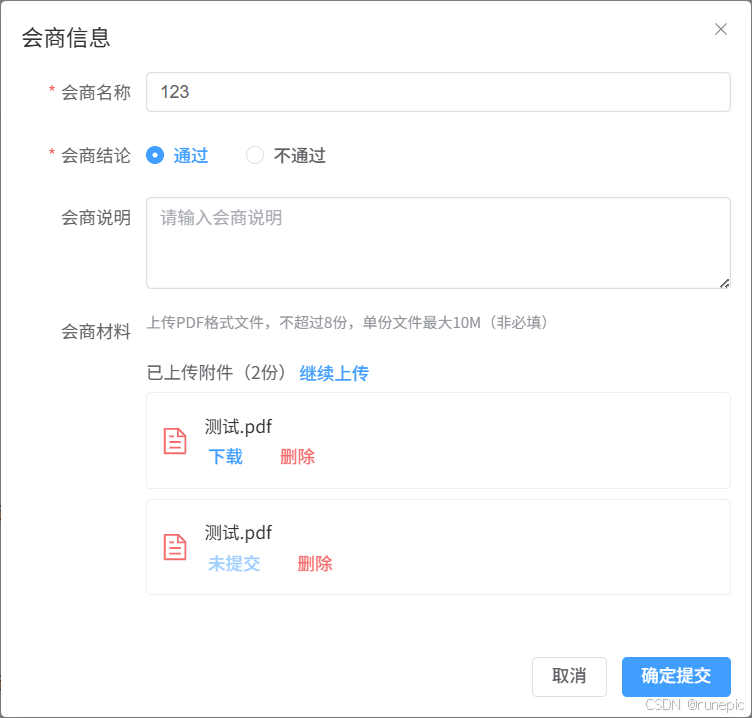
本系统实现了以下核心功能:
- PDF附件上传(支持多文件、大小验证、格式验证)
- PDF附件下载(支持服务端文件下载)
- PDF附件删除(支持本地和云端文件删除)
- 附件状态管理(上传中、上传成功、上传失败)
- 附件列表展示和操作
二、技术栈
- 前端框架:Vue 3 + Composition API
- UI组件库:Element Plus
- HTTP客户端:Axios
- 状态管理:Pinia(可选)
三、核心代码实现
1. 附件上传组件结构
vue
<!-- PDF附件上传区域 -->
<template>
  <div class="upload-section">
    <!-- 上传提示 -->
    <div class="upload-tips">
      上传PDF格式文件,不超过8份,单份文件最大10M(非必填)
    </div>

    <!-- 上传区域 -->
    <div v-if="pdfFileList.length === 0"
         class="attachment-upload-area"
         @click="handleUploadAttachment">
      <el-icon class="upload-icon">
        <DocumentAdd />
      </el-icon>
      <div class="upload-text">点击上传PDF附件</div>
    </div>

    <!-- 隐藏的文件输入 -->
    <input type="file"
           ref="pdfInput"
           style="display: none"
           multiple
           accept=".pdf"
           @change="handlePdfFileChange" />

    <!-- 附件列表 -->
    <div v-if="pdfFileList.length > 0" class="attachment-list">
      <div class="attachment-list-header">
        <span>已上传附件({{ pdfFileList.length }}份)</span>
        <el-button type="primary" link @click="handleUploadAttachment">
          继续上传
        </el-button>
      </div>

      <div class="attachment-items">
        <div v-for="(attachment, index) in pdfFileList"
             :key="attachment.id || index"
             class="attachment-item"
             :class="{
               'uploading': attachment.status === 'uploading',
               'error': attachment.status === 'error'
             }">
          <el-icon class="pdf-icon">
            <Document />
          </el-icon>

          <div class="attachment-info">
            <div class="attachment-name" :title="attachment.filename || attachment.name">
              {{ attachment.filename || attachment.name }}

              <!-- 操作按钮 -->
              <div class="attachment-actions">
                <el-button v-if="attachment.status === 'uploaded'"
                          type="primary" link
                          @click.stop="downloadPdfAttachment(attachment)">
                  下载
                </el-button>
                <el-button v-else type="primary" link disabled>
                  未提交
                </el-button>
                <el-button type="danger" link
                          @click.stop="removePdfAttachment(index, attachment)">
                  删除
                </el-button>
              </div>
            </div>

            <!-- 上传状态提示 -->
            <div v-if="attachment.status === 'uploading'" class="upload-status">
              上传中...
            </div>
            <div v-if="attachment.status === 'error'" class="upload-status error">
              上传失败
            </div>
          </div>
        </div>
      </div>
    </div>
  </div>
</template>
2. 核心JavaScript逻辑
javascript
import { ref } from 'vue'
import { ElMessage, ElMessageBox } from 'element-plus'
import request from '@/api/axios'

// PDF附件列表响应式数据
const pdfFileList = ref([])
const pdfInput = ref() // PDF文件input引用

/**
 * 触发文件选择
 */
const handleUploadAttachment = () => {
  pdfInput.value.click()
}

/**
 * 处理文件选择变化
 */
const handlePdfFileChange = async (event) => {
  const files = Array.from(event.target.files)

  // 验证数量
  const totalCount = pdfFileList.value.length + files.length
  if (totalCount > 8) {
    ElMessage.warning("最多只能上传8个附件")
    event.target.value = ""
    return
  }

  // 验证文件
  const validFiles = []
  for (const file of files) {
    const isPDF = /\.pdf$/i.test(file.name)
    const isLt10M = file.size / 1024 / 1024 < 10

    if (!isPDF) {
      ElMessage.error(`文件"${file.name}"不是PDF格式`)
      continue
    }
    if (!isLt10M) {
      ElMessage.error(`文件"${file.name}"大小超过10M`)
      continue
    }
    validFiles.push(file)
  }

  if (validFiles.length === 0) {
    event.target.value = ""
    return
  }

  // 添加到PDF文件列表,状态为pending
  for (const file of validFiles) {
    const attachmentObj = {
      id: Date.now(), // 临时ID
      filename: file.name,
      file: file,
      type: 'attachment',
      status: 'pending'
    }
    pdfFileList.value.push(attachmentObj)
  }

  event.target.value = ""
}

/**
 * 上传PDF附件到服务器
 */
const uploadPdfAttachmentToServer = async (attachment, recordId, tablename) => {
  const formData = new FormData()
  // 创建一个新的 File 对象,指定正确的 MIME 类型
  const fileWithCorrectType = new File(
    [attachment.file], // 文件内容
    attachment.filename, // 文件名
    {
      type: 'application/octet-stream', // 强制指定为 octet-stream
      lastModified: attachment.file.lastModified
    }
  )

  formData.append('file', fileWithCorrectType)
  formData.append('recordid', recordId)
  formData.append('tablename', tablename) // 会商记录表名
  formData.append('operatetype', '3') // 上传PDF附件
  formData.append('datatype', 1)
  formData.append('consultation', 'HSFJ') // 会商传HSFJ

  try {
    const response = await request.post('/attachments/upload', formData, {
      headers: {
        'Content-Type': 'multipart/form-data'
      }
    })

    if (response.code === 200) {
      // 更新附件状态
      const index = pdfFileList.value.findIndex(a => a.id === attachment.id)
      if (index !== -1) {
        pdfFileList.value[index] = {
          ...pdfFileList.value[index],
          id: response.data[0],
          filetype: 'application/octet-stream',
          status: 'uploaded'
        }
      }
      return true
    } else {
      console.error(`上传附件失败: ${attachment.filename}`)
      return false
    }
  } catch (error) {
    console.error("上传附件失败:", error)
    return false
  }
}

/**
 * 上传所有PDF附件
 */
const uploadAllPdfAttachments = async (recordId, tablename) => {
  const pendingAttachments = pdfFileList.value.filter(item => item.status === 'pending')

  if (pendingAttachments.length === 0) return

  for (const attachment of pendingAttachments) {
    // 标记为上传中
    attachment.status = 'uploading'

    const success = await uploadPdfAttachmentToServer(attachment, recordId, tablename)

    if (!success) {
      attachment.status = 'error'
    }
  }
}

/**
 * 下载PDF附件
 */
const downloadPdfAttachment = async (attachment) => {
  if (!attachment.id || !attachment.recordid) {
    ElMessage.error('缺少必要参数')
    return
  }

  try {
    const response = await request({
      url: '/attachments/downloadPdf',
      method: 'GET',
      params: {
        id: attachment.id,
        recordid: attachment.recordid,
        datatype: 1
      },
      responseType: 'blob'
    })

    if (!response || (response.size !== undefined && response.size === 0)) {
      throw new Error('文件内容为空')
    }

    let filename = attachment.filename || 'document.pdf'
    if (!filename.toLowerCase().endsWith('.pdf')) {
      filename += '.pdf'
    }

    const blob = response
    const downloadUrl = URL.createObjectURL(blob)
    const link = document.createElement('a')
    link.href = downloadUrl
    link.download = filename

    document.body.appendChild(link)
    link.click()
    document.body.removeChild(link)

    setTimeout(() => {
      URL.revokeObjectURL(downloadUrl)
    }, 100)

    ElMessage.success('下载开始')

  } catch (error) {
    console.error('下载失败:', error)
    ElMessage.error(`下载失败: ${error.message}`)

    // 备用下载方式
    window.open(`/attachments/downloadPdf?id=${attachment.id}&recordid=${attachment.recordid}&datatype=1`, '_blank')
  }
}

/**
 * 删除PDF附件
 */
const removePdfAttachment = (index, attachment) => {
  if (attachment.status === 'pending') {
    // 本地未上传的文件,直接删除
    pdfFileList.value.splice(index, 1)
    return
  } else if (attachment.status === 'uploaded') {
    // 已上传到云端的文件,需要调用删除接口
    ElMessageBox.confirm("确定要删除该云端附件吗?", "删除确认", {
      type: "warning"
    }).then(async () => {
      try {
        const formData = new FormData()
        formData.append('operatetype', '2') // 删除操作
        formData.append('datatype', '1')
        formData.append('id', attachment.id)

        const response = await request.post('/attachments/upload', formData, {
          headers: {
            'Content-Type': 'multipart/form-data'
          }
        })

        if (response.code === 200) {
          ElMessage.success("附件删除成功")
          pdfFileList.value.splice(index, 1)
        } else {
          ElMessage.error("附件删除失败")
        }
      } catch (error) {
        console.error("删除失败:", error)
        ElMessage.error("附件删除失败")
      }
    }).catch(() => {
      // 取消删除
    })
    return
  }
}

/**
 * 加载已上传的PDF附件列表
 */
const loadConsultationPdfs = async (consultationId, type) => {
  if (!consultationId) return
  const datatype = numberMap2.value.filter(item => item.value === type)[0]?.num || 1;
  try {
    const response = await request.get('/attachments/downloadPdf', {
      params: {
        recordid: consultationId,
        datatype: datatype
      }
    })

    if (response.code === 200 && response.data) {
      const pdfData = response.data.attachments

      if (pdfData && Array.isArray(pdfData)) {
        pdfFileList.value = pdfData.filter(item => item.consultation === 'HSFJ').map(item => ({
          ...item,
          type: 'attachment',
          status: 'uploaded'
        }))
      }
    }
  } catch (error) {
    console.error("加载PDF附件失败:", error)
  }
}
3. CSS样式
css
/* PDF附件样式 */
.upload-section {
  width: 100%;
}

.upload-tips {
  font-size: 12px;
  color: #909399;
  margin-bottom: 10px;
  line-height: 1.5;
}

.attachment-upload-area {
  width: 100%;
  height: 100px;
  border: 2px dashed #dcdfe6;
  border-radius: 6px;
  display: flex;
  flex-direction: column;
  justify-content: center;
  align-items: center;
  cursor: pointer;
  transition: border-color 0.3s;
  margin-bottom: 15px;
}

.attachment-upload-area:hover {
  border-color: #409eff;
}

.upload-icon {
  font-size: 28px;
  color: #909399;
  margin-bottom: 8px;
}

.upload-text {
  font-size: 14px;
  color: #909399;
}

.attachment-list {
  margin-top: 15px;
}

.attachment-list-header {
  display: flex;
  justify-content: space-between;
  align-items: center;
  margin-bottom: 10px;
}

.attachment-items {
  margin-bottom: 15px;
}

.attachment-item {
  display: flex;
  align-items: center;
  padding: 10px;
  border: 1px solid #ebeef5;
  border-radius: 4px;
  margin-bottom: 8px;
  transition: background-color 0.3s;
}

.attachment-item:hover {
  background-color: #f5f7fa;
}

.attachment-item.uploading {
  opacity: 0.7;
  background-color: #f5f5f5;
}

.attachment-item.error {
  border-color: #f56c6c;
  background-color: #fff2f0;
}

.pdf-icon {
  font-size: 24px;
  color: #f56c6c;
  margin-right: 12px;
}

.attachment-info {
  flex: 1;
  min-width: 0;
}

.attachment-name {
  font-size: 14px;
  color: #333;
  overflow: hidden;
  text-overflow: ellipsis;
  white-space: nowrap;
  margin-bottom: 4px;
  display: flex;
  justify-content: space-between;
  align-items: center;
}

.attachment-actions {
  display: flex;
  gap: 12px;
}

.upload-status {
  font-size: 12px;
  color: #909399;
}

.upload-status.error {
  color: #f56c6c;
}
四、关键实现细节
1. 文件验证策略
javascript
// 文件格式验证
const isPDF = /\.pdf$/i.test(file.name)

// 文件大小验证 (10MB限制)
const isLt10M = file.size / 1024 / 1024 < 10

// 文件数量验证 (最多8个)
const totalCount = pdfFileList.value.length + files.length
if (totalCount > 8) {
  ElMessage.warning("最多只能上传8个附件")
}
2. 文件上传状态管理
我们定义了三种文件状态:
- pending: 已选择但未上传
- uploading: 正在上传中
- uploaded: 已上传到服务器
- error: 上传失败
3. FormData文件上传
javascript
const formData = new FormData()
// 修正MIME类型,避免服务端解析问题
const fileWithCorrectType = new File(
  [attachment.file],
  attachment.filename,
  {
    type: 'application/octet-stream',
    lastModified: attachment.file.lastModified
  }
)
formData.append('file', fileWithCorrectType)
4. 文件下载的两种方式
javascript
// 方式1: Blob下载(推荐)
const blob = response
const downloadUrl = URL.createObjectURL(blob)
const link = document.createElement('a')
link.href = downloadUrl
link.download = filename
link.click()

// 方式2: 备用URL直接打开
window.open(`/attachments/downloadPdf?id=${attachment.id}`, '_blank')
5. 删除操作的差异处理
javascript
// 本地文件直接删除
if (attachment.status === 'pending') {
  pdfFileList.value.splice(index, 1)
  return
}

// 云端文件需要调用删除接口
if (attachment.status === 'uploaded') {
  ElMessageBox.confirm("确定要删除该云端附件吗?", "删除确认")
  // ... 调用删除API
}
五、后端接口设计
1. 上传接口
POST /attachments/upload
Content-Type: multipart/form-data

参数:
- file: 文件对象
- recordid: 关联记录ID
- tablename: 表名
- operatetype: 操作类型 (1:上传图片, 2:删除, 3:上传PDF)
- datatype: 数据类型
- consultation: 会商标识
2. 下载接口
GET /attachments/downloadPdf
参数:
- id: 附件ID
- recordid: 记录ID
- datatype: 数据类型
3. 获取附件列表接口
GET /attachments/downloadPdf (复用下载接口查询功能)
参数:
- recordid: 记录ID
- datatype: 数据类型