Playwright 安装
在项目中执行yarn create playwright即可。该命令会在package.json中添加依赖,并生成以下文件和目录。
arduino
playwright.config.ts
tests/
    example.spec.ts
tests-examples/
    demo-todo-app.spec.ts
Playwright 配置
playwright.config.ts是Playwrigth的配置文件,生成文件基本不用改动即可运行。
php
import { defineConfig, devices } from '@playwright/test';

/**
 * Read environment variables from file.
 * https://github.com/motdotla/dotenv
 */
// require('dotenv').config();

/**
 * See https://playwright.dev/docs/test-configuration.
 */
export default defineConfig({
  testDir: './tests',
  /* Run tests in files in parallel */
  fullyParallel: true,
  /* Fail the build on CI if you accidentally left test.only in the source code. */
  forbidOnly: !!process.env.CI,
  /* Retry on CI only */
  retries: process.env.CI ? 2 : 0,
  /* Opt out of parallel tests on CI. */
  workers: process.env.CI ? 1 : undefined,
  /* Reporter to use. See https://playwright.dev/docs/test-reporters */
  reporter: 'html',
  /* Shared settings for all the projects below. See https://playwright.dev/docs/api/class-testoptions. */
  use: {
    /* Base URL to use in actions like `await page.goto('/')`. */
    // baseURL: 'http://local.test.com:3001',
    /* Collect trace when retrying the failed test. See https://playwright.dev/docs/trace-viewer */
    trace: 'on-first-retry',
  },
  /* Configure projects for major browsers */
  projects: [
    { name: 'setup', testMatch: /.*\.setup\.ts/ },
    {
      name: 'chromium',
      use: {
        ...devices['Desktop Chrome'],
        storageState: 'playwright/.auth/user.json',
        viewport: { width: 1920, height: 1080 },
      },
      dependencies: ['setup'],
    },

    // {
    //   name: 'firefox',
    //   use: { ...devices['Desktop Firefox'] },
    // },

    // {
    //   name: 'webkit',
    //   use: { ...devices['Desktop Safari'] },
    // },

    /* Test against mobile viewports. */
    // {
    //   name: 'Mobile Chrome',
    //   use: { ...devices['Pixel 5'] },
    // },
    // {
    //   name: 'Mobile Safari',
    //   use: { ...devices['iPhone 12'] },
    // },

    /* Test against branded browsers. */
    // {
    //   name: 'Microsoft Edge',
    //   use: { ...devices['Desktop Edge'], channel: 'msedge' },
    // },
    // {
    //   name: 'Google Chrome',
    //   use: { ...devices['Desktop Chrome'], channel: 'chrome' },
    // },
  ],
  timeout: 5 * 60 * 1000,
  /* Run your local dev server before starting the tests */
  webServer: {
    command: 'yarn dev',
    url: 'http://local.aaa.com:3001',
    reuseExistingServer: !process.env.CI,
  },
});
不过在实践中,有几项建议修改:
-
baseURL,设置后,使用 page.goto不需要再指定完整路径
-
timeout,不知道是否是网络原因,Playwright打开网页总是很慢,测试用例很容易跑超时,所以我将timeout改成了5 * 60 * 1000
-
webServer 本地测试时强烈建议开启该功能
yamlwebServer: { command: 'yarn dev', url: 'http://local.test.com:3001', reuseExistingServer: !process.env.CI, },运行测试时,Playwright将先运行
yarn dev启动服务,并等待local.test.com:3001 可访问时再开始测试。这个配置非常好用,相对比cypress 就需要额外安装start-server-and-test。 -
用户登录相关,见下一节。
Playwright缓存用户登录信息
一般运行测试前需要先进行登录,Playwright可以缓存用户信息,在之后多次测试中复用,配置也很简单。
创建auth文件夹
按照官网建议,直接在项目中创建playwright.auth文件夹
编写登录程序
在tests目录中新增auth.setup.ts,内容可参考如下
csharp
import { test as setup, expect } from '@playwright/test';

const authFile = 'playwright/.auth/user.json';

setup('authenticate', async ({ page }) => {
  // Perform authentication steps. Replace these actions with your own.
  await page.goto('https://xxx.xxx.com/login/');
  await page.locator('#account').fill('xxx');
  await page.locator('#password').fill('xxx');
  await page.locator('button[type=submit]').click();
  // Wait until the page receives the cookies.
  //
  // Sometimes login flow sets cookies in the process of several redirects.
  // Wait for the final URL to ensure that the cookies are actually set.
  await page.waitForURL('https://xxx.xxx.com/');

  // Alternatively, you can wait until the page reaches a state where all cookies are set.
  await expect(page.locator('#title')).toBeVisible();

  // End of authentication steps.

  await page.context().storageState({ path: authFile });
});这段代码先访问统一登录地址(测试网页域名可能和登录地址不一样),模拟输入用户名/密码,点击提交。登录成功后,page.context().storageState({ path: authFile })将cookie/storage信息存入authFile文件。
修改配置文件
修改配置文件中的projects配置
css
  projects: [
    { name: 'setup', testMatch: /.*\.setup\.ts/ },
    {
      name: 'chromium',
      use: {
        ...devices['Desktop Chrome'],
        storageState: 'playwright/.auth/user.json',
        viewport: { width: 1920, height: 1080 },
      },
      dependencies: ['setup'],
    },
    ...
]
Playwright 运行
直接运行命令yarn playwright test --ui,会出现下面弹窗
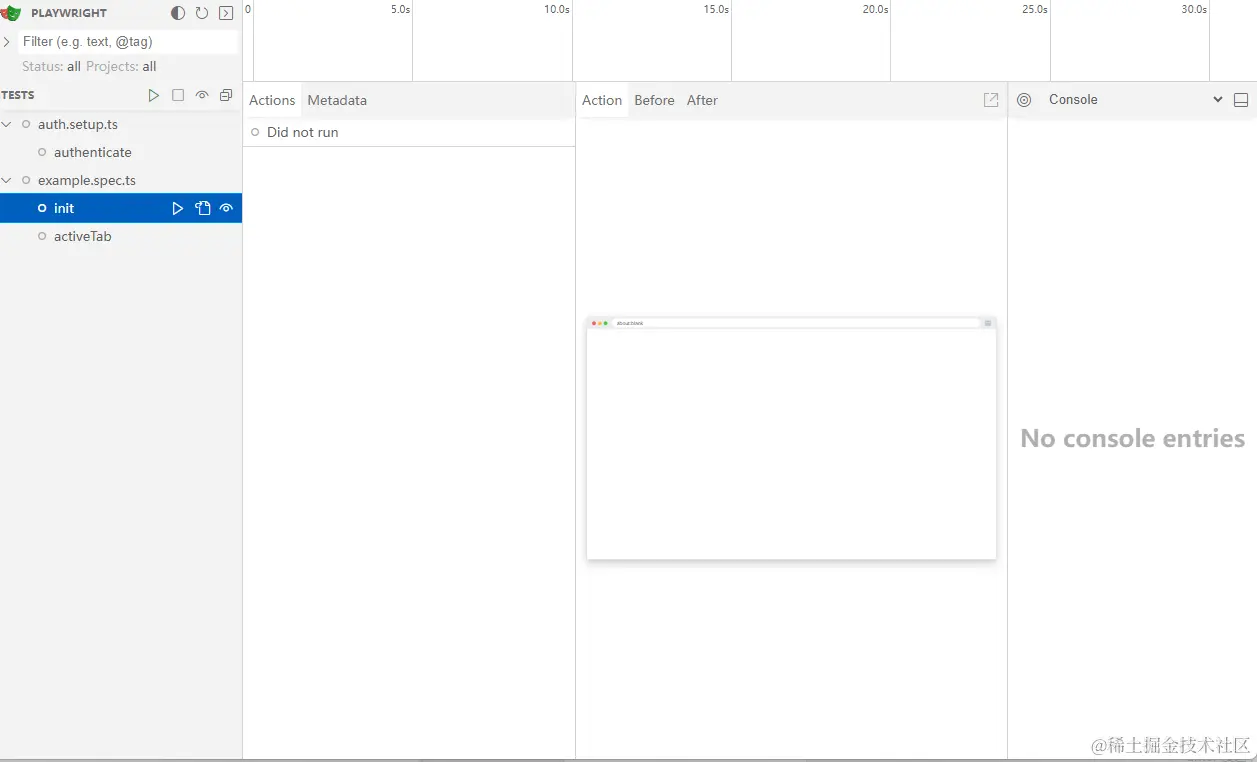
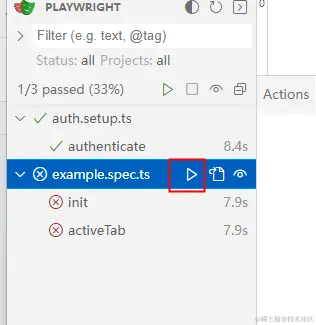
点击example.spec.ts旁边的开始键就可以运行测试用例了,可以看到auth.setup.ts中的登录程序也被自动运行了。 点击每个用例可以显示更多运行信息。
Playwright 简单小结
Playwright上手非常简单,但是ui mode比较简陋,不适合边测试边debug。