前言
运动勋章成就系统是提升用户粘性和运动动力的有效手段。通过游戏化的成就机制,用户可以在运动过程中获得即时的正向反馈,激励他们持续运动。本文将详细介绍如何在Flutter与OpenHarmony平台上实现专业的运动勋章成就组件,包括成就定义、解锁判定、展示动画、分享功能等模块的完整实现方案。
Flutter成就数据模型
dart
class Achievement {
  final String id;
  final String name;
  final String description;
  final String icon;
  final String category;
  final AchievementCondition condition;
  final bool isUnlocked;
  final DateTime? unlockedAt;
  final int points;

  Achievement({
    required this.id,
    required this.name,
    required this.description,
    required this.icon,
    required this.category,
    required this.condition,
    this.isUnlocked = false,
    this.unlockedAt,
    this.points = 10,
  });

  static List<Achievement> get allAchievements => [
    Achievement(id: 'first_run', name: '初次起跑', description: '完成第一次跑步', icon: '🏃', category: '里程碑', condition: AchievementCondition(type: 'workout_count', value: 1), points: 10),
    Achievement(id: 'marathon', name: '马拉松达人', description: '单次跑步超过42公里', icon: '🏅', category: '距离', condition: AchievementCondition(type: 'single_distance', value: 42), points: 100),
    Achievement(id: 'early_bird', name: '早起鸟儿', description: '早上6点前开始运动', icon: '🌅', category: '时间', condition: AchievementCondition(type: 'early_workout', value: 6), points: 20),
    Achievement(id: 'streak_7', name: '周周坚持', description: '连续7天运动', icon: '🔥', category: '坚持', condition: AchievementCondition(type: 'streak', value: 7), points: 50),
    Achievement(id: 'streak_30', name: '月度达人', description: '连续30天运动', icon: '💪', category: '坚持', condition: AchievementCondition(type: 'streak', value: 30), points: 200),
    Achievement(id: 'total_100km', name: '百公里俱乐部', description: '累计跑步100公里', icon: '🎯', category: '距离', condition: AchievementCondition(type: 'total_distance', value: 100), points: 50),
    Achievement(id: 'total_1000km', name: '千里之行', description: '累计跑步1000公里', icon: '🏆', category: '距离', condition: AchievementCondition(type: 'total_distance', value: 1000), points: 500),
    Achievement(id: 'speed_demon', name: '速度恶魔', description: '配速低于4分钟/公里', icon: '⚡', category: '速度', condition: AchievementCondition(type: 'pace', value: 240), points: 80),
  ];
}

class AchievementCondition {
  final String type;
  final double value;

  AchievementCondition({required this.type, required this.value});
}
成就数据模型定义了成就的完整结构。每个成就包含名称、描述、图标、分类、解锁条件和积分值。AchievementCondition定义解锁条件的类型和阈值,支持运动次数、单次距离、累计距离、连续天数、配速等多种条件类型。allAchievements静态列表预定义了丰富的成就,从简单的首次运动到困难的千公里累计,满足不同水平用户的追求。积分系统让成就有了量化的价值。
OpenHarmony成就存储服务
typescript
import dataPreferences from '@ohos.data.preferences';

class AchievementStorageService {
  private preferences: dataPreferences.Preferences | null = null;

  async initialize(context: Context): Promise<void> {
    this.preferences = await dataPreferences.getPreferences(context, 'achievements');
  }

  async unlockAchievement(achievementId: string): Promise<void> {
    if (this.preferences) {
      let unlockedJson = await this.preferences.get('unlocked', '{}') as string;
      let unlocked = JSON.parse(unlockedJson);

      if (!unlocked[achievementId]) {
        unlocked[achievementId] = new Date().toISOString();
        await this.preferences.put('unlocked', JSON.stringify(unlocked));
        await this.preferences.flush();
      }
    }
  }

  async getUnlockedAchievements(): Promise<object> {
    if (this.preferences) {
      let unlockedJson = await this.preferences.get('unlocked', '{}') as string;
      return JSON.parse(unlockedJson);
    }
    return {};
  }

  async getTotalPoints(): Promise<number> {
    // 计算总积分
    return 0;
  }
}
成就存储服务管理用户的成就解锁状态。unlockAchievement方法记录成就解锁时间,使用成就ID作为键,解锁时间作为值。检查是否已解锁避免重复记录。getUnlockedAchievements方法返回所有已解锁成就的映射。这种存储设计简洁高效,支持快速查询成就状态。
Flutter成就检查服务
dart
class AchievementChecker {
  static List<Achievement> checkAchievements({
    required int workoutCount,
    required double totalDistance,
    required double singleDistance,
    required int streak,
    required int workoutHour,
    required int paceSeconds,
    required List<Achievement> allAchievements,
    required Set<String> unlockedIds,
  }) {
    List<Achievement> newlyUnlocked = [];

    for (var achievement in allAchievements) {
      if (unlockedIds.contains(achievement.id)) continue;

      bool shouldUnlock = false;
      var condition = achievement.condition;

      switch (condition.type) {
        case 'workout_count':
          shouldUnlock = workoutCount >= condition.value;
          break;
        case 'total_distance':
          shouldUnlock = totalDistance >= condition.value;
          break;
        case 'single_distance':
          shouldUnlock = singleDistance >= condition.value;
          break;
        case 'streak':
          shouldUnlock = streak >= condition.value;
          break;
        case 'early_workout':
          shouldUnlock = workoutHour < condition.value;
          break;
        case 'pace':
          shouldUnlock = paceSeconds > 0 && paceSeconds <= condition.value;
          break;
      }

      if (shouldUnlock) {
        newlyUnlocked.add(achievement);
      }
    }

    return newlyUnlocked;
  }
}
成就检查服务在运动结束后判断是否解锁新成就。checkAchievements方法接收当前的运动统计数据,遍历所有未解锁的成就,根据条件类型进行判断。支持多种条件类型的检查逻辑,返回新解锁的成就列表。这种设计将成就判定逻辑集中管理,便于添加新的成就类型和条件。
Flutter成就卡片组件
dart
class AchievementCard extends StatelessWidget {
  final Achievement achievement;
  final VoidCallback? onTap;

  const AchievementCard({Key? key, required this.achievement, this.onTap}) : super(key: key);

  @override
  Widget build(BuildContext context) {
    return Card(
      color: achievement.isUnlocked ? Colors.white : Colors.grey[100],
      child: InkWell(
        onTap: onTap,
        borderRadius: BorderRadius.circular(12),
        child: Padding(
          padding: EdgeInsets.all(16),
          child: Row(
            children: [
              Container(
                width: 56,
                height: 56,
                decoration: BoxDecoration(
                  color: achievement.isUnlocked ? Colors.amber.withOpacity(0.2) : Colors.grey[300],
                  borderRadius: BorderRadius.circular(12),
                ),
                child: Center(
                  child: Text(
                    achievement.icon,
                    style: TextStyle(fontSize: 28),
                  ),
                ),
              ),
              SizedBox(width: 16),
              Expanded(
                child: Column(
                  crossAxisAlignment: CrossAxisAlignment.start,
                  children: [
                    Text(
                      achievement.name,
                      style: TextStyle(
                        fontWeight: FontWeight.bold,
                        color: achievement.isUnlocked ? Colors.black : Colors.grey,
                      ),
                    ),
                    SizedBox(height: 4),
                    Text(
                      achievement.description,
                      style: TextStyle(
                        fontSize: 12,
                        color: achievement.isUnlocked ? Colors.grey[600] : Colors.grey,
                      ),
                    ),
                  ],
                ),
              ),
              Column(
                children: [
                  Text(
                    '+${achievement.points}',
                    style: TextStyle(
                      fontWeight: FontWeight.bold,
                      color: achievement.isUnlocked ? Colors.amber : Colors.grey,
                    ),
                  ),
                  if (achievement.isUnlocked)
                    Icon(Icons.check_circle, color: Colors.green, size: 20),
                ],
              ),
            ],
          ),
        ),
      ),
    );
  }
}
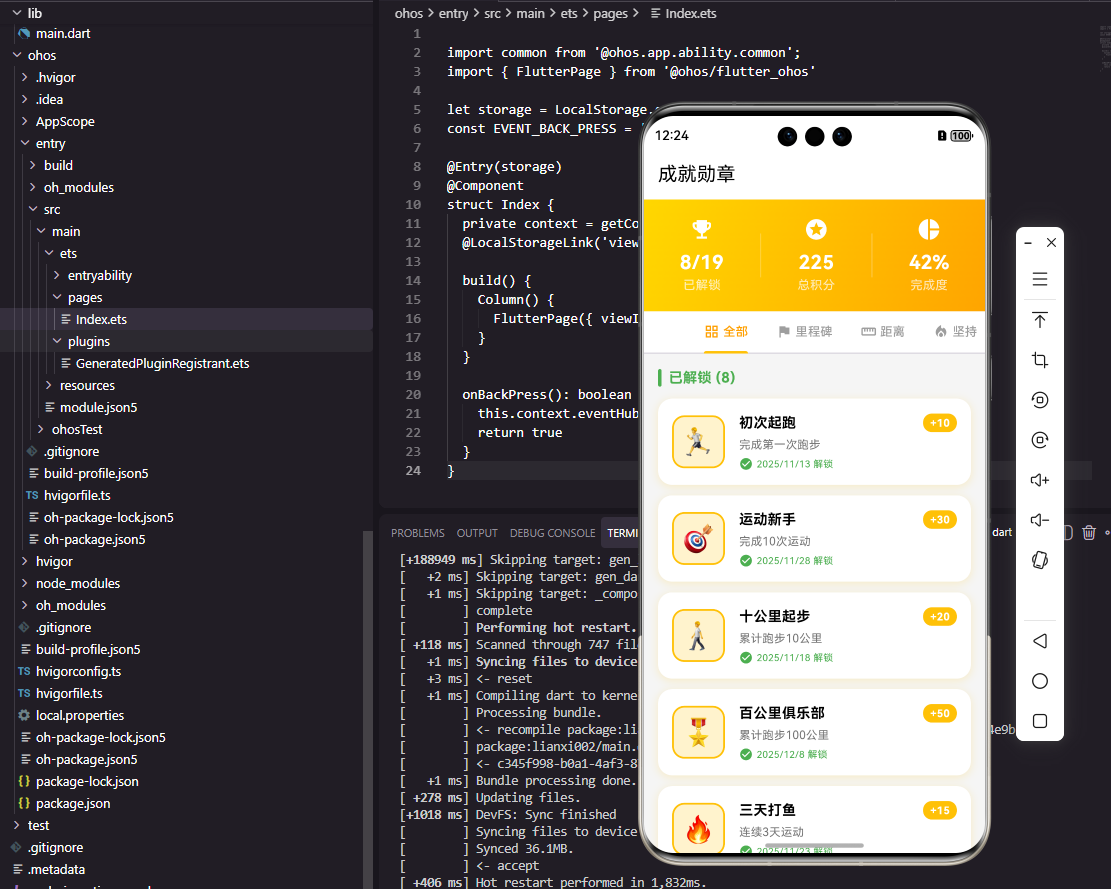
成就卡片组件展示单个成就的信息。已解锁成就使用白色背景和金色图标背景,未解锁成就使用灰色调。显示成就图标、名称、描述和积分值,已解锁成就显示绿色勾选。这种视觉区分让用户一眼就能识别哪些成就已经获得,哪些还需要努力。
Flutter成就解锁动画
dart
class AchievementUnlockAnimation extends StatefulWidget {
  final Achievement achievement;
  final VoidCallback onComplete;

  const AchievementUnlockAnimation({Key? key, required this.achievement, required this.onComplete}) : super(key: key);

  @override
  State<AchievementUnlockAnimation> createState() => _AchievementUnlockAnimationState();
}

class _AchievementUnlockAnimationState extends State<AchievementUnlockAnimation> with SingleTickerProviderStateMixin {
  late AnimationController _controller;
  late Animation<double> _scaleAnimation;
  late Animation<double> _opacityAnimation;

  @override
  void initState() {
    super.initState();
    _controller = AnimationController(duration: Duration(milliseconds: 1000), vsync: this);
    _scaleAnimation = Tween<double>(begin: 0.0, end: 1.0).animate(CurvedAnimation(parent: _controller, curve: Curves.elasticOut));
    _opacityAnimation = Tween<double>(begin: 0.0, end: 1.0).animate(CurvedAnimation(parent: _controller, curve: Interval(0.0, 0.5)));

    _controller.forward().then((_) {
      Future.delayed(Duration(seconds: 2), widget.onComplete);
    });
  }

  @override
  Widget build(BuildContext context) {
    return AnimatedBuilder(
      animation: _controller,
      builder: (context, child) {
        return Opacity(
          opacity: _opacityAnimation.value,
          child: Transform.scale(
            scale: _scaleAnimation.value,
            child: Container(
              padding: EdgeInsets.all(32),
              decoration: BoxDecoration(
                color: Colors.white,
                borderRadius: BorderRadius.circular(24),
                boxShadow: [BoxShadow(color: Colors.black26, blurRadius: 20)],
              ),
              child: Column(
                mainAxisSize: MainAxisSize.min,
                children: [
                  Text('🎉', style: TextStyle(fontSize: 48)),
                  SizedBox(height: 16),
                  Text('成就解锁!', style: TextStyle(fontSize: 24, fontWeight: FontWeight.bold)),
                  SizedBox(height: 16),
                  Text(widget.achievement.icon, style: TextStyle(fontSize: 64)),
                  SizedBox(height: 8),
                  Text(widget.achievement.name, style: TextStyle(fontSize: 20, fontWeight: FontWeight.bold)),
                  SizedBox(height: 8),
                  Text('+${widget.achievement.points} 积分', style: TextStyle(color: Colors.amber, fontWeight: FontWeight.bold)),
                ],
              ),
            ),
          ),
        );
      },
    );
  }

  @override
  void dispose() {
    _controller.dispose();
    super.dispose();
  }
}
成就解锁动画在用户获得新成就时播放庆祝效果。使用弹性缩放动画让成就卡片从小变大弹出,配合透明度渐变。显示庆祝emoji、成就图标、名称和获得的积分。动画播放完成后延迟2秒自动关闭,给用户足够时间欣赏成就。这种即时的正向反馈能够显著提升用户的满足感和运动动力。
OpenHarmony成就通知服务
typescript
import notificationManager from '@ohos.notificationManager';

class AchievementNotificationService {
  async notifyUnlock(achievement: object): Promise<void> {
    let notificationRequest: notificationManager.NotificationRequest = {
      id: Date.now(),
      content: {
        notificationContentType: notificationManager.ContentType.NOTIFICATION_CONTENT_BASIC_TEXT,
        normal: {
          title: '🎉 成就解锁',
          text: `恭喜获得「${achievement['name']}」成就!+${achievement['points']}积分`,
        }
      }
    };

    await notificationManager.publish(notificationRequest);
  }
}
成就通知服务在后台运动时发送成就解锁通知。即使用户没有查看应用,也能通过系统通知了解到获得的新成就。通知内容包含成就名称和获得的积分,激励用户打开应用查看详情。
Flutter成就列表页面
dart
class AchievementsPage extends StatelessWidget {
  final List<Achievement> achievements;
  final int totalPoints;

  const AchievementsPage({Key? key, required this.achievements, required this.totalPoints}) : super(key: key);

  @override
  Widget build(BuildContext context) {
    int unlockedCount = achievements.where((a) => a.isUnlocked).length;
    Map<String, List<Achievement>> grouped = {};
    for (var a in achievements) {
      grouped.putIfAbsent(a.category, () => []).add(a);
    }

    return Scaffold(
      appBar: AppBar(title: Text('成就')),
      body: ListView(
        children: [
          Container(
            padding: EdgeInsets.all(24),
            color: Colors.amber.withOpacity(0.1),
            child: Row(
              mainAxisAlignment: MainAxisAlignment.spaceAround,
              children: [
                Column(
                  children: [
                    Text('$unlockedCount/${achievements.length}', style: TextStyle(fontSize: 24, fontWeight: FontWeight.bold)),
                    Text('已解锁', style: TextStyle(color: Colors.grey)),
                  ],
                ),
                Column(
                  children: [
                    Text('$totalPoints', style: TextStyle(fontSize: 24, fontWeight: FontWeight.bold, color: Colors.amber)),
                    Text('总积分', style: TextStyle(color: Colors.grey)),
                  ],
                ),
              ],
            ),
          ),
          ...grouped.entries.map((entry) => Column(
            crossAxisAlignment: CrossAxisAlignment.start,
            children: [
              Padding(
                padding: EdgeInsets.fromLTRB(16, 16, 16, 8),
                child: Text(entry.key, style: TextStyle(fontWeight: FontWeight.bold, color: Colors.grey)),
              ),
              ...entry.value.map((a) => AchievementCard(achievement: a)),
            ],
          )),
        ],
      ),
    );
  }
}
成就列表页面展示所有成就和用户的获得情况。顶部显示解锁数量和总积分,下方按分类展示成就列表。分类包括里程碑、距离、时间、坚持、速度等,让用户可以按类别浏览成就。这种页面设计既展示了用户的成就,又激励用户解锁更多徽章。
总结
本文全面介绍了Flutter与OpenHarmony平台上运动勋章成就组件的实现方案。从成就定义到解锁判定,从卡片展示到解锁动画,涵盖了成就系统的各个方面。通过游戏化的成就机制,我们可以有效激励用户持续运动,提升应用的用户粘性和使用体验。
欢迎加入开源鸿蒙跨平台社区:https://openharmonycrossplatform.csdn.net