引言
最近在学习 React 的过程中,我发现了一个有趣的特性:父子组件间的 props.children 传递。这让我不禁思考:Vue 中是否也有类似的功能?
React 中的 Children 传递
基础示例
先来看一个简单的父子组件示例:
父组件 App.tsx
tsx
import Son from './study/Son.tsx';

function App() {
  return (
    <>
     <Son message={'this is a reactApp'}>
      <span>this is a span</span>
     </Son>
    </>
  )
}

export default App
子组件 Son.tsx
tsx
function Son(props: any) {
    console.log(props);

    return <div>{props.message}</div>;
}
export default Son;
这是如何工作的?
通过控制台的输出内容可以看到,在 React 中,当你在组件标签内部放置内容时,这些内容会作为 props.children 传递给子组件。这是一个非常强大的特性,它允许组件作为容器来包裹其他组件或元素。
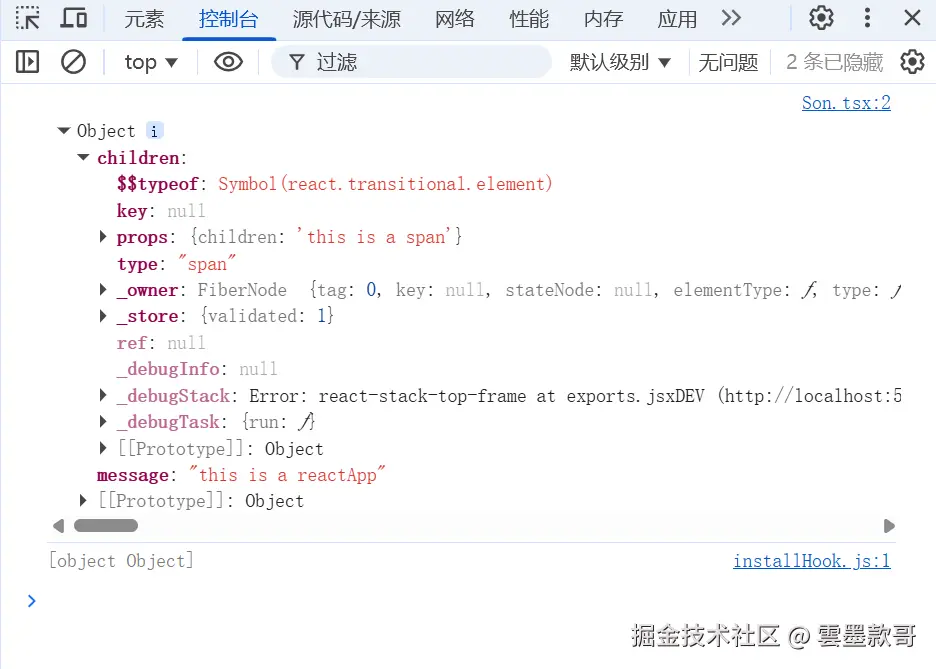
所以,在子组件中,只要使用props.children就可以把它显示出来。:
Vue 中的类似功能
在我的认知中,Vue 似乎不能这样写?实际上,Vue 也有类似的功能,但语法不同:
Vue 3 中的插槽 (Slots)
vue
<!-- 父组件 -->
<template>
  <Son message="this is a vue app">
    <span>this is a span</span>
  </Son>
</template>

<!-- 子组件 Son.vue -->
<template>
  <div>
    <div>{{ message }}</div>
    <slot></slot> <!-- 这里会渲染父组件传递的内容 -->
  </div>
</template>

<script setup>
defineProps(['message'])
</script>
Vue 使用 <slot> 元素来接收父组件传递的内容,而 React 使用 props.children。两者语法不同,概念相似,但也有一些区别的。
props.children 与 slot 的本质差异
React 的逻辑:数据驱动,责任自负
在 React 中,当父组件这样写:
tsx
<Son>
  <span>我是内容</span>
</Son>
实际上被转译成:
javascript
React.createElement(Son, {
  children: React.createElement('span', null, '我是内容')
})关键点:
- 数据已经送达 :子组件无论如何都能在
props.children中访问到这个<span>元素 - 处理权完全在子组件:子组件可以选择渲染、修改、忽略,甚至把它放到别的地方
- 无法"拒绝接收" :这份数据(React 元素引用)已经作为参数传递给了子组件函数
tsx
// 子组件可以有各种处理方式
function Son(props) {
  // 1. 正常渲染
  // return <div>{props.children}</div>

  // 2. 包装后再渲染
  // return <div className="wrapper">{props.children}</div>

  // 3. 有条件地渲染
  // return props.show ? props.children : null

  // 4. 拆分处理
  // const childrenArray = React.Children.toArray(props.children)
  // return childrenArray.map(child => <div className="item">{child}</div>)

  // 5. 完全忽略
  return <div>我不需要 children</div>
}
Vue 的逻辑:模板驱动,需要显式声明
现象观察
父组件:
vue
<template>
  <Son message="Hello">
    <span class="important">我是重要内容!</span>
  </Son>
</template>子组件:
vue
<!-- 情况1:有 slot 签收 -->
<template>
  <div>
    <div>{{ message }}</div>
    <slot></slot> <!-- span 会被渲染 -->
  </div>
</template>

<!-- 情况2:没有 slot 签收 -->
<template>
  <div>
    <div>{{ message }}</div>
    <!-- 没有 slot,span 就像不存在一样 -->
  </div>
</template>
在 Vue 中:
- 编译时处理:Vue 在编译阶段处理插槽内容
- 需要显式签收 :只有在子组件模板中写了
<slot>,内容才会被渲染 - 未签收就丢弃 :如果没有
<slot>,内容在渲染阶段就被丢弃了
代码背后的逻辑:
javascript
// Vue 在编译时决定是否包含插槽内容
// 如果子组件没有 slot,父组件的内容就不会被包含在渲染函数中- 插槽是模板特性:slot 是模板语法的一部分
- 编译时决策:在编译阶段决定是否包含内容
- 更安全的默认行为:防止意外渲染
React 的优势与风险
优势:
- 灵活性极高:可以任意操作 children
- 模式多样:支持 render props、HOC 等模式
- 运行时控制:可以在运行时动态决定如何处理
tsx
// React 的灵活模式
function Toggle({ children }) {
  const [isOn, setIsOn] = useState(false);

  return (
    <>
      <button onClick={() => setIsOn(!isOn)}>
        Toggle
      </button>
      {/* 运行时决定渲染哪个 child */}
      {isOn ? children : null}
    </>
  );
}风险:
- 可能浪费资源:即使不渲染,children 也被创建和传递
- 需要更多注意:必须显式处理,否则可能意外遗漏
Vue 的优势与局限
优势:
- 性能优化:未使用的插槽内容不会被包含
- 更安全:不会意外渲染未声明的内容
- 模板清晰:在模板中明确显示插槽位置
vue
<!-- Vue 3 组合式 API 中 -->
<script setup>
// 可以访问 slots
import { useSlots } from 'vue'

const slots = useSlots()
// 检查是否有某个插槽内容
const hasHeader = slots.header
</script>局限:
- 灵活性较低:操作插槽内容不如 React 灵活
- 模板限制:必须在模板中声明插槽位置