一 computed计算属性
1 理解双向绑定
&esmp;&esmp;通过 v-model 实现双向绑定,具体为视图数据的变动input,引起响应式变量数据变动let,随之视图另一处也跟着变动span
&esmp;&esmp;此时若想对用户信息进行隐藏,则需要对模板进行修改,并不方便,模板内表达式应该简单化。
js
<template>
  <div class="person">
    <!--v-model 实现双向绑定-->
    来自:<input type="text" v-model="city"><br>
    姓名:<input type="text" v-model="name"><br>
    介绍:<span>{{city}}--{{name}}</span><br>
    <!--隐藏名字-->
    介绍:<span>{{city}}--{{name.slice(0,1) + '女士'}}</span><br>
  </div>
</template>

<script lang="ts" setup>
  import {defineOptions,ref} from "vue";

  defineOptions({
    name: "Person"
  })

  // 数据
  let city = ref('南宁')
  let name = ref('大黄')
  // 方法

</script>

<style>
/*类选择器样式 此处可查看有几个元素匹配到*/
.person {
  background-color: bisque;
  box-shadow: chocolate;
  border-radius: 6px;
  padding: 8px;
}

button {
  margin: 0 6px;
}

li{
  font-size: 28px;
}
</style>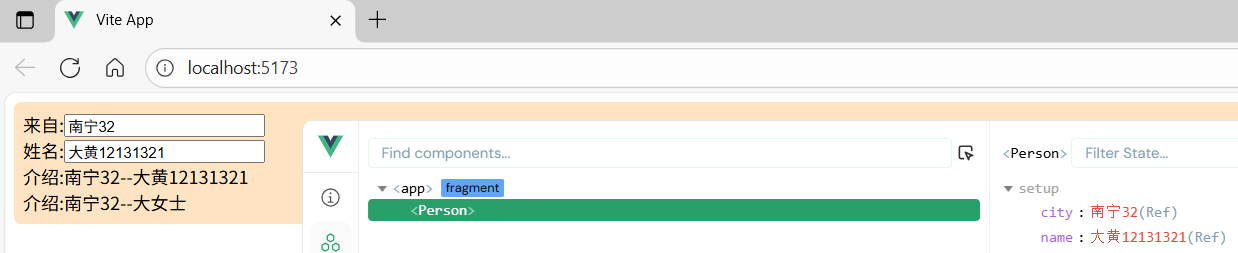
2 引入计算属性 -- 只读
引入computed,它通过封装一个计算函数,自动追踪其依赖的响应式数据(如 ref 或 reactive 变量),仅在依赖项变更时重新执行计算逻辑,并将结果缓存以供后续直接复用;
若依赖未变化,则直接返回缓存值,避免重复计算开销。与普通方法不同,计算属性的返回值默认是只读的(若需修改需通过 set 实现),
而方法每次调用都会重新执行且无缓存机制,因此计算属性更适合处理需要频繁读取且计算成本较高的派生数据场景。
js
<template>
  <div class="person">
    <!--v-model 实现双向绑定-->
    来自:<input type="text" v-model="city"><br>
    姓名:<input type="text" v-model="name"><br>
    <!--多次调用计算属性-->
    介绍:<span>{{introduce}}</span><br>
    介绍:<span>{{introduce}}</span><br>
    介绍:<span>{{introduce}}</span><br>
    介绍:<span>{{introduce}}</span><br>
    介绍:<span>{{testIntroduce()}}</span><br>
    介绍:<span>{{testIntroduce()}}</span><br>
    介绍:<span>{{testIntroduce()}}</span><br>
    介绍:<span>{{testIntroduce()}}</span><br>
  </div>
</template>

<script lang="ts" setup>
  import {defineOptions,ref,computed} from "vue";

  defineOptions({
    name: "Person"
  })

  // 数据
  let city = ref('南宁')
  let name = ref('大黄')

  // 通过计算属性隐藏信息 此时该数据是只读的
  let introduce = computed(()=>{
    // 查看计算次数
    console.log(1)
    return city.value + name.value.slice(0,1) + '女士'
  })

  // 方法
  function testIntroduce(){
    // 查看计算次数
    console.log(2)
    return city.value + name.value.slice(0,1) + '女士'
  }


</script>

<style>
/*类选择器样式 此处可查看有几个元素匹配到*/
.person {
  background-color: bisque;
  box-shadow: chocolate;
  border-radius: 6px;
  padding: 8px;
}

button {
  margin: 0 6px;
}

li{
  font-size: 28px;
}
</style>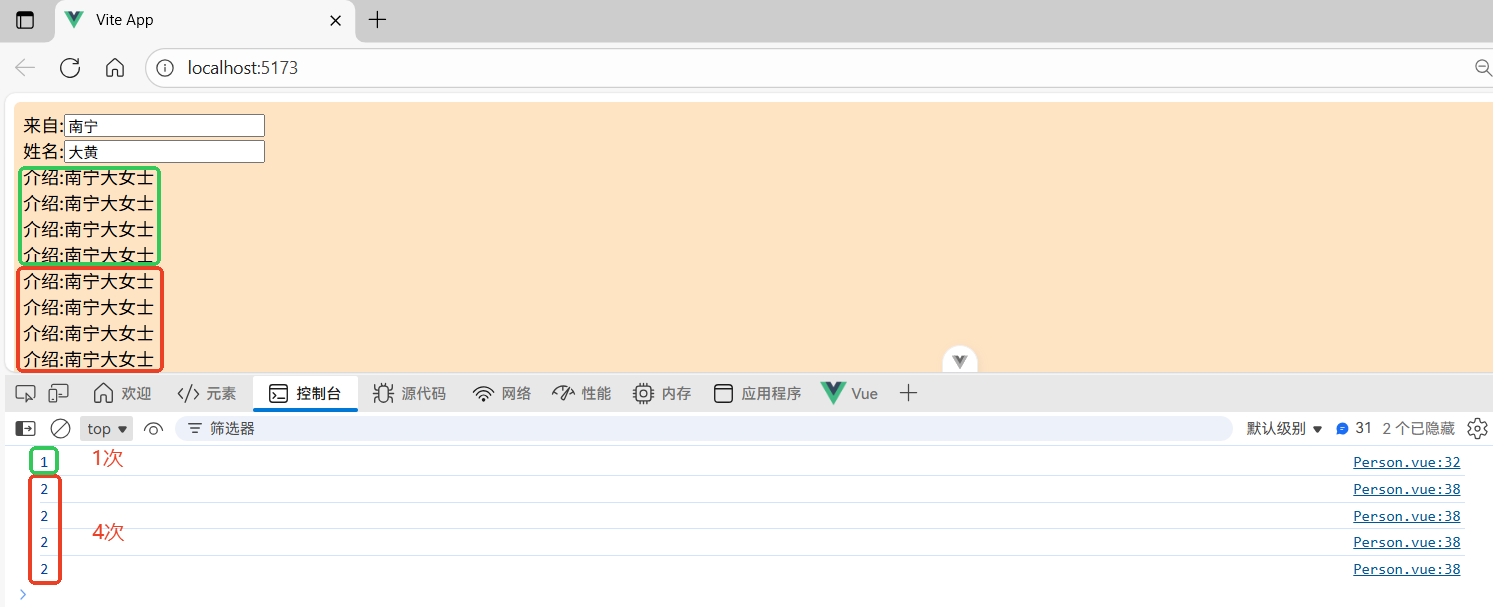
3 引入计算属性 -- 读写
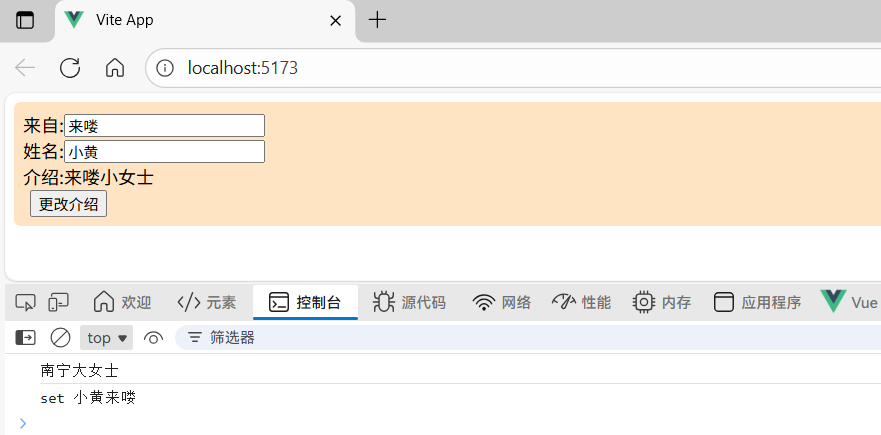
需注意要修改的不是计算属性,而是计算属性的数据来源
js
<template>
  <div class="person">
    <!--v-model 实现双向绑定-->
    来自:<input type="text" v-model="city"><br>
    姓名:<input type="text" v-model="name"><br>
    <!--多次调用计算属性-->
    介绍:<span>{{introduce}}</span><br>
    <button @click="changeIntroduce">更改介绍</button>
  </div>
</template>

<script lang="ts" setup>
  import {defineOptions,ref,computed} from "vue";

  defineOptions({
    name: "Person"
  })

  // 数据
  let city = ref('南宁')
  let name = ref('大黄')

  // 通过计算属性隐藏信息 只读
  // let introduce = computed(()=>{
  //   // 查看计算次数
  //   console.log(1)
  //   return city.value + name.value.slice(0,1) + '女士'
  // })

  // 可读写的计算属性 响应式数据
  let introduce = computed({
    // 读取 introduce 时调用 get
    get(){
      return city.value + name.value.slice(0,1) + '女士'
    },
    // 修改 introduce 时调用 set
    set(val){
      // 查看是否调用 以及获得的参数
      console.log('set',val)
      // 将参数分组赋值给 name city
      name.value = val.slice(0, 2);
      city.value = val.slice(2)
    }
  })

  // 方法
  function changeIntroduce(){
    // 计算属性 introduce 是 ref 定义的响应式数据
    console.log(introduce.value)
    introduce.value = '小黄来喽'
  }

</script>

<style>
/*类选择器样式 此处可查看有几个元素匹配到*/
.person {
  background-color: bisque;
  box-shadow: chocolate;
  border-radius: 6px;
  padding: 8px;
}

button {
  margin: 0 6px;
}

li{
  font-size: 28px;
}
</style>