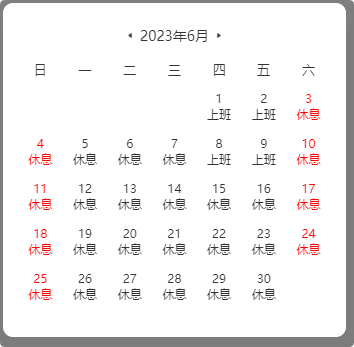
留置自己用的,封装日历组件方便自定义样式。
go
<template>
	<view style="padding: 30rpx;">
		<view class="calendar-container">
			<!-- 日历标题 -->
			<view class="calendar-header flex align-center justify-center">
				<image @click="prevMonth" mode="widthFix" src="@/static/cw_client_provider/img/calendar_left.png"
					style="width: 13rpx; height: 12rpx;"></image>
				<text style="margin: 0 14rpx;display: inline-block;">{{ year }}年{{ month }}月</text>
				<image @click="nextMonth" mode="widthFix" src="@/static/cw_client_provider/img/calendar_right.png"
					style="width: 13rpx; height: 12rpx;"></image>
			</view>
			<!-- 星期显示 -->
			<view class="calendar-week">
				<text v-for="(dayOfWeek, index) in dayOfWeeks" :key="index">{{ dayOfWeek }}</text>
			</view>
			<!-- 日期及上班休息状态显示 -->
			<view class="calendar-days">
				<view v-for="(day, index) in days" :key="index" class="calendar-day"
					:class="{ 'is-weekend': isWeekend(day), 'has-work-status': day.workStatus }">
					<!-- 自定义排版 -->
					<!-- :class="day.workStatusNew === 'work'?'calendar-day-work':'calendar-day-xiu'" -->
					<!-- 法定节假日 -->
					<!-- :class="{ 'is-weekend': isWeekend(day), 'has-work-status': day.workStatus }" -->
					<text
						:class="day.workStatusNew === 'work'?'calendar-day-text':'calendar-day-xiu'">{{ day.dateNew }}</text>
					<text v-if="day.workStatusNew">{{ day.workStatusNew === 'work'? '上班' : '休息' }}</text>
				</view>
			</view>
		</view>
		<!-- <image mode="widthFix" src="@/static/cw_client_provider/img/calendar_bg.png"
			style="width:626rpx; height: 62rpx;"></image>
		<view class="calendar-paiban">

		</view> -->

	</view>
</template>

<script>
	export default {
		name: 'hi-picker-calendar',
		props: {
			show: {
				type: Boolean,
				default: false
			},
		},
		data() {
			return {
				year: 2023,
				month: 6,
				dayOfWeeks: ['日', '一', '二', '三', '四', '五', '六'],
				days: [],
				prevIcon: '←',
				nextIcon: '→'
			};
		},
		watch: {
			show(newVal, oldVal) {
				console.log('show----newVal', newVal, 'show----oldVal', oldVal)
				if (newVal) {
					this.generateCalendar();
				}

			}
		},
		onLoad() {
			console.log('onLoad', this.show)
		},
		onShow() {
			console.log('onShow', this.show)
		},
		mounted() {
			console.log('mounted', this.show)
			if (this.show) {
				this.generateCalendar();
			}
		},
		methods: {
			// 生成日历数据
			generateCalendar() {
				const firstDay = new Date(this.year, this.month - 1, 1);
				const lastDay = new Date(this.year, this.month, 0);
				const firstDayOfWeek = firstDay.getDay();
				const daysInMonth = lastDay.getDate();
				let dayIndex = 0;
				for (let i = 0; i < firstDayOfWeek; i++) {
					this.days.push({
						date: '',
						workStatus: null
					});
					dayIndex++;
				}
				// for (let i = 1; i <= daysInMonth; i++) {
				//   const workStatus = this.getWorkStatus(i);
				//   this.days.push({ date: i, workStatus });
				//   dayIndex++;
				// }
				for (let i = 1; i <= daysInMonth; i++) {
					const workStatus = this.getWorkStatus(i);
					const workStatusNew = this.getWorkStatusN(i);
					const dateObj = new Date(this.year, this.month - 1, i);
					this.days.push({
						dateNew: i,
						date: dateObj,
						workStatus,
						workStatusNew
					});
					dayIndex++;
				}

				while (dayIndex % 7 !== 0) {
					this.days.push({
						date: '',
						workStatus: null
					});
					dayIndex++;
				}
				console.log('this.days', this.days)
			},
			// 自定义获取上班休息状态的方法
			getWorkStatus(day) {
				// 这里可以根据业务逻辑自定义返回上班还是休息,示例数据如下
				const workRestData = {
					3: 'rest',
					4: 'rest',
					6: 'rest',
					10: 'rest',
					17: 'rest',
					18: 'rest',
					21: 'rest',
					24: 'rest'
				};
				return workRestData[day] || 'work';
			},
			getWorkStatusN(day) {
				if (day == 1 || day == 2 || day == 8 || day == 9) {
					return 'work';
				}
				return 'rest'
			},
			// 判断是否为周末
			isWeekend(day) {
				console.log('day', day)
				return day.date && (day.date.getDay() === 0 || day.date.getDay() === 6);
			},
			// 上一个月
			prevMonth() {
				this.month--;
				if (this.month === 0) {
					this.month = 12;
					this.year--;
				}
				this.days = [];
				this.generateCalendar();
			},
			// 下一个月
			nextMonth() {
				this.month++;
				if (this.month === 13) {
					this.month = 1;
					this.year++;
				}
				this.days = [];
				this.generateCalendar();
			}
		}
	};
</script>

<style scoped>
	.calendar-container {
		width: 100%;
		background-color: #fff;
		border-radius: 26rpx;
		padding-top: 16rpx;
	}

	.calendar-header {
		align-items: center;
		margin-bottom: 30rpx;
		font-weight: 500;
		font-size: 28rpx;
		color: #333333;
		line-height: 40rpx;
	}

	.calendar-week {
		display: flex;
		justify-content: space-around;
		margin-bottom: 25rpx;
		font-weight: 500;
		font-size: 26rpx;
		color: #333333;
	}

	.calendar-days {
		display: flex;
		justify-content: flex-start;
		flex-wrap: wrap;

	}

	.calendar-day {
		display: flex;
		justify-content: center;
		flex-direction: column;
		width: 14.28%;
		text-align: center;
		font-weight: 500;
		font-size: 24rpx;
		color: #333333;
		margin-bottom: 26rpx;
	}

	.calendar-day.is-weekend {
		color: red;
	}

	.calendar-day.has-work-status {
		position: relative;
	}

	.calendar-day.has-work-status::after {
		content: attr(data-work-status);
		position: absolute;
		bottom: 0;
		left: 0;
		right: 0;
		font-size: 12px;
	}

	.calendar-day-xiu {
		/* color: #4172F0 !important; */
	}

	.calendar-day-work {
		color: #82868D;
	}

	.calendar-day-text {
		color: #333333;
	}

	.calendar-paiban {
		width: 100%;
		background-color: #fff;
		padding: 36rpx;
		border-radius: 26rpx;
	}
</style>