目录
[commitlint 安装](#commitlint 安装)
[初始化 Husky](#初始化 Husky)
[npm or yarn](#npm or yarn)
[配置 commit-msg 钩子](#配置 commit-msg 钩子)
[npm or yarn](#npm or yarn)
[Commitizen 适配器](#Commitizen 适配器)
[配置 Commitizen 适配器](#配置 Commitizen 适配器)
规范团队的commit提交规范,采用工具验证commit提交命令
本文包含了 commitlint 安装使用、commitizen适配器安装使用、中文适配器安装使用、自定义内容适配器安装使用以及遇到的几个问题
我采用的是pnpm命令安装,部分错误在文中给出了另外解决命令,npm、yarn命令需要用到在看是否有报错
commitlint 安装
安装commitlint插件
参考官网 install 命令commitlint.js.org/
// npm安装
npm install --save-dev @commitlint/cli @commitlint/config-conventional

// yarn安装
yarn add -D @commitlint/cli @commitlint/config-conventional

// pnpm 安装
pnpm add --save-dev @commitlint/{cli,config-conventional}
pnpm add -D @commitlint/cli @commitlint/config-conventional
创建commitlint.config.js文件
根目录创建commitlint.config.js文件,写入下面这段内容
echo "export default { extends: ['@commitlint/config-conventional'] };" > commitlint.config.js安装husky
// npm
npm install --save-dev husky
// yarn
yarn add -D husky
// pnpm
pnpm add -D husky
初始化 Husky
npm or yarn
npx husky install
# 可选:在 package.json 中添加 prepare 脚本自动初始化
npm pkg set scripts.prepare="husky install"
pnpm
# 通过命令初始化 Husky 并自动在 package.json 中添加 prepare 脚本:
pnpm exec husky init
配置 commit-msg 钩子
npm or yarn
npx husky add .husky/commit-msg 'npx --no -- commitlint --edit ${1}'直接写入
# 创建钩子文件并写入命令
echo "npx --no -- commitlint --edit $1" > .husky/commit-msg
# 赋予执行权限
chmod +x .husky/commit-msg
验证提交拦截
尝试提交一个不符合约定式提交的信息:
git commit -m "bad message"你会看到类似以下报错,提交被阻止:
⧗   input: bad message
✖   subject may not be empty [subject-empty]
✖   type may not be empty [type-empty]

✖   found 2 problems, 0 warnings
ⓘ   Get help: https://github.com/conventional-changelog/commitlint/#what-is-commitlint
修改为符合规范的提交,例如:
git commit -m "feat: add error handling"
# 预期:提交成功
Commitizen 适配器
如图所示
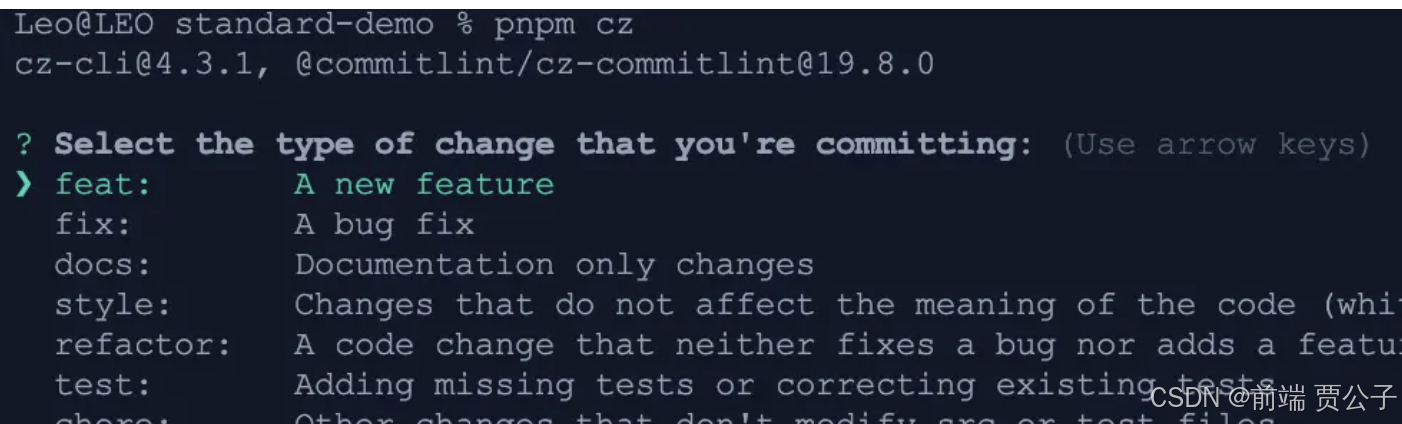
安装依赖
pnpm add -D commitizen 一款工程性更强,轻量级,高度自定义,标准输出格式的 commitizen 适配器
npm install -D cz-git配置 Commitizen 适配器
在项目根目录的 package.json 中,添加:
{
  "scripts": {
    "commit": "git-cz"
  },
  "config": {
    "commitizen": {
      "path": "node_modules/cz-git"
    }
  }
}
配置模板
import { defineConfig } from 'cz-git'

export default defineConfig({
    extends: ['@commitlint/config-conventional'],
    rules: {
        // @see: https://commitlint.js.org/#/reference-rules
    },
    prompt: {
        alias: { fd: 'docs: fix typos' },
        messages: {
            type: '选择你要提交的类型 :',
            scope: '选择一个提交范围(可选):',
            customScope: '请输入自定义的提交范围 :',
            subject: '填写简短精炼的变更描述 :\n',
            body: '填写更加详细的变更描述(可选)。使用 "|" 换行 :\n',
            breaking: '列举非兼容性重大的变更(可选)。使用 "|" 换行 :\n',
            footerPrefixesSelect: '选择关联issue前缀(可选):',
            customFooterPrefix: '输入自定义issue前缀 :',
            footer: '列举关联issue (可选) 例如: #31, #I3244 :\n',
            confirmCommit: '是否提交或修改commit ?',
        },
        types: [
            { value: 'feat', name: 'feat:     新增功能 | A new feature' },
            { value: 'fix', name: 'fix:      修复缺陷 | A bug fix' },
            { value: 'docs', name: 'docs:     文档更新 | Documentation only changes' },
            { value: 'style', name: 'style:    代码格式 | Changes that do not affect the meaning of the code' },
            { value: 'refactor', name: 'refactor: 代码重构 | A code change that neither fixes a bug nor adds a feature' },
            { value: 'perf', name: 'perf:     性能提升 | A code change that improves performance' },
            { value: 'test', name: 'test:     测试相关 | Adding missing tests or correcting existing tests' },
            { value: 'build', name: 'build:    构建相关 | Changes that affect the build system or external dependencies' },
            { value: 'ci', name: 'ci:       持续集成 | Changes to our CI configuration files and scripts' },
            { value: 'revert', name: 'revert:   回退代码 | Revert to a commit' },
            { value: 'chore', name: 'chore:    其他修改 | Other changes that do not modify src or test files' },
        ],
        useEmoji: false,
        emojiAlign: 'center',
        useAI: false,
        aiNumber: 1,
        themeColorCode: '',
        scopes: [],
        allowCustomScopes: true,
        allowEmptyScopes: true,
        customScopesAlign: 'bottom',
        customScopesAlias: 'custom',
        emptyScopesAlias: 'empty',
        upperCaseSubject: null,
        markBreakingChangeMode: false,
        allowBreakingChanges: ['feat', 'fix'],
        breaklineNumber: 100,
        breaklineChar: '|',
        skipQuestions: [],
        issuePrefixes: [
        // 如果使用 gitee 作为开发管理
            { value: 'link', name: 'link:     链接 ISSUES 进行中' },
            { value: 'closed', name: 'closed:   标记 ISSUES 已完成' },
        ],
        customIssuePrefixAlign: 'top',
        emptyIssuePrefixAlias: 'skip',
        customIssuePrefixAlias: 'custom',
        allowCustomIssuePrefix: true,
        allowEmptyIssuePrefix: true,
        confirmColorize: true,
        scopeOverrides: undefined,
        defaultBody: '',
        defaultIssues: '',
        defaultScope: '',
        defaultSubject: '',
    },
})