Bipes项目二次开发/扩展积木功能(八)
新年第一篇文章,这一篇开发扩展积木功能。先看一段VCR。
广告:需要二开Bipes,Scratch,blockly可以找我。
项目地址:https://maxuecan.github.io/Bipes/index.html
VCR
扩展功能
第一:模式选择
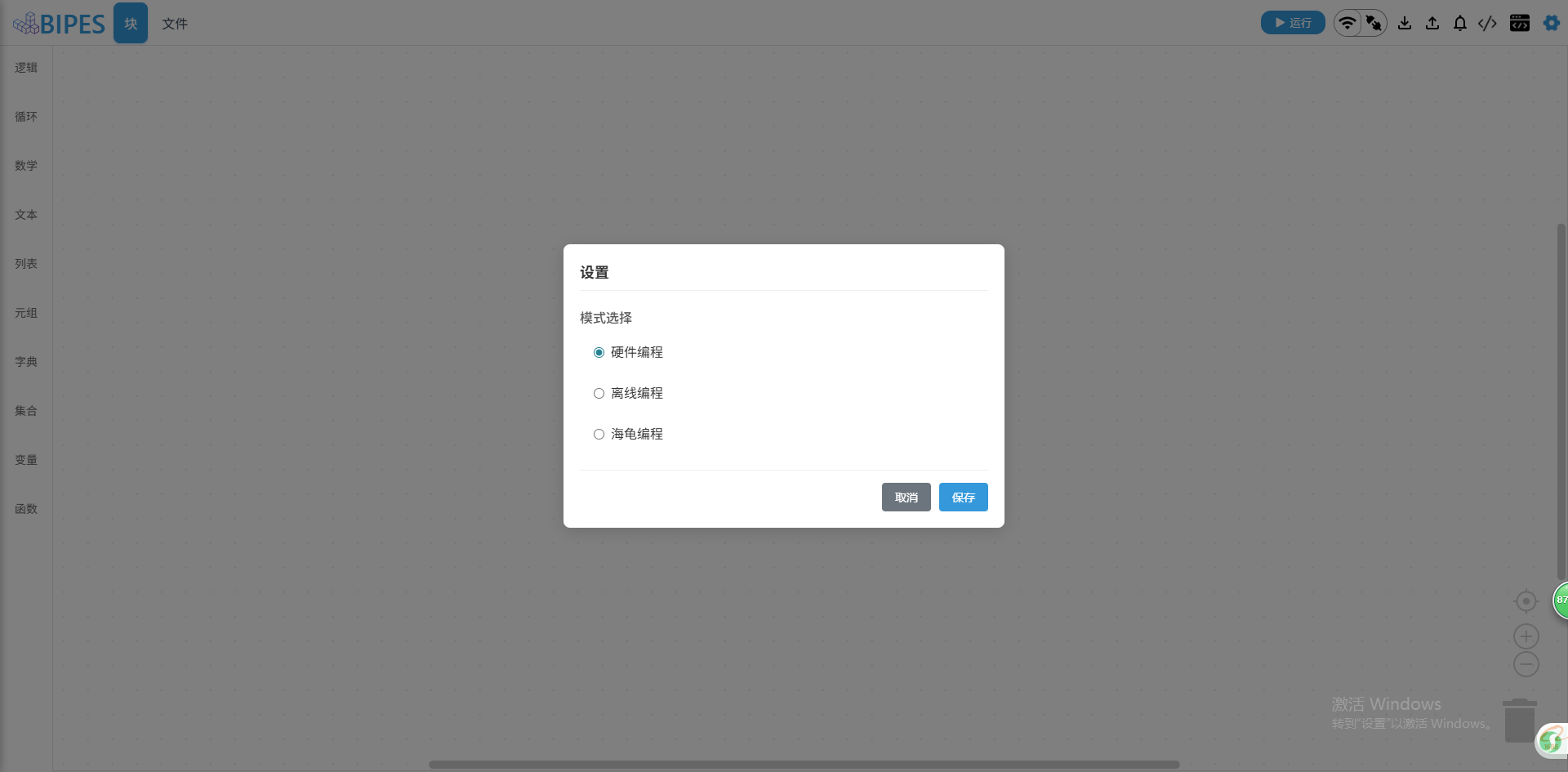
在三种模式中,暂时对海龟编程加了扩展积木功能,点击选择海龟编程,就可以看到积木列表多了个添加按钮。其它模式下不会显示。
第二:积木扩展
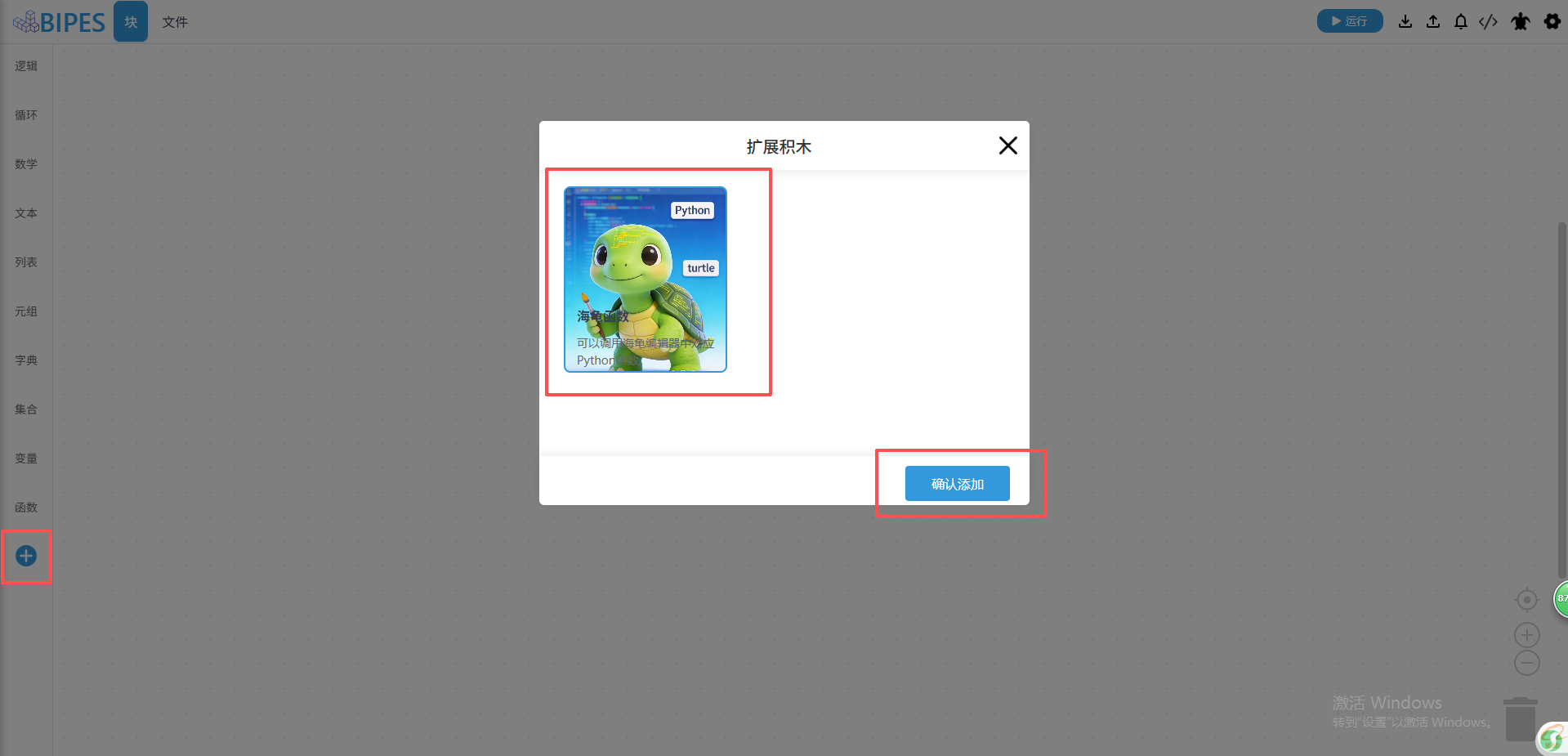
点击扩展按钮,会弹窗一个扩展积木弹窗,接着点击卡片,会显示确认添加按钮,最后点击确认添加,就能动态添加扩展积木。
第三:代码解析
cpp
ui/components/extensions-btn.js(扩展积木按钮)

import EventEmitterController from '../utils/event-emitter-controller'
import { resetPostion } from '../utils/utils'

export default class extensionsBtn {
    constructor(props) {
        this.settings = props.settings
        this.resetPostion = resetPostion
        if (document.getElementById('content_blocks')) {
            $('#content_blocks').append(this.render())
            this.initEvent()
        }

        // 根据模式,控制扩展按钮的显示
        setTimeout(() => {
            let { mode } = this.settings
            resetPostion()
            $('#extensions-btn').css('display', mode === 'turtle' ? 'block' : 'none')
        }, 1000);
    }
    // 初始化事件
    initEvent() {
        window.addEventListener('resize', (e) => {
            this.resetPostion()
        })

        $('#extensions-btn').on('click', () => {
            EventEmitterController.emit('open-extensions-dialog')
        })
    }

    render() {
        return `
            <div id="extensions-btn">
                <div class="extensions-add"></div>
            </div>
        `
    }
}
cpp
ui/components/extensions-dialog.js(扩展积木弹窗)

import ExtensionsList from '../config/extensions-blocks.js'
import { resetPostion } from '../utils/utils'

export default class extensionsDialog {
    constructor() {
        this._xml = undefined
        this._show = false
        this.list = ExtensionsList
        this.use = []
        this.after_extensions = [] // 记录已经添加过的扩展积木
    }
    // 初始化事件
    initEvent() {
        $('.extensions-modal-close').on('click', this.close.bind(this))
        $('.extensions-modal-confirm').on('click', this.confirm.bind(this))
        $('.extensions-modal-list').on('click', this.select.bind(this))
    }
    // 销毁事件
    removeEvent() {
        $('.extensions-modal-close').off('click', this.close.bind(this))
        $('.extensions-modal-confirm').off('click', this.confirm.bind(this))
        $('.extensions-modal-list').off('click', this.select.bind(this))
    }
    // 显示隐藏弹窗
    show() {
        if (this._show) {
            $('.extensions-dialog').remove()
            this.removeEvent()
        } else {
            $('body').append(this.render())
            this.initEvent()
            this.createList()
        }

        this._show = !this._show
    }
    // 创建扩展列表
    createList() {
        $('.extensions-list').empty()
        for (let i in this.list) {
            let li = $('<li>')
                    .attr('key', this.list[i]['type'])
                    .css({
                        background: `url(${this.list[i]['image']}) center/cover no-repeat`,
                    })
            let box = $('<div>')
                    .addClass('extensions-list-image')
                    .attr('key', this.list[i]['type'])
            let detail = $('<div>')
                .addClass('extensions-list-detail')
                .attr('key', this.list[i]['type'])

            let name = $('<h4>').text(this.list[i]['name']).attr('key', this.list[i]['type'])
            let remark = $('<span>').text(this.list[i]['remark']).attr('key', this.list[i]['type'])
            detail.append(name).append(remark)
            $('.extensions-modal-list').append(li.append(box).append(detail))
        }
    }
    // 选择列表
    select(e) {
        let key = e.target.getAttribute('key')
        if (key !== null) {
            let index = this.use.indexOf(key)
            let type = undefined
            if (index !== -1) {
                this.use.splice(index, 1)
                type = 'delete'
            } else {
                this.use.push(key)
                type = 'add'
            }
            this.highlightList(type, key)
            this.showConfirm()
        }
    }
    // 高亮列表项
    highlightList(action, key) {
        $('.extensions-modal-list li').each(function(index) {
            let c_key = $(this).attr('key')
            if (key === c_key) {
                if (action === 'add') {
                    $(this).addClass('extensions-modal-list-act')
                } else if (action === 'delete') {
                    $(this).removeClass('extensions-modal-list-act')
                }
            }
        })
    }
    // 显示确认按钮
    showConfirm() {
        if (this.use.length > 0) {
            $('.extensions-modal-footer').css('display', 'block')
        } else {
            $('.extensions-modal-footer').css('display', 'none')
        }
    }
    // 关闭
    close() {
        this.show()
    }
    // 确认操作
    confirm() {
        let str = ''
        this.use.forEach(item => {
            let index = this.after_extensions.indexOf(item)
            if (index === -1) {
                this.after_extensions.push(item)
                str += this.getExtendsionsXML(item)
            }
        })

        if (str) {
            if (!this._xml) this._xml = window._xml.cloneNode(true)
            let toolbox = this._xml
            toolbox.children[0].innerHTML += str
            Code.reloadToolbox(toolbox)
        }

        this.show()
        resetPostion()
    }
    /* 获取扩展积木的XML */
    getExtendsionsXML(type) {
        let item = ExtensionsList.filter(itm => itm.type === type)
        return item[0].xml
    }
    // 重置toolbox
    resetToolbox() {
        return new Promise((resolve) => {
            this._xml = window._xml.cloneNode(true)
            Code.reloadToolbox(this._xml)
            this.use = []
            this.after_extensions = []
            setTimeout(resolve(true), 200)
        })
    }

    render() {
        return `
            <div class="extensions-dialog">
                <div class="extensions-modal">
                    <div class="extensions-modal-header">
                        <h4></h4>
                        <ul class="extensions-modal-nav">
                            <li class="extensions-modal-nav-act" key="basic">
                                <span key="basic">扩展积木</span>
                            </li>
                        </ul>
                        <div class="extensions-modal-close"></div>
                    </div>

                    <div class="extensions-modal-content">
                        <ul class="extensions-modal-list"></ul>
                    </div>

                    <div class="extensions-modal-footer">
                        <button class="extensions-modal-confirm">确认添加</button>
                    </div>
                </div>
            </div>
        `
    }
}
cpp
ui/config/extensions-blocks.js(扩展积木配置)

let turtle = require('./turtle.png')

module.exports = [
  {
    type: 'turtle',
    name: '海龟函数',
    image: turtle,
    remark: '可以调用海龟编辑器中对应Python函数。',
    xml: `
            <category name="海龟" colour="%{BKY_TURTLE_HUE}">
                <block type="variables_set" id="fg004w+XJ=maCm$V7?3T" x="238" y="138">
                    <field name="VAR" id="dfa$SFe(HK(10)Y+T-bS">海龟</field>
                    <value name="VALUE">
                        <block type="turtle_create" id="Hv^2jr?;yxhA=%oCs1=d"></block>
                    </value>
                </block>
                <block type="turtle_create"></block>
                <block type="turtle_move">
                    <value name="VALUE">
                        <block type="variables_get">
                            <field name="VAR">{turtleVariable}</field>
                        </block>
                    </value>
                    <value name="distance">
                        <shadow type="math_number">
                            <field name="NUM">50</field>
                        </shadow>
                    </value>
                </block>
                <block type="turtle_rotate">
                    <value name="VALUE">
                        <block type="variables_get">
                            <field name="VAR">{turtleVariable}</field>
                        </block>
                    </value>
                    <value name="angle">
                        <shadow type="math_number">
                            <field name="NUM">90</field>
                        </shadow>
                    </value>
                </block>
            <block type="turtle_move_xy">
                <value name="VALUE">
                    <block type="variables_get">
                        <field name="VAR">{turtleVariable}</field>
                    </block>
                </value>
                <value name="x">
                    <shadow type="math_number">
                        <field name="NUM">50</field>
                    </shadow>
                </value>
                <value name="y">
                    <shadow type="math_number">
                        <field name="NUM">50</field>
                    </shadow>
                </value>
            </block>
            <block type="turtle_set_position">
                <value name="VALUE">
                    <block type="variables_get">
                        <field name="VAR">{turtleVariable}</field>
                    </block>
                </value>
                <value name="position">
                    <shadow type="math_number">
                        <field name="NUM">50</field>
                    </shadow>
                </value>
            </block>
            <block type="turtle_draw_circle">
                <value name="VALUE">
                    <block type="variables_get">
                        <field name="VAR">{turtleVariable}</field>
                    </block>
                </value>
                <value name="radius">
                    <shadow type="math_number">
                        <field name="NUM">50</field>
                    </shadow>
                </value>
                <value name="extent">
                    <shadow type="math_number">
                        <field name="NUM">50</field>
                    </shadow>
                </value>
                <value name="steps">
                    <shadow type="math_number">
                        <field name="NUM">50</field>
                    </shadow>
                </value>
            </block>
            <block type="turtle_draw_polygon">
                <value name="VALUE">
                    <block type="variables_get">
                        <field name="VAR">{turtleVariable}</field>
                    </block>
                </value>
                <value name="num_sides">
                    <shadow type="math_number">
                        <field name="NUM">5</field>
                    </shadow>
                </value>
                <value name="radius">
                    <shadow type="math_number">
                        <field name="NUM">30</field>
                    </shadow>
                </value>
            </block>
            <block type="turtle_draw_point">
                <value name="VALUE">
                    <block type="variables_get">
                        <field name="VAR">{turtleVariable}</field>
                    </block>
                </value>
                <value name="diameter">
                    <shadow type="math_number">
                        <field name="NUM">50</field>
                    </shadow>
                </value>
            </block>
            <block type="turtle_write">
                <value name="VALUE">
                    <block type="variables_get">
                        <field name="VAR">{turtleVariable}</field>
                    </block>
                </value>
                <value name="text">
                    <shadow type="text">
                        <field name="TEXT">Hello</field>
                    </shadow>
                </value>
            </block>
            <block type="turtle_set_heading">
                <value name="VALUE">
                    <block type="variables_get">
                        <field name="VAR">{turtleVariable}</field>
                    </block>
                </value>
                <value name="angle">
                    <shadow type="math_number">
                        <field name="NUM">90</field>
                    </shadow>
                </value>
            </block>
            <block type="turtle_pendown">
                <value name="VALUE">
                    <block type="variables_get">
                        <field name="VAR">{turtleVariable}</field>
                    </block>
                </value>
            </block>
            <block type="turtle_set_pensize">
                <value name="VALUE">
                    <block type="variables_get">
                        <field name="VAR">{turtleVariable}</field>
                    </block>
                </value>
                <value name="size">
                    <shadow type="math_number">
                        <field name="NUM">5</field>
                    </shadow>
                </value>
            </block>
            <block type="turtle_set_speed">
                <value name="VALUE">
                    <block type="variables_get">
                        <field name="VAR">{turtleVariable}</field>
                    </block>
                </value>
                <value name="speed">
                    <shadow type="math_number">
                        <field name="NUM">5</field>
                    </shadow>
                </value>
            </block>
            <block type="turtle_get_position">
                <value name="VALUE">
                    <block type="variables_get">
                        <field name="VAR">{turtleVariable}</field>
                    </block>
                </value>
            </block>
            <block type="turtle_show_hide">
                <value name="VALUE">
                    <block type="variables_get">
                        <field name="VAR">{turtleVariable}</field>
                    </block>
                </value>
            </block>
            <block type="turtle_clear">
                <value name="VALUE">
                    <block type="variables_get">
                        <field name="VAR">{turtleVariable}</field>
                    </block>
                </value>
            </block>
            <block type="turtle_stop">
                <value name="VALUE">
                    <block type="variables_get">
                        <field name="VAR">{turtleVariable}</field>
                    </block>
                </value>
            </block>
            <block type="turtle_set_bgcolor">
                <value name="COLOUR">
                    <block type="colour_picker"></block>
                </value>
            </block>
            <block type="turtle_set_pencolor">
                <value name="VALUE">
                    <block type="variables_get">
                        <field name="VAR">{turtleVariable}</field>
                    </block>
                </value>
                <value name="COLOUR">
                    <block type="colour_picker"></block>
                </value>
            </block>
            <block type="turtle_set_fillcolor">
                <value name="VALUE">
                    <block type="variables_get">
                        <field name="VAR">{turtleVariable}</field>
                    </block>
                </value>
                <value name="COLOUR">
                    <block type="colour_picker"></block>
                </value>
            </block>

            <block type="turtle_set_colormode">
                <value name="VALUE">
                    <block type="variables_get">
                        <field name="VAR">{turtleVariable}</field>
                    </block>
                </value>
                <value name="COLOUR">
                    <shadow type="math_number">
                        <field name="NUM">255</field>
                    </shadow>
                </value>
            </block>
            <block type="turtle_set_fill">
                <value name="VALUE">
                    <block type="variables_get">
                        <field name="VAR">{turtleVariable}</field>
                    </block>
                </value>
            </block>
            <block type="turtle_set_color">
                <value name="VALUE">
                    <block type="variables_get">
                        <field name="VAR">{turtleVariable}</field>
                    </block>
                </value>
                <value name="COLOUR">
                    <block type="colour_picker"></block>
                </value>
            </block>
        </category>
        `,
  },
]
总结
扩展积木功能改动挺多的,功能也时不断的完善,讲解可能比较粗糙,也在尽量写注解,有需要可以看下提交日志,信息会比较全。