在Windows环境下编译FFmpeg通常需要处理复杂的依赖关系和工具链配置。ShiftMediaProject提供的源码和依赖库简化了这一过程,本文将详细介绍VS2019如何通过MSVC工具链完成FFmpeg的完整编译。
一、环境准备与目录结构
创建编译目录
在磁盘根目录(如D:\)下创建ShiftMediaProject目录,并在其下新建msvc和source子目录:
D:\ShiftMediaProject\
├── msvc\
└── source\
二、源码与依赖下载
源码获取方式
在 source目录中,Git克隆:
git clone https://github.com/ShiftMediaProject/FFmpeg.git手动下载 : 国内访问GitHub可能需多次尝试,失败后可手动下载源码压缩包并解压到source目录。从ShiftMediaProject FFmpeg发布页下载最新源码包。
也可以利用gitee先同步到国内,再git下载。
依赖库下载
- 自动下载 : 进入
source\SMP目录,打开cmd.exe,确保git.exe可以执行,运行project_get_dependencies.bat脚本自动下载依赖库。
自动下载失败时,可以先打开project_get_dependencies.bat将DEPENDENCIES中已经下载成功的依赖删掉,然后将UPSTREAMURL换为国内网址:https://gitee.com/ShiftMediaProject-FFmpeg,再次尝试自动下载。
如何还是下载失败,需手动下载依赖并放置到source目录中:例如:
git clone https://github.com/ShiftMediaProject/bzip2.git
2.其他依赖下载 :在source目录中**,Git克隆**:
git clone https://github.com/ShiftMediaProject/libdvdnav.git
git clone https://github.com/ShiftMediaProject/libdvdread.git
3.外部库路径配置 :在msvc目录中**,建立include目录**:
在include目录中**,Git克隆**:
git clone https://gitee.com/ShiftMediaProject-FFmpeg/msvc-include.git
得到项目需要的依赖头文件:
msvc\include\gl\ # OpenGL头文件
msvc\include\KHR\ # KHR目录
msvc\include\ffnvcodec\ # NVIDIA Codec头文件
msvc\include\AMF\ # AMF头文件
最新AMF项目见 https://gitcode.com/gh_mirrors/am/AMF.git
最新ffnvcodec见 https://github.com/FFmpeg/nv-codec-headers
下载 vulkan-headers,Git克隆:
git clone https://gitee.com/src-openeuler/vulkan-headers.git
将Vulkan-Headers-vulkan-sdk中的include\vk_video目录和 include\vulkan目录复制到msvc\include\目录下。
三、工具链配置
在msvc目录中**,Git克隆**:
git clone https://gitee.com/lsam2019/ShiftMediaProject-VSNASM.git
git clone https://gitee.com/lsam2019/ShiftMediaProject-VSYASM.git
打开Visual Studio 2019的x64 Native Tools Command Prompt for VS 2019 命令行窗口
执行:
set path=C:\Windows\System32\WindowsPowerShell\v1.0;%path%
cd /d D:\ShiftMediaProject\msvc
.\VSNASM\install_script.bat
.\VSYASM\install_script.bat
四、编译流程详解
依赖项编译顺序
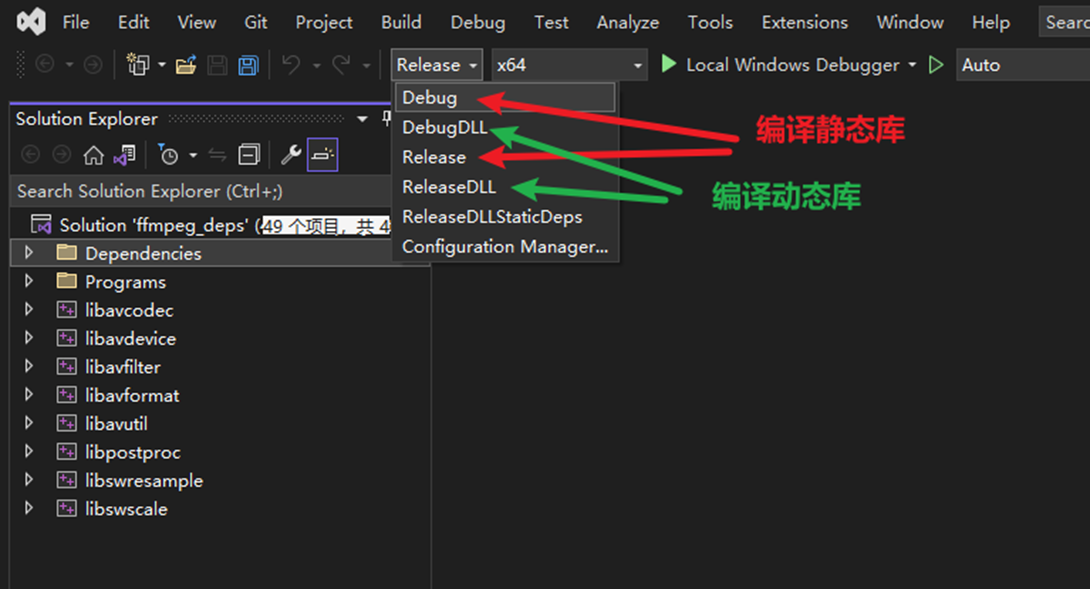
- 用VS2019打开source\FFmpeg\SMP\ffmpeg_deps.sln解决方案文件。
- 选择ReleaseDll x64
- 按顺序生成依赖项:
- libx264
- libvpx
- 其他依赖库
- 编译FFmpeg核心库:
- libavutil
- libavformat
- libavcodec
- 其他
- 最后编译可执行文件:
- ffmpeg.exe
- ffplay.exe
- ffprobe.exe
五、验证编译结果
编译完成后,生成的库文件在msvc\lib\x64下,
可执行程序在msvc\bin\x64目录下,可通过运行ffmpeg.exe -version验证是否成功。
D:\ShiftMediaProject\msvc\bin\x64>ffmpeg.exe -version
ffmpeg version 7.1 Copyright (c) 2000-2024 the FFmpeg developers
built with msvc
configuration: --enable-gpl --enable-version3 --enable-bzlib --enable-iconv --enable-lzma --enable-sdl2 --enable-zlib --enable-libmp3lame --enable-libvorbis --enable-libspeex --enable-libopus --enable-libilbc --enable-libtheora --enable-libx264 --enable-libx265 --enable-libxvid --enable-libvpx --enable-libgme --enable-libmodplug --enable-libsoxr --enable-libfreetype --enable-fontconfig --enable-libfribidi --enable-libharfbuzz --enable-libass --enable-libxml2 --enable-gnutls --disable-schannel --enable-gcrypt --enable-libssh --enable-libcdio --enable-libbluray --enable-libdvdread --enable-libdvdnav --enable-opengl --enable-libmfx --enable-ffnvcodec --enable-cuda --enable-amf
libavutil 59. 39.100 / 59. 39.100
libavcodec 61. 19.100 / 61. 19.100
libavformat 61. 7.100 / 61. 7.100
libavdevice 61. 3.100 / 61. 3.100
libavfilter 10. 4.100 / 10. 4.100
libswscale 8. 3.100 / 8. 3.100
libswresample 5. 3.100 / 5. 3.100
libpostproc 58. 3.100 / 58. 3.100
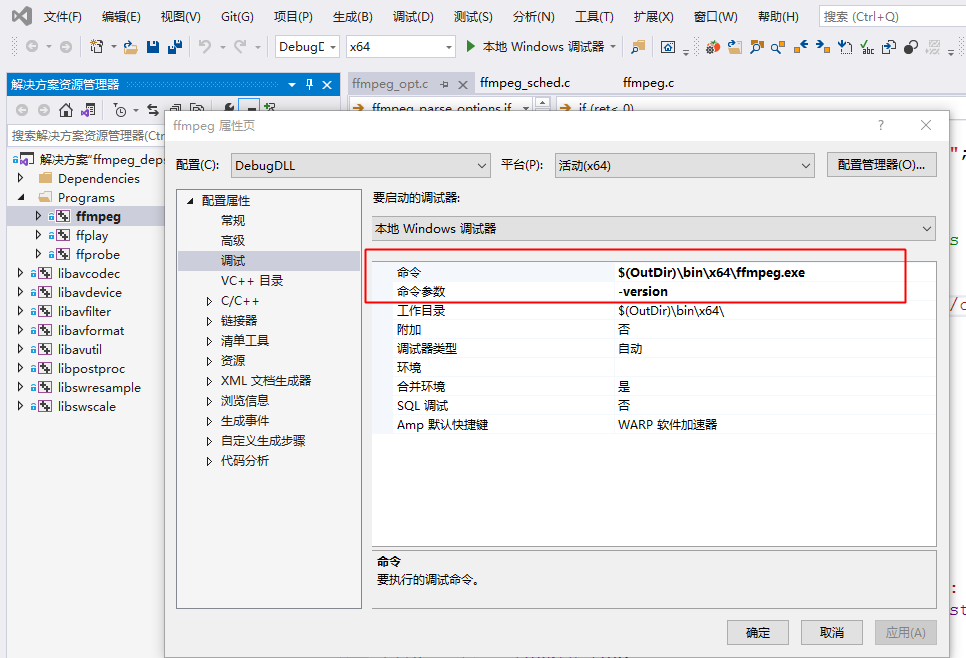
调试时修改运行路径 和 参数:
六、其他问题:
- dvdvideodec.obj : error LNK2001: 无法解析的外部符号 dvdnav_open2
解决方法:在libdvdnav.def添加dvdnav_open2,再次编译libdvdnav工程,再编译其他工程
https://comate.baidu.com/zh/page/pr4angp8wvk
https://blog.csdn.net/u014552102/article/details/121781348
本文下载并编译成功的代码备份地址:https://cloud.189.cn/t/MnYrEbAnARje(访问码:q0tt)